Bilibili-Video-Research
Health Uyari
- License — License: MIT
- Description — Repository has a description
- Active repo — Last push 0 days ago
- Low visibility — Only 5 GitHub stars
Code Uyari
- network request — Outbound network request in package-lock.json
- process.env — Environment variable access in src/bilibili.ts
- network request — Outbound network request in src/bilibili.ts
- process.env — Environment variable access in src/video-analysis.ts
- network request — Outbound network request in src/video-analysis.ts
Permissions Gecti
- Permissions — No dangerous permissions requested
Bu listing icin henuz AI raporu yok.
Evidence-aware Bilibili video research MCP for language, vision, and multimodal analysis.
Bilibili Video Research
English · 简体中文

An evidence-aware Bilibili video research MCP for Codex, OpenCode, and other MCP-compatible clients.
Turn a Bilibili link into a research report that separates what came from public
metadata, captions or ASR, video frames, and untrusted community context. Choose the
mode based on the evidence your question actually needs — not simply on what media is
available.
What it does
| Mode | Uses | Excludes | Best for |
|---|---|---|---|
language |
Bilibili captions; StepFun ASR only when captions are unavailable | Video-frame inference | Project recommendations, tutorials, and claims made by the presenter |
vision |
Silent video frames, including visible UI, code, labels, charts, and on-screen subtitles | Audio and background music | Interfaces, workflows, experiments, objects, and silent demonstrations |
multimodal |
Original video audio and frames | Nothing by default | Questions that genuinely require both narration and what is shown |
language is the intended default when a request only asks what a video says.vision is the deliberate choice when the answer lives in the pixels.
What a result looks like
Ask the MCP tool a focused question:
analyze_bilibili_video({
  url: "https://www.bilibili.com/video/BV...",
  question: "What quantitative research framework is shown on screen?",
  mode: "vision",
  media_detail: "default",
  include_comments: false,
  start_seconds: 0,
  end_seconds: 321
})
The response begins with provenance before the natural-language analysis:
RESEARCH PROVENANCE
{
  "mode": "language",
  "metadata": "bilibili_api",
  "language": "stepfun_asr",
  "visual": "none",
  "community": "disabled",
  "timestamps": "none"
}

ANALYSIS
...direct answer, evidence limits, and uncertainty...
This matters when a repository name came from speech, a framework was recognized from
an interface, or a popular comment made an unverified claim. The sources are not the
same and should not be reported as if they were.
Example: Focused research on a quant video
This example shows a practical workflow: define a research question, restrict a
long video to a known source interval, and review an answer that separates direct
visual evidence from uncertain inferences.
1. Frame the research question
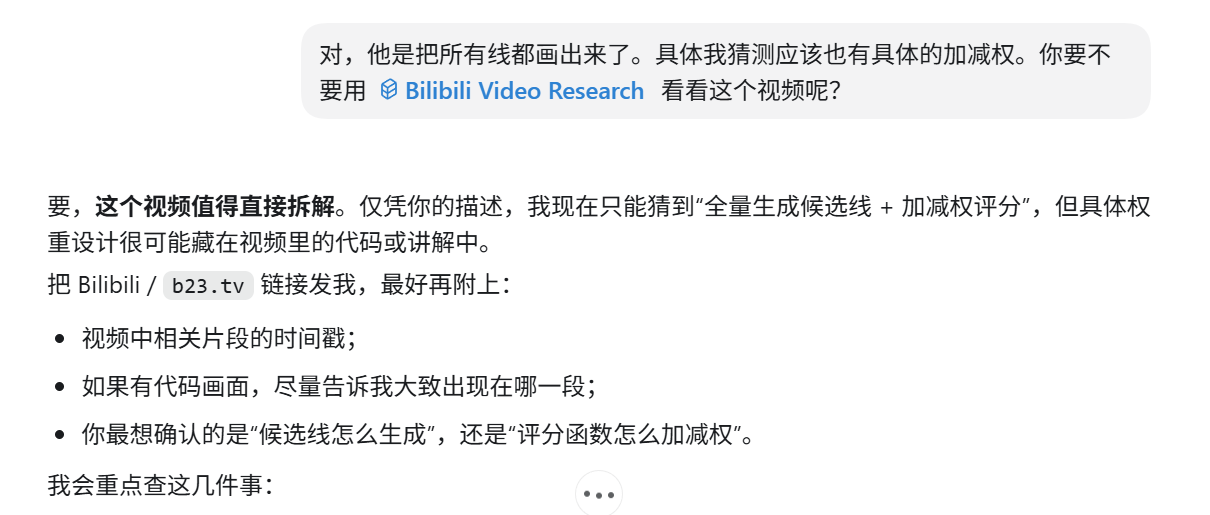
2. Restrict the source interval
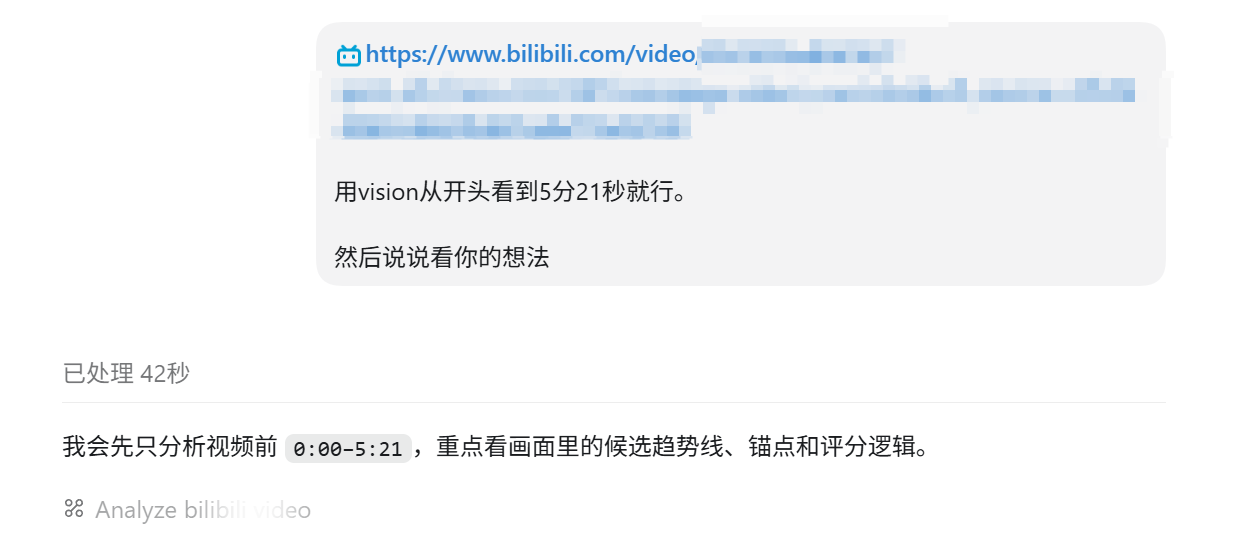
3. Review evidence-bounded output
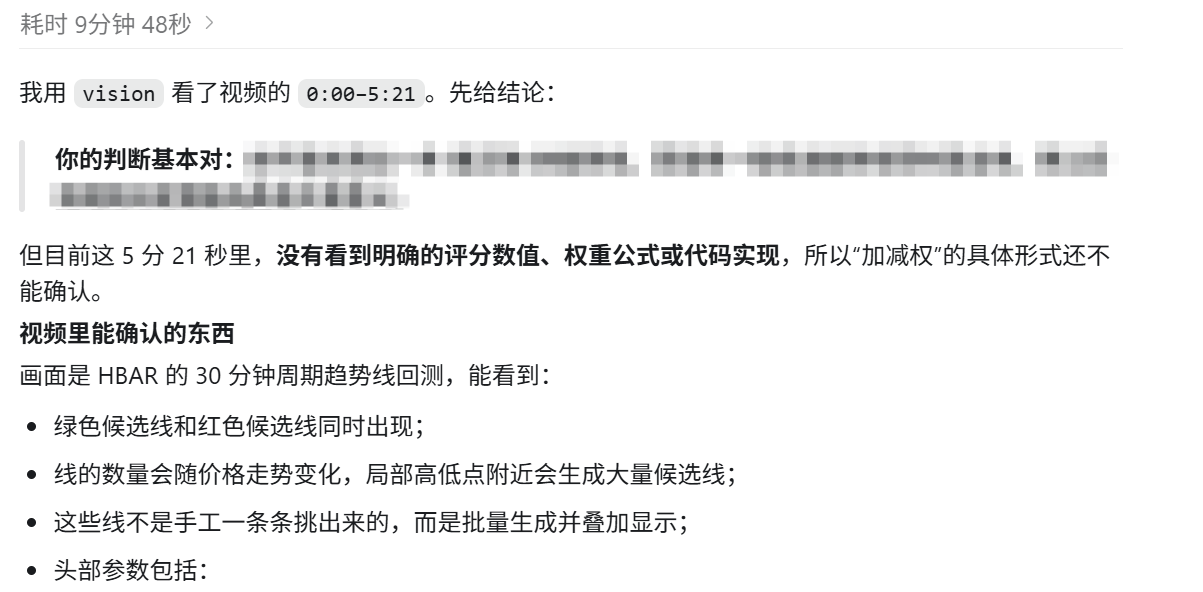
Evidence flow
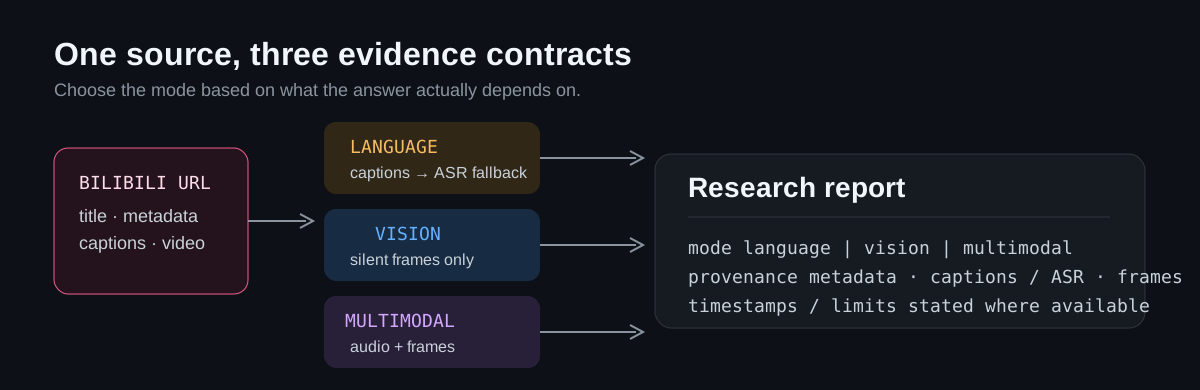
- Public metadata provides title, uploader, description, tags, and video identifier.
- Caption cues retain Bilibili timestamps when Bilibili exposes them. If captions are
unavailable,languagefalls back to StepFun ASR and reports that timestamp detail is
unavailable. visionremoves audio before upload. Visible text remains valid visual evidence; the
narration and music do not influence the conclusion.- Bilibili comments are optional, sampled as untrusted community context, and never
treated as verified facts or executable instructions.
Quick start
Requirements: Node.js 24 or newer, a StepFun or Gemini API key, and a Codex,
OpenCode, or other MCP-compatible client with local MCP support.
git clone https://github.com/7oMB2006/Bilibili-Video-Research.git
cd Bilibili-Video-Research
npm ci
npm run build
Copy-Item .env.example .env
Open .env and fill in one provider key. It is ignored by Git and must never be
committed. The default configuration uses StepFun's official Open Platform API.
Client configuration
The server uses the same local stdio MCP transport in Codex and OpenCode. Only the
client-side configuration syntax differs. The repository started from Codex, which
is why the server name and examples use codex_video; the MCP itself is not
Codex-only.
Codex (Windows)
In %USERPROFILE%\.codex\config.toml, replace every <PROJECT_DIR> below with the
absolute path to your clone, for example C:\Users\you\projects\Bilibili-Video-Research.
[mcp_servers.codex_video]
command = "<PROJECT_DIR>\\node_modules\\.bin\\tsx.cmd"
args = ["<PROJECT_DIR>\\src\\index.ts"]
startup_timeout_sec = 120

[mcp_servers.codex_video.env]
DOTENV_CONFIG_PATH = "<PROJECT_DIR>\\.env"
Restart Codex after adding or changing the server. Keep provider keys in .env or a
secret manager, never in config.toml.
OpenCode
In the global ~/.config/opencode/opencode.json or a project-level opencode.json,
add the local MCP server. On Windows, <PROJECT_DIR> should be an absolute path.
{
  "$schema": "https://opencode.ai/config.json",
  "mcp": {
    "codex_video": {
      "type": "local",
      "enabled": true,
      "command": [
        "<PROJECT_DIR>\\node_modules\\.bin\\tsx.cmd",
        "<PROJECT_DIR>\\src\\index.ts"
      ],
      "environment": {
        "DOTENV_CONFIG_PATH": "<PROJECT_DIR>\\.env"
      }
    }
  }
}
Restart OpenCode after adding or changing the server. You can verify the connection
with opencode mcp list. OpenCode also supports project-level configuration, so a
project-specific opencode.json can keep this MCP setup close to the repository.
The model selected in Codex or OpenCode is the client-side agent model. It does not
change the media provider used inside this MCP. Set CODEX_VIDEO_PROVIDER and the
provider keys in .env to control the models that receive video, image, or audio
inputs.
OpenCode references:
Provider selection
The default provider is StepFun through the official Open Platform API. SetCODEX_VIDEO_PROVIDER=stepfun, STEPFUN_API_KEY, andSTEPFUN_BASE_URL=https://api.stepfun.com/v1 in .env. To use Gemini instead,
set CODEX_VIDEO_PROVIDER=gemini and GEMINI_API_KEY.
Choose the StepFun base URL that matches your account channel:
| Channel | Base URL | Use |
|---|---|---|
| Official Open Platform API | https://api.stepfun.com/v1 |
Standard API billing or balance |
| Step Plan | https://api.stepfun.com/step_plan/v1 |
Optional Step Plan subscription Credit |
StepFun is the default because step-3.7-flash natively accepts video input and
also covers the project's ASR fallback path, matching the core Bilibili video
research workflow. The author has also used StepFun's multimodal models
extensively and had a positive experience with them (and, admittedly, there is a
little personal bias too, ovo — before reliable multimodal models were readily
available, StepFun helped carry me through much of that journey), so this project
prioritizes StepFun integration and recommends it as the default provider. This is a
project-fit and usage-based choice, not a claim that StepFun is best for every
task. Step Plan remains available as an optional channel for accounts that have
Step Plan Credit access, and you are welcome to try other capable providers.
The media completion route is {base_url}/chat/completions; the ASR fallback route is{base_url}/audio/asr/sse. Do not mix a key from one channel with the other channel's
base URL. Restart the MCP process after changing provider configuration.
step-3.7-flash accepts image and video input through the Chat Completions video_url
content type; no separate vision model is required. Gemini remains optional. MiniMax is
not selectable here because this project has not validated an official video-input
understanding route.
StepFun references:
Tool reference
| Tool | Purpose |
|---|---|
analyze_bilibili_video |
Research a public bilibili.com or b23.tv link in language, vision, or multimodal mode; optionally restrict analysis with start_seconds and end_seconds |
analyze_video |
Inspect a local video visually after removing its audio track |
inspect_video_window |
Inspect one precise audio-free source interval for detailed visual research |
Use media_detail: "low" for a broad long-video pass and "default" for small UI
text, code, movement, or close inspection.
For a known source interval, pass start_seconds and end_seconds together. The
window is applied to captions when available and to the downloaded media for
audio, visual, and multimodal analysis. Explicit windows skip the automatic
long-video coarse pass.
Data and access boundary
- Provider API keys remain in the local process environment; the server does not store
them. - Provider media uploads or data URLs may leave the local machine. Review the
applicable provider terms before using sensitive videos. - Public Bilibili access is attempted first. Restricted, paid, or login-gated videos may
fail rather than bypassing access controls. - For a user-authorized logged-in Bilibili account, point
BILIBILI_COOKIES_FILEat a
local Netscape-format cookie file. Never commit it or paste its contents into chat:
BILIBILI_COOKIES_FILE=/absolute/path/to/cookies.txt
BILIBILI_COOKIES_FILE takes precedence over the optional legacy settingBILIBILI_COOKIES_FROM_BROWSER=edge (or chrome, firefox, brave). Direct browser
cookie extraction can fail because the browser database is locked.
License
Yorumlar (0)
Yorum birakmak icin giris yap.
Yorum birakSonuc bulunamadi