claude-code-mux
Health Gecti
- License — License: MIT
- Description — Repository has a description
- Active repo — Last push 131 days ago
- Community trust — 488 GitHub stars
Code Basarisiz
- Hardcoded secret — Potential hardcoded credential in config/default.example.toml
Permissions Gecti
- Permissions — No dangerous permissions requested
Bu listing icin henuz AI raporu yok.
High-performance AI routing proxy built in Rust with automatic failover, priority-based routing, and support for 15+ providers (Anthropic, OpenAI, Cerebras, Minimax, Kimi, etc.)
Claude Code Mux


OpenRouter met Claude Code Router. They had a baby.
Now your coding assistant can use GLM 4.6 for one task, Kimi K2 Thinking for another, and Minimax M2 for a third. All in the same session. When your primary provider goes down, it falls back to your backup automatically.
⚡️ Multi-model intelligence with provider resilience
A lightweight, Rust-powered proxy that provides intelligent model routing, provider failover, streaming support, and full Anthropic API compatibility for Claude Code.
Claude Code → Claude Code Mux → Multiple AI Providers
              (Anthropic API)    (OpenAI/Anthropic APIs + Streaming)
Table of Contents
- Key Features
- Installation
- Quick Start
- Screenshots
- Usage Guide
- Routing Logic
- Configuration Examples
- Supported Providers
- Advanced Features
- CLI Usage
- Troubleshooting
- FAQ
- Performance
- Why Choose Claude Code Mux?
- Documentation
- Changelog
- Contributing
- License
Key Features
🎯 Core Features
- ✨ Modern Admin UI - Beautiful web interface with auto-save and URL-based navigation
- 🔐 OAuth 2.0 Support - FREE access for Claude Pro/Max, ChatGPT Plus/Pro, and Google AI Pro/Ultra
- 🧠 Intelligent Routing - Auto-route by task type (websearch, reasoning, background, default)
- 🔄 Provider Failover - Automatic fallback to backup providers with priority-based routing
- 🌊 Streaming Support - Full Server-Sent Events (SSE) streaming for real-time responses
- 🌐 Multi-Provider Support - 18+ providers including OpenAI, Anthropic, Google Gemini/Vertex AI, Groq, ZenMux, etc.
- ⚡️ High Performance - ~5MB RAM, <1ms routing overhead (Rust powered)
- 🎯 Unified API - Full Anthropic Messages API compatibility
🚀 Advanced Features
- 🔀 Auto-mapping - Regex-based model name transformation before routing (e.g., transform all
claude-*to default model) - 🎯 Background Detection - Configurable regex patterns for background task detection
- 🤖 Multi-Agent Support - Dynamic model switching via
CCM-SUBAGENT-MODELtags - 📊 Live Testing - Built-in test interface to verify routing and responses
- ⚙️ Centralized Settings - Dedicated Settings tab for regex pattern management
Screenshots
📸 Click to view screenshots (5 images)Overview Dashboard
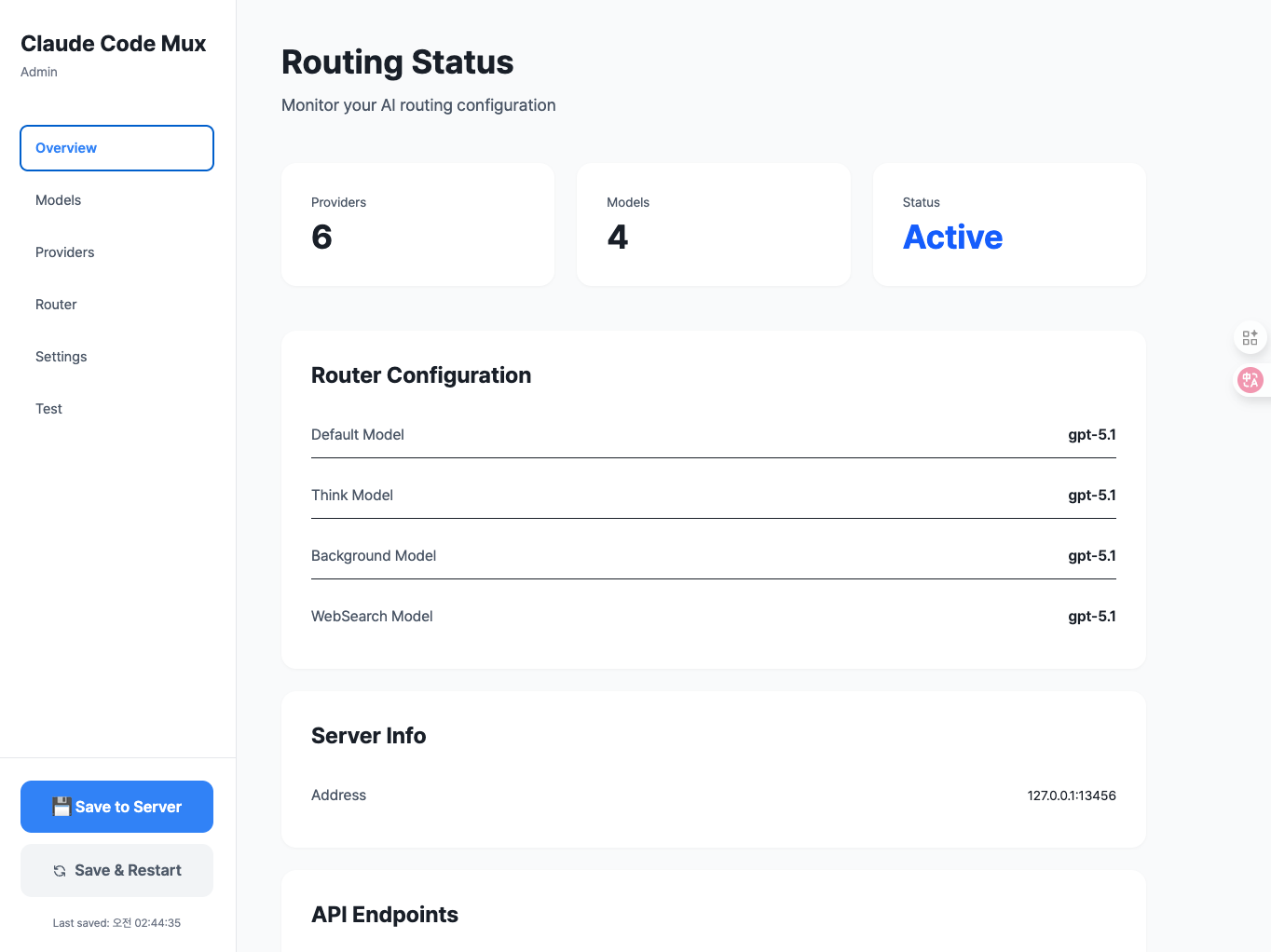
Main dashboard with router configuration and provider management
Provider Management
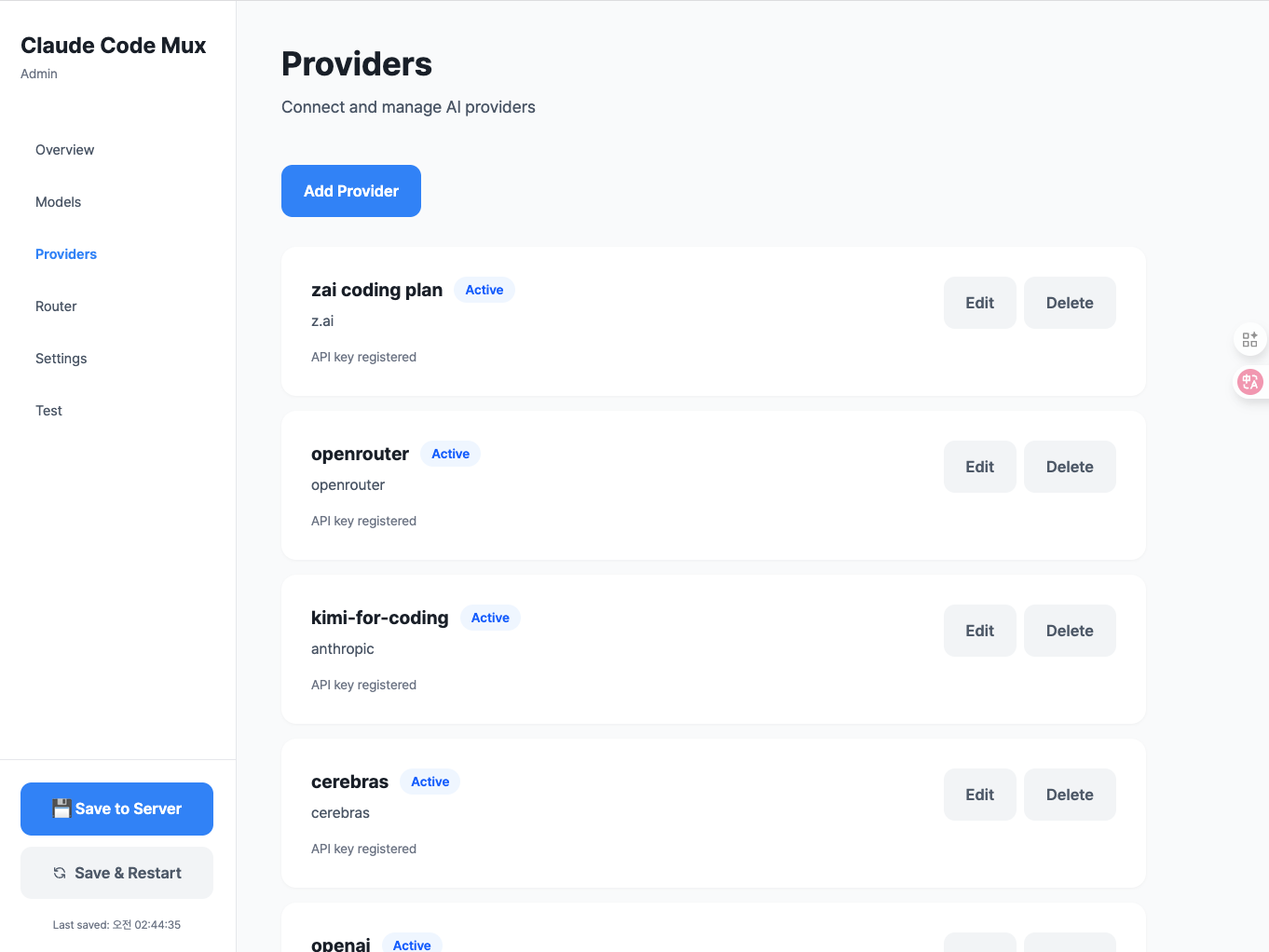
Add and manage multiple AI providers with automatic format translation
Model Mappings with Fallback
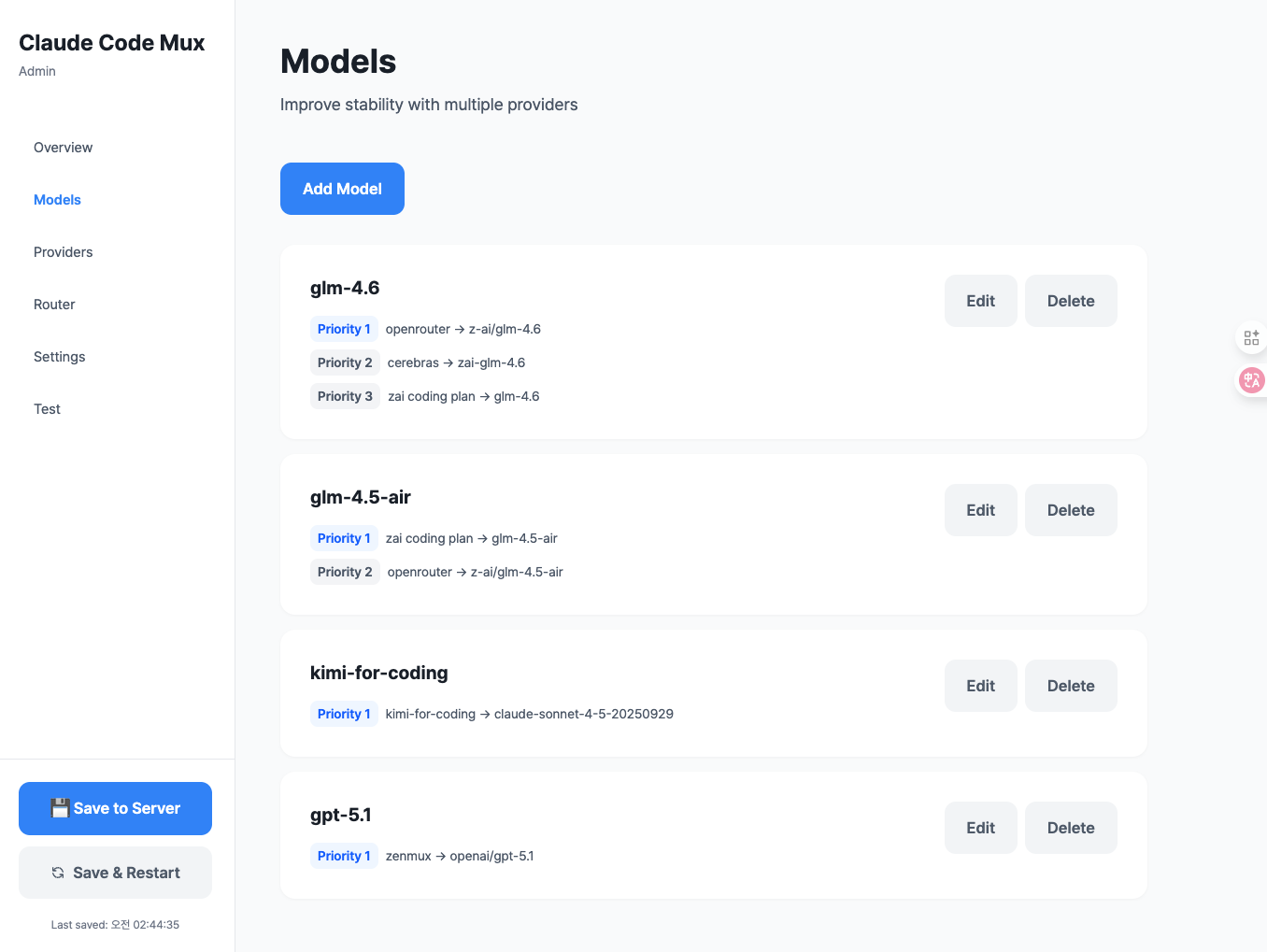
Configure models with priority-based fallback routing
Router Configuration
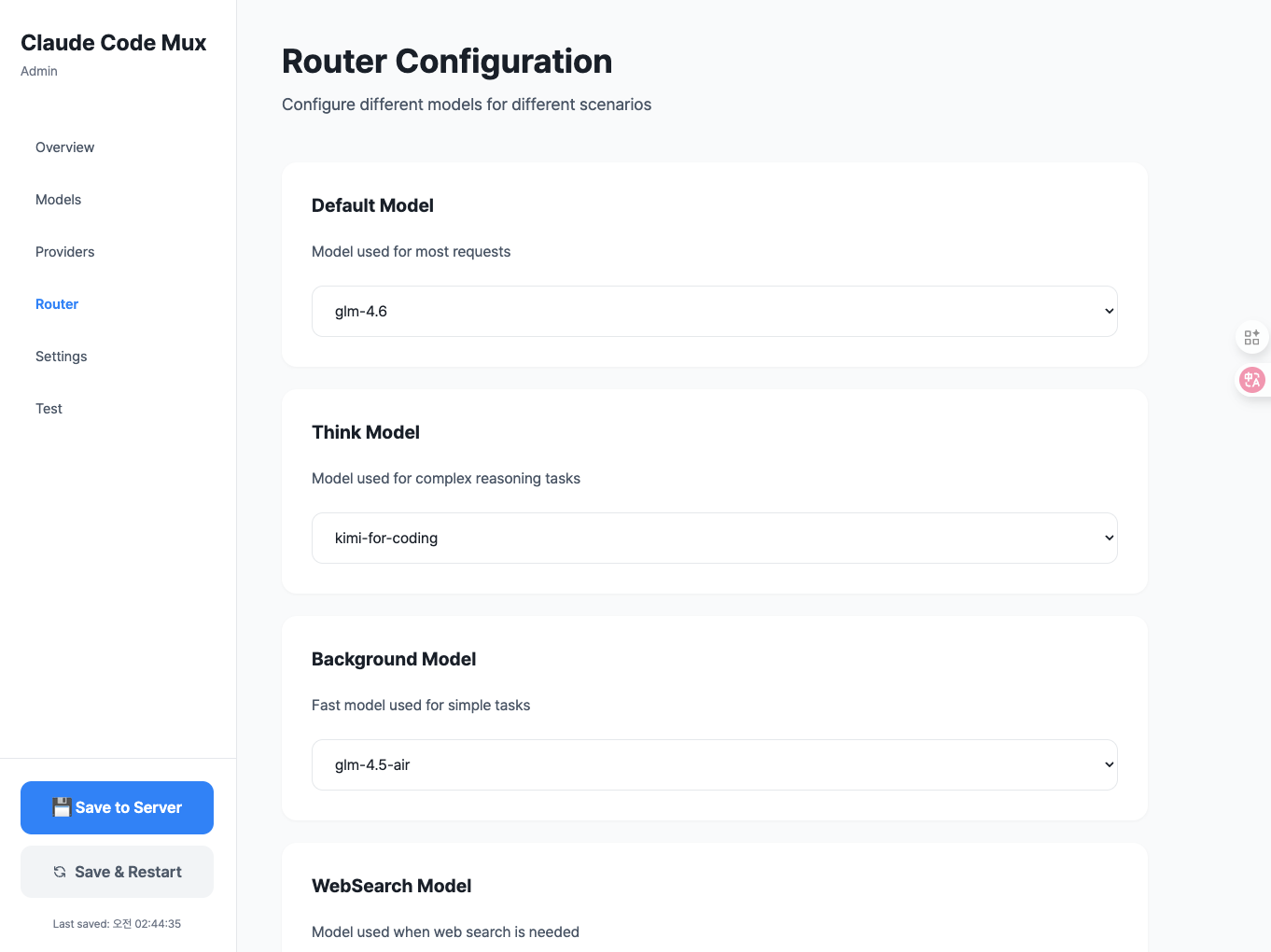
Set up intelligent routing rules for different task types
Live Testing Interface
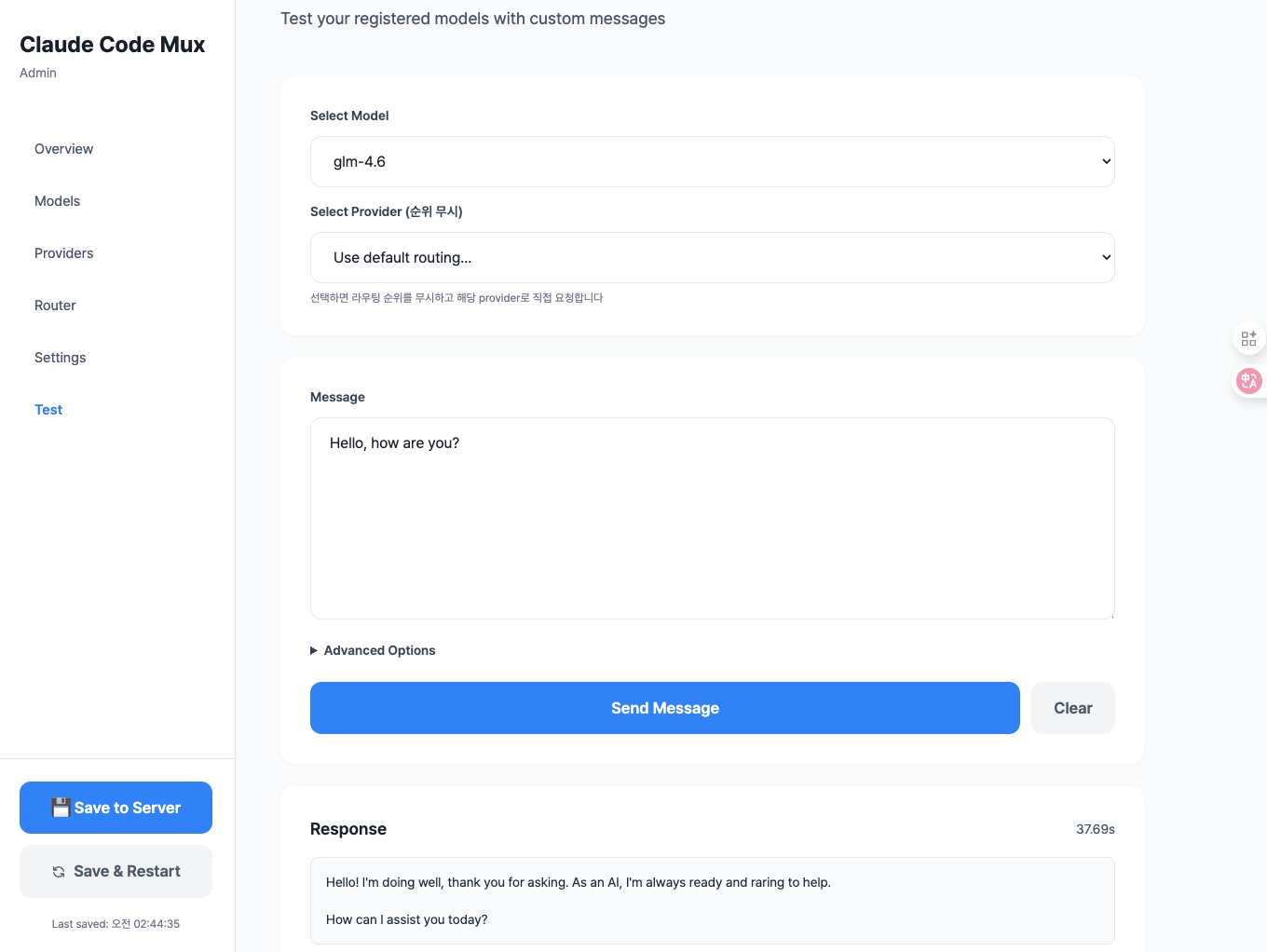
Test your configuration with live API requests and responses
Supported Providers
18+ AI providers with automatic format translation, streaming, and failover:
- Anthropic-compatible: Anthropic (API Key/OAuth), ZenMux, z.ai, Minimax, Kimi
- OpenAI-compatible: OpenAI, OpenRouter, Groq, Together, Fireworks, Deepinfra, Cerebras, Moonshot, Nebius, NovitaAI, Baseten
- Google AI: Gemini (OAuth/API Key), Vertex AI (GCP ADC)
Anthropic-Compatible (Native Format)
- Anthropic - Official Claude API provider (supports both API Key and OAuth)
- Anthropic (OAuth) - 🆓 FREE for Claude Pro/Max subscribers via OAuth 2.0
- ZenMux - Unified API gateway (Sunnyvale, CA)
- z.ai - China-based, GLM models
- Minimax - China-based, MiniMax-M2 model
- Kimi For Coding - Premium membership for Kimi
OpenAI-Compatible
- OpenAI - Official OpenAI API (supports both API Key and OAuth)
- OpenAI (OAuth) - 🆓 FREE for ChatGPT Plus/Pro subscribers via OAuth 2.0 (GPT-5.1, GPT-5.1 Codex)
- OpenRouter - Unified API gateway (500+ models)
- Groq - LPU inference (ultra-fast)
- Together AI - Open source model inference
- Fireworks AI - Fast inference platform
- Deepinfra - GPU inference
- Cerebras - Wafer-Scale Engine inference
- Moonshot AI - China-based, Kimi models (OpenAI-compatible)
- Nebius - AI inference platform
- NovitaAI - GPU cloud platform
- Baseten - ML deployment platform
Google AI
- Gemini - Google AI Studio/Code Assist API (supports both OAuth and API Key)
- Gemini (OAuth) - 🆓 FREE for Google AI Pro/Ultra subscribers via OAuth 2.0 (Code Assist API)
- Vertex AI - GCP platform with ADC authentication (supports Gemini, Claude, Llama via Model Garden)
Installation
Option 1: Download Pre-built Binaries (Recommended)
Download the latest release for your platform from GitHub Releases.
Linux (x86_64)
# Download and extract (glibc)
curl -L https://github.com/9j/claude-code-mux/releases/latest/download/ccm-linux-x86_64.tar.gz | tar xz

# Or download musl version (static linking, more portable)
curl -L https://github.com/9j/claude-code-mux/releases/latest/download/ccm-linux-x86_64-musl.tar.gz | tar xz

# Move to PATH
sudo mv ccm /usr/local/bin/
macOS (Intel)
# Download and extract
curl -L https://github.com/9j/claude-code-mux/releases/latest/download/ccm-macos-x86_64.tar.gz | tar xz

# Move to PATH
sudo mv ccm /usr/local/bin/
macOS (Apple Silicon)
# Download and extract
curl -L https://github.com/9j/claude-code-mux/releases/latest/download/ccm-macos-aarch64.tar.gz | tar xz

# Move to PATH
sudo mv ccm /usr/local/bin/
Windows
- Download ccm-windows-x86_64.zip
- Extract the ZIP file
- Add the directory containing
ccm.exeto your PATH
Verify Installation
ccm --version
Option 2: Install via Cargo
If you have Rust installed, you can install directly from crates.io:
cargo install claude-code-mux
This will download, compile, and install the ccm binary to your cargo bin directory (usually ~/.cargo/bin/).
Verify Installation
ccm --version
Option 3: Build from Source
Prerequisites
- Rust 1.70+ (install from rustup.rs)
Build Steps
# Clone the repository
git clone https://github.com/9j/claude-code-mux
cd claude-code-mux

# Build the release binary
cargo build --release

# The binary will be available at target/release/ccm
Install to PATH (Optional)
# Copy to /usr/local/bin for global access
sudo cp target/release/ccm /usr/local/bin/

# Or add to your shell profile (e.g., ~/.zshrc or ~/.bashrc)
export PATH="$PATH:/path/to/claude-code-mux/target/release"
Run Directly Without Installing (Optional)
# From the project directory
cargo run --release -- start
Quick Start
1. Start Claude Code Mux
ccm start
The server will start on http://127.0.0.1:13456 with a web-based admin UI.
💡 First-time users: A default configuration file will be automatically created at:
- Unix/Linux/macOS:
~/.claude-code-mux/config.toml- Windows:
%USERPROFILE%\.claude-code-mux\config.toml
2. Open Admin UI
Navigate to:
http://127.0.0.1:13456
You'll see a modern admin interface with these tabs:
- Overview - System status and configuration summary
- Providers - Manage API providers
- Models - Configure model mappings and fallbacks
- Router - Set up routing rules (auto-saves on change!)
- Test - Test your configuration with live requests
3. Configure Claude Code
Set Claude Code to use the proxy:
export ANTHROPIC_BASE_URL="http://127.0.0.1:13456"
export ANTHROPIC_API_KEY="any-string"
claude
That's it! Your setup is complete.
Usage Guide
Step 1: Add Providers
Navigate to Providers tab → Click "Add Provider"
Example: Add Anthropic with OAuth (🆓 FREE for Claude Pro/Max)
- Select provider type: Anthropic
- Enter provider name:
claude-max - Select authentication: OAuth (Claude Pro/Max)
- Click "🔐 Start OAuth Login"
- Authorize in the popup window
- Copy and paste the authorization code
- Click "Complete Authentication"
- Click "Add Provider"
💡 Pro Tip: Claude Pro/Max subscribers get unlimited API access for FREE via OAuth!
Example: Add ZenMux Provider
- Select provider type: ZenMux
- Enter provider name:
zenmux - Select authentication: API Key
- Enter API key:
your-zenmux-api-key - Click "Add Provider"
Example: Add OpenAI Provider
- Select provider type: OpenAI
- Enter provider name:
openai - Enter API key:
sk-... - Click "Add Provider"
Example: Add z.ai Provider
- Select provider type: z.ai
- Enter provider name:
zai - Enter API key:
your-zai-api-key - Click "Add Provider"
Example: Add Google Gemini with OAuth (🆓 FREE for Google AI Pro/Ultra)
- Select provider type: Google Gemini
- Enter provider name:
gemini-pro - Select authentication: OAuth (Google AI Pro/Ultra)
- Click "🔐 Start OAuth Login"
- Authorize in the popup window
- Copy and paste the authorization code
- Click "Complete Authentication"
- Click "Add Provider"
💡 Pro Tip: Google AI Pro/Ultra subscribers get unlimited API access for FREE via OAuth!
Example: Add Vertex AI Provider (GCP)
- Select provider type: ☁️ Vertex AI
- Enter provider name:
vertex-ai - Enter GCP Project ID:
your-gcp-project-id - Enter Location:
us-central1(or your preferred region) - Click "Add Provider"
Note: Vertex AI uses Application Default Credentials (ADC). Make sure you've run
gcloud auth application-default loginfirst.
Supported Providers:
- Anthropic-compatible: Anthropic (API Key or OAuth), ZenMux, z.ai, Minimax, Kimi
- OpenAI-compatible: OpenAI, OpenRouter, Groq, Together, Fireworks, Deepinfra, Cerebras, Nebius, NovitaAI, Baseten
- Google AI: Gemini (OAuth/API Key), Vertex AI (GCP ADC)
Step 2: Add Model Mappings
Navigate to Models tab → Click "Add Model"
Example: Minimax M2 (Ultra-fast, Low Cost)
- Model Name:
minimax-m2 - Add mapping:
- Provider:
minimax - Actual Model:
MiniMax M2 - Priority:
1
- Provider:
- Click "Add Model"
Why Minimax M2? - $0.30/$1.20 per M tokens (8% of Claude Sonnet 4.5 cost), 100 TPS throughput, MoE architecture
Example: GLM-4.6 with Fallback (Cost Optimized)
- Model Name:
glm-4.6 - Add mappings:
- Mapping 1 (Primary):
- Provider:
zai - Actual Model:
glm-4.6 - Priority:
1
- Provider:
- Mapping 2 (Fallback):
- Provider:
openrouter - Actual Model:
z-ai/glm-4.6 - Priority:
2
- Provider:
- Mapping 1 (Primary):
- Click "+ Fallback Provider Add" to add more fallbacks
- Click "Add Model"
How Fallback Works: If
zaiprovider fails, automatically falls back toopenrouterGLM-4.6 Pricing: $0.60/$2.20 per M tokens (90% cheaper than Claude Sonnet 4.5), 200K context window
Step 3: Configure Router
Navigate to Router tab
Configure routing rules (auto-saves on change!):
- Default Model:
minimax-m2(general tasks - ultra-fast, 8% of Claude cost) - Think Model:
kimi-k2(plan mode with reasoning - 256K context) - Background Model:
glm-4.5-air(simple background tasks) - WebSearch Model:
glm-4.6(web search tasks) - Auto-map Regex Pattern:
^claude-(transform Claude models before routing) - Background Task Regex Pattern:
(?i)claude.*haiku(detect background tasks)
Step 3.5: Configure Regex Patterns (Optional)
Navigate to Settings tab for centralized regex management:
Auto-mapping Pattern: Regex to match models for transformation (e.g.,
^claude-)- Matched models are transformed to the default model
- Then routing logic (WebSearch/Think/Background) is applied
Background Task Pattern: Regex to detect background tasks (e.g.,
(?i)claude.*haiku)- Matches against the ORIGINAL model name (before auto-mapping)
- Matched models use the background model
Step 4: Save Configuration
Click "💾 Save to Server" to save configuration to disk, or "🔄 Save & Restart" to save and restart the server.
Note: Router configuration auto-saves to localStorage on change, but you need to click "Save to Server" to persist to disk.
Step 5: Test Your Setup
Navigate to Test tab:
- Select a model (e.g.,
minimax-m2orglm-4.6) - Enter a message:
Hello, test message - Click "Send Message"
- View the response and check routing logs
Routing Logic
Flow: Auto-map (transform) → WebSearch > Subagent > Think > Background > Default
0. Auto-mapping (Model Name Transformation)
- Trigger: Model name matches
auto_map_regexpattern - Example: Request with
model="claude-4-5-sonnet"and regex^claude- - Action: Transform
claude-4-5-sonnet→minimax-m2(default model) - Then: Continue to routing logic below
- Configuration: Set in Router or Settings tab
Key Point: Auto-mapping is NOT a routing decision - it transforms the model name BEFORE routing logic is applied.
1. WebSearch (Highest Priority)
- Trigger: Request contains
web_searchtool in tools array - Example: Claude Code using web search tool
- Routes to:
websearchmodel (e.g., GLM-4.6)
2. Subagent Model
- Trigger: System prompt contains
<CCM-SUBAGENT-MODEL>model-name</CCM-SUBAGENT-MODEL>tag - Example: AI agent specifying model for sub-task
- Routes to: Specified model (tag auto-removed)
3. Think Mode
- Trigger: Request has
thinkingfield withtype: "enabled" - Example: Claude Code Plan Mode (
/plan) - Routes to:
thinkmodel (e.g., Kimi K2 Thinking, Claude Opus)
4. Background Tasks
- Trigger: ORIGINAL model name matches
background_regexpattern - Default Pattern:
(?i)claude.*haiku(case-insensitive) - Example: Request with
model="claude-4-5-haiku"(checked BEFORE auto-mapping) - Routes to:
backgroundmodel (e.g., GLM-4.5-air) - Configuration: Set in Router or Settings tab
Important: Background detection uses the ORIGINAL model name, not the auto-mapped one.
5. Default (Fallback)
- Trigger: No routing conditions matched
- Routes to: Transformed model name (if auto-mapped) or original model name
Routing Examples
Example 1: Claude Haiku with Web Search
Request: model="claude-4-5-haiku", tools=[web_search]
Config: auto_map_regex="^claude-", background_regex="(?i)claude.*haiku", websearch="glm-4.6"

Flow:
1. Auto-map: "claude-4-5-haiku" → "minimax-m2" (transformed)
2. WebSearch check: tools has web_search → Route to "glm-4.6"
Result: glm-4.6 (websearch model)
Example 2: Claude Haiku (No Special Conditions)
Request: model="claude-4-5-haiku"
Config: auto_map_regex="^claude-", background_regex="(?i)claude.*haiku", background="glm-4.5-air"

Flow:
1. Auto-map: "claude-4-5-haiku" → "minimax-m2" (transformed)
2. WebSearch check: No web_search tool
3. Think check: No thinking field
4. Background check on ORIGINAL: "claude-4-5-haiku" matches "(?i)claude.*haiku" → Route to "glm-4.5-air"
Result: glm-4.5-air (background model)
Example 3: Claude Sonnet with Think Mode
Request: model="claude-4-5-sonnet", thinking={type:"enabled"}
Config: auto_map_regex="^claude-", think="kimi-k2-thinking"

Flow:
1. Auto-map: "claude-3-5-sonnet" → "minimax-m2" (transformed)
2. WebSearch check: No web_search tool
3. Think check: thinking.type="enabled" → Route to "kimi-k2-thinking"
Result: kimi-k2-thinking (think model)
Example 4: Non-Claude Model (No Auto-mapping)
Request: model="glm-4.6"
Config: auto_map_regex="^claude-", default="minimax-m2"

Flow:
1. Auto-map: "glm-4.6" doesn't match "^claude-" → No transformation
2. WebSearch check: No web_search tool
3. Think check: No thinking field
4. Background check: "glm-4.6" doesn't match background regex
5. Default: Use model name as-is
Result: glm-4.6 (original model name, routed through model mappings)
Configuration Examples
Cost Optimized Setup (~$0.35/1M tokens avg)
Providers:
- Minimax (ultra-fast, ultra-cheap)
- z.ai (GLM models)
- Kimi (for thinking tasks)
- OpenRouter (fallback)
Models:
minimax-m2→ Minimax (MiniMax M2) — $0.30/$1.20 per M tokensglm-4.6→ z.ai (glm-4.6) with OpenRouter fallback — $0.60/$2.20 per M tokensglm-4.5-air→ z.ai (glm-4.5-air) — Lower cost than GLM-4.6kimi-k2-thinking→ Kimi (kimi-k2-thinking) — Reasoning optimized, 256K context
Routing:
- Default:
minimax-m2(8% of Claude cost, 100 TPS) - Think:
kimi-k2-thinking(thinking model with 256K context) - Background:
glm-4.5-air(simple tasks) - WebSearch:
glm-4.6(web search + reasoning) - Auto-map Regex:
^claude-(transform Claude models to minimax-m2) - Background Regex:
(?i)claude.*haiku(detect Haiku models for background)
Cost Comparison (per 1M tokens):
- Minimax M2: $0.30 input / $1.20 output
- GLM-4.6: $0.60 input / $2.20 output
- Claude Sonnet 4.5: $3.00 input / $15.00 output
- Savings: ~90% cost reduction vs Claude
Quality Focused Setup
Providers:
- Anthropic (native Claude)
- OpenRouter (for fallbacks)
Models:
claude-sonnet-4-5→ Anthropic nativeclaude-opus-4-1→ Anthropic native
Routing:
- Default:
claude-sonnet-4-5 - Think:
claude-opus-4-1 - Background:
claude-haiku-4-5 - WebSearch:
claude-sonnet-4-5
Multi-Provider with Fallback
Providers:
- Minimax (primary, ultra-fast)
- z.ai (for GLM models)
- OpenRouter (fallback for all)
Models:
minimax-m2:- Priority 1: Minimax →
MiniMax-M2 - Priority 2: OpenRouter →
minimax/minimax-m2(if available)
- Priority 1: Minimax →
glm-4.6:- Priority 1: z.ai →
glm-4.6 - Priority 2: OpenRouter →
z-ai/glm-4.6
- Priority 1: z.ai →
Routing:
- Default:
minimax-m2(falls back to OpenRouter if Minimax fails) - Think:
glm-4.6(with OpenRouter fallback) - Background:
glm-4.5-air - WebSearch:
glm-4.6
Advanced Features
OAuth Authentication (FREE for Claude Pro/Max, ChatGPT Plus/Pro & Google AI Pro/Ultra)
Claude Pro/Max, ChatGPT Plus/Pro, and Google AI Pro/Ultra subscribers can use their respective APIs completely free via OAuth 2.0 authentication.
Setting Up OAuth
Via Web UI (Recommended):
For Claude Pro/Max:
- Navigate to Providers tab → "Add Provider"
- Select provider type: Anthropic
- Enter provider name (e.g.,
claude-max) - Select authentication: OAuth (Claude Pro/Max)
- Click "🔐 Start OAuth Login"
- Complete authorization in popup window
- Copy and paste the authorization code
- Click "Complete Authentication"
For ChatGPT Plus/Pro:
- Navigate to Providers tab → "Add Provider"
- Select provider type: OpenAI
- Enter provider name (e.g.,
chatgpt-codex) - Select authentication: OAuth (ChatGPT Plus/Pro)
- Click "🔐 Start OAuth Login"
- Complete authorization in popup window (port 1455)
- Copy and paste the authorization code
- Click "Complete Authentication"
For Google AI Pro/Ultra:
- Navigate to Providers tab → "Add Provider"
- Select provider type: Google Gemini
- Enter provider name (e.g.,
gemini-pro) - Select authentication: OAuth (Google AI Pro/Ultra)
- Click "🔐 Start OAuth Login"
- Complete authorization in popup window
- Copy and paste the authorization code
- Click "Complete Authentication"
💡 Supported Models:
- Claude OAuth: All Claude models (Opus, Sonnet, Haiku)
- ChatGPT OAuth: GPT-5.1, GPT-5.1 Codex (with reasoning blocks converted to thinking)
- Gemini OAuth: All Gemini models via Code Assist API (Pro, Flash, Ultra)
Via CLI Tool:
# Run OAuth login tool
cargo run --example oauth_login

# Or if installed
./examples/oauth_login
The tool will:
- Generate an authorization URL
- Open your browser for authorization
- Prompt for the authorization code
- Exchange code for access/refresh tokens
- Save tokens to
~/.claude-code-mux/oauth_tokens.json
Managing OAuth Tokens
Navigate to Settings tab → OAuth Tokens section to:
- View token status (Active/Needs Refresh/Expired)
- Refresh tokens manually (auto-refresh happens 5 minutes before expiry)
- Delete tokens when no longer needed
Token Features:
- 🔐 Secure PKCE-based OAuth 2.0 flow
- 🔄 Automatic token refresh (5 min before expiry)
- 💾 Persistent storage with file permissions (0600)
- 🎨 Visual status indicators (green/yellow/red)
Security Notes:
- Tokens are stored with
0600permissions (owner read/write only) - Never commit
oauth_tokens.jsonto version control - Tokens auto-refresh before expiration
- PKCE protects against authorization code interception
OAuth API Endpoints
For advanced integrations:
POST /api/oauth/authorize- Get authorization URLPOST /api/oauth/exchange- Exchange code for tokensGET /api/oauth/tokens- List all tokensPOST /api/oauth/tokens/refresh- Refresh a tokenPOST /api/oauth/tokens/delete- Delete a token
See docs/OAUTH_TESTING.md for detailed API documentation.
Auto-mapping with Regex
Automatically transform model names before routing logic is applied:
- Navigate to Router or Settings tab
- Set Auto-map Regex Pattern:
^claude- - All requests for
claude-*models will be transformed to your default model - Then routing logic (WebSearch/Think/Background) is applied to the transformed request
Use Cases:
- Transform all Claude models to cost-optimized alternative:
^claude- - Transform both Claude and GPT models:
^(claude-|gpt-) - Transform specific models only:
^(claude-sonnet|claude-opus)
Example:
Config: auto_map_regex="^claude-", default="minimax-m2", websearch="glm-4.6"
Request: model="claude-sonnet", tools=[web_search]

Flow:
1. Transform: "claude-sonnet" → "minimax-m2"
2. Route: WebSearch detected → "glm-4.6"
Result: glm-4.6 model
Background Task Detection with Regex
Automatically detect and route background tasks using regex patterns:
- Navigate to Router or Settings tab
- Set Background Regex Pattern:
(?i)claude.*haiku - All requests matching this pattern will use your background model
Use Cases:
- Route all Haiku models to cheap background model:
(?i)claude.*haiku - Route specific model tiers:
(?i)(haiku|flash|mini) - Custom patterns for your naming convention
Important: Background detection checks the ORIGINAL model name (before auto-mapping)
Streaming Responses
Full Server-Sent Events (SSE) streaming support:
curl -X POST http://127.0.0.1:13456/v1/messages \
  -H "Content-Type: application/json" \
  -H "anthropic-version: 2023-06-01" \
  -d '{
    "model": "minimax-m2",
    "max_tokens": 1000,
    "stream": true,
    "messages": [{"role": "user", "content": "Hello"}]
  }'
Supported Providers:
- ✅ Anthropic-compatible: ZenMux, z.ai, Kimi, Minimax
- ✅ OpenAI-compatible: OpenAI, OpenRouter, Groq, Together, Fireworks, etc.
Provider Failover
Automatic failover with priority-based routing:
[[models]]
name = "glm-4.6"

[[models.mappings]]
actual_model = "glm-4.6"
priority = 1
provider = "zai"

[[models.mappings]]
actual_model = "z-ai/glm-4.6"
priority = 2
provider = "openrouter"
If z.ai fails, automatically falls back to OpenRouter. Works with all providers!
CLI Usage
Start the Server
# Start with default config (~/.claude-code-mux/config.toml)
# Config file is automatically created if it doesn't exist
ccm start

# Start with custom config
ccm start --config path/to/config.toml

# Start on custom port
ccm start --port 8080
Default Config Location:
- Unix/Linux/macOS:
~/.claude-code-mux/config.toml - Windows:
%USERPROFILE%\.claude-code-mux\config.toml(e.g.,C:\Users\<username>\.claude-code-mux\config.toml)
Run in Background
Using nohup (Unix/Linux/macOS)
# Start in background
nohup ccm start > ccm.log 2>&1 &

# Check if running
ps aux | grep ccm

# Stop the server
pkill ccm
Using systemd (Linux)
Create /etc/systemd/system/ccm.service:
[Unit]
Description=Claude Code Mux
After=network.target

[Service]
Type=simple
User=your-username
WorkingDirectory=/path/to/claude-code-mux
ExecStart=/path/to/claude-code-mux/target/release/ccm start
Restart=on-failure
RestartSec=5s

[Install]
WantedBy=multi-user.target
Then:
# Reload systemd
sudo systemctl daemon-reload

# Enable on boot
sudo systemctl enable ccm

# Start service
sudo systemctl start ccm

# Check status
sudo systemctl status ccm

# View logs
sudo journalctl -u ccm -f
Using launchd (macOS)
Create ~/Library/LaunchAgents/com.ccm.plist:
<?xml version="1.0" encoding="UTF-8"?>
<!DOCTYPE plist PUBLIC "-//Apple//DTD PLIST 1.0//EN" "http://www.apple.com/DTDs/PropertyList-1.0.dtd">
<plist version="1.0">
<dict>
    <key>Label</key>
    <string>com.ccm</string>
    <key>ProgramArguments</key>
    <array>
        <string>/path/to/claude-code-mux/target/release/ccm</string>
        <string>start</string>
    </array>
    <key>RunAtLoad</key>
    <true/>
    <key>KeepAlive</key>
    <true/>
    <key>StandardOutPath</key>
    <string>/tmp/ccm.log</string>
    <key>StandardErrorPath</key>
    <string>/tmp/ccm.error.log</string>
</dict>
</plist>
Then:
# Load and start
launchctl load ~/Library/LaunchAgents/com.ccm.plist

# Stop
launchctl unload ~/Library/LaunchAgents/com.ccm.plist

# Check status
launchctl list | grep ccm
Other Commands
# Show version
ccm --version

# Show help
ccm --help
Supported Features
- ✅ Full Anthropic API compatibility (
/v1/messages) - ✅ Token counting endpoint (
/v1/messages/count_tokens) - ✅ Extended thinking (Plan Mode support)
- ✅ Streaming responses (SSE format)
- ✅ System prompts (string and array formats)
- ✅ Tool calling
- ✅ Vision (image inputs)
- ✅ Auto-mapping with regex patterns
- ✅ Provider failover with priority-based routing
- ✅ Auto-strip incompatible parameters for OpenAI models
Troubleshooting
Check if server is running
curl http://127.0.0.1:13456/api/config/json
Enable debug logging
Set environment variable:
RUST_LOG=debug ccm start
Or update your config file (~/.claude-code-mux/config.toml):
[server]
log_level = "debug"
Test routing directly
curl -X POST http://127.0.0.1:13456/v1/messages \
  -H "Content-Type: application/json" \
  -H "anthropic-version: 2023-06-01" \
  -d '{
    "model": "minimax-m2",
    "max_tokens": 100,
    "messages": [{"role": "user", "content": "Hello"}]
  }'
View real-time logs
# If running with RUST_LOG
RUST_LOG=info ccm start

# Check system logs
tail -f ~/.claude-code-mux/ccm.log
Performance
- Memory: ~6MB RAM (vs ~156MB for Node.js routers) - 25x more efficient
- Startup: <100ms cold start
- Routing: <1ms overhead per request
- Throughput: Handles 1000+ req/s on modern hardware
- Streaming: Zero-copy SSE streaming with minimal latency
FAQ
Does it work with my existing Claude Code setup?Yes! Just set two environment variables:
export ANTHROPIC_BASE_URL="http://127.0.0.1:13456"
export ANTHROPIC_API_KEY="any-string"
claude
The proxy returns an error response with details about the failover chain and which providers were attempted. Check the logs for debugging information.
Can I use this with Claude Pro/Max, ChatGPT Plus/Pro, or Google AI Pro/Ultra subscription?Yes! Claude Code Mux supports OAuth 2.0 authentication for all three providers:
- Claude Pro/Max: Providers tab → Add Provider → Select "Anthropic" → Choose "OAuth (Claude Pro/Max)"
- ChatGPT Plus/Pro: Providers tab → Add Provider → Select "OpenAI" → Choose "OAuth (ChatGPT Plus/Pro)"
- Google AI Pro/Ultra: Providers tab → Add Provider → Select "Google Gemini" → Choose "OAuth (Google AI Pro/Ultra)"
All three provide FREE unlimited API access to subscribers!
How do I add a new AI provider?- Navigate to the Providers tab in the admin UI
- Click "Add Provider"
- Select provider type (Anthropic-compatible or OpenAI-compatible)
- Enter provider name, API key, and base URL
- Click "Add Provider"
- Click "Save to Server"
Check the routing order:
- WebSearch (highest priority) - if request has
web_searchtool - Subagent - if system prompt contains
<CCM-SUBAGENT-MODEL>tag - Think Mode - if request has
thinkingfield - Background - if ORIGINAL model name matches background regex
- Default - fallback
Enable debug logging with RUST_LOG=debug ccm start to see routing decisions.
- Bug reports: Open a GitHub issue
- Feature requests: Start a discussion
- Security issues: Email the maintainer (see GitHub profile)
Why Choose Claude Code Mux?
🎯 Two Core Advantages
1. Automatic Failover 🔄
Priority-based provider fallback - if your primary provider fails, automatically route to backup:
[[models]]
name = "glm-4.6"

[[models.mappings]]
actual_model = "glm-4.6"
priority = 1
provider = "zai"

[[models.mappings]]
actual_model = "z-ai/glm-4.6"
priority = 2
provider = "openrouter"
If zai fails → automatically falls back to openrouter. No manual intervention needed.
💡 Why This Matters: Claude Code Router doesn't have failover - if a provider goes down, your workflow stops. With Claude Code Mux, you get uninterrupted coding even during provider outages.
2. Simpler & More Efficient ⚡️
| Feature | Claude Code Router | Claude Code Mux |
|---|---|---|
| UI Access | ccr ui (separate launch) |
Built-in at http://localhost:13456 |
| Config Format | JSON + Transformers | TOML (simpler) |
| Memory Usage | ~156MB (Node.js) | ~6MB (Rust) - 25x lighter |
| Failover | ❌ Not supported | ✅ Priority-based automatic failover |
| Claude Pro/Max | API Key only | ✅ OAuth 2.0 supported |
| Router Auto-save | Manual save only | Auto-saves to localStorage |
| Config Sharing | Share JSON file | Share URL (?tab=router) |
💡 What This Means
Reliability: Automatic failover keeps you coding when providers go down. (CCR lacks this)
Faster Setup: Built-in UI (no ccr ui needed) + simpler TOML config.
Performance: 25x more memory efficient (6MB vs 156MB).
Claude Pro/Max Compatible: OAuth 2.0 authentication supported (CCR requires API key only).
Simplicity: TOML is easier than JSON with complex transformer configurations.
Documentation
- Design Principles - Claude Code Mux design philosophy and UX guidelines
- URL-based State Management - Admin UI URL-based state management pattern
- LocalStorage-based State Management - Admin UI localStorage-based client state management
Changelog
See CHANGELOG.md for detailed release history or view GitHub Releases for downloads.
Contributing
We love contributions! Here's how you can help:
🐛 Report Bugs
Found a bug? Open an issue with:
- Clear description of the problem
- Steps to reproduce
- Expected vs actual behavior
- Your environment (OS, Rust version)
💡 Suggest Features
Have an idea? Start a discussion or open an issue with:
- Use case description
- Proposed solution
- Alternative approaches considered
🔧 Submit Pull Requests
- Fork the repository
- Create a feature branch (
git checkout -b feature/amazing-feature) - Make your changes
- Run tests:
cargo test - Run formatting:
cargo fmt - Run linting:
cargo clippy - Commit with clear message
- Push and create a Pull Request
📝 Improve Documentation
- Fix typos or unclear explanations
- Add examples or use cases
- Translate docs to other languages
- Create tutorials or guides
🌟 Support the Project
- Star the repo on GitHub
- Share with others who might benefit
- Write blog posts or create videos
- Join discussions and help other users
See CONTRIBUTING.md for detailed guidelines.
License
MIT License - see LICENSE
Acknowledgments
- claude-code-router - Original TypeScript implementation inspiration
- Anthropic - Claude API
- Rust community for amazing tools and libraries
Made with ⚡️ in Rust
Yorumlar (0)
Yorum birakmak icin giris yap.
Yorum birakSonuc bulunamadi