mbeditor
Health Gecti
- License — License: MIT
- Description — Repository has a description
- Active repo — Last push 0 days ago
- Community trust — 27 GitHub stars
Code Gecti
- Code scan — Scanned 12 files during light audit, no dangerous patterns found
Permissions Gecti
- Permissions — No dangerous permissions requested
This is a CLI-based editor for WeChat Official Accounts (微信公众号) powered by AI. It allows users to create, preview, and publish articles via command-line or REST API, integrating with AI agents like Claude or Codex.
Security Assessment
The tool interacts with the WeChat Official Account API, which requires authentication tokens to publish content and upload images. This means network requests are made to external services (WeChat APIs and potentially AI provider endpoints). No hardcoded secrets were found in the 12 files scanned, and no dangerous code patterns (e.g., arbitrary shell execution, eval, or obfuscated code) were detected. The tool requests no dangerous system permissions. Given that it handles API credentials for publishing, there is inherent sensitive data exposure (WeChat tokens), but the implementation appears to handle this normally. Overall risk: Low. The codebase is small and clean with no red flags.
Quality Assessment
The project is actively maintained, with the last push occurring today. It carries a permissive MIT license. Community engagement is modest (27 stars), which is reasonable for a niche Chinese-market tool. The README is well-documented with clear feature descriptions, deployment instructions (Docker support), and usage examples. The code scan covered 12 files with no issues found, suggesting a lean and focused codebase.
Verdict
Safe to use. A clean, actively maintained, MIT-licensed tool with no dangerous patterns detected — suitable for developers who manage WeChat Official Accounts and want CLI or AI-driven publishing workflows. Standard caution applies: review how your WeChat API credentials are stored and transmitted.
支持 CLI 化操作的微信公众号编辑器 — 编辑·预览·发布·AI 驱动
MBEditor
支持 CLI 化操作的微信公众号编辑器
编辑 · 预览 · 发布 · 一体化 · AI 驱动



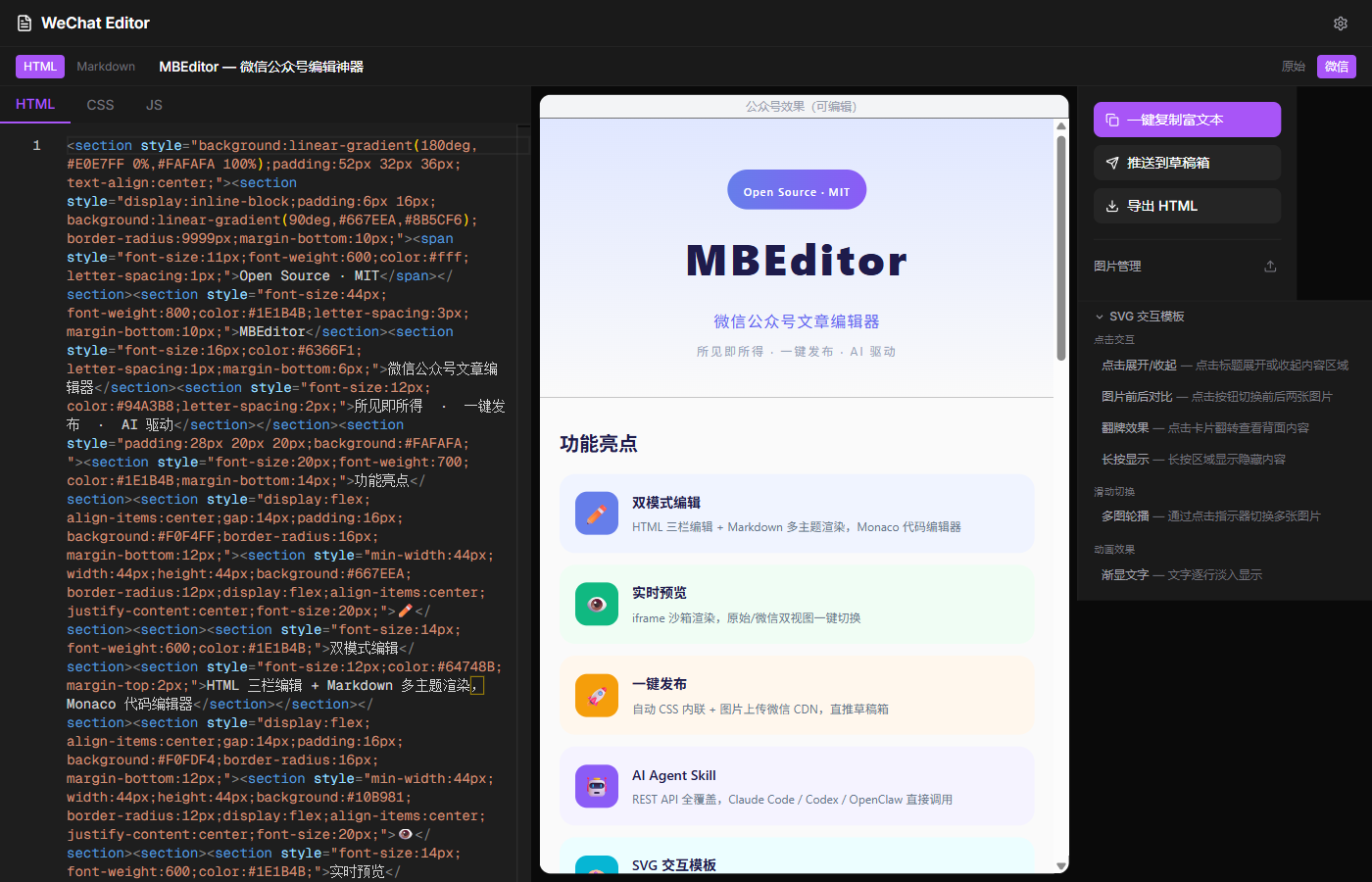
为什么选 MBEditor
告诉 AI「写一篇 Docker 入门推文,暗色科技风,卡片式排版」—— AI 自动生成 HTML,实时预览,一键推送到微信草稿箱。
|
Skill 化 将 SKILL.md 注册为 AI Agent 的 Skill,Claude Code / Codex / OpenClaw 即装即用,任意目录下操作编辑器。 |
自然语言排版 用对话描述你想要的排版风格,AI 直接生成微信兼容的 HTML/CSS,所见即所得。 |
CLI 全流程 每个功能都有 REST API。创建、编辑、上传、发布,全部 curl 搞定,CI/CD 无缝集成。 |
功能
|
编辑器 — 双模式编辑(HTML 三栏 + Markdown 多主题)、Monaco 代码编辑器、所见即所得预览、原始/微信双视图切换 发布 — 一键复制富文本、一键推送草稿箱(自动 CSS 内联 + 图片上传微信 CDN)、导出 HTML 素材 — 本地图床(MD5 去重 / 按日归档)、格式自动转换(WebP/SVG/BMP → PNG)、SVG 交互模板(点击展开/翻牌/轮播/渐显) 微信兼容 — premailer CSS 内联化、智能清洗不支持的 CSS、 REST API — 文章 CRUD、图片上传、发布推送、配置管理,完整覆盖所有功能 |
内置排版模板
MBEditor + AI 可以用自然语言生成各种风格的公众号排版,以下是 6 种内置示例:
| 明亮清新 | 暗黑终端 | 报纸编辑部 |
 |
 |
 |
| 霓虹赛博 | 大地暖色 | 瑞士极简 |
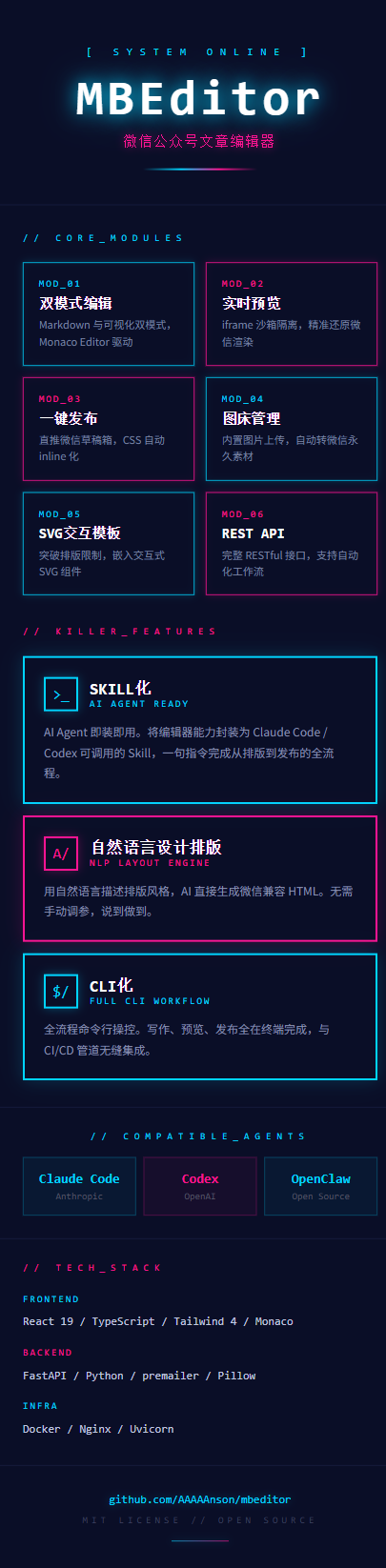 |
 |
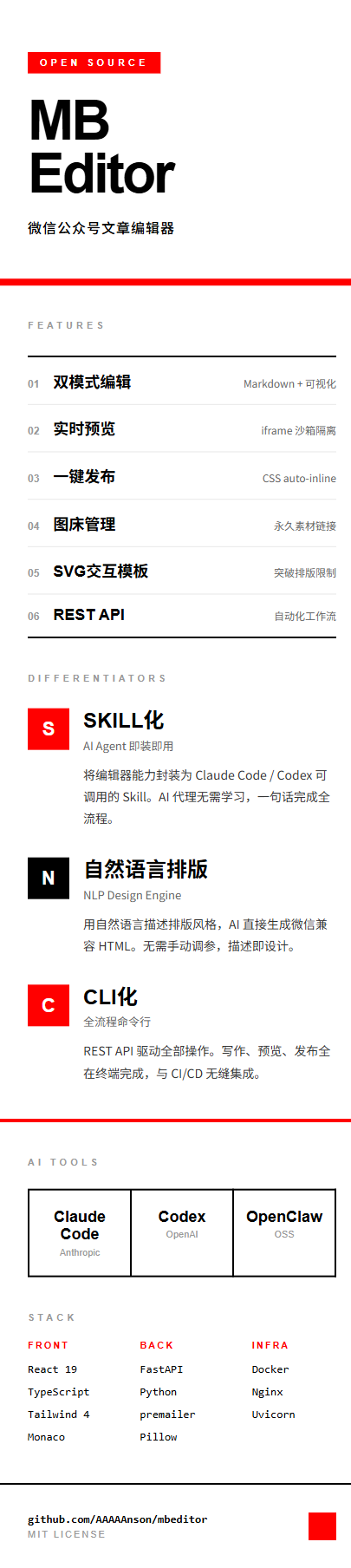 |
生成这些风格的提示词参考所有模板均为纯 inline style +
<section>标签,100% 微信公众号兼容。你也可以用自然语言描述任意风格,AI 会实时生成。
以下是生成上述 6 种风格时使用的提示词,你可以直接复制使用,也可以在此基础上自由发挥:
明亮清新
帮我写一篇 MBEditor 介绍推文,明亮清新风格。
浅色渐变背景,彩色图标卡片,圆润友好的设计。
功能用带颜色图标的横向卡片展示,技术栈用三栏对比,底部深色 footer。
暗黑终端
帮我写一篇 MBEditor 介绍推文,暗黑终端/黑客风格。
纯黑背景 #0c0c0c,荧光绿 #00e87b 为主色调,搭配琥珀黄 #ffbe0b 和品红 #ff006e。
功能区用左侧彩色边框卡片,代码区模拟终端界面,等宽字体 Menlo,章节用 01/02/03 编号。
报纸编辑部
帮我写一篇 MBEditor 介绍推文,复古报纸/杂志编辑部风格。
奶油色背景 #f4f1eb,黑色油墨文字,双线装饰边框,衬线字体 Georgia。
功能用双栏报纸排版,大号衬线体编号,BREAKING NEWS / EXCLUSIVE REPORT 等新闻标签。
霓虹赛博
帮我写一篇 MBEditor 介绍推文,赛博朋克/霓虹风格。
深海蓝背景 #0a0e27,霓虹青 #00d4ff 和热粉 #ff1493 为点缀色。
用 box-shadow 做发光效果,全等宽字体,MOD_01 编号体系,[ SYSTEM ONLINE ] 标签。
大地暖色
帮我写一篇 MBEditor 介绍推文,大地色/手工匠人风格。
深棕背景 #2c1810,赤陶色 #c1440e、沙色 #e8d5b7、森林绿 #2d5016 搭配。
圆角卡片,编号圆圈,Georgia 衬线标题,温暖有质感的手工艺人感觉。
瑞士极简
帮我写一篇 MBEditor 介绍推文,瑞士国际主义/极简风格。
纯白背景,纯黑文字,唯一的彩色是红色 #ff0000 色块。
极致留白,功能用表格式水平排列(编号 + 标题 + 简述),无装饰,严格网格对齐。
你也可以完全自定义:
帮我写一篇推文,主题是 [你的主题],风格是 [你想要的风格描述],
色调 [你喜欢的颜色],排版要 [你的排版偏好]
技术栈
| 前端 | 后端 | 部署 |
|---|---|---|
| React 19 | FastAPI | Docker Compose |
| TypeScript | Python | Nginx |
| Tailwind CSS 4 | premailer | Uvicorn |
| Monaco Editor | Pillow | 一键启动 |
快速开始
Docker 部署
git clone https://github.com/AAAAAnson/mbeditor.git
cd mbeditor

# 配置微信凭据
cp data/config.json.example data/config.json
# 编辑 data/config.json,填入 appid 和 appsecret

# 启动
docker compose up -d
访问 http://localhost:7070 开始使用。
本地开发
# 后端
cd backend && pip install -r requirements.txt
# 设置数据目录(默认路径是 Docker 容器内路径,本地需覆盖)
export IMAGES_DIR=../data/images ARTICLES_DIR=../data/articles CONFIG_FILE=../data/config.json
uvicorn app.main:app --reload --port 7071

# 前端(新终端)
cd frontend && npm install && npm run dev
AI 工具集成
MBEditor 的每个功能都有 REST API,天然支持 AI 代理操作。
Claude Code
# 在项目目录下
claude "帮我写一篇关于 AI 的推文,排版精美,推送到草稿箱"

# 安装为全局 Skill(任意目录可用)
cp skill/SKILL.md ~/.claude/skills/wechat-editor.md
Codex
codex "部署这个微信编辑器,然后创建一篇文章"
OpenClaw
openclaw skill add ./skill/SKILL.md
openclaw "写一篇公众号推文,主题是 Docker 入门"
REST API
# 创建 → 编辑 → 发布,三步搞定
curl -X POST http://localhost:7071/api/v1/articles \
  -H "Content-Type: application/json" \
  -d '{"title":"我的文章","mode":"html"}'

curl -X PUT http://localhost:7071/api/v1/articles/{id} \
  -H "Content-Type: application/json" \
  -d '{"html":"<h1>标题</h1><p>正文</p>"}'

curl -X POST http://localhost:7071/api/v1/publish/draft \
  -H "Content-Type: application/json" \
  -d '{"article_id":"{id}"}'
文章管理
| 方法 | 端点 | 说明 |
|---|---|---|
POST |
/api/v1/articles |
创建文章 |
GET |
/api/v1/articles |
列出所有文章 |
GET |
/api/v1/articles/{id} |
获取文章详情 |
PUT |
/api/v1/articles/{id} |
更新文章 |
DELETE |
/api/v1/articles/{id} |
删除文章 |
图片管理
| 方法 | 端点 | 说明 |
|---|---|---|
POST |
/api/v1/images/upload |
上传图片 |
GET |
/api/v1/images |
列出所有图片 |
DELETE |
/api/v1/images/{id} |
删除图片 |
发布
| 方法 | 端点 | 说明 |
|---|---|---|
GET |
/api/v1/publish/html/{id} |
获取处理后的 HTML |
POST |
/api/v1/publish/preview |
预览处理(CSS 内联) |
POST |
/api/v1/publish/process |
处理文章图片 |
POST |
/api/v1/publish/draft |
推送到微信草稿箱 |
配置
| 方法 | 端点 | 说明 |
|---|---|---|
GET |
/api/v1/config |
查看配置状态 |
PUT |
/api/v1/config |
设置 AppID / AppSecret |
项目结构
mbeditor/
├── frontend/              # React 19 + TypeScript + Tailwind 4
│   └── src/
│       ├── pages/         # 编辑器 / 文章列表 / 设置
│       ├── components/    # Monaco 编辑器 / 预览 / 操作面板 / 图片管理
│       └── utils/         # CSS 内联 / Markdown 渲染 / HTML 提取
├── backend/               # FastAPI + Python
│   └── app/
│       ├── api/v1/        # REST API 路由
│       └── services/      # 文章 / 图片 / 微信 API 服务
├── skill/                 # AI Agent Skill 定义
│   └── SKILL.md           # Claude Code / OpenClaw 兼容
├── data/                  # 运行时数据(gitignored)
├── docker-compose.yml     # 一键部署
└── LICENSE
贡献者

AAAAAnson — 创建者与维护者
欢迎提交 Issue 和 Pull Request!
许可证
MIT © 2026 Anson
Yorumlar (0)
Yorum birakmak icin giris yap.
Yorum birakSonuc bulunamadi