disp8ch
Health Uyari
- License — License: MIT
- Description — Repository has a description
- Active repo — Last push 0 days ago
- Low visibility — Only 7 GitHub stars
Code Basarisiz
- process.env — Environment variable access in desktop/pty-policy.ts
- process.env — Environment variable access in desktop/security.ts
- os.homedir — User home directory access in desktop/update.ts
- process.env — Environment variable access in desktop/update.ts
Permissions Gecti
- Permissions — No dangerous permissions requested
Bu listing icin henuz AI raporu yok.
Self-hosted AI workspace where chat becomes visual workflows, multi-agent operations, and reviewable automations. Local memory; local or cloud models




One local command center where chat turns into workflows, agents, memory, decisions, boards, and shipped work.
Build automations, run multi-agent organizations, remember what matters, and steer the whole workspace from plain-English WebChat.
Quick Start · Local Model · Screenshots · Tabs · Use Cases · Migration · Release Notes · Security
What Is disp8ch?
disp8ch is a self-hosted AI workspace for people who want one local app to do the work of a chat assistant, automation builder, personal memory system, multi-agent dashboard, and autonomous company control plane.
Use it as:
- a normal assistant chat that can use tools and inspect app state;
- a visual workflow builder for cron jobs, webhooks, channel messages, agents, documents, HTTP, logic, and files;
- a local memory and skill system that can improve over time without hiding the data from you;
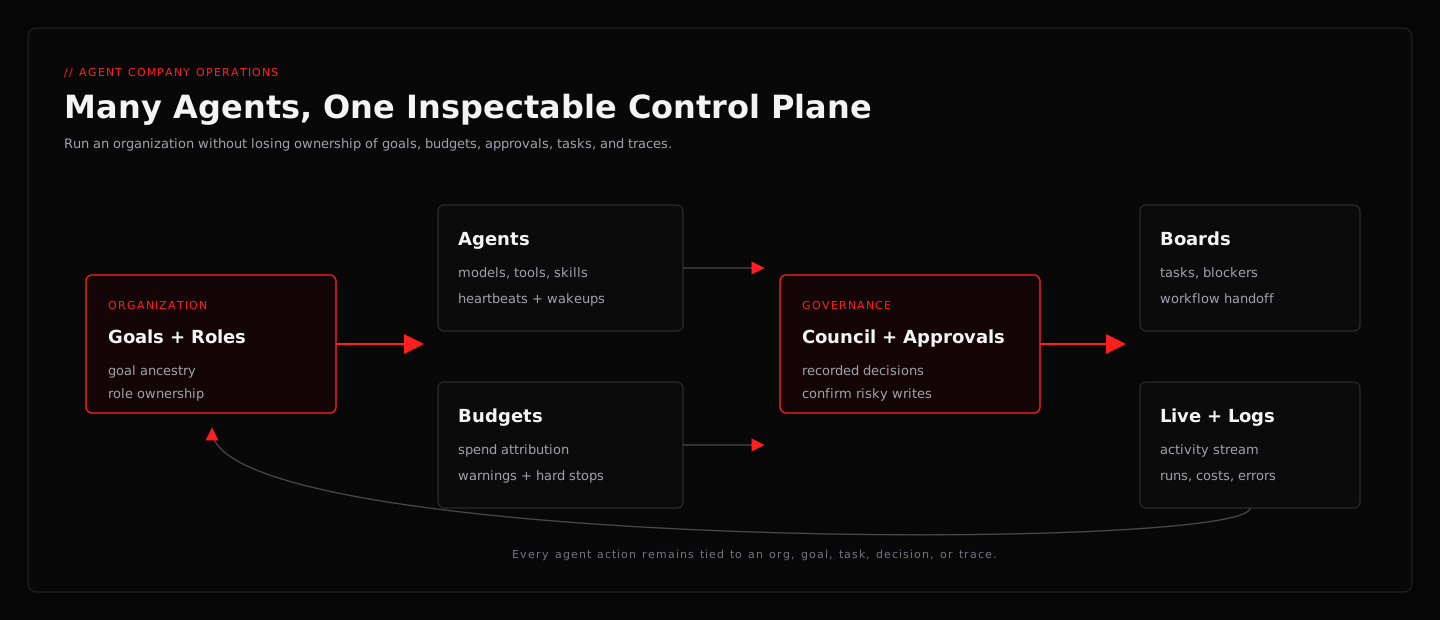
- a multi-agent operating dashboard with boards, goals, budgets, approvals, hierarchy, heartbeats, and audit trails;
- a research and design workspace that can gather evidence, create artifacts, and turn ideas into workflows.
The core idea is simple: install one app, connect one model, and start running personal or team workflows from a browser UI and plain-English chat. You do not have to choose between a chat agent, workflow builder, notebook, design tool, and agent-company dashboard. The primary navigation keeps daily work and Help visible; lower-frequency diagnostics and power tools are available under More tools and the command palette instead of competing with first-use tasks.
What disp8ch Gives You
You can use disp8ch alongside the tools you already like. Its role is to give you one local workspace where chat, memory, workflows, documents, agents, decisions, boards, and generated artifacts can work together.
Already using another local assistant, notebook, automation builder, design workspace, or agent dashboard? Keep using what works. When you want a shared local command center, disp8ch can import compatible skill libraries, workflow JSON, and company/org templates — skills, agents, roles, goals, budgets, and workflow structure move over when the source format is supported. Secrets are never copied silently. Jump to Migration and Imports.
| You want | disp8ch gives you |
|---|---|
| A fast local assistant | WebChat with model routing, tools, memory, files, sessions, and app-control prompts. |
| An agent that learns | Reviewable memory, learning candidates, reusable skills, session recall, and workspace startup files on disk. |
| Automations without hidden prompt chains | A visual workflow canvas with triggers, node contracts, replay, imports, exports, templates, queues, and testable runs. |
| Long-running autonomous work | Dynamic Runs with /loop, phase/worker ledgers, pause/resume/cancel, saved run commands, and Project Manager harness templates. |
| Scheduled and event-driven work | Cron schedules, signed webhooks, direct webhook responses, RSS reads, run-now actions, HMAC examples, and WebChat access to live automation state. |
| Messaging where you already work | WebChat plus Telegram, Discord, WhatsApp, Slack, Google Chat, Microsoft Teams, BlueBubbles/iMessage-style paths, and gateway status screens. |
| Many agents without chaos | Agent roles, tools, skills, budgets, models, channels, wakeups, approvals, and execution history. |
| Parallel work, not 20 lost terminals | Spawn background subagents with the active model by default, or explicitly choose an installed coding CLI; results return to the same session and appear in Activity. |
| A company-style command center | Boards, hierarchy, multiple organizations, goals with full goal ancestry, reporting lines, heartbeats, cost attribution, governance, and portable company packs. |
| Better decisions | Council sessions where multiple agents debate options, vote, and produce a recorded verdict. |
| Research notebooks without another chat surface | Data Sources manages uploads, crawls, notebooks, notes, generated outputs, and citations; WebChat is the single place to ask questions and synthesize. |
| Generated artifacts without leaving the workspace | Design Studio creates persistent UI concepts, dashboards, diagrams, landing pages, decks, and app screens from the same agent runtime. |
| Tools beyond the built-ins | Connect any MCP server, install extension packs, and expose custom tools — extend the agent without forking the app. |
| Research with current sources | Multi-provider web search (Tavily, Brave, DuckDuckGo), browser automation, source-cited briefs, and a repeatable experiment loop. |
| Voice in and out | Text-to-speech and speech-to-text nodes (ElevenLabs, Whisper, and provider-configurable) wired into workflows and channels. |
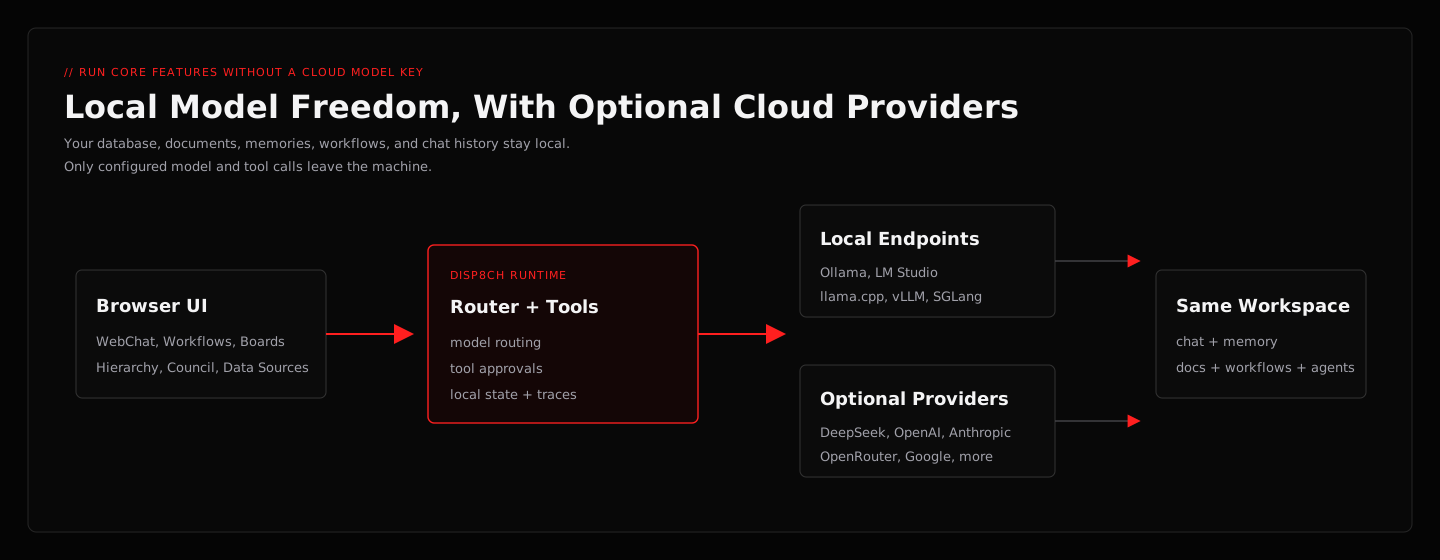
| Local model freedom | Direct API providers, OpenRouter, and OpenAI-compatible local servers such as Ollama, llama.cpp, LM Studio, vLLM, and SGLang — or run core features fully offline with no API key. |
| A smoother path in | Import compatible skills, workflow JSON, and company templates from local agent ecosystems when you want them in the same workspace. See Migration. |
| A public repo without private state | Clean release expectations: no database, API keys, memories, documents, auth state, or chat history committed. |
Screenshots
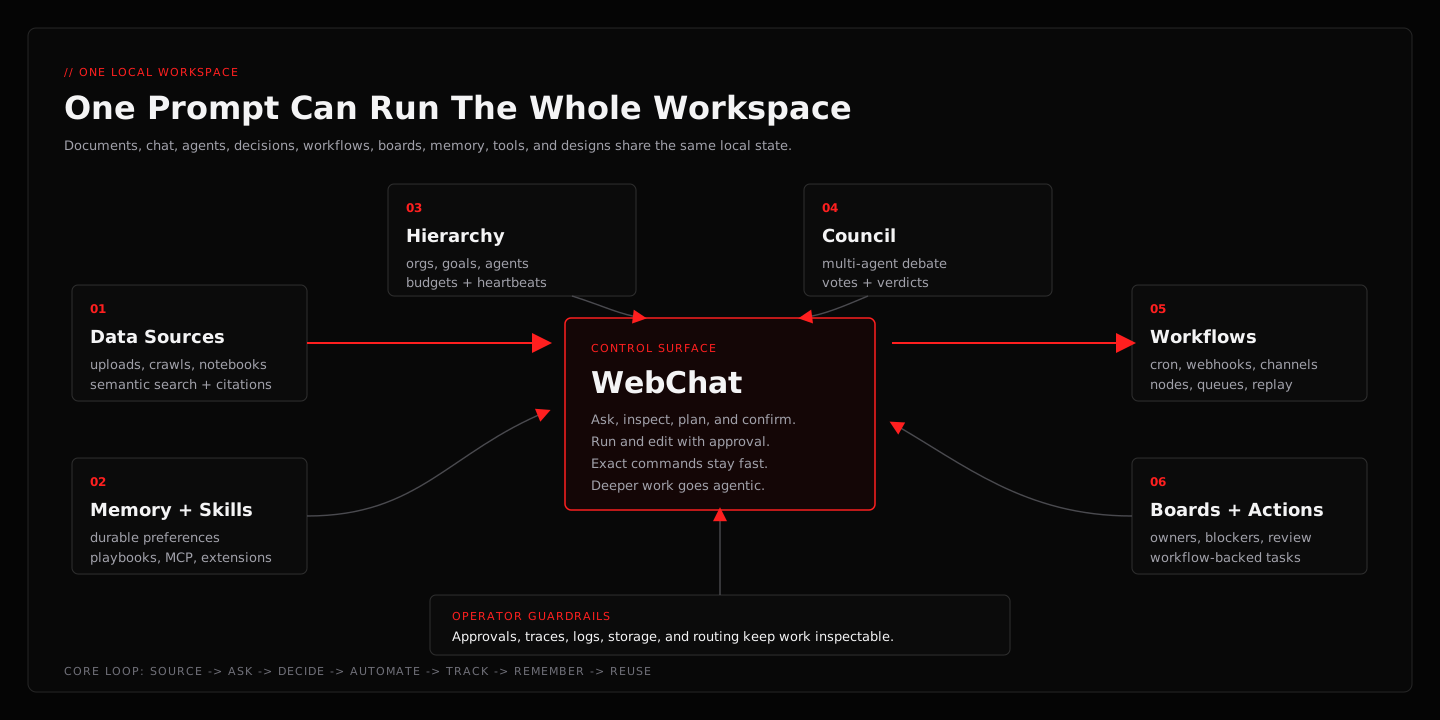
One operating loop — Data Sources, WebChat, Council, Hierarchy, Workflows, Boards, Memory, Skills, Design Studio, Usage, and local model routing share the same workspace instead of acting like separate apps.
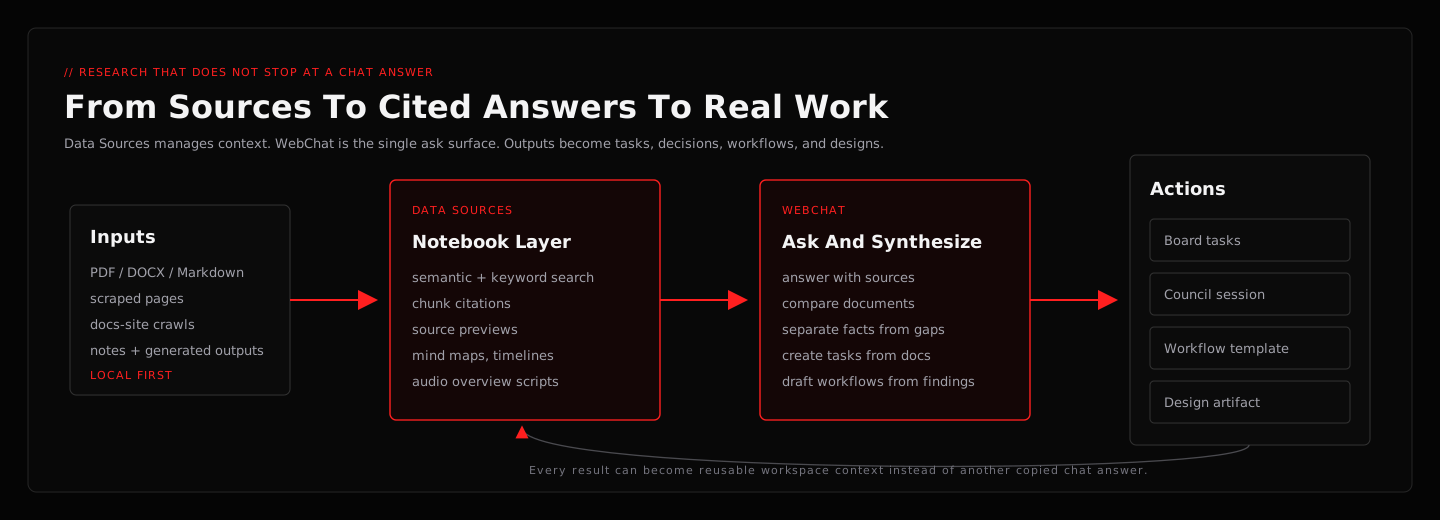
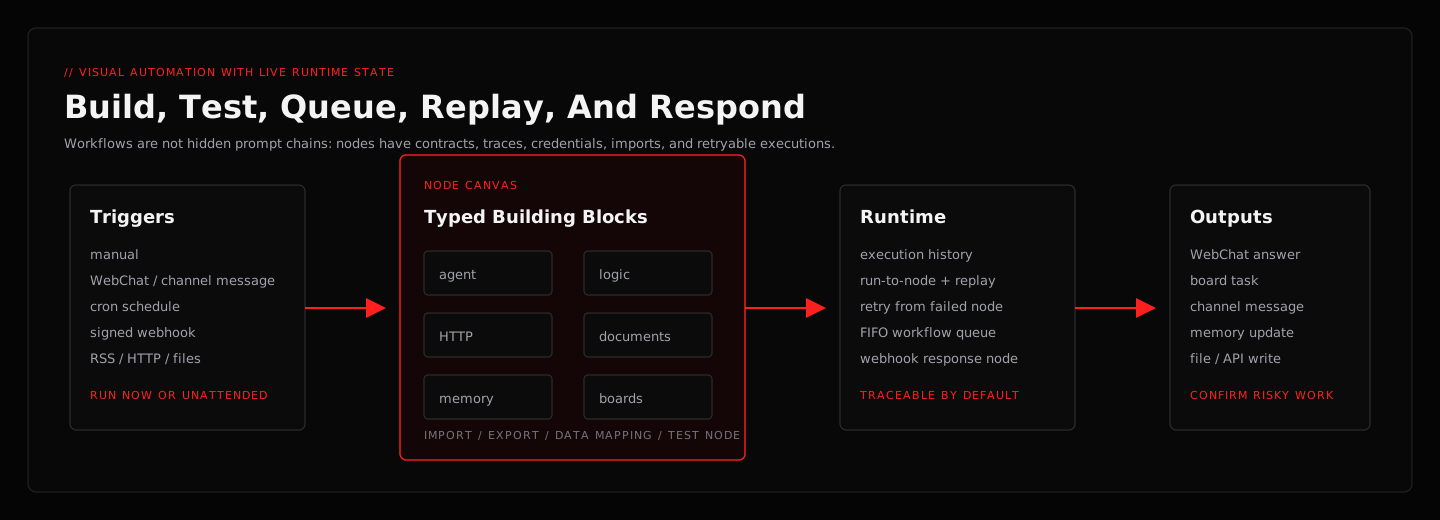
Research becomes work — source material can become cited answers, tasks, council sessions, workflows, and design artifacts. Automation stays visible — triggers, typed nodes, queues, traces, replay, and webhook responses are first-class runtime pieces.
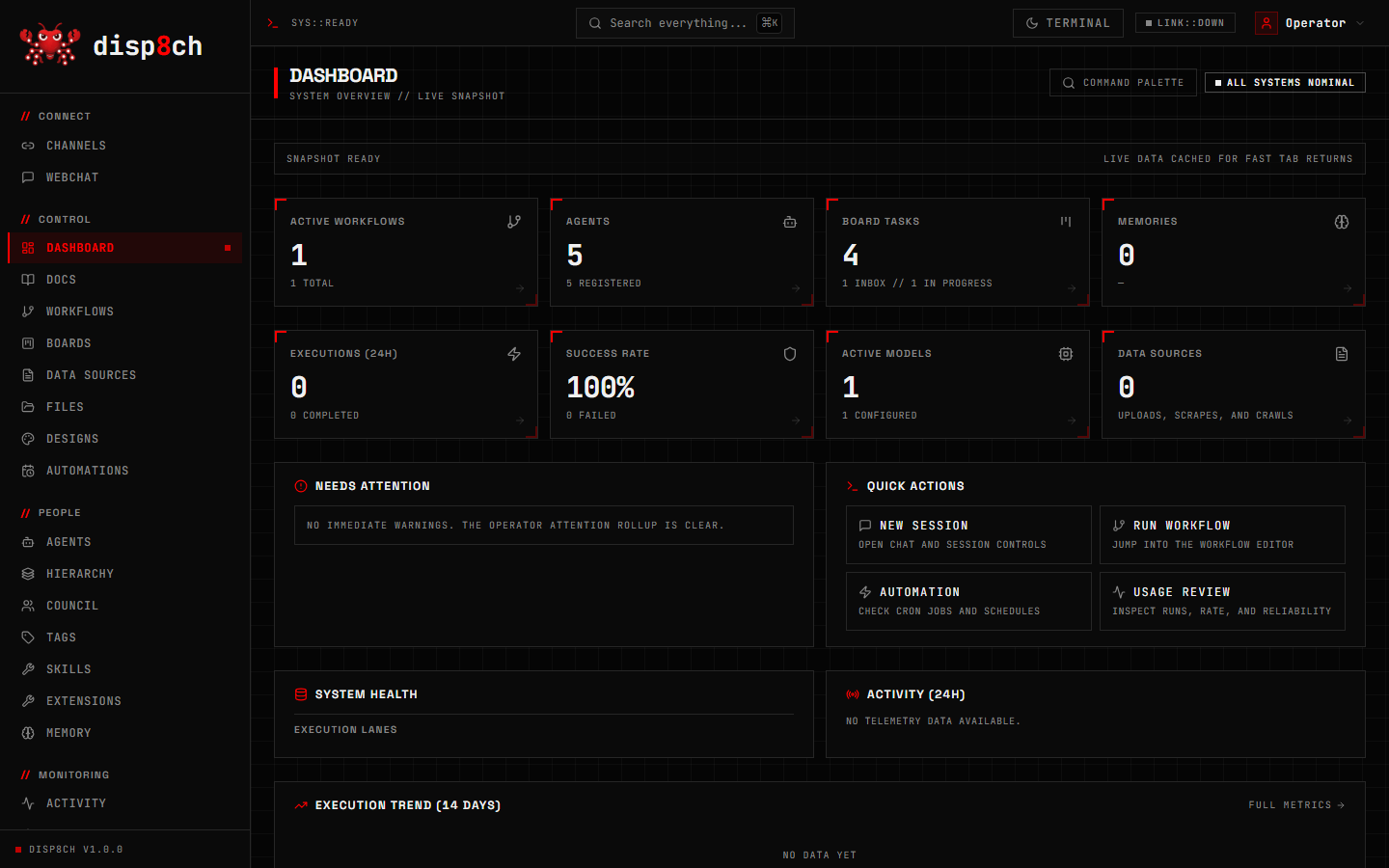
Dashboard — live system health, active workflows, agents, board tasks, execution lanes, and quick actions in one operator view.
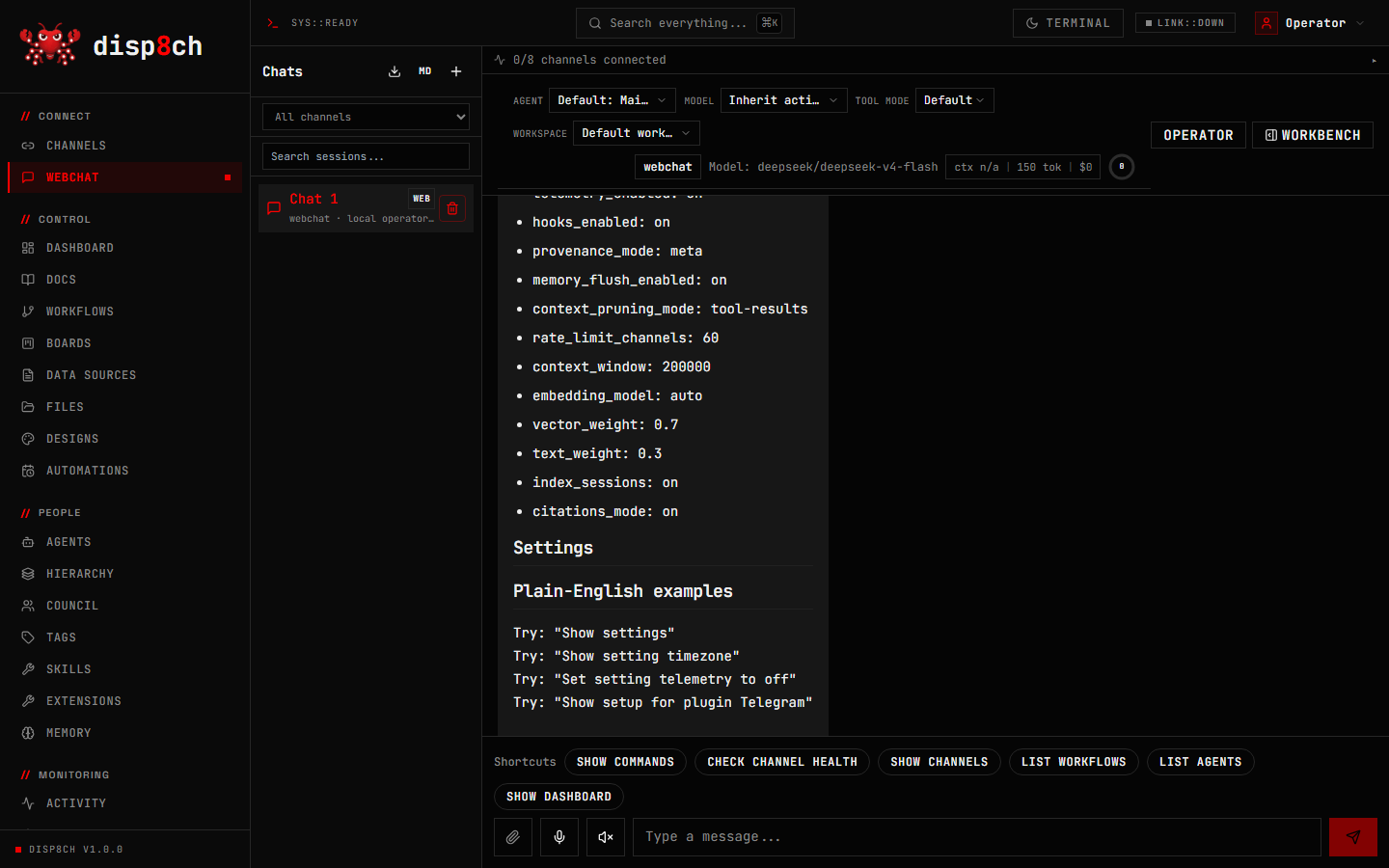
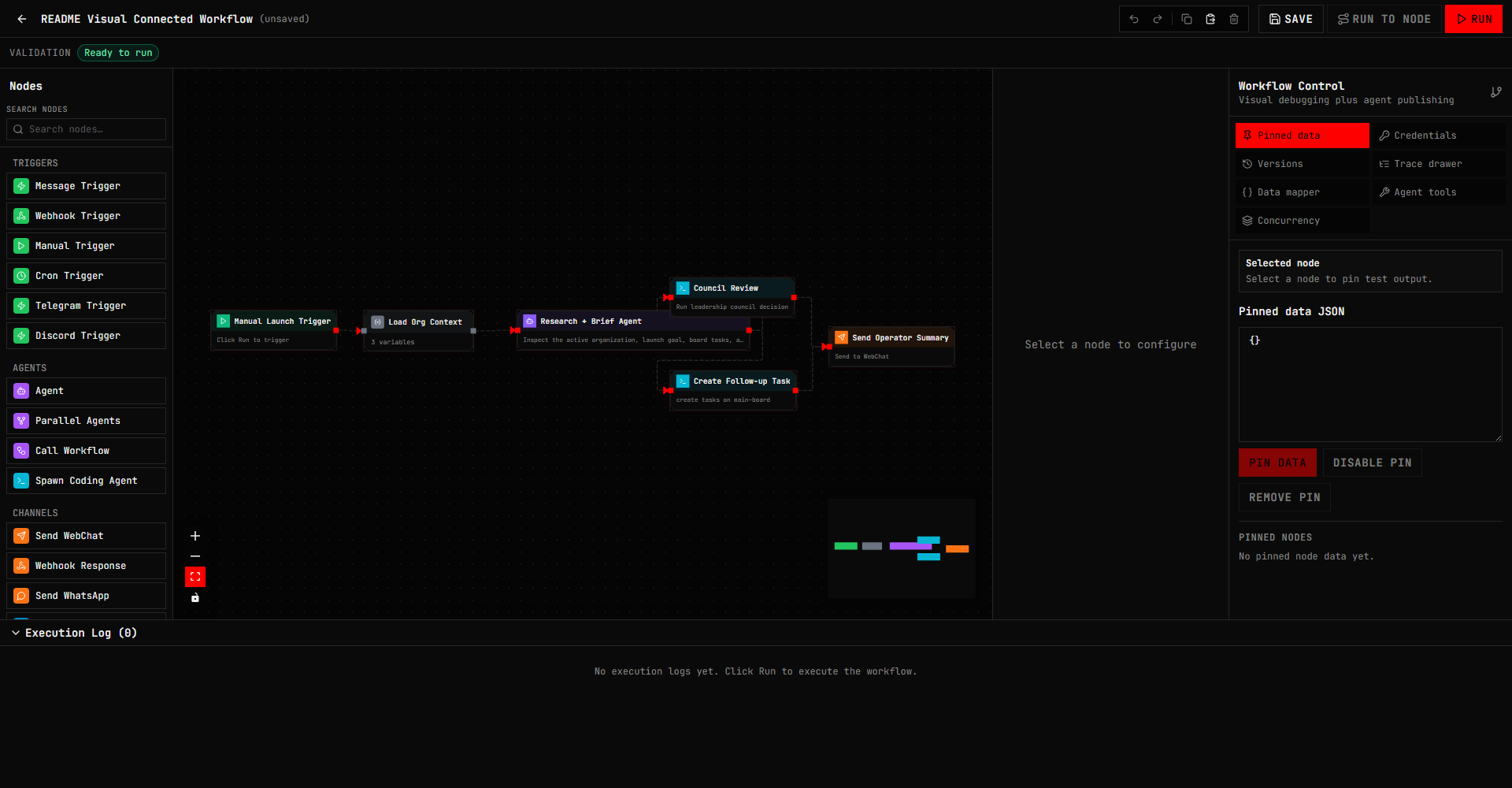
WebChat is the plain-English control surface for asking questions, inspecting app state, creating tasks, and running agentic tool work. Workflows is the visual automation canvas shown with real connected nodes: trigger → org context → agent brief → council/board follow-up → WebChat output.
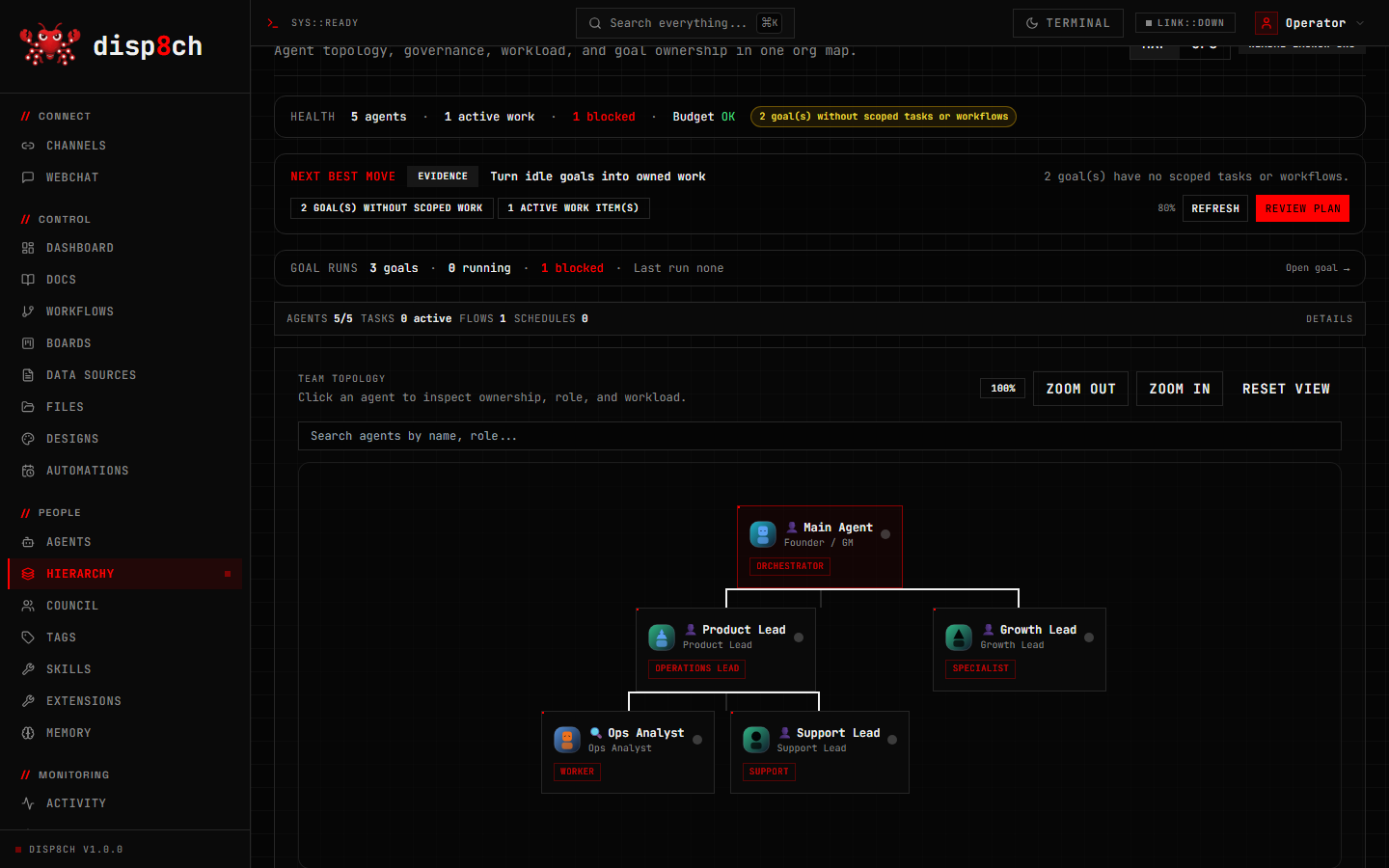
Hierarchy shows the whole agent organization together: roles, goals, reporting lines, heartbeats, governance context, budget status, workload, and agent ownership. Other major surfaces include Boards for task flow, Council for structured debate, Data Sources for searchable context, Skills/Extensions/MCP for tool growth, Automations for cron and webhooks, and Design Studio for generated artifacts.
How The Tabs Work Together
disp8ch is built around one operating loop, not a pile of disconnected tools:
- Data Sources ingests PDFs, documents, scraped pages, crawled docs sites, and connected-source snapshots into searchable context.
- WebChat asks questions over that context, inspects app state, proposes plans, creates tasks, drafts workflows, and hands work to agents.
- Council turns important decisions into structured debate with recorded options, votes, and verdicts.
- Hierarchy assigns goals to organizations, roles, agents, budgets, reporting lines, heartbeats, and governance rules.
- Workflows turns repeatable work into triggerable automations with cron, webhooks, RSS, channels, files, documents, memory, boards, agents, and response nodes.
- Boards tracks the follow-up work created by WebChat, Council, Hierarchy, Data Sources, channels, or workflow outputs.
- Capabilities keeps Memory, Skills & Extensions, and MCP Servers together without mixing their responsibilities. Hierarchy Ops can merge an approved skill/extension preset into an existing team, while MCP access is scoped separately per server.
- Operations keeps Activity, Usage & Costs, and Maintenance visible; approvals, workflow-run detail, logs, and debug tools remain one click away under More tools when needed.
- Design Studio saves generated artifacts into the same workspace, so a design can become a board task, workflow, source, or decision instead of a one-off image.
That means a research brief can become a cited WebChat answer, then a Council decision, then a Hierarchy goal, then workflow-backed board tasks, then a saved design artifact — with one audit trail instead of five separate apps.
Core Features
Agentic WebChat
- Plain-English assistant with app-aware tools.
- Universal agentic runtime for non-trivial research, repo inspection, app capability audits, design tasks, workflow planning, and code edits.
- Deterministic paths only for direct slash commands, tiny arithmetic, explicit no-tool transforms, memory acknowledgements, and protected app reads.
- Post-answer verification, source/file grounding, tool-markup sanitization, and honest missing-evidence handling.
- Depth you control with plain words: design/analysis answers are rich by default; say "quickly" or "keep it short" for an instant compact answer, or "thorough" for maximum depth.
- Chat session management: rename, export, and prune conversations.
- Risk-gated code-edit verification with changed-file accounting, behavioral probe checks, and false-green protection.
- Build and edit workflows in plain English: create from a template, run, activate, and change a node's prompt, model, URL, or config from chat — applied as confirmation-gated, typed actions. The agentic runtime stays read-only; nothing mutates until you confirm.
Visual Workflow Automation
- Drag-and-drop node canvas for message triggers, webhooks, cron, manual triggers, GitHub events, agent calls, HTTP, RSS feeds, files, documents, memory, logic, boards, channels (incl. SMS and GitHub comments), and utility actions.
- Workflow templates for chat assistants, task routing, monitoring, scheduled reports, data processing, document intelligence, docs-site crawling, RSS/news monitoring, local lead enrichment, support/community triage with human-review drafts, evidence-backed strategy hardening loops, research loops, experiment loops, code review, channel intake, ops control towers, crew orchestration, short-video/content pipelines, and integrations.
- A ready-made automation recipe pack: nightly issue triage, pull-request review, docs-drift detection, dependency vulnerability scanning, deploy smoke verification, incident alert correlation, endpoint uptime watch, competitor-repo watching, weekly news digests, and a research-paper scanner — each pre-wired with a trigger, agent, and delivery.
- Notify-only-on-change: an agent (or node) can emit
[SILENT]and the downstream send/notification node suppresses delivery — so scheduled checks stay quiet until something actually needs attention. - Import/export, duplicate, replay, node testing, run-to-node, versions, trace drawer, credentials, data mapping, expression preview, and workflow-as-agent-tool behavior.
- An Executions view across all workflows with status filters, retry, and retry-from-failed-node.
- Per-workflow concurrency control: skip duplicate starts (default) or queue them durably (FIFO) with a max-concurrent limit — queued starts survive restarts.
- Per-workflow budget and escalation policy: cap runs/cost per day with optional auto-disable, and route threshold/failure escalations with notification limits and quiet hours — so unattended automations stay within guardrails.
- Webhook-triggered workflows can answer the HTTP caller directly with a response node (custom status/body/headers), or return a poll URL if the run takes longer.
- Import workflow JSON from other visual automation tools, with unsupported nodes preserved as visible placeholders instead of silently discarded.
Dynamic Runs And Agent Harnesses
- Dynamic Runs turn long-running goals into durable phase/worker plans with events, run status, pause/resume/cancel, worker or phase restart, verification metadata, and saved reusable commands.
- Use
/loop <objective>from WebChat to start a dynamic workflow run,/loop statusto inspect it, and/loop pause|resume|cancelto control the active run. - The Workflows tab includes Dynamic Runs beside My Workflows and Templates, so autonomous work is visible without opening a separate app.
- Project Manager Agent Harness creates a five-phase manager workflow for repo work: triage, research, implementation/recommendation, review, and verification/report with command checks and screenshots.
- Repo Audit Harness provides a smaller read-only audit pattern when you need a quick codebase health report.
Automations: Cron And Webhooks
- Cron workflows with schedule summaries, run-now, resync, enable/disable, and WebChat-readable state.
- Guided setup turns plain choices such as daily, weekly, interval, or one-time into validated schedules, with optional delivery destinations, retry behavior, and overlap control.
- Signed webhook execution with HMAC verification, timestamp/nonce replay protection, body caps, rate limiting, workflow execution, and secret rotation.
- WebChat can answer questions such as "list my automations", "show webhook signing help", and "design a daily digest job" using actual app state.
Memory, Skills, And Self-Improvement
- Durable local memory, fast same-session and cross-session recall, memory health, retrieval explain, FTS fallback, vector index support, and cleanup review.
- Atomic batch add, replace, and remove operations use a journaled SQLite/file transaction so a failed update does not leave memory half-changed.
- A deepening picture of you over time: durable user/profile memory plus session history search, so the assistant remembers preferences and past work across conversations without re-injecting everything into every turn.
- Simple "remember this: key = value" saves and "what is …?" recalls answer in well under a second — deterministic, no model round-trip and no per-turn context tax.
- Skills from bundled packs, optional packs, workspace folders, agent-local folders, extension packs, local folders, and git sources — compatible with common open skill layouts.
- Aggregated skill search across all sources with provenance and trust signals, security scanning of imported skills (disabled until reviewed), and a verification harness that runs a skill against a fixture and checks it produces the required output sections.
- Source-aware skill previews let you inspect the exact matching skill before installation, even when multiple hubs use the same name.
- Reviewable self-learning loop: after work, the agent proposes memory, skill, support-file, and test improvements for your approval instead of silently rewriting your profile.
- Learning modes: Off, Review, and Auto (with an auto-promote threshold so recurring lessons compound only after repeated signal).
- Startup profile files live under
data/workspace/by default and stay readable/editable markdown.
Multi-Agent Operations
- Agents with model overrides, tool controls, budgets, skills, channel routing, cron/wakeup hooks, and workspace files.
- Parallel sub-agents: spawn isolated sessions and coding agents (with optional git-worktree isolation), coordinate them through a shared agent inbox, and gate work with blocker dependencies — so a crew works in parallel instead of one serial chat.
- Background sub-agents return a handle immediately; current and recent jobs remain visible in Activity, and completed results re-enter their originating chat.
- Boards for task intake, blocked work, saved views, labels, comments, workflow-backed actions, and execution handoff.
- Hierarchy for multiple organizations, roles, reporting lines, goals with full goal ancestry, source packs, workload, heartbeat history, budgets, and governance context — one deployment can run several organizations.
- Governance you control: confirmation gates, approval chains, budget warnings and hard-stops, config revisions with rollback, and an immutable activity/audit trail with cost attribution.
- Workflow side-effect approval: every node's effect is classified by its actual configuration (an HTTP GET reads, a POST writes externally, a DELETE is destructive; SQL is classified by verb) and checked immediately before it runs. Tools called inside an AI Agent inherit the same workflow policy. Reads run automatically; external and irreversible actions appear in Approvals with a redacted exact-action preview and Deny or Allow Once. Approval is bound to the exact workflow version, node, target, and payload, so a changed action cannot reuse an old approval, and a small hardline floor blocks catastrophic host operations that no approval can authorize. Unattended cron/webhook runs fail closed for high-risk effects.
- Workflow memory scope: new AI Agent nodes visibly offer no durable memory, private memory for this workflow, or memory shared by this agent. Workflow-private entries are keyed by both workflow and agent, run data stays isolated per execution, filtering happens before ranking, and a broader scope is never inferred from the model's request.
- Cross-surface memory candidates: chat, a workflow result, a Board task, a Council verdict, or a notebook finding can propose durable memory through one evidence-linked, reviewable path. Nothing is saved until you approve it in the Memory Explorer; promotion reuses the same scoped write path so workflow-private memory stays private. Exact duplicates reinforce the existing entry, and a conflicting preference or fact is flagged for you to decide — it is never silently overwritten.
- Cross-tab work trails: a single confirmed plan can create and link objects across Hierarchy, Council, Workflows, Scheduler, Boards, and Goals, recorded as one inspectable trail (Prompt → Org → Council → Workflow → Task).
- Council for structured multi-agent debate, options, weighted votes, document context, and final verdict summaries.
- A usage overview (7/30/90 days): model calls, tokens, cost, workflow runs, error rate, and top models/workflows at a glance.
- Standing goals with
/goal,/subgoal, pause/resume/status/clear, daemon processing, and board task decomposition.
Research, Notebooks, And Data Sources
- Multi-provider web search (Tavily, Brave, DuckDuckGo) with automatic fallback, plus browser automation (
browser_navigate,web_crawl,web_extract) for pages that need rendering. - Upload PDF, DOCX, PPTX, TXT, Markdown, and HTML files.
- Import a local Markdown folder (e.g. an Obsidian vault) as searchable data sources — frontmatter and links preserved, re-imports update in place instead of duplicating.
- Scrape/crawl websites and create searchable, citable data sources with semantic (meaning-based) search, not just keywords.
- Group sources into notebooks with per-source context modes, notes, and generated outputs — interactive mind maps (visual graph view with export), timelines, and audio-overview scripts — with chunk-level citations that link back to the exact passage.
- Ask WebChat to search, inspect, summarize, cite, compare, and turn documents into tasks, goals, Council sessions, designs, or workflows. The Data Sources tab manages context; WebChat is the unified question-answering and synthesis surface.
- Source-category planning, exact-version caveats, and explicit uncertainty handling for current web research — answers are grounded in real URLs and files, not guesses.
- A repeatable experiment loop (init → run → log) and research-pipeline templates for structured, evidence-driven investigations.
- Hierarchy → Research Team creates an editable Scout → Analyst → Briefer team, workflows, schedules, and a local markdown knowledge vault in one guided setup, with Basic, Standard, and Advanced tiers.
Design Studio
- Generate and save design artifacts from WebChat.
- Import standalone HTML, HTML snippets, source-code reference files, image URLs, or uploaded images directly from the Designs tab.
- Attach an image in WebChat and request a controlled edit such as changing a color or removing a background; supported image providers receive the original asset rather than only its filename.
- Use design templates and artifact history for UI concepts, landing pages, dashboards, diagrams, posters, decks, and app screens.
- Preview, revise, validate, version, and export persistent artifacts instead of losing work in a chat transcript.
- Keep design work connected to the same agentic runtime, memory, Data Sources, Boards, Council, Hierarchy, and Workflows.
Connect Anything: MCP, Extensions, And Tools
- Open MCP Servers under Capabilities to connect Model Context Protocol tools and resources. The catalog, per-tool enablement, approval policy, connection diagnostics, and named agent access picker live on this dedicated page. Skills and Extensions remain separate because they are reusable capability packs, while MCP configures external processes, credentials, trust, and runtime access.
- Install extension packs for channels, providers, memory backends, and integrations, and enable them per agent. In Hierarchy → Ops, an approved preset can be merged into every current organization member without removing existing capabilities.
- Define custom tools and expose any workflow as an agent tool — extend the agent without forking the app.
Voice
- Text-to-speech and speech-to-text via configurable providers (ElevenLabs, Whisper, and OpenAI-compatible endpoints).
- Wire voice nodes into workflows and channels for spoken input and output.
Desktop And Work Supervision
- Activity includes a live Work Monitor for agents, workflows, and background sub-agents, with desktop watch windows for individual sessions.
- The Attention Center surfaces approvals, failed work, and actionable alerts without requiring users to inspect every operations page.
Ctrl/Cmd+Kopens the shared command palette; keyboard shortcuts can be rebound under Settings.- The optional Developer Workspace provides file and layout panes. Its embedded terminal remains gated until the native PTY dependency is packaged for the target platform.
Channels And Gateway
- Reach the assistant on the channels you already use: WebChat is built in, with setup/status paths for Telegram, Discord, WhatsApp, Slack, Google Chat, BlueBubbles/iMessage-style usage, Microsoft Teams, and SMS delivery.
- Smooth token streaming on Telegram: long replies appear quickly and update in place as they generate (rate-limit-safe), instead of arriving as one delayed block.
- Multi-agent routing: route inbound channels, accounts, or peers to isolated agents with their own workspaces and sessions, so different surfaces map to different agents.
- Channel work can be routed into workflows, boards, agents, memory, and scheduled automations.
- Inbound DMs are treated as untrusted: DM pairing/allowlists, command approvals, and optional per-session sandboxing keep channel access safe.
- Run disp8ch on your own machine or a server and talk to it from those channels while it works — it is not tied to one laptop session.
Connect Telegram
- In Telegram, open BotFather, run
/newbot, and keep the returned token private. - In disp8ch, open Channels → Telegram, paste the token, and click Connect. The token is stored through the app's secret store, not in agent prompts.
- Send the bot a message, then check the Telegram status card or Channel Doctor if it does not arrive.
- Approve the pairing request or add the chat to the allowlist before granting access to tools or private workspace data.
For headless installs, set TELEGRAM_BOT_TOKEN in .env.local and restart the app. Never commit that file. Discord and Slack follow the same token-and-status flow; WhatsApp uses its QR or configured business adapter. Google Chat requires GOOGLE_CHAT_AUDIENCE, while Microsoft Teams requires its app ID and credential. Google Chat and Teams inbound requests are signature-verified and fail closed when their authentication configuration is incomplete.
Model Freedom
Use one provider or many:
- Direct cloud APIs: OpenAI, Anthropic, Google, DeepSeek, Groq, Together, Mistral, xAI, Qwen/DashScope, Moonshot/Kimi, Zhipu, and other configured providers.
- OpenRouter for many hosted models behind one key.
- OpenAI-compatible local runtimes: Ollama, llama.cpp server, LM Studio, vLLM, SGLang, and similar endpoints.
- Per-agent model overrides and settings UI.
What You Can Use It For
- Personal chief-of-staff: track goals, remember preferences, schedule recurring checks, summarize documents, and keep a live task board.
- Research analyst: compare products, collect current sources, separate confirmed facts from uncertainty, and produce cited briefs.
- Local coding operator: inspect repos, propose patches, edit files when asked, run verification, and explain changed files.
- Workflow builder: build webhook-to-LLM-to-channel flows, scheduled reports, triage workflows, and data-processing automations.
- Local AI automation stack: combine local models, local documents, workflow templates, webhooks, RSS, file operations, and vector search without a managed cloud account.
- Notebook-to-action workspace: upload source material, ask cited questions in WebChat, create board tasks, brief a Council, and turn the resulting decision into a workflow.
- Agent team operator: assign goals to agents, watch heartbeats, use budgets and approvals, coordinate parallel workers, and keep every task linked back to the organization goal.
- Content studio: turn research into outlines, drafts, social calendars, image/design briefs, and review queues.
- Support desk: route channel messages into boards, summarize tickets, trigger workflows, and escalate risky actions for approval.
- Autonomous company dashboard: create an organization, define goals, assign agents, monitor heartbeats, track costs, and review decisions.
- Decision council: ask several agents to debate a product, security, architecture, hiring, or budget question before you decide.
- Design lab: generate UI concepts, landing page drafts, product mockups, dashboards, diagrams, decks, and visual artifacts from chat.
- Local model lab: test cloud, OpenRouter, and local OpenAI-compatible model endpoints from the same app.
Quick Start
One-line install
The one-line installers are the easiest path for non-technical users. They download a managed Node.js 22 runtime if needed, use Corepack or npx pnpm, fetch the app source, install dependencies, create a clean local workspace, start disp8ch, and open onboarding.
Linux, macOS, or WSL
curl -fsSL https://raw.githubusercontent.com/aaronnat23/disp8ch/main/scripts/install.sh | bash -s -- --repo https://github.com/aaronnat23/disp8ch.git
Add --no-start to install without starting the server.
Windows PowerShell
$env:DISP8CH_SOURCE_ZIP_URL = "https://github.com/aaronnat23/disp8ch/archive/refs/heads/main.zip"; iex (irm "https://raw.githubusercontent.com/aaronnat23/disp8ch/main/scripts/install-windows.ps1")
Pass -NoStart to the script to install without starting.
After install, onboarding opens at:
http://localhost:3100/onboarding
From a cloned checkout
If you already cloned the repo:
node install.js
Windows PowerShell from a cloned checkout:
powershell -ExecutionPolicy Bypass -File .\install.ps1
Manual developer path
Use this if you already have Node.js 22.13+ and want full control:
corepack enable
corepack pnpm install
corepack pnpm dpc init --ensure-env
corepack pnpm dev
Later runs from the installed app directory:
pnpm dev
Windows native install and local desktop packaging work, but public desktop installers are currently unsigned. macOS builds may show security warnings until Developer ID signing and notarization are added. Linux source install is the cleanest path today; native packages need release validation.
First Model Setup
The easiest path is /onboarding. disp8ch supports four setup paths:
| Path | Use when | Credential model |
|---|---|---|
| Online API key | You want a hosted provider such as DeepSeek, OpenAI, Anthropic, Google, or OpenRouter. | Store a key as an environment variable or secret reference. |
| Local AI | You want private local inference through Ollama, LM Studio, llama.cpp, vLLM, SGLang, or another OpenAI-compatible server. | No provider key required. |
| Claude account OAuth | You already use Claude Code and want Anthropic models without managing a separate Anthropic API key. | Local Claude Code credentials or an OAuth token reference. |
| Codex account sign-in | You want optional coding-agent delegation through the installed Codex CLI. | Local Codex CLI session. Not the default WebChat model provider. |
For API key or local setup:
- Choose Online and add an API key, or choose Local.
- For Local, select Check this PC to inspect installed models, available RAM and VRAM, and detected runtimes.
- Run the recommended Ollama or
llama-servercommand, then select Use this setup. - Run validation, then open WebChat and send a message.
For Claude account OAuth:
- Install and sign in to Claude Code on the same Windows user that runs disp8ch.
- Keep the Claude Code credential file private. Do not copy
.claude, OAuth token files, or auth JSON into the repo. - In disp8ch, select or add an Anthropic model in Settings -> Models.
- If the model form asks for a credential, use an environment or secret reference such as
env:ANTHROPIC_TOKEN,env:ANTHROPIC_OAUTH_TOKEN,env:CLAUDE_CODE_OAUTH_TOKEN, orsecret:CLAUDE_CODE_OAUTH_TOKEN. - Run the model test before using the model in WebChat or workflows.
For Codex account sign-in:
- Install the Codex CLI and sign in locally with your Codex account.
- Keep Codex auth files outside the repo and outside
.env.local. - Leave normal WebChat on your selected provider or local model. Codex sign-in is only used when you explicitly choose the Codex coding-agent backend for delegated coding work.
- Test with a harmless read-only delegation before granting write access.
You can also configure .env.local:
cp .env.example .env.local
Direct provider examples:
OPENAI_API_KEY=...
ANTHROPIC_API_KEY=...
ANTHROPIC_TOKEN=...
ANTHROPIC_OAUTH_TOKEN=...
CLAUDE_CODE_OAUTH_TOKEN=...
GOOGLE_API_KEY=...
DEEPSEEK_API_KEY=...
OpenRouter:
OPENROUTER_API_KEY=...
Local model endpoints:
OLLAMA_BASE_URL=http://127.0.0.1:11434
VLLM_BASE_URL=http://127.0.0.1:8000/v1
SGLANG_BASE_URL=http://127.0.0.1:30000/v1
Do not commit .env.local, .claude, .codex, auth JSON, OAuth token files, or any local credential store.
Run Fully Local (No API Key)
You do not need a cloud account or API key for core use. Run a local model server and point disp8ch at it — chat, local tools, memory, workflows, agents, boards, council, local document research, and local artifact work can run without a model-provider key. Live web search, external channels, cloud image generation, and third-party APIs still need network access and the credentials you choose to configure.
Pick A Model That Fits This PC
During onboarding, choose Local then select Check this PC. You can also open Settings -> Models later and
select Check this PC under Find a local model for this PC. The advisor reads the machine's RAM, CPU, GPU, and
VRAM and ranks local models by fit and expected speed. It parses installed GGUF metadata, detects exact Ollama tags,
uses llama-fit-params when available, and distinguishes full GPU, hybrid offload, CPU-heavy, and memory-risky plans.
The simple path for new users
- Install and open disp8ch, then choose Local AI during onboarding.
- Select Check this PC. The check is read-only and does not download a model or send your hardware details anywhere.
- Review the three recommendations:
| Choice | Best for | What to expect |
|---|---|---|
| Balanced | Most users | The best starting point for useful answers without making the computer unnecessarily slow. |
| Speed | Older PCs, laptops, and quick chat | A smaller model that is more likely to fit fully in GPU memory and respond quickly. |
| Quality | Research, coding, and harder tasks | The strongest practical model found for the machine. It may use both GPU memory and system RAM, so it can be slower. |
The results show the detected CPU, RAM, GPU, free VRAM, installed local runtimes, and models already on the PC so the
recommendation is explainable. Start with Balanced when unsure. Select Use this setup, run the connection test,
and then open WebChat. If the model is not installed or running, disp8ch shows the exact Ollama or llama-server
command to run first.
What disp8ch does not do: it does not silently download models, start unknown executables, replace the active
model, or upload local model paths and hardware inventory. Recommendations remain suggestions until you explicitly
run the displayed command and save the setup.
The advisor is runtime-neutral:
- An existing GGUF file is paired with the detected
llama-serverand its exact file path. - An installed Ollama model stays on Ollama.
- A download suggestion prefers an exact validated Ollama tag when one exists because it is the simplest install path.
- Nothing is downloaded, started, or activated automatically.
Choose Test and review after configuring a model. A successful connection test creates a non-blocking advisory.
Private or cloud model IDs remain valid even when they are absent from the public catalog; disp8ch does not claim that
a local model is more accurate without comparable evidence.
For installed models, Benchmark on this PC is optional and confirmation-gated. It runs a bounded streamed prompt,
records first-token and generation timing for the exact model/runtime/hardware/context combination, then uses that
measurement ahead of static estimates. Temporary llama.cpp servers bind only to 127.0.0.1; Ollama models loaded by
the benchmark are unloaded afterward. Calibration never changes the active model.
The production model list is bundled with each disp8ch release. It contains manually verified model names, exact runtime
tags, expected size, architecture, context, and capability metadata. It never sends your hardware inventory, model
paths, or provider credentials anywhere. New model families are added in normal app updates after verification.
Option A — Ollama (easiest)
- Install Ollama and start it.
- In onboarding, select Check this PC and use the exact
ollama run ...command shown for the recommended model.
Ollama downloads that model only after you run the command yourself:
ollama serve
ollama run <recommended-model-tag>
- Open onboarding at
http://localhost:3100/onboarding, choose Local, select Check this PC, run the shown command, then select Use this setup, test, and save. No key required.
Memory search works without choosing a separate provider. New installs default to disp8ch's built-in local embedding model (Xenova/all-MiniLM-L6-v2) and fall back to keyword search if the model cache is unavailable. If you prefer Ollama embeddings instead, run ollama pull nomic-embed-text, set Settings -> Memory -> Embedding model to nomic-embed-text, then click Rebuild Index.
Or via .env.local:
OLLAMA_BASE_URL=http://127.0.0.1:11434
Option B — LM Studio, llama.cpp, vLLM, or SGLang (OpenAI-compatible)
- Start your local server and load a model.
- In onboarding choose the LM Studio / OpenAI-compatible preset and set the base URL. Leave the API key blank when the local server does not require one:
| Runtime | Base URL |
|---|---|
| LM Studio (Local Server) | http://127.0.0.1:1234/v1 |
llama.cpp (--server) |
http://127.0.0.1:8080/v1 |
| vLLM | http://127.0.0.1:8000/v1 |
| SGLang | http://127.0.0.1:30000/v1 |
- Run the test and save.
Or via .env.local:
VLLM_BASE_URL=http://127.0.0.1:8000/v1
SGLANG_BASE_URL=http://127.0.0.1:30000/v1
Tip: do not choose from parameter count alone. Context size, quantization, architecture, current free RAM/VRAM,
and runtime support all affect whether a model is practical. Real AI image generation, live web search providers,
external channels, and third-party APIs still need their own credentials, but the core local workspace runs without a
model-provider key.
Main Tabs To Try
- WebChat: ask questions, control the app, inspect state, run agentic work.
- Workflows: build visual automations and import/export workflow JSON.
- Automations: manage cron jobs and signed webhooks.
- Boards: track tasks, blockers, labels, comments, and agent handoff.
- Hierarchy: build organizations, goals, roles, reporting lines, heartbeats, and workload views.
- Council: stage structured debates and record final verdicts.
- Designs: create and save design artifacts from plain English.
- Data Sources (
/documents): upload files, scrape/crawl, manage notebooks, preview citations, search extracted content, and hand source context to WebChat, Boards, Workflows, Hierarchy, or Council. - Agents: configure roles, models, tools, budgets, channels, wakeups, and skills.
- Skills & Extensions: enable capability packs per agent, browse skills, and open extension-source management. Hierarchy Ops provides additive team-preset application for an existing organization.
- MCP Servers: connect external MCP servers, test connections, control tools and approvals, and choose which named agents may use each server.
- Memory: inspect durable memory, session recall, retrieval, cleanup, and health.
- Channels: configure channel tokens and status.
- Activity, Usage & Costs, and Maintenance: supervise live/background work, audit usage, and act on health findings; approvals, workflow-run detail, logs, and debug remain available under More tools.
- Settings: models, providers, memory, secrets, security, backups, and runtime config.
WebChat Examples
What can this app currently do? Separate implemented, configured, and callable.
List my automations and show which webhooks are enabled.
Create a webhook workflow that validates a GitHub-style JSON payload and summarizes it.
Compare three local model runtimes for an 8 GB VRAM laptop. Use current sources.
Audit this repo's API-key handling and cite exact files.
Create a board task for each blocker in this launch document.
Start a council session on whether we should prioritize reliability or new features.
Build a daily 9 AM research digest workflow, but ask before saving if anything is ambiguous.
Spin up a research team, put them in an org, and give them a board task to compare OCR models.
Generate a landing page concept for a local-first AI workspace and save it as a design.
Remember that I prefer concise technical answers. Reply only saved.
What is my preferred answer style?
Migration And Imports
Have useful work in another local AI app? Bring the parts you want into disp8ch when a compatibility importer exists. disp8ch imports skill packs, compatible workflow JSON, and company/org templates from popular local agent ecosystems and converts them into safe, native disp8ch assets — it never copies your secrets, databases, chat history, or auth state.
Bring Work From Another App
| Coming from | Command | What moves over |
|---|---|---|
A SKILL.md skill library |
pnpm dpc skills install <folder-or-git-url> or the matching compatibility importer listed by pnpm dpc |
Skills become safe, normalized disp8ch skill packs (provenance kept; risky command/credential examples stripped). |
| A personal channel-assistant workspace | pnpm dpc skills install <repo-path> plus the matching compatibility importer if available |
Skills imported as above, plus matching extension packs (channels, providers, memory backends) are detected and recommended. |
| An agent-company / org dashboard export | pnpm dpc orgs import <company-pack.json> or the matching compatibility importer listed by pnpm dpc |
A company export/template becomes a local organization with agents, roles, goals, budgets, and governance context when the source format is supported. |
| Another disp8ch instance | pnpm dpc orgs import ./company-pack.json |
A native org pack (export yours with pnpm dpc orgs export <organization-id> ./company-pack.json). |
| Another visual workflow automation tool | Workflows tab → Import, or the workflows API | Workflow JSON; unsupported nodes are preserved as visible placeholders with repair hints instead of being dropped. |
Generic and additional paths:
pnpm dpc skills install /path/to/skill-pack          # local skill pack folder
pnpm dpc skills install https://github.com/user/skills-repo.git   # git source
pnpm dpc skills list
pnpm dpc orgs list
pnpm dpc                                             # full command list for your installed version
Desktop builds can also import an existing disp8ch database (the importer backs up your current DB first).
Import rules:
- Secrets are never imported silently — add them later through Settings → Secrets.
- Runtime databases, chat history, uploaded private docs, and auth sessions are not imported and are not in public releases.
- Imported skills are scanned for high-signal security issues, stored as local skill packs, and disabled until you review them.
- Imported company packs create local organizations, goals, and agent roles you can review before activating.
- Review imported skills and company templates before enabling them for agents.
Security And Control
disp8ch is local-first, but local-first does not mean careless. The app includes:
- admin-gated APIs;
- confirmation gates for risky app actions;
- webhook HMAC, replay, body-cap, and rate-limit controls;
- command approvals and sensitive-path blocking;
- optional shell sandboxing;
- credentials and secret storage paths;
- activity logs, approval records, run traces, and cost attribution;
- backups, checkpoints, rollback-oriented workflows, and desktop data import backups.
You still control your deployment. Be careful with exposed ports, channel bot tokens, API keys, and any workflow that can write files, send messages, call paid APIs, or execute shell commands.
Clean Public Release Expectations
This public repo should not include private runtime state.
Expected blank state:
- no
data/*.db - no
.env.local - no private memories
- no uploaded documents
- no chat history
- no auth sessions
- no private channel tokens
- no imported external packs
Reset to first-run state:
rm -rf data
pnpm dpc init --ensure-env
pnpm dev
Windows PowerShell:
Remove-Item -Recurse -Force .\data
pnpm dpc init --ensure-env
pnpm dev
Useful CLI Commands
pnpm dpc status
pnpm dpc health
pnpm dpc doctor
pnpm dpc models list
pnpm dpc workflows list
pnpm dpc boards list
pnpm dpc orgs list
pnpm dpc skills list
pnpm dpc backup status
pnpm dpc learning status
pnpm dpc goals list
Developer checks:
pnpm install:test
pnpm exec tsc --noEmit
pnpm build
Desktop checks:
pnpm desktop:build
pnpm desktop:smoke
pnpm desktop:installer-smoke
Repository Layout
src/: Next.js app, API routes, UI, channel router, agents, workflows, memory, governance, and design surfaces.server/: websocket server.desktop/: desktop shell and packaging logic.extensions/: bundled extension packs.skills/: bundled skill packs.optional-skills/: optional local skill packs.scripts/: setup, CLI, export, verification, and packaging entrypoints.docs/: public README assets included in the clean release.data/: local runtime state created on first run.
FAQ
Do I need an API key or a cloud account?
No for core local use. disp8ch can run with Ollama, LM Studio, llama.cpp, vLLM, or SGLang — see Run Fully Local. Cloud providers and OpenRouter are optional. Claude account OAuth is supported for Anthropic model access when you already use Claude Code. Codex sign-in is supported for optional coding-agent delegation, not as the default WebChat provider. Live web search, channels, cloud image generation, and third-party APIs need the credentials you choose to configure.
How is this different from a single-agent terminal assistant or a chatbot?
Those are one capability. disp8ch is the whole workspace around them: visual workflows, scheduled automations, multi-agent operations, an org/company control plane, a decision council, memory and skills, research, and design — all driven from plain-English WebChat and a browser UI.
Do I still need a separate document chat tab?
No. Data Sources manages uploads, crawls, notebooks, notes, outputs, and citations. WebChat is the single ask/synthesis surface, so document questions can become tasks, workflows, council sessions, designs, or organization goals without copying context between tabs.
Can I run more than one organization/company?
Yes. One deployment can host multiple organizations with their own agents, goals, budgets, and governance.
Can I bring work from the app I already use?
Yes — import compatible skills, workflow JSON, and company/org templates when you want them in the same workspace. See Migration and Imports.
Does it work unattended?
Yes — cron schedules, signed webhooks, agent heartbeats/wakeups, and standing goals with a background daemon keep work moving without you in the loop. Risky and external actions stay confirmation-gated.
Is my data private?
It is local-first. Your database, memories, documents, and chat history stay on your machine; only the model/tool/channel calls you explicitly configure leave it.
Can I reach it from my phone or messaging apps?
Yes — run it on your machine or a server and talk to it from WebChat or connected channels (Telegram, Discord, Slack, WhatsApp, and more) while it works.
Honest Boundaries
- This is a local-first self-hosted app, not a managed cloud service.
- Some channels and providers require third-party accounts or API keys; chat and core features run fully local with no key (see Run Fully Local).
- Optional capabilities depend on configuration: voice (TTS/STT) and web search/browser tools use providers you set up, and MCP/extension tools depend on the servers and packs you connect.
- Real AI image generation requires configured image-provider credentials; local browser fallback can create simple artifacts when no provider is configured.
- Public desktop installers are not yet signed/notarized.
- Long-horizon autonomous behavior works through goals, daemon processing, boards, and heartbeats, but real multi-day reliability depends on your model, tools, budgets, and deployment.
- The app is designed to be agentic for non-trivial work, but it intentionally keeps exact commands and protected reads fast and deterministic.
License
Released under the MIT License.
Yorumlar (0)
Yorum birakmak icin giris yap.
Yorum birakSonuc bulunamadi