personal-knowledge-base
Health Warn
- No license — Repository has no license file
- Description — Repository has a description
- Active repo — Last push 0 days ago
- Low visibility — Only 7 GitHub stars
Code Pass
- Code scan — Scanned 6 files during light audit, no dangerous patterns found
Permissions Pass
- Permissions — No dangerous permissions requested
This project is a personal knowledge management tool that automatically converts raw web articles and documents about Generative AI into an interlinked, searchable wiki. It relies on the Claude Code CLI to act as a "librarian," organizing markdown files and generating an interactive knowledge graph.
Security Assessment
Overall Risk: Medium. The static code scan of 6 files found no dangerous patterns, hardcoded secrets, or dangerous permission requests. However, the tool's core functionality inherently involves executing local shell commands (via `clip.sh`) and making outbound network requests to scrape and download content from user-provided URLs. Additionally, it delegates a massive amount of local processing to Claude Code, an external LLM agent. While the tool itself is mostly HTML and Python scripts, relying heavily on an automated LLM agent to execute tasks requires careful sandboxing, as the agent's automated file modifications could behave unpredictably depending on the scraped input.
Quality Assessment
The repository is highly active, with its most recent push occurring today, and features clear, well-structured documentation. However, there are significant trust and legal concerns for external contributors. The project completely lacks an open-source license, meaning strict copyright applies and users technically have no legal permission to use, modify, or distribute the code. Furthermore, the project has very low community visibility, with only 7 GitHub stars, indicating it has not been widely peer-reviewed or tested by a broader audience.
Verdict
Use with caution: the tool contains no malicious code, but its reliance on automated LLM execution, lack of licensing, and low community adoption mean it should be thoroughly reviewed and sandboxed before implementing in any professional environment.
LLM-authored knowledge base on Generative AI. Raw sources are clipped and compiled into interlinked wiki articles by Claude Code.
Personal Knowledge Base
An LLM-maintained knowledge base for Generative AI topics. Inspired by Andrej Karpathy's LLM Knowledge Bases concept -- raw source material goes in, and an LLM agent compiles and maintains an interlinked wiki of markdown articles organized by source, with a knowledge graph connecting concepts across sources.
No RAG. No vector databases. No embeddings. Just markdown files, a knowledge graph, and an LLM acting as librarian.
Knowledge Graph
The knowledge graph connects articles across sources via explicit cross-references and shared tags. It is rebuilt automatically after every ingestion.
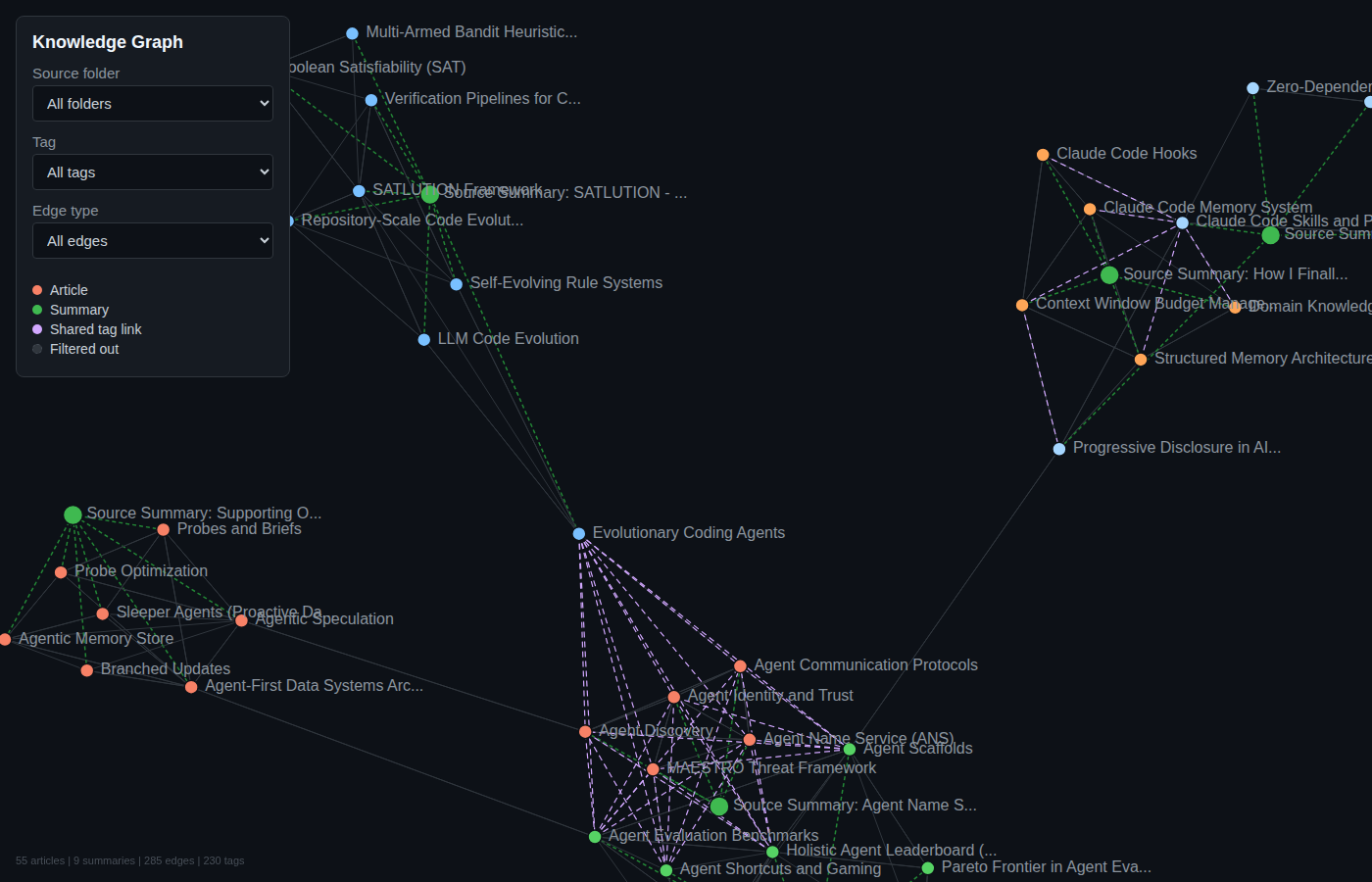
The interactive version is a self-contained D3.js force-directed graph with filtering by source folder, tag, and edge type. Nodes are color-coded by source, and edges come in three types: related (explicit cross-references), shared-tag (auto-generated between articles in different folders sharing 2+ tags), and source (article to its summary).
Prerequisites
- Python 3.11+
- uv package manager
- Claude Code CLI (for the LLM agent operations)
Setup
# Clone the repo
git clone <repo-url>
cd personal-knowledge-base

# Install dependencies
uv sync
Project Structure
personal-knowledge-base/
├── CLAUDE.md              # Schema and instructions for the LLM agent
├── build_graph.py         # Generates wiki/graph.json and wiki/graph.html
├── changelog.md           # Log of every ingest/update run
├── clip.sh                # URL-to-markdown ingestion script
├── pyproject.toml         # Python dependencies (trafilatura, markitdown)
├── docs/
│   └── img/               # Screenshots and diagrams
├── raw/                   # Source documents (append-only, never edit)
│   └── YYYYMMDD-source-slug.md
├── wiki/                  # LLM-authored articles organized by source
│   ├── index.md           # Master index of all articles by category
│   ├── graph.json         # Knowledge graph (nodes + edges)
│   ├── graph.html         # Interactive D3.js visualization
│   └── <source-slug>/     # One folder per ingested source
│       ├── summary-<source-slug>.md   # Source summary at configured depth
│       ├── concept-one.md             # Wiki article
│       └── concept-two.md             # Wiki article
└── .claude/
    └── skills/            # Claude Code skill definitions
        ├── add/           # /add <url> -- clip + ingest in one command
        ├── ingest/        # /ingest -- batch process unprocessed raw files
        ├── query/         # /query -- search by tags and keywords
        └── lint/          # /lint -- health check for broken links, gaps
Adding Content
One-command add (recommended)
The /add skill clips a URL to raw/ and ingests it into wiki articles in a single operation:
/add https://arxiv.org/pdf/2510.11977
/add https://www.anthropic.com/news/contextual-retrieval
/add https://youtu.be/Axd50ew4pco
The depth level for source summaries is configurable (stored in .claude/skills/add/config.json):
| Level | Style | Word Count |
|---|---|---|
| 100 | Explain like I'm 12 (Feynman technique, analogies) | 300-600 |
| 300 | College level (technical but accessible) | 500-800 |
| 500 | Expert deep-dive (full technical detail) | 800-1200 |
Clip URLs directly
# Web article or blog post (uses trafilatura)
./clip.sh https://www.anthropic.com/news/contextual-retrieval

# PDF document (auto-detected, uses markitdown)
./clip.sh https://arxiv.org/pdf/2501.00663

# YouTube video (auto-detected, uses markitdown for transcript)
./clip.sh https://youtu.be/Axd50ew4pco

# Custom slug for cleaner filename
./clip.sh https://some-long-url.com/article my-custom-slug

# Bulk clip from a file (one URL per line, # for comments)
./clip.sh --bulk urls.txt
Batch ingest
After manually placing files in raw/, run the /ingest skill to process all unprocessed files:
/ingest
Ingestion Pipeline
The /add skill runs three phases:
- Clip -- Downloads the URL to
raw/YYYYMMDD-source-slug.mdusing trafilatura (web) or markitdown (PDF/YouTube) - Ingest -- The LLM reads the raw file, extracts 3-10 key concepts, creates a source folder
wiki/<source-slug>/with individual wiki articles and a depth-configured summary with ASCII diagrams - Link -- Adds cross-references between new and existing articles, rebuilds the knowledge graph via
build_graph.py, updateswiki/index.mdandchangelog.md
Ingestion Tools
| Tool | Best For | Image Download |
|---|---|---|
| trafilatura | Web articles, blog posts (clean output) | No |
| markitdown | PDFs, DOCX, YouTube transcripts | No |
- trafilatura strips boilerplate (navbars, ads, footers) and extracts the main article content
- markitdown converts the full page/document to markdown, handles non-HTML formats well
- Neither tool downloads images -- they preserve image URLs as markdown
references
Knowledge Graph
The knowledge graph (wiki/graph.json) is rebuilt after every ingestion by running:
uv run python build_graph.py
This generates two files:
wiki/graph.json-- structured graph with nodes (articles, summaries) and edges (related, shared-tag, source)wiki/graph.html-- self-contained D3.js interactive visualization (works standalone, no server needed)
Edge types
| Type | Source | Description |
|---|---|---|
related |
Explicit related: links in frontmatter |
Direct conceptual relationships between articles |
shared-tag |
Auto-generated by build_graph.py |
Connects articles in different source folders sharing 2+ tags |
source |
Auto-generated by build_graph.py |
Links each article to its source folder's summary |
Visualization features
- Force-directed layout with zoom, pan, and drag
- Filter by source folder, tag, or edge type
- Hover highlights connected nodes
- Color-coded by source folder (articles) and type (summaries)
- Click opens the article file
Wiki Article Format
Each article follows this structure with YAML frontmatter:
---
title: Concept Name
created: 2026-04-08
updated: 2026-04-08
sources: [raw/filename.md]
related: [Other Article](other-article.md), [Cross Folder](../other-folder/article.md)
tags: [concept-tag, broader-topic-tag, category-tag]
---

# Concept Name

Encyclopedia-style summary (200-500 words)...

## Key Points
- ...

## Related Concepts
- [Other Article](other-article.md) - brief note on relationship

## Sources
- raw/filename.md - what this source contributed
Tags
Every article has 3-7 lowercase-kebab-case tags serving two purposes:
- Content-specific tags: what this article covers (e.g.,
pki,pareto-frontier,tacit-knowledge) - Broader topic tags: the larger area it belongs to (e.g.,
ai-agents,software-engineering-philosophy,benchmarking)
Tags drive the shared-tag edges in the knowledge graph, automatically connecting related concepts across different sources.
Source Summary Format
Each source gets a summary at the configured depth level with required ASCII diagrams:
---
title: "Source Summary: Paper Title"
created: 2026-04-08
source: raw/filename.md
depth: 500
articles_created: [article-one.md, article-two.md]
---

# Paper Title - Summary

<Summary at configured depth level>

## What This Source Covers
- ...

## Wiki Articles From This Source
- [Article One](article-one.md) - one line description
Naming Conventions
| Item | Convention | Example |
|---|---|---|
| Raw files | YYYYMMDD-source-slug.md |
20260408-arxiv-2510-11977.md |
| Source folders | wiki/<source-slug>/ |
wiki/arxiv-2510-11977/ |
| Wiki articles | wiki/<source-slug>/lowercase-kebab-case.md |
wiki/arxiv-2510-11977/agent-scaffolds.md |
| Source summaries | wiki/<source-slug>/summary-<source-slug>.md |
wiki/arxiv-2510-11977/summary-arxiv-2510-11977.md |
| Cross-references | [text](file.md) or [text](../folder/file.md) |
[Agent Scaffolds](agent-scaffolds.md) |
Skills
| Skill | Description |
|---|---|
/add <url> |
Clip URL to raw/ and ingest into wiki articles in one command |
/ingest |
Batch process all unprocessed files in raw/ |
/query <question> |
Search by tags and keywords, synthesize answer with references |
/lint |
Health check: broken links, missing articles, stale backlinks, folder structure |
Topic Coverage
This knowledge base covers Generative AI and related topics:
- LLM Fundamentals (transformers, attention, tokenization)
- Prompt Engineering
- Retrieval-Augmented Generation (RAG)
- AI Agents and Agentic Frameworks
- Fine-Tuning and Training
- Guardrails and Responsible AI
- Benchmarking and Evaluation
- GenAI Applications and Tools
- Cloud AI Services (Amazon Bedrock)
- Software Engineering Philosophy
- Economics of Organization
References
- Karpathy's idea file: https://gist.github.com/karpathy/442a6bf555914893e9891c11519de94f
- trafilatura docs: https://trafilatura.readthedocs.io
- markitdown repo: https://github.com/microsoft/markitdown
Reviews (0)
Sign in to leave a review.
Leave a reviewNo results found