toki
Health Warn
- License — License: GPL-3.0
- Description — Repository has a description
- Active repo — Last push 0 days ago
- Low visibility — Only 5 GitHub stars
Code Fail
- rm -rf — Recursive force deletion command in scripts/build-app.sh
- rm -rf — Recursive force deletion command in scripts/package-release.sh
Permissions Pass
- Permissions — No dangerous permissions requested
No AI report is available for this listing yet.
Native macOS menu bar app for tracking Claude Code and Codex account usage.
Toki

A tiny macOS menu bar companion for AI coding agents and usage.



/toki keeps your active AI coding accounts, current-session quota, and weekly quota one click away.
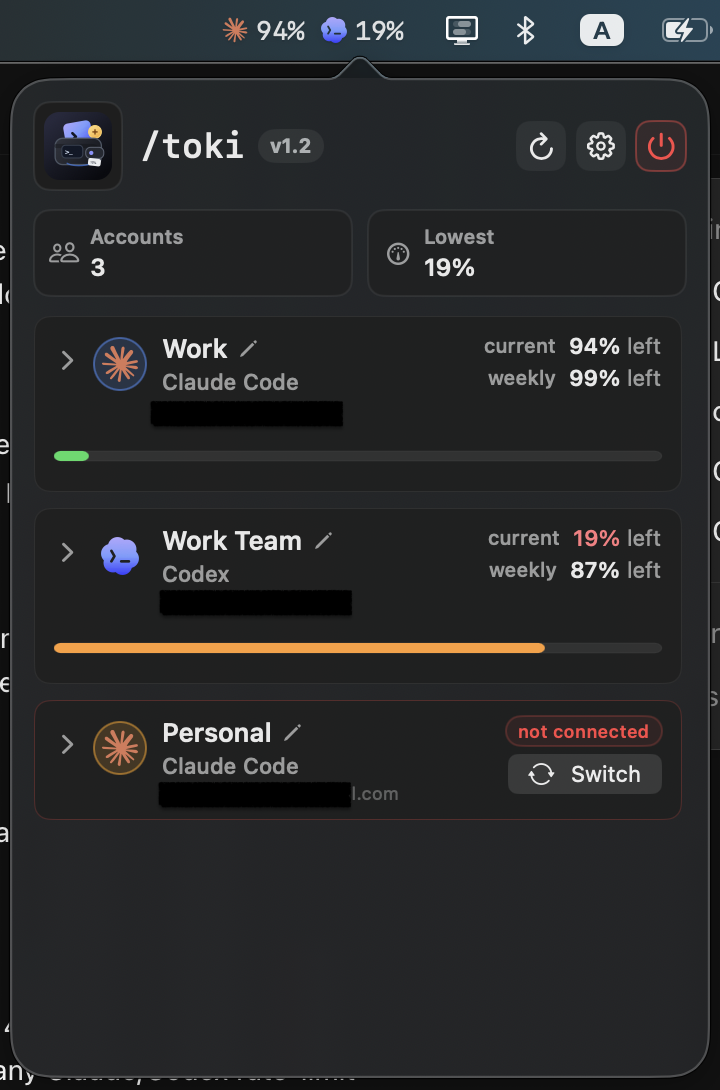
Why Toki
Toki is built for people who jump between Claude Code, Codex, Copilot, Gemini, and OpenCode during the day and want a fast, local view of usage and active agents.
It works especially well with claude-swap: Toki discovers the same Claude Code account registry, shows active and inactive accounts, and lets you switch accounts without reimplementing credential-management logic.
Toki stays local. Credentials are read from your Mac, your configured commands, or provider auth files. The app does not run a cloud service.
Features
- Live quota, rate-limit, and spend tracking for Claude Code (multi-account via
claude-swap, with discovery, one-click switching, and Keychain credential lookup), Codex, and OpenCode. - One-click redemption of banked Codex rate-limit reset credits, gated to when the current window is mostly used.
- Active-agent discovery across Codex, Claude Code, Copilot CLI, Gemini CLI, OpenCode, and ChatGPT-hosted Codex, with best-effort navigation to the matching terminal tab or host app.
- AI-powered insight card with on-device Apple Intelligence summarization (macOS 26+), falling back to a deterministic recommendation with one-click smart switch.
- Native low-quota and session-warning notifications with cooldowns, DND mode, and local event/usage history.
- Session mode for tracking quota burn during a focused coding run.
Toki statusCLI for scripting and shell prompts, plus a Launch at Login toggle backed bySMAppService.- Configurable menu bar display modes, inline account aliases, an "Add account" button to connect more providers any time (not just on first run), and optional manual ledgers for plans without a usage API.
- One-click, verified app updates and privacy-safe rotating diagnostics.
Requirements
- macOS 14 or newer.
- Swift 6 toolchain.
- Claude Code installed and authenticated.
claude-swapinstalled and configured for multi-account Claude workflows.- Codex installed and authenticated for Codex usage.
- Copilot CLI, Gemini CLI, or OpenCode installed when using active-agent discovery for those tools.
macOS may ask for Keychain access the first time Toki reads Claude Code or claude-swap credentials.
Install
Homebrew
brew tap aashutoshrathi/tap
brew install --cask toki
The cask installs the latest release DMG. Toki is ad-hoc signed and not notarized, so on first launch macOS may block it - right-click Toki in Applications and choose Open, or run xattr -dr com.apple.quarantine /Applications/Toki.app.
Direct download
Grab the latest Toki_<version>_universal.dmg from the releases page, open it, and drag Toki to Applications. Updates install in-app once running.
Install From Source
Build and run:
swift run Toki
Build and install an app bundle:
scripts/install-app.sh
open ~/Applications/Toki.app
Build the app bundle without installing:
scripts/build-app.sh
open .build/Toki.app
The generated app bundle is written to .build/Toki.app.
Configuration
Whenever ~/.toki/config.json is missing, or exists but has no accounts yet, Toki's popover shows a Connect an account screen instead of an empty list. It scans for Claude Code (Keychain), Codex (~/.codex/auth.json), OpenCode (its local database), and Gemini CLI (~/.gemini/oauth_creds.json), and a single click on Connect (or Connect all detected) writes the right entries to ~/.toki/config.json for you - no JSON to hand-write. Gemini shows up as signed-in but has no Connect button: like Copilot, it's detection-only (see Features), so there's nothing to write for it. If nothing is detected yet, sign in to Claude Code or Codex and reopen the menu.
This screen isn't just for the first run - the header's + button opens it any time, so starting with just Claude Code and adding Codex (or anything else newly signed in) later needs no config editing either. It only offers providers you haven't already connected.
For scripting, multi-account setups, or fields the wizard doesn't cover (API keys, budgets, manual trackers), edit the config directly. Toki reads:
~/.toki/config.json
Create a starting config:
mkdir -p ~/.toki
cp examples/config.example.json ~/.toki/config.json
Minimal Claude Code plus Codex config:
{
  "refreshMinutes": 5,
  "accountLabels": [
    {
      "email": "[email protected]",
      "organizationUuid": "00000000-0000-0000-0000-000000000000",
      "nickname": "Work",
      "color": "#4F8EF7"
    },
    {
      "email": "[email protected]",
      "nickname": "Personal",
      "color": "#F59E0B"
    }
  ],
  "accounts": [
    {
      "label": "Claude",
      "type": "claudeCode",
      "claudeSwapCommand": "claude-swap"
    },
    {
      "label": "Codex",
      "type": "codex",
      "codexAuthPath": "~/.codex/auth.json"
    }
  ]
}
Each account needs a label (display name) and a type (provider). An id is optional and derived from the label when omitted. Older configs using name/provider/id are migrated automatically on launch, keeping a .bak of the original.
accountLabels are optional presentation overrides. Toki matches discovered Claude accounts by email and, when provided, organization UUID or name. Labels do not alter credentials or switching behavior.
refreshMinutes defaults to 5. API-backed providers refresh stale-while-revalidate style: Toki keeps the last visible usage while refreshing in the background. Automatic refreshes pace Claude Code API calls at 7.5 minutes to reduce early 429 responses, while Codex uses the 5-minute cadence. Opening the popover or pressing reload can refresh sooner, but still keeps a 1-minute minimum between provider API calls. If a provider returns 429, Toki keeps showing the last good usage snapshot.
aiInstructions is an optional string that customizes the on-device LLM prompt used by the AIInsightCard on macOS 26+. When absent, Toki uses a default prompt based on the current recommendation and account snapshots.
Smart Recommendations, AI Insights, Notifications, and History
Toki keeps v2.1 preferences, notification cooldowns, event history, usage history, and session state in:
~/.toki/usage-state.json
The overview shows a single AIInsightCard replacing the three separate stat blocks (Use, Status, Session). When running macOS 26+ with Apple Intelligence available, Toki generates a natural-language summary of your account state with actionable suggestions. A purple sparkle icon and border distinguish AI-generated content from the rule-based fallback. The optional aiInstructions config field lets you steer the on-device LLM prompt. On older systems the card shows the same deterministic recommendation with a lightbulb icon.
The settings panel controls native notifications, DND mode, low-quota threshold, session warning threshold, notification cooldown, history retention, and the menu bar display mode. DND mode suppresses macOS notification delivery but still records events so you can audit what would have fired.
The Agents tab inspects the local process table without persisting command lines, prompts, workspace names, or session titles. Each agent shows its conversation title when available, otherwise the project folder name relative to your home directory (~/Code/project). When an agent has a terminal TTY, clicking it selects the matching tab in iTerm2 or Terminal. For other hosts (iTerm, VS Code, Cursor, ChatGPT), Toki activates the resolved host app via its bundle ID.
OpenCode usage is automatically detected from its local SQLite database and surfaced as an account. Copilot and Gemini are agent-detection-only: Toki detects running Copilot or Gemini CLI processes locally (and, for Gemini, whether gemini is signed in for the onboarding screen), but does not invent quotas - neither GitHub nor Google expose a usage/quota API for these that Toki could read from.
Updates and Diagnostics
Toki checks the latest public GitHub release at most once every six hours, including while the app remains open. Settings also provides a manual “Check now” action that bypasses the schedule. A newer release shows an Update button that downloads its DMG, verifies the local.toki bundle identity, version, and code signature, stages the app, replaces the installed bundle after Toki exits, and relaunches it. Set TOKI_MOCK_UPDATE_VERSION=9.9.9 when developing to preview the banner without publishing a release.
Toki writes rotating diagnostics to ~/.toki/logs/toki.log. These logs contain app-level error categories and status codes only; they exclude credentials, account configuration, prompts, session titles, workspace names, and full file paths. “Send debug report” in Settings creates a local text attachment and opens the macOS share picker. Toki never sends the report automatically.
The AIInsightCard picks the healthiest available account from live snapshots and can optionally surface an on-device LLM summary on macOS 26+. For Claude Code multi-account setups, it can switch to the recommended inactive account through the same configured claude-swap --switch-to path used by account rows.
Session mode records starting quota for visible accounts, then shows a prominent red banner with a live stopwatch and per-account burn during the current coding session. It logs session warning events when quota drops sharply or crosses the configured warning threshold. The play/stop toggle lives in the header bar next to the refresh button.
Launch at Login
Settings has a "Launch at login" toggle backed by SMAppService. It reflects whatever System Settings > General > Login Items actually says rather than a separate stored preference, so removing Toki there also turns the toggle off. macOS occasionally requires approving a freshly-added login item in that same pane before it takes effect - when that happens, the toggle shows an inline "Needs approval" note with a shortcut straight there.
Command Line Status
Toki status              # one line per account, e.g. "Work: 82% left" (uses each account's configured name, not the provider name)
Toki status --compact    # single line matching the menu bar icon, for prompts/status bars
Toki status --json       # full snapshot as JSON
Run the installed app's binary directly, e.g. /Applications/Toki.app/Contents/MacOS/Toki status. This reads a cache the running app writes after every refresh at ~/.toki/status.json (override with TOKI_STATUS_CACHE) - it never launches the menu bar app or makes a live network/Keychain call, so it's safe to call on every shell prompt render. If Toki hasn't run yet, or the cache is more than 15 minutes old, it says so on stderr.
Environment Overrides
TOKI_CONFIG=/path/to/config.json swift run Toki
TOKI_STATE=/path/to/usage-state.json swift run Toki
TOKI_STATUS_CACHE=/path/to/status.json swift run Toki
Legacy TokenBar paths and variables are still recognized during the rename:
TOKENBAR_CONFIGTOKENBAR_STATE~/.tokenbar/config.json~/.tokenbar/usage-state.json
Account Switching
When an inactive Claude Code account is switched, Toki runs:
claude-swap --switch-to <slot>
After the command succeeds, Toki reloads account discovery and refreshes usage. If claude-swap is not on your PATH, set claudeSwapCommand to the full executable path.
Codex Usage
Add a Codex account when this Mac is signed in to Codex:
{
  "label": "Codex",
  "type": "codex",
  "codexAuthPath": "~/.codex/auth.json"
}
Toki reads ~/.codex/auth.json by default and asks the local Codex app-server for account usage and rate limits. Set codexAuthPath to use a different auth file.
Codex usage is separate from OpenAI organization API usage.
When OpenAI has a banked rate-limit reset credit for the account, the expanded Codex card shows a Reset now button (with the count when more than one is banked). It stays disabled until the current window is at least 80% used, so a reset isn't spent while there's still plenty of quota left - redeeming one resets the rate-limit window immediately via the Codex app-server.
Development
Common commands:
swift build
swift run Toki
scripts/build-app.sh
Before shipping a local change, run:
swift build
scripts/build-app.sh
plutil -p .build/Toki.app/Contents/Info.plist
swift-format is not vendored in this repository. Keep Swift changes compiler-clean, locally scoped, and consistent with existing SwiftUI/AppKit conventions.
Repository
aashutoshrathi/toki
Toki keeps backwards-compatible config fallbacks for the old TokenBar name, but new docs, app bundles, examples, and package metadata use Toki.
Troubleshooting
Config needed: create~/.toki/config.jsonor setTOKI_CONFIG.No credentials found: confirm Claude Code andclaude-swapare authenticated and that Keychain access was allowed.Claude Code usage unavailable: Anthropic did not return usage data for that account. Try refreshing later or check the account in Claude Code.Codex usage unavailable: confirmcodex loginhas created~/.codex/auth.json, then refresh Toki.- Switch fails: run
claude-swap --switch-to <slot>in Terminal to inspect the underlying error. - Notifications do not appear: open the Events tab to check whether DND or cooldowns suppressed delivery, then confirm macOS notification permission for Toki.
License
Toki is free software: you can redistribute it and/or modify it under the terms of the GNU General Public License as published by the Free Software Foundation, either version 3 of the License, or (at your option) any later version.
Toki is distributed in the hope that it will be useful, but WITHOUT ANY WARRANTY; without even the implied warranty of MERCHANTABILITY or FITNESS FOR A PARTICULAR PURPOSE. See the GNU General Public License for more details.
You should have received a copy of the GNU General Public License along with Toki. If not, see https://www.gnu.org/licenses/.
Reviews (0)
Sign in to leave a review.
Leave a reviewNo results found