gaddi
Health Uyari
- License — License: Apache-2.0
- Description — Repository has a description
- Active repo — Last push 0 days ago
- Low visibility — Only 5 GitHub stars
Code Basarisiz
- os.homedir — User home directory access in bridge/host.ts
- process.env — Environment variable access in bridge/host.ts
- spawnSync — Synchronous process spawning in cli/gaddi.ts
- os.homedir — User home directory access in cli/gaddi.ts
- process.env — Environment variable access in cli/gaddi.ts
- process.env — Environment variable access in daemon/approval-wake.ts
Permissions Gecti
- Permissions — No dangerous permissions requested
Bu listing icin henuz AI raporu yok.
A local MCP server for AI agents to use existing Chrome tabs, with signed owner approvals.


Gaddi is a local MCP server that lets AI agents work in your existing Chrome tabs.
Agents use your existing logins, open background task groups, read pages and interact with controls.
I built it to work with MCP-capable agents without taking focus from my other apps.

Read with OmniRead
OmniRead is Gaddi’s reading companion. Gaddi captures the page in your signed-in tab; OmniRead extracts Markdown, indexes its sections and reports evidence of missing content. Together, an agent can read a subscriber article, request one section and distinguish a full capture from an abstract or blocked page. A completeness verdict is evidence, not a guarantee.
You authorize the action
A held action waits for you to confirm it in Gaddi's Mac panel. Telling the agent "yes" does not create that signature.
A local broker checks each request before Chrome. The default policy holds recognized payments, purchases, deletion, security changes and sends, plus all uploads. Gmail Send and direct password-field access are refused.
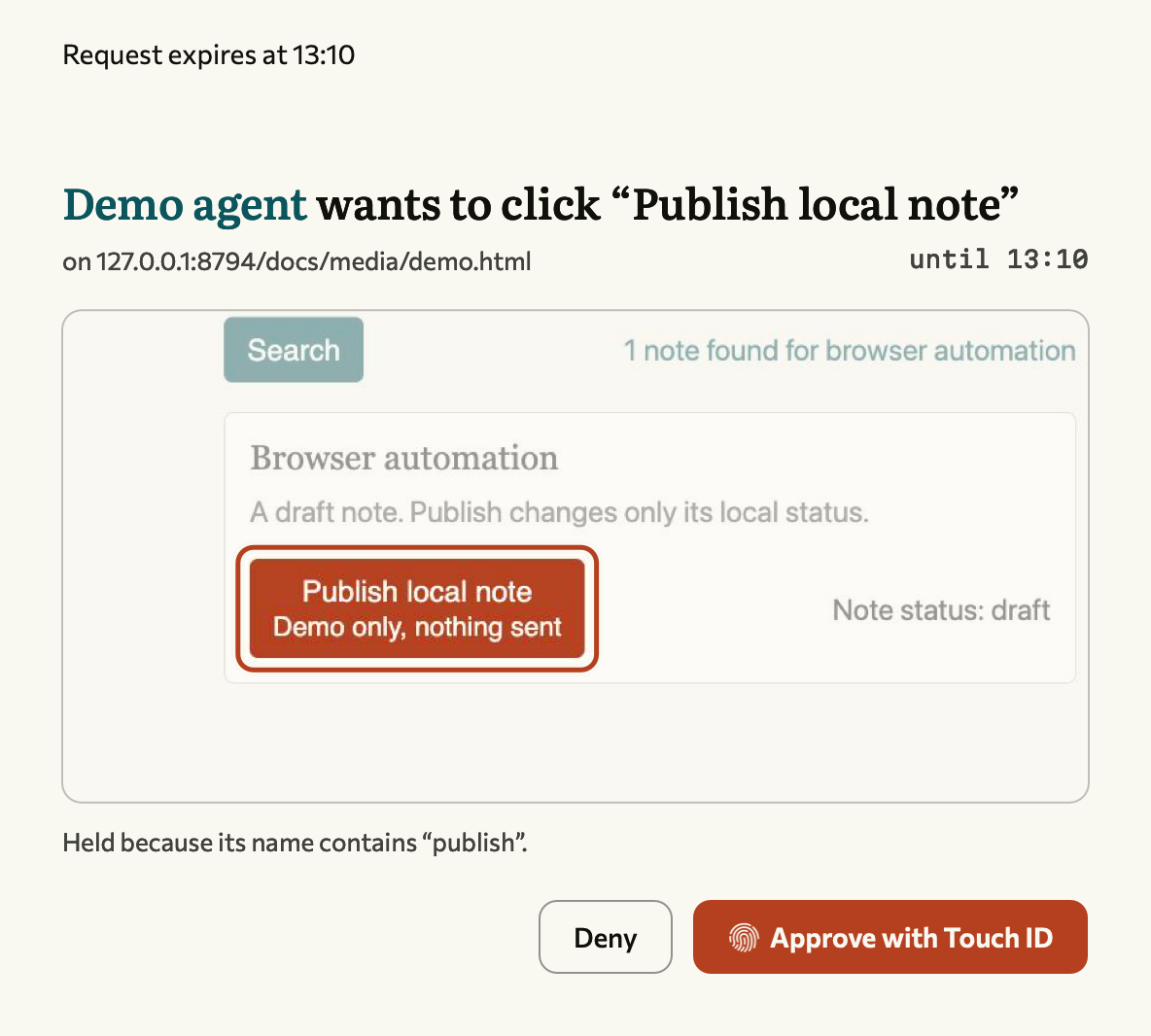
The panel names the action and can show its target. Touch ID or your Mac password authorizes a Secure Enclave key to sign your decision. Approval binds to the pending action; changed requests and reused proofs fail. The button labelled “Approve with Touch ID” also accepts the Mac password. There is no software-key fallback.
Sign-ins and eligible sends can remember a site after a signed decision. The shipped lists are empty. Payments, deletion, security actions and uploads cannot be remembered. See authorization details.
Grant one chat a few holds
An agent can ask once, at the start of a chat, for a session grant: a short list of held actions it may then take without asking, each tied to an address prefix.
browser_grant  rules: ["upload https://github.com/settings/profile", "post https://www.linkedin.com/company/123/admin"]
               minutes: 180   label: "Update the org profile and post the launch note"
Gaddi shows the rules, the length and the agent's label on one card. The grant exists only after you approve that card, with Touch ID, or from your phone if you turned that on (below). It covers the chat that asked and no other, and ends when the time runs out, when that chat closes, when you press End now in the panel, or when the broker restarts. Only uploads, posts and deletes can be granted. Payments, purchases, sends, sign-in and security changes stay held every time, and a button whose name mixes a granted verb with another hold verb stays held. Keep prefixes narrow: a grant on github.com/settings would also cover its key and token pages. Details are in authorization.
Approve from your phone (off by default)
A local bot on your Mac, such as a Telegram bot, can answer the same small set of requests from your phone: uploads, posts and deletes on pages that are not protected, and session grants of up to two hours. You turn it on once in Gaddi's panel with Touch ID, which trusts one Ed25519 key the bot published; anyone can turn it off, from the panel, gaddi remote off or the bot. Each phone answer is signed, bound to one request and usable once, and the panel lists recent ones. Payments, purchases, sign-in, security pages and sending messages stay Touch ID only. The bot's key is a file your user account can read, so another program running as you could approve these requests too; that is why the scope stays small. The contract is in authorization.
Where that protection ends
Gaddi guards its own calls. An agent with shell access can act outside it. Policy matches control names and URLs, mainly in English and Italian; it can miss harmful actions and obfuscated JavaScript. Pages can send requests on their own.
Private information visible in logged-in tabs goes to your agent. The extension needs broad site, debugger, bookmark and extension-management access. Review the default policy and bridge limits.
Install
Requires macOS 26+, a Mac with Secure Enclave, Chrome 120+, Node.js 22.18+ on the 22.x line or 23.6+, and Xcode 26+ to build the approval app. This is a source installation with an ad-hoc-signed Mac app.
git clone https://github.com/ABCastor/gaddi.git
cd gaddi
npm ci
bash install/register/daemon.sh
bash install/register/app.sh
bash install/register/chrome-bridge.sh
In chrome://extensions, enable Developer mode and Load unpacked from extension/. Add ~/.local/bin to your PATH. Keep the checkout: installed components reference it. The Chrome bridge needs node on its non-login PATH; version-manager installations may need an accessible binary in /opt/homebrew/bin or /usr/local/bin.
Quit your client before registration, then restart it.
| Client | Command |
|---|---|
| Claude Code | bash install/register/claude-code.sh |
| Claude Desktop | bash install/register/claude-desktop.sh |
| Codex | bash install/register/codex.sh |
| OpenCode | bash install/register/opencode.sh |
| Antigravity | bash install/register/agy.sh |
Other clients can launch node /absolute/path/to/gaddi/mcp/server.mjs over stdio. Installers accept --dry-run. See configuration and removal.
Work in a tab
gaddi status
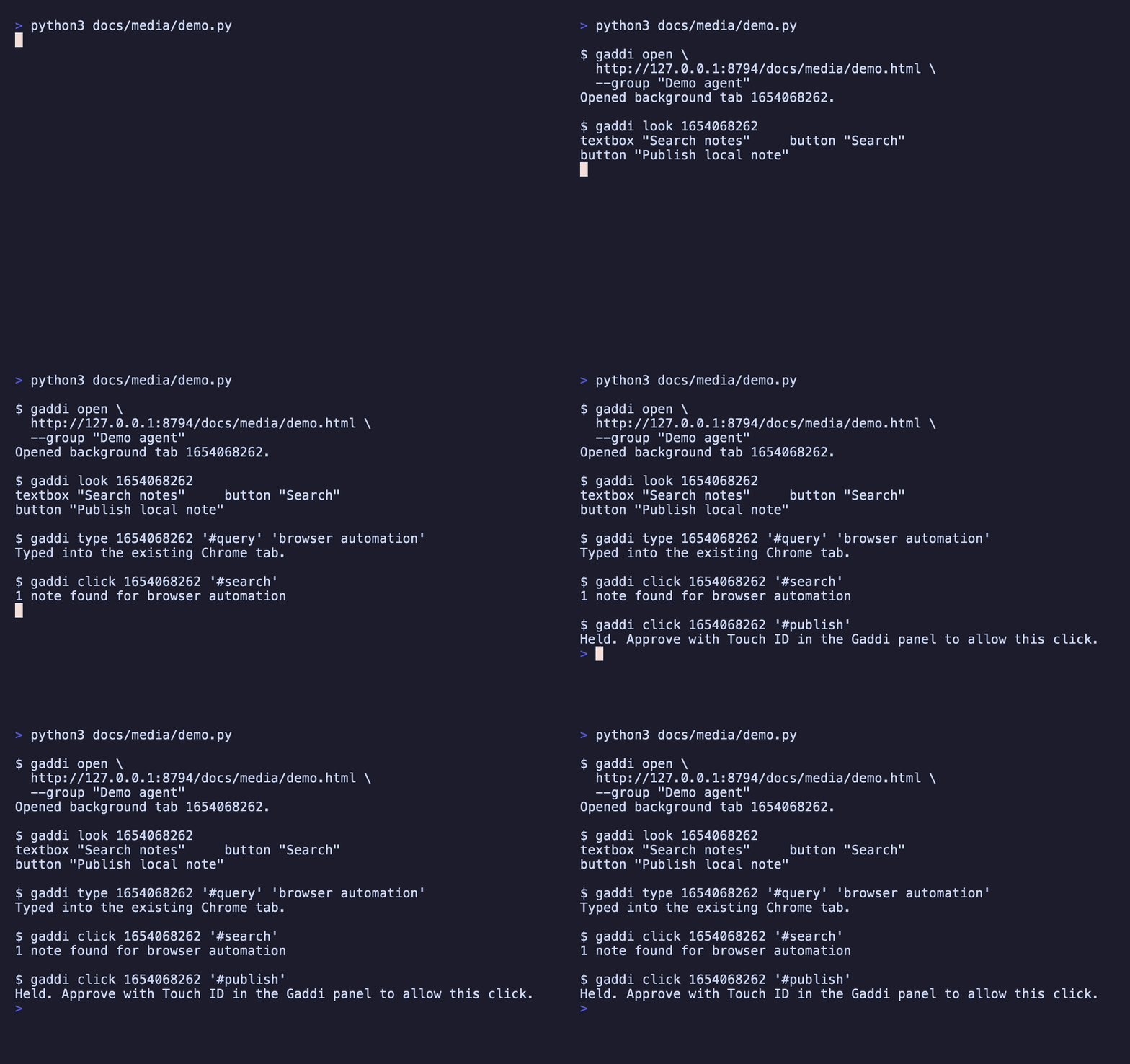
gaddi open https://example.com --group "Research"
gaddi look <tab-id>
gaddi click <tab-id> '<element-ref>'
gaddi close <tab-id>
open returns a tab ID; look returns text and control references. Keep the ID through the task. MCP tools use a browser_ prefix and also support typing, scrolling (sideways too, with dx, and inside a carousel or grid when you name it), selection, waits and screenshots. browser_show brings a tab to you.
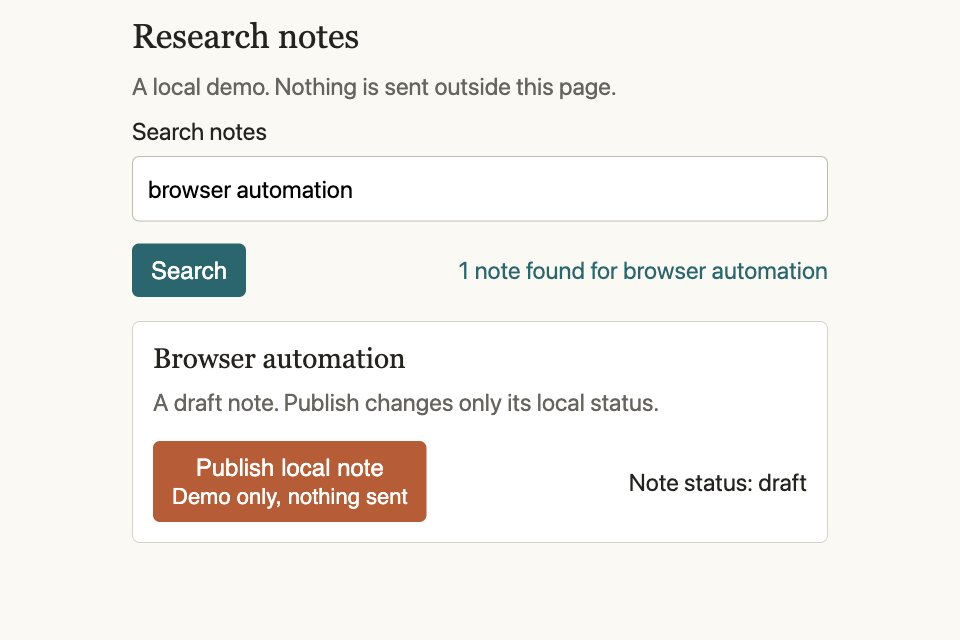
Pass the version from look to reject stale input. When a session ends, its background tabs are cleaned up; tabs shown to you are preserved.
browser_read uses OmniRead to extract Markdown, sections and completeness information from page HTML, including logged-in tabs. Install it before registering your client, or set OMNIREAD_BIN. Without it, Gaddi returns page text without sections or continuation handles.
Sign in with 1Password
browser_signin uses the 1Password CLI and desktop-app integration. You authorize the site and Login item; Gaddi fills it. Captchas, passkeys and extra verification can need you.
Credentials stay out of sign-in results and audit entries. Text output redacts exact matches for ten minutes after use; screenshots do not.
Uploads have a 20 MB limit. Protected credential paths and key files are refused; arbitrary files can still contain secrets. See extension controls. Connection recovery does not resubmit pending page actions.
Development
npm run typecheck
npm run build:extension
bash tests/run-all.sh
Tests use isolated state and falsify gates by removing their protection. Browser tests need Chrome for Testing; Secure Enclave checks need a desktop session. Missing prerequisites are skipped. Commit regenerated extension output after changes. Visual sources are included.
There is no console or network inspection, download handling, browser-dialog handling or video recording. CSS and Web Animations can be slowed; JavaScript timers, canvas and video cannot.
Original code is licensed under Apache-2.0. Bundled fonts, the Public Suffix List and dependencies keep their own licenses; see NOTICE.
Yorumlar (0)
Yorum birakmak icin giris yap.
Yorum birakSonuc bulunamadi