malikclaw
Health Gecti
- License — License: MIT
- Description — Repository has a description
- Active repo — Last push 0 days ago
- Community trust — 14 GitHub stars
Code Gecti
- Code scan — Scanned 12 files during light audit, no dangerous patterns found
Permissions Gecti
- Permissions — No dangerous permissions requested
This is an ultra-lightweight AI agent and assistant designed to run on low-cost hardware (like $10 single-board computers) and Android devices. It facilitates an agentic loop (Plan, Act, Observe, Reflect) while emphasizing low memory usage and offline privacy.
Security Assessment
The overall risk is Low. The light code scan (12 files) found no dangerous patterns, hardcoded secrets, or excessive permission requests. The tool naturally requires network access to communicate with external AI models via user-provided API keys, but the configuration is stored locally. The primary security consideration is the installation method: it relies on piping remote scripts directly into the shell (`curl | bash` and `irm | iex`). While standard for many open-source projects, this method bypasses manual review and requires trusting the repository maintainer. It is highly recommended to download and inspect the installation scripts before executing them.
Quality Assessment
Project quality is Good. It is actively maintained, with the most recent push occurring today. It is fully licensed under the permissive MIT standard. The project currently has 14 GitHub stars, indicating a small but growing level of community trust and early adoption. The repository includes multiple multilingual READMEs and a comprehensive quick-start guide, reflecting a strong focus on accessibility and documentation.
Verdict
Safe to use, but always inspect the `install.sh` and `install.ps1` scripts before running them on your system.
Ultra-lightweight AI Agent & Assistant for $10 SBCs & Android. Urdu-first, Go-based, and privacy-focused. 99% smaller memory than typical gateways.
MalikClaw 🦅
Ultra-Efficient Personal AI Assistant
Production-Grade • <10MB RAM • <1s Boot • $10 Hardware • Built for the World






Quick Start • Features • Installation • Demo • Documentation • Community
اردو | 日本語 | Português | Tiếng Việt | Français | Deutsch | Español | العربية | English
🚀 Quick Start
One-Command Installation
Linux/macOS:
curl -fsSL https://raw.githubusercontent.com/AbdullahMalik17/malikclaw/main/install.sh | bash
Windows (PowerShell):
irm https://raw.githubusercontent.com/AbdullahMalik17/malikclaw/main/install.ps1 | iex
Docker:
docker run -d --name malikclaw -p 18790:18790 -v ~/.malikclaw:/root/.malikclaw ghcr.io/abdullahmalik17/malikclaw:latest
Setup (5 Minutes)
- Run onboarding:
malikclaw onboard - Add API keys: Edit
~/.malikclaw/config.json - Test:
malikclaw agent -m "Hello!"
📖 Full Guide: PRODUCT.md | QUICK_REFERENCE.md
✨ Features
🤖 Production-Grade Agent Loop
NEW: Advanced agentic architecture with full execution cycle:
PLAN → ACT → OBSERVE → REFLECT → MEMORY UPDATE
- Intelligent Planning: Goal decomposition into actionable steps
- Resilient Execution: Retry logic with exponential backoff and circuit breaker
- Smart Observation: Result capture, normalization, and confidence scoring
- Deep Reflection: Success/failure evaluation with lessons learned
- Persistent Memory: Episode storage with search and analytics
📖 Technical Docs: pkg/agent/agentloop/README.md
🌍 Multi-Language Support
- Localized Interface: Urdu, English, Japanese, French, Portuguese, Vietnamese, and growing
- RTL Support: Native Right-to-Left support for Urdu/Arabic users
- Global Community: Contributors from 6+ continents
🪶 Ultra-Lightweight
- <10MB RAM — 99% smaller than typical AI agents
- <1s Boot — 400X faster startup than Python-based alternatives
- $10 Hardware — Runs on Orange Pi Zero, Raspberry Pi Zero, old Android phones
- Cross-Platform — Linux, macOS, Windows, Docker
📱 Mobile Operation
- ADB Control: Screenshot, tap, swipe, type on Android devices
- Termux Support: Run directly on Android without root
- Second Life: Give your old phone a purpose as an AI assistant
💼 Business Integration
- Gmail: Send and manage emails
- Calendar: Schedule and manage events
- MCP Support: Odoo, custom business integrations
- Multi-Channel: Telegram, Discord, WhatsApp, Matrix, QQ, DingTalk, LINE, WeCom
🛠️ Self-Evolution
- Guardian Engine: Autonomous code improvement
- Skill System: Extensible via plugins
- Web Search: DuckDuckGo, Tavily, Brave, Perplexity, SearXNG
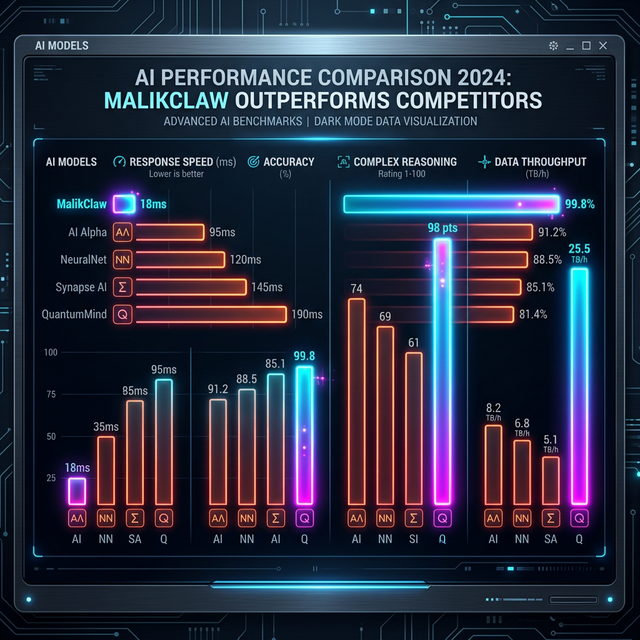
📊 Performance Comparison
| Metric | OpenClaw | NanoBot | MalikClaw |
|---|---|---|---|
| Language | TypeScript | Python | Go |
| RAM Usage | >1GB | >100MB | <10MB |
| Boot Time (0.8GHz) | >500s | >30s | <1s |
| Hardware Cost | $599 | ~$50 | $10 |
| Privacy | Cloud | Local | 100% Local |
📦 Installation
System Requirements
| Platform | Minimum | Recommended |
|---|---|---|
| Linux SBC | Orange Pi Zero ($10) | Raspberry Pi 4 |
| Android | 2GB RAM, Termux | 4GB RAM |
| Desktop | 2GB RAM, any OS | 4GB RAM |
| Docker | 512MB RAM | 1GB RAM |
Installation Methods
1. One-Command Install (Recommended)
See Quick Start above.
2. Build from Source
git clone https://github.com/AbdullahMalik17/malikclaw.git
cd malikclaw

# Build for current platform
make build

# Build and install
make install

# Build for multiple platforms
make build-all
3. Docker
# Minimal (Alpine-based)
docker compose -f docker/docker-compose.yml up

# Full-featured (Node.js 24 for MCP support)
docker compose -f docker/docker-compose.full.yml up
4. Package Managers
Homebrew (macOS):
brew install malikclaw
Scoop (Windows):
scoop install malikclaw
AUR (Arch Linux):
yay -S malikclaw
🎮 Demo
Interactive Demo Script
Run the comprehensive demo showcasing all capabilities:
curl -fsSL https://raw.githubusercontent.com/AbdullahMalik17/malikclaw/main/demo.sh | bash
Demo 1: Phone Control (ADB)
Prerequisites:
- Android device with USB debugging enabled
- ADB installed (
sudo apt install android-tools-adb)
Commands:
# Take a screenshot
malikclaw agent -m "Take a screenshot of my phone"

# Tap at coordinates
malikclaw agent -m "Tap at position 500, 1000 on my phone"

# Type text
malikclaw agent -m "Type 'Hello World' on my phone"

# Open an app
malikclaw agent -m "Open WhatsApp on my phone"

# Swipe gesture
malikclaw agent -m "Swipe up on my phone screen"
Demo 2: Email (Gmail)
Prerequisites:
- Gmail account
- Gmail API enabled in config
Commands:
# Send an email
malikclaw agent -m "Send an email to [email protected] with subject 'Meeting' and body 'Let's meet at 3pm tomorrow'"

# Check recent emails
malikclaw agent -m "Show my 5 most recent emails"

# Search emails
malikclaw agent -m "Find emails from last week about 'project'"

# Reply to email
malikclaw agent -m "Reply to the last email with 'Thanks, I'll review it'"
Demo 3: Web Search
Prerequisites:
- Internet connection
- DuckDuckGo enabled by default (no API key needed)
Commands:
# Get current weather
malikclaw agent -m "What's the weather in Lahore today?"

# Search for news
malikclaw agent -m "What are the latest AI news today?"

# Research topic
malikclaw agent -m "Research quantum computing breakthroughs in 2025"

# Get documentation
malikclaw agent -m "Fetch the Go 1.25 release notes"

# Find tutorials
malikclaw agent -m "Find Go programming tutorials for beginners"
🖥️ Web Interface
Access the modern web UI at: http://localhost:18790
Features:
- Real-time chat interface
- Status dashboard (agent status, memory usage, tools, uptime)
- Demo task shortcuts
- Responsive design (mobile-friendly)
- Dark theme
Start Web UI:
malikclaw gateway
Or with Docker:
docker run -d -p 18790:18790 -v ~/.malikclaw:/root/.malikclaw ghcr.io/abdullahmalik17/malikclaw:latest
⚙️ Configuration
Basic Config
Edit ~/.malikclaw/config.json:
{
  "model_list": [
    {
      "model_name": "gpt-4o-mini",
      "model": "openai/gpt-4o-mini",
      "api_key": "sk-your-api-key-here"
    }
  ],
  "tools": {
    "web": {
      "duckduckgo": { "enabled": true },
      "tavily": { "enabled": false }
    },
    "shell": { "enabled": true },
    "file": { "enabled": true }
  },
  "performance": {
    "low_memory_mode": true,
    "max_concurrent_tasks": 2
  }
}
Get API Keys
LLM Providers:
- OpenRouter - Multi-provider access
- Zhipu - Chinese LLM provider
- Anthropic - Claude models
- OpenAI - GPT models
Web Search (Optional):
- Tavily - AI-optimized (1000 free queries/month)
- Brave - Paid ($5/1000 queries)
- Perplexity - AI-powered
- SearXNG - Self-hosted, free
🎯 Use Cases
1. Personal Assistant
- Manage emails and calendar
- Set reminders and alarms
- Search for information
- Control smart home devices
2. Developer Tool
- Code generation and review
- File operations and search
- Git operations
- Documentation lookup
- TODO comment tracking
3. Mobile Automation
- Automate repetitive phone tasks
- Take screenshots and extract text
- Send messages via WhatsApp
- Control apps remotely
4. Edge AI
- Run on low-power hardware
- Offline-capable with local models
- Privacy-first (data stays local)
- 24/7 operation with minimal power
📚 Documentation
| Document | Description | Audience |
|---|---|---|
| PRODUCT.md | Quick start guide (5-min setup) | New users |
| QUICK_REFERENCE.md | Command cheat sheet | All users |
| README.product.md | Product overview | General |
| pkg/agent/agentloop/README.md | Agent loop architecture | Developers |
| CONTRIBUTING.md | Contribution guidelines | Contributors |
| ROADMAP.md | Development roadmap | Community |
🔧 Troubleshooting
Common Issues
"Command not found" after installation:
export PATH="$HOME/.local/bin:$PATH"
echo 'export PATH="$HOME/.local/bin:$PATH"' >> ~/.bashrc
source ~/.bashrc
"API key not configured":
- Open config:
malikclaw config edit - Add your API key to
model_list - Save and retry
"ADB device not found":
# Check USB debugging is enabled on phone
# List connected devices
adb devices

# If empty, try:
adb kill-server
adb start-server
adb devices
"Out of memory" on low-RAM devices:
{
  "performance": {
    "low_memory_mode": true,
    "max_concurrent_tasks": 1,
    "gc_interval_seconds": 180
  }
}
📖 More Help: PRODUCT.md#troubleshooting
🤝 Contributing
We welcome contributions! See CONTRIBUTING.md for guidelines.
Ways to Contribute
- 🐛 Report bugs
- ✨ Add features
- 📝 Improve documentation
- 🌍 Translate to your language
- 💡 Share use cases
- 🔌 Build skills/plugins
Development Setup
git clone https://github.com/AbdullahMalik17/malikclaw.git
cd malikclaw

# Download dependencies
make deps

# Run tests
make test

# Build
make build

# Run linters
make lint
📢 Community
Join our global community of developers and users:
- GitHub: Discussions
- Website: malikclaw.io
- Twitter: @AbdullahMalik17
- Discord: Join Server (coming soon)
📄 License
MIT License — See LICENSE file for details.
🌍 Built for the World
MalikClaw is proudly used by developers and organizations worldwide:
- 🌏 Asia: Pakistan, India, Japan, China, Vietnam, Philippines
- 🌍 Europe: Germany, France, UK, Netherlands, Poland
- 🌎 Americas: USA, Brazil, Canada, Mexico, Argentina
- 🌍 Africa: Nigeria, Egypt, South Africa, Kenya
- 🌏 Oceania: Australia, New Zealand
Contributors from 20+ countries and growing every day!
🦅 Built with ❤️ for the World
Empowering everyone with efficient AI — anywhere, anytime!
📢 Recent Updates
March 2026 - Production-Grade Agent Loop
NEW: Complete agent loop implementation with:
- Planner: Goal decomposition with LLM and heuristic planning
- Executor: Tool execution with retry, backoff, and circuit breaker
- Observer: Result capture, normalization, and confidence scoring
- Reflector: Success evaluation with lessons learned
- Memory: Persistent episode storage with search capabilities
Files Added:
pkg/agent/agentloop/- Main orchestrator and configurationpkg/agent/planner/planner.go- Enhanced planning systempkg/agent/executor/executor.go- Resilient execution enginepkg/agent/observer/observer.go- Observation capturepkg/agent/reflector/reflector.go- Reflection enginepkg/agent/memory/memory.go- Memory management
Product Enhancements:
- One-command installers for Linux/macOS and Windows
- Interactive demo script showcasing phone, email, and search capabilities
- Modern web UI with chat interface and status dashboard
- Comprehensive documentation (PRODUCT.md, QUICK_REFERENCE.md)
🦅 Built with ❤️ for South Asian developers
آگے بڑھو، ملک کلاؤ! (Let's Go, MalikClaw!)
Yorumlar (0)
Yorum birakmak icin giris yap.
Yorum birakSonuc bulunamadi