localmind
Health Gecti
- License — License: MIT
- Description — Repository has a description
- Active repo — Last push 0 days ago
- Community trust — 279 GitHub stars
Code Gecti
- Code scan — Scanned 12 files during light audit, no dangerous patterns found
Permissions Gecti
- Permissions — No dangerous permissions requested
Bu listing icin henuz AI raporu yok.
A mobile application designed to provide a beautiful, fast, and privacy-respecting interface for on device LLM and local LLM servers and cloud providers
LocalMind
Your AI. Your Device. Your Rules.
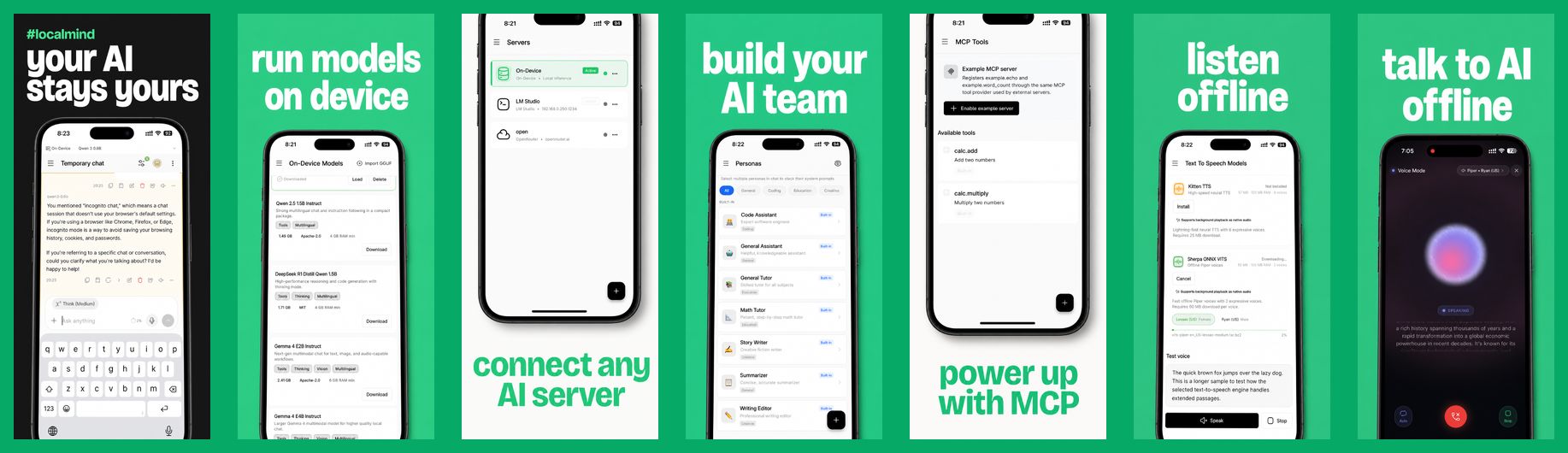
LocalMind is an open-source Android and iOS chat app for LLMs. Run GGUF and LiteRT models fully offline on your phone, or connect to Ollama, LM Studio, OpenRouter, and any OpenAI-compatible server, with MCP tool support built in.








Vision
Built for those who value privacy and performance, LocalMind runs models directly on your device or connects straight to your own inference servers like LM Studio or Ollama, as well as cloud providers like OpenRouter or Requesty. No middleware, no tracking, and no hidden subscriptions. Just you and your models.
Supported Backends
| Backend | Type | Notes |
|---|---|---|
| On-device | Offline | GGUF (llama.cpp via llamadart) and LiteRT (flutter_gemma) models |
| Ollama | Local | Also supports Ollama Cloud |
| LM Studio | Local | Includes the LM Studio model catalog |
| OpenRouter | Cloud | Bring your own API key |
| Requesty | Cloud | Bring your own API key |
| OpenAI-compatible | Local or cloud | llama.cpp server, vLLM, LocalAI, Jan, and others |
Key Features
- On-Device AI Support (iOS & Android): Private, fast, and offline. Run powerful GGUF and LiteRT models (Gemma, Qwen, DeepSeek R1) directly on your device via
llamadartandflutter_gemma. No internet connection required. - Model Context Protocol (MCP): Seamlessly connect to local or remote MCP servers. Grant models access to custom tools and integrations (e.g., file access, web APIs, shell actions) with fine-grained global and chat-level toggles.
- Model Manager: Download curated models or download GGUF models directly from HuggingFace. Manage model files directly within the app.
- Multi-Server Connection: Connect to Ollama, LM Studio, OpenRouter, Requesty, or any OpenAI-compatible API with real-time server health and speed monitoring.
- Premium Chat Experience: A polished, Claude/ChatGPT-inspired user interface featuring:
- Streaming Responses: Real-time SSE support for instant generation.
- Markdown Rendering: Beautiful rendering of text and code with rich syntax highlighting.
- Expandable Reasoning Logs: Collapsible, step-by-step visualization of thought processes for reasoning models like DeepSeek R1.
- Edit & Regenerate: Edit past user prompts to truncate the conversation history and regenerate responses.
- Saved Messages Picker: Quick-access shortcut in the input bar to store, organize, and reuse prompts or templates.
- Message Variants: Swipe and navigate through alternative model replies/variations.
- Temporary Chats: Incognito mode that allows conversations to run in-memory without saving logs to local history.
- Smart Suggested Replies: Context-aware follow-up prompts to keep conversations going.
- Voice & Audio (STT & TTS):
- Speech-to-Text (STT): Dictate your prompts directly via native voice input.
- Text-to-Speech (TTS): Listen to model responses with custom playback speeds, replay caching, and background play.
- Multimodal & Attachments: Attach photos, documents, and other files to prompt vision-capable models.
- Persona Management: Easily switch between specialized AI personas (Code Assistant, Math Tutor, etc.) or create your own with custom system instructions.
- Live Model Swapping: Swap active models mid-conversation without breaking context or losing chat history.
- Conversation History: Full-text search through your chats, folder grouping, pinning, and local-only storage.
- Backup & Restore: Export and import complete backup archives (including chat history, personas, and app settings) locally.
- Multilingual UI: Available in 15 languages, including English, Spanish, German, French, Japanese, Chinese, Arabic, Hindi, and Bengali.
- Deep Customization:
- Theming: Premium dark-first interface with full light mode support.
- Chat Parameters: Fine-tune temperature, top_p, max token limits, and context window size.
Tech Stack
LocalMind is built with modern, scalable technologies:
- Framework: Flutter 3.44 (pinned with FVM)
- On-Device AI:
llamadart+flutter_gemma(supporting llama.cpp & LiteRT) for native, high-performance localized inference. - UI Components: Shadcn-inspired design system (
shadcn_ui) - State Management: Riverpod for robust, testable state.
- Local Storage: ObjectBox for high-performance on-device persistence.
- Networking: Dio for optimized REST API handling.
- Rendering:
gpt_markdown+syntax_highlightfor rich content.
Privacy First
- Zero Analytics: We don't track how you use the app.
- Local Storage: Your conversations are stored only on your device.
- Direct Traffic: Network requests go directly to your servers. LocalMind never sees your data.
- Encrypted Sync (optional): Cloud sync is end-to-end encrypted and only talks to an S3 bucket you control.
Contributors
We are incredibly grateful to the developers who have helped build LocalMind:


Recently Shipped
Have an idea for what comes next? Open a feature request.
- AI Voice (Text-to-Speech): Listen to your AI's responses with high-quality TTS.
- Context Smart Replies: Integrated suggested follow-ups to keep the conversation flowing.
- Multimodal Support: Attach images and documents for vision-capable models.
- Tablet/Desktop Optimization: A split-view layout for large-screen productivity.
- Export Options: Export your chats to Markdown or PDF to share or archive.
- Quick Shortcuts: OS-level widgets and shortcuts for launching new chats instantly.
- Voice-to-Voice Mode: Engage in real-time, low-latency spoken conversations with local models.
- S3 Cloud Sync: End-to-end encrypted cloud sync for settings, custom personas, and chats in your own S3 server.
Getting Started
Prerequisites
- FVM (the project pins Flutter 3.44.2 in
.fvmrc) - Android Studio or Xcode with a device or emulator
- Optional: a local LLM server such as Ollama or LM Studio. On-device models work without one.
Installation
git clone https://github.com/abdulmominsakib/localmind.git
cd localmind
fvm install
fvm flutter pub get
fvm flutter run
Useful Commands
fvm flutter analyzeruns lints and analyzer checks.fvm flutter testruns the test suite.fvm flutter gen-l10nregenerates localization output after editinglib/l10n/app_*.arb.fvm dart run build_runner build --delete-conflicting-outputsregenerates ObjectBox code after entity changes.
Connecting to a Server on Your Computer
When running Ollama or LM Studio on your computer, use its LAN IP (for example http://192.168.1.20:11434), not localhost, and make sure the server listens on all interfaces. For Ollama, set OLLAMA_HOST=0.0.0.0. In LM Studio, turn on "Serve on Local Network".
Contributing
Contributions are welcome. Read AGENTS.md for the project structure, architecture rules, and commit conventions, then open an issue or pull request. Please run fvm flutter analyze and fvm flutter test before submitting.
License
LocalMind is open source and available under the MIT License.
Yorumlar (0)
Yorum birakmak icin giris yap.
Yorum birakSonuc bulunamadi