clipsmith
Health Uyari
- License — License: MIT
- Description — Repository has a description
- Active repo — Last push 0 days ago
- Low visibility — Only 8 GitHub stars
Code Gecti
- Code scan — Scanned 12 files during light audit, no dangerous patterns found
Permissions Gecti
- Permissions — No dangerous permissions requested
Bu listing icin henuz AI raporu yok.
Free open-source OpusClip alternative. Turn long YouTube videos into captioned Shorts, offline on your laptop. No API key, no GPU.
Clipsmith
A free, open-source alternative to OpusClip. Turn one long YouTube video into a batch of ready-to-post Shorts, on your own laptop.





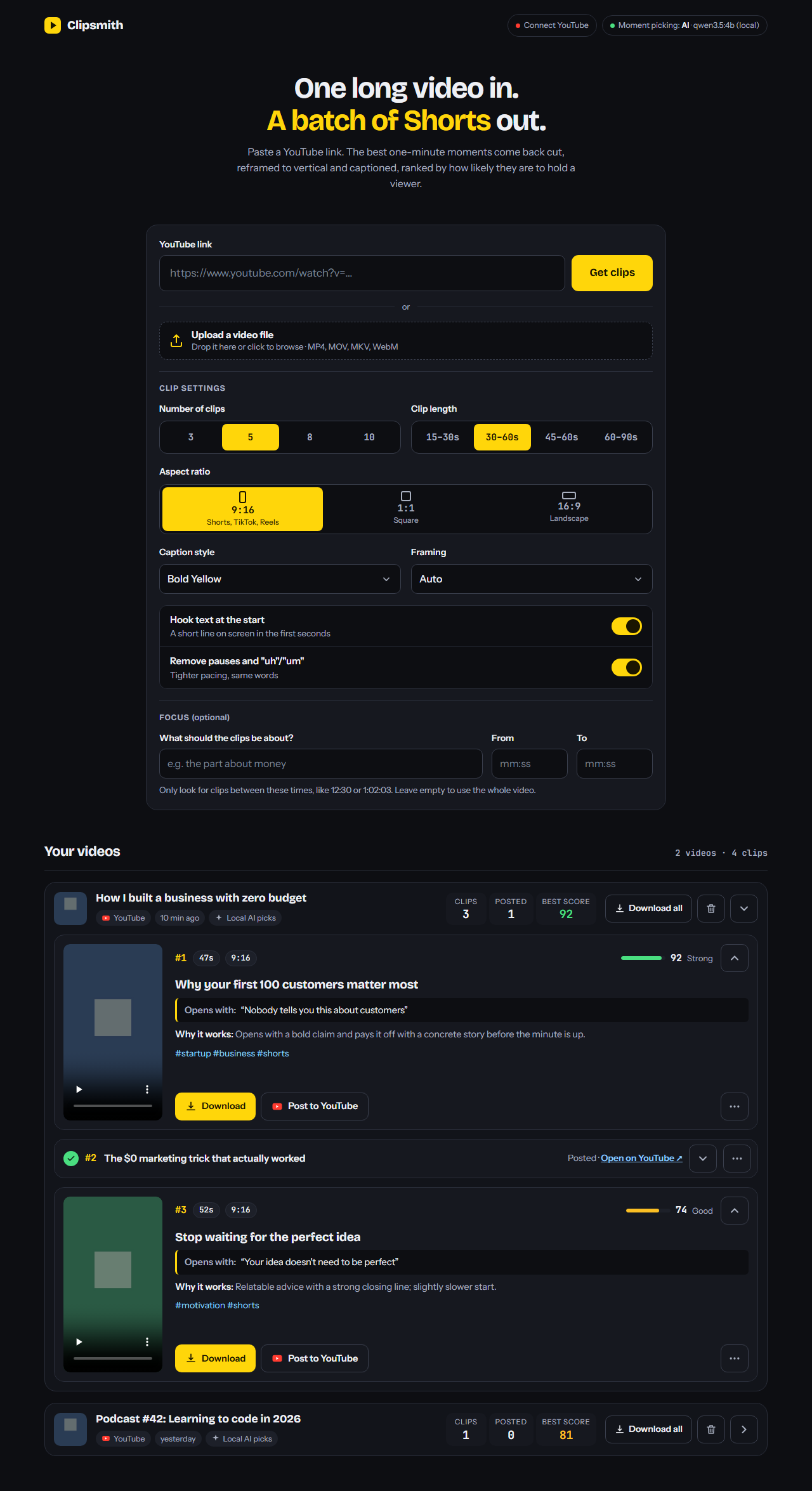
Paste a YouTube link. Clipsmith finds the best 30–60 second moments, crops them to vertical 9:16 around the speaker, burns in animated word-by-word captions, and ranks them by how likely they are to hold a viewer.
- Free and unlimited. No credits, no monthly plan, no watermark, no clips that expire after 3 days.
- Runs offline. Moment picking uses a local AI model (Qwen via Ollama). No API key, no account, your videos never leave your computer.
- Works on an ordinary laptop. No GPU needed; it was built and tested on a 4-core Intel laptop CPU.
Not affiliated with OpusClip. "OpusClip" is mentioned only to describe what this project is an alternative to.
Clipsmith vs OpusClip
| Clipsmith | OpusClip Free | OpusClip paid | |
|---|---|---|---|
| Price | Free forever | $0 | from $15/month |
| Clips per month | Unlimited | 60 credits | 150+ credits |
| Watermark | None | Yes | No |
| Clips expire | Never | After 3 days | After 30 days+ |
| Runs on your computer, offline | Yes | No | No |
| Your videos stay private | Yes | Uploaded | Uploaded |
| Open source | Yes (MIT) | No | No |
| AI picks + viral score | Yes | No score | Yes |
| Animated captions + 9:16 reframe | Yes | Yes | Yes |
| B-roll, scheduler, team features | Not yet | No | Yes |
OpusClip details from its public pricing page, November 2026.
What it does
- Downloads the video and YouTube's captions (or transcribes the audio with Whisper if there are none).
- Picks the moments that open strong, stand on their own and end on a complete thought, and gives each a viral score, a title, an on-screen hook, a caption and hashtags.
- Reframes to 9:16, following the speaker's face. Wide shots get the full frame over a blurred background instead.
- Captions every word as it's spoken, in one of three styles.
- Exports MP4s you can download, or post and schedule straight to YouTube.
Install
You need Python 3.10+, ffmpeg and, for AI moment picking, Ollama.
1. Prerequisites
| Windows | macOS | Linux | |
|---|---|---|---|
| Python | python.org | brew install python |
your package manager |
| ffmpeg | winget install Gyan.FFmpeg |
brew install ffmpeg |
sudo apt install ffmpeg |
| Ollama | ollama.com/download | ollama.com/download | curl -fsSL https://ollama.com/install.sh | sh |
| Deno (YouTube downloads need a JS runtime) | winget install DenoLand.Deno |
brew install deno |
curl -fsSL https://deno.land/install.sh | sh |
Node.js works instead of Deno if you already have it.
2. Download the AI model (about 3.3 GB, once)
ollama pull qwen3.5:4b
3. Set up Clipsmith
git clone https://github.com/AbdulSamad94/clipsmith.git
cd clipsmith
- Windows: double-click
setup.bat - macOS / Linux:
./setup.sh
Run
- Windows: double-click
run.bat - macOS / Linux:
./run.sh
Then open http://127.0.0.1:8765, paste a YouTube link (or drop in a video file) and click Get clips.
Using it
- Clip settings: pick the number of clips, the clip length and the aspect ratio (9:16, 1:1 or 16:9). Choose a caption style (each one shows a live preview; besides the original three there are Comic, Impact, Tall and a "Build-up" style where words appear one by one as they are spoken) and framing, and switch the opening hook text and pause/"uh" removal on or off.
- Focus (optional): describe what the clips should be about, or limit them to part of the video with From and To (like
12:30). - Progress: each video shows three steps (get the video, pick the best moments, cut and caption) with what's happening right now. Finished clips appear while the rest are still rendering.
- Your clips: each clip shows its rank, length, score, the hook it opens with and why it was picked. Download it, Post to YouTube, or open the ⋯ menu to copy the caption, post again or delete the clip. Fold any clip into one line with the arrow; posted clips fold by themselves. Older videos start folded too.
The page works with a keyboard and a screen reader: every control has a label and a visible focus ring, and progress and upload changes are announced.
How long it takes
On a 4-core laptop CPU, a 12-minute video takes about 10 minutes: a few minutes for the AI to read it, then about 1–3 minutes per clip to render. Longer videos take proportionally longer. Fewer clips means faster results.
Post straight to YouTube
Connect your channel once and every clip gets a Post to YouTube button: the AI's title, description and hashtags are filled in, and you can post now or schedule it (YouTube publishes it at that time, even if your computer is off). Setup takes about 5 minutes with your own free Google app: see docs/youtube-setup.md.
Choosing the AI
Set this in .env (copy it from .env.example):
| Option | Cost | Speed | Setting |
|---|---|---|---|
| Local Qwen (default) | Free | Slow on CPU | AI_PROVIDER=ollama |
| Google Gemini | Free tier | Fast | AI_PROVIDER=gemini + GEMINI_API_KEY |
| Anthropic Claude | Paid | Fast | AI_PROVIDER=claude + ANTHROPIC_API_KEY |
| None | Free | Fastest | AI_PROVIDER=none (basic scoring by rules) |
On a machine with more RAM or a GPU, try a bigger local model for better picks, e.g. OLLAMA_MODEL=qwen3.5:9b.
Known limitations
- The small local model sometimes gets facts or numbers wrong in titles. Check titles before posting.
- Face tracking is basic (OpenCV). Fast camera cuts can make the crop lag.
- Posting is built in for YouTube only; for TikTok and Reels, download the MP4 and upload it yourself.
Roadmap
- Filler word and silence removal
- "Prompt to clip": describe the moment you want
- Post and schedule directly to YouTube
- Edit clip start/end and caption text before export
- Keyword and emoji highlights in captions
- Brand template (logo, fonts, colours)
Contributions are welcome! Designers especially: UI/UX ideas are wanted, see issue #24. See CONTRIBUTING.md and the good first issue label. If Clipsmith saves you money, a ⭐ helps other people find it.
Use responsibly
Only post clips of videos you own, or that the creator allows you to clip (for example through a creator's clipping or affiliate program). Re-uploading other people's streams or videos without permission can lead to Content ID claims and copyright strikes.
Monetization is a separate question: YouTube's reused-content policy is separate from copyright and applies even if you have permission from the original creator. Channels that mostly repost others' content with little of their own added can be refused monetization.
Downloading from YouTube may also break YouTube's Terms of Service. You are responsible for how you use this tool.
License
Yorumlar (0)
Yorum birakmak icin giris yap.
Yorum birakSonuc bulunamadi