jidr
Health Warn
- License — License: Apache-2.0
- Description — Repository has a description
- Active repo — Last push 0 days ago
- Low visibility — Only 6 GitHub stars
Code Fail
- rm -rf — Recursive force deletion command in assets/brand/build.sh
Permissions Pass
- Permissions — No dangerous permissions requested
No AI report is available for this listing yet.
Jidr (جذر): open-source Android emulator for the Mac with one-click rooted devices
Jidr (جذر)
Android on your Mac, rooted in a minute.


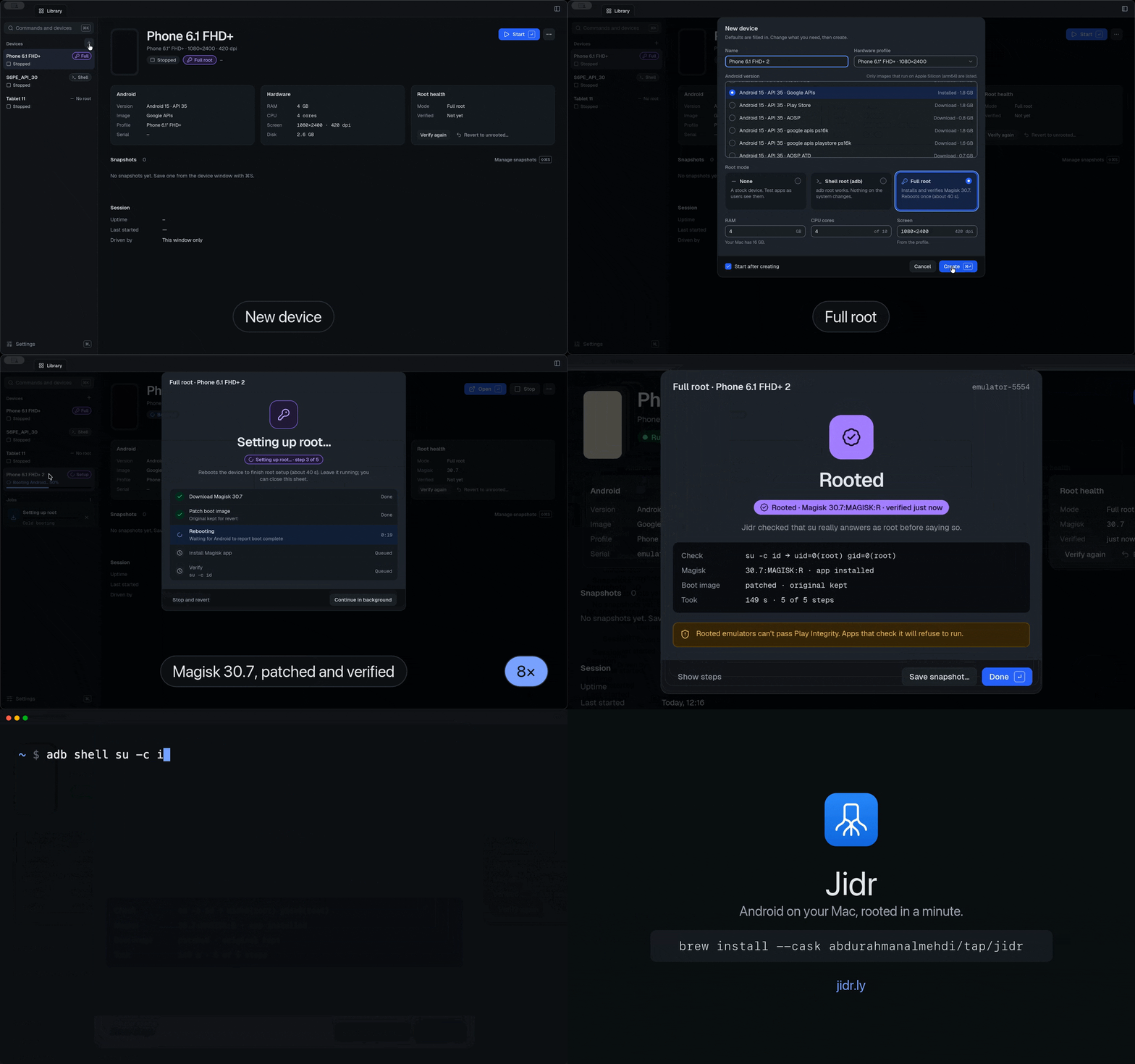
Jidr creates and runs virtual Android phones and tablets on Apple Silicon Macs. Pick Full root and Magisk is patched in and verified for you; pick Shell root for adb root; or keep the device stock. It's a free, open-source alternative to Genymotion Desktop, written in Rust, with a desktop app, a CLI and an MCP server for AI agents.
brew install --cask abdurahmanalmehdi/tap/jidr
Or download the DMG. Site: jidr.ly. News: @Jidr_ly on X.
Features
- Devices: create, clone, start, stop and delete virtual devices from Google's emulator images (API 29–36, arm64). Jidr keeps its own SDK and never modifies Android Studio's SDK or AVDs.
- One-click root: None, Shell root (
adb root) or Full root (Magisk, patched into a per-device copy of the ramdisk and verified withsu -c id). Revert at any time. Play Store images get a guided beta. - Player window: the device screen with mouse and keyboard input, drag-and-drop for APKs and files, and logcat.
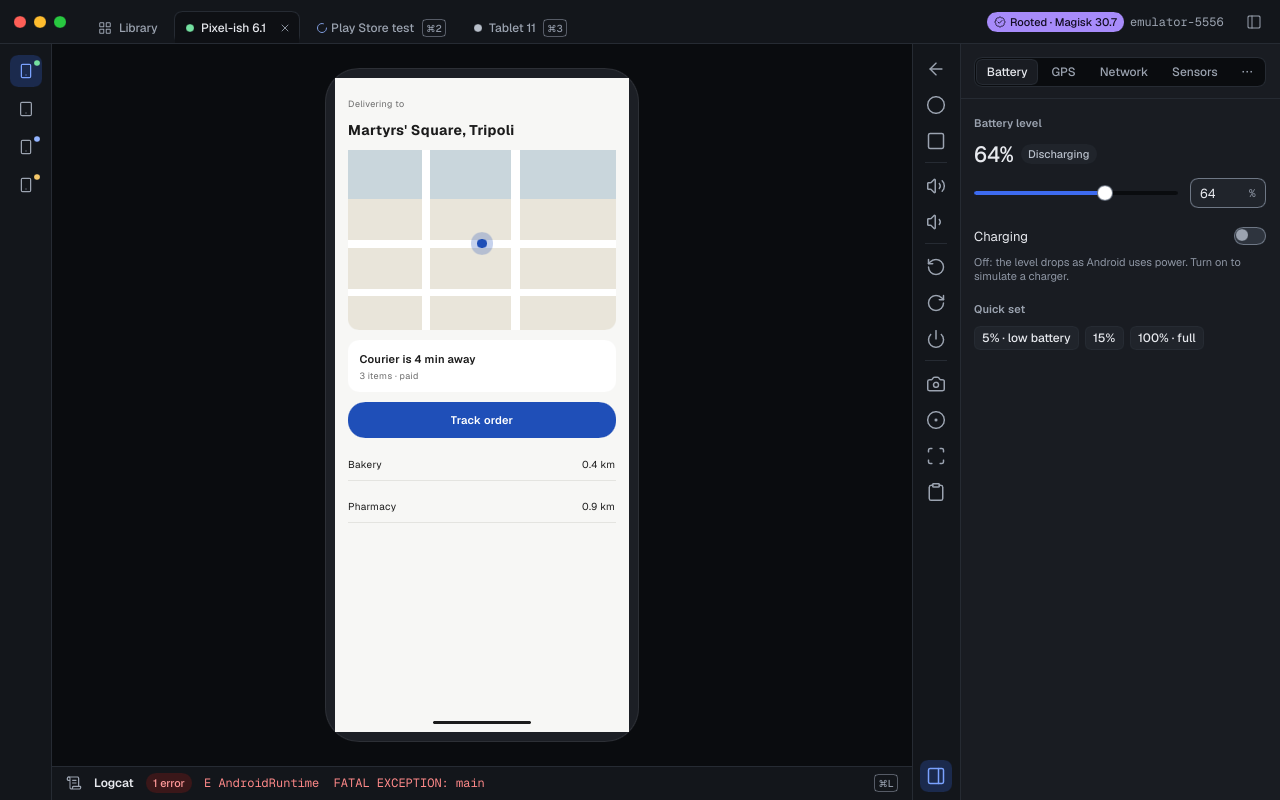
- Widgets: battery, rotation and motion sensors, network (Wi-Fi, mobile data, speed and delay profiles), calls, SMS and signal bars, GPS with GPX/KML route replay on an OpenStreetMap map, fingerprint, the host webcam as the camera, clipboard and developer toggles.
- Media and state: PNG screenshots, MP4 recordings, and snapshots tagged with the root mode they were taken in.
- Build identity: set build properties (model, brand, fingerprint…) on Full-root devices.
- CLI: every action is a
jidrcommand, with--jsonoutput and stable exit codes for CI. - MCP server:
jidr mcplets Claude and other MCP clients see and drive a device: screenshot, tap, type, UI tree, logs.
No accounts, no telemetry, no paid tier.
Install
You need macOS 14 or later on Apple Silicon, and about 10 GB of free disk space for the SDK and one system image.
- Homebrew:
brew install --cask abdurahmanalmehdi/tap/jidrinstallsJidr.appand puts thejidrCLI on yourPATH. Update withbrew upgrade --cask jidr. - DMG: download
Jidr-<version>-arm64.dmgfrom the latest release and drag Jidr to Applications. The CLI is at/Applications/Jidr.app/Contents/Helpers/jidr.
On first launch the app finds or downloads the Android SDK and a system image, after you accept Google's license.
Quick start (CLI)
jidr image install 35 --accept-licenses   # download an API 35 image; you accept Google's license
jidr device create Phone --image 35       # create a device
jidr device start Phone                   # boot it and wait until it's ready
jidr root set Phone magisk                # Full root with Magisk, verified
Use it from an AI agent
Add Jidr to Claude Code as an MCP server:
claude mcp add jidr -- jidr mcp
For Claude Desktop, open jidr-mcp-<version>-darwin-arm64.mcpb from the latest release. Jidr is also in the MCP Registry as io.github.AbdurahmanAlmehdi/jidr. docs/mcp.md lists the tools.
Agent skills teach Claude Code, Cursor, Codex and other agents to create and drive Jidr devices with the CLI (jidr), to test an app on them (jidr-app-testing), to get devices of their own without crowding the machine (jidr-agent-devices) and to root them, install Magisk modules and intercept HTTPS (jidr-root). Install them with the open skills CLI:
npx skills add AbdurahmanAlmehdi/jidr
They live in skills/.
Documentation
- CLI reference
- MCP tools
- Root modes
- Control protocol: the JSON-RPC protocol the app, the CLI and the MCP server share
- Design system
- Decisions and architecture decision records
- Feature parity with Genymotion Desktop
- Clean-room policy
- Changelog
Build from source
git clone https://github.com/AbdurahmanAlmehdi/jidr
cd jidr
cargo build --release -p jidr -p jidr-gui
You need rustup (it installs the toolchain pinned in rust-toolchain.toml) and protoc (brew install protobuf). CONTRIBUTING.md has the full setup and how to run the tests.
Licensing
Jidr is split-licensed. The desktop app (crates/jidr-ui, apps/jidr-gui) is GPL-3.0-only because it links Slint. Everything else (CLI, daemon, MCP server, libraries, site) is Apache-2.0. See LICENSE-APACHE, the LICENSE-GPL files in the two GUI crates, and NOTICE.
Jidr downloads the Android Emulator and system images from Google under the Android SDK License, which you accept in the app. It downloads Magisk (GPL-3.0) only when you choose Full root. None of these are bundled.
Questions and contributing
Questions, ideas and setups you want to share go in Discussions; bugs go in Issues.
Contributions are welcome: read CONTRIBUTING.md. Report security issues as described in SECURITY.md. If you work with an AI coding agent, point it at AGENTS.md.
Trademarks
Android is a trademark of Google LLC. Genymotion is a trademark of its owner. Jidr is not affiliated with Google or Genymotion.
Reviews (0)
Sign in to leave a review.
Leave a reviewNo results found