DevDash-AgenticOS
Health Uyari
- License — License: NOASSERTION
- Description — Repository has a description
- Active repo — Last push 0 days ago
- Low visibility — Only 5 GitHub stars
Code Basarisiz
- exec() — Shell command execution in apps/agent/src/claude.ts
- process.env — Environment variable access in apps/agent/src/claude.ts
- process.env — Environment variable access in apps/agent/src/cli.ts
Permissions Gecti
- Permissions — No dangerous permissions requested
Bu listing icin henuz AI raporu yok.
A self-hosted workspace where a small team and its AI agents build software together, on one Linux server you own. Claude Code sessions, shared projects, tasks, services and native apps.
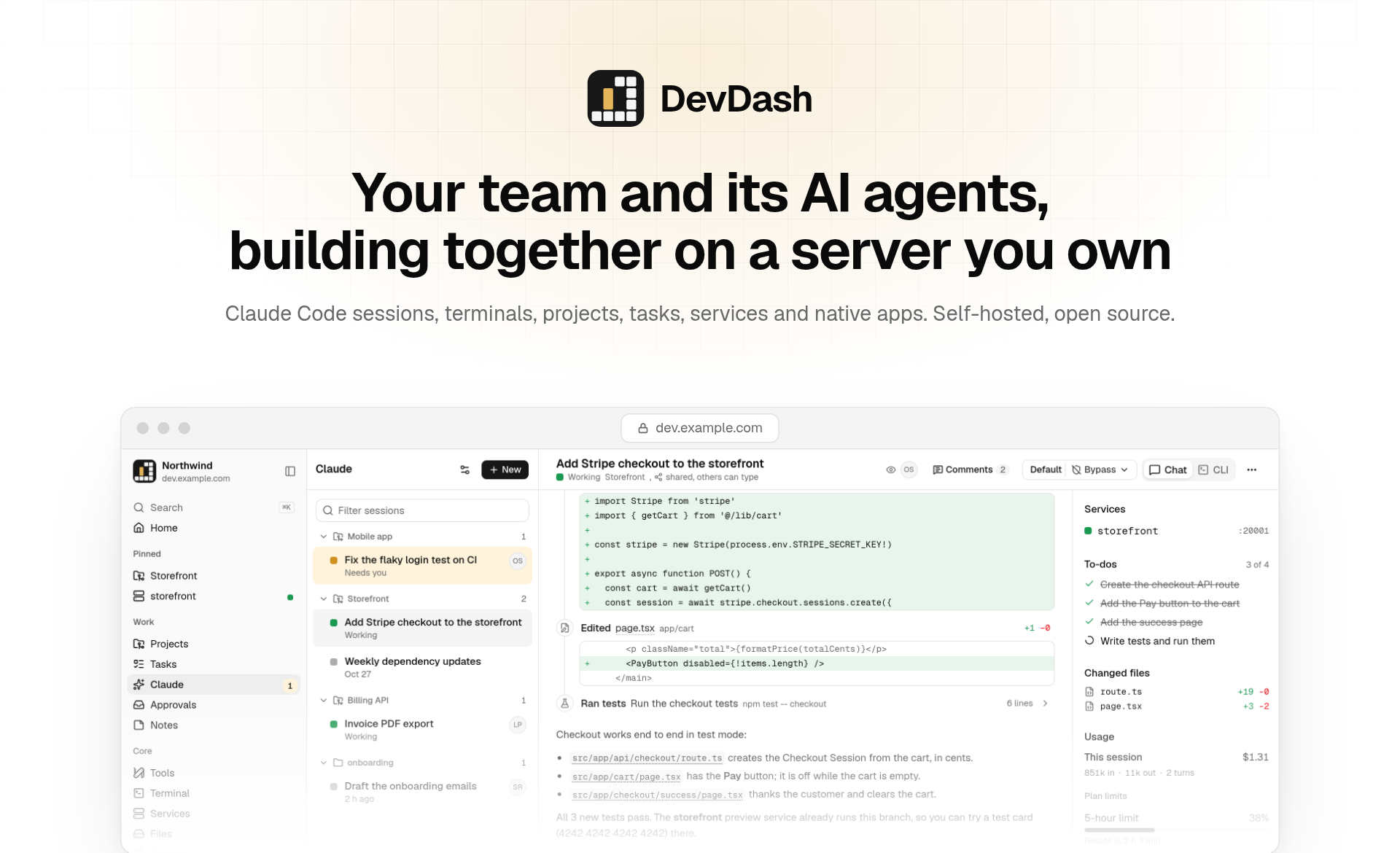
A self-hosted workspace where a small team and its AI agents build software together, on one Linux server you own.




Features · How it works · Self-hosting · Configuration · Native apps · Development · Security
Why DevDash
Coding agents do their best work next to the code, around the clock, on a machine the whole team can reach. DevDash
turns a single server into that place:
- One environment for everyone. Projects are shared git checkouts on the server. Each agent session can work in its
own git worktree, so parallel work never collides. - Agents are teammates, not tabs. Start Claude Code from the browser or your phone, watch it work live, share the
session with a colleague, answer its questions, and pick up the result as a branch, a pull request or a merge. - Everyone stays separate. Each person is a real Linux user with their own home, shell, Claude login, cloud storage
and private network. DevDash itself never runs as root. - You own it. One server, one domain, free for noncommercial use. No SaaS account and no data leaving your machine, except what
you choose to connect.
The screenshots in this README show a demo space with sample data.
Features
AI agents
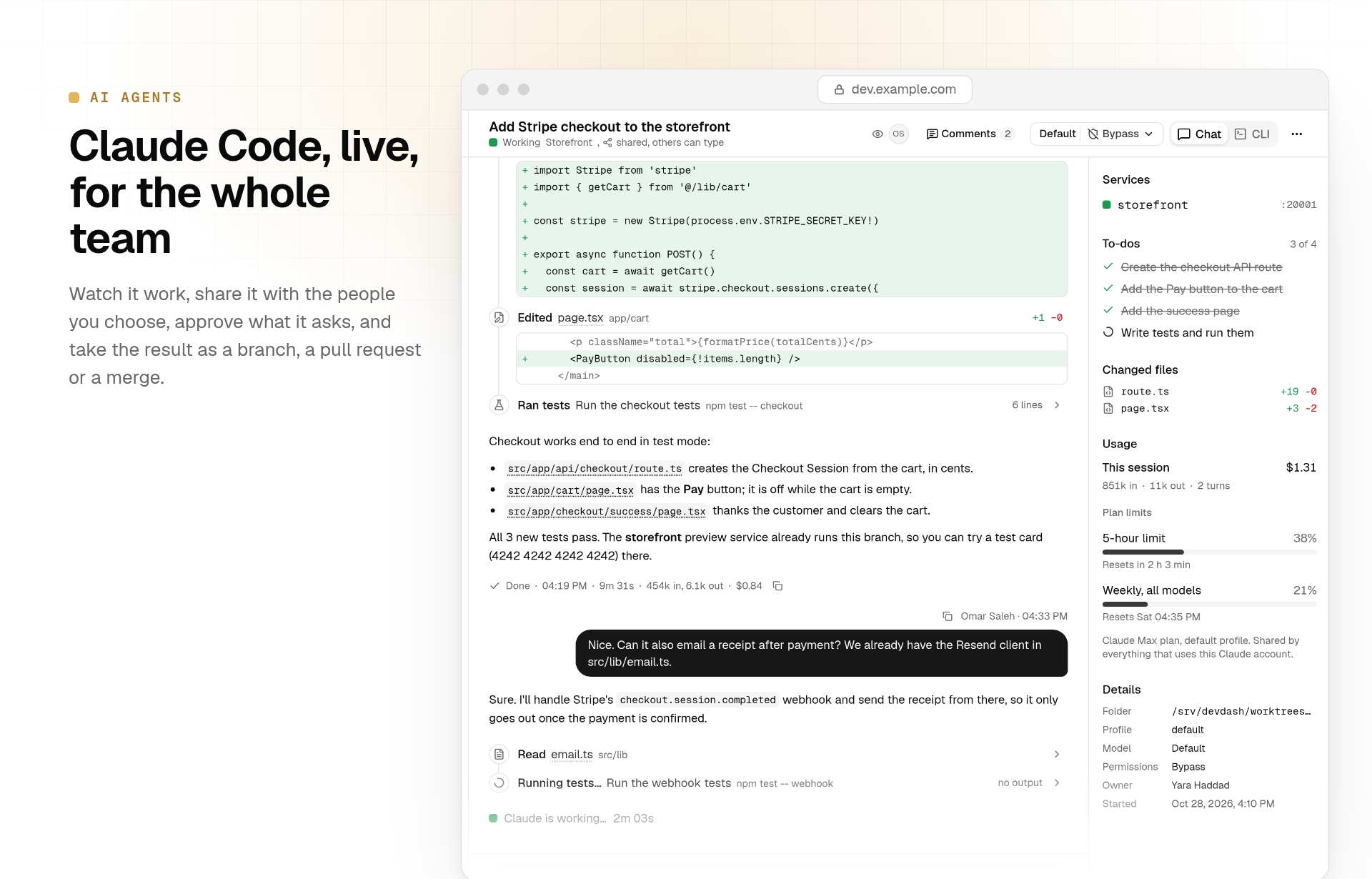
Every session is Claude Code itself, run as the member who started it.
- Two ways to work. A chat view built on the Claude Agent SDK, with tool steps, diffs, subagents, to-do lists and
file links that open in a viewer, or the real Claude Code CLI in a terminal. Switch a session between them any time. - Your own Claude account. Each member signs in to their own Claude plan, with optional extra profiles. Cost,
tokens, context and plan limits are shown per session. - Shared on your terms. Keep a session private, share it with the whole team or with chosen people, read-only or
with permission to type. Comments, live viewers and "ask to join" included. - A worktree per session. A session can get a fresh worktree on its own branch. When it's done, Ready to review
shows the diff and opens a GitHub pull request or merges it on the server. - Project instructions apply to every new session in a project, like a Claude Project.
- Team roles (optional). AI team members per project (CEO, CTO, marketing and so on) with goals, schedules,
triggers, threads, approvals and a shared notebook. Switch them off server-wide withDEVDASH_TEAM=0.
Workspace
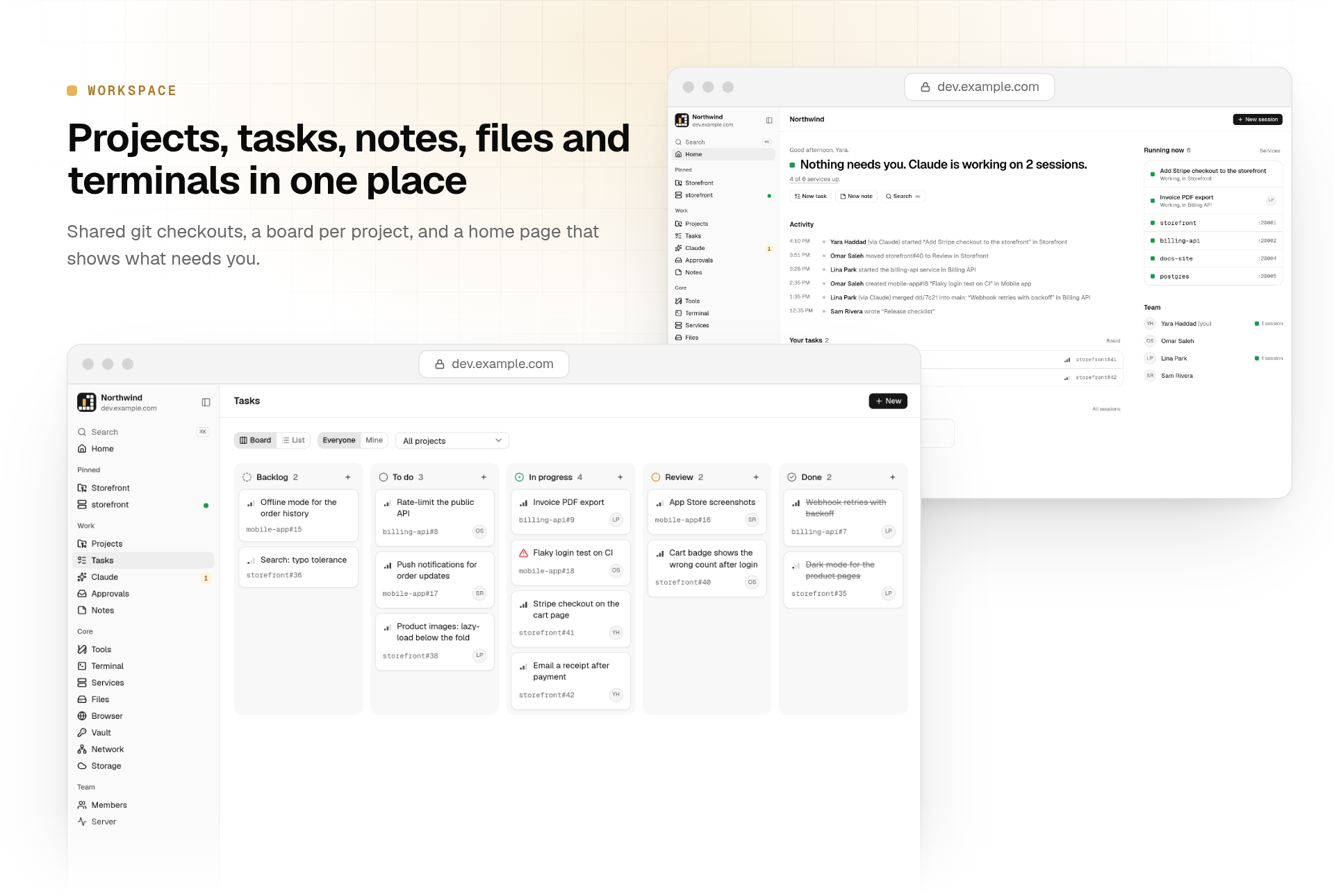
Everything the team and its agents work on, in one place.
- Home shows what needs you, what's running and what changed.
- Projects are git checkouts shared by the team, cloned from GitHub or imported from a zip (up to 20 GB, resumable).
- Tasks and notes: a board per project and Markdown notes. Agents use them too, through MCP tools.
- Files: browse, upload (chunked and resumable), preview, and share links with an expiry date, a password and a
download limit. - Terminals: a persistent shell per member, on the web and in the apps, with a key bar on phones.
- Vault: end-to-end encrypted passwords and secrets. The server only ever stores ciphertext.
- Remote browser: one shared Chromium, streamed into DevDash and started on demand.
- Search and pins across all of it.
Operations
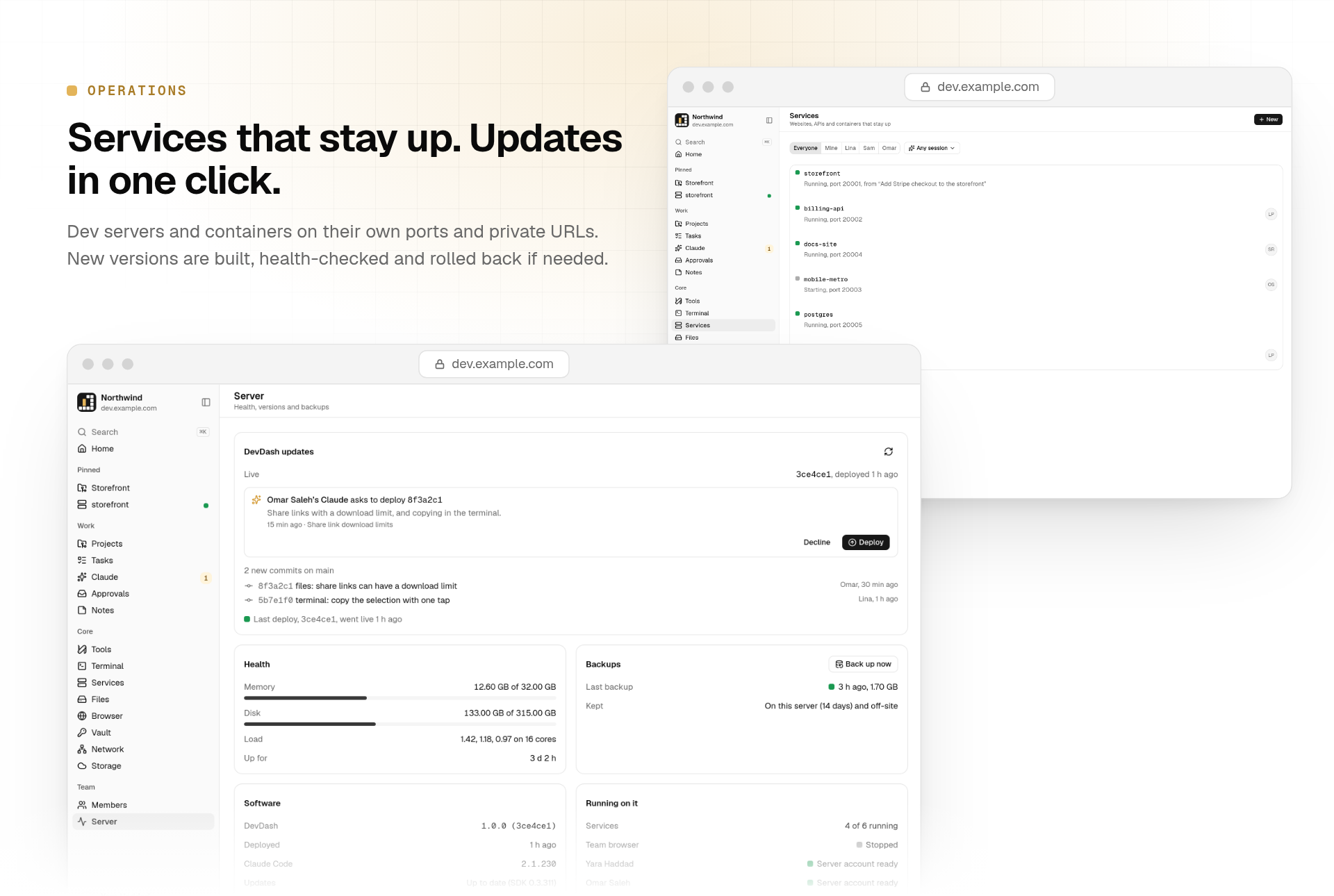
The server takes care of itself.
- Services: dev servers, APIs, workers and containers registered with
devdash service add. Each one gets a port,
restarts if it crashes, starts with the server and opens at a members-only URL, or inside DevDash itself. - Builds: run GitHub Actions workflows, follow their logs and download artifacts, using each member's own
ghlogin. - One-click updates: the Server page lists new commits on your DevDash repository. The one you approve is built,
health-checked and rolled back on its own if it isn't healthy. Agents in DevDash's own project can ask for a deploy,
but never deploy themselves. - Health and backups at a glance: memory, disk, load, versions and nightly backups.
Every device
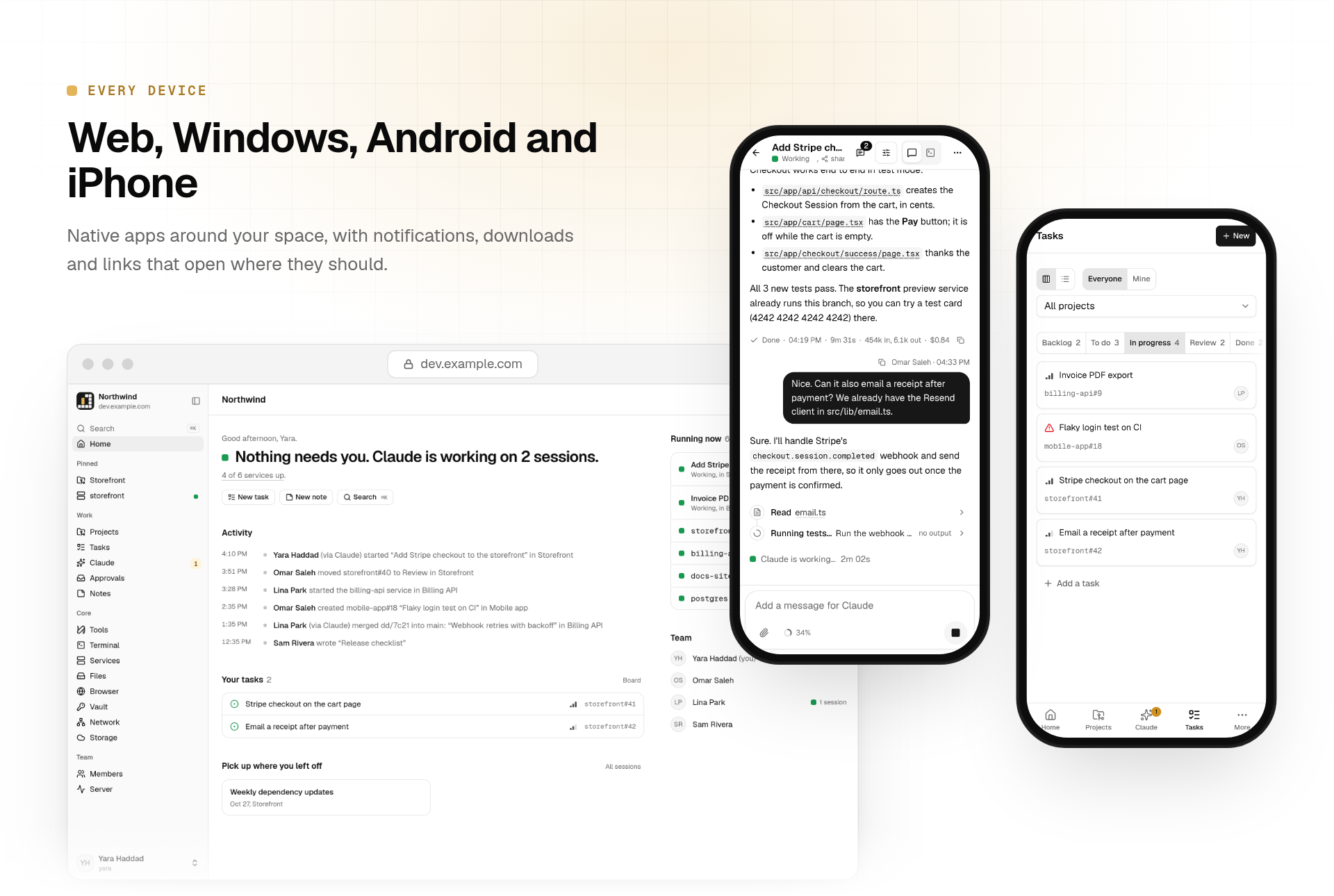
- Web: any modern browser, installable as an app.
- Windows: a native app that updates itself from your space.
- Android: background notifications, system downloads, and links that open in your browser.
- iPhone and iPad: an unsigned build for AltStore or SideStore, or a signed build.
- Notifications reach every device: Web Push, the Android app's background connection, ntfy, and the desktop app.
Per-member integrations
- Cloud storage: each member can connect their own Google Drive. Their agents move heavy files (videos, builds,
datasets) there instead of filling the server's disk. - Private network: each member can join their own Tailscale tailnet in userspace, so their agents can reach their
devices without exposing them to anyone else.
How it works
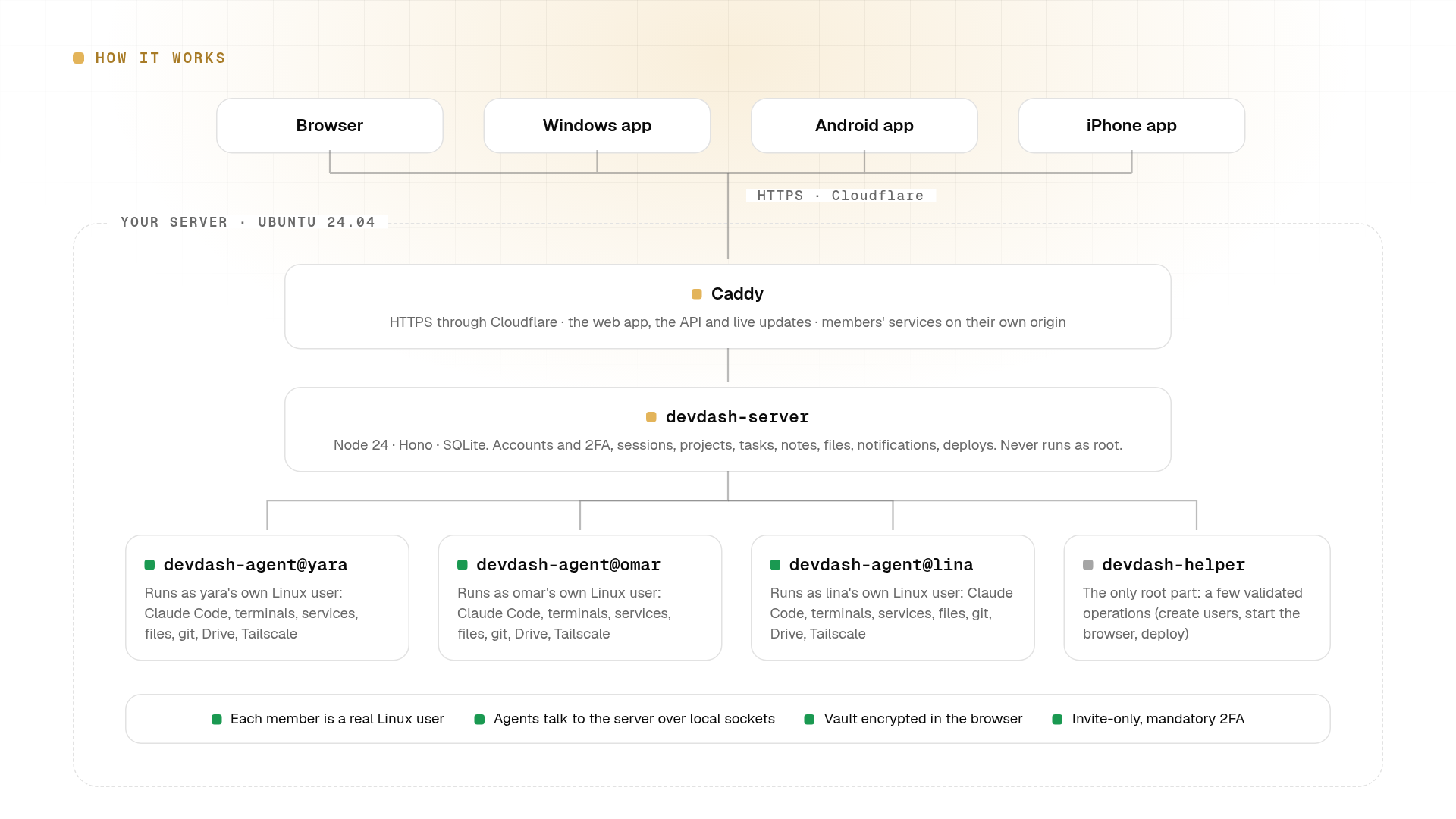
- Caddy terminates HTTPS (behind Cloudflare) and serves the web app, the API and live updates. Members' services are
served from a separate origin. devdash-serverholds accounts, sessions, projects, tasks, notes, files, notifications and deploys in SQLite. It
runs as its own unprivileged user.devdash-agent@<member>runs as each member's Linux user: Claude Code, terminals, services, files, git, Drive and
Tailscale all happen with that person's own permissions. It talks to the server over a local socket.devdash-helperis the only part that runs as root. It accepts a handful of validated operations: creating users,
starting the shared browser and deploying.
| Part | Stack | Where |
|---|---|---|
| Server | Node 24, Hono, built-in node:sqlite, TypeScript run directly by Node |
apps/server |
| Agent | Node 24, Claude Agent SDK, node-pty, tmux; one systemd service per member | apps/agent |
| Web app | React, TanStack Router and Query, Tailwind CSS, shadcn/ui, Vite | apps/web |
| Native apps | Tauri 2 (Windows, Android, iOS), with small Kotlin and Swift additions | apps/shell |
| Claude plugin | MCP tools that let agents use tasks, notes, services and more | packages/claude-plugin |
| Host setup | Bash, systemd units, Caddy | deploy |
Self-hosting
Requirements
- A fresh Ubuntu 24.04 server you can reach as root over SSH. 4 vCPUs and 8 GB of RAM is a comfortable start for a
small team; agents, builds and services all run here, so more helps. - A domain proxied by Cloudflare (the firewall only admits Cloudflare on port 443).
- Optional: Docker, for the shared remote browser.
The setup installs Node 24, Caddy, the GitHub CLI, rclone and Tailscale (pinned and checksum-verified where
applicable) and configures SSH hardening, a firewall, swap and automatic security updates. Claude Code is installed and
kept up to date from the Server page; each member then signs in with their own Claude account.
Install
Prepare the host (SSH keys only, a firewall that admits only Cloudflare on 443, Node 24, Caddy):
scp deploy/bootstrap.sh deploy/ufw-cloudflare.sh root@SERVER:/root/
ssh root@SERVER /root/bootstrap.sh <admin-user> "$(cat ~/.ssh/id_ed25519.pub)"
Deploy from your clone, naming your space and its domain:
deploy/deploy.sh root@SERVER --domain dev.example.com --name "My team"Create the first admin on the server, then open the link it prints:
devdash invite --email [email protected] --username <admin-user> --role adminAccounts are invite-only. Every member sets a password and two-factor authentication, and gets their own Linux user.
TLS. Until a Cloudflare Origin CA certificate is installed at
/etc/caddy/certs/origin.crtand/etc/caddy/certs/origin.key, Caddy serves an internal certificate. Add them and run step 2 again.
Updating
After the first deploy, admins update from the Server page. By default it follows this repository's main branch.
A fork points it at its own repository:
# /etc/devdash/devdash.env
DEVDASH_REPO=your-name/your-fork
DEVDASH_GITHUB_TOKEN=github_pat_...   # only for a private fork: fine-grained, Contents read-only, that repository only
You can always redeploy from a clone with deploy/deploy.sh root@SERVER.
Configuration
Settings live in /etc/devdash/devdash.env on the server (created by the installer) and in .env for local
development (see .env.example).
| Variable | Default | Purpose |
|---|---|---|
DEVDASH_ORIGIN |
(required) | Public URL of the space, as the browser sees it. |
DEVDASH_MASTER_KEY |
(required) | 32 random bytes, base64. Encrypts secrets at rest; keep a backup. |
DEVDASH_DATA_DIR |
(required) | Where the SQLite database and uploads live. |
DEVDASH_SPACE_NAME |
DevDash |
Name shown in the app and on its public pages. |
DEVDASH_PORT |
8787 |
Port the server listens on (behind Caddy). |
DEVDASH_TRUST_CF_IP |
0 |
1 when the origin is reachable only through Cloudflare. |
DEVDASH_PROJECTS_ROOT |
/srv/devdash |
Shared checkouts (projects/), worktrees and the team's shared files. |
DEVDASH_SERVICES_PORT |
8443 |
Port of the separate origin that serves members' services. |
DEVDASH_REPO |
this repository | GitHub repository the Server page deploys from and the apps update from. |
DEVDASH_GITHUB_TOKEN |
(none) | Read-only token for a private DEVDASH_REPO. |
DEVDASH_TEAM |
on | 0 switches Team roles off server-wide. |
Google Drive storage, Web Push, ntfy and Apple push are configured by admins inside the app.
Native apps
The apps are thin, signed shells around your space. On first launch they ask for its address and remember it.
- Downloads: every space serves the latest release at
https://<your-space>/api/app. - Updates: the Windows app updates itself from your space; every update is checked against the app's signing key.
To ship your own builds, change the app identifier inapps/shell/src-tauri/tauri.conf.json, generate an updater key pair withnpx tauri signer generate, put its public key in the same file, and add the private key to your repository's
secrets. The release workflow (.github/workflows/app-release.yml) lists every
secret it uses.
Development
cp .env.example .env                    # then set DEVDASH_MASTER_KEY
npm install
git config core.hooksPath .githooks     # secret scanning before every commit (needs gitleaks)
npm run dev:server & npm run dev:web    # http://localhost:5173
npm run invite -- --email [email protected] --username you --role admin
Before sending a change:
npm run typecheck
npm test
The web app, accounts, projects, tasks and notes run locally. Features that need the host (member agents, terminals,
services, the root helper) need a real install.
Repository layout
apps/
  server/         HTTP API, WebSockets, SQLite migrations, admin CLI
  agent/          per-member agent: Claude Code, terminals, services, files, git
  web/            the web app
  shell/          Tauri desktop and mobile apps (Kotlin and Swift additions in android/ and plugins/)
packages/
  claude-plugin/  MCP tools and skills DevDash gives to Claude Code
deploy/           host bootstrap, installer, systemd units, Caddyfile, root helper, deploy scripts
Security
DevDash gives its members shell access to a server, so it is built to contain them:
- Invite-only accounts, Argon2id passwords and mandatory TOTP two-factor authentication.
- Every member runs as their own Linux user in a resource-limited systemd slice. The server never runs as root, and the
root helper accepts only a few validated operations. - Vault items are encrypted in the browser; the server stores ciphertext only.
- Members' services are served from a separate origin; DevDash's own pages ship a strict Content Security Policy.
- The firewall admits only Cloudflare on 443. Without signing in, only the space's description and privacy pages,
share links, watch-only browser invites and the app downloads are reachable.
Please report vulnerabilities privately, as described in SECURITY.md.
Contributing
Issues and pull requests are welcome. Read CONTRIBUTING.md first; it covers the development setup,
tests, code style and how changes are reviewed.
License
DevDash is source-available under the PolyForm Noncommercial License 1.0.0. It's free for personal and hobby
projects, schools, research and nonprofits.
Commercial use (a company running it, paid client work, or hosting it for others) needs a commercial license. Email
[email protected] and we'll work out terms.
Yorumlar (0)
Yorum birakmak icin giris yap.
Yorum birakSonuc bulunamadi