marka
Health Gecti
- License — License: AGPL-3.0
- Description — Repository has a description
- Active repo — Last push 0 days ago
- Community trust — 12 GitHub stars
Code Basarisiz
- os.homedir — User home directory access in .claude/skills/impeccable/scripts/context.mjs
- process.env — Environment variable access in .claude/skills/impeccable/scripts/context.mjs
- network request — Outbound network request in .claude/skills/impeccable/scripts/context.mjs
- process.env — Environment variable access in .claude/skills/impeccable/scripts/critique-storage.mjs
- exec() — Shell command execution in .claude/skills/impeccable/scripts/design-parser.mjs
Permissions Gecti
- Permissions — No dangerous permissions requested
Bu listing icin henuz AI raporu yok.
Everything you want to come back to. A self-hosted library for bookmarks, watchlists, wishlists, notes, and files.

Everything you want to come back to.
Your self-hosted personal library for the links, watchlists, wishlists, notes, and files worth remembering.





Marka is a self-hosted personal library for everything you want to remember or revisit, not just browser bookmarks. Keep the things that would otherwise be scattered across apps, tabs, and devices in one visual library you control.
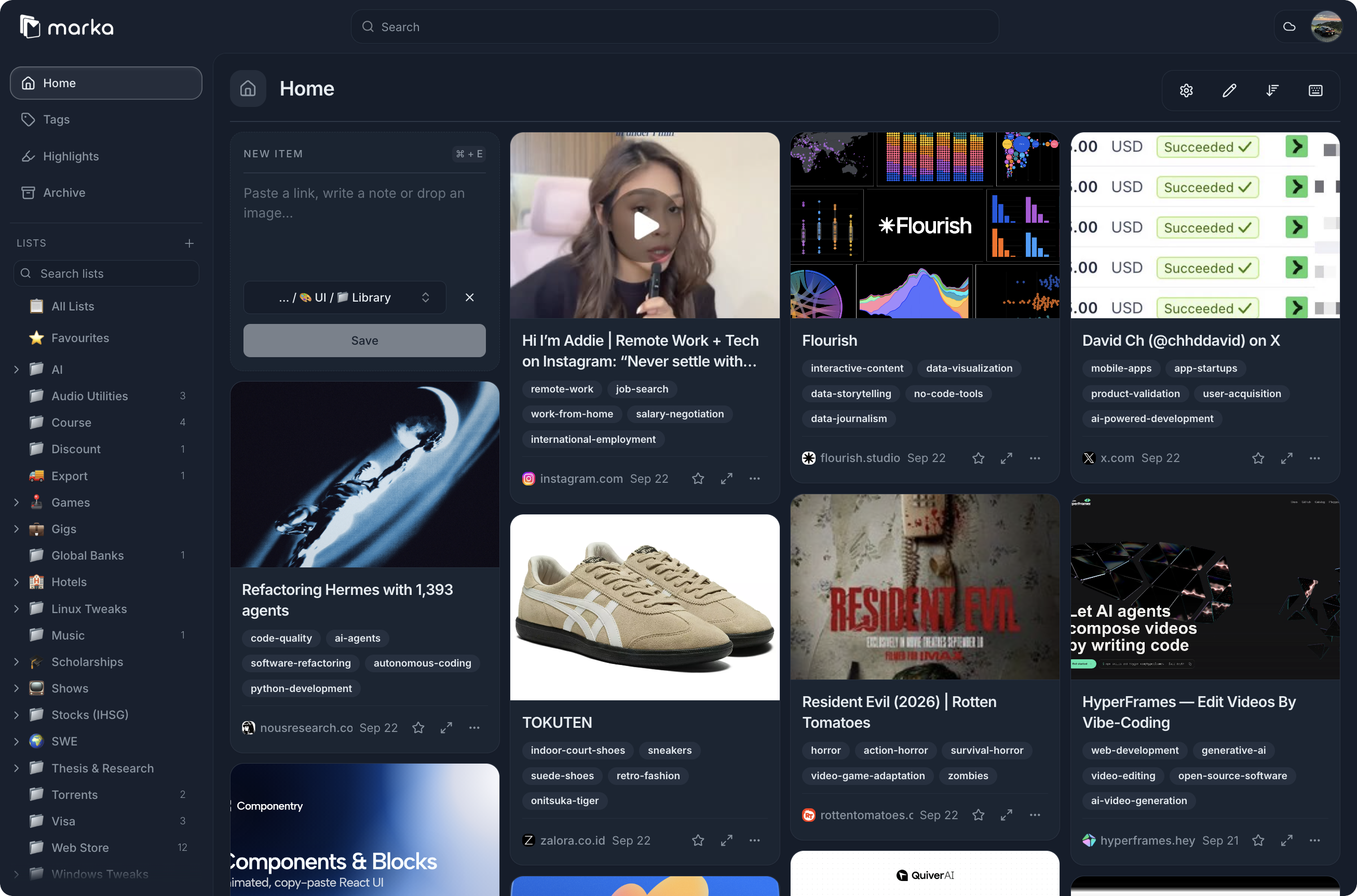
One place for the things you save everywhere
Maybe it is a movie you want to watch, a product you might buy, a TikTok place or hotel, an Instagram career tip, an engineering article, a UI reference, or course material you will need again. Marka brings those saved things together so they do not become a pile of forgotten links.
Save it
Save links, notes, images, PDFs, and web pages in one library. Bring material in through the browser extension, RSS, CLI, API, and MCP tooling.
Keep the context
Marka can retain titles, descriptions, previews, screenshots, archived content, tags, highlights, and readable page content. Later, you can recognize why something mattered without reopening every source.
Rediscover it
Browse visual cards, organize with lists, tags, rules, and sharing, then search across your saved material when you need it. Optional AI tagging and summaries can help you get the point before reading the whole thing again.
Keep it yours
Run Marka on your own infrastructure and use the library through the web app and PWA. Your saved material stays in the setup you control.
Start here
Connect an AI agent
Install Marka's agent skill, then configure the official CLI to access your
instance:
npx skills add absolutepraya/marka
npm install --global @absolutepraya/marka
marka auth init
Create an API key in your Marka instance under Settings > API Keys. Duringmarka auth init, enter your instance address and key. The CLI stores the
key locally with file mode 0600; verify the connection withmarka whoami. Skill installation provides agent instructions only. See the
agent integration guide for
environment-based setup and the REST API option.
Self-host Marka
For a Linux amd64 host with Docker Engine, Docker Compose v2, and OpenSSL already installed:
curl -fsSLo /tmp/marka-setup.sh https://raw.githubusercontent.com/absolutepraya/marka/main/scripts/install.sh && bash /tmp/marka-setup.sh
The guided installer configures the application, search, browser rendering, and optional AI. It writes secrets to restricted env files, validates the generated Compose stack, and starts the deployment.
The default listener is 127.0.0.1:3000. For an Internet-facing deployment, put a reverse proxy with TLS in front of it. The installer does not install Docker, configure DNS, change firewall rules, or provision certificates.
For reproducible setup, replace main with a reviewed release tag or commit SHA:
REF=<tag-or-commit-sha>; curl -fsSLo /tmp/marka-setup.sh "https://raw.githubusercontent.com/absolutepraya/marka/${REF}/scripts/install.sh" && bash /tmp/marka-setup.sh
Read the guided installation guide for all configuration modes and rollback details.
Marka web and workers releases share an annotated vMAJOR.MINOR.PATCH Git tag.
The production Compose file and guided installer follow the paired stable
channel. Each release also keeps immutable version and source-commit image tags
so operators can roll back web and workers together.
After a successful CI run on main, the automatic release workflow classifies
the merged Conventional Commit messages. It creates the next annotated release
tag only for release-worthy changes, then the tag workflow publishes the paired
images and GitHub Release. Documentation-only and other explicitly non-release
changes do not create a version. Package manifest versions remain independent.
Develop Marka
Start with CONTRIBUTING.md for contribution rules and docs/operator-setup.md for local development and deployment workflows.
Runtime prerequisites
The supported local development runtime is:
- Node.js 24.18.1 from
.nvmrc - pnpm 11.25.0 through Corepack, as pinned in
package.json - Git and a Docker-compatible runtime, such as OrbStack on macOS
wtfor isolated worktrees
After the repository is configured, the normal development command is:
pnpm dev:start
pnpm dev:start runs this worktree's web and workers with local Browserless at 127.0.0.1:9251 and Meilisearch at 127.0.0.1:7700. The renderer image matches the personal production renderer. Defaults are WORKER_PROFILE=screenshot-first, CRAWLER_NUM_WORKERS=2, and on-demand browser connections. Set BROWSER_REUSE_CONNECTION=true to test reuse locally. Startup waits for web health and worker readiness. Each worktree keeps separate SQLite/assets, web/worker ports, and search indexes.
Use pnpm dev:test:browserless for opt-in lifecycle validation against the local renderer, or add --with-baseline for a matched sequential connection comparison.
Native development uses macOS workers with hot reload. It reproduces the crawler connection path, but does not establish Linux binary or VPS memory parity. See operator setup for the isolated Linux development stack and optional integrations.
The repository is supported by wt:
wt new ui-polish
wt ls
The project configuration in .wt/config.toml prepares isolated
dependencies, data, ports, and Meilisearch namespaces for each worktree. WT and T3
share lifecycle logic in scripts/dev-worktree.sh. WT
and T3 both run the target worktree's copy so setup tracks that checkout. Each tool keeps its own allocation rules.
T3 Code can import the project actions in t3.json through Project
settings. Its automatic Setup worktree action preserves existing local state or copies the main local snapshot, prepares the isolated environment, and starts the detached server. Production state pulls are explicit.
Pull production state into local development
Use the safe dry run first:
pnpm prod:pull-state --dry-run
The command reads the root .env, connects to the personal VPS, and replaces the current worktree's local data only when run without --dry-run. It backs up the existing DATA_DIR before restoring the full production /data volume.
The personal VPS compose project is /home/praya/marka, configured through KARAKEEP_PROD_COMPOSE_DIR. The service and export image have documented defaults in the script, while machine-specific values belong in .env and must not be committed.
Roadmap
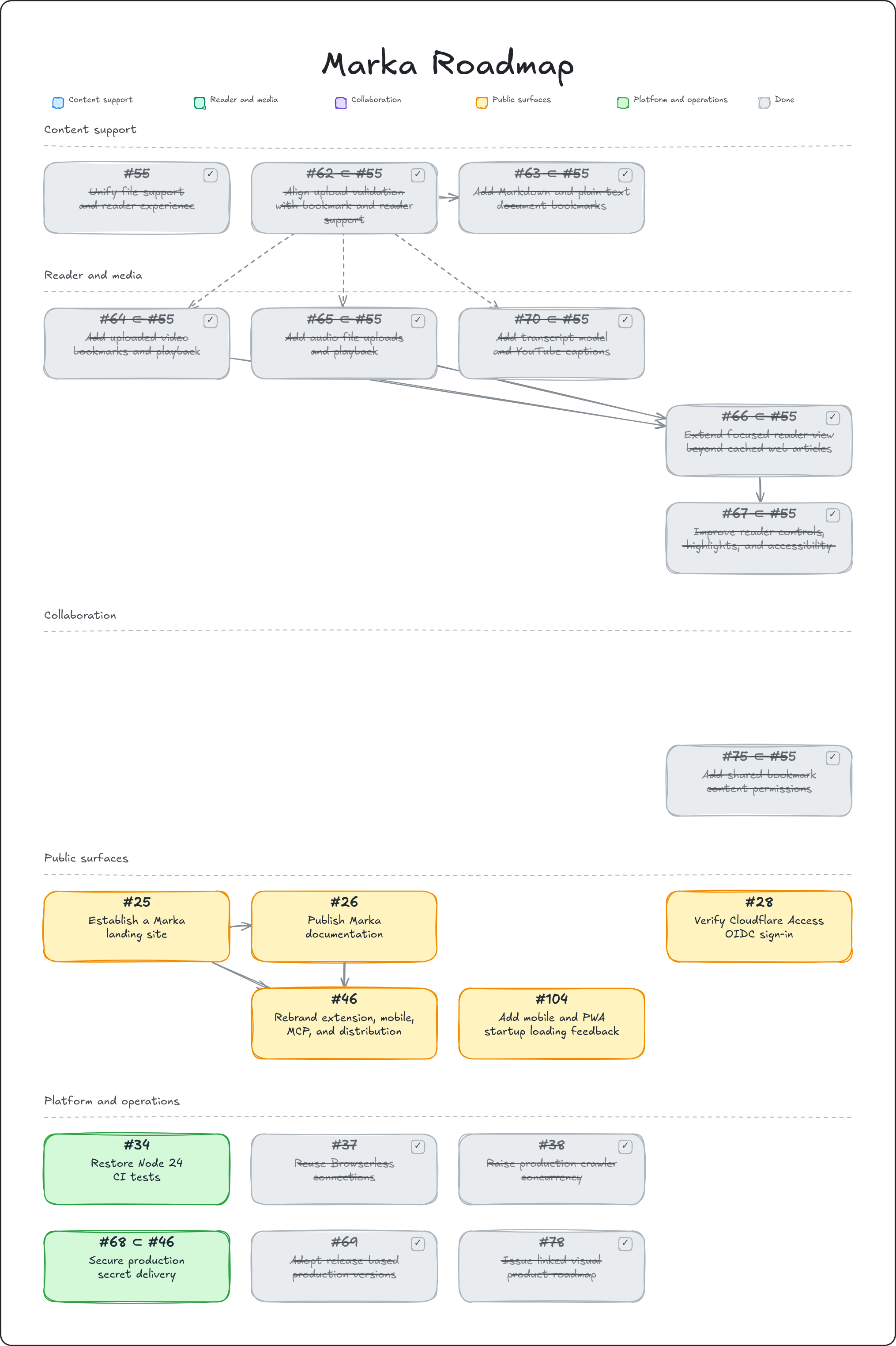
Open the editable Excalidraw source
License
Marka is licensed under AGPL-3.0.
Attribution
Marka builds on the open-source Karakeep project.
Yorumlar (0)
Yorum birakmak icin giris yap.
Yorum birakSonuc bulunamadi