Achbit
Health Uyari
- License — License: MIT
- Description — Repository has a description
- Active repo — Last push 0 days ago
- Low visibility — Only 9 GitHub stars
Code Basarisiz
- rm -rf — Recursive force deletion command in build.sh
Permissions Gecti
- Permissions — No dangerous permissions requested
Bu listing icin henuz AI raporu yok.
A secure, lightweight, local-first AI assistant with GUI, CLI, and TUI interfaces, multiple model providers, and extensible tools, skills, and MCP integrations.

Download · DeepSeek setup · Examples · English · 简体中文
Achbit
Achbit is a local-first coding agent with a desktop GUI, TUI, and CLI. Read and edit a project, run commands, work in a browser, and inspect the result in one conversation.
Connect your preferred model service, then extend the agent with Skills, CLI tools, MCP, and plugins. The AC mark recalls “Accepted” in programming contests.
Overview · Quick start · Computer Use · Terminal · Plugins · Architecture · Build · Documentation
See it in action
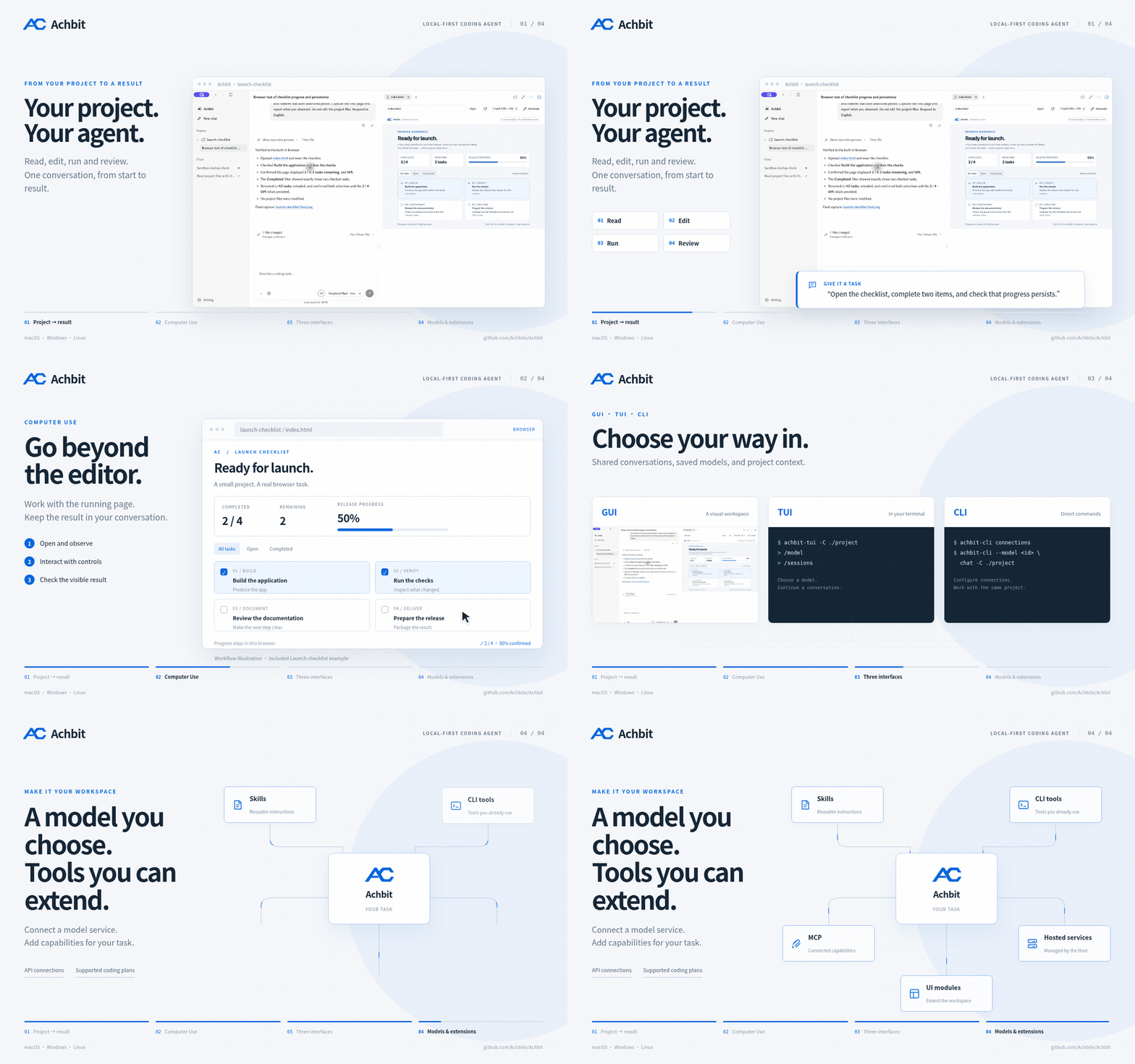
A 24-second workflow overview, combining an actual Achbit interface screenshot with illustrated browser interactions and terminal commands. Watch / download MP4 · Animation source
What you can do
| Work you want to do | How Achbit helps |
|---|---|
| Understand and change a project | Read files, edit code, run commands, and review results in one conversation. |
| Check a running interface | Use the built-in browser, Chrome DevTools MCP, or native macOS / Windows tools to observe and interact with applications. Computer Use → |
| Work from the desktop or terminal | GUI, TUI, and CLI share conversations and saved model connections. Terminal → |
| Choose a model service | Connect supported APIs, local Ollama, or supported Coding Plans. Model profiles keep your endpoint and capability settings. Models & services → |
| Bring your own tools | Add Skills, CLI tools, MCP servers, hosted services, and UI modules. Import or update plugin ZIPs from settings. Plugins → |
| Keep useful work with its result | Inspect files, tool output, browser previews, and generated deliverables alongside the conversation. Try a complete task → |
Start with a small task, then continue in the same conversation: read the project → make a change → open the page → inspect the result.
Quick start
Download a package from Releases.
| Platform | Start Achbit |
|---|---|
| macOS Apple Silicon | Install the .pkg, then open ~/Applications/Achbit.app, or open Achbit.app from the portable archive. |
| Windows x64 | Run the Setup installer, or open Achbit.exe from the portable ZIP. |
| Linux | Run the executable .AppImage for your architecture, or extract the tar archive and run ./Achbit. |
- Open Settings → Models & services and add an API connection or supported subscription. DeepSeek setup →
- Choose a project folder and a model.
- Give it a task: “Read this project's README, explain its entry points, and cite the files you read.”
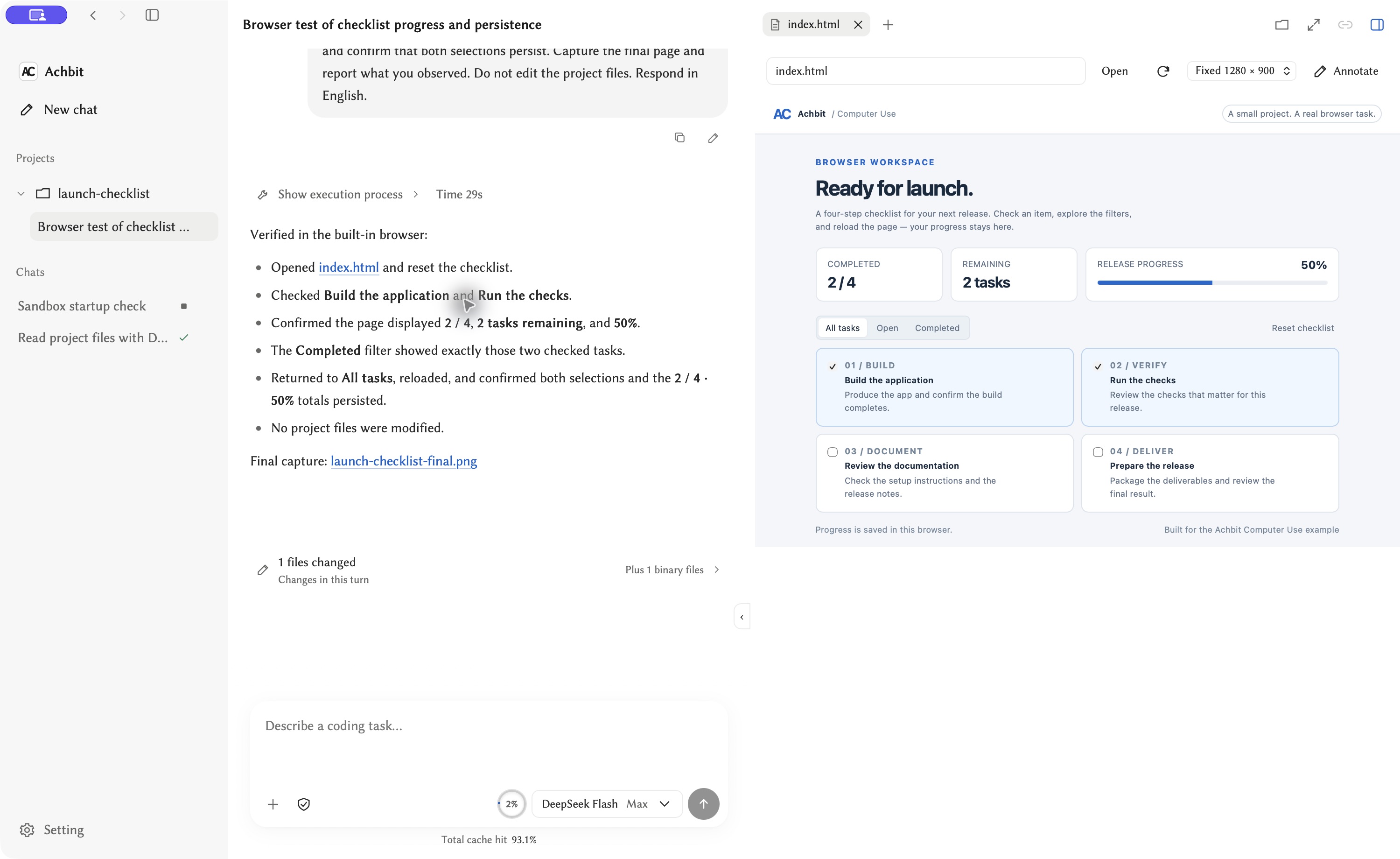
The navigation holds your projects and conversations. Tool results stay with the conversation; files and browser previews open beside it.
Packages include their runtime. See platform requirements and installation for WebView2, Linux desktop dependencies, and the packages available for each release.
Starting with 0.6.61, application data directories, environment variables and integration identifiers use Achbit names. A default first launch uses a new data directory; previous data and credentials are left untouched and are not automatically imported. See the data directory guide when configuring launchers or integrations.
Computer Use
Move from code to its running interface. Achbit can open project pages in its built-in browser, inspect their contents, interact with controls, and capture the result. Chrome DevTools MCP and native macOS / Windows interaction provide additional ways to work with applications.
Try the Launch checklist project. It is a single HTML page with four tasks, filters, and saved progress. No installation or server is required.
Open index.html in the built-in browser. Check two tasks, confirm 2 / 4 and 50%, filter the completed items, then reload and verify that the selections persist.
Open examples/launch-checklist as a project and use its full prompt. For a task that also creates a deliverable, see the DeepSeek browser research example.
See Computer Use and Chrome integration for platform support and permissions.
Terminal
After installing the macOS PKG or Windows Setup, run:
achbit-cli connections
achbit-cli --model <profile-id> chat -C /path/to/project
achbit-tui -C /path/to/project
Copy the saved profile ID from connections. In TUI, use /model to choose a model and /sessions to continue a conversation. GUI, TUI, and CLI share connections and Session state. Portable launchers are listed in the distribution guide.
Plugins
Open Settings → Plugins → Marketplace to search by name, author or type. Expand a result to see its source commit, license and any verification record. Download from author opens the version supplied by the publisher. Public plugin directory
Import an external plugin from Settings → Plugins → Installed → Add…, selecting its ZIP, directory or manifest. Achbit recognizes CLI tools (achbit-tool.json), hosted services (achbit-service.json), display modules (achbit-ui.json) and Skills (SKILL.md). MCP servers use the existing MCP settings. ZIP packages are extracted and validated by the Host before installation or update.
Plugins use shared discovery, invocation and cleanup protocols. A hosted service starts when enabled and releases its process/port when disabled; a compatible model endpoint is configured through the usual model connection settings. Task tools and context are assembled before model requests, keeping optional capabilities separate from the main Loop.
See the complete plugin development rules for artifact layout, manifest fields, stdin/stdout contracts, lifecycle, file transport and validation. This describes generic extension contracts and does not add experimental plugins to the built-in catalog.
How it fits together
| Part | Responsibility |
|---|---|
| Session | One agent loop for model turns, context, waiting, cancellation, and conversation history. |
| Kernel | Tool execution, permissions, results, and resource lifetimes. |
| GUI, TUI, CLI | Interfaces over the shared Session projection. |
| Plugins and Skills | Capabilities discovered and activated for the task. |
File operations can run together when their dependencies permit it. Long-running commands retain their running state, so later work waits for the result it needs. Computer Use follows the same tool and conversation lifecycle.
Build from source
Install Docker and GNU Make. On Windows, use WSL2 with Docker integration. macOS native packaging also needs Xcode Command Line Tools, the repository's Rust toolchain, and Node.js.
On the host:
git clone https://github.com/Achbite/Achbit.git
cd Achbit
# macOS only, once before building:
bash scripts/setup-macos-signing.sh
make shell
make shell automatically checks and updates the development image before entering. Docker reuses unchanged layers and rebuilds affected layers when the Dockerfile, entrypoint or image build arguments change. No separate image-update command is needed.
Skip the signing command on Windows and Linux. Inside the container:
bash ./build.sh           # Runnable build for the development host
bash ./test.sh required  # Standard checks
Return to the host and open the program in bin/macos-arm64, bin/win64, or the matching Linux directory. Use bash ./build.sh --stage package when you need archives and installers. See development and validation for individual targets and Debug builds.
Documentation
- Models, subscriptions, and usage
- Conversations, settings, and extensions
- Plugin development and protocols
- Workspace environments and permissions
- Installation, updates, and local data
- Examples
Project files and conversation records are stored locally. Prompts, selected context, and images are sent to your configured model service; connected tools may contact their own services.
License
Yorumlar (0)
Yorum birakmak icin giris yap.
Yorum birakSonuc bulunamadi