machinectl
Health Uyari
- License — License: MIT
- Description — Repository has a description
- Active repo — Last push 0 days ago
- Low visibility — Only 5 GitHub stars
Code Basarisiz
- rm -rf — Recursive force deletion command in examples/cloudflare-worker-relay/package.json
- network request — Outbound network request in examples/cloudflare-worker-relay/src/index.ts
- network request — Outbound network request in examples/cloudflare-worker-relay/src/machine-host.ts
- network request — Outbound network request in examples/codemode-control/app/src/main.ts
- rm -rf — Recursive force deletion command in examples/codemode-control/package.json
Permissions Gecti
- Permissions — No dangerous permissions requested
Bu listing icin henuz AI raporu yok.
MCP server that lets AI control your machine — anywhere, from any device. Full audit logging, real-time activity feed, and cross-platform tools. Works with any MCP-compatible client.
machinectl
Control your computer from any device, securely.
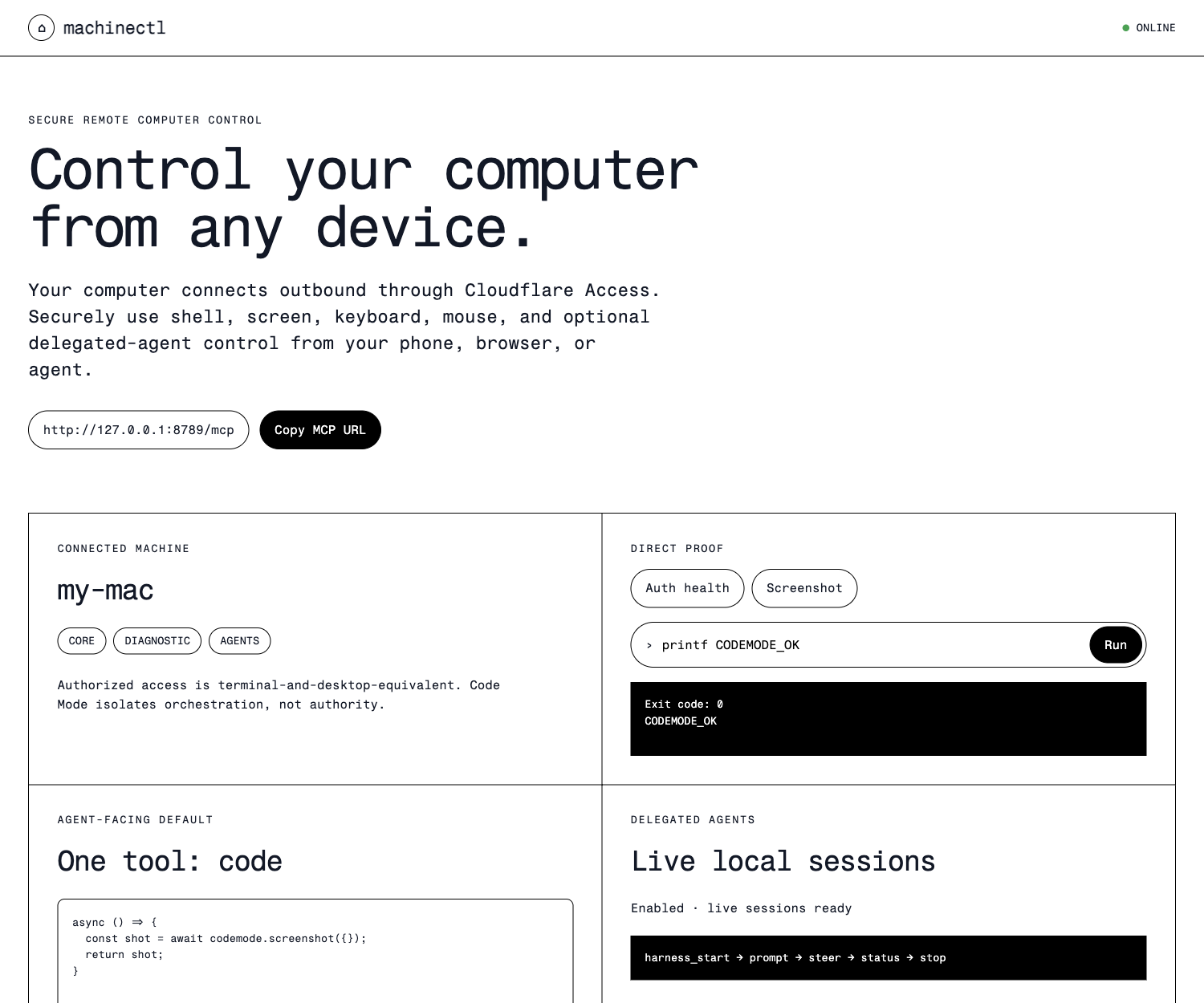
The repository includes this thin Code Mode control client for local proof or private deployment behind an Access policy you control. There is no shared hosted demo.
machinectl turns a laptop into an authenticated MCP-controlled machine over an outbound WebSocket connection. From a phone or another agent client, you can run shell commands, view and control the desktop, and optionally drive local delegated-agent harness sessions. pi is the first adapter.
phone / MCP client
        │ authenticated through your relay
        ▼
Cloudflare Access + Worker relay
        │ outbound WebSocket opened by your laptop
        ▼
machinectl daemon on your computer
        ├── shell / screenshot / mouse / keyboard / input_sequence / accessibility_query / accessibility_action
        ├── local_auth_status
        └── optional delegated-agent harness sessions
No inbound listener on your laptop. No public tunnel to your desktop. When the daemon disconnects, its tools disappear from the relay.
Security: this is intentionally powerful. Anyone allowed to invoke your connected relay can execute commands as your local user and operate your visible desktop. Only run it behind authentication you control and trust.
What you can do
| Capability | Tool | Examples |
|---|---|---|
| Terminal access | shell |
Files, git, builds, scripts, installed CLIs, clipboard/notifications via platform commands |
| See the computer | screenshot |
Capture a compressed preview by default, or an exact PNG on request |
| Control the computer | mouse, keyboard, input_sequence |
Move/click/scroll, type text, issue shortcuts, or batch latency-sensitive input |
| Query semantic UI | accessibility_query, accessibility_action |
Find and activate bounded macOS accessibility elements without pixel guessing |
| Diagnose local auth | local_auth_status |
Secret-free, bounded health summary from cf-local |
| Drive delegated agents | harness_* (opt-in) |
Discover adapters; start, prompt, steer, inspect, abort and stop sessions. Pi is the first adapter. |
| Steer cmux ideas | cmux_* (opt-in) |
Discover durable workspaces, inspect bounded Pi terminal tails, and safely prompt, steer, abort, or focus a verified Pi-paired surface. |
Example: ordinary computer control
shell({ command: "git status --short", cwd: "/Users/me/projects/app" })
screenshot({}) // compressed JPEG preview by default
screenshot({ format: "png", fullResolution: true }) // exact inspection
input_sequence({ actions: [
  { action: "click", x: 420, y: 300 },
  { action: "type", text: "npm test" },
  { action: "key", key: "return" }
] })
Example: delegated-agent harness control
harness_catalog({})
harness_start({ harnessId: "pi", cwd: "/Users/me/projects/app" })
harness_prompt({ harnessId: "pi", id: "<session-id>", message: "Inspect the failing tests and fix them." })
harness_steer({ harnessId: "pi", id: "<session-id>", message: "Do not modify migrations." })
harness_control({ harnessId: "pi", id: "<session-id>", command: "get_last_assistant_text" })
harness_stop({ harnessId: "pi", id: "<session-id>" })
Why this is different
machinectl is not a cloud sandbox, a Screen Sharing server, or a desktop assistant app. It is an authenticated outbound control channel to a real user-owned computer:
- unlike sandbox computer-use systems, it reaches the apps, files and sessions already on your laptop;
- unlike remote desktop/VNC, it does not require exposing an inbound desktop service;
- unlike local automation CLIs, it makes those capabilities reachable from another authenticated device or agent;
- unlike a desktop companion, it stays deliberately small: transport, machine capabilities and delegated-agent adapters.
Built with Cloudflare
The reference architecture demonstrates a Cloudflare-native device-connector pattern:
| Primitive | Role |
|---|---|
| Cloudflare Access | Authenticates the human or agent allowed to reach a high-authority private device. |
| Workers | Hosts the MCP relay endpoint and policy boundary. |
| Durable Objects | Routes one live outbound-connected laptop per authenticated identity. |
| WebSocket Hibernation | Keeps the long-lived device channel economical. |
| KV, optional | Stores content-minimizing audit receipts without command output content. |
| Code Mode / Dynamic Workers | An adopting client can orchestrate the compact machine tool surface through isolated generated code. |
The deployed dogfood client uses Code Mode as its preferred model-facing interface. This repository also ships a thin Code Mode control client example for local proof or private deployment; the raw relay example remains available when you want the smallest inspectable MCP bridge.
Architecture
machinectl is the laptop daemon. A remote caller needs a compatible authenticated relay. This repository includes a deployable Cloudflare Worker relay reference in examples/cloudflare-worker-relay.
┌──────────────────────────────┐
│ Authenticated MCP client      │
└──────────────┬───────────────┘
               │ POST /machinectl/mcp
┌──────────────▼───────────────┐
│ Cloudflare Worker relay       │
│ Access auth + MachineHost DO  │
│ optional minimal receipts     │
└──────────────┬───────────────┘
               │ persistent outbound WebSocket
┌──────────────▼───────────────┐
│ Your laptop                  │
│ machinectl daemon             │
└──────────────────────────────┘
The relay is deliberately separate from the daemon: you can use the included Cloudflare implementation or provide another compatible authenticated endpoint implementing the wire protocol in src/protocol.ts.
Two client/relay examples are included:
| Example | Use it for |
|---|---|
examples/cloudflare-worker-relay |
Smallest raw MCP relay behind Cloudflare Access. |
examples/codemode-control |
Thin private control page plus Code Mode-first MCP endpoint backed by Dynamic Workers. |
Quick start
Requirements
- Node.js 20+
- macOS for the full screen/mouse/keyboard experience
- shell and screenshot have limited Linux support
- A trusted compatible Worker relay
- the included Cloudflare Worker example requires a Cloudflare account, hostname and Access application
cloudflaredon the laptop when authenticating to a Cloudflare Access-protected relay- Optional:
pionPATHfor live structured Pi RPC control
1. Install the daemon
git clone https://github.com/acoyfellow/machinectl
cd machinectl
npm install
npm run build
2. Deploy a private relay
The included reference relay is under examples/cloudflare-worker-relay:
cd examples/cloudflare-worker-relay
npm install
cp wrangler.jsonc.example wrangler.jsonc
Edit wrangler.jsonc with:
- a hostname you control, for example
machinectl.example.com; - your Cloudflare Access application audience tag;
- your Access team issuer;
- optionally, a KV namespace for content-minimizing audit receipts.
Deploy it:
npm run typecheck
npm run deploy
Protect the hostname with a Cloudflare Access self-hosted application before connecting a laptop. Verify the MCP path is not publicly callable:
curl -I https://machinectl.example.com/machinectl/mcp
You should be required to authenticate through Access.
3. Connect your laptop
From the repository root:
export MACHINECTL_URL=https://machinectl.example.com
cloudflared access login "$MACHINECTL_URL"

npm start
Expected output:
[machinectl] connecting to wss://machinectl.example.com/machinectl/connect as "your-machine"
[machinectl] connected; publishing tool catalog
For explicit working directories and optional delegated-agent adapters:
MACHINECTL_URL=https://machinectl.example.com \
MACHINECTL_ALLOWED_PATHS="$HOME/projects" \
MACHINECTL_ENABLE_PI=1 \
  npm start
4. Connect an MCP client
Point an Access-capable MCP client at:
https://machinectl.example.com/machinectl/mcp
Start safely:
screenshot({})
shell({ command: "pwd" })
Tools
Core computer-control tools
shell
shell({
  command: "npm test",
  cwd: "/Users/me/projects/app", // optional; requires MACHINECTL_ALLOWED_PATHS
  timeoutMs: 60000                // optional
})
Runs through bash -lc as the daemon user. Output is capped. On timeout or daemon shutdown, machinectl terminates the shell process group.
MACHINECTL_ALLOWED_PATHS limits only an explicit cwd; it does not sandbox shell command contents.
screenshot
screenshot({})                                           // JPEG preview, max width 1440
screenshot({ format: "jpeg", quality: 55, maxWidth: 1024 }) // low-bandwidth preview
screenshot({ format: "png", fullResolution: true })     // exact/full-resolution inspection
screenshot({ region: { x: 0, y: 0, width: 800, height: 600 } })
On macOS, screenshots default to a resized JPEG preview for responsive remote control. Request PNG/full resolution only when exact pixels are necessary. The temporary local capture is deleted after reading. Screen contents may be sensitive.
mouse
mouse({ action: "move", x: 400, y: 300 })
mouse({ action: "click", x: 400, y: 300 })
mouse({ action: "double_click", x: 400, y: 300 })
mouse({ action: "scroll", delta: -4 })
Implemented on macOS using CoreGraphics pointer events and requires user-approved Accessibility permission.
keyboard
keyboard({ action: "type", text: "hello" })
keyboard({ action: "key", key: "return" })
keyboard({ action: "key", key: "c", modifiers: ["command"] })
Implemented on macOS using System Events and requires user-approved Accessibility permission.
input_sequence
input_sequence({ actions: [
  { action: "click", x: 400, y: 300 },
  { action: "type", text: "hello" },
  { action: "key", key: "return" }
] })
Runs up to 32 mouse/keyboard actions in one remote request, reducing round trips during interactive operation. Homogeneous pointer or keyboard batches are executed together locally; mixed batches preserve order. Typed text remains sensitive and must be redacted by compatible relay audit receipts.
accessibility_query / accessibility_action
const buttons = accessibility_query({ op: "find", app: "Safari", role: "button", text: "New Tab" })
accessibility_action({ op: "activate", elementId: buttons.nodes[0].elementId })
These are the small raw primitives behind richer client-side Code Mode UI orchestration. accessibility_query returns bounded temporary semantic IDs from the macOS accessibility tree; accessibility_action acts only on a recently queried ID. IDs expire quickly and are not stable across app or window changes. Query results are bounded by depth, node count, and text length; callers should prefer semantic controls over screenshot coordinate guessing where available.
local_auth_status
local_auth_status({})
Returns a bounded allowlisted projection from cf-local status --json --remote. It is diagnostic-only and should not be used to automatically trigger relinking or interactive recovery steps.
Optional delegated-agent harness tools
Configure allowed roots plus whichever adapters you want to expose before starting the daemon:
MACHINECTL_ALLOWED_PATHS="$HOME/projects"
MACHINECTL_ENABLE_PI=1          # live RPC steering + pi_* compatibility aliases
MACHINECTL_ENABLE_CMUX=1        # steer existing cmux workspaces/Pi surfaces
| Tool | Purpose |
|---|---|
harness_catalog |
List available adapters and honest capabilities. |
harness_start |
Start a delegated-agent session. |
harness_list |
List active/recent tracked sessions. |
harness_status |
Read normalized status and recent events. |
harness_logs |
Read bounded process output. |
harness_prompt |
Send a prompt. |
harness_steer |
Steer work when supported. |
harness_follow_up |
Queue subsequent work when supported. |
harness_control |
Issue an allowlisted adapter-specific command. |
harness_abort |
Abort current work. |
harness_stop |
Stop the process tree while preserving bounded logs in memory. |
Pi is the initial adapter and supports live RPC steering. The existing pi_* tools remain as deprecated compatibility aliases. Process handles are retained in daemon memory; a daemon restart loses active handles.
Existing cmux workspaces
Set MACHINECTL_ENABLE_CMUX=1 to publish the narrow cmux adapter. It calls the installed cmux CLI with fixed argument arrays over cmux's private local Unix socket; the socket is never network-exposed. Run cmux hooks pi install --yes once and restart Pi so cmux can pair each surface with its durable Pi session.
| Tool | Purpose |
|---|---|
cmux_workspace_list |
List workspaces, bounded surface metadata, and paired Pi lifecycle. |
cmux_workspace_status |
Refresh one workspace by its opaque UUID. |
cmux_surface_tail |
Read at most 200 lines from a verified Pi-paired terminal. |
cmux_pi_prompt |
Submit a single-line prompt only when the paired live Pi process is idle. |
cmux_pi_steer |
Submit single-line steering only while the paired Pi process is running. |
cmux_pi_abort |
Send Ctrl-C only to a verified running Pi surface. |
cmux_workspace_focus |
Focus a currently existing workspace on the laptop. |
Mutating tools fail closed when the workspace/surface mapping is stale, ambiguous, not a terminal, not paired by the cmux Pi extension, or no longer owned by a live Pi process. Prompt text and terminal output are content-redacted from relay audit receipts.
Code Mode
machinectl exposes a small underlying computer capability set. Code Mode is a natural higher-level interface for clients that support it: a client can expose one isolated code tool that orchestrates shell, desktop controls and harness_* operations without repeated model/tool round trips.
That orchestration layer belongs in the authenticated client or relay. The daemon deliberately remains a simple, inspectable computer-control backend.
Configuration
| Variable | Default | Description |
|---|---|---|
MACHINECTL_URL |
required | URL of your trusted compatible Worker relay. |
MACHINECTL_NAME |
hostname | Machine name published to the relay. |
MACHINECTL_ACCESS_TOKEN |
unset | Explicit token override instead of retrieving an Access token through cloudflared. |
MACHINECTL_ALLOWED_PATHS |
empty | Permitted explicit shell.cwd roots and optional pi project/session roots. |
MACHINECTL_SHELL_TIMEOUT |
60000 |
Default shell timeout in milliseconds. |
MACHINECTL_SCREENSHOT_MAX_BYTES |
8388608 |
Maximum encoded image bytes returned from a screenshot. |
MACHINECTL_SCREENSHOT_DEFAULT_MAX_WIDTH |
1440 |
Default maximum width for preview screenshots. |
MACHINECTL_SCREENSHOT_DEFAULT_QUALITY |
68 |
Default JPEG quality for preview screenshots. |
MACHINECTL_LOG_TIMING |
unset | Set to 1 to log bounded local screenshot and persisted-session timing diagnostics. |
MACHINECTL_PI_PERSISTED_CACHE_MS |
10000 |
Cache lifetime for explicit persisted Pi-session discovery. |
MACHINECTL_ENABLE_PI |
unset | Set to 1 or true to publish the Pi adapter and deprecated pi_* aliases. |
MACHINECTL_ENABLE_CMUX |
unset | Set to 1 or true to publish narrow controls for existing cmux/Pi workspaces. |
MACHINECTL_CMUX_BIN |
cmux |
Explicit cmux CLI path; invoked directly without a shell. |
MACHINECTL_CMUX_PI_SESSION_STORE |
~/.cmuxterm/pi-hook-sessions.json |
Override the cmux Pi pairing store path, primarily for tests. |
MACHINECTL_CMUX_PASSWORD_FILE |
unset | Read cmux's password-mode socket secret from a local mode-0600 file for daemon use; the secret is never sent to the relay. |
MACHINECTL_PI_MAX_SESSIONS |
4 |
Maximum concurrently active pi RPC sessions. |
MACHINECTL_PI_MAX_RUNTIME_MS |
7200000 |
Maximum lifetime of a tracked pi process. |
MACHINECTL_PI_STOP_GRACE_MS |
5000 |
Grace period before force-killing a stopped pi process group. |
Security model
An authenticated MCP caller is trusted with your computer:
shellis terminal-equivalent access as your local user;screenshotcan reveal private visible information;mouseandkeyboardcan operate signed-in desktop applications;harness_*tools can read and control local delegated-agent session content;- opt-in
cmux_*tools can read bounded Pi terminal output and control only locally verified Pi-paired surfaces; local_auth_statusexposes only bounded diagnostic metadata, not credentials.
The included relay example:
- authenticates calls through Cloudflare Access;
- maintains one connected laptop per authenticated identity;
- limits catalog, request, result and in-flight sizes;
- optionally stores content-minimizing audit receipts without tool output content.
Do not use an uncontained laptop relay for workloads requiring container isolation or read-only execution. See SECURITY.md.
Development
npm install
npm run typecheck
npm test
npm run dev
The raw relay example is independently testable:
cd examples/cloudflare-worker-relay
npm install
npm test
To run the thin Code Mode control page end to end locally:
cd examples/codemode-control
npm install
npm run dev:worker
Then, from the repository root in another terminal:
npm run build
MACHINECTL_URL=http://127.0.0.1:8789 \
MACHINECTL_ACCESS_TOKEN=dev \
MACHINECTL_NAME=local-mac \
MACHINECTL_ALLOWED_PATHS="$HOME/projects" \
MACHINECTL_ENABLE_PI=1 \
  node dist/index.js
Open http://127.0.0.1:8789/. See the example README for its private-deployment posture and Code Mode endpoint.
License
MIT. See LICENSE.
Yorumlar (0)
Yorum birakmak icin giris yap.
Yorum birakSonuc bulunamadi