QGIS_MCP
Health Uyari
- License — License: NOASSERTION
- Description — Repository has a description
- Active repo — Last push 0 days ago
- Low visibility — Only 9 GitHub stars
Code Gecti
- Code scan — Scanned 12 files during light audit, no dangerous patterns found
Permissions Gecti
- Permissions — No dangerous permissions requested
Bu listing icin henuz AI raporu yok.
Open data toolbox for QGIS. Explore live satellite imagery, weather, elevation and OpenStreetMap data with a few clicks, and let Claude, Cursor, VS Code and other AI agents drive QGIS through a permission gated MCP server with an approval queue and audit log.

QGIS MCP
A geospatial data toolbox for QGIS. The Data Explorer brings live satellite imagery, weather, elevation and OpenStreetMap data into your project with a few clicks, and a permission gated Model Context Protocol server lets Claude and other AI agents drive the same engine.
Explore the world's open data from inside QGIS, and let AI assist with full control in your hands.








Data Explorer: open data in QGIS without any AI
You do not need Claude, an API key or an MCP client to use this toolbox. The Data Explorer is a dock panel inside QGIS. Pick an area, click a button, and the data arrives as a layer in your project.
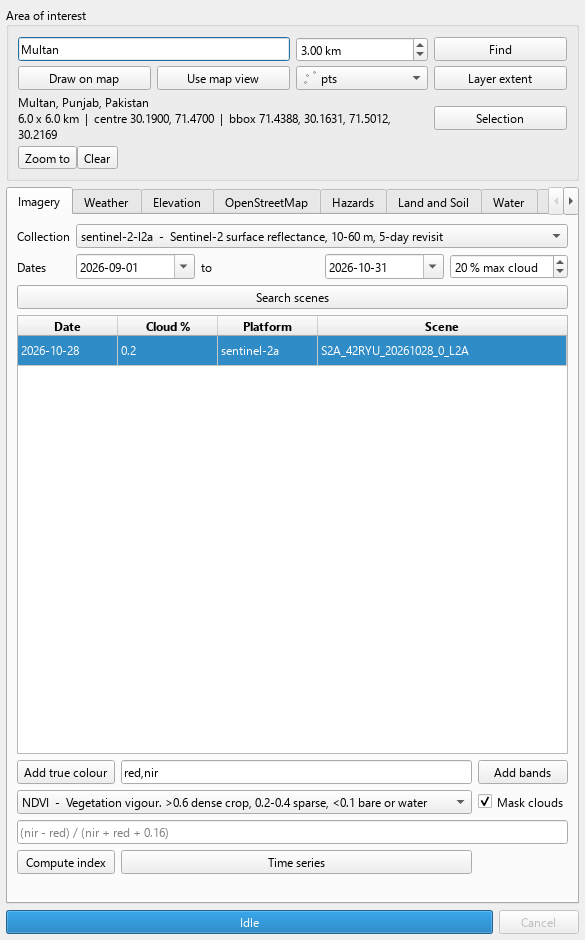
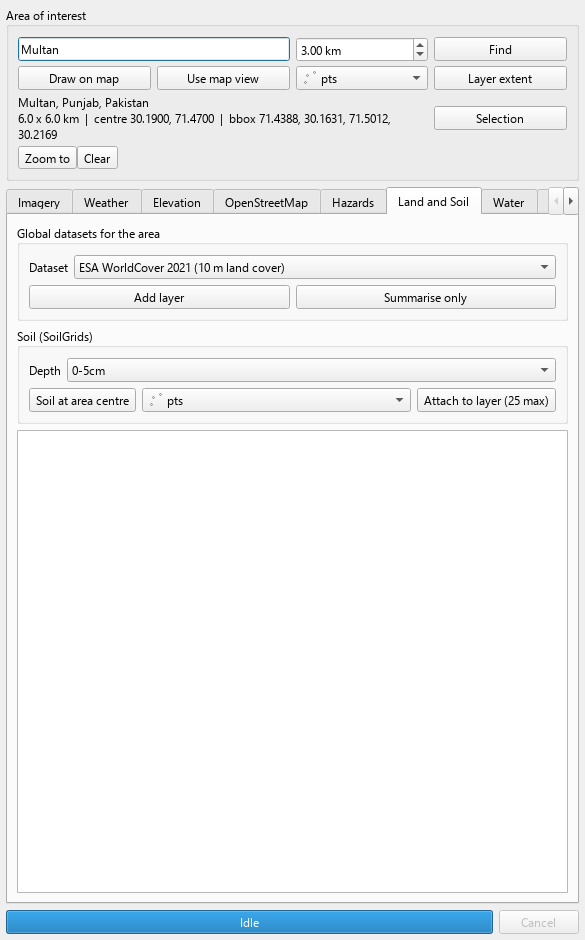
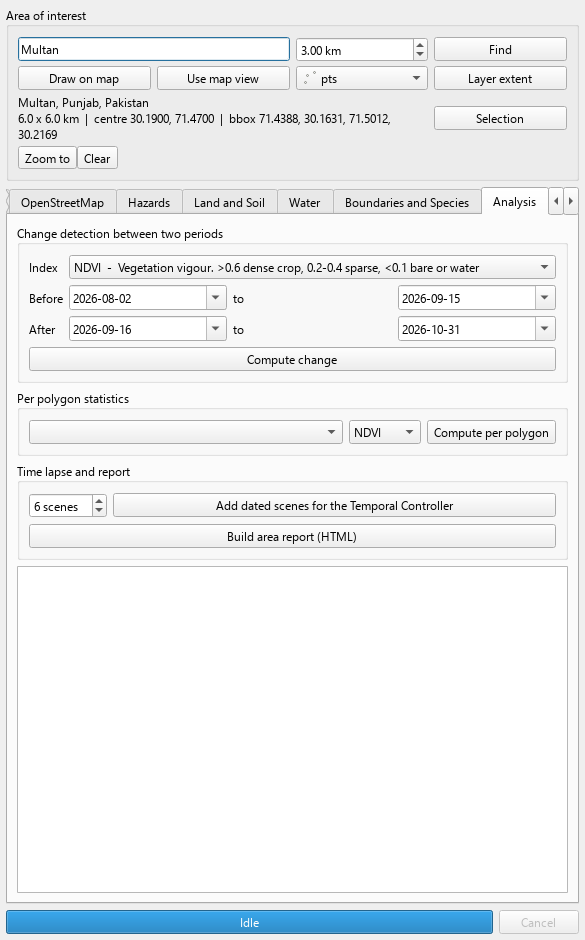
Open it: Plugins > QGIS MCP > Data Explorer, or the arrow next to the QGIS MCP toolbar button.
Choose the area of interest in any of five ways: type a place name and a radius, press Draw on map and drag a rectangle, use the current map view, use a layer's extent, or use the selected features of a layer. The area is outlined in orange on the canvas and remembered between sessions.
Then work through the tabs. Every fetch runs in the background with a progress bar and a Cancel button, so QGIS never freezes.
| Tab | What you can do with clicks |
|---|---|
| Imagery | Search Sentinel-2, Landsat or Sentinel-1 scenes by date and cloud cover; stream true colour or chosen bands; compute NDVI, EVI, SAVI, NDWI, MNDWI, NDMI, NDBI, NBR, BSI or your own band expression with cloud masking; build a time series of any index |
| Weather | Current conditions, a seven day forecast, air quality, daily history back to 1940, NASA POWER agro climatology; attach live weather fields to every feature of a layer |
| Elevation | Copernicus DEM 30 m for the area; slope, aspect, hillshade, roughness, TRI and TPI |
| OpenStreetMap | Twenty one presets (hospitals, schools, roads, buildings, farmland, rivers, parks, power lines and more) or any custom tag, as points or full geometry |
| Hazards | USGS earthquakes by period and magnitude; NASA FIRMS active fires with a free key |
| Land and Soil | ESA WorldCover land cover, Esri annual land use, JRC surface water occurrence and NASADEM for the area with class shares in km²; SoilGrids texture, pH, carbon and nitrogen at a point or attached to a layer |
| Water | GloFAS river discharge forecast and history, sea state and sea surface temperature, elevation at the area's centre and corners |
| Boundaries and Species | Administrative units of any country from geoBoundaries, GBIF species observations by taxon, Sensor.Community air quality stations, GDACS disaster alerts |
| Analysis | Change detection between two periods with loss and gain shares, per polygon index statistics for any layer, dated scene series for the Temporal Controller, and a one click HTML area report with map, weather, elevation, land cover, soil and NDVI |
| Basemaps | OpenStreetMap, Esri imagery and topo, CARTO, OpenTopoMap, and NASA GIBS daily satellite layers by date |
| Sources | Every data source with its licence and whether it needs a key; paste keys here |
| Log | A timestamped record of everything the panel did |
Every layer the panel creates carries provenance metadata (source, query, time, licence) and fetched vectors are written to GeoPackage, so they survive saving the project. All sources are public and keyless except NASA FIRMS, which needs a free key.
QGIS MCP server: an AI assistant for QGIS
QGIS MCP is a QGIS AI assistant built on the Model Context Protocol. It runs a small socket bridge inside QGIS and a standalone MCP server beside it, so an MCP client such as Claude Desktop, Claude Code, Cursor or VS Code can inspect and operate your QGIS session in plain language.
If you work with geospatial data, you can ask things like:
- "Load the district shapefile, filter it to Sugarcane parcels and tell me how many remain."
- "Which CRS does this unlabelled layer most likely use? Show me a render to confirm."
- "Run a buffer, clip it to the study area, and export the result to GeoPackage."
- "Check this layer for invalid geometries and duplicates, then summarise the problems."
- "Render the map and let me see it."
- "Find the least cloudy Sentinel-2 scene over Multan this month, compute NDVI for the farms, and tell me which fields look stressed."
- "Add the hospitals in this district from OpenStreetMap and attach today's temperature to each one."
- "Stream the 30 m DEM for the valley, derive a hillshade, and put it under the roads."
What sets it apart from a plain "run any code" bridge is safety. Every command carries a risk category (read, write, destructive, code). A permission profile decides whether each category is allowed, needs your approval, or is refused. Every command that reaches the dispatcher lands in an append only audit log, so you can always answer "what did the AI change?".
This is a Claude QGIS integration and a general Model Context Protocol GIS server. Any client that speaks the Model Context Protocol can use it.
Table of contents
- Data Explorer: open data in QGIS without any AI
- Features
- Architecture
- Installation
- Connect your MCP client
- Tool reference
- Permission profiles
- Wire protocol (NDJSON)
- Running the tests
- Roadmap
- FAQ and troubleshooting
- Contributing
- Credits
- License
Features
Project
- Create, load and save
.qgzprojects; read project info and set the project CRS.
Layers
- Add vector and raster layers, create in memory scratch layers with typed fields, remove or reload layers.
- Layer visibility, opacity, extent, field listing, CRS repair (
set_layer_crs) and CRS detection (detect_layer_crs). - Export vector layers to GeoPackage, GeoJSON, Shapefile or CSV.
Analysis (PyQGIS automation without writing PyQGIS)
- Exact feature counts, distinct values with counts, field statistics (min, max, sum, mean, median, stdev).
- SQL across project layers through virtual layers (
execute_sql), grouped aggregates, geometry validity checks, duplicate finding.
Editing
- Add features from attributes and WKT, update values, delete features, add, rename and delete fields, build spatial indexes.
- Destructive edits dry run by default and report how many rows would change; they apply only with
confirm=true.
Raster
- Band statistics and point sampling (
get_raster_statistics,sample_raster_values).
Processing
- Discover algorithms, read their parameter help, and run any QGIS Processing algorithm.
Rendering and layouts
- Render the canvas to a file, or return it inline as an image the model can look at (
render_map_image). - List and export print layouts to PDF or image.
Safety and permissions
- Four permission profiles, a non blocking approval queue, temporary per command grants, an optional pairing token, a loopback only listener, and an opt in code execution tier.
- Unknown commands are treated as destructive, so a newly added command fails closed.
Audit
- JSONL audit trail of every dispatched command (verdict, client, status, truncated params, duration), readable through
get_audit_log.
Data Explorer dashboard (no AI required)
- A dock panel inside QGIS: pick an area of interest by typing a place, drawing a rectangle on the map, using the current view, a layer's extent or its selected features.
- Tabs for Imagery, Weather, Elevation, OpenStreetMap, Hazards, Basemaps, Sources and a Log; every fetch runs as a background task with a progress bar and Cancel, so QGIS never freezes.
- Search Sentinel-2 or Landsat scenes, stream true colour or chosen bands, compute NDVI and other indices with one click, build index time series, add DEMs and derive hillshade or slope, fetch OSM presets such as hospitals, roads, buildings and farmland, pull weather for the area centre or attach it to every feature of a layer.
- Open it from the QGIS MCP toolbar button menu or
Plugins > QGIS MCP > Data Explorer.
Live data (keyless public sources)
- Satellite imagery: search Sentinel-2, Landsat 8/9 and Sentinel-1 scenes over any area through STAC and stream them as cloud optimised GeoTIFFs, nothing downloaded until rendered.
- Spectral indices: NDVI, EVI, SAVI, NDWI, MNDWI, NDMI, NDBI, NBR, BSI or a custom band expression, cloud masked with the Sentinel-2 scene classification, computed only over your area, styled on arrival, with class breakdowns and per scene time series.
- Elevation: Copernicus DEM 30 m mosaics on demand, plus slope, aspect, hillshade, roughness, TRI and TPI.
- Weather and climate: Open-Meteo current conditions, forecasts, air quality and an hourly archive back to 1940; NASA POWER daily agro climatology since 1981; weather fields attached to every feature of a layer.
- Places and OpenStreetMap: Nominatim geocoding both ways, administrative boundaries as layers, any OSM feature type by tag through Overpass.
- Hazards: USGS earthquakes for the last hour to month, NASA FIRMS active fires (free key).
- Basemaps: OSM, Esri imagery and topo, CARTO, OpenTopoMap, and NASA GIBS daily satellite layers (true colour, NDVI, fires, snow, night lights, rainfall) selectable by date.
- Land and soil: ESA WorldCover 10 m land cover, Esri annual land use, JRC surface water occurrence and NASADEM clipped to the area with class shares in km²; SoilGrids texture, pH, carbon, nitrogen and water retention at a point or attached to features.
- Water: GloFAS river discharge forecast and history, sea state and sea surface temperature, elevation at any points.
- Boundaries, species and sensors: geoBoundaries administrative units for every country, GBIF species observations by taxon, Sensor.Community live air quality stations, GDACS disaster alerts.
- Analysis workflows: change detection between two periods with loss and gain classes, per polygon index statistics, dated scene series for the Temporal Controller, and an HTML area report.
- Every fetched layer carries provenance metadata: source, query, date and licence.
Panel
- A QGIS dock panel for server status, live counters, activity, approvals, profile switching, tokens and a one click "Copy MCP client config" button.
Architecture
flowchart LR
    subgraph Client["MCP client"]
        C1["Claude Desktop / Claude Code / Cursor / VS Code"]
    end
    subgraph MCPProc["MCP server process (Python, uv)"]
        S["qgis_mcp_server.py<br/>FastMCP tools"]
    end
    subgraph QGIS["QGIS 4 (PyQt6)"]
        direction TB
        L["Plugin socket server<br/>QTcpServer, 127.0.0.1"]
        P["Permission manager<br/>profiles, approvals, grants"]
        A["Audit log (JSONL)"]
        H["Command handlers<br/>PyQGIS, Processing"]
        UI["Dock panel"]
        L --> P --> H
        P --> A
        P <--> UI
    end
    C1 <-->|"MCP over stdio"| S
    S <-->|"NDJSON over TCP"| L
Two components:
- QGIS plugin (
qgis_mcp_plugin/) runs a socket server inside QGIS, authenticates clients, applies the permission profile, writes the audit log and executes commands on the GUI thread. - MCP server (
src/qgis_mcp/qgis_mcp_server.py) speaks MCP to your client over stdio and forwards each tool call to the plugin.
Approvals are non blocking: a command awaiting approval parks its reply instead of opening a modal dialog (which would freeze the very GUI thread the server runs on).
Installation
Prerequisites
- QGIS 4.x (PyQt6). Developed and tested against QGIS 4.2.x.
metadata.txtdeclaresqgisMinimumVersion=3.22andqgisMaximumVersion=4.99, withsupportsQt6=True. - Python 3.12 or newer for the MCP server (
requires-python = ">=3.12"). - uv package manager.
- An MCP client (Claude Desktop, Claude Code, Cursor, VS Code, ...).
Install uv:
# macOS
brew install uv

# Windows (PowerShell)
powershell -ExecutionPolicy ByPass -c "irm https://astral.sh/uv/install.ps1 | iex"

# Linux
curl -LsSf https://astral.sh/uv/install.sh | sh
1. Get the code
git clone https://github.com/adilmunawar/qgis_mcp.git
cd qgis_mcp
2. Install the QGIS plugin
Copy (or symlink) the qgis_mcp_plugin folder into your QGIS 4 profile's plugin directory. You can find the profile in QGIS via Settings > User Profiles > Open Active Profile Folder, then python/plugins.
| OS | QGIS 4 plugin folder |
|---|---|
| Windows | %APPDATA%\QGIS\QGIS4\profiles\default\python\plugins |
| macOS | ~/Library/Application Support/QGIS/QGIS4/profiles/default/python/plugins |
| Linux | ~/.local/share/QGIS/QGIS4/profiles/default/python/plugins |
Windows (PowerShell), symlink for development:
$src = "$(pwd)\qgis_mcp_plugin"
$dst = "$env:APPDATA\QGIS\QGIS4\profiles\default\python\plugins\qgis_mcp_plugin"
New-Item -ItemType SymbolicLink -Path $dst -Target $src
macOS and Linux:
# macOS
ln -s "$(pwd)/qgis_mcp_plugin" "$HOME/Library/Application Support/QGIS/QGIS4/profiles/default/python/plugins/qgis_mcp_plugin"
# Linux
ln -s "$(pwd)/qgis_mcp_plugin" "$HOME/.local/share/QGIS/QGIS4/profiles/default/python/plugins/qgis_mcp_plugin"
Using QGIS 3.x? The profile folder is
QGIS3instead ofQGIS4.
Restart QGIS, open Plugins > Manage and Install Plugins, search for QGIS MCP and tick it.
3. Start the bridge
- In QGIS, open
Plugins>QGIS MCPto show the dock panel. - Click Start Server (default
127.0.0.1:9876). - Choose a permission profile. If you enable the pairing token requirement, copy the token from the panel.
The panel's Copy MCP client config button produces a ready made snippet for your client.
Connect your MCP client
The MCP server reads its settings from environment variables:
| Variable | Default | Meaning |
|---|---|---|
QGIS_MCP_HOST |
127.0.0.1 |
Host of the QGIS plugin socket |
QGIS_MCP_PORT |
9876 |
Port of the QGIS plugin socket |
QGIS_MCP_TOKEN |
(empty) | Pairing token shown in the QGIS MCP panel, when required |
QGIS_MCP_TIMEOUT |
300.0 |
Timeout per request in seconds |
QGIS_MCP_CLIENT_NAME |
claude-mcp |
Name shown in the panel and audit log |
Replace /ABSOLUTE/PATH/TO/qgis_mcp with your clone path (on Windows use forward slashes or escaped backslashes).
Claude Desktop
Claude > Settings > Developer > Edit Config, then edit claude_desktop_config.json:
{
  "mcpServers": {
    "qgis": {
      "command": "uv",
      "args": ["--directory", "/ABSOLUTE/PATH/TO/qgis_mcp/src/qgis_mcp", "run", "qgis_mcp_server.py"],
      "env": {
        "QGIS_MCP_HOST": "127.0.0.1",
        "QGIS_MCP_PORT": "9876",
        "QGIS_MCP_TOKEN": "paste-token-from-panel-if-required"
      }
    }
  }
}
Claude Code
claude mcp add qgis \
  --env QGIS_MCP_HOST=127.0.0.1 --env QGIS_MCP_PORT=9876 --env QGIS_MCP_TOKEN=your-token \
  -- uv --directory /ABSOLUTE/PATH/TO/qgis_mcp/src/qgis_mcp run qgis_mcp_server.py
Or use a project scoped .mcp.json:
{
  "mcpServers": {
    "qgis": {
      "command": "uv",
      "args": ["--directory", "/ABSOLUTE/PATH/TO/qgis_mcp/src/qgis_mcp", "run", "qgis_mcp_server.py"],
      "env": { "QGIS_MCP_PORT": "9876", "QGIS_MCP_TOKEN": "your-token" }
    }
  }
}
Cursor
.cursor/mcp.json (project) or ~/.cursor/mcp.json (global):
{
  "mcpServers": {
    "qgis": {
      "command": "uv",
      "args": ["--directory", "/ABSOLUTE/PATH/TO/qgis_mcp/src/qgis_mcp", "run", "qgis_mcp_server.py"],
      "env": { "QGIS_MCP_HOST": "127.0.0.1", "QGIS_MCP_PORT": "9876", "QGIS_MCP_TOKEN": "your-token" }
    }
  }
}
VS Code
.vscode/mcp.json (the top level key is servers):
{
  "servers": {
    "qgis": {
      "type": "stdio",
      "command": "uv",
      "args": ["--directory", "/ABSOLUTE/PATH/TO/qgis_mcp/src/qgis_mcp", "run", "qgis_mcp_server.py"],
      "env": { "QGIS_MCP_HOST": "127.0.0.1", "QGIS_MCP_PORT": "9876", "QGIS_MCP_TOKEN": "your-token" }
    }
  }
}
Never commit a real token. Use your client's secret or input-variable mechanism where available.
Example prompt
You have access to QGIS tools. Please:
1. Ping to check the connection.
2. Create a new project at "C:/data/demo.qgz".
3. Load "C:/data/districts.shp" as "Districts".
4. Count features where "crop_class" = 'Sugarcane', then filter the layer to them.
5. Check geometry validity and report any problems.
6. Render the map so I can see it, then save the project.
Tool reference
The MCP server exposes 96 tools. The Risk column is the category from permissions.py; it decides what each permission profile does with the tool. render_map_image is a wrapper on the client side over the plugin command render_map_base64 (read).
Diagnostics and audit
| Tool | Purpose | Risk |
|---|---|---|
ping |
Check connectivity to the QGIS plugin. | read |
get_qgis_info |
Get QGIS version, profile folder and Python version. | read |
get_server_info |
Get plugin version, protocol version, and which commands are available. | read |
get_audit_log |
Read the audit trail of commands the bridge has run. | read |
Project
| Tool | Purpose | Risk |
|---|---|---|
load_project |
Load a QGIS project from the specified path. | destructive |
create_new_project |
Create a new project and save it. Clears the currently loaded project. | destructive |
get_project_info |
Get current project information, including its layers. | read |
save_project |
Save the project to the given path, or to its current path if omitted. | destructive |
set_project_crs |
Set the project CRS, e.g. 'EPSG:4326'. | write |
Layers
| Tool | Purpose | Risk |
|---|---|---|
add_vector_layer |
Add a vector layer to the project. | write |
add_raster_layer |
Add a raster layer to the project. | write |
create_memory_layer |
Create an in memory scratch layer. | write |
get_layers |
Retrieve all layers in the current project with their metadata. | read |
remove_layer |
Remove a layer from the project by its ID. | destructive |
reload_layer |
Reload a layer from its source, picking up changes made on disk. | write |
set_layer_visibility |
Show or hide a layer in the layer tree. | write |
set_layer_opacity |
Set layer opacity, 0.0 (transparent) to 1.0 (opaque). | write |
set_layer_crs |
Declare a layer's CRS, e.g. 'EPSG:32642'. | write |
get_layer_fields |
List the attribute fields of a vector layer, with types. | read |
get_layer_extent |
Get a layer's bounding box and CRS. | read |
export_layer |
Export a vector layer to a file. Drivers: GPKG, GeoJSON, ESRI Shapefile, CSV. | write |
zoom_to_layer |
Zoom the map canvas to the extent of a specified layer. | write |
Styling
| Tool | Purpose | Risk |
|---|---|---|
set_layer_style |
Apply a QGIS style (.qml) file to a layer. | write |
save_layer_style |
Save a layer's current style to a .qml file. | write |
Features, selection and filters
| Tool | Purpose | Risk |
|---|---|---|
get_layer_features |
Retrieve features from a vector layer, optionally filtered. | read |
count_features |
Count features exactly, optionally matching a QGIS expression. | read |
get_unique_values |
List a field's distinct values with occurrence counts, most common first. | read |
get_field_statistics |
Compute count, distinct, missing, min, max, sum, mean, median and stdev. | read |
get_layer_filter |
Get the layer's current subset filter expression, if any. | read |
set_layer_filter |
Filter a layer to features matching a QGIS expression. | write |
clear_layer_filter |
Remove a layer's subset filter, restoring all features. | write |
select_features_by_expression |
Select features matching a QGIS expression, and report how many matched. | write |
get_selected_features |
Retrieve the currently selected features of a vector layer. | read |
clear_selection |
Clear the selection on one layer, or on all vector layers if omitted. | write |
zoom_to_selection |
Zoom the canvas to the selected features of a layer. | write |
add_features |
Add features to a writable layer. | write |
update_features |
Set field values on matching features. DESTRUCTIVE. | destructive |
delete_features |
Delete features matching an expression. DESTRUCTIVE. | destructive |
Schema
| Tool | Purpose | Risk |
|---|---|---|
add_field |
Add an attribute field (string, integer, longlong, double, boolean, date, datetime). | write |
rename_field |
Rename an attribute field. | write |
delete_field |
Drop a field and every value in it. DESTRUCTIVE; dry runs unless confirmed. | destructive |
create_spatial_index |
Build a spatial index, which speeds up rendering and spatial queries. | write |
Analysis and data quality
| Tool | Purpose | Risk |
|---|---|---|
execute_sql |
Run SQL across project layers, joining and aggregating them. | read |
group_statistics |
Aggregate a field grouped by another. | read |
check_geometry_validity |
Report invalid or empty geometries, with the reason for each. | read |
find_duplicates |
Find duplicates by attribute values, or by geometry if fields is omitted. | read |
detect_layer_crs |
Infer a layer's true CRS from its coordinates when it is missing or wrong. | read |
Raster
| Tool | Purpose | Risk |
|---|---|---|
get_raster_statistics |
Band minimum, maximum, mean, standard deviation, range and sum. | read |
sample_raster_values |
Read raster values at points. | read |
Processing
| Tool | Purpose | Risk |
|---|---|---|
list_processing_algorithms |
List available processing algorithms, optionally filtered by substring. | read |
get_processing_algorithm_help |
Get the help text and parameter list for a processing algorithm. | read |
execute_processing |
Execute a processing algorithm with the given parameters. | destructive |
Canvas, rendering and layouts
| Tool | Purpose | Risk |
|---|---|---|
get_canvas_state |
Get the map canvas extent, scale, rotation, CRS and size. | read |
set_canvas_extent |
Set the map canvas extent, in project CRS coordinates. | write |
render_map |
Render the map to an image file. | write |
render_map_image |
Render the current map and return it as an image you can actually look at. | read |
list_layouts |
List the print layouts defined in the current project. | read |
export_layout |
Export a print layout to PDF or an image, chosen by the file extension. | write |
Code
| Tool | Purpose | Risk |
|---|---|---|
execute_code |
Execute arbitrary PyQGIS code inside QGIS. | code |
Live data: discovery and places
Every live data tool takes an aoi that can be {"place": "Multan"}, {"place": "Multan", "radius_km": 15}, {"bbox": [west, south, east, north]}, {"layer_id": "..."}, {"layer_id": "...", "selected": true}, {"canvas": true}, {"point": [lon, lat], "radius_km": 10} or {"wkt": "...", "crs": "EPSG:4326"}.
| Tool | Purpose | Risk |
|---|---|---|
list_data_sources |
Catalogue of live sources by category with licence and key requirements. | read |
resolve_aoi |
Preview how an area of interest will be interpreted. | read |
geocode |
Place name to coordinates and bounding box (Nominatim). | read |
reverse_geocode |
Coordinates to a place description. | read |
add_place_marker |
Add a geocoded place, with its boundary polygon when known, as a layer. | write |
set_data_source_key |
Store an API key for a source that needs one (never echoed back). | write |
Live data: satellite imagery and elevation
| Tool | Purpose | Risk |
|---|---|---|
search_imagery |
Find Sentinel-2, Landsat or Sentinel-1 scenes over an area, least cloudy first. | read |
add_imagery |
Stream a scene's bands into the project as cloud optimised GeoTIFF layers. | write |
compute_spectral_index |
NDVI, NDWI, NBR and more, or a custom expression, cloud masked, over an area. | write |
get_index_time_series |
Mean index per scene across a date range, with the change from first to last scene. | read |
add_dem |
Stream Copernicus DEM 30 m covering an area as one layer. | write |
derive_terrain |
Slope, aspect, hillshade, roughness, TRI or TPI from a DEM layer. | write |
Live data: weather and climate
| Tool | Purpose | Risk |
|---|---|---|
get_weather |
Current conditions, a daily forecast, or air quality for a point or area. | read |
get_weather_history |
Historical daily weather since 1940 with per variable summaries. | read |
get_climate_series |
NASA POWER daily agro climatology since 1981. | read |
attach_weather_to_layer |
Add weather fields to every feature of a layer, sampled at its centroid. | write |
Live data: basemaps, OpenStreetMap and hazards
| Tool | Purpose | Risk |
|---|---|---|
list_basemaps |
Available basemaps, including NASA GIBS daily satellite layers. | read |
add_basemap |
Add a tiled basemap underneath the other layers; GIBS layers take a date. | write |
fetch_osm_features |
OpenStreetMap features by tag inside an area, as point or full geometry layers. | write |
fetch_earthquakes |
USGS earthquakes for the last hour to month, filtered by area and magnitude. | write |
fetch_active_fires |
NASA FIRMS active fire detections for the last 1 to 10 days (free key). | write |
Toolbox: land, soil and water
| Tool | Purpose | Risk |
|---|---|---|
list_datasets |
Global datasets the toolbox can add: WorldCover, land use, surface water, NASADEM. | read |
add_dataset |
Add a global dataset clipped to the area, styled, with class shares and area. | write |
summarise_land_cover |
Share and area of each land cover class without adding a layer. | read |
get_soil_properties |
SoilGrids texture, pH, carbon, nitrogen and more by depth, with the USDA texture class. | read |
attach_soil_to_layer |
Add topsoil properties to features at their centroids. | write |
get_river_discharge |
GloFAS river discharge forecast and recent history. | read |
get_marine_conditions |
Waves, swell, sea surface temperature and currents. | read |
get_elevation |
Elevation at up to 100 points or the area centre. | read |
Toolbox: boundaries, species, sensors and alerts
| Tool | Purpose | Risk |
|---|---|---|
add_admin_boundaries |
A country's administrative units from geoBoundaries, optionally only those touching the area. | write |
fetch_species_occurrences |
GBIF species records in the area by taxon, with the most recorded species. | write |
fetch_air_sensors |
Live PM2.5, PM10, temperature and humidity from citizen sensor stations. | write |
fetch_disaster_alerts |
Current GDACS alerts worldwide or in the area, by type and level. | write |
Toolbox: analysis workflows
| Tool | Purpose | Risk |
|---|---|---|
compute_index_change |
Index difference between two periods as a styled raster with loss and gain shares. | write |
zonal_index_statistics |
Mean, min and max of an index per polygon, written to the layer. | write |
add_imagery_series |
Dated scenes with time ranges for the Temporal Controller. | write |
export_area_report |
HTML briefing: map, weather, elevation, land cover, soil, NDVI. | write |
Commands missing from the permission table are treated as
destructive, so new commands fail closed.
Permission profiles
| Profile | read | write | destructive | code | Intended use |
|---|---|---|---|---|---|
| Read only | allow | deny | deny | deny | Inspect only |
| Standard (default) | allow | allow | approve | deny | Everyday editing; deletions and overwrites ask first |
| Full | allow | allow | approve | approve | Everything available; destructive actions and code ask first |
| Master Control | allow | allow | allow | allow | Unrestricted; nothing is refused or asks |
- approve parks the command in the panel's approval queue until you accept, reject, or it times out (60 s by default).
- Temporary grants let you allow one specific command for a number of minutes without changing profile.
pingandget_server_infoare always allowed so a client can discover why it was refused.- Pairing token (optional): when required, clients must send a
hellowith the token before anything butping. - The listener binds to
127.0.0.1. Treat Master Control andexecute_codeas full control of QGIS's Python on your machine. - Every decision is written to
qgis_mcp_audit.jsonlin the QGIS settings directory.
Wire protocol (NDJSON)
The plugin and MCP server talk newline delimited JSON over TCP (protocol version 3), one document per line in both directions:
request   {"type": "<command>", "params": {...}, "id": <optional>}\n
response  {"status": "success" | "error", "result": ..., "id": <echoed>}\n
- The MCP server first sends
{"type": "hello", "params": {"client": "<name>", "token": "<token>"}}. The reply reports the protocol version and whether a token is required. pinganswers before authentication; everything else requireshellowhen a token is enforced.- Errors carry
error_type(for exampleUnauthorized) and amessage. - Bare JSON documents without a trailing newline from older v1 clients are still accepted.
- Buffers per client are capped at 32 MB.
Running the tests
The headless tests run inside QGIS's own Python, with no GUI. On Windows with QGIS 4.2.2:
"C:\Program Files\QGIS 4.2.2\bin\python-qgis.bat" tests\test_plugin_headless.py
"C:\Program Files\QGIS 4.2.2\bin\python-qgis.bat" tests\test_permissions_headless.py
"C:\Program Files\QGIS 4.2.2\bin\python-qgis.bat" tests\test_data_commands_headless.py
"C:\Program Files\QGIS 4.2.2\bin\python-qgis.bat" tests\test_lifecycle_headless.py
"C:\Program Files\QGIS 4.2.2\bin\python-qgis.bat" tests\test_live_data_headless.py
"C:\Program Files\QGIS 4.2.2\bin\python-qgis.bat" tests\test_toolbox_headless.py
"C:\Program Files\QGIS 4.2.2\bin\python-qgis.bat" tests\test_explorer_headless.py
The live data, toolbox and explorer suites import the plugin from the checkout and stub every HTTP call, so they need no network; add --online to the explorer suite for a real network scenario. The four older suites import the plugin from the QGIS 4 profile (%APPDATA%\QGIS\QGIS4\profiles\default\python\plugins), so copy the plugin there first. Adjust the QGIS path for your install location. Together the suites run about 390 checks.
Roadmap
Shipped in 4.2.0:
- Data Explorer without AI: twelve tabs covering every source below, with background tasks
- Land and soil: ESA WorldCover, Esri land use, JRC surface water, NASADEM, SoilGrids
- Water: GloFAS river discharge, marine conditions, point elevation
- Boundaries, species, sensors, alerts: geoBoundaries, GBIF, Sensor.Community, GDACS
- Analysis: change detection, per polygon statistics, temporal series, HTML area report
Shipped in 4.1.0:
- Satellite imagery: Sentinel-2, Landsat and Sentinel-1 discovery and streaming through STAC
- Spectral indices: NDVI and eight more, custom expressions, cloud masking, time series
- Weather and climate: Open-Meteo and NASA POWER, attached to layers
- Geocoding and OpenStreetMap: Nominatim and Overpass
- Elevation: Copernicus DEM and terrain derivatives
- Hazards and basemaps: USGS earthquakes, NASA FIRMS, NASA GIBS daily imagery
- Data Explorer dashboard: the same engine driven by clicks inside QGIS, with background tasks
Next:
- Refreshing layers: sensors and alerts that update on a timer, with threshold notifications
- More sensor networks: OGC SensorThings, OpenAQ (key), USGS river gauges, NDBC buoys
- 3D: building footprints with heights, point clouds, 3D Tiles and 3D scene rendering
- Background jobs: long fetches as QGIS tasks with progress and cancel
- More sources: Copernicus Data Space (Sentinel-5P, Sentinel-3), FAO WaPOR, WorldPop, Overture buildings, CHIRPS rainfall
Track progress in the CHANGELOG and the issue tracker.
FAQ and troubleshooting
The tools do not appear in my client.
Check that your client config points at src/qgis_mcp with uv --directory ... run qgis_mcp_server.py, then restart the client. Run the command by hand to see import or uv errors.
"Connection refused" or timeouts.
The QGIS side must be listening. Open the QGIS MCP panel and click Start Server; confirm the port matches QGIS_MCP_PORT. Another process may hold port 9876: change the port in the panel and in your client config.
"QGIS refused the connection" or Unauthorized.
The panel requires a pairing token. Copy it into QGIS_MCP_TOKEN and restart the MCP client.
A command was refused.
The active profile denies its risk category. Raise the profile, grant that command temporarily, or approve it from the queue. Ask the assistant to call get_audit_log with only_failures=true to see why.
An approval request seems stuck.
It is waiting for you in the panel and times out after 60 seconds by default. Keep the client's QGIS_MCP_TIMEOUT longer than the approval timeout.
execute_code is denied.
Code is denied in Read only and Standard, and needs approval in Full. Treat it as a last resort when no specific tool fits.
The plugin does not show up in QGIS 4.
Make sure it sits in the QGIS4 profile folder (not QGIS3) and that metadata.txt has supportsQt6=True. Enable it under Plugins > Manage and Install Plugins after a restart.
Did set_layer_crs move my data?
No. It only relabels coordinates and never reprojects. Use a Processing reprojection algorithm for that.
Is my data sent anywhere?
The bridge listens on loopback only. Your MCP client and model provider see whatever tool results the model requests, so apply the same care as with any AI assistant.
Contributing
This project is growing into a complete open data toolbox for QGIS, and it needs more hands. Whether you are a GIS analyst, a remote sensing researcher, a Python developer or a technical writer, there is a place for you here.
Where help is most valuable right now
| Area | What it involves | Skills |
|---|---|---|
| New data connectors | Sensor networks (OGC SensorThings, OpenAQ, river gauges), Copernicus Data Space, ESA WorldCover, SoilGrids, FAO WaPOR, Overture buildings | Python, public APIs |
| Analysis workflows | Change detection between two dates, flood mapping with Sentinel-1, urban heat with Landsat thermal, crop health reports | Remote sensing, PyQGIS |
| 3D | Building footprints with heights, point clouds, 3D Tiles, scene rendering | QGIS 3D, GDAL |
| Dashboard | New tabs, better result views, charts for time series, accessibility | PyQt6, UX |
| MCP server | Resources and prompts, background jobs with progress, Streamable HTTP transport | Python, MCP |
| Quality | Tests on Linux and macOS, continuous integration with the QGIS Docker image, translations | Testing, CI |
| Documentation | Tutorials, screenshots, videos, example prompts, use cases from your field | Writing |
How to start
- Read CONTRIBUTING.md for the development setup and the checklist for adding a command.
- Look at the open issues, especially those labelled
good first issueandhelp wanted, or open a new issue to propose an idea. - Fork, create a branch, add tests under
tests/(the live data suite shows how to stub HTTP so no network is needed), and open a pull request. - Join the Discussions to ask questions, share maps you built with it, or request a data source.
Every contribution is credited in the changelog and the contributors list. Please follow the Code of Conduct, and report vulnerabilities as described in SECURITY.md.
Credits
- Forked from and built on jjsantos01/qgis_mcp by Juan Santos (MIT). The original project provided the QGIS plugin and MCP server this work extends.
- Strongly inspired by BlenderMCP by Siddharth Ahuja.
- Built with the Model Context Protocol Python SDK, QGIS and uv.
Maintained by Adil Munawar.
License
MIT. Copyright Adil Munawar 2026, with upstream copyright retained for jjsantos01.
Keywords: QGIS MCP server, QGIS AI assistant, Claude QGIS integration, PyQGIS automation, Model Context Protocol GIS, QGIS plugin, geospatial AI agent, remote sensing, LLM agents.
Yorumlar (0)
Yorum birakmak icin giris yap.
Yorum birakSonuc bulunamadi