ai-dash
Health Warn
- License — License: Apache-2.0
- Description — Repository has a description
- Active repo — Last push 0 days ago
- Low visibility — Only 5 GitHub stars
Code Pass
- Code scan — Scanned 8 files during light audit, no dangerous patterns found
Permissions Pass
- Permissions — No dangerous permissions requested
This tool is a terminal UI that allows you to browse and manage your local AI coding sessions. It parses local transcripts, session logs, and SQLite databases from compatible tools like Claude Code, Codex, and OpenCode.
Security Assessment
The tool accesses local session logs and databases (which may contain sensitive coding history and chat transcripts), but it does not request dangerous system permissions or make external network requests. A light source code scan of 8 files found no dangerous patterns, backdoors, or hardcoded secrets. The binary installation method pipes downloaded executables directly to a file, which is standard practice but requires trust in the maintainer's release security. Overall risk is rated as Low.
Quality Assessment
The project is very new and has low visibility, currently sitting at only 5 GitHub stars. However, it is under active development (last push was today) and follows good open-source practices by including a clear description and an Apache-2.0 license. The codebase is written in Go and appears clean and straightforward based on the automated audit.
Verdict
Safe to use, though you should inspect the source code if you have strict requirements regarding the handling of your local AI session transcripts.
A terminal UI for browsing coding sessions across multiple tools from local transcripts, session logs, and databases. It currently supports Claude Code, Codex, and OpenCode.
AI Dash
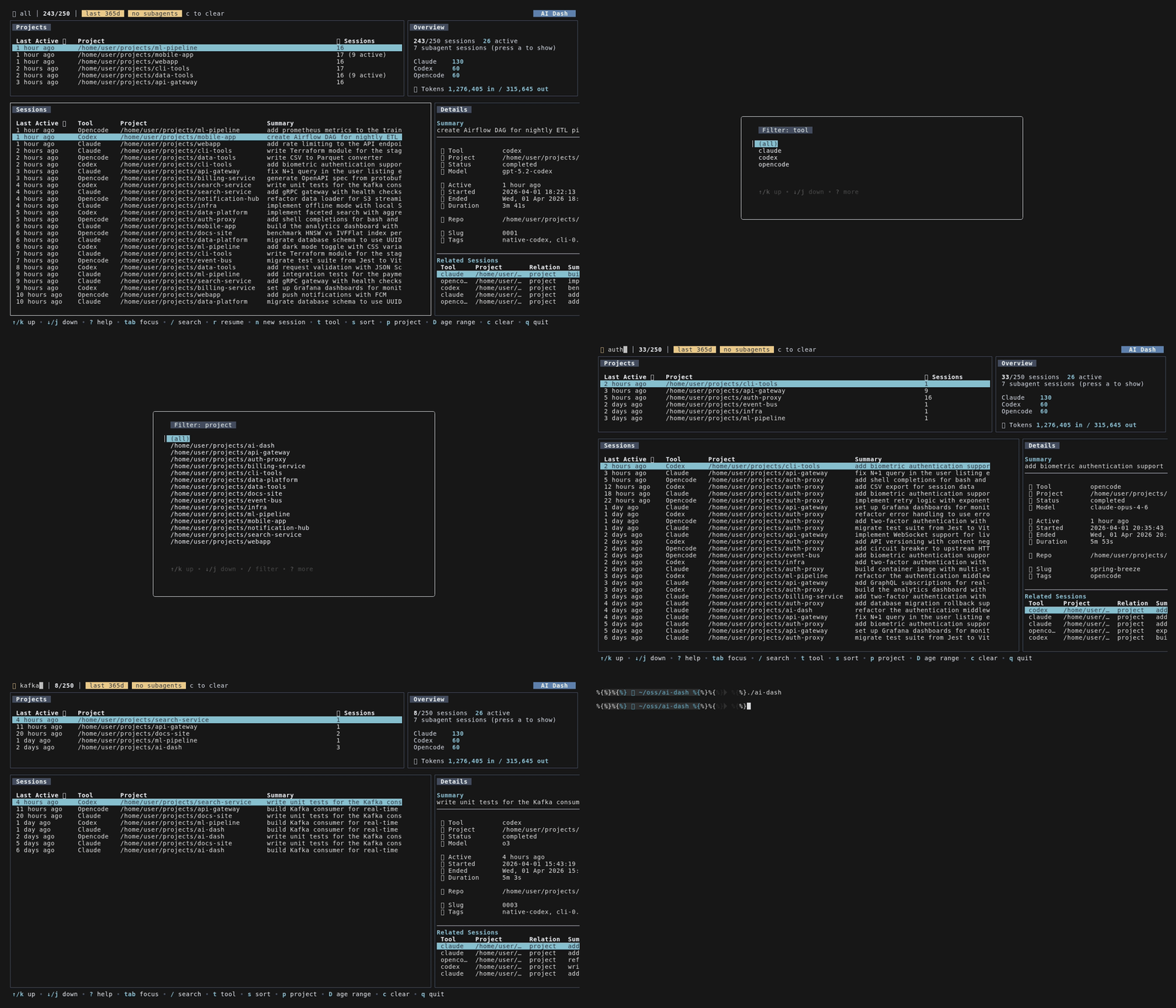
A terminal UI for browsing coding sessions across multiple tools from local transcripts, session logs, and databases. It currently supports Claude Code, Codex, and OpenCode.
What it does
- Parses Claude Code JSONL transcripts, Codex session logs, and the OpenCode SQLite database
- Fuzzy search across sessions, live as you type
- Filter by tool, project, or date range
- Sort per table (last active, tool, project, summary)
- Project overview with session counts and tool breakdown
- Detail pane with tokens, cost, metadata, related sessions
- Picks up subagent/child sessions (Claude subagents, OpenCode parent/child)
- Nerd Font icons when available, falls back to Unicode
- Resume or start sessions from the dashboard
Install
From source
git clone https://github.com/adinhodovic/ai-dash.git
cd ai-dash
make build
./ai-dash
Binary
Pre-built binaries are available on the releases page.
Linux:
curl -L https://github.com/adinhodovic/ai-dash/releases/latest/download/ai-dash-linux-amd64 -o ai-dash
chmod +x ai-dash
macOS:
curl -L https://github.com/adinhodovic/ai-dash/releases/latest/download/ai-dash-darwin-arm64 -o ai-dash
chmod +x ai-dash
For other architectures, see all binaries on the releases page.
Configuration
Config file: ~/.config/ai-dash/config.json
Sources
Sessions are discovered from default paths. Override them if needed:
| Tool | Default path | Config key |
|---|---|---|
| OpenCode | ~/.local/share/opencode/opencode.db or ~/Library/Application Support/opencode/opencode.db on macOS |
opencode_path |
| Codex | ~/.codex/config.toml |
codex_path |
| Claude Code | ~/.claude/projects/ |
claude_path |
Options
{
  "$schema": "https://raw.githubusercontent.com/adinhodovic/ai-dash/main/config.schema.json",
  "terminal": "ghostty",
  "poll_interval": "10s",
  "default_age_filter": "14d",
  "default_tool": "claude",
  "auto_select_tool": false,
  "nerd_font": null,
  "age_presets": ["1h", "1d", "3d", "7d", "14d", "30d"]
}
| Option | What it does | Default |
|---|---|---|
terminal |
Terminal emulator used to open/resume sessions (e.g. ghostty, kitty) |
$TERMINAL |
poll_interval |
How often sessions reload | 10s |
default_age_filter |
Default age filter used on load and when clearing filters | 14d |
default_tool |
Pre-selected tool when pressing n |
none |
auto_select_tool |
Skip the tool picker for new sessions | false |
nerd_font |
Force Nerd Font on/off, null auto-detects |
auto |
age_presets |
Options when cycling with D |
1h,1d,3d,7d,14d,30d |
Add the $schema line to get autocompletion in your editor. You can also run ai-dash schema to print it.
On macOS, terminal should be a CLI terminal binary like ghostty or kitty.
Keys
| Key | Action |
|---|---|
/ |
Search |
r |
Resume session |
n |
New session |
t / p |
Filter by tool / project |
s |
Cycle sort |
D |
Cycle age range |
a |
Toggle subagents |
c |
Clear filters/search |
tab |
Switch focus |
? |
Full help |
q |
Quit |
Press ? in the app to see the full context-aware keymap.
Development
Common tasks
make fmt
make build
make test
golangci-lint run ./...
Run the app locally with:
./ai-dash
Project layout
cmd/ai-dash- cobra entrypointinternal/config- config loading and schema generationinternal/session- shared session model and sortinginternal/sources/claude- Claude Code parserinternal/sources/codex- Codex parserinternal/sources/opencode- OpenCode parserinternal/sources/shared- shared source discovery helpersinternal/ui- Bubble Tea TUI
Source support
Only official provider files are supported:
- Claude Code transcripts
- Codex session JSONL files
- OpenCode SQLite database
Do not add generic or custom session JSON loaders.
Testing notes
- Add provider-specific tests when changing importer or parser logic
- Keep fixtures under each source package's
testdata/directory - Run
make fmt,make build,make test, andgolangci-lint run ./...before finishing changes
License
Apache License 2.0
Reviews (0)
Sign in to leave a review.
Leave a reviewNo results found