graph-memory
Health Pass
- License — License: MIT
- Description — Repository has a description
- Active repo — Last push 0 days ago
- Community trust — 391 GitHub stars
Code Warn
- process.env — Environment variable access in index.ts
- network request — Outbound network request in src/engine/embed.ts
- network request — Outbound network request in src/engine/llm.ts
- process.env — Environment variable access in src/extractor/extract.ts
- process.env — Environment variable access in src/graph/community.ts
- process.env — Environment variable access in src/graph/maintenance.ts
Permissions Pass
- Permissions — No dangerous permissions requested
This plugin acts as a Knowledge Graph Context Engine for OpenClaw. It extracts structured data from conversations, compresses context to save tokens, and enables cross-session memory recall for AI agents.
Security Assessment
Overall risk: Medium. The tool makes outbound network requests (in the embedding and LLM modules) to send data to external APIs. It also accesses environment variables in multiple files, likely to retrieve API keys or database credentials. No hardcoded secrets or dangerous system permissions were detected. Because it handles your conversation history and relies on external LLM endpoints, you should ensure your environment variables are properly secured and that you trust the API endpoints it communicates with.
Quality Assessment
The project is actively maintained, with its most recent push happening today. It has a solid community footprint with 391 GitHub stars and uses a standard MIT license, making it highly accessible for integration. The repository is well-documented and appears to be a legitimate, actively developed utility.
Verdict
Use with caution — it is a high-quality and actively maintained plugin, but you must verify and secure any external API endpoints configured via environment variables.
Openclaw记忆插件Knowledge Graph + Memory;Knowledge Graph Context Engine for OpenClaw — extracts structured triples from conversations, compresses context 75%, enables cross-session experience reuse
graph-memory
Knowledge Graph Context Engine for OpenClaw
By adoresever · MIT License
Installation · How it works · Configuration · 中文文档
What it does
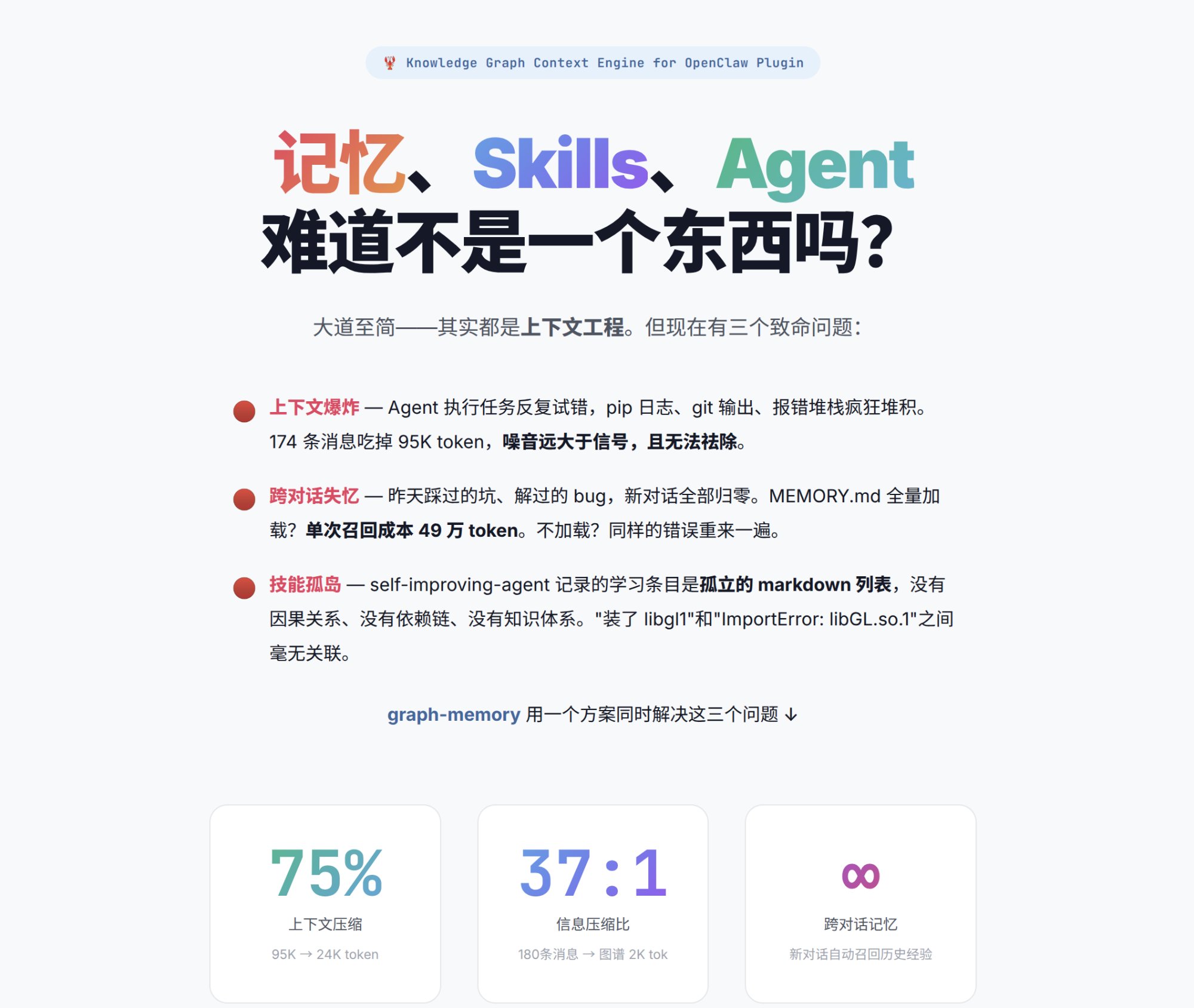
When conversations grow long, agents lose track of what happened. graph-memory solves three problems at once:
- Context explosion — 174 messages eat 95K tokens. graph-memory compresses to ~24K by replacing raw history with structured knowledge graph nodes
- Cross-session amnesia — Yesterday's bugs, solved problems, all gone in a new session. graph-memory recalls relevant knowledge automatically via FTS5/vector search + graph traversal
- Skill islands — Self-improving agents record learnings as isolated markdown. graph-memory connects them: "installed libgl1" and "ImportError: libGL.so.1" are linked by a
SOLVED_BYedge
It feels like talking to an agent that learns from experience. Because it does.
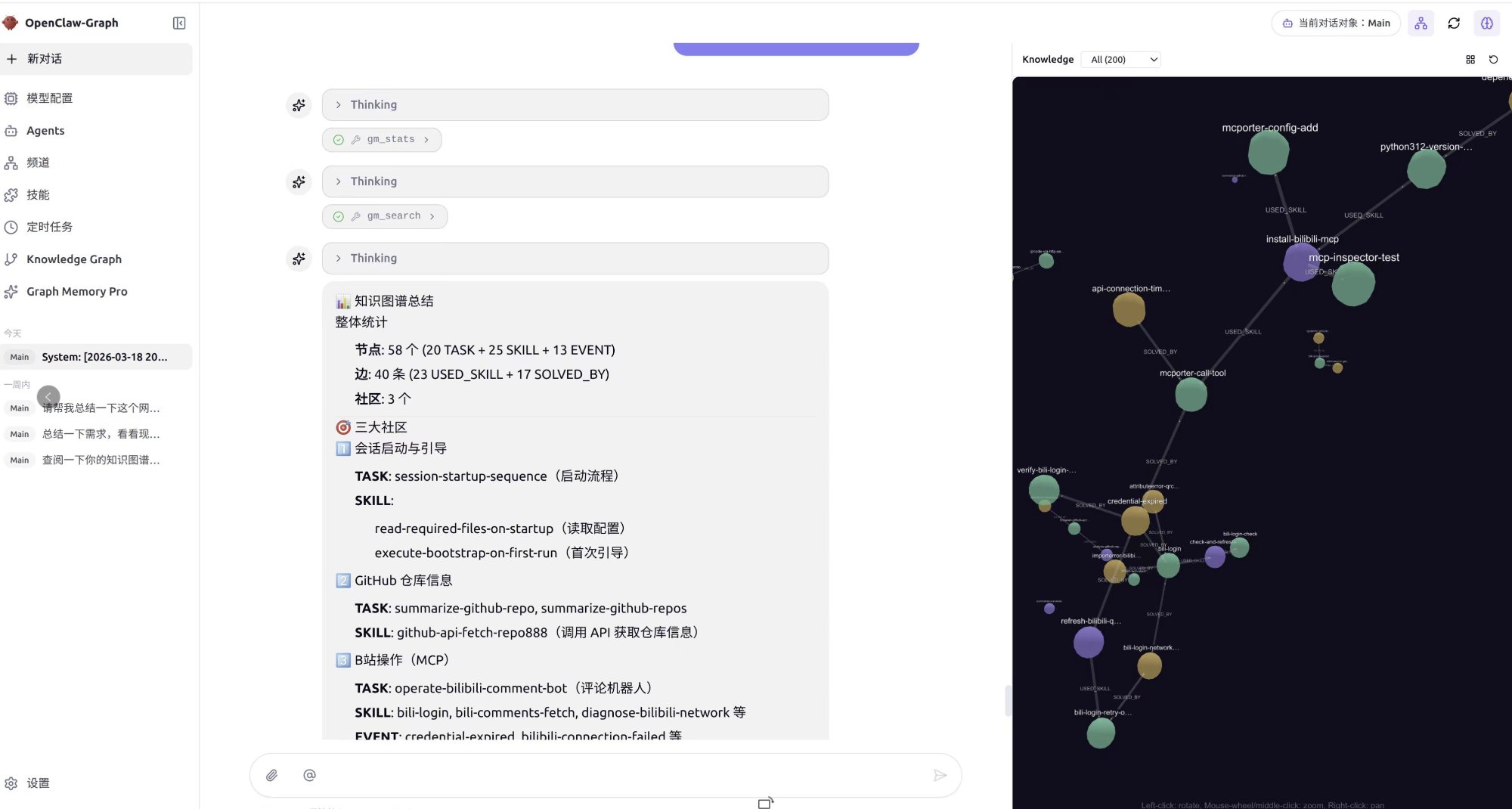
58 nodes, 40 edges, 3 communities — automatically extracted from conversations. Right panel shows the knowledge graph with community clusters (GitHub ops, B站 MCP, session management). Left panel shows agent using
gm_statsandgm_searchtools.
What's new in v2.0
Community-aware recall
Recall now runs two parallel paths that merge results:
- Precise path: vector/FTS5 search → community expansion → graph walk → PPR ranking
- Generalized path: query vector vs community summary embeddings → community members → PPR ranking
Community summaries are generated immediately after each community detection cycle (every 7 turns), so the generalized path is available from the first maintenance window.
Episodic context (conversation traces)
The top 3 PPR-ranked nodes now pull their original user/assistant conversation snippets into the context. The agent sees not just structured triples, but the actual dialogue that produced them — improving accuracy when reapplying past solutions.
Universal embedding support
The embedding module now uses raw fetch instead of the openai SDK, making it compatible with any OpenAI-compatible endpoint out of the box:
- OpenAI, Azure OpenAI
- Alibaba DashScope (
text-embedding-v4) - MiniMax (
embo-01) - Ollama, llama.cpp, vLLM (local models)
- Any endpoint that implements
POST /embeddings
Windows one-click installer
v2.0 ships a Windows installer (.exe). Download from Releases:
- Download
graph-memory-installer-win-x64.exe - Run the installer — it auto-detects your OpenClaw installation
- The installer configures
plugins.slots.contextEngine, adds the plugin entry, and restarts the gateway
Real-world results
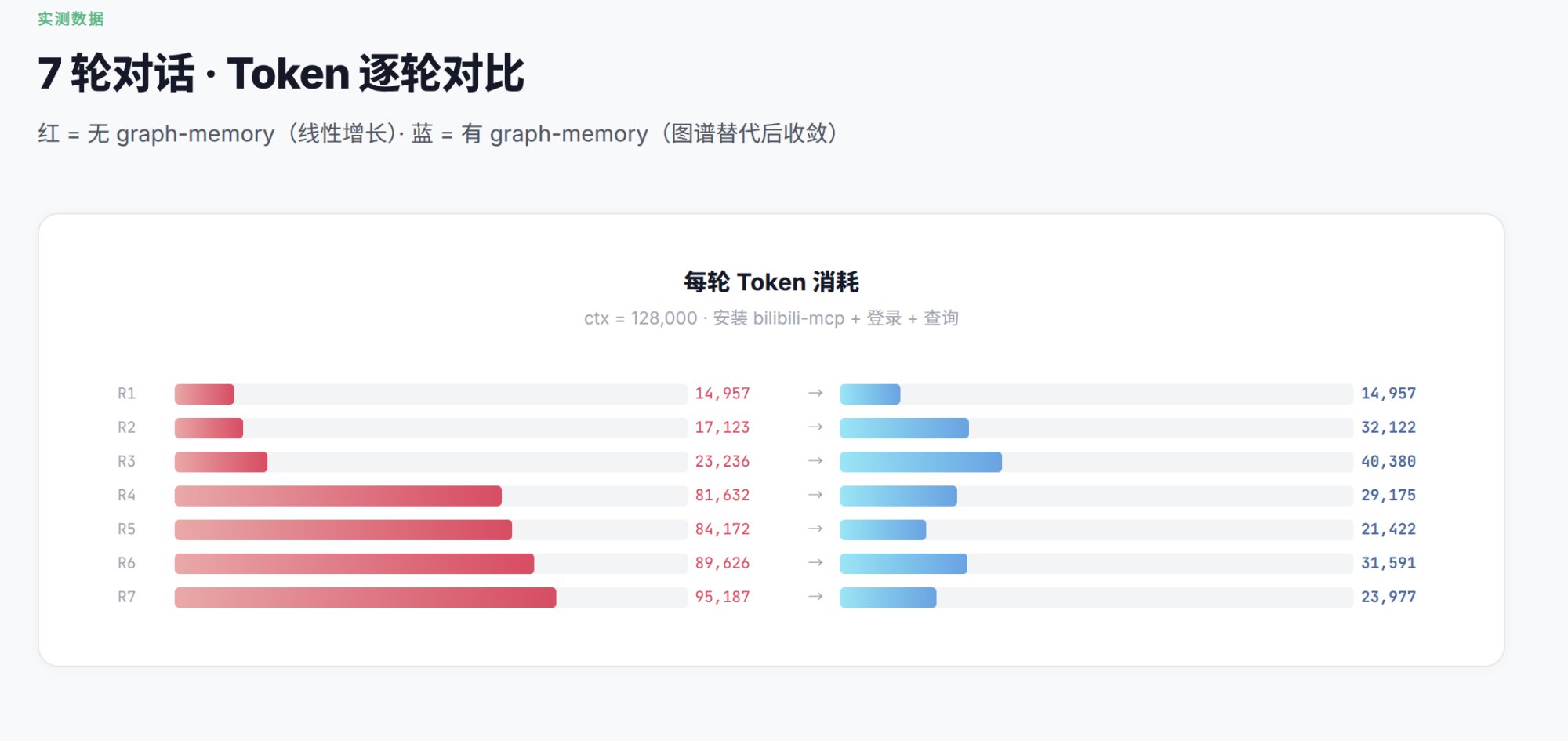
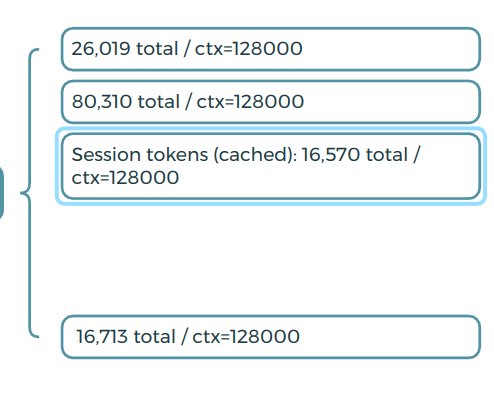
7-round conversation installing bilibili-mcp + login + query:
| Round | Without graph-memory | With graph-memory |
|---|---|---|
| R1 | 14,957 | 14,957 |
| R4 | 81,632 | 29,175 |
| R7 | 95,187 | 23,977 |
75% compression. Red = linear growth without graph-memory. Blue = stabilized with graph-memory.
How it works
The Knowledge Graph
graph-memory builds a typed property graph from conversations:
- 3 node types:
TASK(what was done),SKILL(how to do it),EVENT(what went wrong) - 5 edge types:
USED_SKILL,SOLVED_BY,REQUIRES,PATCHES,CONFLICTS_WITH - Personalized PageRank: ranks nodes by relevance to the current query, not global popularity
- Community detection: automatically groups related skills (Docker cluster, Python cluster, etc.)
- Community summaries: LLM-generated descriptions + embeddings for each community, enabling semantic community-level recall
- Episodic traces: original conversation snippets linked to graph nodes for faithful context reconstruction
- Vector dedup: merges semantically duplicate nodes via cosine similarity
Dual-path recall
User query
  │
  ├─ Precise path (entity-level)
  │    vector/FTS5 search → seed nodes
  │    → community peer expansion
  │    → graph walk (N hops)
  │    → Personalized PageRank ranking
  │
  ├─ Generalized path (community-level)
  │    query embedding vs community summary embeddings
  │    → matched community members
  │    → graph walk (1 hop)
  │    → Personalized PageRank ranking
  │
  └─ Merge & deduplicate → final context
Both paths run in parallel. Precise results take priority; generalized results fill gaps from uncovered knowledge domains.
Data flow
Message in → ingest (zero LLM)
  ├─ All messages saved to gm_messages
  └─ turn_index continues from DB max (survives gateway restart)

assemble (zero LLM)
  ├─ Graph nodes → XML with community grouping (systemPromptAddition)
  ├─ PPR ranking decides injection priority
  ├─ Episodic traces for top 3 nodes
  ├─ Content normalization (prevents OpenClaw content.filter crash)
  └─ Keep last turn raw messages

afterTurn (async, non-blocking)
  ├─ LLM extracts triples → gm_nodes + gm_edges
  ├─ Every 7 turns: PageRank + community detection + community summaries
  └─ User sends new message → extract auto-interrupted

session_end
  ├─ finalize (LLM): EVENT → SKILL promotion
  └─ maintenance: dedup → PageRank → community detection

Next session → before_prompt_build
  ├─ Dual-path recall (precise + generalized)
  └─ Personalized PageRank ranking → inject into context
Personalized PageRank (PPR)
Unlike global PageRank, PPR ranks nodes relative to your current query:
- Ask about "Docker deployment" → Docker-related SKILLs rank highest
- Ask about "conda environment" → conda-related SKILLs rank highest
- Same graph, completely different rankings per query
- Computed in real-time at recall (~5ms for thousands of nodes)
Installation
Prerequisites
- OpenClaw (v2026.3.x+)
- Node.js 22+
Windows users
Download the installer from Releases:
graph-memory-installer-win-x64.exe
The installer handles everything: plugin installation, context engine activation, and gateway restart. After running, skip to Step 3: Configure LLM and Embedding.
Step 1: Install the plugin
Choose one of three methods:
Option A — From npm registry (recommended):
pnpm openclaw plugins install graph-memory
No node-gyp, no manual compilation. The SQLite driver (@photostructure/sqlite) ships prebuilt binaries — works with OpenClaw's --ignore-scripts install.
Option B — From GitHub:
pnpm openclaw plugins install github:adoresever/graph-memory
Option C — From source (for development or custom modifications):
git clone https://github.com/adoresever/graph-memory.git
cd graph-memory
npm install
npx vitest run   # verify 80 tests pass
pnpm openclaw plugins install .
Step 2: Activate context engine
This is the critical step most people miss. graph-memory must be registered as the context engine, otherwise OpenClaw will only use it for recall but won't ingest messages or extract knowledge.
Edit ~/.openclaw/openclaw.json and add plugins.slots:
{
  "plugins": {
    "slots": {
      "contextEngine": "graph-memory"
    },
    "entries": {
      "graph-memory": {
        "enabled": true
      }
    }
  }
}
Without "contextEngine": "graph-memory" in plugins.slots, the plugin registers but the ingest / assemble / compact pipeline never fires — you'll see recall in logs but zero data in the database.
Step 3: Configure LLM and Embedding
Add your API credentials inside plugins.entries.graph-memory.config:
{
  "plugins": {
    "slots": {
      "contextEngine": "graph-memory"
    },
    "entries": {
      "graph-memory": {
        "enabled": true,
        "config": {
          "llm": {
            "apiKey": "your-llm-api-key",
            "baseURL": "https://api.openai.com/v1",
            "model": "gpt-4o-mini"
          },
          "embedding": {
            "apiKey": "your-embedding-api-key",
            "baseURL": "https://api.openai.com/v1",
            "model": "text-embedding-3-small",
            "dimensions": 512
          }
        }
      }
    }
  }
}
LLM (config.llm) — Required. Used for knowledge extraction and community summaries. Any OpenAI-compatible endpoint works. Use a cheap/fast model.
Embedding (config.embedding) — Optional but recommended. Enables semantic vector search, community-level recall, and vector dedup. Without it, falls back to FTS5 full-text search (still works, just keyword-based).
⚠️ Important:
pnpm openclaw plugins installmay reset your config. Always verifyconfig.llmandconfig.embeddingare present after reinstalling.
If config.llm is not set, graph-memory falls back to the ANTHROPIC_API_KEY environment variable + Anthropic API.
Supported embedding providers
| Provider | baseURL | Model | dimensions |
|---|---|---|---|
| OpenAI | https://api.openai.com/v1 |
text-embedding-3-small |
512 |
| Alibaba DashScope | https://dashscope.aliyuncs.com/compatible-mode/v1 |
text-embedding-v4 |
1024 |
| MiniMax | https://api.minimax.chat/v1 |
embo-01 |
1024 |
| Ollama | http://localhost:11434/v1 |
nomic-embed-text |
768 |
| llama.cpp | http://127.0.0.1:8080/v1 |
your model name | varies |
Set dimensions: 0 or omit it entirely if the model doesn't support the dimensions parameter.
Restart and verify
pnpm openclaw gateway --verbose
You should see these two lines in the startup log:
[graph-memory] ready | db=~/.openclaw/graph-memory.db | provider=... | model=...
[graph-memory] vector search ready
If you see FTS5 search mode instead of vector search ready, your embedding config is missing or the API key is invalid.
After a few rounds of conversation, verify:
# Check messages are being ingested
sqlite3 ~/.openclaw/graph-memory.db "SELECT COUNT(*) FROM gm_messages;"

# Check knowledge triples are being extracted
sqlite3 ~/.openclaw/graph-memory.db "SELECT type, name, description FROM gm_nodes LIMIT 10;"

# Check communities are detected
sqlite3 ~/.openclaw/graph-memory.db "SELECT id, summary FROM gm_communities;"

# In gateway logs, look for:
# [graph-memory] extracted N nodes, M edges
# [graph-memory] recalled N nodes, M edges
Troubleshooting
| Symptom | Cause | Fix |
|---|---|---|
recall works but gm_messages is empty |
plugins.slots.contextEngine not set |
Add "contextEngine": "graph-memory" to plugins.slots |
FTS5 search mode instead of vector search ready |
Embedding not configured or API key invalid | Check config.embedding credentials |
No LLM available error |
LLM config missing after plugin reinstall | Re-add config.llm to plugins.entries.graph-memory |
No extracted log after afterTurn |
Gateway restart caused turn_index overlap | Update to v2.0 (fixes msgSeq persistence) |
content.filter is not a function |
OpenClaw expects array content | Update to v2.0 (adds content normalization) |
| Nodes are empty after many messages | compactTurnCount not reached |
Default is 7 messages. Keep chatting or set a lower value |
Agent tools
| Tool | Description |
|---|---|
gm_search |
Search the knowledge graph for relevant skills, events, and solutions |
gm_record |
Manually record knowledge to the graph |
gm_stats |
View graph statistics: nodes, edges, communities, PageRank top nodes |
gm_maintain |
Manually trigger graph maintenance: dedup → PageRank → community detection + summaries |
Configuration
All parameters have defaults. Only set what you want to override.
| Parameter | Default | Description |
|---|---|---|
dbPath |
~/.openclaw/graph-memory.db |
SQLite database path |
compactTurnCount |
7 |
Turns between maintenance cycles (PageRank + community + summaries) |
recallMaxNodes |
6 |
Max nodes injected per recall |
recallMaxDepth |
2 |
Graph traversal hops from seed nodes |
dedupThreshold |
0.90 |
Cosine similarity threshold for node dedup |
pagerankDamping |
0.85 |
PPR damping factor |
pagerankIterations |
20 |
PPR iteration count |
Database
SQLite via @photostructure/sqlite (prebuilt binaries, zero native compilation). Default: ~/.openclaw/graph-memory.db.
| Table | Purpose |
|---|---|
gm_nodes |
Knowledge nodes with pagerank + community_id |
gm_edges |
Typed relationships |
gm_nodes_fts |
FTS5 full-text index |
gm_messages |
Raw conversation messages |
gm_signals |
Detected signals |
gm_vectors |
Embedding vectors (optional) |
gm_communities |
Community summaries + embeddings |
vs lossless-claw
| lossless-claw | graph-memory | |
|---|---|---|
| Approach | DAG of summaries | Knowledge graph (triples) |
| Recall | FTS grep + sub-agent expansion | Dual-path: entity PPR + community vector matching |
| Cross-session | Per-conversation only | Automatic cross-session recall |
| Compression | Summaries (lossy text) | Structured triples (lossless semantics) |
| Graph algorithms | None | PageRank, community detection, vector dedup |
| Context traces | None | Episodic snippets from source conversations |
Development
git clone https://github.com/adoresever/graph-memory.git
cd graph-memory
npm install
npm test        # 80 tests
npx vitest      # watch mode
Project structure
graph-memory/
├── index.ts                     # Plugin entry point
├── openclaw.plugin.json         # Plugin manifest
├── src/
│   ├── types.ts                 # Type definitions
│   ├── store/                   # SQLite CRUD / FTS5 / CTE traversal / community CRUD
│   ├── engine/                  # LLM (fetch-based) + Embedding (fetch-based, SDK-free)
│   ├── extractor/               # Knowledge extraction prompts
│   ├── recaller/                # Dual-path recall (precise + generalized + PPR)
│   ├── format/                  # Context assembly + transcript repair + content normalization
│   └── graph/                   # PageRank, community detection + summaries, dedup, maintenance
└── test/                        # 80 vitest tests
License
MIT
Reviews (0)
Sign in to leave a review.
Leave a reviewNo results found