adspower-browser
Health Gecti
- License — License: MIT
- Description — Repository has a description
- Active repo — Last push 0 days ago
- Community trust — 55 GitHub stars
Code Basarisiz
- network request — Outbound network request in packages/adspower-browser/package.json
- network request — Outbound network request in packages/adspower-browser/tsup.config.ts
- network request — Outbound network request in packages/core/package.json
- network request — Outbound network request in packages/core/src/constants/api.ts
- process.env — Environment variable access in packages/core/src/constants/config.ts
- os.homedir — User home directory access in packages/core/src/handlers/automation.ts
Permissions Gecti
- Permissions — No dangerous permissions requested
This server acts as an MCP bridge, allowing AI models and compatible CLIs to interact with the AdsPower antidetect browser via its LocalAPI. It enables automated control of browser profiles and tasks.
Security Assessment
The tool makes multiple outbound network requests to communicate with the AdsPower LocalAPI and accesses environment variables for configuration. However, it fails a critical security check by actively accessing the user's home directory. While this is likely done to locate local configuration or browser profile files automatically, accessing high-level system paths without strict boundaries poses a potential privacy and security risk. No dangerous system permissions were requested, and no hardcoded secrets or shell command executions were detected. Overall risk is rated as Medium.
Quality Assessment
The project appears to be actively maintained, with repository activity as recent as today. It uses the permissive and standard MIT license, and it has gathered a modest but healthy level of community trust with 55 GitHub stars. A minor drawback is the lack of a README file, which means setup instructions, usage examples, and expected behaviors are not clearly documented for new users.
Verdict
Use with caution.
MCP server for using the AdsPower LocalAPI
AdsPower cli & MCP
Adding the adspower-browser Skill
Use the adspower-browser skill so the AI can operate AdsPower via the CLI without the MCP server. Add it in your editor as follows:
| Environment | How to add |
|---|---|
| Cursor | npx skills add AdsPower/adspower-browser |
| Claude Code | npx skills add AdsPower/adspower-browser |
| GPT / Codex | If your setup supports add-skill: npx skills add AdsPower/adspower-browser. Otherwise copy the skill from skills/adspower-browser/ into your agent’s skills directory (e.g. ~/.codex/skills/adspower-browser/). |
AdsPower LocalAPI MCP Server
A Model Context Protocol server that AdsPower browser LocalAPI. This server enables LLMs to interact with AdsPower browser profiles using the v2 API, including creating, updating, deleting profiles, managing groups, and automating browser operations.
Usage with Claude Desktop
Talk to LLMs to create browser: Create an Android UA browser using Chrome 134

Talk to LLMs to create browser: Help me with random UA, random fingerprint, random cookie generation, create 3 browsers, use 134 cores, and open them

How to use?
Requirements
Node version 18 or greater
Version Compatibility
Some APIs are introduced incrementally by AdsPower client version.
If the client has not been upgraded to a version that includes a specific API, requests may return Not found.
When this happens:
- Upgrade AdsPower client to the latest patch version first.
- Then retry the same command/API.
Installation
To use with Claude Desktop, add the server config:
On macOS: ~/Library/Application Support/Claude/claude_desktop_config.json On Windows: %APPDATA%/Claude/claude_desktop_config.json
MacOS / Linux
{
  "mcpServers": {
    "adspower-local-api": {
      "command": "npx",
      "args": ["-y", "local-api-mcp-typescript"]
    }
  }
}
Windows
{
  "mcpServers": {
    "adspower-local-api": {
      "command": "cmd",
      "args": ["/c", "npx", "-y", "local-api-mcp-typescript"]
    }
  }
}
Configuration Parameters
The MCP server supports configuration through command-line arguments or environment variables.
Port Configuration
The port parameter specifies the AdsPower Local API port. Default is 50325.
Priority order:
- Command-line argument
--port(highest priority) - Environment variable
PORT(medium priority) - Default value
50325(lowest priority)
Examples:
Using command-line argument:
{
  "mcpServers": {
    "adspower-local-api": {
      "command": "npx",
      "args": ["-y", "local-api-mcp-typescript", "--port", "50325"]
    }
  }
}
Using environment variable:
{
  "mcpServers": {
    "adspower-local-api": {
      "command": "npx",
      "args": ["-y", "local-api-mcp-typescript"],
      "env": {
        "PORT": "50325"
      }
    }
  }
}
API Key Configuration
The API key is used for authentication with the AdsPower API. It will be sent as Authorization: Bearer <api-key> header in requests.
Priority order:
- Command-line argument
--api-key(highest priority) - Environment variable
API_KEY(medium priority) - No default value (if not provided, requests will not include the API key header)
Examples:
Using command-line argument:
{
  "mcpServers": {
    "adspower-local-api": {
      "command": "npx",
      "args": ["-y", "local-api-mcp-typescript", "--api-key", "your-api-key-here"]
    }
  }
}
Using environment variable:
{
  "mcpServers": {
    "adspower-local-api": {
      "command": "npx",
      "args": ["-y", "local-api-mcp-typescript"],
      "env": {
        "API_KEY": "your-api-key-here"
      }
    }
  }
}
Combined Configuration
You can use both parameters together. Command-line arguments will override environment variables:
{
  "mcpServers": {
    "adspower-local-api": {
      "command": "npx",
      "args": ["-y", "local-api-mcp-typescript", "--port", "50326", "--api-key", "new-key"],
      "env": {
        "PORT": "50325",
        "API_KEY": "old-key"
      }
    }
  }
}
In this example, the server will use port: 50326 and apiKey: new-key (command-line arguments override environment variables).

or use in Cursor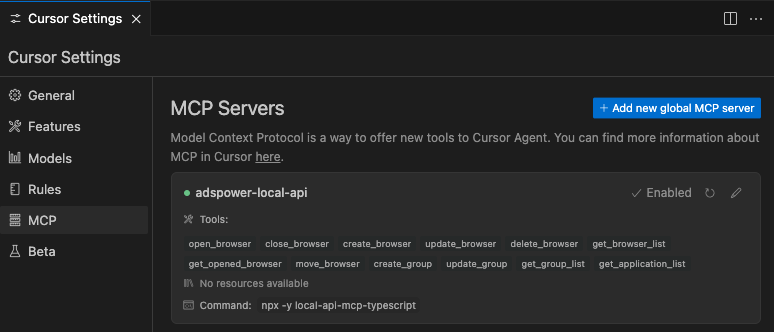
Development
# clone
git clone https://github.com/AdsPower/adspower-browser.git
cd adspower-browser

# install (monorepo)
pnpm install

# build all packages
pnpm run build
For local MCP development, point Claude Desktop to the MCP package:
"mcpServers": {
  "adspower-local-api": {
    "command": "node",
    "args": ["<Replace Your Project Path>/adspower-browser/packages/local-api-mcp/build/index.js"]
  }
}
Yorumlar (0)
Yorum birakmak icin giris yap.
Yorum birakSonuc bulunamadi