blindspot
Health Uyari
- License — License: Apache-2.0
- Description — Repository has a description
- Active repo — Last push 0 days ago
- Low visibility — Only 6 GitHub stars
Code Basarisiz
- rm -rf — Recursive force deletion command in tests/interactive.sh
- rm -rf — Recursive force deletion command in tests/make-fixture.sh
- rm -rf — Recursive force deletion command in tests/run-ps.sh
Permissions Gecti
- Permissions — No dangerous permissions requested
Bu listing icin henuz AI raporu yok.
See the AI keys and agents you can't. A free, read-only check for your Mac, from GIRD.

Blindspot
See the AI keys and agents you can't. A free, read-only check for your Mac, Linux or Windows computer, from GIRD.


Coding agents run with your access: your shell, your repos and the keys in your home folder. In October 2026, OpenCode, Railway, Zeabur and LiteLLM all leaked developer keys. Blindspot shows where your AI keys sit in plain text, which coding agents could read them, and whether that week's leaks touched you. It never prints a key.
Run it
Download the script, read it, check its hash, then run it.
curl -fsSLO https://github.com/aegis-mesh/blindspot/releases/latest/download/gird-check.sh
less gird-check.sh
shasum -a 256 gird-check.sh   # compare with the release notes
bash gird-check.sh
You can also copy it from gird.ai/blindspot. It takes under a minute. While it scans, press space to play GIRD Runner and watch what it finds.
Please don't pipe it straight into a shell. Reading it first is the point.
| Option | What it does |
|---|---|
--full |
Prints every detail instead of the summary. |
--all |
Also scans Desktop, Documents and Downloads. macOS asks for permission. |
--offline |
Shares nothing. DO_NOT_TRACK=1 does the same. |
--save |
Saves the full report as a text file without asking. |
--no-game |
Skips the game while it scans. |
NO_COLOR=1 |
Plain text, no colors. |
What it checks
- Coding agents. Every agent installed, such as Claude Code, Codex, Cursor, Gemini CLI and OpenCode, and whether you used it in the last 30 days. An agent you never open can still be driven by a poisoned package. That is how the Nx attack stole keys from developer laptops.
- MCP servers. The servers each agent is set up to start, and any token written straight into a config file. Configs inside plugin folders and caches, such as Codex's
.tmp/plugins, are shown as a separate count. - Keys in plain text. AI and cloud keys in shell profiles, shell history, agent configs and
.envfiles, grouped by provider and file. It also lists login files any agent can read, such as AWS credentials and SSH keys without a passphrase. - Keys saved in Claude Code allow lists. Click "always allow" on a command that has a key in it, and Claude Code saves the whole command in the project's settings file. Blindspot flags each one, and whether an npm publish from that folder would ship it.
- That week's leaks. Files left by the LiteLLM 1.107.0 malware in every Python environment it finds, the bad package in your uv cache, and what to rotate if you use OpenCode Console, Railway or Zeabur.
At the end you get a short summary: how you compare with the other AI builders who ran it, one line per check, and the first thing to fix. Everyone who shares their result gets a number, and the first 1,000 are marked. Press 1 to 5 for the details of a check, s to save the full report, or ENTER for your AI Exposure Check: a page with your result, the steps to fix what it found, and an image to post on LinkedIn or X. --full prints every detail instead, and so does running it into a file or a pipe.
What it never does
- Print a key. It names the provider, never the value.
- Use sudo or ask for your password.
- Start an agent, an MCP server or Python.
- Leave a file behind, unless you ask it to save the report. It keeps two small temp files while it runs, for the progress line and the public totals, and deletes them when it exits.
- Send a path, a key, a username, a hostname or your raw hardware ID.
What it shares
When it starts, it asks gird.ai for public totals, such as how many AI builders have run it. That request sends nothing else. When it finishes, it sends one report to gird.ai: the counts above, which agents, key providers and well-known MCP servers it saw (from fixed lists, so no name you typed is sent), where keys sit by kind of file, a few facts about your setup such as your terminal app and macOS version, and a hashed device ID so repeat runs can be counted. The reply says how your result compares and your number. The result link carries a random run ID, and the result page sends it back only when you press a share button. Every field is listed in TELEMETRY.md. Run it with --offline, or set DO_NOT_TRACK=1, and it makes no requests at all.
GIRD Runner
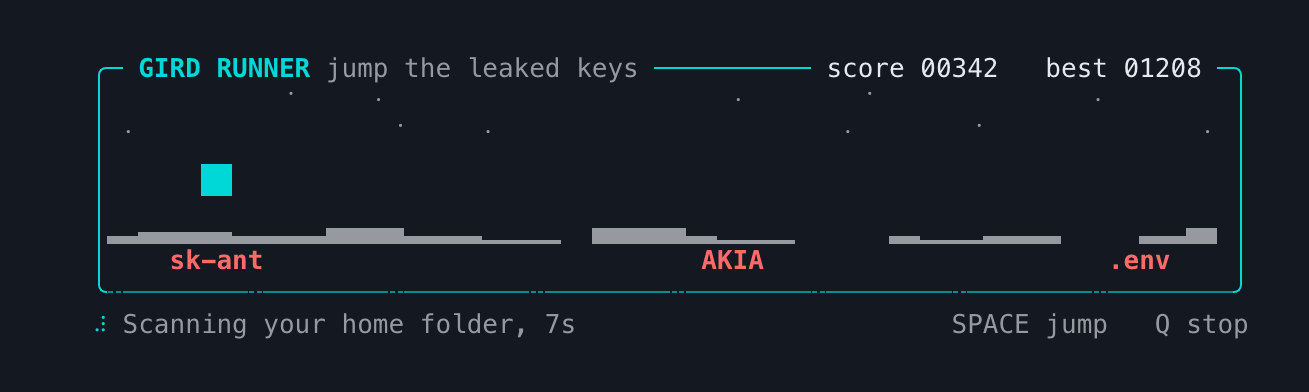
A small jump game that runs while the scan does, with the latest finding shown under it. Jump the leaked keys. When your results are ready, it asks whether to show them or let you keep playing for another minute.
Requirements
macOS 13 or later, Linux, or Windows. It runs on the bash that ships with macOS (3.2) and on newer versions, and uses standard tools only: find, grep, awk, sed, od and stty. curl is used only for the public totals and to share counts. jq is used if it is installed.
Windows
Run gird-check.sh in Git Bash (it comes with Git for Windows), MSYS2 or Cygwin, the same way as above. It checks the Windows places: agents and MCP configs in your user folder and in %APPDATA% and %LOCALAPPDATA% (Claude Desktop, Cursor, VS Code, Windsurf, Goose), PowerShell's command history, Python installs and the uv cache under AppData, and the LiteLLM marker files in %TEMP%. Without jq, which Git Bash doesn't include, it finds MCP config files but can't count the servers in JSON ones.
In WSL it checks the Linux system you run it in, not the files on the Windows side, and says so at the end.
For plain PowerShell, with nothing to install, there is a PowerShell version, gird-check.ps1, with the same checks and the same report. It runs on Windows PowerShell 5.1 and PowerShell 7:
irm https://gird.ai/blindspot/gird-check.ps1 -OutFile gird-check.ps1
Get-FileHash .\gird-check.ps1
powershell -ExecutionPolicy Bypass -File .\gird-check.ps1
-ExecutionPolicy Bypass applies to that one run. The switches are -All, -Full, -Offline and -Save, and DO_NOT_TRACK=1 works too. It also reads PowerShell's command history. It has no game. A file that takes too long to check is listed as skipped, never counted as clean. On the same PC, Git Bash and PowerShell send the same device ID.
Limits
Blindspot shows what could reach your keys, not what your agents did with them. Finding nothing does not prove nothing leaked. It doesn't look at containers, servers or CI.
Argus is GIRD's free Mac app. It watches what your agents actually do, tells you when one opens a key file or tries to send a key off your Mac, and can stop terminal agents from reading your keys.
Contributing
Found a bug, or a key it missed? Open an issue. New agents, key formats and incident checks are welcome, and CONTRIBUTING.md has the steps for an issue or a pull request. Report security issues privately, as described in SECURITY.md.
If Blindspot is useful to you, a star helps other developers find it.
License
Apache-2.0. Copyright 2026 GIRD AI Technologies Private Limited.
Yorumlar (0)
Yorum birakmak icin giris yap.
Yorum birakSonuc bulunamadi