pilothouse
Health Uyari
- License — License: MIT
- Description — Repository has a description
- Active repo — Last push 0 days ago
- Low visibility — Only 5 GitHub stars
Code Basarisiz
- rm -rf — Recursive force deletion command in docs/appstore/metadata.json
- network request — Outbound network request in docs/media/demo-src/cdp.ts
- execSync — Synchronous shell command execution in docs/media/demo-src/launch.ts
- fs.rmSync — Destructive file system operation in docs/media/demo-src/launch.ts
- process.env — Environment variable access in docs/media/demo-src/launch.ts
Permissions Gecti
- Permissions — No dangerous permissions requested
Bu listing icin henuz AI raporu yok.
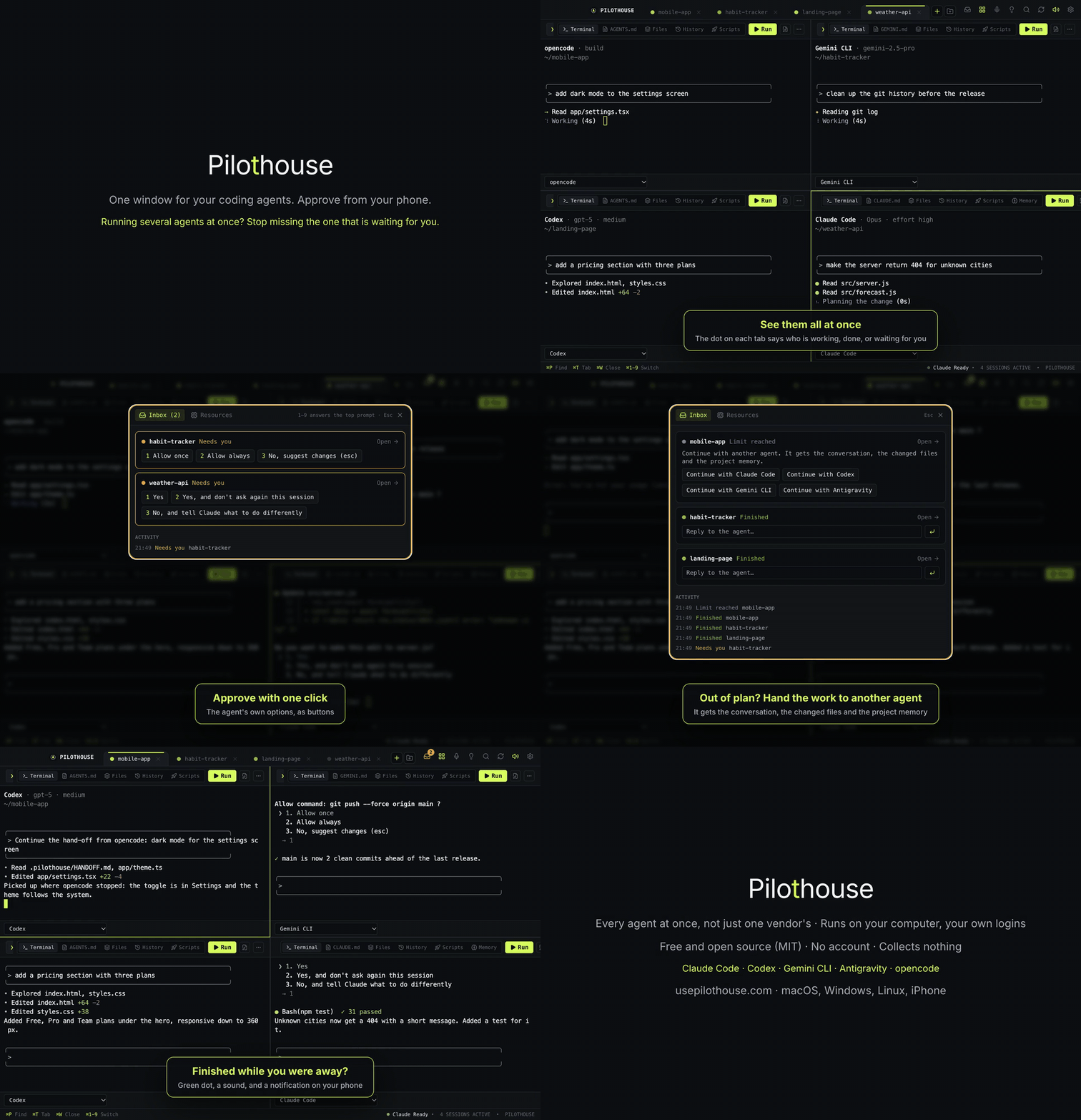
One window for your coding agents. Approve from your phone. Runs Claude Code, Codex, Gemini CLI, Antigravity and opencode side by side, every approval in one inbox. Free, MIT, no account.
Pilothouse
One window for your coding agents. Approve from your phone.





Built with the Electron framework; not affiliated with the OpenJS Foundation or the Electron project.
Download for Mac · Windows · Linux · iPhone app · Web app · 50-second demo
Website: usepilothouse.com
Pilothouse keeps all your AI coding projects in one window, and in your pocket: every project gets its own real terminal tab (node-pty + xterm.js) that starts your agent (claude, codex, gemini or opencode) with the flags you choose. You can switch between projects with ⌘1-9, edit CLAUDE.md, browse files and send prompts without leaving the app, and answer your agents from your phone. Free and open source (MIT), no account, no data collected.
| Pilothouse | An agent CLI on its own | A single-agent app | |
|---|---|---|---|
| Several agents side by side in one window | ✅ | ❌ | ❌ |
| One Inbox for every approval, across agents and projects | ✅ | ❌ | ❌ |
| Answer from your phone or any browser | ✅ | ❌ | Some |
| Hand the work to another agent when one hits its limit | ✅ | ❌ | ❌ |
| Two agents debate a plan | ✅ | ❌ | ❌ |
| Free and open source | ✅ | Varies | Varies |
Quick install
macOS
With Homebrew:
brew install --cask aemresrbyk/tap/pilothouse
Or with the install script:
curl -fsSL https://raw.githubusercontent.com/aemresrbyk/pilothouse/main/install.sh | bash
The installer:
- picks the right build for Apple Silicon (
arm64) or Intel (x64), - installs
Pilothouse.appinto/Applications, - installs a build that is signed with a Developer ID and notarized by Apple, so it opens without Gatekeeper warnings,
- puts a
Pilothousealias on your Desktop.
If you run ./install.sh inside a clone, it builds from source instead of downloading.
Windows
Download Pilothouse-Setup-x64.exe (installer) or Pilothouse-Portable-x64.exe (no install) from Releases. The build isn't code-signed yet (a certificate costs money every year and Pilothouse is free), so SmartScreen shows Windows protected your PC the first time: click More info, check it says Pilothouse-Setup-x64.exe, then Run anyway. Download it only from usepilothouse.com or this repo's Releases. Details.
Linux (x64)
curl -fsSL https://raw.githubusercontent.com/aemresrbyk/pilothouse/main/install.sh | bash
This puts the AppImage in ~/.local/bin and adds Pilothouse to your app menu (Ubuntu 22.04+ needs sudo apt install libfuse2 for AppImages). A .deb is on the Releases page too.
Features
- Setup on first run. Pilothouse looks for each agent CLI (Claude Code, Codex, Gemini CLI, opencode) on your shell's PATH and the usual install folders; choose the ones it can't find, or skip them. Then it lists the folders Claude Code and Codex have worked in, with how many sessions each agent has there, and you pick the projects and the agent for each. Run it again from Settings.
- Tabbed embedded terminals. Each tab runs a login shell in the project folder and starts Claude automatically. You can open several tabs for the same project (e.g. one for Claude, one for
npm run dev). Open tabs come back when you restart the app. - Any terminal agent. Pick Claude Code, Codex, Gemini CLI, Antigravity (
agy) or opencode per project. Each agent keeps its own flags, and the instructions tab edits its file (CLAUDE.md,AGENTS.md,GEMINI.md). History works for Claude Code and Codex. - Knows when you're needed. A tab's dot pulses while the agent works, turns amber when it asks for approval and green when it finished while you were in another tab. You also get a desktop notification and, on macOS, a Dock badge.
- Inbox (
⌘I/Ctrl+Shift+I). Everything your agents ask you, in one column: each approval prompt shows the agent's own options as buttons (or press 1–9). Commands that failed are listed apart from questions, with their exit code, and finished tabs get a reply box. Nothing is approved for you. Come back after 5+ minutes away and the Inbox opens on what happened meanwhile. - Hand-off between agents. Ran out of your Claude plan's usage? Pilothouse notices the limit message, and the Inbox offers Continue with Codex / Gemini / opencode (or use the ⇄ button in the toolbar any time). The next agent starts with
.pilothouse/handoff.md: the last conversation, the uncommitted changes, recent commits and the project's memory and instruction files (CLAUDE.md, Claude's auto memory,AGENTS.md,GEMINI.md). So opencode can see what Claude or Codex did. The folder is added to the repo's local git exclude list, never committed. - Resources. The Inbox's second page shows the CPU and memory of every tab (agent, dev server and their child processes), with a button to stop one.
- Grid view. Show all open tabs side by side instead of one at a time.
- Drag tabs to reorder them. The order also sets
⌘1–⌘9and the grid; the terminals keep running. - Agent debate. Drafts → Debate: pick two or more agents (Claude Code, Codex, Gemini CLI, opencode) and a question. They answer in turns, read-only, each on your own account, and can look at the project but not change it. It stops early when all agree, then one agent writes the decision, open points and a task list to
.pilothouse/debate.md; Use decision as draft puts it in Drafts, ready to send, queue or run in a worktree. - Worktree tabs. The fork button next to the git badge opens a new tab in its own
git worktreeand branch (pilothouse/<time>), so two agents on the same repo don't overwrite each other's files. - Voice prompts. Press
⌘⇧Space(Ctrl+Shift+Spaceon Windows/Linux) anywhere (or the mic button), speak, and your words are typed into the active agent tab. Speech is recognised on your computer with Whisper large-v3-turbo (one-time 574 MB download) and never leaves it. Works with English in any accent, Turkish and ~100 other languages; Settings → Voice lists 31 to pick from (or auto-detect). The iPhone app offers every language iOS can recognise. Optionally say "Hey Pilothouse" instead of pressing the hotkey: a small on-device wake-word model (openWakeWord, trained for this phrase) listens while the app sits in the menu bar / system tray. - Talk with your agent. Conversation mode turns voice prompts into a back-and-forth: Pilothouse reads the agent's answer aloud (code stays on screen), asks you to repeat words it wasn't sure it heard, reads approval questions out so you can answer "yes" or "no", and keeps listening. Talk over it to interrupt; say "stop" while the agent works to cancel. Replies in the language you speak (English, Turkish …) with your system's own voices (macOS voices, Windows SAPI voices, or
espeak-ngon Linux). - Agent, model and effort from your own account. One menu under the terminal lists every agent with its models underneath (Claude Code → Fable, Opus, Sonnet, Haiku; Codex → your account's models; …). Picking another agent's model switches the tab to that agent right away; next to it, choose the effort level. The lists come from the agent on your computer: Codex's models and their levels from your ChatGPT/API account,
opencode modelsandagy modelsfor opencode and Antigravity, Claude Code's effort levels from its own help, and Gemini's aliases (auto, pro, flash, flash-lite). Picking the agent's name alone leaves its own default model. A new model for the same agent applies when you press Run. - Per-project flags. The toolbar has on/off toggles for the flags you use (
--continue,--verbose,--model opus…). You choose the list, and which ones new projects start with, in Settings. Add any extra flags/prompt in the input bar. Run restarts the session with the current command. - Quick actions. The ⋯ menu sends
/doctor,/compact,/init,/cost, plus "Review Git Diff", "Find Bugs" and "Write Tests" prompts to the running agent, and holds stop, clear, open-in-editor and show-in-folder. - Conversation history & search. Claude Code and Codex conversations of a project in one list, with dates and times; search across all of them with
⌘F(Ctrl+Shift+F). Resume reopens one in the agent that wrote it; Continue with… hands that exact conversation to another agent (Codex ran out? continue in Claude from the same point). - CLAUDE.md editor. View and edit the project's
CLAUDE.mdin the app, or start from a template if the project doesn't have one. - File browser. Browse project folders and preview files (large files are truncated, open them in your editor for the full content).
- Prompt drafter. A per-project scratchpad for multi-line prompts, sent to the terminal with one click.
- Git badge. Shows the current branch and the number of modified files.
- Project discovery. On first run, imports the projects Claude Code already knows about (
~/.claude.json). Use the sync button to pick up new ones later. You can add folders with the picker, by typing a path, or by drag & drop. - Your language. The interface speaks English, Türkçe, Español, Português, Deutsch, Français, Русский, 中文, 日本語 and 한국어 (Settings → Interface language; Auto follows your system). The iPhone app and the web app follow your phone's or browser's language.
- 4 themes. Pilothouse (default: near-black with one signal-lime accent, the logo's colours), OLED Black, Nord Frost and Paper.
All flags start off, including
--dangerously-skip-permissions(shown in red when on: Claude then runs tools without asking first).
- Auto-approve rules. Settings → Auto-approve: one phrase per line (
npm test,git status…). When an agent asks for approval and the request contains one, Pilothouse answers with its first option. Risky commands (rm -rf, force-push,git reset --hard, deploy,sudo,curl | sh,.env…) are never auto-approved, whatever the rules say. Works for every agent; each one is logged.
From your phone or any browser
The iPhone app (App Store), or usepilothouse.com/app in any browser. One QR code, no account, no VPN to set up, end-to-end encrypted.
- Every agent, every computer, one list. What needs you is on top, with the agent each tab runs and its last message. The iPhone app and the web app can each follow several computers and servers.
- The live terminal, exactly as on the desktop, with a key bar (Esc, Tab, arrows, Enter, Ctrl+C) and multi-line messages.
- Approve safely. The agent's own options as buttons. Risky commands take two taps (and Face ID on the iPhone). If the prompt changed since you looked, your tap is refused instead of approving something else. "What changed" sits right under the prompt.
- Notifications when an agent needs you or finishes: lock-screen ones with Approve / Deny on the iPhone, browser notifications in the web app, and a Live Activity with the counts.
- Usage. How much of Claude Code's 5-hour and weekly limits (and Codex's) you have used, with reset times, read from files the CLIs keep on your computer.
- Agent debate from the iPhone app. Pick the agents and the question, follow the turns as they come in, stop it any time; it runs on your computer, read-only, as on the desktop.
- Changes and to-dos, open any project's agent, stop a running one, talk instead of typing, widgets.
- View-only links let someone watch without being able to act. Pilothouse server runs agents on a Linux box, VPS or Mac mini without a window (
server). - Audit log. Every remote action goes to
~/.pilothouse/remote-audit.jsonlon your computer.
Set up: Pilothouse → Settings → Remote control → scan the QR code with your phone's camera or the iPhone app. The phone shows a 6-digit security code; your computer shows the same code with the device's approximate location (city, from the relay). Click Allow if they match, and the phone is ready. Like WhatsApp's linked devices, you scan once: the phone stays paired until you remove it in Settings or unpair it on the phone. Each QR pairs one device and expires after 10 minutes.
Security (full write-up): two ways in, the same API. Through the relay (relay.usepilothouse.com), every request and reply is sealed with AES-256-GCM using a key that only your computer and that device hold, bound to the device id, with a timestamp and nonce against replays; the relay only passes sealed messages and stores nothing. Or over Tailscale: the computer listens only on its Tailscale address, never on your Wi-Fi network, and checks the Host header against DNS rebinding. Either way the computer stores only a hash of each device's token and refuses actions from view-only devices.
Get it on the App Store. The iOS app lives in mobile/ios (SwiftUI + WidgetKit; generate the project with xcodegen).
Privacy
Pilothouse collects nothing. No accounts, no analytics, no telemetry, no crash reporting. Your code, prompts and terminal output stay on your computer and the devices you pair.
What it talks to on the network, and why:
| Where | When |
|---|---|
| GitHub Releases | update check |
| Hugging Face | one-time voice model download, only if you turn voice on |
| Your paired devices, through the Pilothouse relay (Cloudflare) or over Tailscale | only if you turn Remote control on; end-to-end encrypted, the relay stores nothing |
| Pilothouse relay → Apple Push Notification service | iPhone notifications: an encrypted blob only your phone can open. Live Activity: two numbers (agents needing you, agents working) |
| Your browser's push service | only if you turn on notifications in the web app; encrypted for that browser |
Your agents (Claude Code, Codex …) talk to their own providers as they always do; Pilothouse doesn't sit in between.
Keyboard shortcuts
| macOS | Windows / Linux | Action |
|---|---|---|
⌘T |
Ctrl+Shift+T |
Open the project picker in a new tab |
⌘P / ⌘K |
Ctrl+Shift+P / Ctrl+Shift+K |
Command palette: search, open, or remove projects |
⌘I |
Ctrl+Shift+I |
Inbox: answer agents, see failures and resource use |
⌘W |
Ctrl+Shift+W |
Close the active tab |
⌘1 – ⌘9 |
Ctrl+1 – Ctrl+9 |
Switch tabs |
⌘C / ⌘V |
Ctrl+C (with a selection) / Ctrl+V |
Copy selection / paste (bracketed paste, so multi-line pastes don't submit early) |
Enter in the input bar |
same | Restart Claude with the current flags + input |
On Windows and Linux the app shortcuts add Shift, because plain Ctrl+T/W/K/P/I/F are keys your shell uses inside the terminal.
FAQ
Does my code leave my computer? No. Code, prompts and terminal output stay on your computer and the devices you paired. Phone and web app traffic is end-to-end encrypted; the relay only passes sealed messages. See Security.
Do I need an API key or a new account? No. Pilothouse runs the agent CLIs you already use, with their own logins and plans, and never reads their credentials.
Can someone else approve commands on my computer? Only a device you paired with a one-time QR code and allowed on the computer after checking the security code. Risky commands need two taps (and Face ID on the iPhone).
Does it change how my agents behave? No. It starts the real CLI in a real terminal. Flags that let an agent act without asking are off by default and shown in red when on.
Do I need the phone? No. The desktop app works on its own; remote control is off until you turn it on.
Is it really free? Yes, MIT licensed, no paid plan, no ads, no data collection. You still pay your agent providers as usual.
Build from source
How it fits together, file by file: ARCHITECTURE.md.
Requirements: Node.js 18+ (or Bun) and at least one supported agent CLI: Claude Code (npm install -g @anthropic-ai/claude-code), Codex, Gemini CLI or opencode.
git clone https://github.com/aemresrbyk/pilothouse.git
cd pilothouse
npm install          # or: bun install
npm run dev          # development mode with live reload
npm run build        # type-check + production bundle
npm run dist:mac     # .dmg / .zip into release/ (on a Mac)
npm run dist:win     # .exe installer + portable (on Windows)
npm run dist:linux   # .AppImage + .deb (on Linux)
npm run build:whisper  # optional: local speech recognition (needs cmake + a C++ compiler)
Settings and the project list are stored in ~/.pilothouse/config.json. Configs from older versions (~/.electron-app, ~/.claude-launcher) are migrated automatically.
Releases
.github/workflows/build-and-release.yml builds packages when you push a v* tag (or run it manually from the Actions tab) and attaches them to a GitHub Release: macOS arm64 + x64 (Pilothouse-<arch>-mac.zip / .dmg), Windows x64 (Pilothouse-Setup-x64.exe, Pilothouse-Portable-x64.exe) and Linux x64 (.AppImage, .deb). Each platform's auto-update feed (latest-mac.yml, latest.yml, latest-linux.yml) is attached too.
Code signing & notarization
Builds are unsigned unless these repository secrets exist. Once they do, CI signs with the hardened runtime (build/entitlements.mac.plist) and notarizes automatically:
| Secret | Value |
|---|---|
MAC_CERT_P12_BASE64 |
base64 -i cert.p12 of a Developer ID Application certificate (an Apple Development cert is not enough) |
MAC_CERT_PASSWORD |
the .p12 export password |
APPLE_ID |
Apple ID email |
APPLE_APP_SPECIFIC_PASSWORD |
app-specific password from appleid.apple.com |
APPLE_TEAM_ID |
10-character team ID |
Local npm run pack / dist:mac builds stay unsigned on purpose.
License
MIT, made by Ali Emre Sarıbıyık (aemresrbyk).
Third-party software shipped with the app and its licenses: THIRD_PARTY_NOTICES.md. The "Hey Pilothouse" wake word model has its own license (resources/wakeword/LICENSE.md).
Pilothouse is an independent project, not affiliated with or endorsed by Anthropic, OpenAI, Google or the makers of opencode. Claude Code, Codex, Gemini CLI, Antigravity and opencode are trademarks of their respective owners and are named only to say which tools Pilothouse works with.
Yorumlar (0)
Yorum birakmak icin giris yap.
Yorum birakSonuc bulunamadi