Aether-Agent
Health Uyari
- License — License: Apache-2.0
- Description — Repository has a description
- Active repo — Last push 0 days ago
- Low visibility — Only 5 GitHub stars
Code Uyari
- process.env — Environment variable access in .github/workflows/ci.yml
- fs module — File system access in .github/workflows/ci.yml
- process.env — Environment variable access in .github/workflows/codeql.yml
- fs module — File system access in .github/workflows/codeql.yml
- fs module — File system access in .github/workflows/release.yml
Permissions Gecti
- Permissions — No dangerous permissions requested
Bu listing icin henuz AI raporu yok.
A coding agent that lives in your terminal. Local Ollama first, or hosted models through the Aether AI fleet.

Aether Agent
Coding and account agents in your terminal.
It reads your repository, makes the change, runs the checks you name,
and shows you the exit code. Hosted models or your own local Ollama.
The 0.4.0 source candidate also brings your account agents and Online chats
into the terminal, with guided ATS setup.



Quickstart · Models · Commands · Aether Code · Safety · Patch notes
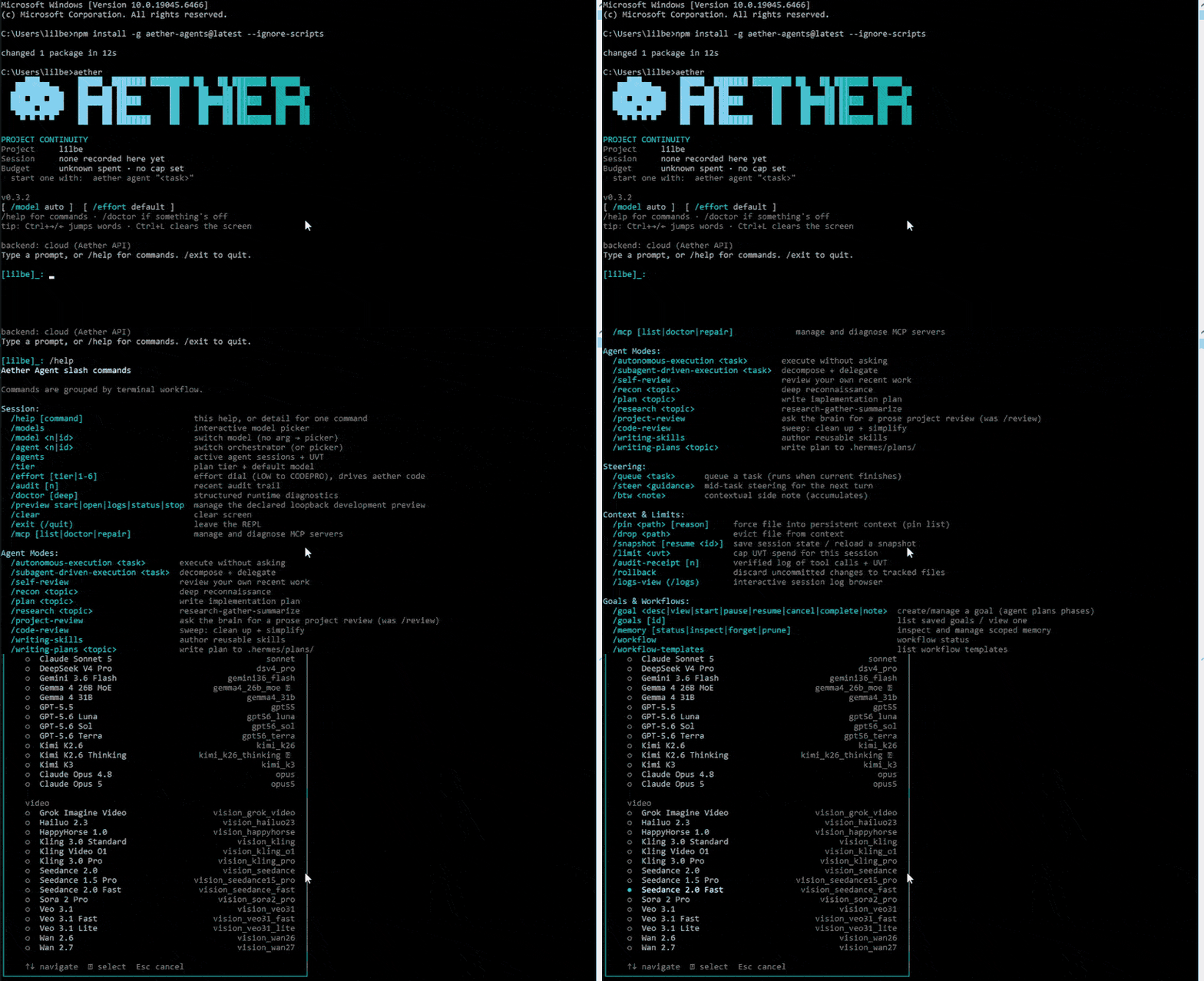
Install → launch → /help → /models. That's the whole first run.
Requires 0.3.2 or newer. Check what you have with
aether --version.The live npm badge below resolves the currently published
latest. Until a
verifiedv0.4.0tag and registry publication exist, the account-agent and
ATS sections below describe the 0.4.0 source candidate onmain; source text
alone is not publication evidence.
Quickstart
Run these from inside the repository you want Aether to work on:
npm install -g aether-agents@latest --ignore-scripts
aether auth login
aether
That last line is the whole idea: one task, one way to prove it worked.
Aether makes the edit, your machine runs npm test, and the real exit code
decides whether the run is verified. No exit code, no claim.
Prefer Python? pipx install aether-agent installs the same CLI and forwards
every command to it, so aether-agent code "..." and aether code "..." do the
same work. See packages/pypi-cli.
Account agents and ATS — 0.4.0 source candidate
ATS is the trading adapter for account agents.
What works now — and what does not
Aether Agent 0.4.0 has a real, account-bound ATS setup and observation path. It
can create the managed-agent draft, verify local memory, install and compile the
reviewed Nano starter strategies, save data-provider configuration, and open a
bounded browser observer. Those capabilities are useful today, but they are not
broker execution.
| Stage | 0.4.0 status | Release boundary |
|---|---|---|
| Account agent, consent and local ownership | Available in the source candidate | Identity-bound setup; consent never grants trading authority. |
| Memory, strategy scan/compile and data configuration | Available in the source candidate | Preparation and diagnostics only; no order can result. |
| Browser observation | Available in the source candidate | Read-only, freshness-checked images; no model-controlled browser action. |
| ATS runtime and market-data session | Next implementation gate | Must prove lifecycle, health, freshness, cancellation and cleanup before paper trading. |
| Paper-order execution and reconciliation | Not shipped | Requires typed intents, limits, idempotency, venue receipts and uncertain-outcome recovery. |
| Supervised live orders | Not shipped | Requires separate, scoped user authority, broker connectivity, preflight limits, confirmation and a kill switch. |
| Autonomous live trading | Not shipped | No setup choice, mode preference, strategy, chat message or policy receipt enables it. |
Execution work is deliberately sequential: establish the runtime and data-plane
contracts first, then paper execution and reconciliation, then supervised live
execution. Autonomous live authority is a later, separately qualified product
gate—not a side effect of installing 0.4.0. The exact candidate evidence and
remaining qualification are tracked in the
operator packet.
After signing in, use aether agent list to see the same managed agents as
Aether Online. aether agent chat opens the one-column picker; select an agent
to read and send messages in its existing Online conversation.
aether agent list
aether agent create ATS Atlas
aether agent configure <agent-id> purpose "Review my trading strategies"
aether agent chat <agent-id>
ATS setup asks for a local memory folder, a memory size, a strategy folder and
data provider/symbol settings. Local resources belong to the verified account
and agent; rotating a token preserves that identity. Switching accounts while
chat is open closes its local resources and requires reopening the conversation.
Before the first setup for a policy version, the terminal presents the
ATS Autonomous Trading Acceptable Use, Risk and Data Policy:
choose 1 to accept or 2 to reject. Rejection exits before creating an agent
or configuring storage, strategies, datafeeds, browsers, plugins or MCP. The
local, pseudonymous consent receipt records the policy digest but grants no
broker or trading authority.
The packaged adapters verify storage and report native Nano compiler results.
Inside ATS chat, type /ats status, /ats strategies or /ats data to inspect the
workspace. Shift-Tab cycles the
local ATS permission preference. Model availability, projects, APR memory and
UVT admission remain enforced by Cloud.
ATS chat opens the configured browser view after memory verification. For any
managed agent, /browser setup [URL] configures the connection and /browser open
opens it. Use /browser status, /browser refresh, /browser stop or/browser retry to manage the view; /ats browser is an alias. Status updates
preserve your draft and cursor. LIVE requires a fresh validated screenshot;
an open window alone is not proof of observation. Retry starts a new bounded
session after releasing the old one. Cleanup receipts survive restarts. If a
creation response was lost, an idle runtime cannot prove that request finished;
the terminal retains the receipt and blocks replacement until cleanup is known.
The local API defaults to http://127.0.0.1:8092. Runnpx [email protected] doctor to check the separately installed runtime.
Remote APIs use HTTPS and environment credentials. The native noVNC viewer
stays on the browser host and must never be tunneled or published.
The bundled read-only visual skill exposes verified images for an admitted
host; Cloud DM does not yet receive those images or control this browser.
These commands require the matching Cloud terminal adapter. ATS setup also
requires its Python engine and a separately running Agent Browser runtime;
missing services are reported explicitly. This candidate prepares and observes
an ATS workspace. It does not yet provide model-controlled broker actions or
automatic live orders: it does not start an execution engine, connect a broker,
or submit or reconcile orders. See the
candidate packet for the qualification
still required before publication.
Pick where the model runs
Both routes keep your files, your permissions, and your verification on your
machine. The only thing that moves is where the model thinks.
Hosted — sign in and go
aether auth login
aether models
Your task and the context you hand over go to the Aether API. Repository tools
and checks still run in your checkout. If the service can't honour that
local-authority contract, the run stops rather than quietly moving your tools
to a server.
Local — no account needed
Install Ollama, start it, then:
aether setup --local
aether local pull qwen2.5-coder:7b --yes
aether local use qwen2.5-coder:7b --yes
aether agent --local --test-cmd "npm test" "fix the failing test"
Once Ollama and the model are downloaded, inference can stay on the machine.
The default endpoint is loopback; if OLLAMA_HOST points elsewhere, prompts go
there instead. Network tools stay separate and permissioned either way.
Model catalogue
What your account can actually reach is whatever aether models prints while
you are signed in. The snapshot below is a dated reference, published so the
list is readable without signing in first.
A dated, sanitized offline fallback snapshot is available as HTML, JSON, and Markdown. It was generated at 2026-09-22T01:47:56.169Z from Cloud public projection model-catalogue-v1 with verified digest sha256:f5f516625932d8932bfca221aa5dbf3eb1d7b415eba8dabe298da24b984c64f7. Listed availability is not an account entitlement; use aether models while signed in.
Local Ollama is independent of all of it — you get whatever you have installed
at your configured endpoint.
What you get
- One terminal workflow. Task, diff, tests, and review in the same place you
already work. - Proof, not claims.
--test-cmdties "done" to a command and an exit code.
Change the repo afterwards and that evidence goes stale on purpose. - Repo-aware tools. File, search, shell, Git, session, and review tools
scoped to the workspace you chose — not your whole machine. - Work you can pick back up. Sessions are project-scoped: list them, resume
one, or hand it off as a redacted bundle. - MCP built in. Inspect, diagnose, and repair configured MCP servers without
stepping around tool permissions.
Commands
| Command | What it does |
|---|---|
aether auth login |
Sign in for hosted models. |
aether agent [task] |
Run the coding agent, or open its REPL. |
aether agent list|create|configure|chat |
List, create and configure account agents, or open their shared Online DM conversation (0.4.0 source candidate). |
aether agent --local [task] |
Same, through your Ollama endpoint. |
aether models |
Show the hosted models your account can see. |
aether local doctor|models|use|pull |
Diagnose and manage local Ollama. |
aether sessions |
Inspect and continue project-scoped sessions. |
aether review |
See the changes and the current verification evidence. |
aether mcp |
List, diagnose, or repair MCP servers. |
aether doctor |
Check the environment. |
aether ship |
Preview and approve a branch and pull request. |
aether help <command> has the details, or read the generated
command reference for every flag, slash command,
environment variable, and exit code.
Aether Code on the web
Aether Code is the browser surface for the
same Aether account — one of three apps on the portal, alongside Web Chat and
Design Lab. Sign in once, then pick where you want to work that day.
Aether Code and Aether Agent are deliberately separate products. The CLI is
standalone and open source: on the local route it needs no Aether account at
all. Coding workspace sessions stay on their host; the managed-agent workflow
above shares account agents and their Online DM conversations.
Remote viewing status in the 0.4.0 source candidate
Remote viewing — aether rc — is the observer-only bridge between a terminal
run and the browser. Its host foundation and local status/exposure controls are
on main; they remain outside the published 0.3.x line. A fully qualified live
Cloud viewer journey is still unproven, and the old draft
PR #108 is not release
evidence for current main. The source-candidate contract is:
- Starting a session prints a link and a QR code.
- Your phone or browser watches the run. It never gets tool authority.
- One command shows what is exposed; another revokes it.
- Outbound TLS only — no inbound listener on your machine.
- Events are allowlisted and redacted: no environment variables, credentials,
cookies, private memory, raw file contents, absolute paths, or unredacted
shell history. - If the broker drops, your local session carries on regardless.
Those are release requirements, not goals — which is why the work is still open
rather than shipped.
What stays on your machine
- Files stay in the workspace. File tools are confined to the workspace you
selected, and writes, shell, Git, network, and publishing each pass a
host-side permission gate. - Hosted runs send only what you hand over. Your task and context go to the
Aether API; repository tools and checks run in your checkout, and the
local-authority route fails closed rather than quietly degrading. - Local runs stay local. Ollama prompts go to your configured endpoint,
which is loopback by default. - Secrets live outside the repository. So do session records. Portable
handoffs drop transcripts, file contents, shell commands, and absolute paths —
still give one a read before you share it. - Publishing is never implicit.
aether shipprints its branch, commit,
destination, and pull-request plan before it acts, and--yeson its own is
not publication authority.
SECURITY.md has the supported versions, the full boundary, and
the private path for reporting a vulnerability.
Versions and patch notes
The repository and the published package are versioned independently.
| Install | Version | What it is |
|---|---|---|
npm latest |
 |
The published package; the badge resolves the live dist-tag. |
PyPI aether-agent |
 |
A launcher that installs and runs the npm CLI. It follows npm latest unless you pin one. |
main source build |
0.4.0 | Source candidate for shared agents and ATS setup; publication and live-service qualification are recorded separately in the operator packet. |
- Release notes — one entry per release, in plain language.
- Release log — dated candidate, publication, and
documentation events, plus operator packets that freeze prerelease
qualification and link the authoritative tag and registry evidence. - Releases and tags —
every published version.
Build from source
Node.js 24 or newer:
git clone https://github.com/AetherAI3/aether-agent.git
cd aether-agent
npm ci --ignore-scripts
npm run build
npm link
Development
npm ci --ignore-scripts
npm run typecheck
npm test
npm run smoke
npm run verify:production
npm run docs:check
npm run release:truth
npm pack --dry-run
The runtime bundles the reviewed aether-ats-skills source package with exactaether-browser and aether-context dependencies. TypeScript and Node types
remain development-only. Read CONTRIBUTING.md before opening a pull
request, and see the architecture and protocol docs or
production operations if you are going deeper.
Help and license
Bugs and feature requests go to
GitHub issues. Security
reports use the private path in SECURITY.md.
The Agent and bundled ATS adapter code are Apache-2.0. The paid ATS engine is a
separate prerequisite. The license covers the code, not the
Aether name or the hosted service (LICENSE · NOTICE.md).
Yorumlar (0)
Yorum birakmak icin giris yap.
Yorum birakSonuc bulunamadi