zerobox
Health Gecti
- License — License: Apache-2.0
- Description — Repository has a description
- Active repo — Last push 0 days ago
- Community trust — 328 GitHub stars
Code Uyari
- process.env — Environment variable access in examples/ai-agent-sandboxed/agent.ts
Permissions Gecti
- Permissions — No dangerous permissions requested
Zerobox is a cross-platform sandboxing utility that allows developers to run commands with strict, default-deny controls over file system access, network traffic, and environment variables. It also offers credential injection so processes can use secrets to communicate with approved hosts without directly seeing the underlying values.
Security Assessment
As a sandboxing tool, its core function is to restrict and execute shell commands securely. It does make network requests and manages environment variables, but only according to the explicit permissions granted by the user. No hardcoded secrets or dangerous broad permissions were found in the codebase. There is a minor warning regarding environment variable access (`process.env`) in an example TypeScript file, which is standard and expected for demonstrating how to pass secrets into the sandbox. Overall risk: Low.
Quality Assessment
The project is actively maintained, with its most recent code push happening today. It has a solid foundation of community trust with 328 GitHub stars and is transparently licensed under the permissive Apache-2.0. However, users should be aware that the primary installation method relies on piping a remote shell script directly into the system shell (`curl | sh`), which is common but requires trusting the repository's supply chain.
Verdict
Safe to use.
Lightweight, cross-platform process sandboxing powered by OpenAI Codex's runtime. Sandbox any command with file, network, and credential controls.
🫙 Zerobox
Sandbox any command with file, network, and credential controls.



Lightweight, cross-platform process sandboxing powered by OpenAI Codex's sandbox runtime.
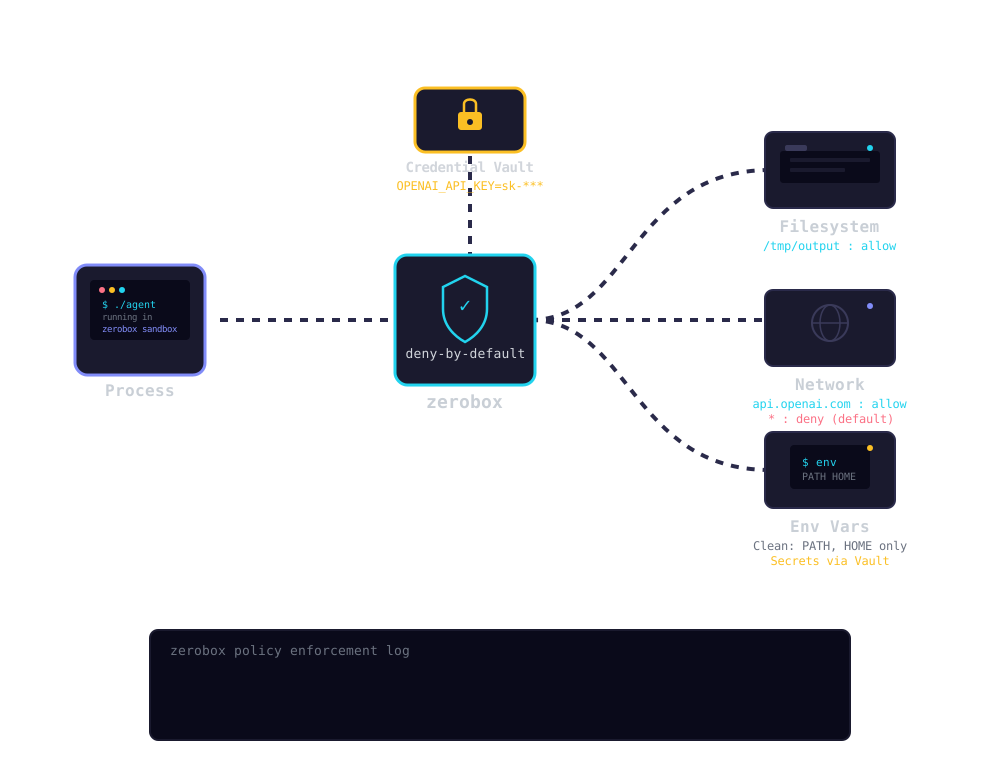
- Deny by default: Writes, network, and environment variables are blocked unless you allow them
- Credential injection: Pass API keys that the process never sees. Zerobox injects real values only for approved hosts
- File access control: Allow or deny reads and writes to specific paths
- Network filtering: Allow or deny outbound traffic by domain
- Clean environment: Only essential env vars (PATH, HOME, etc.) are inherited by default
- TypeScript SDK:
import { Sandbox } from "zerobox"with a Deno-style API - Cross-platform: macOS and Linux. Windows support planned
- Single binary: No Docker, no VMs, ~10ms overhead
Install
Shell (macOS / Linux)
curl -fsSL https://raw.githubusercontent.com/afshinm/zerobox/main/install.sh | sh
npm
npm install -g zerobox
From source
git clone https://github.com/afshinm/zerobox && cd zerobox
./scripts/sync.sh && cargo build --release -p zerobox
Quick start
Run a command with no writes and no network access:
zerobox -- node -e "console.log('hello')"
Allow writes to a specific directory:
zerobox --allow-write=. -- node script.js
Allow network to a specific domain:
zerobox --allow-net=api.openai.com -- node agent.js
Pass a secret to a specific host and the inner process never sees the real value:
zerobox --secret OPENAI_API_KEY=sk-proj-123 --secret-host OPENAI_API_KEY=api.openai.com -- node agent.js
Same thing with the TypeScript SDK:
import { Sandbox } from "zerobox";

const sandbox = Sandbox.create({
  secrets: {
    OPENAI_API_KEY: {
      value: process.env.OPENAI_API_KEY,
      hosts: ["api.openai.com"],
    },
  },
});

const output = await sandbox.sh`node agent.js`.text();
Architecture
Secrets
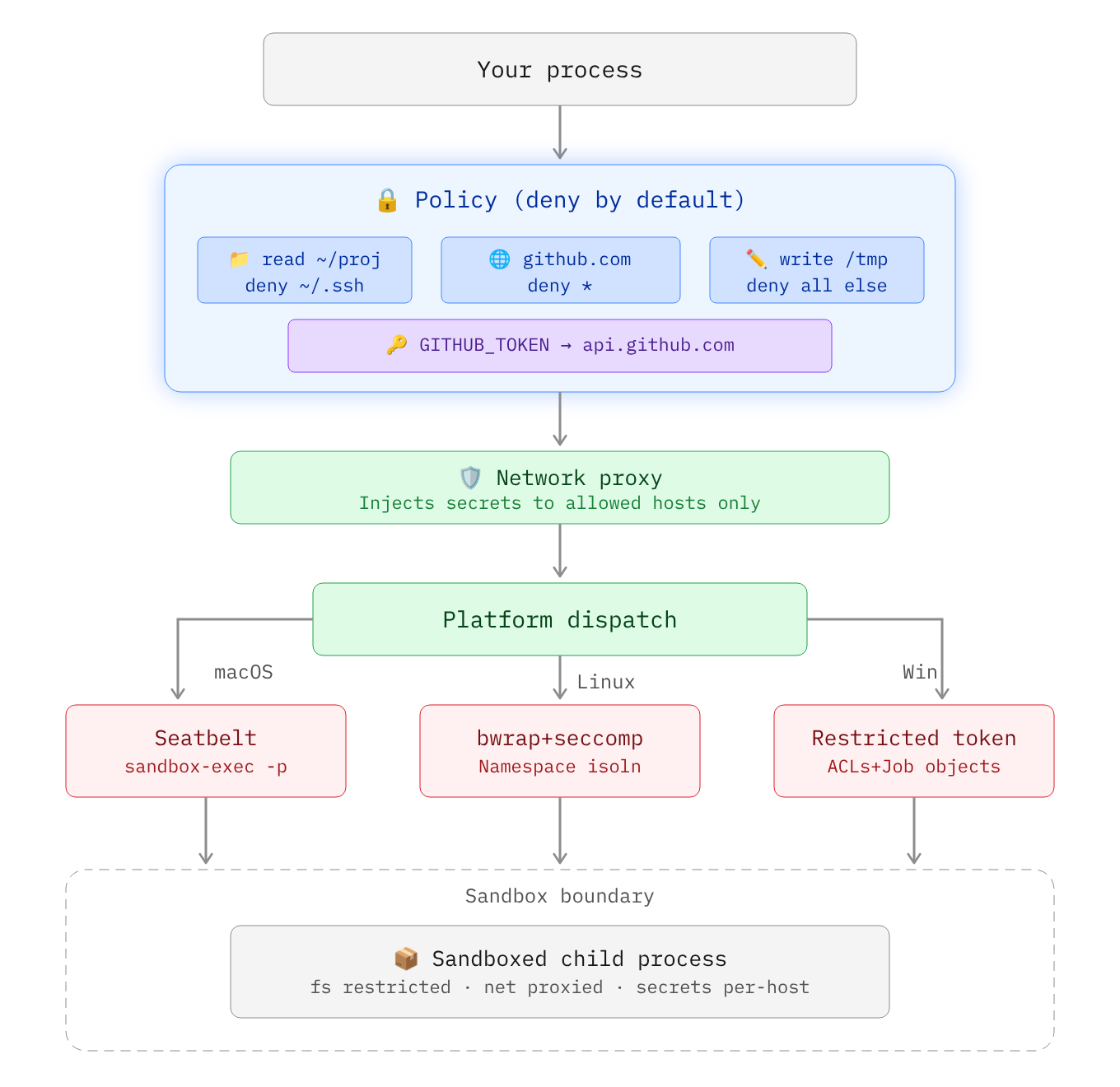
Secrets are API keys, tokens, or credentials that should never be visible inside the sandbox. The sandboxed process sees a placeholder in the environment variable and the real value is substituted at the network proxy level only for requested hosts:
sandbox process: echo $OPENAI_API_KEY
  -> ZEROBOX_SECRET_a1b2c3d4e5...  (placeholder)

sandbox process: curl -H "Authorization: Bearer $OPENAI_API_KEY" https://api.openai.com/...
  -> proxy intercepts, replaces placeholder with real key
  -> server receives: Authorization: Bearer sk-proj-123
Using the CLI
Pass a secret with --secret and restrict it to a specific domain with --secret-host:
zerobox --secret OPENAI_API_KEY=sk-proj-123 --secret-host OPENAI_API_KEY=api.openai.com -- node app.js
Without --secret-host, the secret is pass to all domains:
zerobox --secret TOKEN=abc123 -- node app.js
You can also pass multiple secrets with different domains:
zerobox \
  --secret OPENAI_API_KEY=sk-proj-123 --secret-host OPENAI_API_KEY=api.openai.com \
  --secret GITHUB_TOKEN=ghp-456 --secret-host GITHUB_TOKEN=api.github.com \
  -- node app.js
Node.js
fetchdoes not respectHTTPS_PROXYby default. When running Node.js inside a sandbox with secrets, make sure to pass the--use-env-proxyargument.
TypeScript SDK
import { Sandbox } from "zerobox";

const sandbox = Sandbox.create({
  secrets: {
    OPENAI_API_KEY: {
      value: process.env.OPENAI_API_KEY,
      hosts: ["api.openai.com"],
    },
    GITHUB_TOKEN: {
      value: process.env.GITHUB_TOKEN,
      hosts: ["api.github.com"],
    },
  },
});

await sandbox.sh`node agent.js`.text();
Environment variables
By default, only essential variables are passed to the sandbox e.g. PATH, HOME, USER, SHELL, TERM, LANG.
Inherit all parent env vars
The --allow-env flag allows all parent environment variables to be inherited by the sandboxed process:
zerobox --allow-env -- node app.js
Inherit specific env vars only
zerobox --allow-env=PATH,HOME,DATABASE_URL -- node app.js
Block specific env vars
zerobox --allow-env --deny-env=AWS_SECRET_ACCESS_KEY -- node app.js
or set a specific variable:
zerobox --env NODE_ENV=production --env DEBUG=false -- node app.js
TypeScript SDK
const sandbox = Sandbox.create({
  env: { NODE_ENV: "production" },
  allowEnv: ["PATH", "HOME"],
  denyEnv: ["AWS_SECRET_ACCESS_KEY"],
});
Examples
Run AI-generated code safely
Run AI generated code without risking file corruption or data leaks:
zerobox -- python3 /tmp/task.py
Or allow writes only to an output directory:
zerobox --allow-write=/tmp/output -- python3 /tmp/task.py
Or via the TypeScript SDK:
import { Sandbox } from "zerobox";

const sandbox = Sandbox.create({
  allowWrite: ["/tmp/output"],
  allowNet: ["api.openai.com"],
});

const result = await sandbox.sh`python3 /tmp/task.py`.output();
console.log(result.code, result.stdout);
Restrict LLM tool calls
Each AI tool call can also be sandboxed individually. The parent agent process runs normally and only some operations are sandboxed:
import { Sandbox } from "zerobox";

const reader = Sandbox.create();
const writer = Sandbox.create({ allowWrite: ["/tmp"] });
const fetcher = Sandbox.create({ allowNet: ["example.com"] });

const data = await reader.js`
  const content = require("fs").readFileSync("/tmp/input.txt", "utf8");
  console.log(JSON.stringify({ content }));
`.json();

await writer.js`
  require("fs").writeFileSync("/tmp/output.txt", "result");
  console.log("ok");
`.text();

const result = await fetcher.js`
  const res = await fetch("https://example.com");
  console.log(JSON.stringify({ status: res.status }));
`.json();
Full working examples:
examples/ai-agent-sandboxed- Entire agent process sandboxed with secrets (API key never visible)examples/ai-agent- Vercel AI SDK with per-tool sandboxing and secretsexamples/workflow- Vercel Workflow with sandboxed durable steps
Protect your repo during builds
Run a build script with network access:
zerobox --allow-write=./dist --allow-net -- npm run build
Run tests with no network and catch accidental external calls:
zerobox --allow-write=/tmp -- npm test
SDK reference
npm install zerobox
Shell commands
import { Sandbox } from "zerobox";

const sandbox = Sandbox.create({ allowWrite: ["/tmp"] });
const output = await sandbox.sh`echo hello`.text();
JSON output
const data = await sandbox.sh`cat data.json`.json();
Raw output (doesn't throw on non-zero exit)
const result = await sandbox.sh`exit 42`.output();
// { code: 42, stdout: "", stderr: "" }
Explicit command + args
await sandbox.exec("node", ["-e", "console.log('hi')"]).text();
Inline JavaScript
const data = await sandbox.js`
  console.log(JSON.stringify({ sum: 1 + 2 }));
`.json();
Error handling
Non-zero exit codes throw SandboxCommandError:
import { Sandbox, SandboxCommandError } from "zerobox";

const sandbox = Sandbox.create();
try {
  await sandbox.sh`exit 1`.text();
} catch (e) {
  if (e instanceof SandboxCommandError) {
    console.log(e.code);   // 1
    console.log(e.stderr);
  }
}
Cancellation
const controller = new AbortController();
await sandbox.sh`sleep 60`.text({ signal: controller.signal });
Performance
Sandbox overhead is minimal, typically ~10ms and ~7MB:
| Command | Bare | Sandboxed | Overhead | Bare Mem | Sandbox Mem |
|---|---|---|---|---|---|
echo hello |
<1ms | 10ms | +10ms | 1.2 MB | 8.4 MB |
node -e '...' |
10ms | 20ms | +10ms | 39.3 MB | 39.1 MB |
python3 -c '...' |
10ms | 20ms | +10ms | 12.9 MB | 13.0 MB |
cat 10MB file |
<1ms | 10ms | +10ms | 1.9 MB | 8.4 MB |
curl https://... |
50ms | 60ms | +10ms | 7.2 MB | 8.4 MB |
Best of 10 runs with warmup on Apple M5 Pro. Run ./bench/run.sh to reproduce.
Platform support
| Platform | Backend | Status |
|---|---|---|
| macOS | Seatbelt (sandbox-exec) |
Fully supported |
| Linux | Bubblewrap + Seccomp + Namespaces | Fully supported |
| Windows | Restricted Tokens + ACLs + Firewall | Planned |
CLI reference
| Flag | Example | Description |
|---|---|---|
--allow-read <paths> |
--allow-read=/tmp,/data |
Restrict readable user data to listed paths. System libraries remain accessible. Default: all reads allowed. |
--deny-read <paths> |
--deny-read=/secret |
Block reading from these paths. Takes precedence over --allow-read. |
--allow-write [paths] |
--allow-write=. |
Allow writing to these paths. Without a value, allows writing everywhere. Default: no writes. |
--deny-write <paths> |
--deny-write=./.git |
Block writing to these paths. Takes precedence over --allow-write. |
--allow-net [domains] |
--allow-net=example.com |
Allow outbound network. Without a value, allows all domains. Default: no network. |
--deny-net <domains> |
--deny-net=evil.com |
Block network to these domains. Takes precedence over --allow-net. |
--env <KEY=VALUE> |
--env NODE_ENV=prod |
Set env var in the sandbox. Can be repeated. |
--allow-env [keys] |
--allow-env=PATH,HOME |
Inherit parent env vars. Without a value, inherits all. Default: only PATH, HOME, USER, SHELL, TERM, LANG. |
--deny-env <keys> |
--deny-env=SECRET |
Drop these parent env vars. Takes precedence over --allow-env. |
--secret <KEY=VALUE> |
--secret API_KEY=sk-123 |
Pass a secret. The process sees a placeholder; the real value is injected at the proxy for approved hosts. |
--secret-host <KEY=HOSTS> |
--secret-host API_KEY=api.openai.com |
Restrict a secret to specific hosts. Without this, the secret is substituted for all hosts. |
-A, --allow-all |
-A |
Grant all filesystem and network permissions. Env and secrets still apply. |
--no-sandbox |
--no-sandbox |
Disable the sandbox entirely. |
--strict-sandbox |
--strict-sandbox |
Require full sandbox (bubblewrap). Fail instead of falling back to weaker isolation. |
--debug |
--debug |
Print sandbox config and proxy decisions to stderr. |
-C <dir> |
-C /workspace |
Set working directory for the sandboxed command. |
-V, --version |
--version |
Print version. |
-h, --help |
--help |
Print help. |
License
Apache-2.0
Yorumlar (0)
Yorum birakmak icin giris yap.
Yorum birakSonuc bulunamadi