lathe
Health Gecti
- License — License: Apache-2.0
- Description — Repository has a description
- Active repo — Last push 0 days ago
- Community trust — 39 GitHub stars
Code Basarisiz
- rm -rf — Recursive force deletion command in .github/actions/neovim/action.yml
Permissions Gecti
- Permissions — No dangerous permissions requested
Bu listing icin henuz AI raporu yok.
Java language server that learns your project from its build: javac-accurate analysis for Maven, Gradle and OpenJDK, in Neovim, VS Code, Emacs, Zed and AI agents (MCP).
Lathe


Lathe is a Java language server that learns your project from its build.
It runs javac as you edit using compiler settings from Maven, Gradle, or the OpenJDK make build.
When one module generates a class and another imports it, you can follow that import straight to the generated Java source.
First build · Editors · AI agents
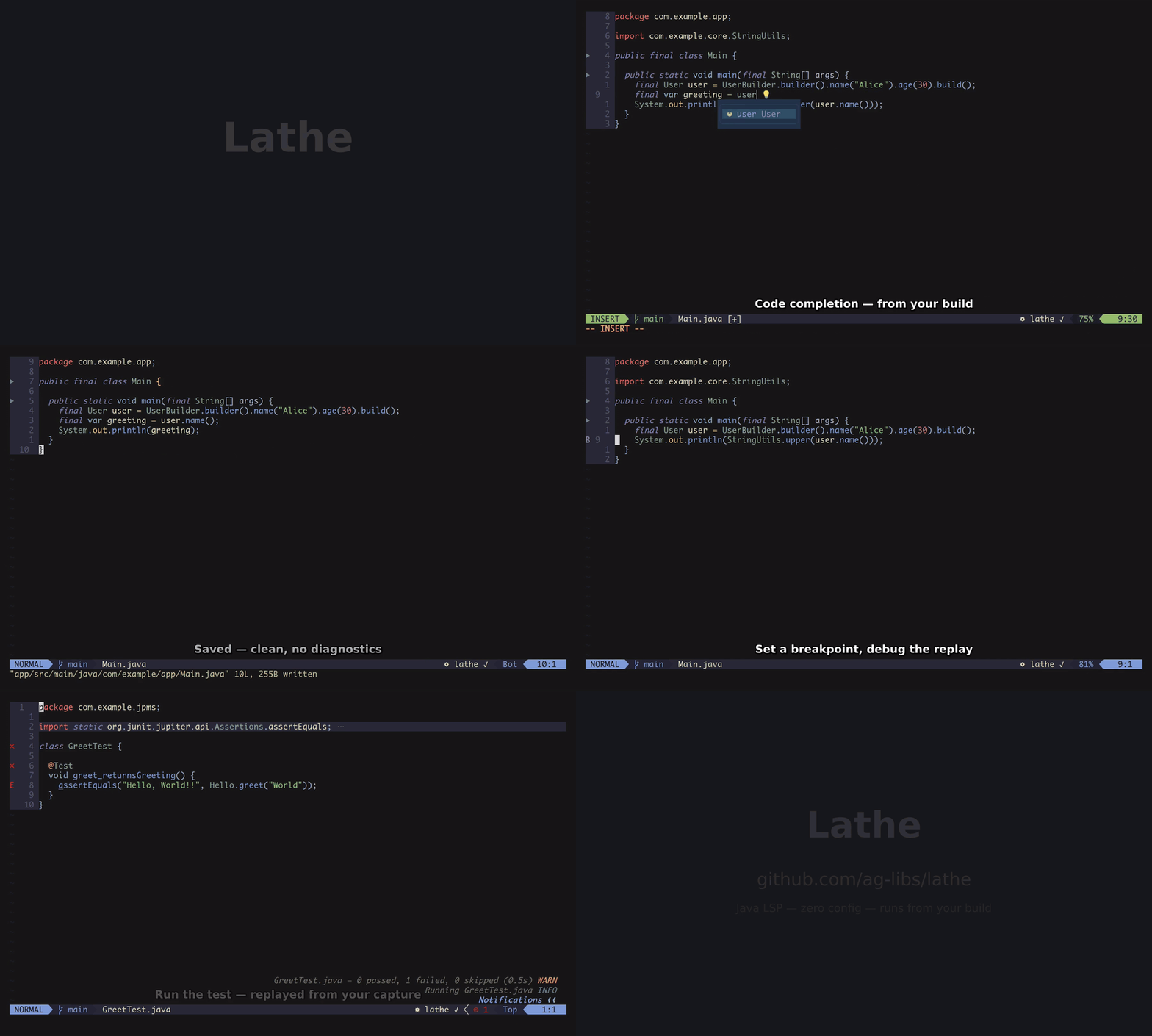
In Neovim, you can run a main method, rerun a single test, or stop at a breakpoint using the classes your build already compiled.
First build
Choose the build for your project and run its commands from the project root.
This installs the language server and creates the .lathe/ workspace that your editor or coding agent uses.
Lathe writes a .gitignore inside it, so git ignores the directory with no change to your project.
The Maven and Gradle commands below also capture supported JUnit test launches without running the tests.
Use Maven 3.6.3 or later with JDK 17 or newer.
Create .mvn/extensions.xml at the project root with the following content.
If the file already exists, add the <extension> entry inside its existing <extensions> element.
<extensions>
  <extension>
    <groupId>io.github.ag-libs</groupId>
    <artifactId>lathe-maven-extension</artifactId>
    <version>0.3.1</version>
  </extension>
</extensions>
mvn clean test -Dlathe.capture.only=true
In Windows PowerShell, quote the property: mvn clean test '-Dlathe.capture.only=true'.
Use Gradle 8.8 or later with JDK 17 or newer.
Add the plugin to the plugins block in your root settings file (settings.gradle.kts or settings.gradle).
plugins {
    id("io.github.ag-libs.lathe") version "0.3.1"
}
./gradlew latheSync -Plathe.capture.only=true --continue
For Groovy settings files, Windows commands, or a personal init script, see the Gradle guide.
OpenJDK (make)If you work on the JDK itself, configure the OpenJDK checkout and build it with make jdk.
Then use Maven 3.6.3 or later running on JDK 17 or newer to sync Lathe with the JDK you built.
mvn io.github.ag-libs:lathe-openjdk-maven-plugin:sync
Editors
Neovim · VS Code and Cursor · Emacs · Zed
On Windows, use VS Code, Cursor, or Zed; the Neovim and Emacs clients run on Linux and macOS.
Neovim
On Linux or macOS with Neovim 0.12+, install the editor plugin once, then set up each project through its build.
If you already run nvim-jdtls and want to keep both servers, follow the jdtls setup notes.
Install the plugin
Choose the snippet for your plugin manager.
lazy.nvim — If your config imports lua/plugins/, save this as ~/.config/nvim/lua/plugins/lathe.lua.
Restart Neovim and run :Lazy install.
return {
  "ag-libs/lathe.nvim",
  ft = "java",
  cmd = "LatheStart",
  main = "lathe",
  opts = {},
}
Built-in package manager — Add these lines to ~/.config/nvim/init.lua, restart Neovim, and accept the install prompt.
vim.pack.add({ "https://github.com/ag-libs/lathe.nvim" })
require("lathe").setup()
After the first build, open a Java source file in the project and Lathe attaches automatically.
Once the workspace has loaded, use Go to Definition on a method call to open its source, even in another module.
For completion, type part of a name and invoke your usual completion command.
To run a main method, put the cursor inside it and type :LatheRun.
Lathe picks up Java source edits automatically.
After changing dependencies, compiler settings, or modules, run :LatheSync in Neovim or rerun the Lathe-enabled build.
- Indentation. Install the Java Tree-sitter parser.
With nvim-treesitter, run:TSInstall java. - Completion menu and keymaps. The demo uses blink.cmp for suggestions as you type and Telescope for navigation.
You can copy those pieces into your existing config.
Example init.lua · Try the example separately - JUnit tests. Install neotest and add
require("lathe.neotest")to itsadapterslist.
The Maven and Gradle steps above capture the test launch for supported JUnit Platform projects.
Neotest setup · Test capture requirements - Breakpoints. Load nvim-dap before Lathe so the plugin can register
:LatheDebug.
With lazy.nvim, adddependencies = { "mfussenegger/nvim-dap" },to the Lathe spec above.
Debugger setup and keymaps
VS Code and Cursor
The Lathe for Java preview provides completion, compiler diagnostics, navigation, rename, and refactoring.
Use Rename Symbol on an interface method and Lathe updates its implementations and callers across modules.
Lathe's run, test, and debug controls are currently available in Neovim.
- Complete the first build to create the
.lathe/directory that the extension looks for. - Download the
.vsixrelease asset and choose Extensions → ⋯ → Install from VSIX… in VS Code or Cursor.
Lathe releases - Open the project folder.
If Language Support for Java by Red Hat is installed, disable it for this workspace so only one server handles your Java files. - Open a Java file and choose Go to Definition on a method call.
Try a library method to jump into the dependency's source when its sources are available.
AI agents
An MCP server gives coding agents access to the same compiler and project information as your editor.
After changing a method signature, ask your agent “Which callers in other modules still need updating?”
Lathe can compile the affected callers and report the file and line of each error.
The initial build installs the MCP launcher.
Connect your agent
Documentation
Features · How Lathe works · Installation · Troubleshooting · Project status
Contributing
We welcome questions, bug reports, and feedback through GitHub issues.
Code contributions are currently closed.
Contributing policy
Lathe is developed with AI coding tools, mainly Claude Code.
A maintainer reviews every change and takes responsibility for it.
AI-assisted commits carry a Co-Authored-By trailer, following the Apache Software Foundation's guidance.
License
Yorumlar (0)
Yorum birakmak icin giris yap.
Yorum birakSonuc bulunamadi