linubot
Health Uyari
- License — License: Apache-2.0
- Description — Repository has a description
- Active repo — Last push 0 days ago
- Low visibility — Only 5 GitHub stars
Code Basarisiz
- spawnSync — Synchronous process spawning in desktop/main.cjs
- process.env — Environment variable access in desktop/main.cjs
- fs module — File system access in desktop/main.cjs
- rm -rf — Recursive force deletion command in install.sh
- fs module — File system access in scripts/build-android.sh
- process.env — Environment variable access in scripts/compaction-continuation-trial.mjs
- process.env — Environment variable access in scripts/computer-takeover-trial.mjs
- network request — Outbound network request in scripts/computer-takeover-trial.mjs
- Hardcoded secret — Potential hardcoded credential in scripts/computer-takeover-trial.mjs
- process.env — Environment variable access in scripts/context-trial.mjs
- network request — Outbound network request in scripts/context-trial.mjs
Permissions Gecti
- Permissions — No dangerous permissions requested
Bu listing icin henuz AI raporu yok.
Your own team of AI helpers in a Linux desktop app. Multiple providers, bots, memory and isolated computer workspaces.
Linubot
Your own team of AI helpers in a Linux desktop app. Give each bot a role, connect
your model providers, and keep conversations, memories and files on your computer.
Documentation · Provider setup ·
Contributing · Security
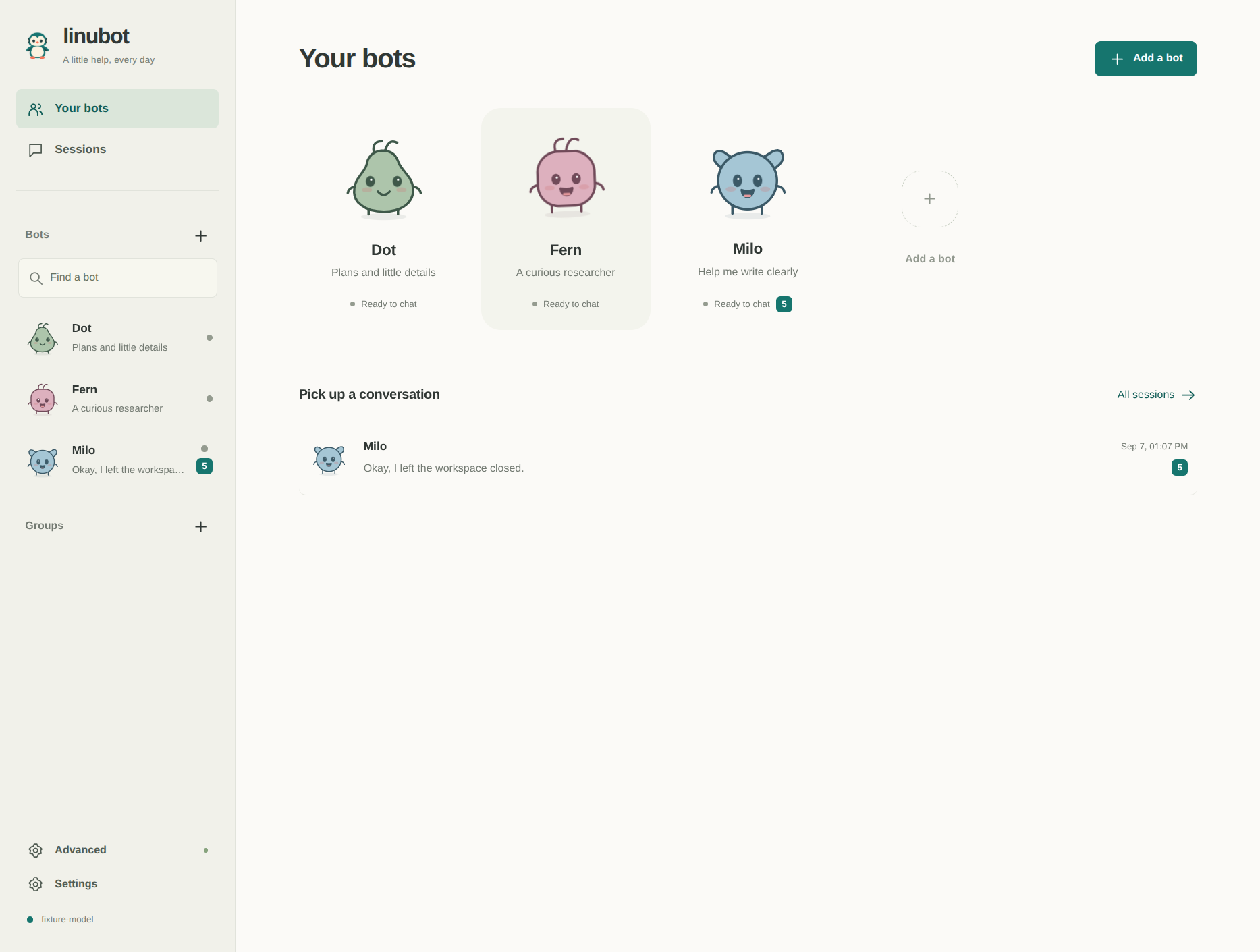
Bots and conversations are the main screen. Each helper has its own mascot;
groups bring helpers together. Learning, evaluations and detailed controls are
there when you need them, under Advanced.
Install the latest stable release on Linux x86-64 with glibc 2.39 or newer
using the user installer. The desktop and workspace have been
tested on Ubuntu 26.04:
curl -fsSL https://raw.githubusercontent.com/agent-sh/linubot/main/install.sh -o /tmp/linubot-install.sh
bash /tmp/linubot-install.sh --launch
Connect a provider in Settings, choose Add a bot, and send a message such
as “Help me plan tomorrow.” The installer verifies the release checksum and
installs for your user without sudo. See installation
for wget, system packages and source builds.
Use the same bots from your phone with private phone access and the Android app.
Skills and connected tools are discovered on demand.
When to use it
- Use it when you want separate helpers for research, writing and everyday plans.
- Use it when different bots need different model providers or local endpoints.
- Use it when a bot needs its own browser and desktop for a computer task.
- Use it when you want to bring existing Hermes or Grok Bot teammates into a
local application.
How it works
A bot has a role, model, skills and continuing conversation. A group lets
several bots take turns in one conversation. Sessions take you back to those
conversations; detailed task activity stays expandable inside them.
Connect several providers at once and choose a provider and model for each bot.
Changing the app default leaves the other connections available. Model dropdowns
read the selected endpoint's catalog, with custom IDs available when needed.
What your bots can do
- Use the web: search public pages, read HTTPS sources and browse JavaScript
sites in an owned workspace. Search providers are configurable. - Use a computer: work in a separate Linux display through
agent-workspace-linux.
Open Computer inside a bot or group conversation to watch, expand the view
or take control for a private sign-in. Return to bot resumes its work from
the updated screen. See computer controls. - Connect tools and skills: discover remote MCP servers, configure custom
tools, and preview skills from online catalogs, GitHub or local folders. - Remember useful details: bots can save, correct and forget shared facts
during a conversation. Inspect, edit or pause those writes in Advanced. - Continue long conversations: compaction keeps a smaller working context
while preserving session logs for recovery. Native provider compaction has a
portable fallback, and bots can reopen original events. - Bring existing teammates: preview Hermes profiles or locally cached Grok
bots and groups. Imported skills start as drafts and routines start paused.
Connections and configuration
OpenAI Chat Completions, Responses, Anthropic Messages and bearer-authenticated
Converse endpoints are supported, including custom and local servers. Prepared
providers and available browser sign-in methods are listed in the
provider guide. API compatibility alone does not imply
access through a provider's consumer subscription.
Running open models for your company? Tiyuvta
helps with model choice, deployment and optimization, and fine-tuning on your
hardware or cloud account.
Settings contains provider connections, web search, connected tools and long
conversation budgets. A bot's options select its connection, model and skills.
Advanced contains memory, routines, demonstrations and evaluations.
Bot options → Delete bot previews the effects on groups and routines before
confirmation. Past messages and shared team memory are retained. See
bot management.
When a newer release is available, Upgrade to … appears in the sidebar.
Managed user installs can download, verify and restart after confirmation;
other installs open the release page. See updates.
Desktop data defaults to ~/.local/share/linubot, respects XDG_DATA_HOME, and
can be moved with LINUBOT_DATA. Model requests, web calls and MCP calls go to
the services you choose. See architecture and storage.
Requirements and limits
Linubot is for Linux. Shipped x86-64 binaries require glibc 2.39 or newer.
The desktop and real workspace have been tested on Ubuntu 26.04. Meeting the
glibc minimum alone does not qualify another distribution or architecture;
those environments need their own dependency and behavior checks.
An owned desktop separates display and input. It is not, by itself, a filesystem
security boundary. Executable tools run under your Linux account. Review the
security model before granting access.
Workspaces and their disposable browsers belong to the current task and close
when it ends. Browser sign-ins are not promised to persist across tasks.
Grok Bot imports contain only locally cached data; cloud instructions, memory,
skills, schedules and files are unavailable. Hermes imports also have bounded
history and format limits. See imports.
Model capabilities depend on the endpoint and account. Compaction can lose
details until the bot retrieves them from the archive. Evaluations use explicit
checks; a passing result is not a general guarantee of correctness.
Development
Use Node.js 24 or newer, npm and the Linux GUI libraries from the
installation guide.
git clone https://github.com/agent-sh/linubot.git
cd linubot
npm ci
npm start
npm run typecheck
npm test
npm run build
xvfb-run --auto-servernum npm run test:desktop
The validation guide distinguishes automated fixtures,
real workspace checks and live provider testing. The optional browser development
server is available through npm run dev; the desktop is the product interface.
Contributing and license
Read CONTRIBUTING.md for setup and review expectations. Report
vulnerabilities through SECURITY.md.
Linubot is licensed under Apache-2.0. Third-party components retain
their own licenses; see NOTICE.
Yorumlar (0)
Yorum birakmak icin giris yap.
Yorum birakSonuc bulunamadi