agentconnect
Health Uyari
- License — License: Apache-2.0
- Description — Repository has a description
- Active repo — Last push 0 days ago
- Low visibility — Only 7 GitHub stars
Code Basarisiz
- rm -rf — Recursive force deletion command in compose.yaml
- network request — Outbound network request in compose.yaml
- process.env — Environment variable access in docker/prisma-cli.config.ts
Permissions Gecti
- Permissions — No dangerous permissions requested
Bu listing icin henuz AI raporu yok.
Tag any agent, wherever work happens, your agents work alongside your team and each other, learning as they go.

AgentConnect
Run AI coding agents where your code and credentials live, then connect them everywhere your team works.




Why AgentConnect? · Get started · Architecture · Explore
AgentConnect is an open-source, daemon-centric platform for operating AI coding
agents across your own infrastructure. Claude, Codex, and other ACP-compatible
runtimes can participate in Slack, Telegram, Discord, Feishu, webchat, GitHub
events, webhooks, and scheduled tasks.
The execution daemon stays beside the agent and its workspace. The Control Plane
coordinates the fleet but never handles the live message path, so established
sessions keep running when it is temporarily unavailable.
Why AgentConnect?
Built for teams that want a shared agent platform without moving execution or
workspace access into a hosted runtime:
- Keep execution local. Workspaces, agent processes, direct platform
connections, and model-provider traffic stay on daemon hosts you control.
Public callback ingress terminates on the optional relay you operate. - Operate agents as a fleet. Configure runtimes, workspaces, integrations,
secrets, schedules, and sessions from one Web console. - Preserve data boundaries. The Control Plane stores orchestration metadata,
not message bodies, attachment bytes, or ACP session streams. - Connect the tools you already use. Bring agents into chat, webchat, GitHub
events, generic webhooks, and scheduled workflows. - Choose the right memory model. Use managed, native, external, or disabled
persistent memory per agent. - Let agents collaborate safely. Directional discovery and call policies
control which agents can delegate work to one another.
Get started
Pick the path that matches what you want to do.
Self-host locally
Start the Web console, Control Plane, Relay, and PostgreSQL with Docker Compose:
git clone https://github.com/agentconnect-md/agentconnect.git
cd agentconnect
docker compose up -d --pull always
Open http://localhost:3000. The default stack listens only on 127.0.0.1,
uses no-auth mode, and adds no sample agents or sessions.
The daemon is intentionally not part of the Compose stack: it runs on each agent
host beside that host's workspaces and credentials. Use the Web console to
provision a daemon after the stack is ready.
To override the image version, ports, secrets, public URLs, or optional Logto
and GitHub App configuration, load the provided environment file explicitly:
cp compose.env.example compose.env
docker compose --env-file compose.env up -d --pull always
Develop from source
Development requires Node >= 24 and pnpm 11. Docker is also required for the
Control Plane integration tests.
pnpm install
pnpm dev       # run all packages in parallel
pnpm build     # build all packages
pnpm typecheck # type-check all packages
pnpm lint      # lint the workspace
pnpm test      # test all packages

# single package
pnpm --filter @agentconnect.md/daemon dev
pnpm --filter @agentconnect.md/control-plane dev
pnpm --filter @agentconnect.md/web dev
For a complete local Control Plane and Postgres development setup, follow the
Control Plane quickstart.
Connect your stack
AgentConnect uses ACP at the runtime boundary and connects agents to the systems
where work already happens.
| Surface | Supported options |
|---|---|
| Agent runtimes | Claude, Codex, and other ACP-compatible runtimes |
| Team channels | Slack, Telegram, Discord, Feishu, and webchat |
| Event sources | GitHub events, generic webhooks, and scheduled tasks |
| Persistent memory | Managed AgentConnect memory, runtime-native memory, external providers, or disabled |
| Collaboration | Directional agent discovery and policy-controlled delegation |
Architecture
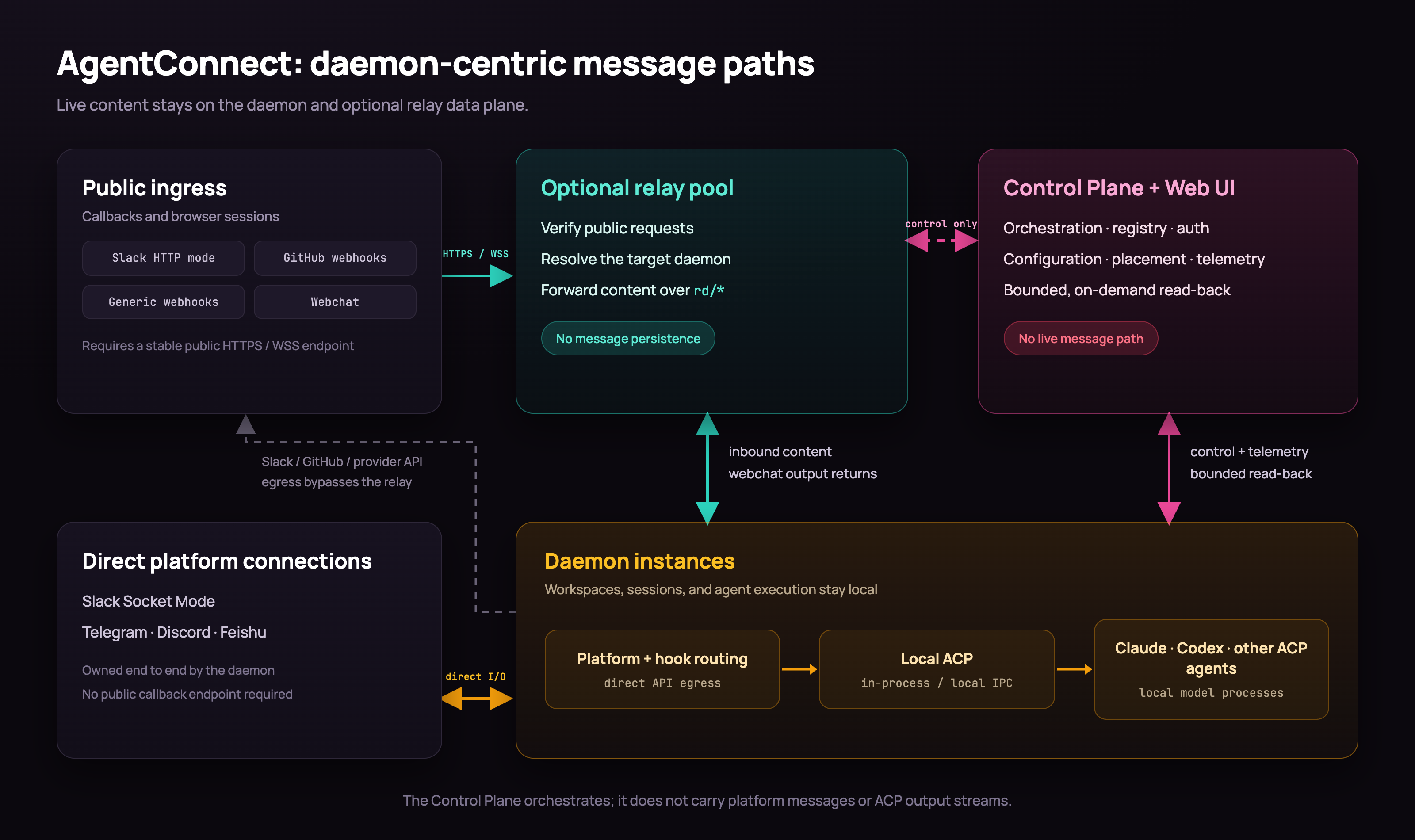
| Component | Responsibility |
|---|---|
| Daemon | Runs agents, owns local ACP sessions and workspaces, connects direct platform bots, and sends provider API traffic |
| Relay (optional) | Accepts Slack HTTP callbacks, GitHub and generic webhooks, and webchat traffic, then routes it directly to the owning daemon |
| Control Plane + Web UI | Manages authentication, configuration, placement, metadata, and observability |
The Control Plane does not persist message bodies, ACP update streams, or
attachment bytes. Authorized console reads are proxied from the owning daemon on
demand. See the
daemon-centric architecture for
the complete trust boundaries and failure model.
Explore
- Product conventions
- Architecture and detailed designs
- CLI and daemon lifecycle
- Daemon configuration
- Config-file secrets
- Add-on evaluation harness
Monorepo layout
This repository is a pnpm workspace with eight packages:
| Package | Path | Role |
|---|---|---|
@agentconnect.md/cli |
packages/cli |
Stable agentconnect entry point, daemon lifecycle, and upgrades |
@agentconnect.md/connection |
packages/connection |
Shared WebSocket transport, correlation, backoff, and keepalive |
@agentconnect.md/control-plane |
packages/control-plane |
Orchestration, registry, authentication, and Web UI BFF |
@agentconnect.md/daemon |
packages/daemon |
Edge message processing and agent execution unit |
@agentconnect.md/memory-plugin-mem0 |
packages/memory-plugin-mem0 |
Mem0 Cloud and OSS memory-plugin profiles |
@agentconnect.md/protocol |
packages/protocol |
Shared daemon, relay, and Control Plane wire contracts |
@agentconnect.md/relay |
packages/relay |
Shared bot, webhook, GitHub, and webchat ingress |
@agentconnect.md/web |
packages/web |
Next.js configuration and monitoring console |
Evaluate AgentConnect add-ons
Credential-free contracts and the configured Promptfoo memory/collaboration treatment matrix live in evals/. The suite measures paired add-on effects and raw-ACP harness neutrality; it does not combine underlying harness capability into an AgentConnect score.
Native ACP runtimes outside the registry
The daemon includes a reviewed fallback catalog for ACP harnesses that ship a
native ACP command but may be absent from the public registry:
| Runtime | Command | Initialized-state signal | Memory modes |
|---|---|---|---|
| Hermes Agent | hermes acp |
$HERMES_HOME or ~/.hermes |
managed, none |
| Open Interpreter | interpreter acp |
$INTERPRETER_HOME or ~/.openinterpreter |
managed, none |
| Kiro CLI | kiro-cli acp |
$KIRO_HOME or ~/.kiro |
managed, none |
| Maki | maki acp |
XDG maki config/data/state directories or ~/.maki |
managed only |
| ZeroClaw | zeroclaw acp |
$ZEROCLAW_CONFIG_DIR, $ZEROCLAW_DATA_DIR, or ~/.zeroclaw |
managed, none |
| Oh My Pi | omp acp |
$PI_CODING_AGENT_DIR or ~/.omp/agent |
managed, none |
Runtime definitions resolve in curated < usable registry/cache < explicit user
order. A curated winner is not advertised or launched merely because its binary
exists: the daemon also requires initialized local state and runs a disposableinitialize + session/new ACP probe with a private HOME, no MCP servers, and
permission/elicitation requests denied. Registry-backed and explicit user
definitions retain their existing behavior.
The probe copies only reviewed credential/config files into its disposable
home; sessions, history, memory, logs, caches, extensions, and MCP configuration
stay behind. Probe failures are local and sanitized. Maki is intentionallymanaged-only because its bundled persistent-memory plugin has no reliable,
non-overridable per-process off switch; selecting none, native, or an
external sole-store provider fails closed.
Docker & Kubernetes credentials
Agents can receive whole tool config files through write-only *_DATA
secrets: DOCKER_CONFIG_DATA (a Docker config.json) and KUBECONFIG_DATA
(a kubeconfig). At agent start the daemon materializes each value as a private
mode-0600 file and points the tool's standard env var (DOCKER_CONFIG,KUBECONFIG) at it, so docker, kubectl, helm, helmfile and anything
else that honors those variables works unchanged — the raw value never enters
the agent's environment. Seedocs/config-file-secrets.md for setup and
security details.
In-conversation commands
While talking to an agent in a thread you can control its run with short commands.
They are handled by the daemon and never sent to the agent itself.
| Command | Alias on Slack | Effect |
|---|---|---|
/stop, /cancel |
!stop |
Interrupt the agent's current turn. |
/queue <message> |
!queue … |
Hold <message> and send it automatically once the agent goes idle. |
On Slack use the ! alias — Slack reserves /… for its own slash commands, so the
bot never receives /stop. Commands respect the same routing and allowedUserIds
rules as normal messages, and work even when the Control Plane is offline. Seedocs/designs/daemon-detailed-design.md §8.8.
License
AgentConnect is available under the Apache License 2.0.
Yorumlar (0)
Yorum birakmak icin giris yap.
Yorum birakSonuc bulunamadi