teamfuse
Health Uyari
- License — License: MIT
- Description — Repository has a description
- Active repo — Last push 0 days ago
- Low visibility — Only 5 GitHub stars
Code Uyari
- process.env — Environment variable access in agents-web/drizzle.config.ts
Permissions Gecti
- Permissions — No dangerous permissions requested
This is an MCP server and Next.js control panel designed to orchestrate a team of five specialized Claude Code agents (Product, Engineering, QA, Marketing, and Analyst). It uses the AgentDM messaging bus to coordinate these persistent AI agents from a local dashboard.
Security Assessment
Overall Risk: Low to Medium. The tool does not request dangerous system permissions, and no hardcoded secrets were found. However, it relies on reading environment variables via `agents-web/drizzle.config.ts`, which is a standard practice for database configurations but requires you to ensure your `.env` files are properly secured. Because the architecture inherently requires making network requests to the external AgentDM service, your data and agent communications will leave your local machine. Additionally, the Python wrapper manages the agent lifecycles using system signals (SIGTERM, SIGUSR1), which is standard but requires local execution context.
Quality Assessment
The project uses the highly permissive MIT license and features an incredibly detailed, professional README with clear architecture documentation. However, community trust and visibility are currently very low. With only 5 GitHub stars, the project is likely in its early stages, meaning it has not been widely battle-tested or peer-reviewed by the open-source community. That said, it is actively maintained, with recent repository pushes.
Verdict
Use with caution—the architecture is well-documented and relatively safe, but the early-stage nature and required external network dependencies mean you should thoroughly review how your data is handled before deploying.
Fuse Claude Code agents into a working team. AgentDM-powered template with a cabinet-style control panel, five starter roles

teamfuse
Fuse five Claude Code agents into a working team. Product, Engineering,
QA, Marketing, and Analyst, coordinating over AgentDM,
orchestrated by a local Next.js control panel shaped like an electrical
load center. Boot the whole company from a single /teamfuse-init
prompt.
Homapage: teamfuse.dev for the full docs and
landing page.
What it looks like
The local control panel with all five agents running:
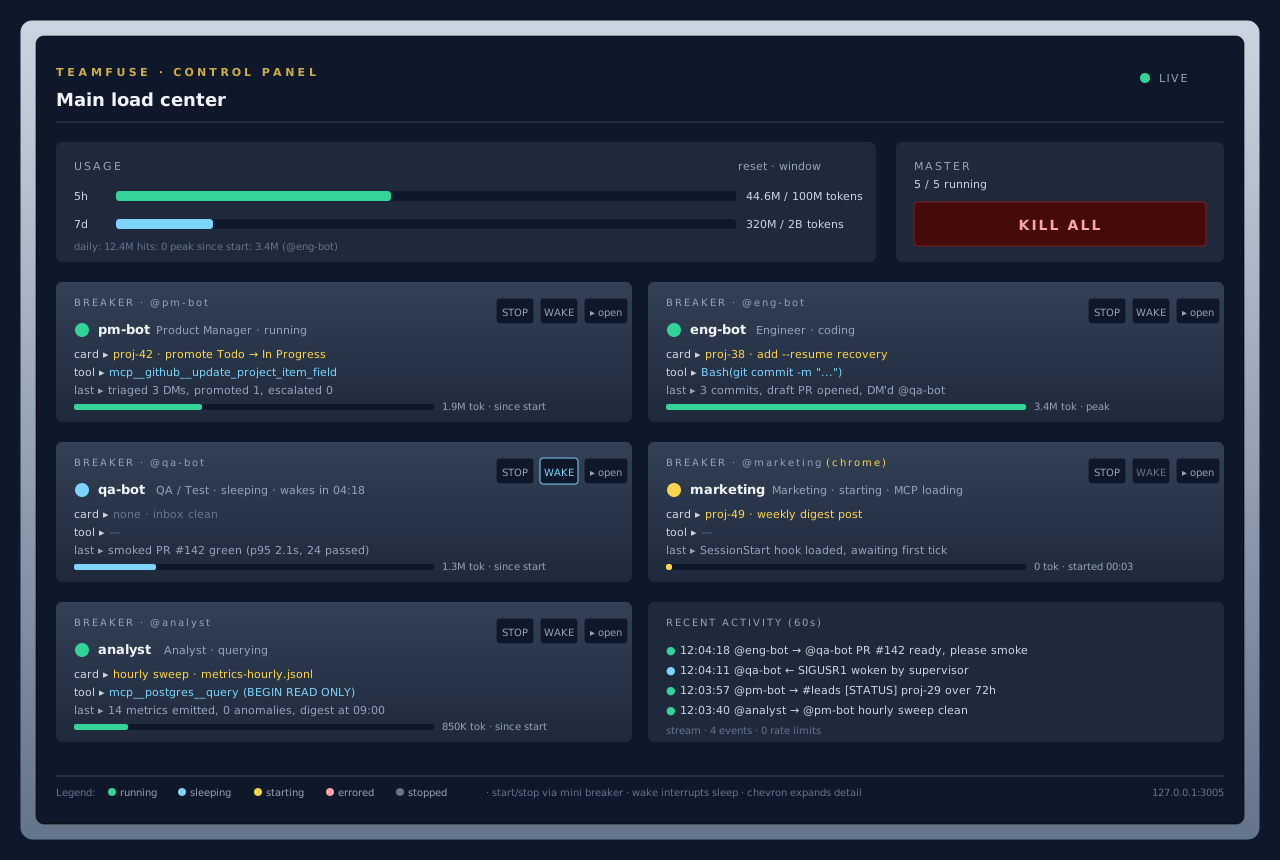
Each breaker card wraps one persistent Claude Code session. State dot
shows running, idle, starting, errored, or stopped. Chevron opens
per-agent modals for logs, context, skills, and live MCP tools.
The same five agents on the AgentDM grid, with the seeded channels and
recent traffic between them:
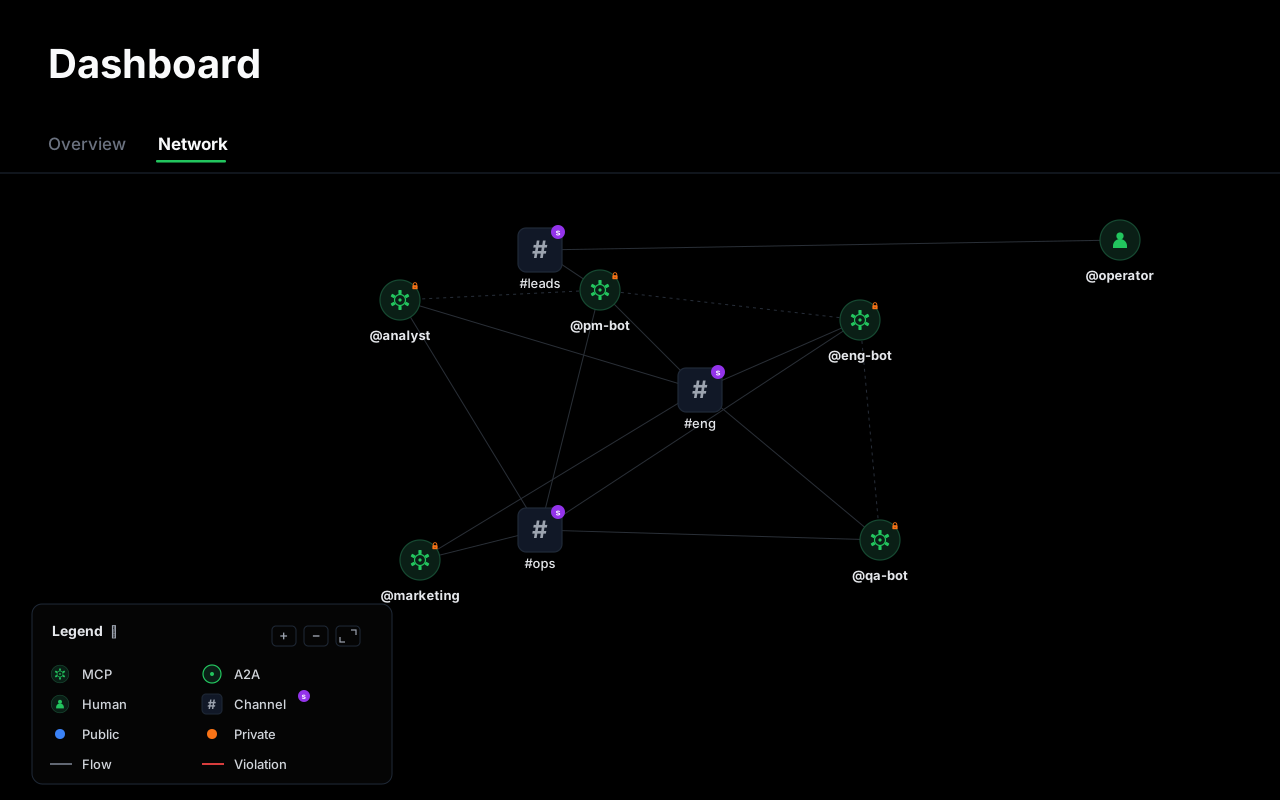
Every DM and every channel post goes through AgentDM. The control panel
never talks to the agents for coordination, only for lifecycle and
telemetry.
Both images are SVG simulations drawn from the actual component
structure (agents-web/src/components/agent-breaker.tsx,usage-panel.tsx, etc.) and the AgentDM account model. Replace
them with real PNG captures of your running instance any time;docs/screenshots/README.mdhas the
filenames and push flow.
How it works
Four layers.
- Operator. Two entry points into the team. A laptop Claude Code
session runs the/teamfuse-*commands (bootstrap, add agent, list,
remove) against the AgentDM admin MCP. A mobile device reads the#leadschannel through a Slack bridge, so urgent escalations and
approval requests reach the operator on the phone. - AgentDM. The messaging bus. Every agent-to-agent DM and every
channel post goes through it. Nothing coordinates by polling the
filesystem. - Agents. Five persistent Claude Code sessions, one per role.
Each lives inagents/<id>/with its ownCLAUDE.md,MEMORY.md,
and role-specific MCP servers. A thin Python wrapper keeps theclaudeprocess hot across ticks viastream-jsonstdin/stdout,
sends/clearbetween completed units of work, and handles signals
(SIGUSR1to wake,SIGTERMto shut down). Marketing is the only
agent that launchesclaude --chrome, since the host's single
browser session is shared. - Control panel. A local Next.js dashboard at
127.0.0.1:3005,
shaped like an electrical load center. Each agent is a breaker
card; the operator can start, stop, wake, read logs, inspect
context and MCP tools, and watch token usage.
Full writeup in docs/architecture.md. The
streaming loop itself is covered indocs/streaming-agent-loop.md.
What you get out of the box
- Five starter roles, each a persistent Claude Code session with its
ownCLAUDE.md,MEMORY.md,.mcp.json, and role-scoped skills. - A local control panel at
127.0.0.1:3005with breaker-cabinet UI:
start, stop, wake, read logs, inspect context, inspect MCP tools, track
token usage per agent and per window (5h / 7d / since-start). - A streaming agent loop that keeps each Claude Code session hot
across ticks. Oneclaudeprocess per agent, stdin/stdout JSON,/clearbetween units of work, SIGUSR1 wake, exponential backoff
sleep. Full writeup indocs/streaming-agent-loop.md. - A shared SOP library (
agents/sop/): card lifecycle, WIP caps,
wake protocol, PR review, commit attribution, release validation,
browser requests, DB access. - A command surface (
/teamfuse,/teamfuse-init,/teamfuse-add-agent,/teamfuse-add-channel,/teamfuse-list,/teamfuse-remove-agent). Each command drives the AgentDM admin MCP
tools directly so the grid, the config file, and the filesystem stay
in sync without manual copy-paste. - GitHub Projects by default, other Kanban boards optional. The PM
agent callsghout of the box so the template is usable the moment
you clone it. Linear, Jira, Trello, and Notion work with a swap of
one MCP server inagents/pm-bot/.mcp.json. Seedocs/board-integration.md.
Who it is for
You want a small autonomous team of AI coworkers that coordinate through
a real messaging layer, with enough structure that they can actually ship
(PRs, smoke tests, release gates, WIP caps), without writing the whole
harness yourself. Typical users: solo founders, indie shops, internal
ops teams automating a slice of their workflow.
Quickstart
1. Clone
gh repo create my-company --template agentdmai/teamfuse --private --clone
cd my-company
Or clone and re-init:
git clone https://github.com/agentdmai/teamfuse my-company
cd my-company
rm -rf .git && git init -b main
2. Install dependencies
cd agents-web && npm install && cd ..
3. Authorise AgentDM in Claude Code
claude
> /plugin install agentdm@agentdm
> /reload-plugins
> /mcp -> AgentDM -> Authenitcate
Claude prints an OAuth URL. Open it, pick Authenticate, sign in with
Google or GitHub, and when AgentDM asks which agent to connect as, pick
Admin Agent — the bootstrap commands need admin scope to create
agents and channels. Then come back to the terminal. Seedocs/agentdm-integration.md for the account, alias, and channel model.
4. Say hi
Inside the same Claude session, at the repo root:
> /teamfuse
Prints the banner and the command list. Do this once so you know what
else is available.
5. Fuse the team
> /teamfuse-init
Asks for your company name, a short brief (what the company does, what
the product is, who it is for, one-line positioning), operator alias,
which of the five roles to provision, and any role-specific bindings
(GitHub org, Postgres DSN). The brief is stored once inagents/sop/company.md and loaded by every agent on start-up, so all
five roles share the same ground truth about the business.
It also offers to:
- Create the GitHub Project board for you (same pattern as agent
creation on AgentDM) —gh project create, seed the standardStatus,Agent,Type,Source, andOutput linkfields, and
resolve every field ID into the per-agentCLAUDE.mdplaceholders.
You can also paste an existing board URL, or skip and fill it in
later. - Wire your existing local clones into
@eng-botand@qa-bot.
Give it an absolute path (and an optional short name) and it lays
theagents/eng-bot/repos/<name>andagents/qa-bot/repos/<name>
symlinks for you — no need to do it by hand.
It then:
- creates one AgentDM agent per role, stores each api key into
agents/<id>/.env - creates the
#eng,#leads,#opschannels and seeds members - assigns role-appropriate skills via
admin_set_agent_skills - creates / resolves the project board and captures its field IDs
- symlinks each wired repo into eng's and qa's
./repos/ - writes
agents.config.jsonandagents/sop/company.md - replaces every
<placeholder>in the roleCLAUDE.mdfiles
Idempotent. Safe to rerun.
6. Light the panel
cd agents-web
cp .env.example .env.local
npm install
npm run dev
Open http://127.0.0.1:3005. One breaker card per agent, all stopped.
Flip the first Start. The wrapper forks, status.json starts updating,
and the log modal fills with tick output.
Prerequisites
- Node 18.17+
- Python 3.10+
- Claude Code CLI
- An AgentDM account
- A GitHub account (only if Eng, PM, or QA are provisioned)
- A Postgres DSN (only if Analyst is provisioned)
Commands
Run inside a Claude Code session at the repo root.
| Command | What it does |
|---|---|
/teamfuse |
Show the banner and the command list. Run first in a fresh checkout. |
/teamfuse-init |
Bootstrap the company. AgentDM agents, channels, agents.config.json, placeholder fills. Idempotent. |
/teamfuse-add-agent |
Add a new role. Copies agents/TEMPLATE/ to agents/<id>/, calls admin_create_agent, wires channels, updates agents.config.json. |
/teamfuse-add-channel |
Create a channel on AgentDM and seed members. |
/teamfuse-list |
Show the current roster. Cross-checks agents.config.json against AgentDM and flags drift. Read-only. |
/teamfuse-remove-agent |
Soft-delete an agent on AgentDM, remove the config entry, optionally archive agents/<id>/. |
Docs
| Architecture | Three pieces: sub-agent sessions, control plane, messaging layer. |
| Streaming agent loop | Deep dive on scripts/agent-loop.py. Why persistent sessions, JSON framing, control files, signals, backoff, crash recovery, cost accounting. |
| AgentDM integration | Accounts, aliases, channels, admin vs user MCP tools, OAuth, guardrails. |
| Creating agents | Three paths: edit a starter, copy the TEMPLATE/ skeleton, or replace the lineup entirely. |
| Operator guide | Daily ops: start, stop, wake, context, skills, MCP tools, usage windows, master breaker. |
| Board integration | GitHub Projects by default. Swap flow for Linear, Jira, Trello, Notion. The card model every agent reads and writes. |
| Extending | Adding MCP servers, skills, guardrails, optional patterns (Gmail intake, paid ads, browser work). |
Layout
.
├── README.md                           you are here
├── SETUP.md                            long-form bootstrap walkthrough
├── LICENSE                             MIT
├── .gitignore
├── .claude/
│   ├── settings.example.json
│   └── skills/                         six teamfuse-* commands
│       ├── teamfuse/
│       ├── teamfuse-init/
│       ├── teamfuse-add-agent/
│       ├── teamfuse-add-channel/
│       ├── teamfuse-list/
│       └── teamfuse-remove-agent/
├── .mcp.json.example                   AgentDM MCP, copy to .mcp.json
├── agents.config.example.json          copy to agents.config.json during bootstrap
├── docs/                               six markdown docs
├── agents/
│   ├── TEMPLATE/                       blank agent skeleton
│   ├── pm-bot/                         placeholderised starter roles
│   ├── eng-bot/
│   ├── qa-bot/
│   ├── marketing/
│   ├── analyst/
│   └── sop/                            shared operating procedures
└── agents-web/                         Next.js control panel
Naming
The product is teamfuse: a team fused into existence. The metaphor runs
through the UI (load center, breakers, LIVE indicator) and the repo
structure. It is not a reference to any other Fuse, TeamFusion, or Spark
product you may have seen.
License
MIT. See LICENSE.
Yorumlar (0)
Yorum birakmak icin giris yap.
Yorum birakSonuc bulunamadi