Agentlas-OS
Health Gecti
- License — License: Apache-2.0
- Description — Repository has a description
- Active repo — Last push 0 days ago
- Community trust — 124 GitHub stars
Code Gecti
- Code scan — Scanned 12 files during light audit, no dangerous patterns found
Permissions Gecti
- Permissions — No dangerous permissions requested
Bu listing icin henuz AI raporu yok.
Agent OS: keep specialist agents in a hub, spin up a temporary orchestrator per task. Local-first, works with any model.
Agentlas OS
Agents are easy to create. Agentlas gives them an operating system.
Run owned agents, borrow Hub specialists, control a real browser, preserve governed memory,
and verify work on the LLMs you already use. Hephaestus is the open-source engine underneath.



English · Korean · 中文 · 日本語 · हिन्दी
Paste to Install
Paste this into the LLM you are using now, such as Claude Code, Codex,
Gemini CLI, Antigravity, or Cursor:
Install Agentlas OS / Hephaestus from this GitHub repo:
https://github.com/agentlas-ai/Hephaestus

Register it with the plugin marketplace, install the plugin, and make the
Hephaestus plugin and commands available from my next session. If global routing
is supported, turn that on too.

At the end, confirm the active plugin, command surface, and global routing status.
Use this when you are already inside an LLM and want the Agentlas command
surface active there. For direct shell commands, see the install methods below.
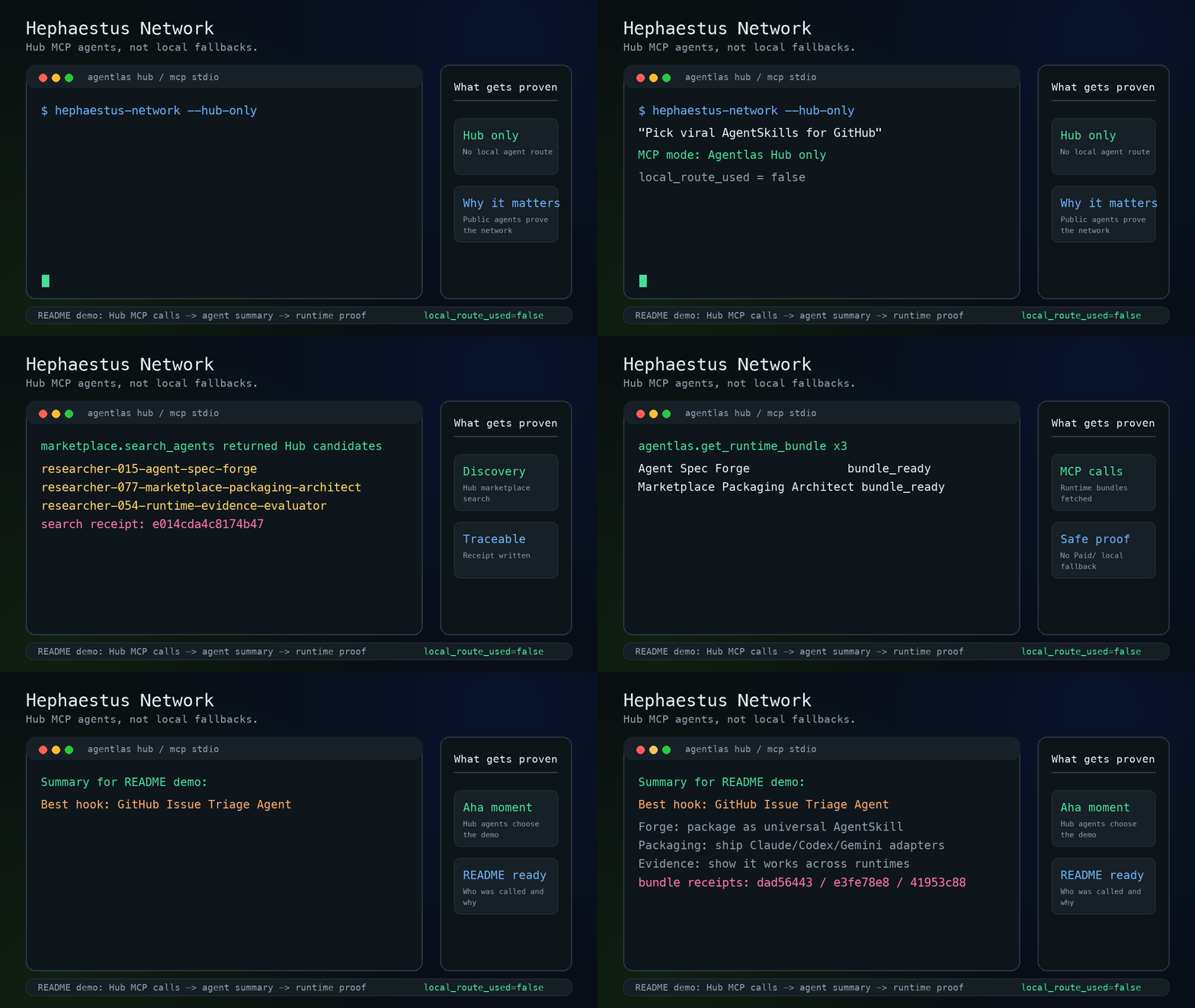
Borrow specialists, route them locally, and verify real work across your LLMs, browser, files, memory, and tools.
Why Agentlas OS · Paste to Install · Why Not Just A Claude Agent? · All Install Methods · Command Surface · New in v1.1.0 · Subsystems · Product Surfaces · Owned Agent Operations · System Packaging · Docs Registry
Why Agentlas OS
Most AI products help you create another agent. Agentlas OS is for the harder
part: making agents operate as a team you own.
You should be able to imagine this after installing it:
- Your LLMs work like a team instead of isolated chat sessions.
- Your real browser becomes an execution surface, not a screenshot in a prompt.
- Your agents keep package contracts, routing cards, memory rules, permissions,
and verification receipts after the chat ends. - Your existing Claude Code, Codex, Gemini, Cursor, Antigravity, API keys, and
local models become part of one operating layer. - Hub specialists can be borrowed into your local runtime without copying the
creator's private work or sending your private files to their agent.
Hephaestus is the open-source engine underneath Agentlas OS. It is not a prompt
marketplace, an agent template generator, or another model subscription. It is a
local-first runtime that builds, routes, borrows, runs, verifies, and packages
agents across LLM command surfaces.
The point is not "make an agent from a prompt." The point is:
Create, package, route, run, and verify agents across your LLMs, browser,
memory, and local tools.
Why Not Just Make A Claude Agent?
Claude subagents and custom agents are useful. They give a task its own prompt,
tools, and context window. Agentlas starts after that point.
An LLM can draft an agent. Agentlas turns it into an operating unit:
| Layer | A prompt-made agent | An Agentlas package |
|---|---|---|
| Definition | Role prompt, markdown, tool list | Manifest, agent card, mode map, package contract |
| Invocation | Manual mention or simple trigger | Routing card, triggers, anti-triggers, benchmarks, receipts |
| Browser | Ad hoc browsing or screenshots | Real browser hardpoint with visible clicks, forms, waits, and snapshots |
| Memory | Copied context or chat history | Memory map, memory tickets, Memory Curator, Policy Gate |
| Runtime | One LLM session or one vendor runtime | Adapters across Claude Code, Codex, Gemini, Cursor, Antigravity, and local runtime |
| Teams | Another prompt layer | Orchestrator, PM Soul, Memory Curator, Policy Gate, eval judge, QA gate |
| Verification | User checks manually | Package checks, receipts, Stormbreaker final gate |
| Distribution | Copy the prompt | Hub/Cloud bundle with public/private boundary checks |
That is the product boundary: Agentlas does not compete on "better prompt." It
gives agents the architecture to keep working outside one chat.
The Agent OS Stack
Agentlas maps agent work to operating-system-like responsibilities without
forcing your work into one model provider:
| OS Abstraction | Implementation in Hephaestus |
|---|---|
| Kernel / Policy Gate | Deterministic router + security gates. Every routing action yields an auditable receipt; tool execution permissions are strictly sandboxed and enforced by the active runtime. |
| Processes / Threads | Independent agents and multi-agent teams compiled as packages with explicit, typed contracts (Routing Cards, anti-scopes, memory boundaries, and verification shims). |
| Process Scheduler | Network 2.0 routing (local-first, quality-gated, and benchmark-gated dispatch) combined with Stormbreaker's parallel execution fabric and append-only run journals. |
| Memory Management (MMU) | Two-boundary governed memory: local project memory remains isolated on the machine, while durable promotions are gated by a local Memory Curator. |
| Virtual File System | Production Ontology Runtime: local-first source ingestion, CJK trigram FTS5 search, hybrid Reciprocal Rank Fusion, and GraphRAG retrieval. |
| Inter-Process Call (IPC) | A2A Agent Card Boundary (cryptographic import/export and caller-gating) + Model Context Protocol (MCP) tool registrations. |
| Package Manager | Agentlas Hub & Cloud: compile, publish, version, and share agents with built-in quality gates. |
| Shell Interface | A small, unified command set in external client runtimes; plain-language intent routing in native Agentlas shells. |
| Process Initialization | Meta-Agent Factory with an integrated Briefing Interview Gate—specifying agent parameters before compiling code. |
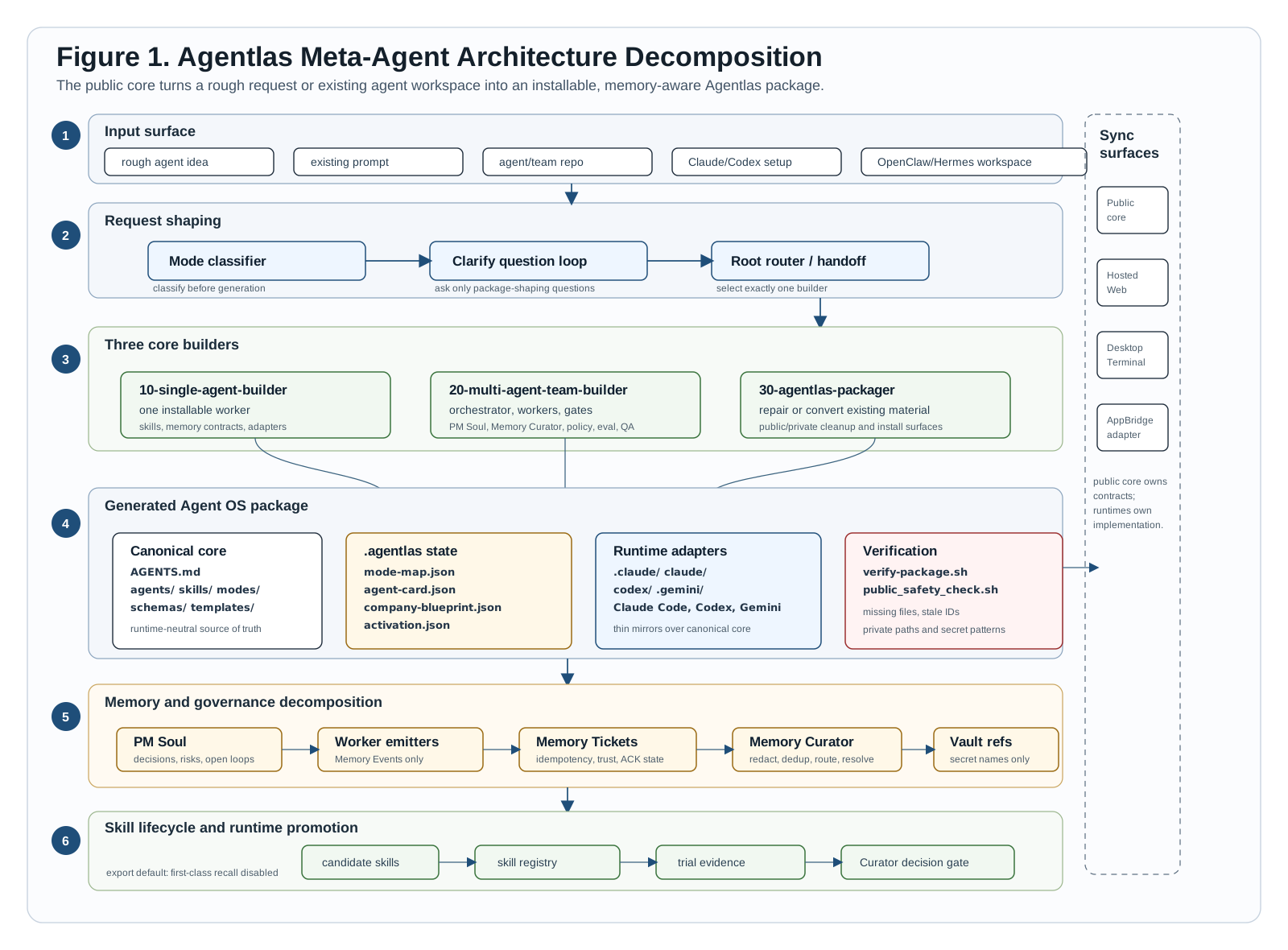
Figure 1. Request shaping, three builders, generated package contracts, memory curation, skill lifecycle, runtime adapters, and sync boundaries.
New In v1.1.0 — The Briefing Interview Engine
Agents generated from vague, single-sentence prompts fail under real-world edge cases. Hephaestus v1.1.0 positions task specification as a first-class OS service through the Briefing Interview Engine:
- Quantitative Ambiguity Gates: The compilation scheduler evaluates prompt clarity across four key vectors (Goal, Constraints, Scope, Context). The build process is strictly gated until the ambiguity score passes a numeric threshold (ambiguity score $\le 0.2$, with per-dimension safety floors). Clear prompts bypass the interview loop entirely via a budget system that caps questions for trivial tasks.
- Lens-Driven System Analysis: Clarifying questions are dynamically sourced from a structured lens table (Scope, Intent, Challenge, System Architecture) focusing on critical routing indicators: anti-scope bounds (what the agent must NOT do), verifiable acceptance criteria, and exit conditions.
- The Work Brief: Resolved details are frozen into
.agentlas/work-brief.json—recording the validated goal, concrete constraints, an assumption ledger with source tags, and the metadata ambiguity score. - Contextual In-Flight Briefs: The CLI tool
cards migrateautomatically maps brief details directly to triggers and anti-triggers on the agent's routing card. Runningroute --briefpropagates this brief to all Stormbreaker execution packets, ensuring constraints and exit conditions govern parallel subprocesses across the entire lifecycle. - Enhanced Routing Discrimination: Prevents same-topic/different-intent collision (e.g., a security agent intercepting a deployment prompt) via double-sided gating: interview-validated anti-triggers on the routing card, and low-confidence LLM re-ranking escalation inside the router.
All Install Methods
Manual LLM Adapter Install
Use this only when your current LLM cannot run setup for you. It installs the
shared Hephaestus runner and command adapters for supported LLM tools.
xcode-select --install   # Command line tools (skip if already installed)
git --version            # Confirm git is available
curl -fsSL https://raw.githubusercontent.com/agentlas-ai/Hephaestus/main/scripts/install-all-runtimes.sh | bash
This installs the neutral runner at ~/.agentlas/runtime/current/bin/hephaestus and registers the command adapters for Claude Code, Codex, Gemini CLI, Antigravity, and Cursor. The installer verifies each runtime surface after registration.
Optional Global Router
hep-global install
This appends a managed marker block to ~/.codex/AGENTS.md, ~/.claude/CLAUDE.md, and ~/.gemini/GEMINI.md. After that, Codex, Claude Code, and Antigravity/Gemini can treat ordinary prompts more like Agentlas-native sessions. For substantial work the router order is: Hephaestus Network first, Hephaestus Cloud second, local agents third, and local skills last. If Network or Cloud is blocked by credits, entitlement, or a poor match, the runtime reports that boundary and continues down the fallback order. The command is idempotent and keeps a timestamped backup before editing.
The status line names final workers, not router commands. Korean sessions use사용 에이전트: <agent names>. 이유: <short reason>. or, for final skill
fallbacks, 사용 스킬: <skill names>. 이유: <short reason>. English sessions
use Agents used: <agent names>. Reason: <short reason>. orSkills used: <skill names>. Reason: <short reason>.
Global router command reference:
| Command | What it does |
|---|---|
hep-global install |
Install or refresh the managed router block for Codex, Claude Code, and Antigravity/Gemini. |
hep-global status |
Show whether each runtime file has the managed router block. |
hep-global remove |
Remove only the managed Hephaestus router block. Existing user content stays in place. |
hep-global install --target codex |
Install only ~/.codex/AGENTS.md. |
hep-global install --target claude |
Install only ~/.claude/CLAUDE.md. |
hep-global install --target antigravity |
Install only ~/.gemini/GEMINI.md, which Antigravity shares with Gemini CLI. |
hep-global install --target codex --target claude --target antigravity |
Explicitly install all supported targets. |
hep-global install --dry-run |
Preview what would change without writing files. |
hep-global install --no-backup |
Edit without writing a timestamped .bak.* file. |
hep-global install --home /tmp/test-home |
Test against another home directory. Useful for installer QA. |
hephaestus global install |
Same command through the main Hephaestus runner. |
~/.agentlas/runtime/current/bin/hephaestus global status |
Use the installed runtime directly when shell shims are not on PATH. |
Per-Runtime Plugin Drivers
Claude Code PluginFrom your OS terminal:
claude plugin marketplace add https://github.com/agentlas-ai/Hephaestus --sparse .claude-plugin claude/plugins
claude plugin install hephaestus@agentlas-core-engine
Note: Claude Code also supports claude plugins ... as an alias, but this README uses the singular claude plugin ... for consistency.
From your OS terminal:
codex plugin marketplace add agentlas-ai/Hephaestus --ref v1.1.10
codex plugin add hephaestus@agentlas-core-engine
Note: Codex does not accept /plugin marketplace add inside the app — run the two commands above in your OS terminal. The OS-terminal CLI command is singular (codex plugin); inside the Codex app, the plugin browser slash command is plural (/plugins). After install, /prompts:hep-build is the in-app entry.
Clone the repo and copy AGENTS.md, agent.md, agents/, skills/, modes/, schemas/, templates/, and .agentlas/ into your workspace. Runtime folders (.claude/, codex/, .gemini/, .agents/) function as adapters over the same canonical core.
Just talk: After installation, speak in plain language within native Agentlas interfaces to auto-route tasks. In external LLM tools, use the explicit commands listed below. When you don't know what agents exist, start with /hep-search. To connect Telegram, use /hep-connect in Claude Code or /prompts:hep-connect in Codex.
Where This Fits
This repository installs the Hephaestus engine and LLM command adapters. It is
the open-source command surface under Agentlas OS.
| Surface | Role |
|---|---|
| Agentlas Desktop | Visual local OS for running AI-native apps, agent teams, memory, browser work, and Hub specialists. |
| Hephaestus plugin | Open-source engine and command surface for Claude Code, Codex, Gemini CLI, Antigravity, Cursor, and compatible runtimes. |
| Agentlas Hub / Cloud | Borrow, publish, and sync agent packages without turning Hub into a server-side model proxy. |
The install prompt above is intentionally scoped to this repo and the current
LLM surface. Desktop and Hub are product surfaces around the same Agentlas OS
architecture; they are not prerequisites for installing the plugin.
The Command Surface
Inside native Agentlas environments, Hephaestus operates commandless. External LLM tools use a deliberately small visible command set. System-level utilities like Stormbreaker, research loadouts, and configuration tables attach automatically from context:
| System Subsystem | Shell Command | Example |
|---|---|---|
| Process Builder | /hep-build |
/hep-build create a customer support agent for Shopify refunds |
| A2A Scheduler | /hep-network |
/hep-network split this launch plan into research, copy, QA, and release agents |
| Cloud State Sync | /hep-cloud |
/hep-cloud use my saved finance analyst agent to review this report |
| Directory Search | /hep-search |
/hep-search find agents for a market report workflow |
| Browser Hardpoint | /hep-browser or /prompts:hep-browser |
/hep-browser https://example.com |
| Inter-Process Call (IPC) | /hep-call |
/hep-call market-researcher, report-writer {draft a market report} |
| Package Exporter | /hep-upload |
/hep-upload ./agents/customer-support-hq |
| Telegram Setup | /hep-connect or /prompts:hep-connect |
/hep-connect Telegram for Marketing Agent Team |
The OS Subsystems
Meta-Agent Factory — Process Creation
A unified compilation factory using three builders. Every generated package registers its global command (.agentlas/global-commands.json) and ships verification scripts—the user never has to infer how to run the compiled package:
| Compilation Mode | Routing Target | Output Artifact |
|---|---|---|
| Single-Agent | 10-single-agent-builder |
Standalone worker with localized skills, memory contracts, and runtime adapters. |
| Multi-Agent Team | 20-multi-agent-team-builder |
Hierarchical team containing a PM Orchestrator, Memory Curator, Policy Gate, QA, and validation scripts. |
| Workspace Packager | 30-agentlas-packager |
Compiled bundle ready for runtime import, CLI execution, or GitHub distribution. |
Briefing Interview Gate: Builders initiate the process using the briefing interview gate (docs/builder-interview-research-gate.md): conducting lens-driven questions, evaluating the ambiguity threshold, searching primary sources, and outputting the work brief.
Network 2.0 — The Scheduler
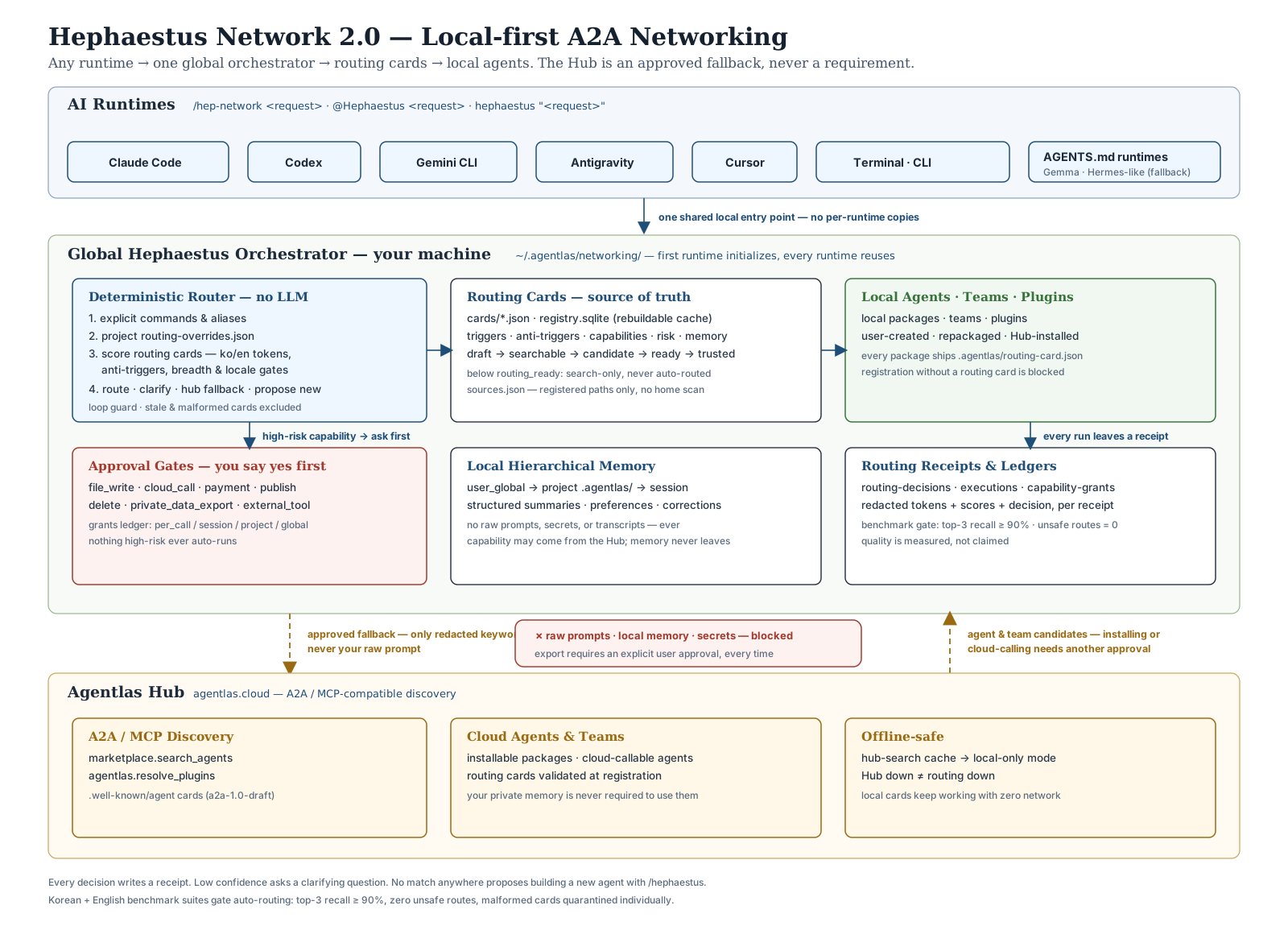
Figure 2. A2A scheduling: LLM runtimes, local-first orchestrator, routing cards, local memory, and the Agentlas Hub A2A/MCP fallback.
- Routing Cards: Every agent, team, and plugin ships a standardized card containing triggers, anti-triggers, capabilities, risk profiles, and memory parameters. Cards failing verification are excluded from routing.
- Local-First Dispatch: Dispatch is resolved locally first (project overrides $\rightarrow$ local cards). Outer lookups via the Agentlas Hub are redacted to keywords; your raw prompts never leave your local environment.
- Temporary Task Forces: Composite requests decompose into Hub/local Task Force plans, packing Stormbreaker envelopes, session hints, and ontology pathways. Named specialists are scheduled dynamically, and a temporary orchestrator manages task handoffs.
- Receipt-Driven Execution: Every routing decision writes a receipt. The router determines only which agent or package to invoke; tool execution permissions remain strictly sandboxed and managed by the active runtime.
- Bilingual Benchmarking: Auto-routing is gated by a bilingual (Korean + English) benchmark requiring top-3 recall $\ge 90%$ and zero privacy leaks. Low-confidence paths escalate to runtime-level Router Agent re-ranking.
Details: docs/hephaestus-network-2.0.md · Runtime support matrix: docs/runtime-fallback-adapters.md
Stormbreaker — Disciplined Execution
Stormbreaker is the execution gating subsystem of the Agent OS. It ensures that agents do not report success or terminate until all outcomes have been verified by deterministic checks:
Kernel Gating Envelope:
[Scope Lock] -> [Decomposition] -> [Parallel Work Packets] -> [Verify Contracts] -> [Bounded Repair] -> [Final Gate]
A local run journal makes long executions resumable after interruption. Execution packets carry the Work Brief so that anti-scope rules and exit criteria govern all parallel subprocesses. Stormbreaker reports explicit completion states (verified / unverified / blocked) to prevent autonomous completion theater.
Execution protocol: docs/robustness-protocol.md · Benchmarks & Evals: docs/robustness-eval.md
Ontology Runtime — The Knowledge Filesystem
For knowledge-intensive operations, bin/ontology acts as the semantic filesystem, converting unstructured local files into an agent-readable database stack:
Ingested Files -> [Parser Adapter] -> [CJK trigram/bigram tokenization]
  -> [FTS5 + SQLite Storage] -> [Reciprocal Rank Fusion Ranking] -> [GraphRAG Search]
Features first-party Korean document parsing (HWPX and legacy HWP5) with zero GPL dependencies. Fully local and SQLite-backed; confidential and private chunks are isolated, preventing them from reaching external cloud hooks.
bin/ontology ingest ./corpus --scope internal
bin/ontology query "Project Helios Memory Curator" --agent verifier
bin/ontology memory candidates
Details: docs/ontology-runtime.md
Governed Memory — Curated Promotion
- Local Project Memory: Stored under
~/.agentlas/networking/and isolated to the local machine. It cannot be exported without explicit authorization. - Workspace Personalization: Manages personalization logs (summaries, playbooks, plugin locks, and receipts) for borrowed Cloud/Hub agents without storing raw prompts, credential values, or private files.
- Curator Gating: Skills and memory modifications are kept as candidates. They are promoted to durable status only after a local curator confirms holdout/replay proofs, rollback coverages, and security policy approvals.
A2A Boundary — Inter-Agent Isolation
Standardized CLI commands allow safe inter-agent coordination:
agentlas-cloud ao a2a import ./agent-card.json .
agentlas-cloud ao a2a export . --agent local/10-builder
agentlas-cloud route "run the release check" --caller local/orchestrator .
Import acts as a proposal (restricting automatic invocation), export redacts private paths and logic, and invocations are caller-gated before routing is resolved.
Built For Owned Agent Operations
Users and teams do not need another way to write isolated agents. They need to
operate an owned workforce of them. Hephaestus is designed for that operational
model:
- Model Neutrality: Agents, memory repositories, and knowledge domains are stored as local assets under your control. Transitioning to a new model provider (or utilizing local models like Ollama, DeepSeek, GLM, Gemini, or Claude) is a configuration update, not a codebase migration.
- Auditability by Construction: Every routing decision, execution step, memory candidate, and curator decision is logged as a text file. You can diff, audit, and commit them. Work is either verified or flagged as unverified.
- Deterministic Pipeline Gates: Security filters, anti-scopes, routing card triggers, and prompt sanitizations are hardcoded into the OS pipeline—they do not rely on LLM system instructions or guidelines.
- Specification Before Generation: The Briefing Interview Engine measures request ambiguity and stamps the score on the Work Brief, ensuring task execution can always be audited back to what was agreed.
- Local-First Data Boundary: Raw text, documents, and database files remain local. External transactions are redacted and opt-in.
Where Frameworks Fit
CrewAI, LangChain, and vendor agent SDKs function as libraries—excellent for writing custom agent logic inside a single process. Hephaestus operates as the runtime substrate: it specifies, packages, routes, runs, audits, and migrates agents across workspace runtimes. Framework code runs inside Hephaestus packages; the kernel only requires that agents honor their directory contracts and Routing Cards.
What It Builds (Process Packaging)
Hephaestus packages agents into a standard directory layout that any workspace runtime can parse, install, verify, and run:
├── AGENTS.md                          # Canonical route configurations
├── agent.md / agents/                 # Single worker or team roles
├── skills/                            # Local agent skills and capabilities
├── modes/                             # Custom agent execution modes
├── schemas/                           # Validation contracts and schemas
├── templates/                         # Configuration templates
├── .agentlas/                         # System Directory: routing cards, work briefs,
│                                      # global commands, memory contracts, eval plans
├── .claude/ codex/ .gemini/ .agents/  # Runtime shims (driver adapters over the core)
├── scripts/
│   ├── verify-package.sh              # Package structure verifier
│   └── public_safety_check.sh         # Secret and credentials scanner
└── docs/                              # Briefing records, tool specifications,
                                       # and prompt contracts
Docs By Goal
| System Goal | Reference Documentation |
|---|---|
| Understand the canonical route | AGENTS.md |
| See the full team contract | agent.md |
| Architecture source of truth | docs/source-of-truth.md |
| Runtime boundaries | docs/runtime-sync-boundaries.md |
| Agentlas OS positioning | docs/agentlas-os-architecture-positioning-2026-07-08.md |
| Google Next 2026 comparison | docs/agentlas-os-google-next-2026-comparison-2026-07-08.md |
| Briefing interview & research gate | docs/builder-interview-research-gate.md |
| Network 2.0 routing | docs/hephaestus-network-2.0.md |
| Stormbreaker protocol | docs/robustness-protocol.md |
| Ontology runtime | docs/ontology-runtime.md |
| Memory architecture | docs/memory-architecture.md |
| Skill lifecycle promotion | docs/skill-lifecycle-promotion.md |
| Cloud runtime bundles | docs/agentlas-cloud-runtime.md |
| Verify a package | scripts/verify-package.sh |
| Public safety check | scripts/public_safety_check.sh |
Public Safety Boundary
This repository does not include Agentlas billing/account logic, production cloud credentials, customer databases, raw private transcripts, native keychain managers, or private deployment scripts.
Public output packages compiled by Hephaestus must exclude local absolute paths, API keys, service-account keys, .env secrets, raw transcripts, customer logs, or private developer notes.
Contributing and Verification
Before opening a pull request or publishing updates, run the verification test suite:
scripts/verify-package.sh
scripts/verify-ontology-runtime.sh
scripts/public_safety_check.sh
License
Apache-2.0. See LICENSE.
Yorumlar (0)
Yorum birakmak icin giris yap.
Yorum birakSonuc bulunamadi