drawio-skill
Health Gecti
- License — License: MIT
- Description — Repository has a description
- Active repo — Last push 0 days ago
- Community trust — 1636 GitHub stars
Code Gecti
- Code scan — Scanned 8 files during light audit, no dangerous patterns found
Permissions Gecti
- Permissions — No dangerous permissions requested
Bu listing icin henuz AI raporu yok.
drawio-skill — From Text to Professional Diagrams. An Agent Skill (SKILL.md) that generates draw.io diagrams from natural language and exports to PNG/SVG/PDF. Works with Claude Code, OpenClaw, Hermes Agent, OpenAI Codex, and SkillsMP.
drawio-skill — From Text to Professional Diagrams








English · 中文 · 📖 Online Docs
A skill that turns natural-language descriptions into .drawio XML and exports them to PNG / SVG / PDF / JPG via the native draw.io desktop CLI. Works with Claude Code, Cursor, Copilot, OpenClaw, Codex, Hermes, and any agent compatible with the Agent Skills format.
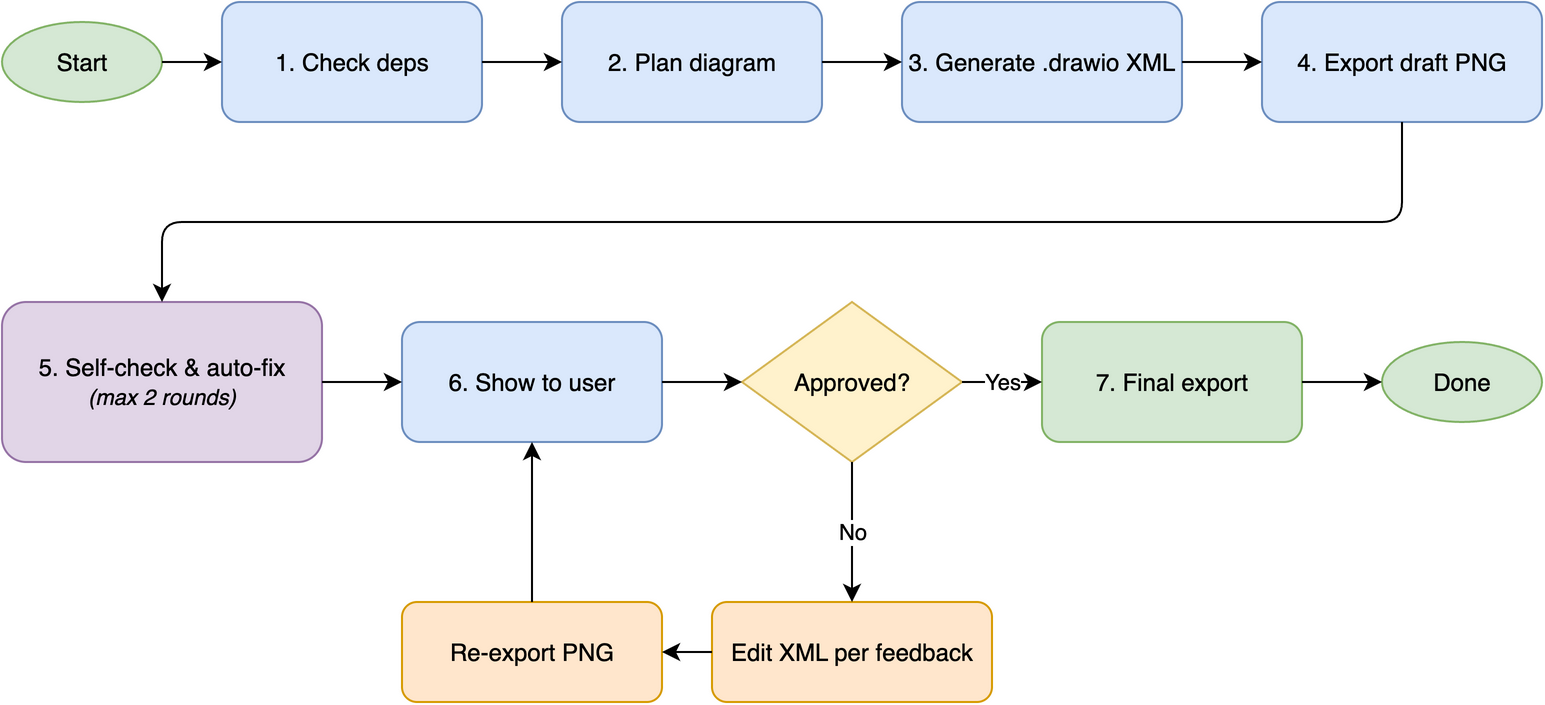
✨ Highlights
- 6 diagram type presets — ERD, UML Class, Sequence, Architecture, ML/Deep Learning, Flowchart
- Self-check + auto-fix — reads its own PNG output and auto-fixes 6 issue types (up to 2 rounds)
- Iterative feedback loop — 5-round targeted refinement until you're satisfied
- Style presets — capture your visual style from a
.drawiofile or image, reuse on demand - Grid-aligned layout — complexity-scaled spacing, routing corridors, hub-center strategy
- Multi-agent, zero-config — pure SKILL.md; no MCP server, no Python, no Node.js
🖼️ Examples
[!TIP]
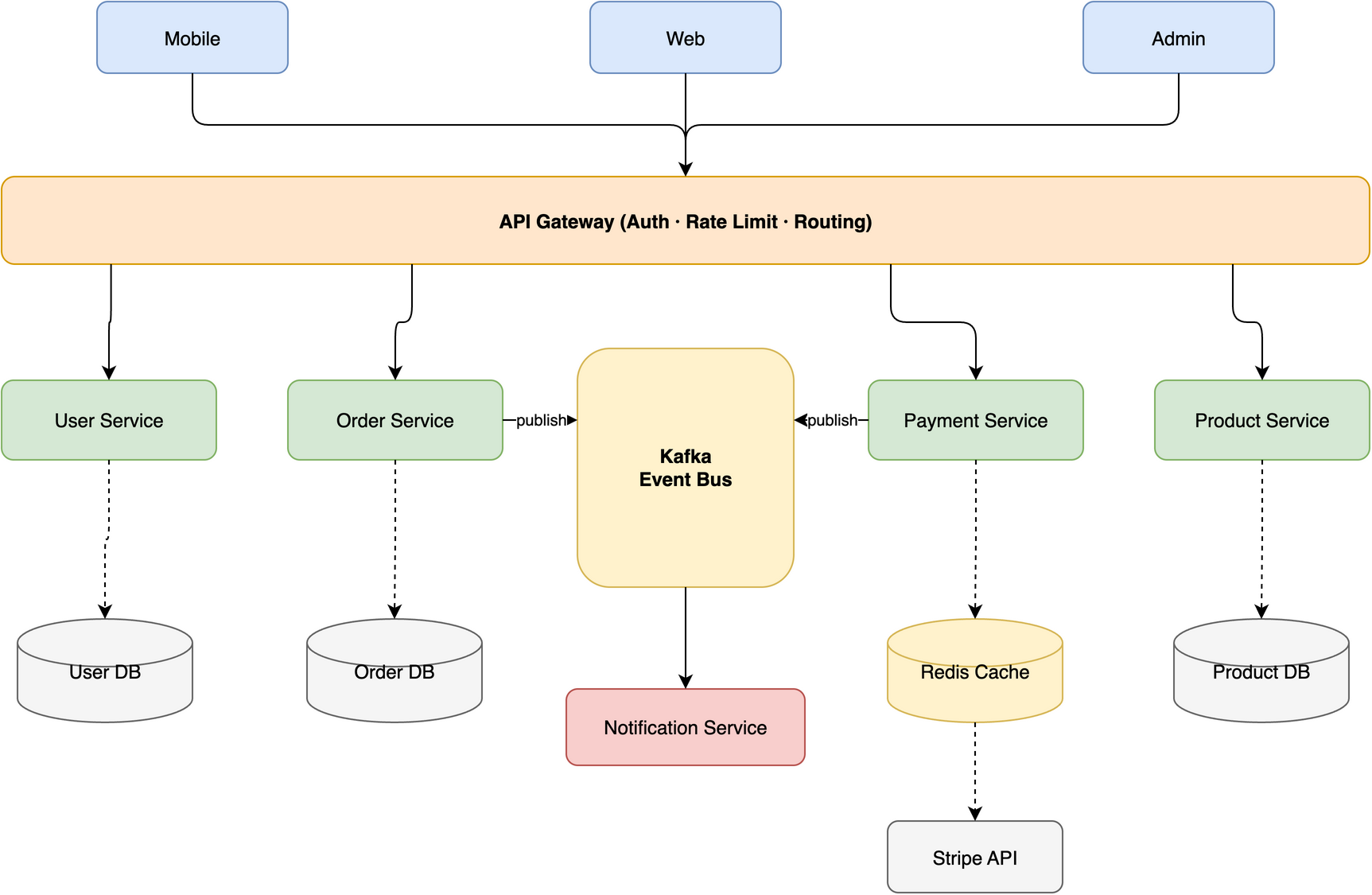
Try this prompt to generate the diagram below:
Create a microservices e-commerce architecture with Mobile/Web/Admin clients,
API Gateway, Auth/User/Order/Product/Payment services, Kafka message queue,
Notification service, and User DB / Order DB / Product DB / Redis Cache / Stripe API
The skill also routes edges cleanly across different topologies — no lines crossing through shapes:
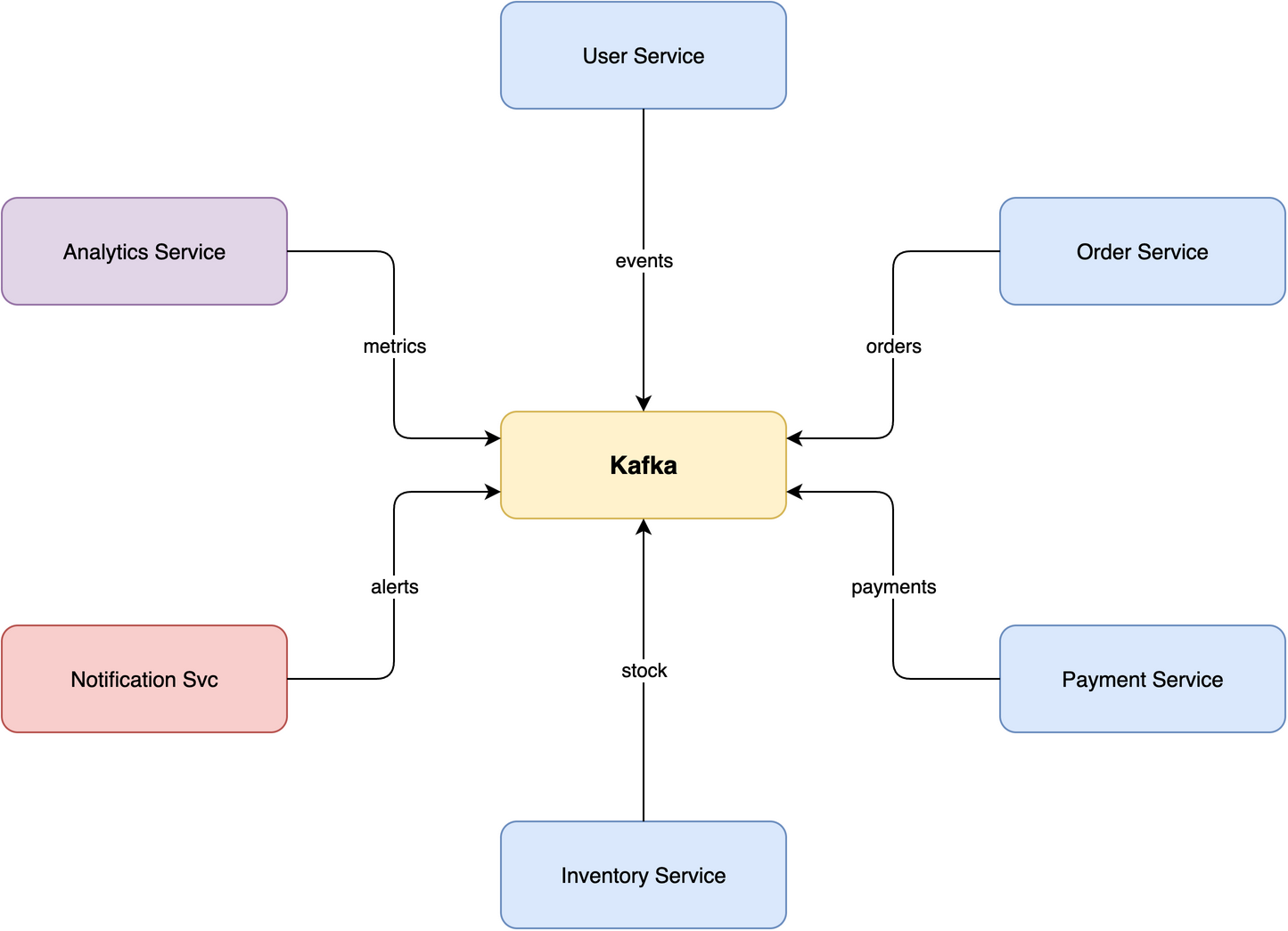 Star · 7 nodes Central message broker with 6 microservices radiating outward, zero edge crossings. |
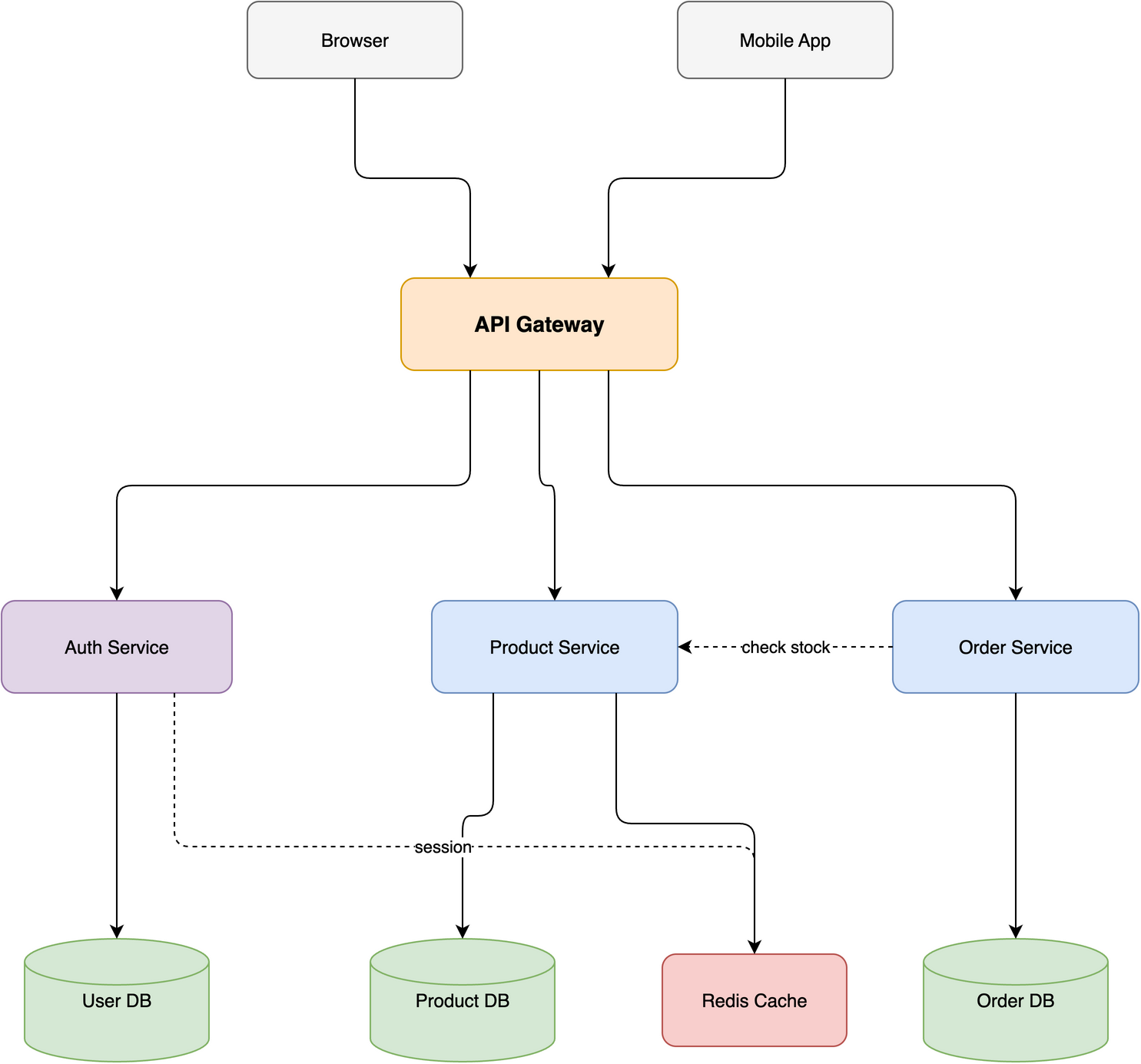 Layered · 10 nodes / 4 tiers E-commerce stack with horizontal and diagonal cross-connections routed via corridors. |
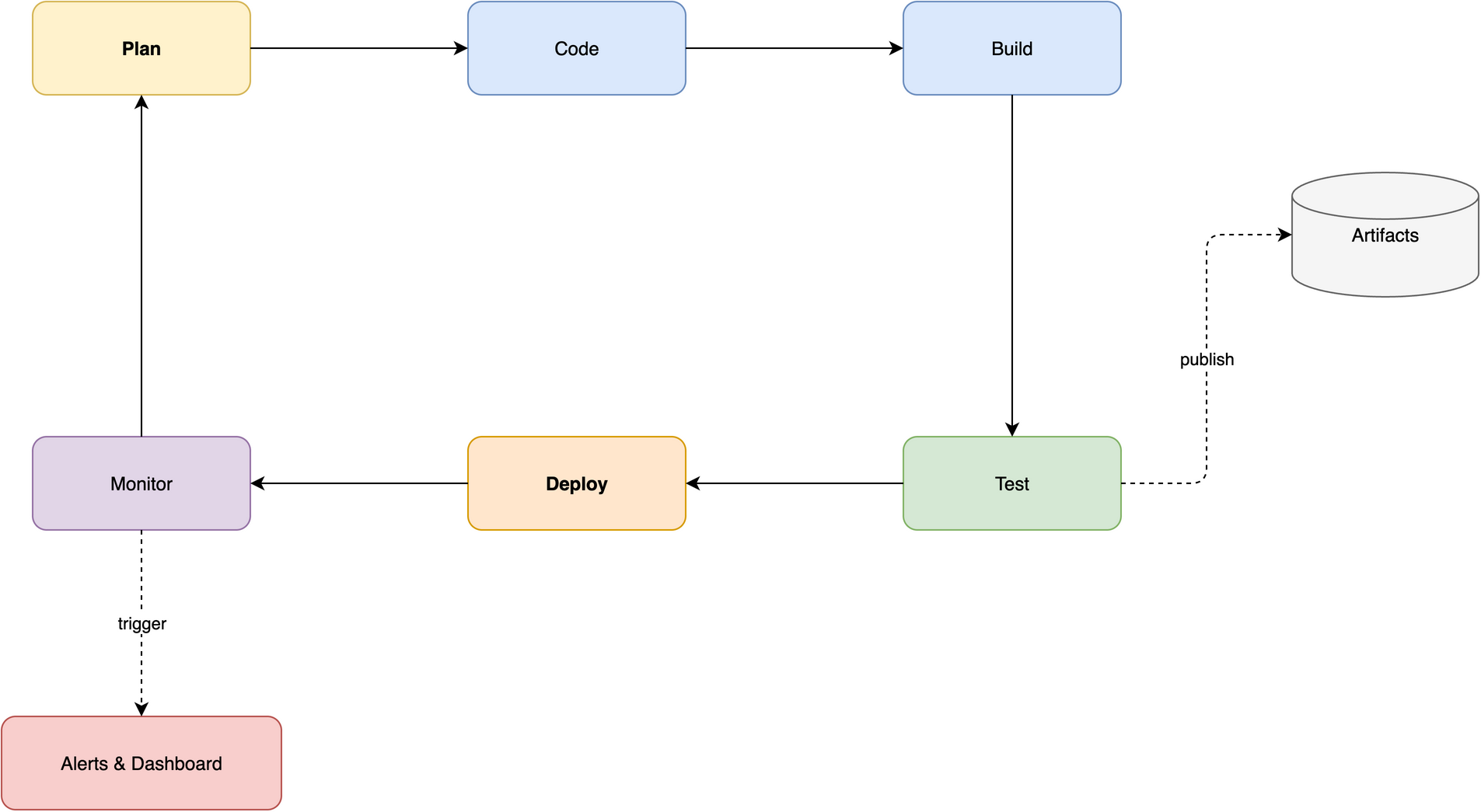 Ring · 8 nodes CI/CD pipeline with a closed loop and 2 spur branches flowing along the perimeter. |
Full walkthrough in docs/USAGE.md.
🚀 Installation
1. Install the draw.io desktop CLI
| Platform | Command |
|---|---|
| macOS | brew install --cask drawio |
| Windows | Download installer |
| Linux | .deb/.rpm from releases; sudo apt install xvfb for headless |
Verify with drawio --version. Full recipes in docs/INSTALL_CLI.md.
2. Install the skill
# Any agent (Claude Code, Cursor, Copilot, ...)
npx skills add Agents365-ai/365-skills -g
# Claude Code plugin marketplace
> /plugin marketplace add Agents365-ai/365-skills
> /plugin install drawio
# Manual install
git clone https://github.com/Agents365-ai/drawio-skill.git \
  ~/.claude/skills/drawio-skill
Also indexed on SkillsMP and ClawHub.
Updating: /plugin update drawio (Claude Code), skills update drawio-skill (SkillsMP), clawhub update drawio-pro-skill (OpenClaw), or git pull for manual installs — see docs/INSTALL_SKILL.md#updates.
⚡ Quick Start
After installation, just describe what you want:
Create a microservices e-commerce architecture with API Gateway,
Auth/User/Order/Product/Payment services, Kafka message queue,
Notification service, and a separate database per service
The skill plans the layout, generates the .drawio XML, exports to your chosen format, self-checks the result, and lets you iterate.
🧩 Supported Diagram Types
| Category | Examples | Notable features |
|---|---|---|
| Architecture | microservices, cloud (AWS/GCP/Azure), network topology, deployment | Tier-based swimlanes, hub-center strategy |
| ML / Deep Learning | Transformer, CNN, LSTM, GRU | Tensor shape annotations, layer-type color coding |
| Flowcharts | business processes, workflows, decision trees, state machines | Semantic shapes (parallelogram I/O, diamond decisions) |
| UML | class diagrams, sequence diagrams | Inheritance / composition / aggregation arrows; lifelines + activation boxes |
| Data | ER diagrams, data flow diagrams (DFD) | Table containers, PK/FK notation |
| Other | org charts, mind maps, wireframes | — |
🎨 Style Presets
Capture a visual style once, reuse it everywhere. Three presets are built in — default, corporate, handdrawn — and you can teach the skill your own style from a .drawio file or a flat image:
Draw a microservices architecture using my "corporate" style
Learn my style from ~/diagrams/brand.drawio as "mybrand"
The skill extracts colors, shapes, fonts, and edge style, renders a preview, and only saves the preset after you approve. Full preset-management commands in docs/STYLE_PRESETS.md.
🆚 Comparison
vs Native Agent (no skill)
| Feature | Native agent | drawio-skill |
|---|---|---|
| Self-check after export | ❌ | ✅ reads PNG, auto-fixes 6 issue types |
| Iterative review loop | ❌ manual re-prompt | ✅ targeted edits, 5-round safety valve |
| Diagram type presets | ❌ | ✅ 6 presets (ERD, UML, Seq, Arch, ML, Flow) |
| Grid-aligned layout | ❌ | ✅ 10px snap, routing corridors |
| Color palette | random / inconsistent | ✅ 7-color semantic system |
| Style presets | ❌ | ✅ learn from .drawio file or image |
vs Other draw.io Skills & Tools
| Feature | drawio-skill | jgraph/drawio-mcp (official, 1.3k⭐) |
bahayonghang/drawio-skills (60⭐) |
GBSOSS/ai-drawio (63⭐) |
|---|---|---|---|---|
| Approach | Pure SKILL.md | SKILL.md / MCP / Project | YAML DSL + MCP | Plugin + browser |
| Dependencies | draw.io desktop only | draw.io desktop | MCP server (npx) |
Browser + local server |
| Multi-agent | ✅ 6 platforms | ❌ Claude Code only | ❌ Claude Code only | ❌ |
| Self-check + auto-fix | ✅ 2-round | ❌ | ❌ | ❌ screenshot only |
| Iterative review | ✅ 5-round loop | ❌ generate once | ✅ 3 workflows | ❌ |
| Diagram presets | ✅ 6 types | ❌ | ❌ | ❌ |
| ML/DL diagrams | ✅ tensor shapes, layer colors | ❌ | ❌ | ❌ |
| Color system | ✅ 7-color semantic | ❌ | ✅ 5 themes | ❌ |
| Browser fallback | ✅ diagrams.net URL | ❌ | ❌ | ❌ |
| Zero-config | ✅ copy skills/drawio-skill/ |
✅ | ❌ needs npx |
❌ needs plugin install |
Full 18-row comparison + key-advantages summary in docs/COMPARISON.md.
📚 Documentation
| Doc | What's inside |
|---|---|
| docs/INSTALL_CLI.md | draw.io desktop CLI install recipes for macOS / Windows / Linux |
| docs/INSTALL_SKILL.md | Plugin marketplace, manual clone, update commands |
| docs/USAGE.md | Natural-language prompts, microservices walkthrough, topology demos |
| docs/STYLE_PRESETS.md | Built-in presets, "learn my style from a file" workflow, manage commands |
| docs/COMPARISON.md | Side-by-side tables vs. native agents and other draw.io skills/tools |
| skills/drawio-skill/SKILL.md | Workflow guide loaded by the agent |
💬 Community
- Discord: https://discord.gg/79JF5Atuk
- WeChat: scan the QR code below

❤️ Support
If this skill helps you, consider supporting the author:

WeChat Pay |

Alipay |

Buy Me a Coffee |

Give a Reward |
👤 Author
Agents365-ai
- GitHub: https://github.com/Agents365-ai
- Bilibili: https://space.bilibili.com/441831884
📄 License
Yorumlar (0)
Yorum birakmak icin giris yap.
Yorum birakSonuc bulunamadi