plantuml-skill
Health Gecti
- License — License: MIT
- Description — Repository has a description
- Active repo — Last push 0 days ago
- Community trust — 34 GitHub stars
Code Gecti
- Code scan — Scanned 1 files during light audit, no dangerous patterns found
Permissions Gecti
- Permissions — No dangerous permissions requested
Bu listing icin henuz AI raporu yok.
PlantUML diagrams (.puml) from natural language via Kroki — no Java install. 10+ UML types, 5 themes, PNG/SVG, multi-agent.
plantuml-skill — From Text to Professional UML Diagrams





English · 中文 · 📖 Online Docs




A skill that turns natural-language descriptions into .puml PlantUML source and exports diagrams to PNG / SVG via the Kroki rendering API — no Java, no Graphviz, no local install (just curl). Local Kroki Docker and plantuml.jar fallbacks are available for offline / air-gapped use. Works with Claude Code, Cursor, Copilot, OpenClaw, Codex, Hermes, and any agent compatible with the Agent Skills format.
✨ Highlights
- 10+ diagram types — sequence, component, class, ER, activity, use case, state, C4, mind map, gantt — each with idiomatic syntax templates and shape vocabulary
- Zero-install default — public Kroki API needs only
curl; no Node, no Java, no Graphviz - 3 rendering backends — public Kroki, local Kroki via Docker (offline), or
plantuml.jar+ Java + Graphviz (air-gapped) — picks by sensitivity, never silently downgrades, and reports whether your source left the machine - 5 built-in themes —
plain,cerulean,blueprint,aws-orange,vibrant— plus fullskinparamoverrides - C4 that actually works — uses Kroki's
c4plantumlendpoint to sidestep the public PlantUML server's!include404 trap - Common Mistakes guide — 9-row curated table covering arrow direction, layout overflow, label escaping, participant ordering, and the C4 include pitfall
- Vision self-check + review loop — beyond the syntax/render self-correct loop, reads the exported PNG to catch readability defects auto-layout can't prevent (clipped labels, component overlap, wrong orientation), auto-fixes (≤2 rounds), then iterates with you (≤5 rounds)
- Beyond text → diagram — also generates diagrams from existing source code (class/sequence/component/ER), and renders PlantUML embedded in Markdown to images, rewriting the doc with image links (Confluence / Notion-ready)
🖼️ Examples
[!TIP]
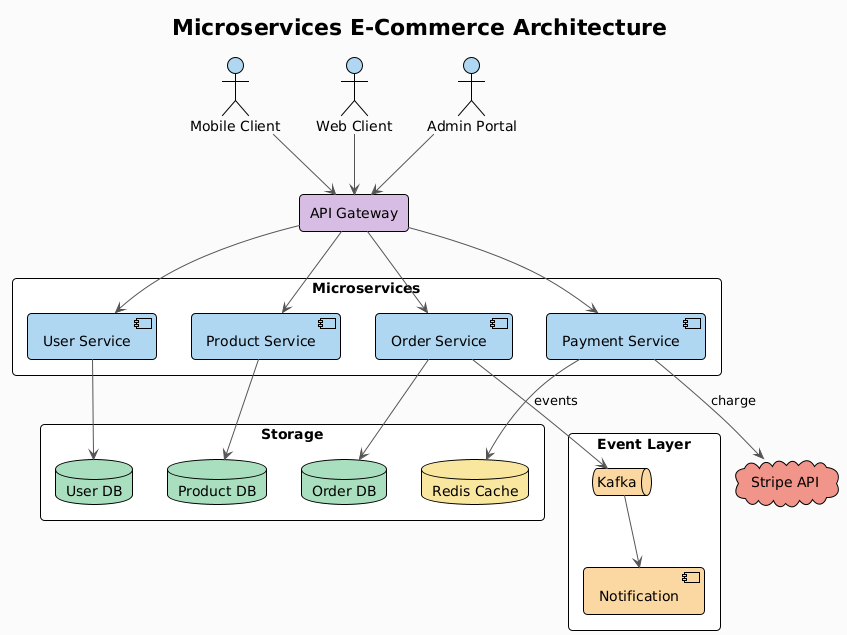
The hero image above was generated from this single prompt:
Create a microservices e-commerce architecture with Mobile/Web/Admin clients,
API Gateway, User/Order/Product/Payment services, Kafka event bus,
Notification service, and User DB / Order DB / Product DB / Redis Cache /
Stripe API
Source .puml and rendered PNG live in assets/ — the skill produced both in one shot.
More examples — different types & themes
Six diagram types, each in a different built-in theme — all rendered via Kroki. Sources + PNGs in assets/examples/.
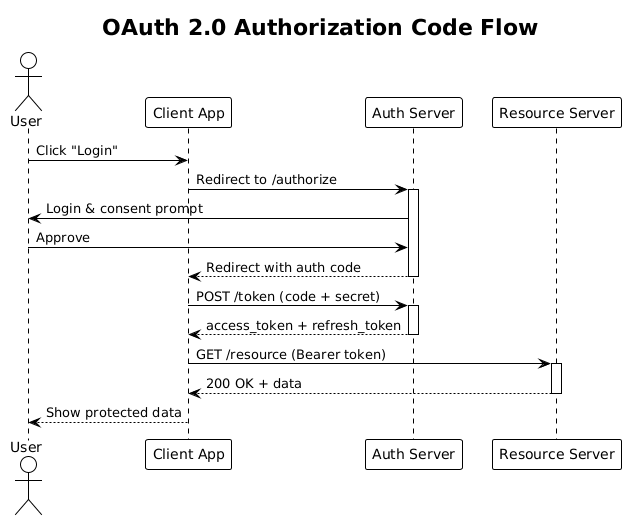 Sequence · plain |
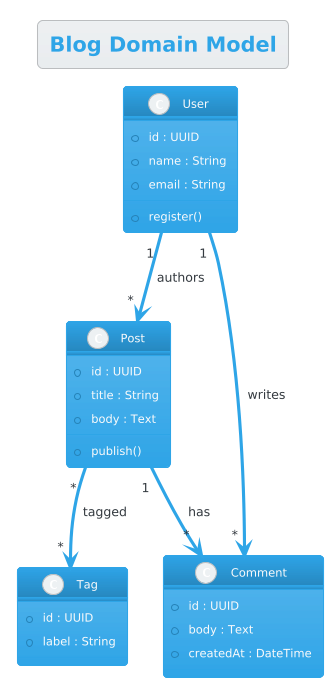 Class · cerulean |
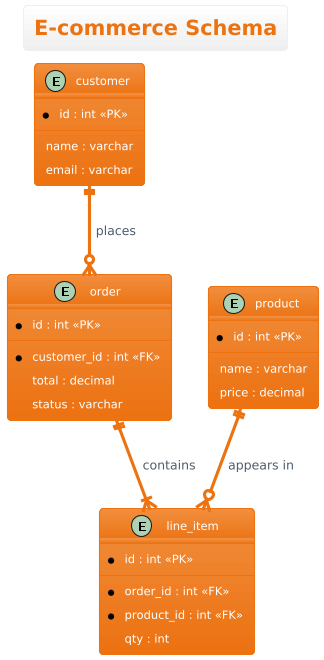 ER · aws-orange |
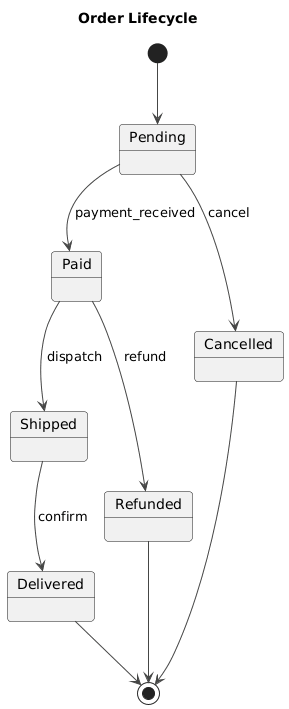 State · vibrant |
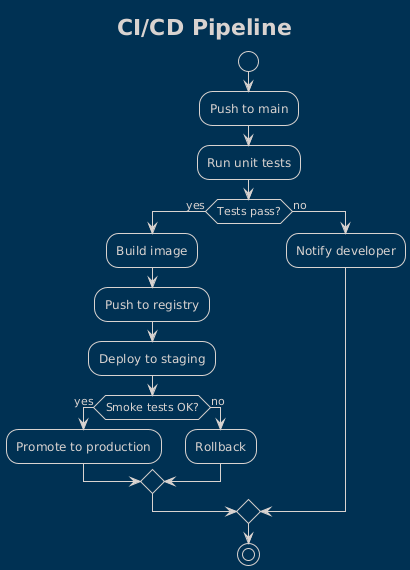 Activity · blueprint |
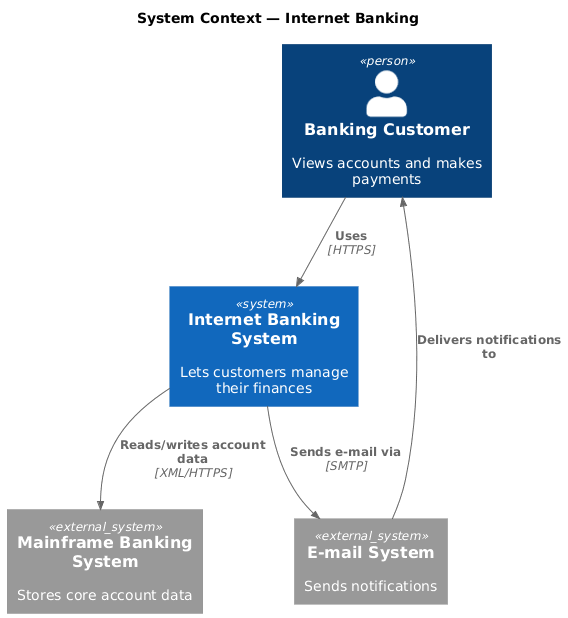 C4 Context · <C4/…> |
🚀 Installation
1. Pick a rendering backend
| Option | Install | When to use |
|---|---|---|
| Kroki API (default) | curl (pre-installed everywhere) |
Online — zero setup |
| Local Kroki | docker run -d -p 8000:8000 yuzutech/kroki |
Offline / privacy / heavy workloads |
plantuml.jar |
brew install graphviz openjdk + download jar |
Fully air-gapped |
Full recipes in docs/setup.md.
2. Install the skill
# Any agent (Claude Code, Cursor, Copilot, ...)
npx skills add Agents365-ai/365-skills -g
# Claude Code plugin marketplace
> /plugin marketplace add Agents365-ai/365-skills
> /plugin install plantuml
# Manual install
git clone https://github.com/Agents365-ai/plantuml-skill.git \
  ~/.claude/skills/plantuml-skill
Common paths: ~/.claude/skills/ (Claude Code), ~/.config/opencode/skills/ (Opencode), ~/.openclaw/skills/ (OpenClaw), ~/.agents/skills/ (Codex). Also indexed on SkillsMP and ClawHub.
Updating: /plugin update plantuml (Claude Code), skills update plantuml-skill (SkillsMP), clawhub update plantuml-pro-skill (OpenClaw), or git pull for manual installs.
⚡ Quick Start
After installation, just describe what you want:
Create a sequence diagram showing the OAuth 2.0 authorization code flow with
Client, Authorization Server, Resource Server, and User. Include the redirect,
token exchange, and resource access steps with proper activation boxes.
The skill picks the right diagram type, generates the .puml source, and exports to PNG/SVG via Kroki.
🧩 Supported Diagram Types
| Category | Examples | Notable features |
|---|---|---|
| Sequence | API calls, OAuth flows, protocol traces | Lifelines, activation boxes, async arrows |
| Component / Architecture | services, modules, queues, databases, clouds | package/rectangle grouping, shape vocabulary |
| Class | OOP models, data structures | Inheritance, composition, aggregation, multiplicities ("1" --> "*") |
| ER / Entity | database schemas | <<PK>> / <<FK>> notation, crow's-foot relationships |
| Activity / Flowchart | workflows, business processes | if/then/else/endif decision branches |
| Use Case | system requirements, user stories | Actors, system boundaries |
| State | state machines, lifecycle flows | [*] --> start/end markers |
| C4 | Context, Container, Component | Via Kroki's c4plantuml endpoint (no broken includes) |
| Other | mind maps, gantt | @startmindmap, @startgantt |
🔄 How it works
Behind the scenes: check curl → pick diagram type → generate .puml source with @startuml/@enduml markers → POST to Kroki (https://kroki.io/plantuml/png or …/svg) → validate & self-correct the render (fix syntax, ≤3 rounds) → vision self-check readability and auto-fix (≤2 rounds) → review loop on your feedback (≤5 rounds) → save output + report paths. Swap the endpoint for http://localhost:8000 to use a local Kroki container, or run java -jar plantuml.jar for air-gapped renders.
🆚 Comparison
vs Native Agent (no skill)
| Feature | Native agent | plantuml-skill |
|---|---|---|
| Generate PlantUML source | ✅ (LLMs know the syntax) | ✅ |
| Export to PNG/SVG | ❌ outputs text only | ✅ one curl POST to Kroki |
| Self-correct on render error | ❌ ships broken output | ✅ checks HTTP/bytes, fixes syntax, retries (≤3 rounds) |
| Vision self-check + review loop | ❌ never looks at the render | ✅ reads the PNG, auto-fixes readability (≤2), then iterates on feedback (≤5) |
| Renderer choice | none | ✅ public Kroki / local Kroki / plantuml.jar |
| Diagram-type catalog | implicit | ✅ 10+ types with shape & arrow vocabulary |
| Theme defaults | random per run | ✅ 5 named themes + skinparam overrides |
| C4 via cloud | ❌ often broken (!include 404s) |
✅ Kroki c4plantuml endpoint |
| Common-mistake guard rails | ❌ | ✅ 9-row curated pitfalls table |
| Offline / air-gapped | ❌ | ✅ local Kroki Docker or local jar |
Full comparison + key-advantages summary in docs/features.md.
🎯 When to use (and when not to)
Good fit:
- Standardized UML — class, sequence, state, component, use-case, activity, deployment, C4
- Diagrams-as-code with automatic layout; ideal for CI pipelines and docs-as-code
- When correct, conventional UML notation matters (hollow inheritance arrows, lifelines, etc.)
Reach for a sibling skill instead when you need:
- General, non-UML quick diagrams embedded in Markdown → mermaid-skill
- Freeform, heavily-styled, or branded diagrams with pixel control → drawio-skill
- A hand-drawn / sketchy look → excalidraw-skill or tldraw-skill
🔗 Related Skills
Part of the Agents365-ai diagram-skill family — pick the right tool for the job:
| Skill | Style | Best for |
|---|---|---|
| drawio-skill | Professional / vector | Architecture, ML/DL, ER diagrams with self-check loop |
| excalidraw-skill | Hand-drawn / sketchy | Whiteboard mockups, informal diagrams |
| mermaid-skill | Text-based, auto-layout | README-embeddable, version-control friendly |
| tldraw-skill | Whiteboard collaboration | Casual sketches, FigJam-style boards |
❤️ Support
If this skill helps you, consider supporting the author:

WeChat Pay |

Alipay |

Buy Me a Coffee |

Give a Reward |
👤 Author
Agents365-ai
- GitHub: https://github.com/Agents365-ai
- Bilibili: https://space.bilibili.com/441831884
📄 License
Yorumlar (0)
Yorum birakmak icin giris yap.
Yorum birakSonuc bulunamadi