tldraw-skill
Health Uyari
- No license — Repository has no license file
- Description — Repository has a description
- Active repo — Last push 0 days ago
- Community trust — 11 GitHub stars
Code Uyari
- Code scan incomplete — No supported source files were scanned during light audit
Permissions Gecti
- Permissions — No dangerous permissions requested
This tool is a skill for AI coding agents that translates natural language descriptions into whiteboard diagrams. It generates `.tldr` JSON files for the tldraw editor and uses a CLI tool to automatically export them to PNG or SVG formats.
Security Assessment
The overall risk is Medium. The automated rule-based scan did not find any hardcoded secrets or requests for explicitly dangerous permissions. However, the code scan was incomplete, meaning the underlying source files could not be fully verified. Functionally, the tool executes shell commands to run external software (`tldraw-cli`) and interact with the file system (such as creating new directories). It also makes network requests to auto-update itself once every 24 hours. While no sensitive data access is immediately apparent, the lack of a complete code audit means these system-level actions should be monitored.
Quality Assessment
The project is actively maintained, with its most recent push occurring today. It has a solid initial foundation of community trust with 11 GitHub stars, which is a good sign for a new, niche developer tool. A major red flag for enterprise or broader open-source use is the complete absence of a license file. Without a defined license, the software is technically all-rights-reserved by default, which creates strict legal limitations on how it can be used, modified, or distributed.
Verdict
Use with caution: the tool offers highly useful automated features but lacks a software license and could not be fully code-scanned, so you should review its actions locally before fully integrating it into sensitive workflows.
Claude Code skill for generating tldraw whiteboard diagrams (.tldr) and exporting to PNG/SVG via tldraw-cli.
tldraw-skill — From Text to Whiteboard Diagrams
What it does
- Generates
.tldrJSON files from natural language descriptions - Exports diagrams to PNG or SVG using
@kitschpatrol/tldraw-cli - 6 diagram type presets: Architecture, Flowchart, Sequence, ML/Deep Learning, ERD, UML — with preset shape vocabulary and layout conventions
- Self-check loop — uses vision to read the exported PNG and auto-fix overlaps, clipped labels, and missing arrows before showing you
- Iterative review loop — collect feedback, apply targeted JSON edits, re-export until approved (5-round safety valve)
- Complexity-scaled layout — spacing automatically grows with node count to prevent overlaps
- Auto-update — pulls the latest skill version once per 24h
- Custom output directory — ask for any output path (e.g.
./artifacts/) and the skill willmkdir -pand export there - Triggers automatically when diagrams would help explain complex systems
- Hand-drawn whiteboard aesthetic by default; switchable to clean fonts
Multi-Platform Support
Works with all major AI coding agents that support the Agent Skills format:
| Platform | Status | Details |
|---|---|---|
| Claude Code | ✅ Full support | Native SKILL.md format |
| Opencode | ✅ Full support | Native SKILL.md via skill tool; also reads .claude/skills/ paths |
| OpenClaw / ClawHub | ✅ Full support | metadata.openclaw namespace, dependency gating, ClawHub installer |
| Hermes Agent | ✅ Full support | metadata.hermes namespace, tags, tool gating |
| OpenAI Codex | ✅ Compatible | Place under .agents/skills/ |
| SkillsMP | ✅ Indexed | GitHub topics configured |
Comparison
vs Native Agent (no skill)
| Feature | Native agent | This skill |
|---|---|---|
Generate .tldr JSON |
Partial — LLMs often produce schema-invalid records | Yes — schema-correct skeleton + record templates |
| Self-check after export | No | Yes — reads PNG and auto-fixes 6 issue types |
| Iterative review loop | No — must manually re-prompt | Yes — targeted edits, 5-round safety valve |
| Proactive triggers | No — only when explicitly asked | Yes — auto-suggests when 3+ components |
| Layout guidelines | None — varies by run | Complexity-scaled spacing, routing corridors, hub placement |
| Diagram type presets | No | Yes — 6 presets (Architecture, Flowchart, Sequence, ML/DL, ERD, UML) |
| Color palette | Random / inconsistent | 10-color semantic system (blue=services, green=DB, violet=auth...) |
| Arrow distribution rules | Basic | Distribute normalizedAnchor across shape perimeter to prevent stacking |
| Index ordering rules | Often wrong (uses b1, c1) |
Strict a* format with z-order conventions |
| Multi-platform metadata | No | Yes — OpenClaw, Hermes, SkillsMP namespaces |
vs Other Diagram Skills
| Feature | tldraw-skill | drawio-skill | mermaid-skill | excalidraw-skill |
|---|---|---|---|---|
| Aesthetic | Hand-drawn whiteboard | Clean professional | Auto-layout text | Sketchy informal |
| Format | .tldr JSON |
.drawio XML |
text DSL | .excalidraw JSON |
| Export formats | PNG, SVG | PNG, SVG, PDF, JPG | PNG, SVG, PDF | PNG, SVG |
| Manual layout control | ✅ x/y coords | ✅ x/y coords | ❌ auto-layout only | ✅ x/y coords |
| Self-check loop | ✅ vision-based | ✅ vision-based | partial | partial |
| Diagram presets | ✅ 6 types | ✅ 6 types | text-syntax driven | None |
| Style presets | ❌ | ✅ user-learnable | ❌ | ❌ |
| Best for | Whiteboard sketches, casual explainers, internal docs | Polished business / academic figures | Quick text-to-diagram for docs | Hand-drawn presentations |
Supported diagram types
- Architecture: microservices, cloud, deployment — with tier-based color coding and hub placement
- Flowcharts: business processes, decision trees, state machines — with semantic shape types
- Sequence: actor-message flows approximated with rectangles + horizontal arrows
- ML / Deep Learning: layer-type color coding, tensor shape annotations
- ERD: entities as multi-line text rectangles with cardinality on arrows
- UML Class: classes as multi-line text rectangles with relationship arrows
Prerequisites
# Install tldraw-cli
npm install -g @kitschpatrol/tldraw-cli

# Verify
tldraw --version
Requires Node.js (npm). Works identically on macOS, Windows, and Linux — no extra setup required, no browser automation.
Skill Installation
Claude Code
# Global install (available in all projects)
git clone https://github.com/Agents365-ai/tldraw-skill.git ~/.claude/skills/tldraw-skill

# Project-level install
git clone https://github.com/Agents365-ai/tldraw-skill.git .claude/skills/tldraw-skill
Opencode
# Global install (Opencode-native path)
git clone https://github.com/Agents365-ai/tldraw-skill.git ~/.config/opencode/skills/tldraw-skill

# Project-level install
git clone https://github.com/Agents365-ai/tldraw-skill.git .opencode/skills/tldraw-skill
Opencode also reads ~/.claude/skills/ and .claude/skills/, so an existing Claude Code install is automatically picked up — no second clone needed.
OpenClaw / ClawHub
# Via ClawHub CLI (recommended)
clawhub install tldraw-pro-skill

# Manual install
git clone https://github.com/Agents365-ai/tldraw-skill.git ~/.openclaw/skills/tldraw-skill

# Project-level install
git clone https://github.com/Agents365-ai/tldraw-skill.git skills/tldraw-skill
Hermes Agent
git clone https://github.com/Agents365-ai/tldraw-skill.git ~/.hermes/skills/design/tldraw-skill
OpenAI Codex
git clone https://github.com/Agents365-ai/tldraw-skill.git ~/.agents/skills/tldraw-skill
# or project-level
git clone https://github.com/Agents365-ai/tldraw-skill.git .agents/skills/tldraw-skill
Installation paths summary
| Platform | Global path | Project path |
|---|---|---|
| Claude Code | ~/.claude/skills/tldraw-skill/ |
.claude/skills/tldraw-skill/ |
| Opencode | ~/.config/opencode/skills/tldraw-skill/ (also reads ~/.claude/skills/) |
.opencode/skills/tldraw-skill/ |
| OpenClaw | ~/.openclaw/skills/tldraw-skill/ |
skills/tldraw-skill/ |
| Hermes Agent | ~/.hermes/skills/design/tldraw-skill/ |
Via external_dirs config |
| OpenAI Codex | ~/.agents/skills/tldraw-skill/ |
.agents/skills/tldraw-skill/ |
Updates
The skill auto-checks for updates once per 24 hours on first use in a conversation (a single git pull --ff-only). The check is silent when up to date, offline, or not a git install — it won't block or slow the workflow.
To update manually:
cd <your-install-path>/tldraw-skill && git pull
Package-manager installs handle updates themselves:
# ClawHub
clawhub update tldraw-pro-skill
Usage
Just describe what you want:
Create a microservices e-commerce architecture with API Gateway, auth/user/order/product/payment services,
Kafka message queue, notification service, and separate databases for each service
The agent will plan the layout, generate the .tldr JSON, export to PNG, self-check, and let you iterate.
Example
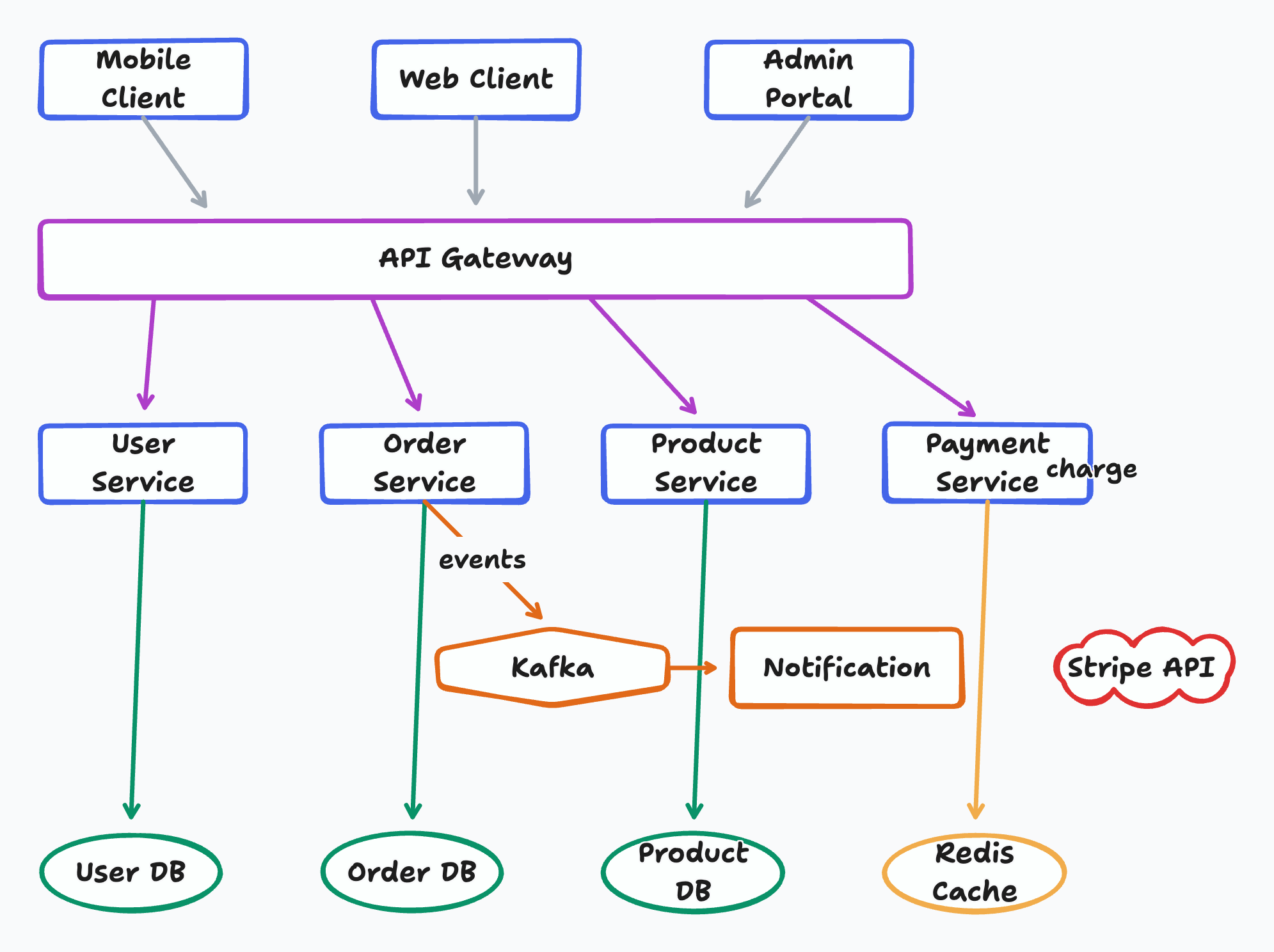
Prompt:
Create a microservices e-commerce architecture with Mobile/Web/Admin clients, API Gateway,
User/Order/Product/Payment services, Kafka event bus, Notification service,
and User DB / Order DB / Product DB / Redis Cache / Stripe API
Output:
Files
SKILL.md— the only required file. Loaded by all platforms as the skill instructions.README.md— this file (English, displayed on GitHub homepage)README_CN.md— Chinese documentationassets/— example diagrams (safe to delete to save space)
All example diagrams were generated by Claude with this skill.
Known Limitations
- Native UML notation: tldraw arrowheads are limited (no hollow triangles for inheritance). Use drawio-skill for strict UML/ERD figures intended for academic papers
- No native containers/swimlanes: tldraw's grouping model differs from drawio. Use color and spacing for visual grouping instead
- PDF export not supported: tldraw-cli supports PNG and SVG only. Convert SVG to PDF post-hoc if needed (e.g.
rsvg-convert) - Self-check requires vision: The auto-fix step reads exported PNGs using the model's vision capability. Models without vision support skip this step
License
MIT
Support
If this skill helps you, consider supporting the author:

WeChat Pay |

Alipay |

Buy Me a Coffee |

Give a Reward |
Author
Agents365-ai
- Bilibili: https://space.bilibili.com/441831884
- GitHub: https://github.com/Agents365-ai
Yorumlar (0)
Yorum birakmak icin giris yap.
Yorum birakSonuc bulunamadi