video-podcast-maker
Health Pass
- License — License: MIT
- Description — Repository has a description
- Active repo — Last push 0 days ago
- Community trust — 328 GitHub stars
Code Pass
- Code scan — Scanned 12 files during light audit, no dangerous patterns found
Permissions Pass
- Permissions — No dangerous permissions requested
This tool is an automated pipeline that transforms a given topic into a professional video podcast. It handles the entire workflow, from research and script generation to multi-engine text-to-speech, 4K video rendering, and optional publishing to platforms like YouTube and Bilibili.
Security Assessment
The tool inherently requires system-level access to perform its core functions, which includes executing shell commands (via FFmpeg for audio mixing) and making external network requests (for web research and interacting with various cloud TTS APIs like OpenAI and Azure). A light code audit of 12 files found no dangerous patterns, no hardcoded secrets, and no requests for dangerous permissions. Because the tool handles file generation, API calls, and media processing locally, the overall risk is rated as Low, provided users configure their own API keys securely through standard environment variables rather than hardcoding them.
Quality Assessment
The project appears to be actively maintained, with its last repository push occurring today. It is transparent about being in active development and not fully mature yet. The tool uses the permissive MIT license and has garnered over 300 GitHub stars, indicating a healthy and growing level of community trust. The repository includes clear documentation and a detailed description of its capabilities.
Verdict
Safe to use, provided you follow standard security practices for managing your external TTS API keys.
AI-powered video podcast creation skill for coding agents. Supports Bilibili & YouTube, multi-language (zh-CN/en-US), 6 TTS engines (Edge/Azure/ElevenLabs/OpenAI/Doubao/CosyVoice), 4K Remotion rendering.
Video Podcast Maker
Automated pipeline to create professional video podcasts from a topic. Supports Bilibili and YouTube with multi-language output (zh-CN, en-US). Combines research, script generation, multi-engine TTS (Edge/Azure/Doubao/CosyVoice), Remotion video rendering, and FFmpeg audio mixing.
Supported platforms: Claude Code · OpenClaw (ClawHub) · OpenCode · Codex
No coding required! Just describe your topic in plain language — the coding agent guides you through each step interactively. You make creative decisions, the agent handles all the technical details. Creating your first video podcast is easier than you think.
Note: This project is still under active development and may not be fully mature yet. We are continuously iterating and improving. Your feedback and suggestions are greatly appreciated — feel free to open an issue or reach out!
Features
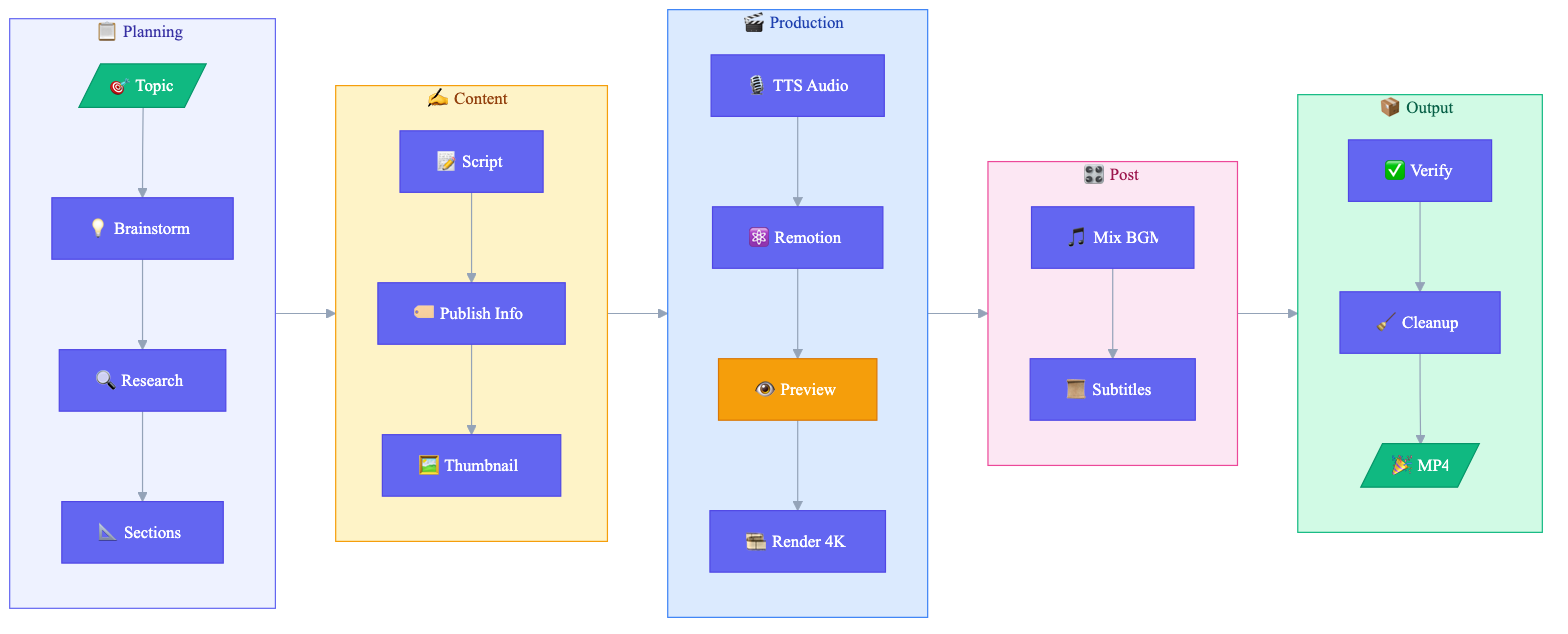
- Topic Research - Web search and content gathering
- Script Writing - Structured narration with section markers
- Multi-TTS - Edge TTS (free), Azure Speech, Volcengine Doubao, CosyVoice, ElevenLabs, Google Cloud TTS, OpenAI TTS
- Remotion Video - React-based video composition with animations
- Visual Style Editing - Adjust colors, fonts, and layout in Remotion Studio UI
- Real-time Preview - Remotion Studio for instant debugging before render
- Auto Timing - Audio-video sync via
timing.json - BGM Mixing - Background music overlay with FFmpeg
- Subtitle Burning - Optional SRT subtitle embedding
- 4K Output - 3840x2160 resolution for crisp uploads
- Chapter Progress Bar - Visual timeline showing current section during playback
- Bilingual TTS - Chinese/English mixed narration with Azure Speech or CosyVoice
- Pronunciation Correction - Built-in polyphone dictionary + custom phoneme support
- Bilibili Templates - Ready-to-use Remotion templates (
Video.tsx,Root.tsx,Thumbnail.tsx,podcast.txt) for quick project scaffolding - Component Library - Reusable visual building blocks (ComparisonCard, Timeline, CodeBlock, QuoteBlock, FeatureGrid, DataBar, StatCounter, FlowChart, IconCard, DiagramReveal, AudioWaveform, LottieAnimation, MediaSection, SectionLayouts, AnimatedBackground) for composing rich section layouts
- Preference Learning - Auto-learns user style preferences (colors, fonts, speech rate) and applies them to future videos
- Multi-Platform - Bilibili and YouTube with independent platform and language settings
- Multi-Language - Chinese (zh-CN) and English (en-US) script templates, TTS voices, subtitle fonts
- Subtitle Preferences - Custom font, size, color, outline; toggle subtitle burning on/off
- Configurable CTA - Auto (Bilibili triple/YouTube subscribe), animation, text, or custom
Platform Optimizations
Bilibili:
- Script Structure - Welcome intro + call-to-action outro (一键三连)
- Chapter Timestamps - Auto-generated
MM:SSformat for B站 chapters - Thumbnail Generation - AI (imagen/imagenty) or Remotion, auto-generates 16:9 + 4:3 versions
- Visual Style - Bold text, minimal whitespace, high information density
- Publish Info - Title formulas, tag strategies, description templates
YouTube:
- SEO Optimization - Title <70 chars, keyword-rich description, tags and hashtags
- Chapters - Auto-generated YouTube chapter timestamps (first line at 0:00)
- CTA - "Like, Subscribe & Share" text animation or custom
Workflow
Related Skills
This skill depends on remotion-best-practices and works alongside other optional skills:
- remotion-best-practices - Official Remotion best practices (required, provides core Remotion patterns and guidelines)
- find-skills - Official skill discovery tool (optional, helps find and install additional skills)
- ffmpeg - Advanced audio/video processing (optional)
- imagen / imagenty - AI thumbnail generation (optional)
Requirements
System Requirements
| Software | Version | Purpose |
|---|---|---|
| macOS / Linux | - | Tested on macOS, Linux compatible |
| Python | 3.8+ | TTS script, automation |
| Node.js | 18+ | Remotion video rendering |
| FFmpeg | 4.0+ | Audio/video processing |
Installation
# macOS
brew install ffmpeg node python3

# Ubuntu/Debian
sudo apt install ffmpeg nodejs python3 python3-pip

# Python dependencies
pip install azure-cognitiveservices-speech dashscope edge-tts requests
Project Setup (Required)
Important: This skill requires a Remotion project as the foundation.
Understanding the components:
| Component | Source | Purpose |
|---|---|---|
| Remotion Project | npx create-video |
Base framework with src/, public/, package.json |
| video-podcast-maker | Claude Code skill | Workflow orchestration (this skill) |
# Step 1: Create a new Remotion project (base framework)
npx create-video@latest my-video-project
cd my-video-project
npm i  # Install Remotion dependencies

# Step 2: Verify installation
npx remotion studio  # Should open browser preview
If you already have a Remotion project:
cd your-existing-project
npm install remotion @remotion/cli @remotion/player zod
API Keys Required
| Service | Purpose | Get Key |
|---|---|---|
| Azure Speech | TTS audio generation (high quality) | Azure Portal → Speech Services |
| Volcengine Doubao Speech | TTS audio generation (alternative backend) | Volcengine Console |
| Aliyun CosyVoice | TTS audio generation (alternative backend) | Aliyun Bailian |
| Edge TTS | TTS audio generation (default, free, no key needed) | pip install edge-tts |
| ElevenLabs | TTS audio generation (highest quality English) | ElevenLabs |
| Google Cloud TTS | TTS audio generation (wide language support) | Google Cloud Console |
| OpenAI | TTS audio generation (simple API) | OpenAI Platform |
| Google Gemini | AI thumbnail generation (optional) | AI Studio |
| Aliyun Dashscope | AI thumbnail - Chinese optimized (optional) | Aliyun Bailian |
Environment Variables
Add to ~/.zshrc or ~/.bashrc:
# TTS Backend: edge (default, free), azure, doubao, cosyvoice, elevenlabs, google, openai
export TTS_BACKEND="edge"                            # Default (free), or "azure" / "doubao" / "cosyvoice" / "elevenlabs" / "google" / "openai"

# Azure TTS (high quality)
export AZURE_SPEECH_KEY="your-azure-speech-key"
export AZURE_SPEECH_REGION="eastasia"

# Volcengine Doubao TTS (alternative backend)
export VOLCENGINE_APPID="your-volcengine-appid"
export VOLCENGINE_ACCESS_TOKEN="your-volcengine-access-token"
export VOLCENGINE_CLUSTER="volcano_tts"              # Default cluster, adjust per console config
export VOLCENGINE_VOICE_TYPE="BV001_streaming"       # Adjust per console voice options

# Aliyun CosyVoice TTS (alternative backend) + AI thumbnails
export DASHSCOPE_API_KEY="your-dashscope-api-key"

# Optional: Edge TTS voice override
export EDGE_TTS_VOICE="zh-CN-XiaoxiaoNeural"

# ElevenLabs TTS
export ELEVENLABS_API_KEY="your-elevenlabs-api-key"

# Google Cloud TTS
export GOOGLE_TTS_API_KEY="your-google-tts-api-key"

# OpenAI TTS
export OPENAI_API_KEY="your-openai-api-key"

# Optional: Google Gemini for AI thumbnails
export GEMINI_API_KEY="your-gemini-api-key"
Then reload: source ~/.zshrc
Quick Start
Usage
This skill is designed for use with Claude Code or Opencode. Simply tell Claude:
"Create a video podcast about [your topic]"
Claude will guide you through the entire workflow automatically.
Tips: The quality of first-generation output heavily depends on the model's intelligence and capabilities — the smarter and more advanced the model, the better the results. In our testing, both Codex and Claude Code produce excellent videos on the first try, and OpenCode paired with GLM-5 also delivers solid results. If the initial output isn't perfect, you can preview it in Remotion Studio and ask the coding agent to keep refining until you're satisfied.
Preview & Visual Editing with Remotion Studio
Before rendering the final video, use Remotion Studio to preview and visually edit styles:
npx remotion studio src/remotion/index.ts
This opens a browser-based editor where you can:
- Visual Style Editing - Adjust colors, fonts, and sizes in the right panel
- Scrub through the timeline frame-by-frame
- See live updates as you edit components
- Debug timing and animations instantly
Editable Properties
| Category | Properties |
|---|---|
| Colors | Primary color, background, text color, accent |
| Typography | Title size (72-120), subtitle size, body size |
| Progress Bar | Show/hide, height, font size, active color |
| Audio | BGM volume (0-0.3) |
| Animation | Enable/disable entrance animations |
Output Structure
videos/{video-name}/
├── topic_definition.md      # Topic direction
├── topic_research.md        # Research notes
├── podcast.txt              # Narration script
├── podcast_audio.wav        # TTS audio
├── podcast_audio.srt        # Subtitles
├── timing.json              # Section timing for sync
├── thumbnail_*.png          # Video thumbnails
├── publish_info.md          # Title, tags, description
├── part_*.wav               # TTS segments (temp, cleanup via Step 14)
├── output.mp4               # Raw render (temp)
├── video_with_bgm.mp4       # With BGM (temp)
└── final_video.mp4          # Final output
Background Music
Included tracks in assets/:
perfect-beauty-191271.mp3- Upbeat, positivesnow-stevekaldes-piano-397491.mp3- Calm piano
Roadmap
- Vertical video support (9:16) for Bilibili mobile-first content
- Remotion transitions (@remotion/transitions) for professional chapter transitions
- Component template library (ComparisonCard, Timeline, CodeBlock, QuoteBlock, FeatureGrid, DataBar, StatCounter, FlowChart, IconCard)
- Broadcast quality upgrade (gradient backgrounds, layered shadows, animated counters, quality checklists)
- Multi TTS engine support (Azure Speech + Doubao + CosyVoice + Edge TTS via
TTS_BACKENDenv var) - Edge TTS free backend (no API key required)
- Resume from breakpoint (
--resumeflag) - Dry-run mode (
--dry-runfor duration estimation) - User preference self-evolution (auto-learns visual/TTS/content style preferences)
- Refactor to latest Claude Code SKILL spec (
references/layered docs,${CLAUDE_SKILL_DIR}variable,argument-hint/effort/allowed-toolsfrontmatter fields) - Design learning system — Learn design styles from reference videos/images, build a design reference library and reusable style profiles
- Playwright auto-capture — Analyze Bilibili/YouTube video design styles directly via URL (Phase 4)
- Step 9 smart suggestions — Auto-match and recommend existing style profiles when creating videos (Phase 5)
- Cover design learning — Apply learned cover styles to Thumbnail.tsx template (Phase 5)
- Additional TTS engines (based on user demand)
- Windows compatibility (WSL verification + docs)
License
MIT
Support
If this project helps you, consider supporting the author:

WeChat Pay |

Alipay |

Buy Me a Coffee |
Author
Agents365-ai
- Bilibili: https://space.bilibili.com/441831884
- GitHub: https://github.com/Agents365-ai
Reviews (0)
Sign in to leave a review.
Leave a reviewNo results found