vynth
Health Gecti
- License — License: MIT
- Description — Repository has a description
- Active repo — Last push 0 days ago
- Community trust — 15 GitHub stars
Code Uyari
- process.env — Environment variable access in apps/cli/src/main.ts
- process.env — Environment variable access in packages/core/src/config.test.ts
Permissions Gecti
- Permissions — No dangerous permissions requested
Bu listing icin henuz AI raporu yok.
Zeno —— 本地优先的单二进制 TUI AI 编程工具。多智能体协作 + 安全沙箱 + 插件可扩展。基于 bun + TypeScript,类似 Claude Code / OpenCode / Codex CLI。
Vynth



Terminal-first AI coding agent. 多智能体协作 · 安全沙箱 · 单二进制 · 插件可扩展。
Vynth 把你 terminal 变成 AI 编程工作台。Plan(先规划再动手)或 Vibe(边聊边写),自然语言直接「合成」为代码改动。纯 TypeScript + bun build --compile → 一个 dist/vynth 二进制,零依赖开箱即用。
# 一行命令搞定
export VYNTH_API_KEY="sk-..." && vynth -g '给 src/core 写单元测试'
为什么选 Vynth?
| 特性 | 说明 |
|---|---|
| 单二进制 | ~60 MB,无 node_modules、无 wasm,scp 到服务器直接跑 |
| 双模式 | Plan(结构化规划 → 分步执行)/ Vibe(流式对话即时改动) |
| 安全第一 | 路径越界守卫 + 联网开关 + 5 维审计 + 插件信任门禁 |
| 可扩展 | MCP 协议接入外部工具 · 插件系统热扩展 · 工具注册表动态注入 |
| 极快冷启 | P95 = 30.5 ms(远低于 150 ms 交互基线) |
| Terminal 原生 | 完整 ANSI TUI:多面板、语法高亮、命令面板、文件树、配置界面 |
快速上手
一行命令安装(推荐)
# macOS / Linux — 自动装 Bun、编译、装到 ~/.local/bin
curl -fsSL https://raw.githubusercontent.com/Agions/vynth/main/scripts/install.sh | bash

# Windows PowerShell
irm https://raw.githubusercontent.com/Agions/vynth/main/scripts/install.ps1 | iex
# 装完三步开跑
export VYNTH_API_KEY="sk-..."
vynth                                # 交互 TUI — 全屏终端体验
vynth -g '给当前目录写一份 README.md'  # 无头模式 — 直接干活
源码构建
git clone [email protected]:Agions/vynth.git && cd vynth
bun install && bun run compile      # → dist/vynth
前置要求:Bun >= 1.1、Git。Node.js >= 18 仅用于
biome/turbo等辅助工具,非运行时依赖。更多方式(二进制分发 / 自定义目录 / 卸载)见 安装指南。
配置
Vynth 采用三级优先级:命令行参数 > 环境变量 > 配置文件。
环境变量(主要方式)
| 变量 | 作用 | 默认值 | 必填 |
|---|---|---|---|
VYNTH_API_KEY |
LLM API Key | — | 是 |
VYNTH_MODEL |
模型名 | deepseek-v4-pro |
否 |
VYNTH_LLM_BASE_URL |
OpenAI 兼容端点 | https://api.deepseek.com/v1 |
否 |
VYNTH_MODE |
plan / vibe / auto |
vibe |
否 |
VYNTH_THEME |
mocha(默认) / latte / neon / midnight / forest / light |
mocha |
否 |
VYNTH_HARDEN |
OS 级硬隔离开关(1=开启 sandbox-exec/bwrap) |
关闭 | 否 |
VYNTH_NET |
联网开关(0=关闭) |
开启 | 否 |
VYNTH_DATA_DIR |
数据目录 | ~/.vynth |
否 |
VYNTH_AUDIT |
审计日志(1=开启) |
关闭 | 否 |
VYNTH_REPOMAP |
仓库地图(0=关闭) |
开启 | 否 |
配置文件(可选便利层)
支持 ~/.vynth/config.json(全局)和项目根 vynth.json / .vynthrc(项目级),可配置 mode、model、theme 等非敏感项。API Key 必须走环境变量,配置文件禁止写入。
// vynth.json(项目根)
{
  "mode": "plan",
  "model": "deepseek-v4-pro",
  "theme": "mocha",
  "sandbox": { "networkAllowed": false, "harden": true }
}
使用示例
Plan 模式 — 先规划,再动手
vynth -m plan '实现用户认证模块:注册、登录、JWT 刷新'
Agent 先输出结构化执行计划,你确认后逐步实施,每步可审查回滚。
Vibe 模式 — 边聊边写(默认)
vynth -g '把 utils 目录下所有函数加上 JSDoc 注释'
流式输出 + tool_calls,改动即时生效,适合探索式编程。
TUI 速览
四区布局:聊天主区 + 常驻侧栏(^B 开关 / ^T 切文件·任务·工具)+ 分屏输出流(^O)+ 浮窗命令面板(/ 命令、@ 文件引用)。Tab 切换 Vibe/Plan,^P^N 翻输入历史,↑↓ 纯滚屏不碰输入框。全套快捷键与斜杠命令见 TUI 使用指南。
加载插件
# 无头模式(-p 即授权,适合 CI/脚本)
vynth -g '用自定义工具处理数据' -p packages/plugins/examples/hello-plugin.ts

# TUI 模式(启动后弹出信任确认)
vynth -p packages/plugins/examples/hello-plugin.ts
⚠️ 插件在 Vynth 进程内执行,拥有同等权限。仅加载你完全信任的插件。
接入 MCP Server
# 接入 stdio MCP server(可重复 -s 接入多个)
vynth -g '查询天气' -s "npx -y @modelcontextprotocol/server-xxx"

# 自建 MCP server
vynth -g '用自定义工具' -s "bun run packages/mcp/examples/echo-server.ts"
MCP server 以子进程启动(stdio JSON-RPC,协议版本 2024-11-05),工具自动并入 agent 工具集,走同一套沙箱/审计链路。
功能矩阵
| 功能 | 说明 | 状态 |
|---|---|---|
| 单二进制 | Bun compile 打包,零外部依赖 | ✅ MVP |
| 双模式 TUI | 交互式 ANSI 终端 / 无头流式输出 | ✅ MVP |
| Agent 循环 | 流式 token + tool_calls + 回填,maxSteps=8 | ✅ MVP |
| 内置工具 | read_file / write_file / run_shell,经 sandbox 守卫 | ✅ MVP |
| LLM 兼容 | DeepSeek 端点,OpenAI 兼容 SSE 均可接入 | ✅ MVP |
| 插件系统 | -p/--plugin 动态加载,工具注册表热扩展 |
✅ MVP |
| 沙箱守卫 | safeResolve 越界拦截 + 网络开关 | ✅ MVP |
| MCP 接入 | -s/--mcp 接入 stdio JSON-RPC server |
✅ v0.1.0 |
| TUI 内插件 | 交互界面加载 + 信任确认门禁 | ✅ v0.1.0 |
| 配置体系 | 环境变量 + config.json + vynth.json 三级优先级 | ✅ v0.1.0 |
| 5 维审计 | 工具调用 / 文件 / 网络 / 配置 / 插件全链路 | ✅ v0.1.0 |
| OS 硬隔离 | bubblewrap(Linux 推荐) / seatbelt(macOS 15+ 需 root);VYNTH_HARDEN=1 或 sandbox.harden,不可用时 Fail-Closed |
✅ v0.1.0 |
架构概览
自然语言目标(goal)→ engine 的 agent 循环 → LLM 流式补全 → 工具调用 → sandbox 执行 → TUI / 无头渲染。整条链由 bun build --compile 打包为单二进制。
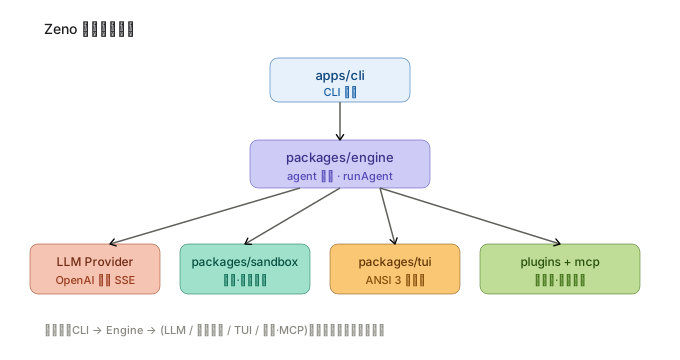
更完整的模块职责、数据流与不变量见 架构总览(含 mermaid 版与交互说明)。
目录结构
vynth/
├── apps/
│   └── cli/                      # CLI 入口(bin: vynth)
├── packages/
│   ├── core/                     # 共享类型 · 配置 · 错误 · 事件总线 · 日志
│   ├── engine/                   # LLM 客户端 · 工具系统 · agent 循环
│   ├── tui/                      # ANSI 渲染器 · 主题 · 组件库 · 逃生舱
│   ├── sandbox/                  # fs 越界守卫 · 命令执行 · 网络开关
│   ├── mcp/                      # MCP 客户端(stdio JSON-RPC)
│   ├── plugins/                  # 插件加载 · 生命周期 · 信任模型
│   └── harness/                  # 集成测试 / e2e 驱动
├── docs/                         # 项目文档
├── scripts/                      # 开发脚本 · 基��测试
├── dist/                         # 编译输出
├── package.json
├── pnpm-workspace.yaml
├── turbo.json
└── biome.json
文档导航
| 文档 | 受众 | 说明 |
|---|---|---|
| 安装指南 | 新用户 | 快捷脚本 / 源码 / 二进制分发、平台矩阵 |
| 快速开始 | 新用户 | API Key、首次运行、插件与 MCP |
| TUI 使用指南 | 全体用户 | 四区布局、快捷键、斜杠命令、主题 |
| 配置详解 | 全体用户 | 环境变量与配置文件完整参考 |
| 插件开发 | 插件开发者 | manifest、生命周期、工具注册 |
| 架构总览 | 架构师 / 贡献者 | 模块关系、数据流、关键不变量 |
| Package 职责 | 贡献者 | 各 @zeno/* 包职责与入口 |
| API 参考 | 用户 / 开发者 | CLI 参数、退出码 |
| 开发规范 | 贡献者 | 分支模型、代码规范、安全红线 |
| 贡献指南 | 贡献者 | PR 规范、评审标准 |
| 测试指南 | 贡献者 | 测试策略、基准测试、覆盖率 |
| FAQ | 全体用户 | 常见问题与故障排查 |
| 变更日志 | 全体用户 | 版本历史与迁移指南 |
阅读路径
🟢 入门(15 分钟)
🟡 进阶(30 分钟)
🔴 深入(2 小时+)
贡献
欢迎 PR!请先阅读 贡献指南,了解分支模型、Conventional Commits、测试策略与安全红线(密钥扫描、体积门禁)。
许可证
MIT © 2026 Agions
Yorumlar (0)
Yorum birakmak icin giris yap.
Yorum birakSonuc bulunamadi