linkedin-content-creator
Health Pass
- License — License: MIT
- Description — Repository has a description
- Active repo — Last push 0 days ago
- Community trust — 27 GitHub stars
Code Pass
- Code scan — Scanned 12 files during light audit, no dangerous patterns found
Permissions Pass
- Permissions — No dangerous permissions requested
No AI report is available for this listing yet.
AI-powered LinkedIn content generator with text, image & carousel posts. Features smart AI research, content calendar, batch generation, and direct LinkedIn posting via OAuth. Built with React, TypeScript & Gemini AI.
LinkedIn Content Creator
An AI-powered application for generating and scheduling engaging LinkedIn posts. Built with React, TypeScript, and powered by Google's Gemini AI.
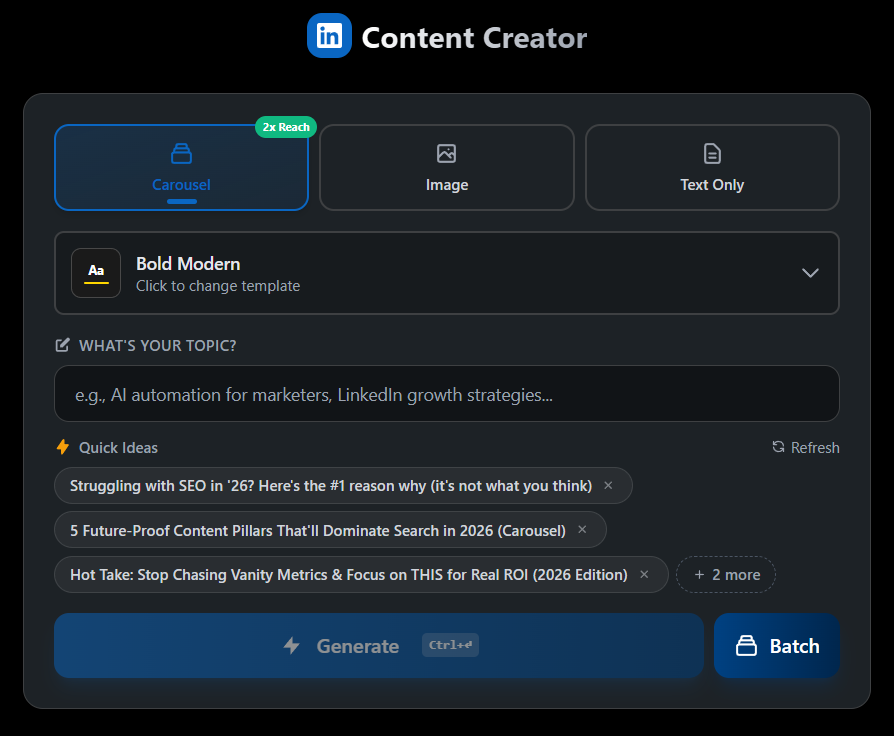
Features
- AI Content Generation - Generate professional LinkedIn posts using Gemini AI
- Multiple Content Types - Create text posts, image posts, and carousel/document posts
- Smart Research - AI researches topics and best practices before generating content
- Content Calendar - Schedule and manage your posts with an intuitive calendar view
- AI Planner - Plan multiple posts at once with intelligent scheduling
- Batch Generation - Generate multiple post variations simultaneously
- Profile Customization - Configure your brand voice, target audience, and content preferences
- Dark/Light Mode - Full theme support for comfortable viewing
- LinkedIn Integration - Direct posting to LinkedIn via OAuth
Tech Stack
- Frontend: React 18, TypeScript, Tailwind CSS
- AI: Google Gemini API
- Build: Vite
- Testing: Playwright (E2E)
- Backend: Express.js (OAuth proxy server)
Installation
Clone the repository
git clone https://github.com/AgriciDaniel/linkedin-content-creator.git
cd linkedin-content-creator
Install dependencies
npm installConfigure environment variables
Copy
.env.exampleto.envand fill in your API keys:cp .env.example .envRequired API Keys
Service Required Purpose Get it from Gemini API Yes AI content generation Google AI Studio LinkedIn OAuth Yes Post to LinkedIn LinkedIn Developers Firecrawl API Optional Web research Firecrawl
Configuration
Gemini API Key
Add your Gemini API key in the app's Settings panel, or set it in .env.local:
GEMINI_API_KEY=your_gemini_api_key
LinkedIn OAuth Setup
- Create an app at LinkedIn Developers
- Add these OAuth 2.0 redirect URLs:
http://localhost:5000(main app)http://localhost:5001(OAuth proxy server)
- Request the following permissions:
openidprofilew_member_social
- Copy your Client ID and Client Secret to
.env
Usage
Development
# Start the development server
npm run dev

# Start with OAuth proxy server (for LinkedIn posting)
npm run dev:full
Production Build
npm run build
npm run preview
Testing
# Run all E2E tests
npm run test:e2e

# Run tests with UI
npx playwright test --headed

# Run specific test file
npx playwright test e2e/app.spec.ts
Project Structure
├── components/        # React components
├── services/          # API and business logic services
├── e2e/              # Playwright E2E tests
├── server/           # OAuth proxy server
├── public/           # Static assets
└── types/            # TypeScript type definitions
Testing Coverage
The app includes comprehensive E2E tests:
- 100 integration tests covering UI, storage, calendar, and scheduling
- 3 live generation tests for real API testing (requires API keys)
Attribution
App created by Agrici Daniel
Community
Join our community for tips, updates, and support:
License
MIT License - see LICENSE for details.
Author
Built by Agrici Daniel - AI Workflow Architect.
- Blog - Deep dives on AI marketing automation
- AI Marketing Hub - Free community, 2,800+ members
- YouTube - Tutorials and demos
- All open-source tools
Reviews (0)
Sign in to leave a review.
Leave a reviewNo results found