claude-code-usage-swiftbar
Health Gecti
- License — License: MIT
- Description — Repository has a description
- Active repo — Last push 0 days ago
- Community trust — 10 GitHub stars
Code Uyari
- fs module — File system access in cc-usage.2m.js
- network request — Outbound network request in cc-usage.2m.js
Permissions Gecti
- Permissions — No dangerous permissions requested
Bu listing icin henuz AI raporu yok.
Claude Code usage for SwiftBar.
Claude Code Usage for SwiftBar
This SwiftBar plugin shows Claude Code's
rolling 5-hour and 7-day usage in the macOS menu bar. It uses the same data
as Claude Code's /usage command.
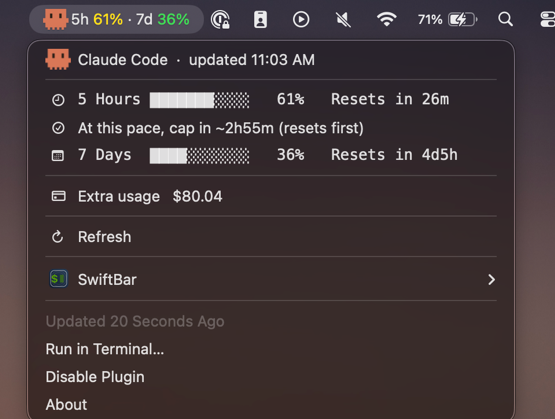
The crab reacts as either window approaches its limit. The 5-hour row estimates when
the current average pace will reach the limit.
Security and data
The plugin reads Claude Code's OAuth access token from your macOS Keychain. It keeps
the token in memory and sends it only to api.anthropic.com over HTTPS. It doesn't
write the token to disk or refresh it.
The cache in $TMPDIR stores the last usage result and fetch time. It contains no
credentials.
The plugin uses only Node.js built-ins. It requires no API key or background service.
Requirements
- macOS with SwiftBar
- Node.js 18 or later on your
PATH - An active Claude Code login
Install
Install SwiftBar:
brew install --cask swiftbarOpen SwiftBar and select a plugin folder.
Clone this repository and run the installer:
git clone https://github.com/agusalvarez6/claude-code-usage-swiftbar.git
cd claude-code-usage-swiftbar
./install.sh
On the first run, click Always Allow when macOS asks to read the
Claude Code-credentialsKeychain item.
install.sh copies cc-usage.2m.js into SwiftBar's plugin folder and refreshes it.
Run it again after pulling updates. The installer preserves the configured refresh
interval.
To uninstall the plugin, delete the installed file:
rm "$(defaults read com.ambar.SwiftBar PluginDirectory)"/cc-usage.*m.js
Behavior
- The menu bar shows usage in green below 50%, yellow from 50% through 89%, and red
at 90% or higher. - SwiftBar sends the 90% notification only when macOS grants permission in
System Settings > Notifications. - After a failed request, the plugin shows the most recent successful result. It
marks that result as cached after 10 minutes. - The filename controls the polling interval. Rename the installed file to
cc-usage.5m.jsorcc-usage.10m.jsto poll less often. The installer preserves
the renamed file. - If SwiftBar reports "node not found," add the Node.js executable path to the
launcher list on line 2 ofcc-usage.2m.js.
Limitations
- The plugin uses Claude Code's undocumented
/api/oauth/usageendpoint. An endpoint
change can break the plugin. - If the token expires, open Claude Code to renew your login.
This project isn't affiliated with Anthropic or SwiftBar.
License
MIT. See LICENSE.
Yorumlar (0)
Yorum birakmak icin giris yap.
Yorum birakSonuc bulunamadi