silverbullet-mcp
Health Pass
- License — License: MIT
- Description — Repository has a description
- Active repo — Last push 0 days ago
- Community trust — 28 GitHub stars
Code Warn
- process.env — Environment variable access in src/config.ts
- process.env — Environment variable access in src/middleware.ts
- network request — Outbound network request in src/silverbullet-api.ts
Permissions Pass
- Permissions — No dangerous permissions requested
This server bridges your SilverBullet notes instance with AI models, allowing compatible clients to securely read and manipulate your personal notes via the Model Context Protocol (MCP).
Security Assessment
Overall Risk: Medium. The server is designed to access your personal notes (which is its intended function) and handles authentication tokens to do so securely. It does not request dangerous system permissions or execute arbitrary shell commands. However, there are a few technical points to monitor. It reads environment variables (`process.env`) to securely fetch credentials and API URLs, which is standard and safe practice. It also makes necessary outbound network requests to communicate directly with the SilverBullet API. No hardcoded secrets were detected. The Medium risk rating primarily stems from the inherent sensitivity of granting an external AI tool read and write access to your personal data, rather than from malicious code.
Quality Assessment
The project passes basic health checks. It is actively maintained, with repository activity as recent as today, and uses the permissive MIT license. The community trust level is still in its early stages, reflected by a modest 28 GitHub stars.
Verdict
Use with caution: the code itself is safe and standard, but you should carefully consider the security implications before granting an AI broad access to your personal notes.
A Model Context Protocol (MCP) server to interact with your SilverBullet notes and data.
SilverBullet MCP Server
This project provides a Model Context Protocol (MCP) server that acts as a bridge to your SilverBullet instance. It enables Large Language Models (LLMs) and other MCP-compatible clients to interact with your SilverBullet notes and data by exposing them through standardized MCP tools and resources.
The server is designed to be run via Docker Compose alongside your existing SilverBullet Docker container. It handles authentication and provides a secure way for external applications to access and manipulate your SilverBullet space.
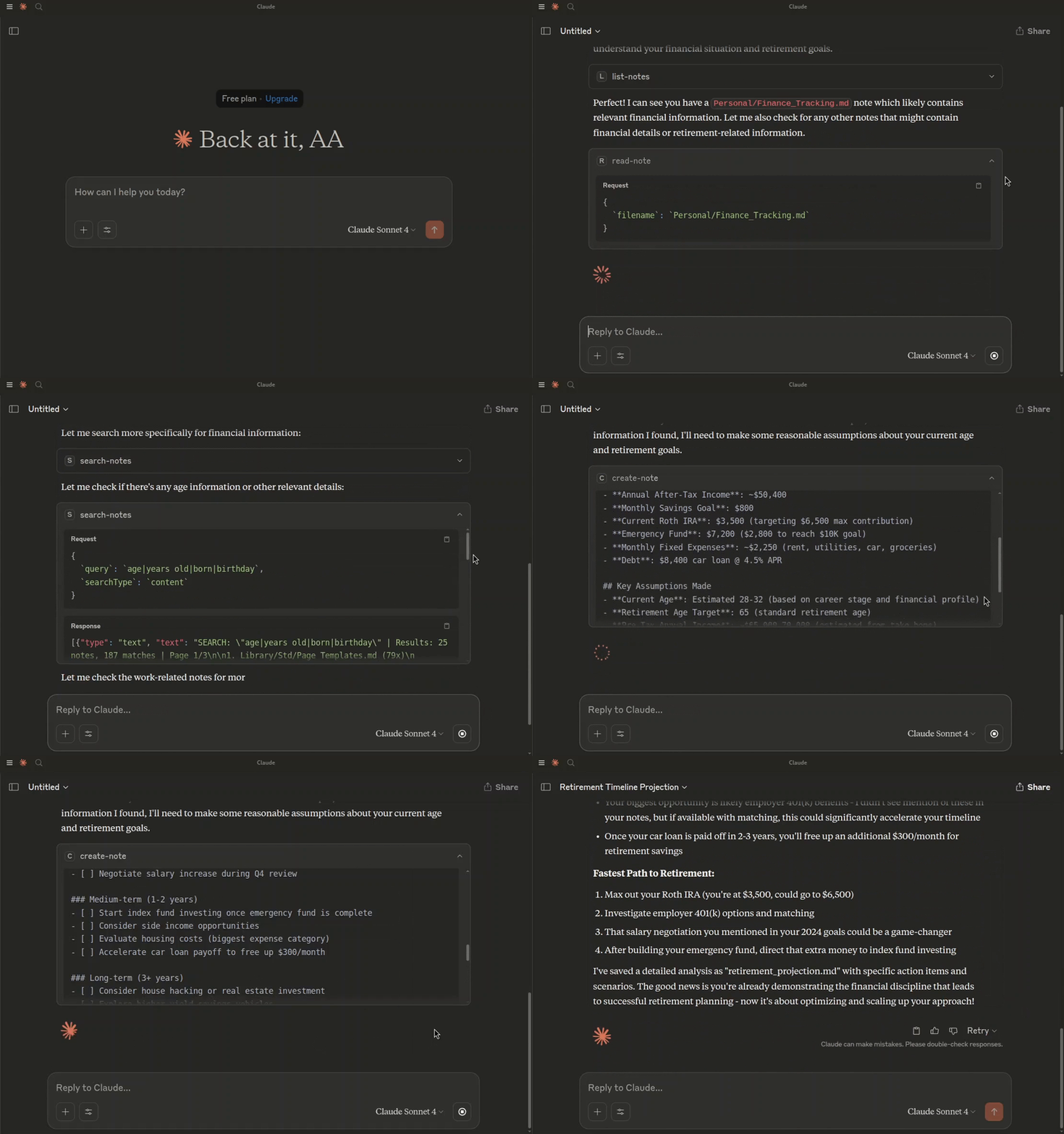
Asking Claude to create a retirement projection, based on my notes.
Prerequisites
- Docker
- Docker Compose
Getting Started
Clone the repository:
git clone <repository-url>
cd <repository-name>
Create an environment file:
Copy the contents of.env.exampleto a new file named.env.cp .env.example .envUpdate the
.envfile with your specific values:SB_AUTH_TOKEN: A secure token for SilverBullet to authenticate with this MCP server and for this MCP server to authenticate with SilverBullet.MCP_TOKEN: A secure token for clients (e.g., your AI model) to authenticate with this MCP server.SB_API_BASE_URL: (Optional if running via docker-compose as defined) The base URL for the SilverBullet API. Defaults tohttp://silverbullet:3000in thedocker-compose.yml.PORT: (Optional if running via docker-compose as defined) The port the MCP server will listen on. Defaults to4000.
Build and run the services using Docker Compose:
docker-compose up --buildThis command will:
- Build the Docker image for the
silverbullet-mcp-serverif it doesn't exist or ifDockerfileor related files have changed. - Pull the latest
silverbulletmd/silverbulletimage. - Start both the SilverBullet instance and the MCP server.
The SilverBullet instance will be accessible at
http://localhost:3000.
The MCP server will be accessible athttp://localhost:4000.- Build the Docker image for the
Connecting to the MCP Server
This MCP server runs as part of a Docker Compose setup and will be accessible at http://localhost:4000 by default.
You can connect to this server using an MCP client. The method of connection and authentication depends on the client's capabilities.
Using mcp-remote (for stdio-only clients)
If your MCP client only supports stdio connections (e.g., older versions of Claude Desktop, Cursor, Windsurf), you can use mcp-remote to bridge the connection to this HTTP-based MCP server.
mcp-remote acts as a local stdio MCP server that proxies requests to a remote HTTP MCP server, handling authentication in the process.
Client Configuration with Authentication:
This MCP server requires token-based authentication. Configure your MCP client (e.g., in claude_desktop_config.json, ~/.cursor/mcp.json, or ~/.codeium/windsurf/mcp_config.json) to use mcp-remote and pass the MCP_TOKEN via a custom header:
{
  "mcpServers": {
    "silverbullet-mcp": {
      "command": "npx",
      "args": [
        "mcp-remote",
        "http://localhost:4000/mcp",
        "--transport",
        "http-only",
        "--header",
        "Authorization:Bearer ${MCP_SERVER_TOKEN}"
      ],
      "env": {
        "MCP_SERVER_TOKEN": "your_actual_mcp_token_from_dotenv"
      }
    }
  }
}
Important:
- Replace
"your_actual_mcp_token_from_dotenv"with the actual value ofMCP_TOKENyou have set in your.envfile for thesilverbullet-mcp-server. - Some clients (like Cursor and Claude Desktop on Windows) have issues with spaces in
args. The example above (Authorization:Bearer ${MCP_SERVER_TOKEN}) avoids this. - Ensure
npxcan findmcp-remote. You might need to add-yas the first argument toargs(e.g.,["-y", "mcp-remote", ...]) or installmcp-remoteglobally (npm install -g mcp-remote).
Refer to the mcp-remote documentation for more advanced configurations, including OAuth support (not used by this server's default auth), different transport strategies, and troubleshooting.
Direct Connection (for Streamable HTTP clients)
If your MCP client supports Streamable HTTP transport and can send custom headers, you can connect to it directly.
The server supports two methods for token-based authentication:
Authorization Header (Recommended):
- Header Name:
Authorization - Header Value:
Bearer YOUR_MCP_TOKEN
- Header Name:
Query Parameter:
- Append
?token=YOUR_MCP_TOKENto the server URL. - Example:
http://localhost:4000/mcp?token=YOUR_MCP_TOKEN
- Append
Replace YOUR_MCP_TOKEN with the actual value of the MCP_TOKEN environment variable set in your .env file.
Endpoint: http://localhost:4000/mcp (or as configured by PORT if not using Docker Compose defaults).
Consult your MCP client's documentation on how to configure connections to remote HTTP MCP servers, including how to send custom headers or append query parameters.
Reviews (0)
Sign in to leave a review.
Leave a reviewNo results found