claude-self-hosted-environment-operator
Health Warn
- License — License: Apache-2.0
- Description — Repository has a description
- Active repo — Last push 0 days ago
- Low visibility — Only 5 GitHub stars
Code Pass
- Code scan — Scanned 12 files during light audit, no dangerous patterns found
Permissions Pass
- Permissions — No dangerous permissions requested
No AI report is available for this listing yet.
Kubernetes operator for Claude Code self-hosted environments: fixed and on-demand runner fleets to run claude code agents in.
Claude Code self-hosted environment operator


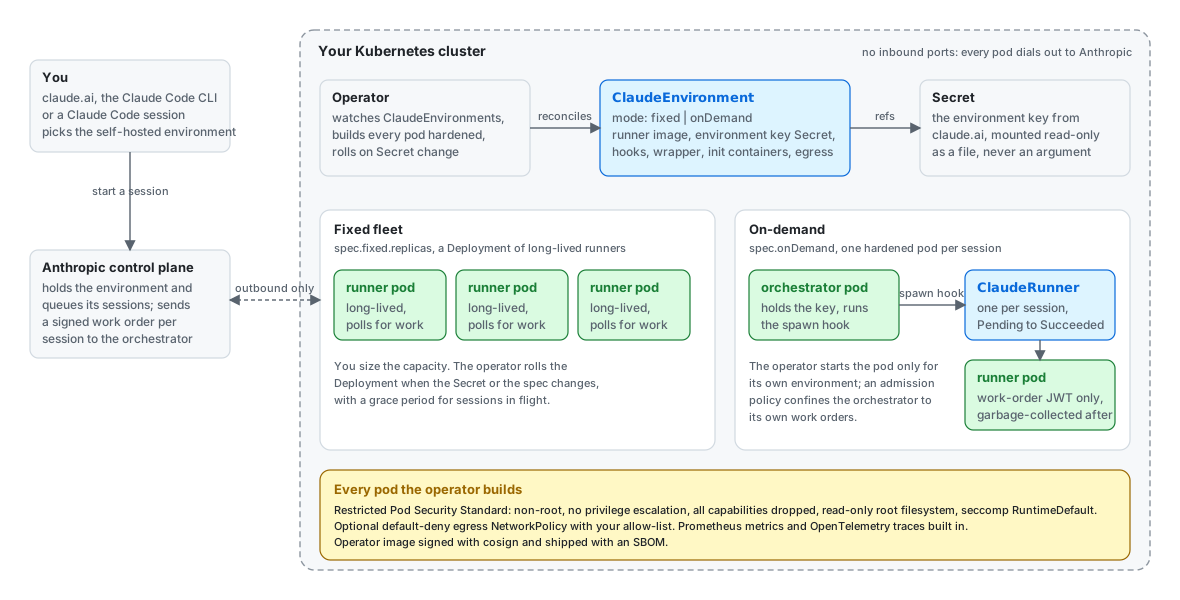
A Kubernetes operator that runs Claude Code self-hosted environments
on your cluster. You create one ClaudeEnvironment per environment from
claude.ai admin settings, point it at a runner image you build and a Secret
holding the environment key, and the operator runs the fleet: a fixed set
of runners, or an orchestrator that spawns one hardened pod per session.
Every pod meets the Restricted Pod Security Standard by default. Give each
on-demand environment its own namespace: its orchestrator can create
work-order Secrets there.
Status: pre-release. The API is claude.cloudeng.ps/v1alpha1 and may still change; see
API stability for what that promises.
Every change runs through unit, envtest, kind e2e and upgrade e2e suites in CI, and a
manual real-environment test registers with
Anthropic's control plane and routes a real session through the operator; see
What a run looks like.
Install: the Helm chart (oci://ghcr.io/ahmadmasry/charts/claude-selfhosted-operator, values in its
README) or the kustomize installer attached to each
release; the commands are in
the quickstart.
Docs: quickstart below, on-demand mode,
customization (entrypoint, init containers, wrapper script, lifecycle hooks),
hardening, metrics,
upgrade, troubleshooting,
testing, releasing,
security policy, contributing.
What a run looks like
A session on the operator, from the real-environment run of 2026-10-14 (ids are real): the environment
registers with Anthropic and reports Ready, a session started from the CLI lands on a runner pod the
orchestrator spawned for it, the runner succeeds when the session is released, and it is garbage-collected
two minutes later. A session started in claude.ai takes the same path.

== create the environment (on-demand mode) and wait for it to register with Anthropic
$ kubectl apply -f environment.yaml
claudeenvironment.claude.cloudeng.ps/real created
$ kubectl get -n claude-real-e2e claudeenvironments
NAME  MODE      READY  REPLICAS  AGE
real  onDemand  True             15s
== start a session on it, from claude.ai or the CLI
$ claude -p "Reply with exactly the text: operator-real-e2e-1791997021" \
    --environment "$CLAUDE_ENVIRONMENT_ID" --ref test/readme-visuals --output-format json
{"ok":true,"session_id":"session_01WsFME7Xbwnr52yqsBt8VZy","title":"Operator real e2e 1791997021", ...}
== the orchestrator spawned a runner pod for the session
$ kubectl get -n claude-real-e2e clauderunners,pods -l claude.cloudeng.ps/environment=real
NAME                                                                  PHASE    SESSION                           POD                                   AGE
clauderunner.claude.cloudeng.ps/57f5899f-1a39-59bd-b130-33eaa3aa1778  Running  session_01WsFME7Xbwnr52yqsBt8VZy  57f5899f-1a39-59bd-b130-33eaa3aa1778  2s

NAME                                      READY  STATUS   RESTARTS  AGE
pod/57f5899f-1a39-59bd-b130-33eaa3aa1778  0/1    Running  0         2s
pod/real-orchestrator-65888d966c-p2jzp    1/1    Running  0         26s
pod/real-orchestrator-65888d966c-zmnb4    1/1    Running  0         26s
== the session replied and was released: the runner succeeded
$ kubectl get -n claude-real-e2e clauderunners,pods -l claude.cloudeng.ps/environment=real
NAME                                                                  PHASE      SESSION                           POD                                   AGE
clauderunner.claude.cloudeng.ps/57f5899f-1a39-59bd-b130-33eaa3aa1778  Succeeded  session_01WsFME7Xbwnr52yqsBt8VZy  57f5899f-1a39-59bd-b130-33eaa3aa1778  91s

NAME                                      READY  STATUS     RESTARTS  AGE
pod/57f5899f-1a39-59bd-b130-33eaa3aa1778  0/1    Completed  0         91s
pod/real-orchestrator-65888d966c-p2jzp    1/1    Running    0         115s
pod/real-orchestrator-65888d966c-zmnb4    1/1    Running    0         115s
== two minutes later (runnerTTLSecondsAfterFinished): garbage-collected, only the orchestrator remains
$ kubectl get -n claude-real-e2e clauderunners,pods -l claude.cloudeng.ps/environment=real
NAME                                    READY  STATUS   RESTARTS  AGE
pod/real-orchestrator-65888d966c-p2jzp  1/1    Running  0         3m56s
pod/real-orchestrator-65888d966c-zmnb4  1/1    Running  0         3m56s
Regenerate the recording with hack/render-terminal-svg.py docs/images/user-flow.txt > docs/images/user-flow.svg
and the architecture diagram with hack/render-architecture-svg.py docs/images. The transcript comes from the
tables hack/real-session-test.sh prints at each step, so every run of the
real-environment test produces a fresh one.
Quickstart
Anthropic publishes no runner image, so you build one. Runner pods run under the Restricted Pod Security Standard.
Create the environment in claude.ai. In admin settings, enable self-hosted environments and create
one; Anthropic's guide is Self-hosted environments.
You get two values. The environment key (ccenvkey_...) is shown once, at creation: it is what the
operator needs, so copy it now. The environment id (ccpool_...) is in the environment's detail dialog:
the operator does not use it; it is whatclaude --environment <id>takes to start a session from the
CLI, while claude.ai picks the environment by name.Create the namespace (Restricted Pod Security labels included):
kubectl apply -f examples/namespace.yamlStore the key in a Secret in the environment's namespace, under the key name
environment-secret.
It goes in through a file created withumask 077, never through a committed manifest or a shell
argument:(umask 077 && cat > ./environment-secret) # paste the key, Enter, Ctrl-D kubectl -n claude-runners create secret generic claude-env-secret --from-file=environment-secret=./environment-secret rm ./environment-secretThe
ClaudeEnvironmentnames that Secret inspec.environmentSecretRef.name(step 6). The operator
mounts it read-only as a file and never logs its value; in on-demand mode only the orchestrator holds it.
The key expires 365 days after creation. To rotate it, create a new key from the environment's
Configuration tab in claude.ai, update the Secret, and revoke the old key once the pods have rolled:
the operator rolls the fleet, or the orchestrator, on the change.Build and push the runner image. See
examples/runner-image:docker build --build-arg CLAUDE_CODE_VERSION=<version> -t <registry>/claude-runner:<version> examples/runner-image docker push <registry>/claude-runner:<version>Install the operator. With Helm, from a release:
kubectl create namespace claude-selfhosted-operator-system
kubectl label namespace claude-selfhosted-operator-system pod-security.kubernetes.io/enforce=restricted
helm install claude-selfhosted-operator oci://ghcr.io/ahmadmasry/charts/claude-selfhosted-operator \
  --namespace claude-selfhosted-operator-system
Without
--versionHelm installs the newest stable chart; pre-releases need--version X.Y.Z-rc.N
or--devel. The values, their defaults and the cluster requirements (admissionPolicy.enabledneeds
Kubernetes 1.30) are in the chart's README. To run without cluster-wide RBAC,
with the operator and its environments in one namespace, see
namespaced install.Or with the installer of the newest stable release (it creates and labels the namespace itself; a
pre-release's installer is under that release's assets):kubectl apply --server-side -f https://github.com/AhmadMasry/claude-self-hosted-environment-operator/releases/latest/download/install.yamlOr build the image yourself and deploy with kustomize from a checkout:
make docker-build docker-push IMG=<your-registry>/claude-selfhosted-operator:<tag>
make install
make deploy IMG=<your-registry>/claude-selfhosted-operator:<tag>
On-demand mode needs the manager to know its own image for the hook (
--hook-image, defaultOPERATOR_IMAGE); the kustomize manifests set it automatically fromIMG.On kind, replace
docker-pushwithkind load docker-image <your-registry>/claude-selfhosted-operator:<tag>.Apply the example. Edit
runner.imageinexamples/fixed-fleet.yamlto your image first; itsenvironmentSecretRefalready names the Secret from step 3.kubectl apply -f examples/hooks-configmap.yaml -f examples/fixed-fleet.yaml
A minimal single-resource sample is in config/samples.
Reading status
kubectl get cenv -A
kubectl -n claude-runners describe cenv platform
The list shows Mode, Ready, Replicas and Age. Conditions on .status.conditions:
| Condition | Meaning |
|---|---|
Ready |
The environment is serving as configured |
SecretFound |
The environment Secret and its key exist (SecretMissing, SecretKeyMissing) |
FleetAvailable |
Enough runners are available (on-demand: OrchestratorUnavailable when the orchestrator is not ready, WorkloadApplyFailed when applying the workload failed) |
Progressing |
A rollout or scale change is under way |
Degraded |
Something needs attention, for example ConfigMapMissing, GracePeriodTooShort, RunnerFailedStart, HookImageUnset |
SecretOnRunners |
The Secret is mounted on runner pods; False/OnDemandSecretOnOrchestrator in on-demand mode |
Configuration notes
- Egress.
spec.runner.networkPolicy.enabled: trueadds a default-deny egress NetworkPolicy
(<env>-egress): DNS to kube-dns, TCP 443 to the IPv4 ranges inegressCIDRs(at most 64), with169.254.169.254always excluded, plus the standard egress rules inadditionalEgress(at most 16) for
in-cluster services or other ports. On-demand environments also get<env>-egress-apiserverso the
orchestrator reaches the API server. Off by default; see hardening. - Validation.
runner.imageneeds a tag or digest and may not be:latest.baseDirandpodTemplate.volumeMountsmay not use/etc/claude,/home/runneror/tmp.runner.envmay not setSELF_HOSTED_RUNNER_HOST_CONFIG_DIR,SELF_HOSTED_RUNNER_CLIENT_LABELorSELF_HOSTED_RUNNER_ENVIRONMENT_SECRET(userunner.hostConfig,settings.clientLabelandenvironmentSecretRef).env,volumeMountsandonDemand.orchestrator.envtake at most 64 entries;onDemand.orchestrator.hookTimeoutSecondsis at least 15. The messages are listed in
troubleshooting. - Manager flags.
--watch-namespaces(comma-separated; empty watches all),--log-level
(debug,info,error),--log-format(json,text),--tracing-endpoint(OTLP gRPC, default$OTEL_EXPORTER_OTLP_ENDPOINT),--tracing-sample-ratio(default 0.1),--hook-image,--apiserver-endpoints(comma-separatedip:port; empty reads thedefault/kubernetesEndpoints). The
chart exposes each of them as a value.
Hardening notes
lockToAccount accepts an email address. That value is stored in the ClaudeEnvironment object and passed to the
runner pod as an argument, so treat the object as containing personal data and limit who can read it. The operator
watches Secrets and ConfigMaps cluster-wide unless the manager runs with --watch-namespaces.
See hardening for Anthropic's checklist mapped to the operator, and
SECURITY.md to report a vulnerability.
Uninstall
Every ClaudeRunner carries a finalizer that the operator removes once the runner's pod is gone, so remove
the environments while the operator still runs, and the operator last:
Delete the
ClaudeEnvironmentobjects and wait until noClaudeRunnerremains:kubectl delete claudeenvironments --all -A kubectl get clauderunners -A # repeat until "No resources found"Delete the environment namespaces, and the Secrets and ConfigMaps in them, if you no longer need them.
Uninstall the operator:
helm uninstall claude-selfhosted-operator -n claude-selfhosted-operator-system,
orkubectl delete -f install.yamlfor the kustomize installer. The chart keeps the CRDs (crd.keep);
delete them yourself to remove every remaining object of the API:kubectl delete crd claudeenvironments.claude.cloudeng.ps clauderunners.claude.cloudeng.ps
A namespace deleted in the wrong order, after the operator is gone or outside the namespaces it watches,
stays Terminating on the runner finalizers. Confirm the runner pods are gone, then clear the finalizers:
kubectl get clauderunners -n <namespace> -o name \
  | xargs -r -I{} kubectl patch {} -n <namespace> --type=merge -p '{"metadata":{"finalizers":null}}'
Development
make test        # unit tests (envtest)
make lint
See CONTRIBUTING.md and testing.
API stability
The CRDs follow the Kubernetes API conventions
and deprecation policy.
- Group.
claude.cloudeng.psis fixed. Versions change; the group does not. v1alpha1, the current version. The schema may change incompatibly between
releases. Every such change is listed under "API" in the changelog
of the release that ships it, with the migration it needs. After 0.1.0 such changes
are kept to a minimum; new fields are added as optional.- Beta. Once the schema stops moving,
v1beta1is served alongsidev1alpha1
with a conversion webhook and becomes the storage version.v1alpha1is then
deprecated and stops being served no sooner than the policy's notice period for
beta APIs (nine months or three minor releases, whichever is longer). - Status. Only the operator writes
status, through the status subresource.
Conditions aremetav1.Conditionvalues;Ready,ProgressingandDegraded
are stable names, and theirreasonvalues are documented in
troubleshooting.
Learn more
Reviews (0)
Sign in to leave a review.
Leave a reviewNo results found