spine
Health Uyari
- License — License: MIT
- Description — Repository has a description
- Active repo — Last push 0 days ago
- Low visibility — Only 5 GitHub stars
Code Uyari
- network request — Outbound network request in src/benchmarks/catalog.ts
- process.env — Environment variable access in src/cli.ts
Permissions Gecti
- Permissions — No dangerous permissions requested
This tool analyzes a codebase to generate a verified architecture diagram, a prioritized file reading order, and a comprehensive onboarding guide. It is designed to help developers quickly understand unfamiliar repositories and integrates closely with AI coding assistants like Claude Code.
Security Assessment
Overall Risk: Low. The tool does not request any dangerous permissions and there are no hardcoded secrets. It does access environment variables in the CLI module, which is standard practice for application configuration. The codebase does make outbound network requests, which the README suggests is used to fetch benchmark data or generate shareable `mermaid.live` links. No unexpected shell command executions were detected during the scan.
Quality Assessment
The project is actively maintained, with its most recent code push occurring today. It is properly licensed under the standard MIT license, making it safe for personal and commercial use. However, community trust and visibility are currently very low; the repository has only 5 GitHub stars, meaning it has not yet been broadly tested or vetted by the open-source community.
Verdict
Use with caution. The tool is actively maintained and appears safe from a permissions standpoint, but its low community adoption means it is best evaluated in a sandboxed environment before running against proprietary or highly sensitive codebases.
Generate a personalized reading tour and verified architecture spine for any codebase.
spine
spine turns an unfamiliar repository into a verified onboarding guide.

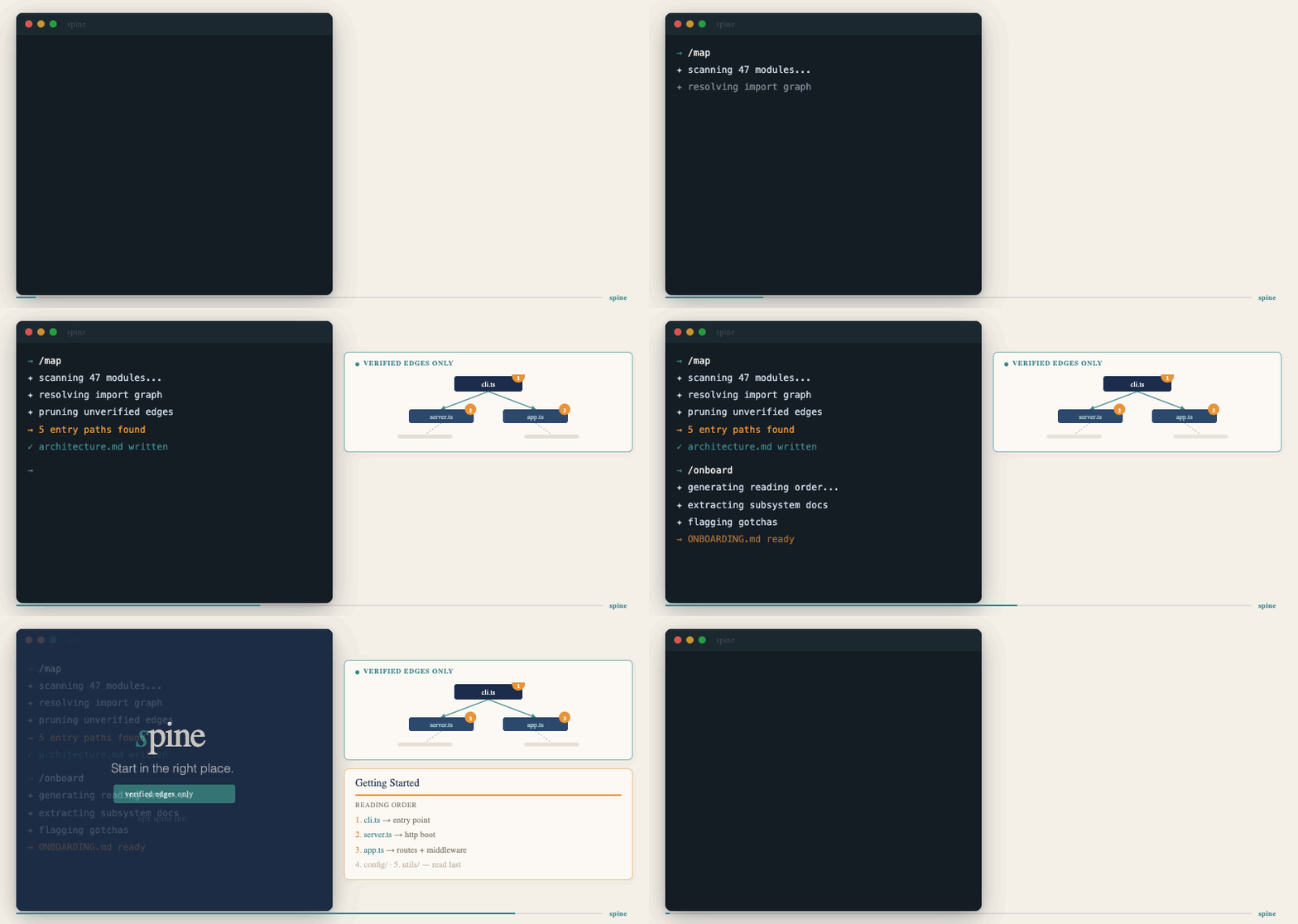
In one run it gives you:
- a small architecture diagram built from verified static-analysis edges only
- a prioritized reading order for the files that matter first
- a short mental model, subsystem summary, and gotchas
- a shareable
mermaid.livelink
If you open a repo and think "where do I even start?", spine is for that moment.
Why it exists
Most onboarding docs are stale, too broad, or guessed. spine takes a narrower approach:
- it detects likely entry points
- it extracts a small verified spine from real source relationships
- it refuses to invent edges it cannot prove
- it turns that verified structure into a readable tour
That makes it useful both for humans and for Claude Code.
What you get
/map
Use /map when you want the fastest deterministic preview.
- no synthesis step
- no
ONBOARDING.md - just the validated Mermaid graph and
mermaid.livelink
/onboard
Use /onboard when you want the full guide.
ONBOARDING.md- verified architecture map
- reading order
- mental model
- subsystem summaries
- gotchas
- estimated read time
Quick start
Install from npm
npm install -g @spine-io/onboard
Then run:
onboard .
Or for the map only:
onboard . --map-only
Run from source
npm install
npm run onboard -- .
For the deterministic map-only path:
npm run map -- .
Use with Claude Code
The v1 Claude Code distribution lives in .claude-plugin/skills/:
.claude-plugin/skills/onboard/for/onboard.claude-plugin/skills/map/for/map
The intended flow is:
- Run
/mapfor a fast, token-free architecture preview. - Run
/onboardwhen you want the full reading tour. - Let
spinerefresh.claude/REPO_CONTEXT.mdso later Claude sessions inherit repo context.
Why this is useful for Claude Code users:
spinecan write.claude/REPO_CONTEXT.mdwhen you opt in with--write-context-file- that file captures a compact verified snapshot of the repo
- later Claude sessions can start more grounded instead of re-discovering the same project shape from scratch
- the built-in Anthropic path supports prompt caching and cost reporting for repeated runs
If you are not using Claude Code skills yet, the CLI gives the same core output:
onboard .
onboard . --map-only
Best first demo
Start with axios.
Why axios is the best launch benchmark:
- the repo is well known, so the output is easy to judge
- the architecture is real but still compact
- the verified spine is small enough to understand at a glance
- the before/after value shows up quickly
Use the built-in benchmark catalog:
npm run benchmark:list
npm run benchmark:clone -- axios
npm run onboard -- benchmarks/repos/axios
Other strong follow-up demos:
glowfor a clean Go CLI storypoetryfor a larger Python codebaselogfor a compact Rust library
Example output
Typical ONBOARDING.md sections:
TL;DRArchitecture mapMental modelReading orderEntry points foundSubsystemsGotchasEstimated read time
Typical CLI output:
Detected library in javascript.
Found 1 entry point(s).
Synthesis source: deterministic.
Wrote ONBOARDING.md
Estimated cost: ~$0.008 input + ~$0.010 output = ~$0.018
This tour covers 7 spine file(s) and 4 subsystems.
Estimated savings: ~3.5 hours of manual exploration for ~$0.02 of LLM cost.
Commands
npm run onboard -- .                         # full guide
npm run map -- .                             # map only
npm run onboard -- . --prompt-out prompt.txt
npm run onboard -- . --synthesis-input .onboard-response.json
npm run onboard -- . --synthesis-command "your-command-here"
npm run onboard -- . --cost-model sonnet-4.6
npm run onboard -- . --diff-against ONBOARDING.md
npm run onboard -- . --dry-run
npm run onboard -- . --write-context-file
The built CLI also supports:
onboard . --out custom-onboarding.md
onboard . --map-only --out architecture.mmd
onboard --help
onboard . --dry-run
onboard . --write-context-file
Supported languages
Current verified spine coverage includes:
- TypeScript / JavaScript
- Python
- Go
- Rust
- PHP
Product rules
- verified edges only
- one small diagram, not a giant graph dump
- if Mermaid validation fails twice, the diagram is omitted
- the synthesis layer may summarize verified structure, but may not invent architecture
Benchmarks and launch assets
- benchmark catalog: src/benchmarks/catalog.ts
- before/after examples: docs/before-after.md
- launch blog draft: docs/blog-v1.md
- media prompts: docs/media-prompts.md
- launch cover image: assets/spine-cover.png
- launch storyboard: assets/spine-storyboard.png
- static hero image: assets/spine-hero.png
Development
npm run check
npm run test
npm run build
npm run onboard and npm run map execute the built CLI so the release path and local path stay aligned.
Contributing and testing
Contributions and real-repo testing are very welcome.
- open a bug report if
spinefinds the wrong entry points or produces misleading output - open repo test feedback if you try
spineon a real codebase and want to share what matched reality and what did not - open a PR if you want to improve detection, docs, benchmarks, or output quality
Start here:
Yorumlar (0)
Yorum birakmak icin giris yap.
Yorum birakSonuc bulunamadi