GodeX
Health Gecti
- License — License: Apache-2.0
- Description — Repository has a description
- Active repo — Last push 0 days ago
- Community trust — 17 GitHub stars
Code Basarisiz
- rm -rf — Recursive force deletion command in .github/workflows/release.yml
Permissions Gecti
- Permissions — No dangerous permissions requested
Bu listing icin henuz AI raporu yok.
Make every model a CodeX engine through an OpenAI-compatible Responses API gateway

Make every model a Codex engine.
OpenAI-compatible Responses API gateway for Codex, CLI tools and developer agents.




GodeX lets clients that speak the OpenAI Responses API use providers such as DeepSeek, Xiaomi, MiniMax, and Zhipu through one local server.
Highlights
- OpenAI-compatible
POST /v1/responsesendpoint with sync and streaming responses. GET /v1/modelsaliases so clients can use stable model names while GodeX routes to provider/model targets.- Built-in bridge providers for DeepSeek, Xiaomi, MiniMax, and Zhipu.
- Provider capability planning for request parameters, tools,
tool_choice, structured output formats, reasoning, and stream usage. - Responses
previous_response_idsession chains backed by memory or SQLite. - Trace recording for provider requests, provider responses, stream events, usage, and errors.
- Native Bun runtime, TypeScript source, and compiled platform binaries for releases.
Built-in Providers
| Provider | Reasoning | GodeX Input | Tool Choice | Response Format | Cached Tokens | Default Model |
|---|---|---|---|---|---|---|
| DeepSeek | native | text | auto, none, required, function | text, json_object | ✅ | deepseek-v4-pro |
| Xiaomi | boolean | text | auto | text, json_object | ✅ | mimo-v2.5-pro |
| MiniMax | boolean | text, image, video | auto, none, required, function | text, json_object | ✅ | MiniMax-M3 |
| Zhipu | boolean | text | auto, none | text, json_object | ✅ | glm-5.1 |
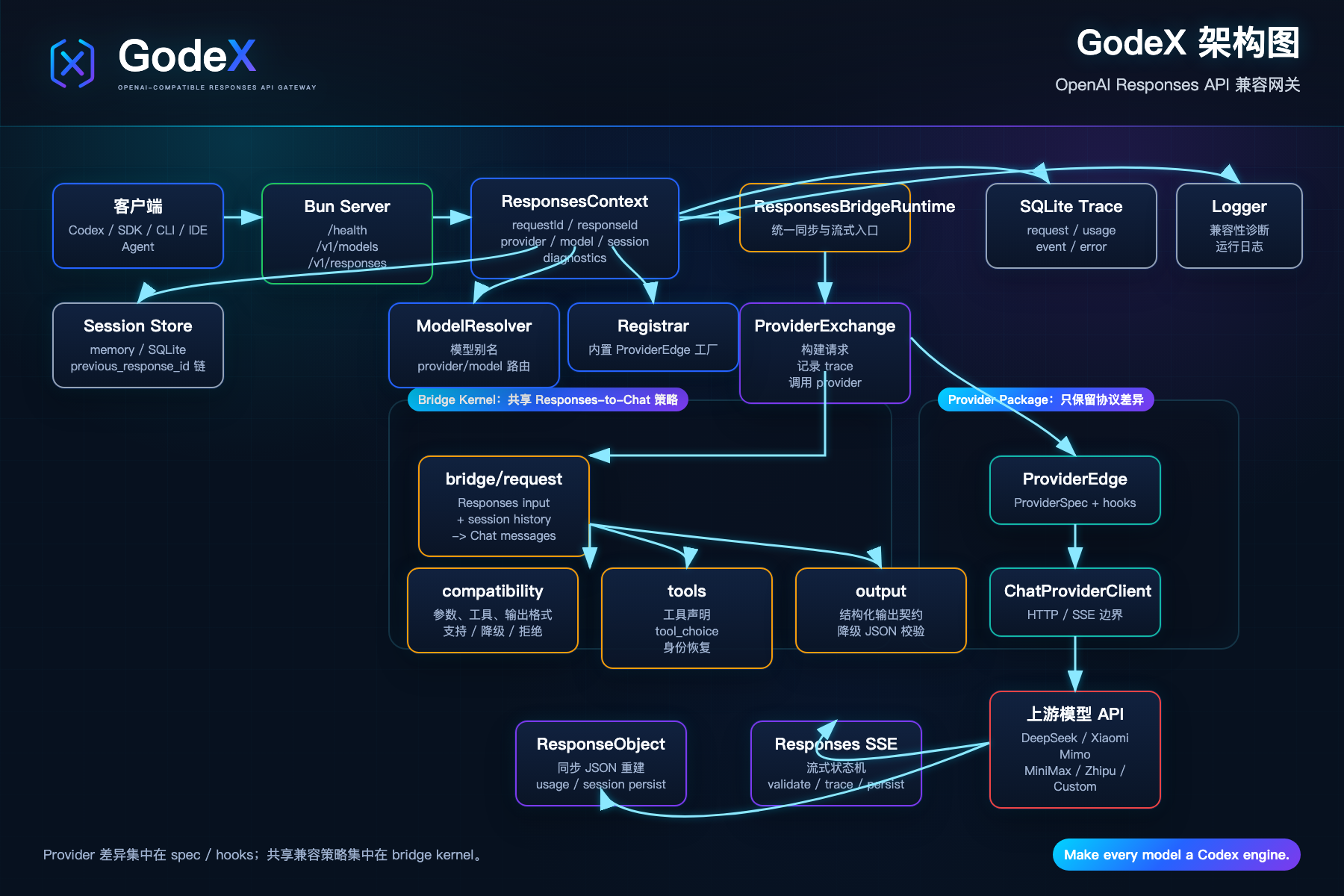
Architecture
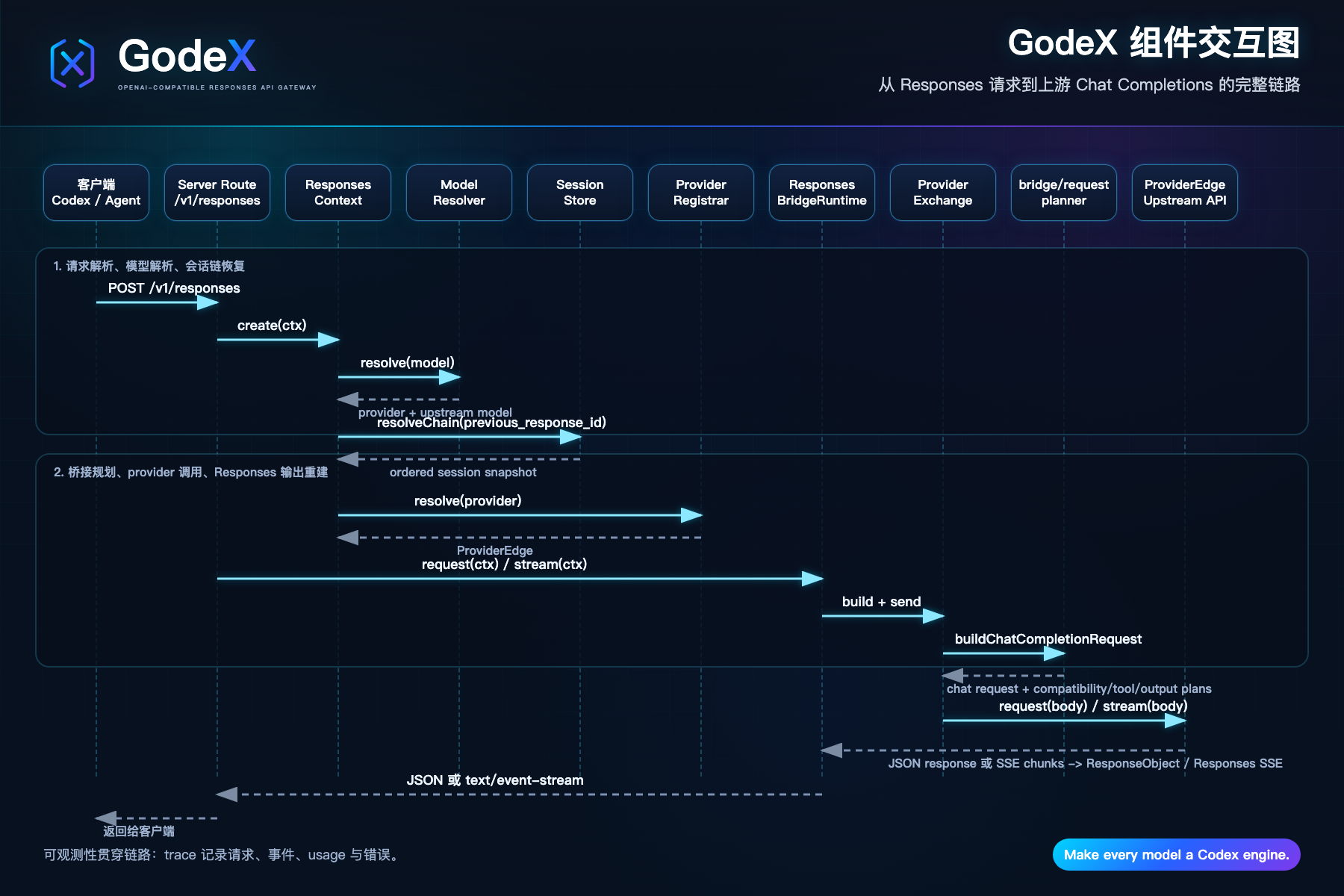
Component Interaction
Install
For local development:
git clone https://github.com/Ahoo-Wang/GodeX.git
cd GodeX
bun install
For package use, install the published package and run the godex binary:
npm install -g @ahoo-wang/godex
godex --help
Docker
Pre-built images are published to Docker Hub and GitHub Container Registry:
docker pull ahoowang/godex:latest
# or
docker pull ghcr.io/ahoo-wang/godex:latest
Run with a config file:
docker run -d \
  --name godex \
  -p 5678:5678 \
  -e ZHIPU_API_KEY=your-key \
  -e DEEPSEEK_API_KEY=your-key \
  -e MINIMAX_API_KEY=your-key \
  -e MIMO_API_KEY=your-key \
  -v ./godex.yaml:/etc/godex/godex.yaml:ro \
  -v godex-data:/data \
  ahoowang/godex:latest
The image supports linux/amd64 and linux/arm64.
- Config file:
/etc/godex/godex.yaml - Data directory (sessions, trace):
/data - Default port:
5678
Quick Start
Create a config and start the server:
godex init
godex serve --config ./godex.yaml
The interactive wizard walks you through selecting providers, entering base URLs and API keys, and writes the config file automatically.
Alternatively, create godex.yaml manually:
server:
  port: 5678
  host: 0.0.0.0

default_provider: deepseek

models:
  aliases:
    # -------------------------------------------------------------------------
    # Codex-compatible model aliases
    #
    # 这些 alias 是 GodeX routing policy,不代表与 OpenAI 原模型能力等价。
    # 依据优先级:公开 benchmark > 官方模型定位 > Provider 产品说明。
    # -------------------------------------------------------------------------

    # Codex 默认主力:复杂编码 / computer use / research workflows
    # 依据:DeepSeek V4-Pro 在 SWE / Terminal / Codeforces / GDPval-AA 上公开成绩强。
    gpt-5.5: "deepseek/deepseek-v4-pro"

    # Codex 旗舰:coding + reasoning + tool use + agentic workflows
    # 依据:DeepSeek V4-Pro 有更完整的公开 coding/agentic benchmark 覆盖。
    gpt-5.4: "deepseek/deepseek-v4-pro"

    # Codex mini:subagents
    gpt-5.4-mini: "zhipu/glm-5.1"

    # Codex 编码专用:复杂软件工程
    # 依据:DeepSeek V4-Pro 的 SWE Verified / SWE Pro / Terminal Bench 表现。
    gpt-5.3-codex: "deepseek/deepseek-v4-pro"

    # Codex spark:近实时编码迭代
    gpt-5.3-codex-spark: "zhipu/glm-5.1"

    # 上一代通用 coding / agentic fallback
    # 严谨起见仍走 DeepSeek;不强行映射到 Zhipu。
    gpt-5.2: "deepseek/deepseek-v4-pro"

    # -------------------------------------------------------------------------
    # Provider native models
    # -------------------------------------------------------------------------

    deepseek-v4-pro: "deepseek/deepseek-v4-pro"
    deepseek-v4-flash: "deepseek/deepseek-v4-flash"

    mimo-v2.5-pro: "xiaomi/mimo-v2.5-pro"
    mimo-v2.5: "xiaomi/mimo-v2.5"

    glm-5.1: "zhipu/glm-5.1"
    glm-5-turbo: "zhipu/glm-5-turbo"
    glm-4.7: "zhipu/glm-4.7"
    glm-4.5-air: "zhipu/glm-4.5-air"

    MiniMax-M3: "minimax/MiniMax-M3"

    # Fallback for unknown bare model names
    "*": "deepseek/deepseek-v4-pro"

providers:
  deepseek:
    spec: deepseek
    credentials:
      api_key: ${DEEPSEEK_API_KEY}
    endpoint:
      base_url: https://api.deepseek.com
  zhipu:
    spec: zhipu
    credentials:
      api_key: ${ZHIPU_API_KEY}
    endpoint:
      base_url: https://open.bigmodel.cn/api/coding/paas/v4
  minimax:
    spec: minimax
    credentials:
      api_key: ${MINIMAX_API_KEY}
    endpoint:
      base_url: https://api.minimaxi.com/v1
  xiaomi:
    spec: xiaomi
    credentials:
      api_key: ${MIMO_API_KEY}
    endpoint:
      base_url: https://api.xiaomimimo.com/v1

session:
  backend: sqlite

logging:
  level: info

trace:
  enabled: true
  path: ./data/trace.db
  capture_payload: false
Start the server:
godex serve --config ./godex.yaml
The dev command starts GodeX on port 13145; the default runtime config port is 5678.
API
Health
curl http://localhost:5678/health
Models
curl http://localhost:5678/v1/models
/v1/models lists configured aliases, excluding the wildcard alias *.
Responses
curl http://localhost:5678/v1/responses \
  -H 'content-type: application/json' \
  -d '{
    "model": "gpt-5.5",
    "input": "Write a short TypeScript function that adds two numbers."
  }'
Streaming uses standard Responses SSE event names:
curl -N http://localhost:5678/v1/responses \
  -H 'content-type: application/json' \
  -d '{
    "model": "gpt-5.5",
    "stream": true,
    "input": "Explain Bun streams in two sentences."
  }'
Model Routing
Clients may pass either:
- A provider-qualified selector such as
deepseek/deepseek-v4-pro - A configured alias such as
gpt-5.5 - A bare model name, which resolves through
default_providerwhen no alias matches
Aliases must map to provider/model values, and the provider must exist in providers.
Codex Integration
Connect the Codex desktop app to GodeX by adding a custom provider in ~/.codex/config.toml:
model = "gpt-5.5"
model_provider = "godex"

[model_providers.godex]
name = "GodeX"
base_url = "http://127.0.0.1:5678/v1"
wire_api = "responses"
requires_openai_auth = false
supports_websockets = false
Model aliases (gpt-5.5, gpt-5.4, gpt-5.4-mini, etc.) are resolved by GodeX using the models.aliases map in godex.yaml — Codex itself only needs the alias name.
Provider Bridge Behavior
GodeX builds a provider request in three steps:
- Resolve the client model selector to a configured provider and upstream model.
- Plan compatibility from the provider
ProviderSpec, including request parameters, tool declarations,tool_choice, response format, reasoning, and stream usage. - Convert Responses input and session history into Chat Completions messages, call the upstream provider, and reconstruct a Responses object or Responses SSE stream.
Provider-specific differences belong in each provider's spec.ts, hooks.ts, protocol types, and HTTP client. Shared Responses-to-Chat policy belongs under src/bridge.
Structured Output
When a provider supports json_object but not native json_schema, GodeX can degrade strict json_schema requests to json_object.
For strict downgraded schemas:
- The schema instruction is added to the provider prompt preamble for the current request.
- The provider receives
response_format: { "type": "json_object" }. - GodeX validates that the final output is valid JSON.
- Invalid sync output fails the response; invalid stream output is rewritten to a terminal
response.failedevent.
The validator checks JSON syntax, not full JSON Schema conformance.
Sessions
Responses can be stored and replayed with previous_response_id.
session.backend: memorykeeps history in process memory.session.backend: sqlitepersists history to SQLite.- Requests with
store: falseare not saved. - The session chain stores request snapshots and response output items, then rebuilds provider-neutral history on the next turn.
Trace Database
Tracing is enabled by default and writes SQLite rows to ./data/trace.db unless configured otherwise.
Trace records include:
- Provider request metadata and final patched request payload summaries
- Provider request lifecycle events without duplicating full request bodies
- Sync provider response bodies as summarized payloads
- Raw and transformed stream events
- Usage details, including cached tokens when provided by the upstream
- Route and provider errors
Set trace.capture_payload: true to persist payload JSON up to trace.payload_max_bytes for trace rows that carry payloads. Keep it disabled for sensitive environments.
Development
bun install                  # Install dependencies
bun run dev                  # Dev server with hot reload on port 13145
bun run start                # Start server from source
bun run build                # Build a binary for the current platform
bun run compile:all          # Cross-compile all supported platform packages
Quality gates:
bun run typecheck            # TypeScript
bun run lint                 # Biome check
bun run lint:fix             # Biome autofix
bun run format               # Biome format
bun run test                 # Unit and integration tests, excluding src/e2e
bun run test:e2e             # Mocked end-to-end tests
bun run test:zhipu           # Live Zhipu tests; requires ZHIPU_API_KEY
bun run test:deepseek        # Live DeepSeek tests; requires DEEPSEEK_API_KEY
bun run test:minimax         # Live MiniMax tests; requires MINIMAX_API_KEY
bun run test:xiaomi         # Live Xiaomi tests; requires MIMO_API_KEY
bun run check                # typecheck + lint + test
bun run ci                   # typecheck + biome ci + test + e2e
Source Map
src/
  cli/          Commander CLI, init wizard, runtime config loading
  config/       godex.yaml schema, defaults, env interpolation
  context/      ApplicationContext and per-request ResponsesContext
  bridge/       Provider-agnostic Responses-to-Chat planning and reconstruction
  providers/    Built-in provider specs, hooks, clients, and registry
  responses/    Sync and stream request pipelines
  server/       Bun routes for /health, /v1/models, /v1/responses
  session/      Memory and SQLite response session stores
  trace/        SQLite trace recorder and usage/error/event mappers
  protocol/     OpenAI protocol type definitions
  error/        GodeXError hierarchy and domain codes
Provider Development
Provider folders follow this shape:
src/providers/<name>/
  spec.ts       ProviderSpec declaration
  client.ts     ProviderEdge construction with ChatProviderClient
  hooks.ts      Provider-specific patching, accessors, usage, stream deltas
  protocol/     Provider DTOs when needed
  index.ts      Public exports
Add shared compatibility policy to src/bridge; add shared provider transport or protocol helpers to src/providers/shared.
License
Apache-2.0. See LICENSE.
Yorumlar (0)
Yorum birakmak icin giris yap.
Yorum birakSonuc bulunamadi