aiusage
Health Warn
- License — License: MIT
- Description — Repository has a description
- Active repo — Last push 0 days ago
- Low visibility — Only 5 GitHub stars
Code Warn
- network request — Outbound network request in src/aiusage/dashboard.py
Permissions Pass
- Permissions — No dangerous permissions requested
No AI report is available for this listing yet.
Cross-platform (Linux/macOS/Windows) terminal + tray usage tracker for Claude Code, Codex, and other AI coding subscriptions
aiusage
Track your Claude Code, Codex, and other AI coding subscription usage — from the terminal, a local JSON API, or your system tray. Works on Linux, macOS, and Windows.
Ever burned through your weekly Claude limit without knowing it was close? aiusage reads the same login you already have from Claude Code and shows your session and weekly usage percentages, plus a local spend estimate (today / yesterday / last 30 days) computed entirely from logs already on your machine. No dashboard login, no extra account, no telemetry.
In Claude Code's own status bar — live bars, percentages, reset countdowns, and today's spend:

In your system tray — session (circle) and weekly (square) badges with the live percentage, color-shifting as you approach limits:

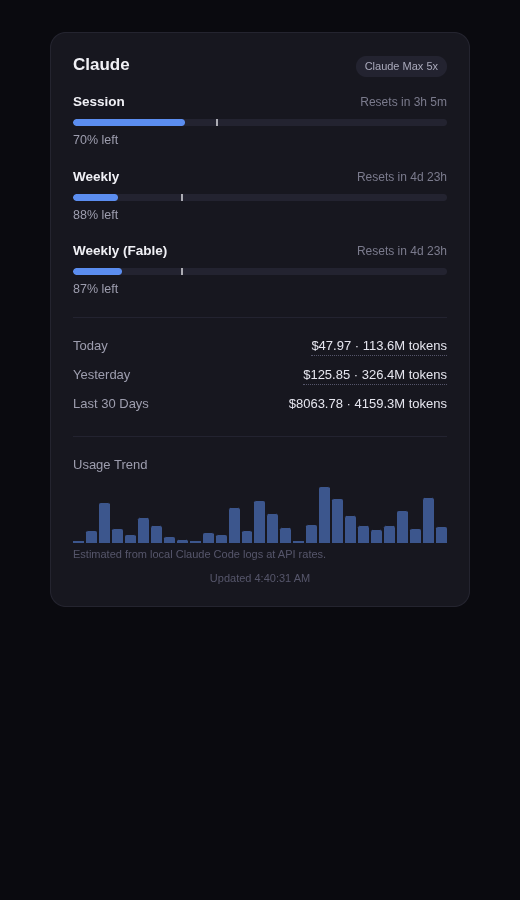
In a local dashboard (http://127.0.0.1:8737) — pacing projections, per-model spend breakdown, 30-day trend:
$ aiusage status
{
  "providerId": "claude",
  "displayName": "Claude",
  "lines": [
    { "type": "progress", "label": "Session", "used": 3.0, "limit": 100.0 },
    { "type": "progress", "label": "Weekly",  "used": 97.0, "limit": 100.0 },
    { "type": "text", "label": "Today", "value": "$4.48 · 8.4M tokens" }
  ]
}
"Can't you just use Claude Code's built-in statusline?" — Yes, and for terminal-only display you should. Here's the honest breakdown of who needs this tool, who doesn't, and what problem each feature solves.
Features
- Live Claude usage — session (5h) and weekly (7d) limits, read via the OAuth login Claude Code already stores locally.
- Codex too — if the Codex CLI is installed, its weekly limit, plan, rate-limit reset credits, and local spend show up automatically (auto-detected, zero config).
- Local spend estimate — Today / Yesterday / Last 30 Days, computed by scanning your own
~/.claude/projectssession logs. Nothing is uploaded anywhere. - System tray icon — a small ring showing session usage %, color-coded (blue → amber → red), on Linux, macOS, and Windows.
- Local JSON API —
GET http://127.0.0.1:8737/v1/usage, so other local tools/scripts can read your usage numbers. Loopback-only. - Zero-config — if you're already signed in via
claude, it just works.
Install
One command per platform — no Python required (with Python 3.9+ it installs a lightweight venv; without, it downloads a self-contained binary):
macOS / Linux / WSL:
curl -fsSL https://raw.githubusercontent.com/ahsanhabibakik/aiusage/main/scripts/install.sh | bash
Windows (PowerShell):
irm https://raw.githubusercontent.com/ahsanhabibakik/aiusage/main/scripts/install.ps1 | iex
Both wire up everything automatically: aiusage command, Claude Code status bar, login autostart, and launch the tray immediately. Safe to re-run any time.
Standalone binaries (no Python, no install script): grab aiusage-linux-x86_64, aiusage-macos-arm64 (Apple Silicon), or aiusage-windows-x86_64.exe from the latest release. Note: on Linux the binary's tray icon can't use the system AppIndicator libs — prefer the installer with Python there; serve + the dashboard work fully either way.
pip:
pip install aiusage-tracker
Homebrew (macOS/Linux):
brew install ahsanhabibakik/tap/aiusage-tracker
From source:
git clone https://github.com/ahsanhabibakik/aiusage.git
cd aiusage
pip install -e .
Arch Linux: PKGBUILDs are included in packaging/aur/ (not yet published to the AUR — needs python-pystray first, since pystray has no AUR package of its own). Build python-pystray before aiusage-tracker:
cd packaging/aur/python-pystray && makepkg -si
cd ../aiusage-tracker && makepkg -si
All methods install the same aiusage command.
Linux tray icon note
Modern desktops (Plasma 6, GNOME, etc.) only show tray icons that speak the StatusNotifierItem/AppIndicator protocol — not the older XEmbed one. pystray supports both, but picks XEmbed silently if it can't import gi/AppIndicator3, and an icon made that way will run with no error yet never appear in the panel.
Install the system packages first:
# Arch
sudo pacman -S python-gobject libappindicator
# Debian/Ubuntu
sudo apt install python3-gi gir1.2-appindicator3-0.1
Then create your virtualenv with --system-site-packages so it can see them:
python3 -m venv --system-site-packages .venv
.venv/bin/pip install -e .
.venv/bin/python3 -c "import pystray; print(pystray.Icon.__module__)"
# should print pystray._appindicator, not pystray._xorg
If your desktop has no tray support at all, use aiusage serve + the local dashboard instead — no system dependency needed.
Usage
aiusage status          # print current usage as JSON and exit
aiusage serve            # run the local HTTP API + web dashboard (no tray icon)
aiusage tray             # run the system tray icon + local HTTP API (default experience)
aiusage setup            # wire up Claude Code's statusLine + login autostart
aiusage update           # upgrade to the latest version
Open http://127.0.0.1:8737 in a browser for a small live dashboard while serve or tray is running.
Claude Code status bar
aiusage setup wires everything up automatically (the installer already runs this for you): adds a statusLine to ~/.claude/settings.json showing live usage right in Claude Code's own status bar, plus login autostart for the tray. It's safe to re-run any time — it never overwrites a different statusLine you already have unless you pass --force.
aiusage setup            # wire up statusLine + autostart
aiusage setup --force    # overwrite an existing different statusLine
aiusage statusline        # what settings.json actually runs, one line of output
Important: to reload after changing settings.json, open a new Claude Code session — don't run /statusline. That command is Claude Code's own status-bar config wizard; running it replaces whatever's there (including aiusage's) with its own sample. If that happens, just run aiusage setup again.
Keeping it updated
aiusage update
Tries PyPI first, falls back to the GitHub source. There's no silent background auto-update — a tool that quietly rewrites itself (or your config) without being asked is a real supply-chain risk, not a feature. You'll also get a one-line "update available" notice when running status/serve/tray if a newer version exists.
If you installed via Homebrew or the AUR, use brew upgrade / your AUR helper's update flow instead — same idea, just through that package manager.
Local HTTP API
GET http://127.0.0.1:8737/v1/usage
GET http://127.0.0.1:8737/v1/usage/claude
Returns a normalized snapshot per provider:
{
  "providerId": "claude",
  "displayName": "Claude",
  "plan": null,
  "lines": [
    { "type": "progress", "label": "Session", "used": 3.0, "limit": 100.0, "format": {"kind": "percent"}, "resets_at": "..." },
    { "type": "text", "label": "Today", "value": "$4.48 · 8.4M tokens" }
  ],
  "fetchedAt": "2026-07-08T19:17:31Z"
}
The server listens on 127.0.0.1 only — never reachable from other machines on your network.
How credentials are read
aiusage never asks you to paste a token. It checks, in order:
~/.claude/.credentials.json(or$CLAUDE_CONFIG_DIR/.credentials.json) — the file Claude Code itself writes afterclaudelogin.CLAUDE_CODE_OAUTH_TOKENenvironment variable, as a fallback.
If neither is present, the Session/Weekly lines report "Not logged in" — run claude and sign in once.
Privacy
- Local spend tiles are computed entirely on your machine from your own Claude Code session logs — no external calls.
status/serve/traymake one usage-check request toapi.anthropic.com(the same one Claude Code's own client makes) and one lightweight, best-effort check topypi.orgfor a newer version — never on the statusline render path, so it can't slow down your status bar.- The local HTTP API only ever serves usage numbers, never tokens or credentials, and only listens on loopback.
Roadmap
- Cursor, OpenRouter, Z.ai providers
- Packaged binaries (no Python required) for macOS/Windows
Contributing
Issues and PRs welcome — especially new providers. See Roadmap for what's missing. Keep new providers read-only against local credentials; no telemetry, no new accounts required.
License
MIT — see LICENSE.
Reviews (0)
Sign in to leave a review.
Leave a reviewNo results found