loop-now
Health Uyari
- License — License: Apache-2.0
- Description — Repository has a description
- Active repo — Last push 0 days ago
- Low visibility — Only 5 GitHub stars
Code Basarisiz
- fs.rmSync — Destructive file system operation in auth-helper/cli_verify_guard.mjs
- process.env — Environment variable access in auth-helper/codex-service-tier.mjs
- network request — Outbound network request in auth-helper/google_auth.py
- process.env — Environment variable access in auth-helper/ipc.mjs
Permissions Gecti
- Permissions — No dangerous permissions requested
Bu listing icin henuz AI raporu yok.
Loop Now: a local multi-agent workspace for running your own team of agents, extensible with plugins | 本地运行的多 Agent 协作平台

Loop Now
A local multi-agent workspace, built to extend with plugins.
Connect CLI and MCP tools, subscribe to events, and shape how your agents work—while keeping projects, conversations, and tasks in one place.
English · 简体中文
Getting started ·
Features ·
Plugins ·
Issues
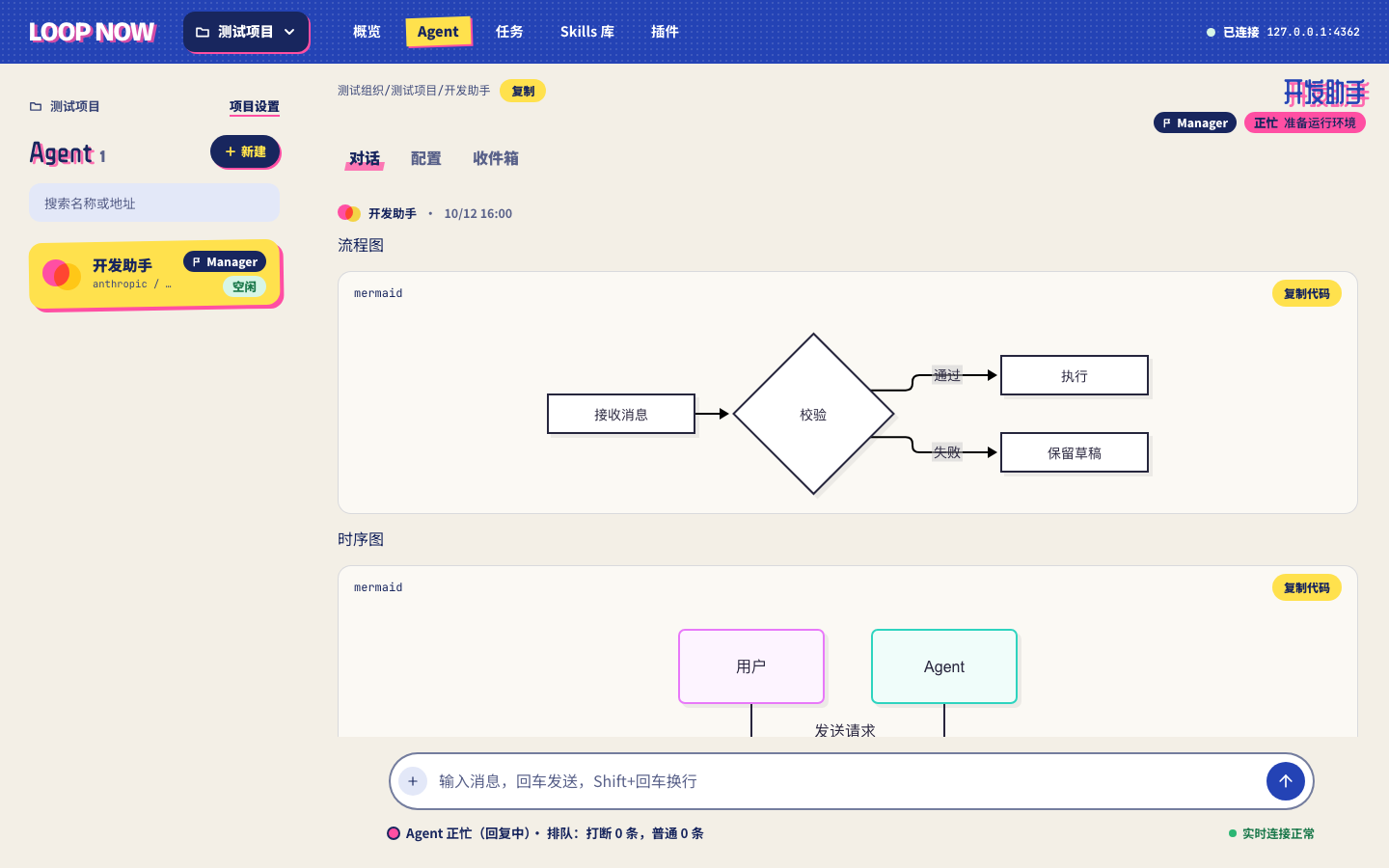
Actual console with demonstration data. The interface currently uses Simplified Chinese.
Loop Now brings your agents into one browser workspace. An agent keeps its own working directory and conversation; a Manager can coordinate specialists through a task workflow. You can follow the conversation, inspect tool calls, send a message, and see who is working or waiting.
Plugins are the main extension point: tools, event hooks, accounts, permissions, and resources can travel together as a versioned package.
The platform runs on your machine, with Pi as its execution engine. You choose the models, credentials, repositories, and tools each agent may use.
Early-stage personal edition. This repository targets a single local server. The console has no login and is intended for loopback access. Model and tool providers may still receive data when you use their services.
What you can do
| Capability | What it gives you |
|---|---|
| Build a team | Organize agents by project. Give each a model, thinking level, instructions, Skills, repositories, and tool access. Designate a Manager to coordinate the project. |
| Keep work in context | Continue an agent's regular conversation and workspace. Tasks use separate copies, with the same agent reusing its task workspace and session across steps. |
| Coordinate through Inbox | Agents and people exchange messages, ask questions, and reply. Choose queue or interrupt when an agent is busy; sleeping agents can wake when messages arrive. |
| Run visible workflows | Follow task nodes, conditional branches, bounded review loops, retries, and saved artifacts. A task's workflow and captured configuration stay fixed after it starts. |
| Extend through plugins | Bring CLI and MCP tools, event hooks, accounts, permissions, and Skills into one package. Add the integrations your team needs. |
| See what happened | Stream replies, send images, render Markdown and Mermaid, and inspect model usage, tool commands, timing, and failures in each reply's run timeline. |
An example: from implementation to review
Create a Manager, a Developer, and a Reviewer. Assign their repositories, models, and allowed tools, then ask the Manager to coordinate a change:
Implement this feature, have the Reviewer check it, and return the result. Ask me through Inbox if a decision is needed.
A workflow can move from development to review and back for a bounded number of revisions. Each participant works in its task context; you can inspect messages and artifacts throughout. Your project instructions and Skills define the actual process—the platform does not prescribe a particular coding, QA, or deployment policy.
Built to extend: the plugin system
New tools and project-specific behavior belong in plugins. A plugin is one directory whose package.json is the manifest. It has up to two halves, and either one is optional:
- The agent half is a standard Pi package: Pi extensions, Skills, MCP servers, and CLIs, loaded into the Pi process of each agent you grant. An existing Pi package installs unchanged.
- The platform half runs in one long-lived Node plugin host next to the server. It subscribes to platform events and calls the platform API with a scoped plugin token.
| The host provides | What it means for a plugin |
|---|---|
| Events | Every observation event in the catalog: runs, tasks, nodes, Inbox, questions, sleep, agents, Pi processes, folders, plugins. Events are persisted, acknowledged after the handler returns, retried, and replayed after a restart. Interception, modification, and claim hooks have their own timeouts and fallbacks. |
| State + secrets | Per-plugin persistent state, global or per project. x-secret configuration fields are write-only in the console and masked in plugin logs. |
| Configuration forms | loopNow.configSchema is plain JSON Schema; the console renders it. Fields marked x-scope: project can be overridden per project. |
| Reliable outbound HTTP | The SDK's delivery library keeps a persisted queue, retries with backoff, signs requests with HMAC-SHA256, and writes a delivery log that the plugin page displays. |
| Logs + isolation | Each plugin's output lands in its own log. A plugin that throws, times out, or fails to load affects only itself. |
The manifest is authoritative. Subscribing to an event, or calling an API scope, that the manifest does not declare fails, and install shows the user both halves, the events, and the permissions before anything runs.
Observation events, state, secrets, configuration, and the delivery library are available now. Interception and modification hooks, console action buttons, HTTP endpoints, schedules, channels, and plugin accounts are specified in plugins/SPEC.md and are being rolled out.
Install once, enable per project, grant per agent
Install from the official plugins, a Git repository, an npm package, or a local directory, in the console or with loopctl plugin install. Next, enable the plugin in a project and fill in its configuration. Then grant it to the agents that should load its agent half. Installing or enabling a plugin never authorizes an agent by itself. Versions are pinned: updating is an explicit action, and running tasks keep the files they started with.
Two official plugins ship with the platform:
- webhook POSTs
inbox.receivedevents to your URL with a signature, retries, and a delivery log. External identities use it instead of polling their Inbox. - hello is the smallest plugin with both halves, and the starting point for writing your own.
A platform half in a few lines
import { createDelivery, type PluginAPI } from '@loop-now/plugin-sdk'

export default function register(api: PluginAPI) {
  const delivery = createDelivery(api)
  api.on('task.completed', async (event) => {
    const { url } = api.config.get<{ url?: string }>(event.projectId)
    if (url) await delivery.deliver({ target: url, body: event, eventId: event.id, eventType: event.type })
  })
}
{
  "name": "task-notifier",
  "version": "1.0.0",
  "keywords": ["loop-now-plugin"],
  "peerDependencies": { "@loop-now/plugin-sdk": "*" },
  "loopNow": {
    "id": "task-notifier",
    "platform": "./platform.ts",
    "events": ["task.completed"],
    "permissions": ["state"],
    "configSchema": { "type": "object", "properties": { "url": { "type": "string", "x-scope": "project" } } }
  }
}
The host loads TypeScript directly, as Pi does, and provides @loop-now/plugin-sdk itself. Check a directory with node plugins/host/dist/main.js validate <dir> --load, which reports manifest errors and any subscriptions the code makes outside loopNow.events.
Start with the SDK reference and the two official plugins. plugins/SPEC.md is the full contract: package format, event catalog, hook kinds and timeouts, permissions, and installation. api/plugin-host-protocol.md describes the wire protocol between the server and the host. There is no sandbox: plugins execute code, so install sources you trust.
Lark user execution separately requires the pinned platform bundle described in its build notes; it is not required for basic chat.
Getting started
The current setup is a source installation. macOS Apple Silicon is the primary validated environment. Some components target Linux, but equivalent full-system coverage is not yet established; the Lark user CLI runtime is currently macOS arm64 only.
1. Prepare dependencies
| Dependency | Repository baseline |
|---|---|
| Go | 1.27 or later |
| Node.js / npm | 24.21.0 / 11.19.0; Web scripts check these exact versions |
| PostgreSQL | 18 |
| Redis | 8 |
| Pi coding agent | 1.4.0 |
| Other tools | Git |
With the required Node and npm active:
npm install -g @earendil-works/[email protected]
pi --version

git clone --depth 1 --branch main https://github.com/AI-for-anyone/loop-now.git
cd loop-now
Start PostgreSQL and Redis using your preferred local installation. Create a dedicated PostgreSQL role and database; run these as your local PostgreSQL administrator:
createuser --login --pwprompt loopnow
createdb --owner=loopnow loopnow
2. Configure the server
Run the following from the repository root. Replace the database password with the one you chose, URL-encoded if necessary. Use a dedicated Redis database and key prefix; add Redis authentication to the URL if your server requires it.
export LOOP_NOW_DATABASE_URL='postgres://loopnow:[email protected]:5432/loopnow?sslmode=disable'
export LOOP_NOW_REDIS_URL='redis://127.0.0.1:6379/1'
export LOOP_NOW_REDIS_KEY_PREFIX='loopnow:'
export LOOP_NOW_NODE_BIN="$(command -v node)"
export LOOP_NOW_PI_BIN="$(command -v pi)"
Credentials are stored in plaintext in PostgreSQL; protect database access and backup files. The server reads process environment variables; it does not automatically load an .env file.
Choose a persistent working directory outside your home directory, with no AGENTS.md or CLAUDE.md in its ancestor directories. This prevents Pi from inheriting unrelated host instructions. For a fresh installation, the default is /Users/Shared/loop-now on macOS or /var/lib/loop-now on Linux:
# macOS; on Linux use /var/lib/loop-now instead.
export LOOP_NOW_WORK_ROOT='/Users/Shared/loop-now'
sudo mkdir -p "$LOOP_NOW_WORK_ROOT"
sudo chown "$(id -u):$(id -g)" "$LOOP_NOW_WORK_ROOT"
chmod 700 "$LOOP_NOW_WORK_ROOT"
3. Build and start the backend
Build the server and its matching loopctl distribution together:
mkdir -p bin
go build -o bin/loop-server ./cmd/loop-server
loop_version="$(bin/loop-server version)"
go run ./cmd/loopctl-dist -version "$loop_version" -out "$PWD/.local-build/loopctl-dist"

export LOOP_NOW_LOOPCTL_DIST_DIR="$PWD/.local-build/loopctl-dist"
bin/loop-server
Startup checks dependencies, applies pending database migrations, and creates the default organization and project. The API listens on 127.0.0.1:8780. Run one server per installation; when updating, preserve the database, Redis configuration, and working directory.
Plugins need the Node plugin host, built from plugins/ (Node 24.21.0). The server runs it only when LOOP_NOW_PLUGIN_HOST_ENTRY is set, and offers the official plugins as the builtin install source when LOOP_NOW_PLUGIN_OFFICIAL_DIR is set:
(cd plugins && npm ci --ignore-scripts && npm run build)
export LOOP_NOW_PLUGIN_HOST_ENTRY="$PWD/plugins/host/dist/main.js"
export LOOP_NOW_PLUGIN_OFFICIAL_DIR="$PWD/plugins/official"
Set these before starting bin/loop-server. dist/main.js is a single self-contained file and can be copied elsewhere. Optional tool integrations may require their own dependencies and credentials.
4. Start the console
In a second terminal, from the repository root, with Node 24.21.0 and npm 11.19.0 active:
cd web
export LOOP_NOW_WEB_NODE_BIN="$(dirname "$(command -v node)")"
./bin/npm24 ci
./bin/npm24 run dev
Open http://localhost:5173. The default API address is already configured. For a different address, see web/.env.example.
5. Give your first agent a job
- Open a project and add a model account using a supported login or API key.
- Create an Agent, select its model and account, and add instructions or Skills.
- Add any repositories or files it needs. Enable plugins and grant tool access explicitly.
- Start a conversation. For images, choose a model that supports image input.
- When you want collaboration, add specialist agents and designate a project Manager.
Start with one agent and a small task before adding a longer workflow.
How it fits together
flowchart LR
    UI[Web console] <-->|HTTP and SSE| Server[Go server]
    Server <--> PG[(PostgreSQL)]
    Server <--> Redis[(Redis)]
    Server -->|RPC| Pi[Pi processes]
    Server <-->|stdio| Host[Node plugin host]
    Host -->|HTTP, plugin token| Server
    Pi --> CLI[Scoped CLI tools]
    Pi --> Ext[Plugin extensions and MCP servers]
PostgreSQL stores platform state, credentials, messages, and task records. Redis handles coordination, queues, and live streams. The local filesystem holds agent workspaces, sessions, and installed tools. These components form one local installation; the diagram does not imply independently scalable services.
| Source | Purpose |
|---|---|
web/ |
React, TypeScript, and Vite console |
internal/server/ |
Go API, scheduling, storage, and local execution |
cmd/loopctl/ |
JSON CLI for platform agents and external identities |
plugins/ |
Plugin specification, Node plugin host, SDK, and official plugins |
api/ |
Console and Agent OpenAPI contracts |
MAIN.md |
Maintainer overview and current implementation state |
Configuration and boundaries
All server options and defaults are defined in internal/server/config/config.go. Frequently adjusted settings include:
| Variable | Purpose / default |
|---|---|
LOOP_NOW_LISTEN_ADDR |
Console API; 127.0.0.1:8780 |
LOOP_NOW_WORK_ROOT |
Persistent agent workspaces and runtime files |
LOOP_NOW_CONTEXT_DIR |
Shared project (projects/<id>/) and global (global/) context folders; ~/.loop_now of the server user |
LOOP_NOW_PLUGIN_HOST_ENTRY |
Absolute path of the plugin host entry run with Node; unset means plugin platform halves do not run |
LOOP_NOW_PLUGIN_OFFICIAL_DIR |
Absolute path of the official plugins shipped with the platform (one directory per plugin); unset means no builtin install source |
LOOP_NOW_PLUGIN_MARKET_URL |
https address of the official plugin market's loop-now-market.json; defaults to the official market index and can point elsewhere |
LOOP_NOW_PI_MAX_PROCESSES |
0 means unlimited; a positive value caps local Pi processes |
LOOP_NOW_PI_IDLE_TIMEOUT |
Idle Pi process timeout; 10m |
LOOP_NOW_CONSOLE_ORIGINS |
Allowed browser origins; local port 5173 by default |
LOOP_NOW_LARK_USER_BUNDLE_DIR |
Optional verified Lark user CLI bundle |
The current release is intended for trusted personal use:
- The console has no authentication. Keep it on loopback rather than exposing it to a public network.
- Agents execute local commands under the server's operating-system user. A separate task directory is not an OS security sandbox.
- Plugins execute code; install sources you trust. Model and tool access also depends on the credentials and permissions you provide.
- Workflows support linear steps, conditional branches, and bounded loops. Parallel joins, multi-replica deployment, and elastic scaling are outside this edition's current scope.
- Conversation history is persistent, but a server restart is not a promise of uninterrupted execution or automatic replay of in-flight work. Prefer updating when agents are idle.
Contributing
Bug reports, small fixes, plugin integrations, and documentation improvements are welcome. For larger behavior changes, open an issue first so the scope is clear.
Read AGENTS.md and MAIN.md, keep changes focused, and run the checks relevant to your changes:
# Backend (from the repository root)
go test ./cmd/... ./internal/... ./api/...

# Web (from web/, using the Node path configured above)
./bin/npm24 run typecheck
./bin/npm24 run api:check
./bin/npm24 run lint
./bin/npm24 test
./bin/npm24 run build
Database integration tests require an isolated test database through LOOP_NOW_TEST_DATABASE_URL; tests using Redis also need LOOP_NOW_TEST_REDIS_URL. Native and browser tests have additional fixture requirements. A skipped integration test is not a successful integration run. Keep credentials, local runtime data, and build artifacts out of contributions.
License
Copyright 2026 Loop Now contributors.
Loop Now is licensed under the Apache License 2.0. Bundled third-party code and fonts retain their own licenses and notices.
Yorumlar (0)
Yorum birakmak icin giris yap.
Yorum birakSonuc bulunamadi