open-science
Health Uyari
- License — License: NOASSERTION
- Description — Repository has a description
- Active repo — Last push 0 days ago
- Low visibility — Only 6 GitHub stars
Code Gecti
- Code scan — Scanned 12 files during light audit, no dangerous patterns found
Permissions Gecti
- Permissions — No dangerous permissions requested
Bu listing icin henuz AI raporu yok.
Open Science — an open AI workbench for scientists. Open-source alternative to Claude Science: local-first, model-agnostic, reproducible AI research desktop (macOS & Windows), built on Tauri + MCP + agent skills.
Open Science
An open AI workbench for scientists. Your research partner for rigorous science.
An open-source, local-first, model-agnostic, reproducible AI research
workbench — an open alternative to Claude Science and similar AI-for-science products.
Not a chat box: a workbench that ties literature, code, figures, reports, and review
into one auditable, reproducible workflow.







Contents
- ✨ Why it is different
- 🎬 See it in action
- 🧭 How it works
- 🧪 What's inside
- 🔌 Skills & connectors
- 🚀 Getting started
- 💬 Using it
- 🔒 Safety & privacy
- 🗂️ Repository layout
- 📌 Status & roadmap
- 🤝 Contributing
- ⚖️ License
- 🙏 Acknowledgments
✨ Why it is different
- A workbench, not a chat box — plan → approve → execute → artifacts → review.
- Traceable artifacts, not just text — every figure, table, and report links
back to its code, data, environment, and the conversation that produced it. - Local-first — your data and compute stay on your machine; the app states
plainly what (if anything) leaves it. - Model-agnostic — BYOK via OpenRouter, OpenAI-compatible, Anthropic, or local
models; a free out-of-the-box model works with zero setup. - Reproducible — code, data, figures, reports, logs, and
provenance.jsonlare
kept, and every artifact version is recoverable. - Multi-domain — starting with AI4S, expanding to materials, chemistry, biology,
medicine, and engineering.
🎬 See it in action
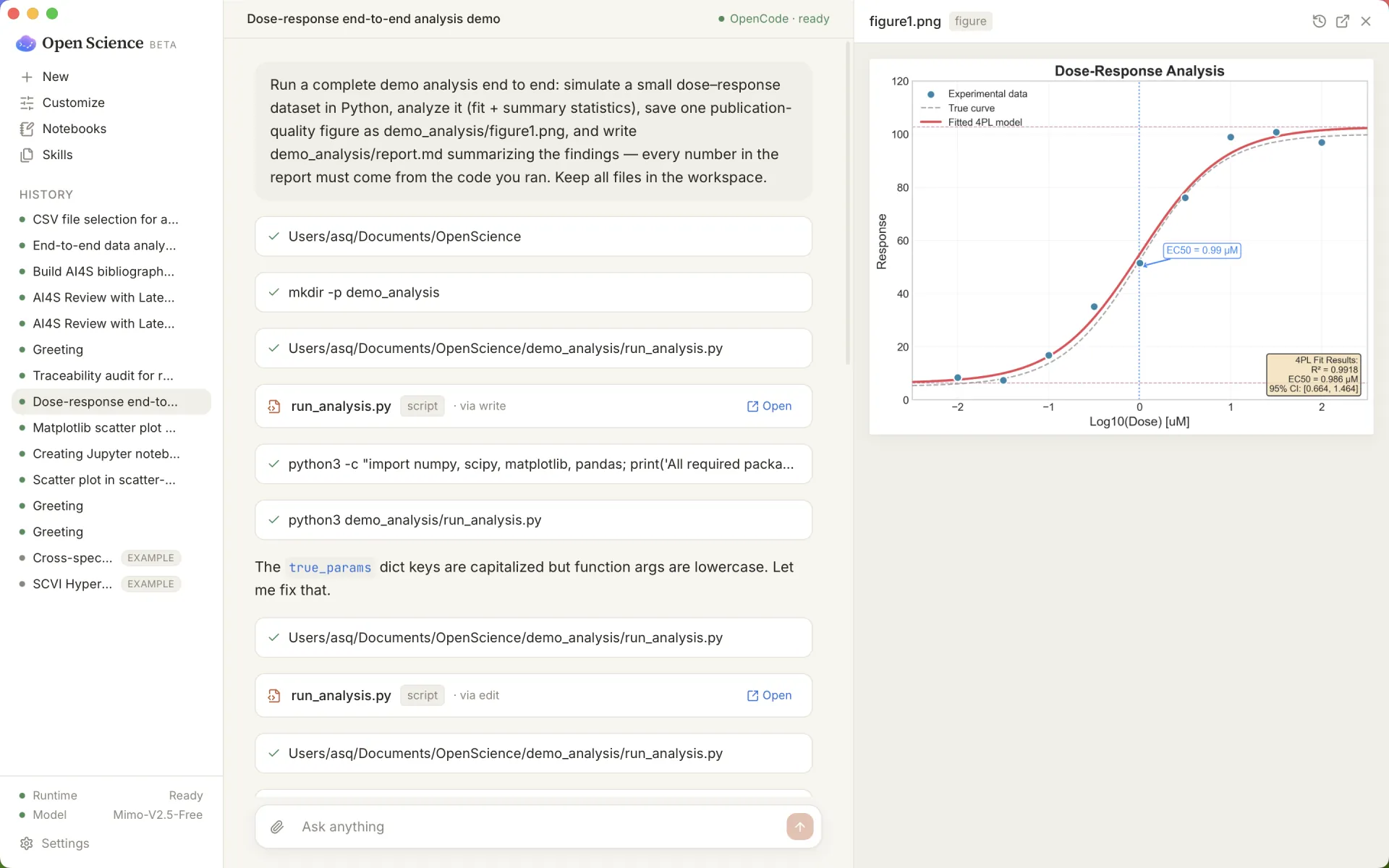
One prompt → a complete, traceable analysis. Simulate data, fit a model, save a
publication-grade figure, and write a report where every number traces to the code.
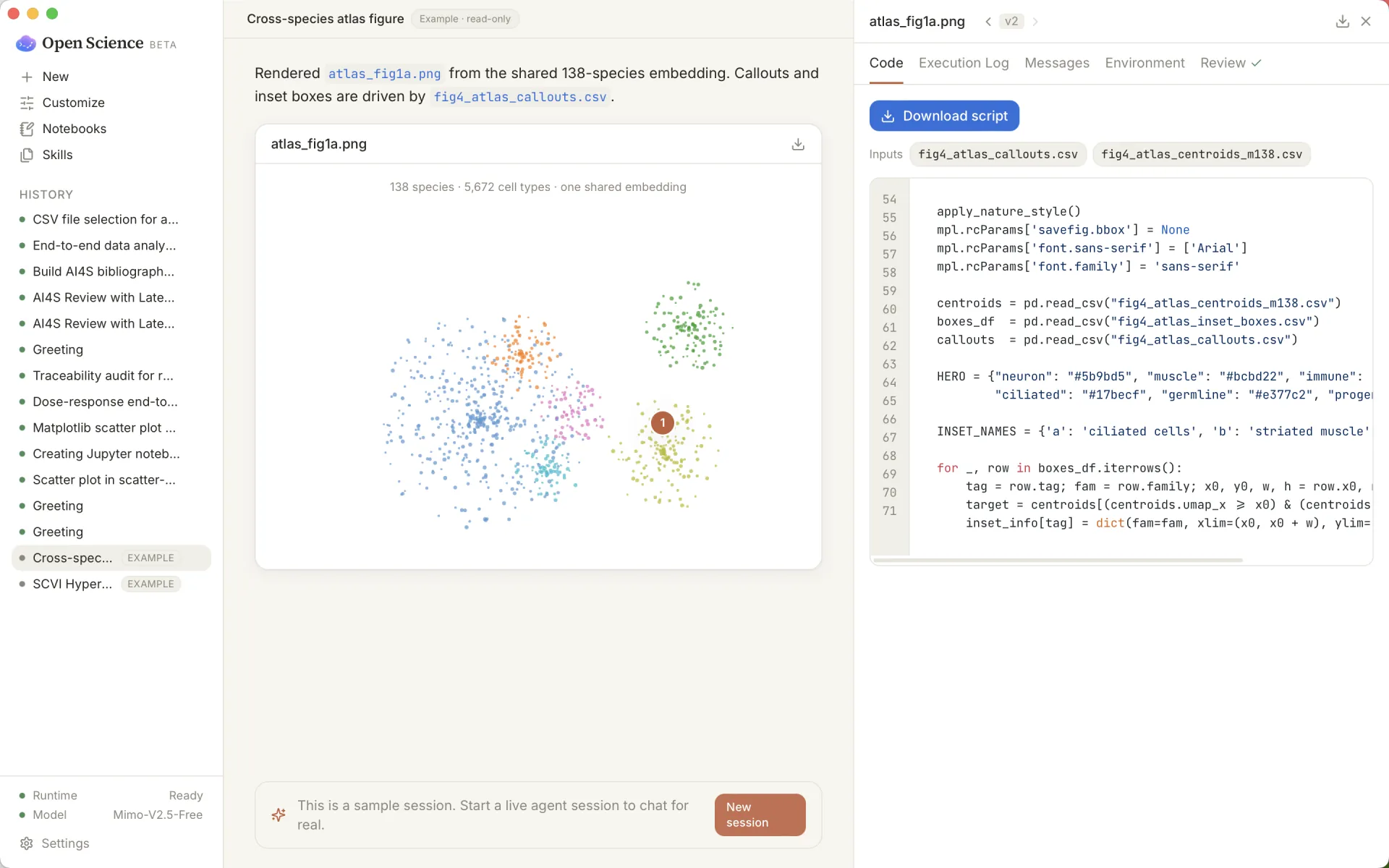
Every artifact traces back to its code, inputs, and conversation — one click on a
figure reveals the script that made it and the versions behind it.
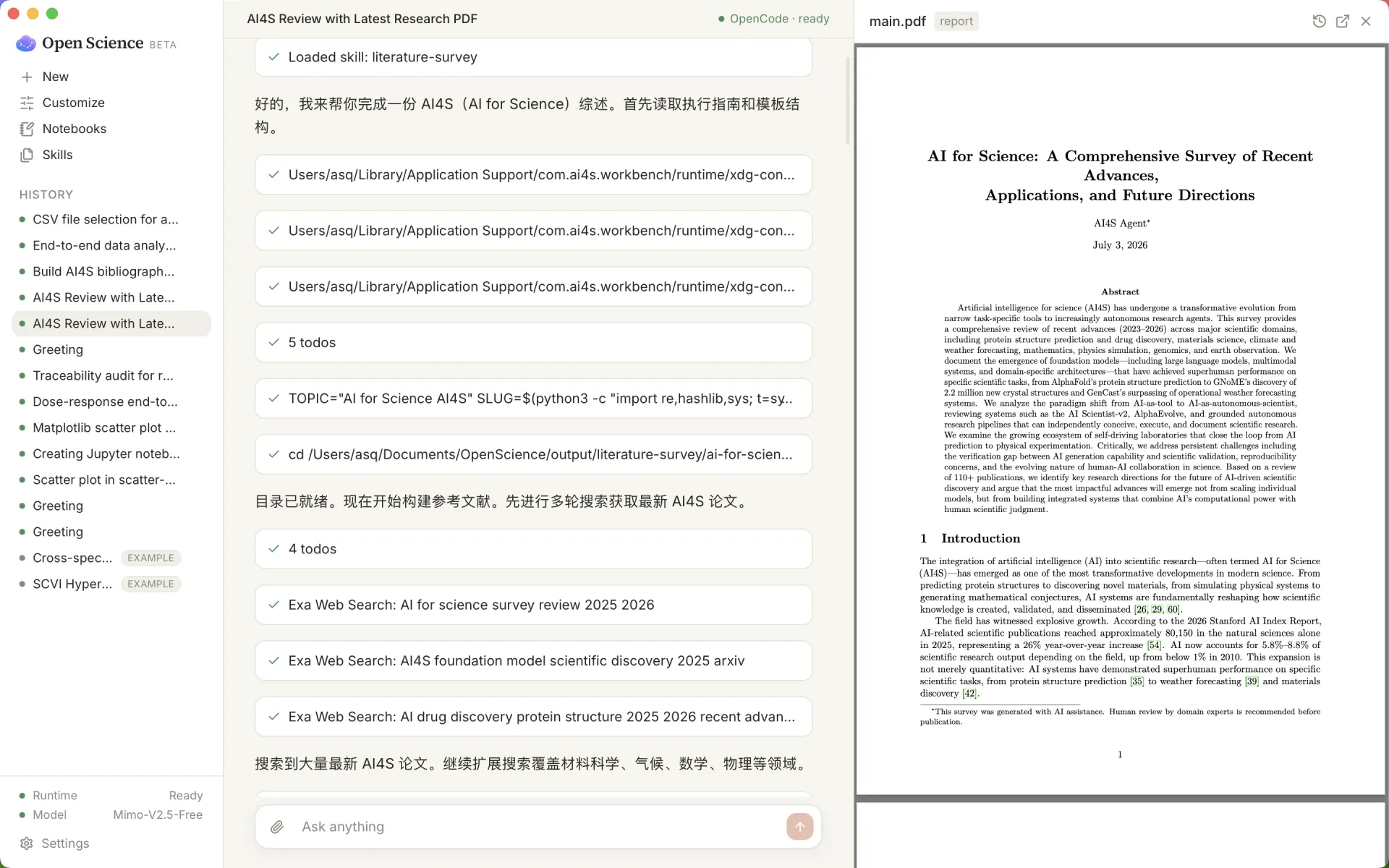
Literature → verifiable report. Search papers, draft a manuscript rendered as a
PDF, and audit it for citations, unsourced numbers, and figure↔code consistency.
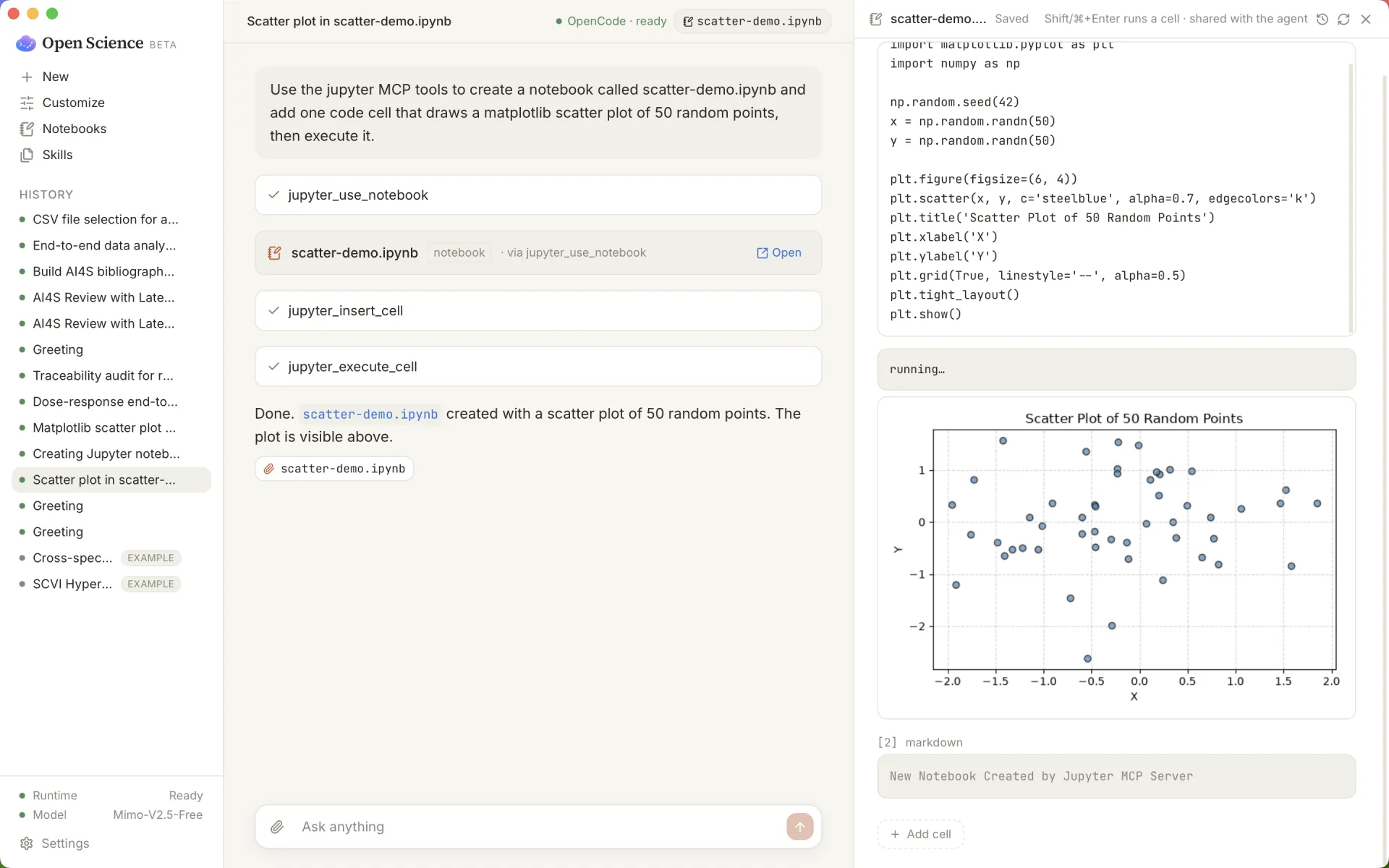
Conversation-first notebooks. The agent drives a real Jupyter kernel; cells and
figures appear live beside the chat.
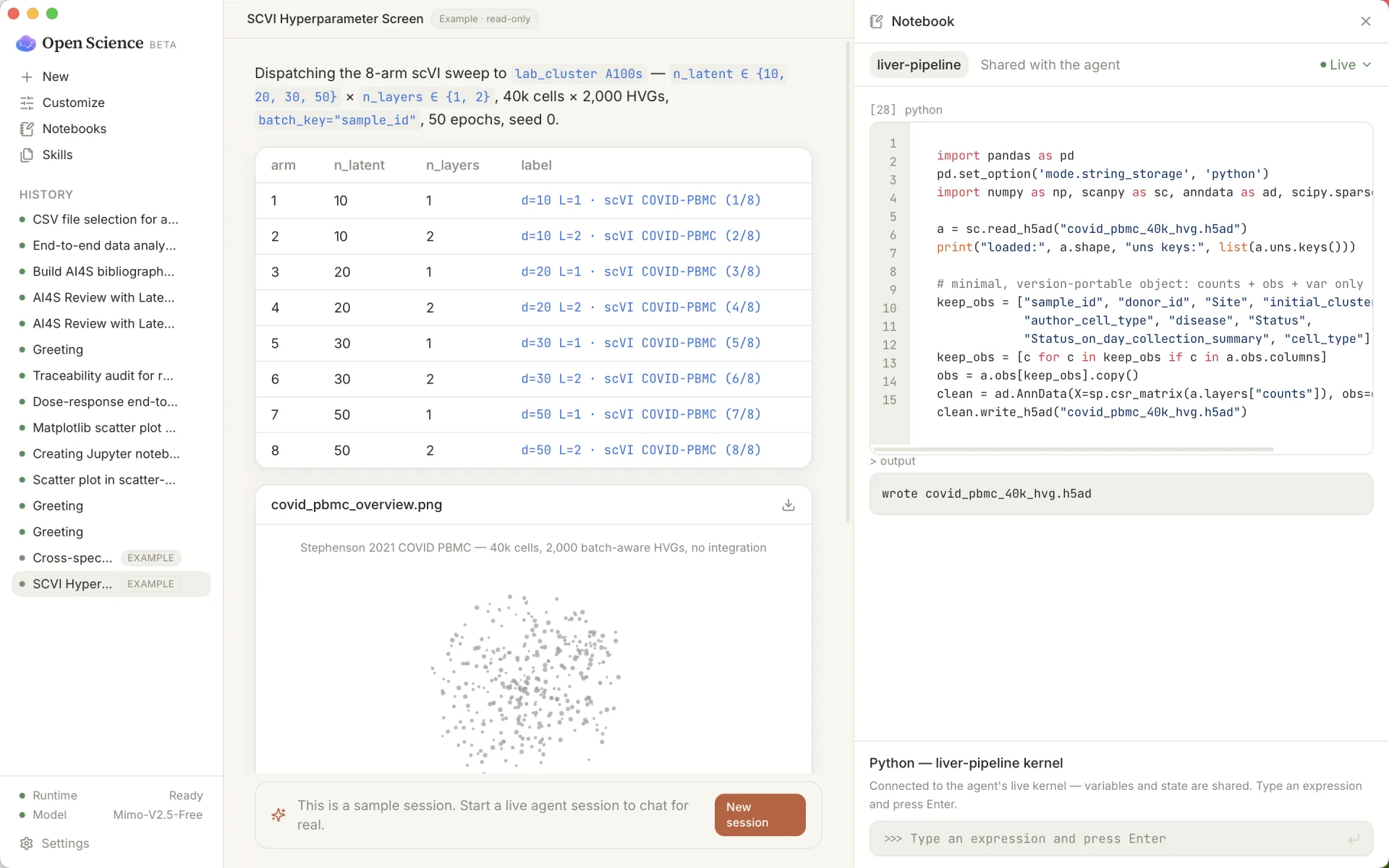
Run and track experiments. Sweep parameters, keep a persistent kernel, and surface
results as traceable artifacts.
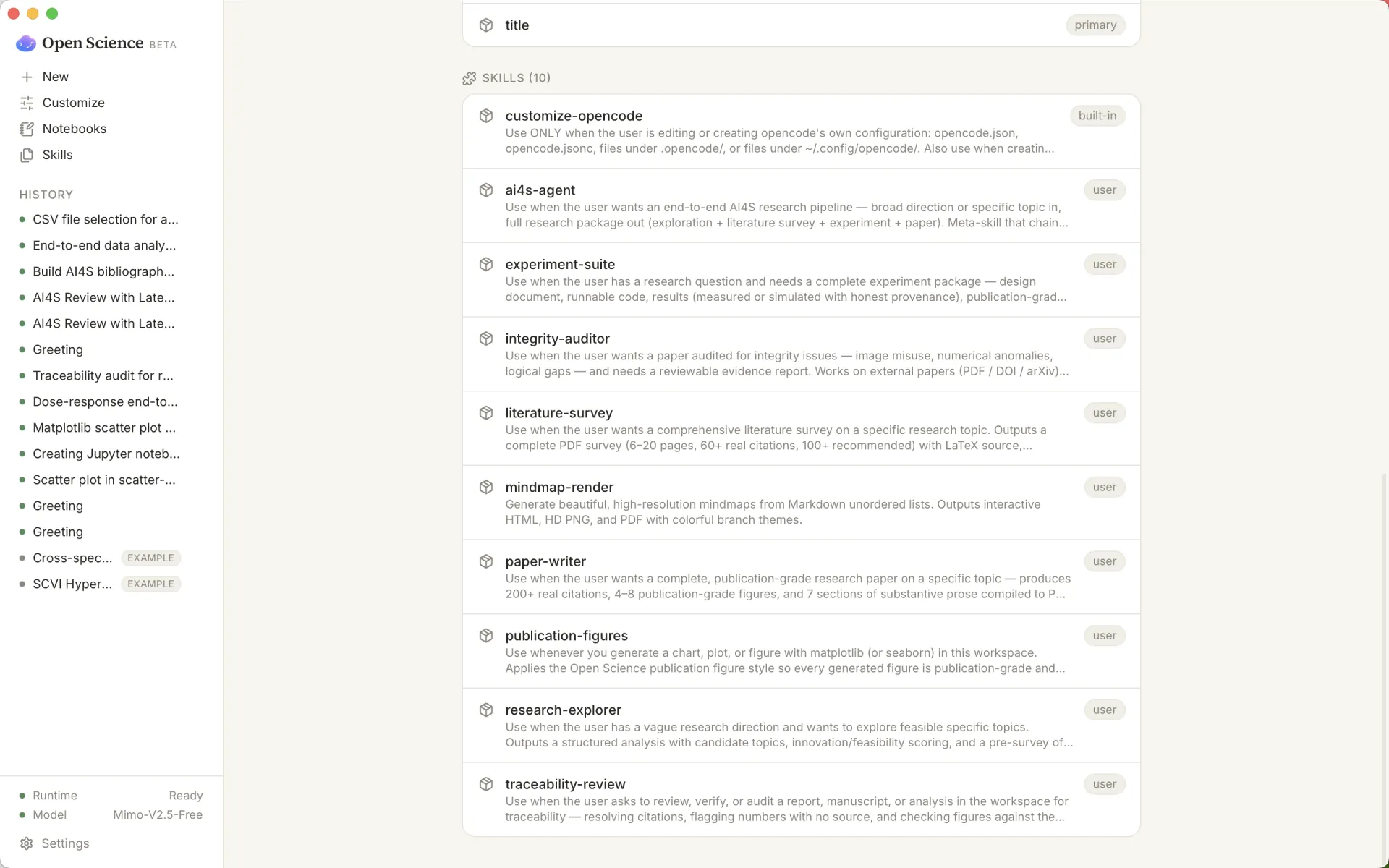
Pluggable scientific skills. Bundled skills for literature, experiments, figures,
and integrity — plus one-click open-source connectors and bring-your-own.
🧭 How it works
your prompt
   │
   ▼
[ plan ] ──▶ [ approve ] ──▶ [ execute ]           local Python / Jupyter kernel,
   ▲              ▲              │                  shell, MCP tools — on your machine
   │              │              ▼
   │         you answer     [ artifacts ]  ──▶  figures · tables · notebooks · reports
   │        questions /          │                  each linked to code + data + env
   │        permissions          ▼
   └──────────────────────  [ review ]        citation audit · untraceable-number
                                               flags · figure ↔ code consistency
Everything runs through the bundled OpenCode agent runtime
(a single-binary sidecar, pinned and managed by the app). The UI never talks to a
model directly — it goes through a thin SDK, so skills, MCP servers, and model
providers stay pluggable.
🧪 What's inside
| Capability | What it does |
|---|---|
| Full workflow | One prompt drives data → code → figure → report → a reproducible record. One-click starters get you going. |
| Local compute | A persistent local Python kernel and an optional isolated Jupyter environment (provisioned with a bundled uv — your system Python is untouched). |
| Artifact provenance | Every agent write appends a version record to .openscience/provenance.jsonl; a History panel shows each version's code, model, and originating conversation. |
| Traceability reviewer | Resolves citations (Crossref / arXiv / PubMed), flags numbers with no traceable source, and checks figures against the code that made them. |
| Native viewers | Inline PDF, tables, images, HTML, and Office documents; matplotlib/plotly figures render publication-grade by default. |
| One design system | A single validated chart palette shared by native UI and agent-generated matplotlib figures — correct in light and dark. |
| Keyboard-first | A command palette (⌘K) reaches every primary action. |
| Model choice | ~150 providers via OpenCode; BYOK, OpenAI/Anthropic-compatible endpoints, local Ollama, or the free built-in model. |
🔌 Skills & connectors
Bundled scientific skills (agent playbooks the app ships and keeps in sync):
research-explorer,literature-survey,experiment-suite,paper-writer,mindmap-render,integrity-auditor,ai4s-agent— the
ai4s-skills pack.traceability-reviewandpublication-figures— first-party skills for verifiable
review and on-system figures.
One-click open-source connectors (provisioned into an isolated env via the bundled uv):
- Literature — arXiv, PubMed, Crossref, Semantic Scholar, bioRxiv/medRxiv
(paper-search-mcp). - Biomedical — PubMed, ClinicalTrials.gov, genomic variants
(biomcp).
Bring your own — any MCP server (local command or remote URL) or skill; seedocs/CONNECT_YOUR_TOOLS.md.
🚀 Getting started
Prerequisites: Node.js ≥ 20, pnpm 9,
and the Rust toolchain (for Tauri). macOS or Windows.
Build the desktop app from source:
git clone https://github.com/ai4s-research/open-science
cd open-science
pnpm install

# Fetch the pinned sidecars and bundled skills (kept out of git):
bash scripts/dev/fetch-opencode.sh   # the OpenCode agent runtime
bash scripts/dev/fetch-uv.sh         # uv, for isolated Python/Jupyter envs
bash scripts/dev/fetch-skills.sh     # the ai4s-skills pack

# Develop, or build an installer (.dmg / .app / NSIS / .msi):
pnpm --filter @ai4s/desktop tauri dev
pnpm --filter @ai4s/desktop tauri build
On first launch the app starts the bundled runtime automatically and works out of the
box with a free model — pick your own provider anytime in Settings.
Common checks:
pnpm test        # unit tests (Vitest)
pnpm typecheck   # TypeScript
pnpm lint        # ESLint
💬 Using it
- Start from a workflow — the empty session offers one-click starters (run a demo
analysis, analyze your data, audit a report), or just type what you want. - Answer when asked — when the agent needs a decision it asks inline with options;
when it wants to run a command or write a file it asks permission (allow once /
always / reject). Manual approval is the default. - Inspect any artifact — click a figure, report, or notebook to open it in the
right pane; open its History to see every version and jump back to the
conversation that produced it. - Reach anything with ⌘K — the command palette runs every primary action.
- Add data — drop files into the workspace (
~/Documents/OpenScience) or attach
them in the composer; the agent reads and writes there.
🔒 Safety & privacy
- Local by default — your workspace files, raw data, code execution, session
history, and provenance stay on your machine. Settings shows, in plain language,
exactly what is sent to your chosen model provider (your messages and the file /
command output the agent reads for the task) and what never leaves. - Human-in-the-loop — command execution, file deletion, dependency installs, and
remote connections require approval; the app ships in manual-approval mode. - Credentials — provider keys live in an app-private file, never in the workspace,
provenance, logs, or exports.
🗂️ Repository layout
| Path | Purpose |
|---|---|
apps/desktop/ |
Tauri 2 + React + TypeScript + Vite desktop shell (src/ frontend, src-tauri/ Rust) |
packages/shared/ |
Shared domain types and the chart design system |
packages/sdk/ |
OpenCodeClient SDK wrapper (isolates the UI from the runtime) |
packages/ui/ |
Shared UI component library |
runtime/skills/core/ |
First-party scientific skills (traceability-review, publication-figures) |
runtime/skills/external/ |
The bundled ai4s-skills pack (fetched by script) |
runtime/ |
manager, opencode-profile, mcp configuration |
docs/ |
PRD.md, TECHNICAL_DESIGN.md, REQUIREMENTS.md, CONNECT_YOUR_TOOLS.md |
examples/bci-trends/ |
A built-in end-to-end demo project workspace |
scripts/ |
release/ and dev/ scripts (sidecar + skills fetchers) |
📌 Status & roadmap
v0.1, in active development — a working desktop MVP on macOS. SeePROGRESS.md for the log anddocs/REQUIREMENTS.md / docs/PRD.md for
the full spec.
- ✅ End-to-end workflow, artifact provenance, traceability reviewer, local Python
kernel + Jupyter, one-click science connectors, plain-language data-flow, chart
design system, command palette. - 🚧 Next: domain renderers (protein / chemical structures), an R kernel, a Windows
installer, larger multi-file projects, and HPC / Slurm compute.
🤝 Contributing
Issues and PRs are welcome. Keep changes minimal and verifiable, follow the design
principles in AGENTS.md (simple · explicit · clear · complete), and
run pnpm test, pnpm typecheck, and pnpm lint before opening a PR.
⚖️ License
MIT. Bundled third-party scientific skills and connectors carry their own
licenses.
This is beta research tooling. Outputs are drafts — verify numbers, citations, and
claims, and have a domain expert review before any submission or decision.
🙏 Acknowledgments
Built on Tauri, OpenCode, and the
ai4s-skills pack. Thanks to
linux.do — a vibrant tech community where this project is shared
and discussed.
Yorumlar (0)
Yorum birakmak icin giris yap.
Yorum birakSonuc bulunamadi