claude-usage-monitor
Health Pass
- License — License: MIT
- Description — Repository has a description
- Active repo — Last push 0 days ago
- Community trust — 28 GitHub stars
Code Fail
- rm -rf — Recursive force deletion command in install.sh
Permissions Pass
- Permissions — No dangerous permissions requested
This is a terminal statusline plugin for Claude Code that displays your 5-hour and 7-day usage quotas, context window percentage, and token counts directly in your CLI.
Security Assessment
Overall Risk: Low. The plugin reads local Claude Code configuration and session files to calculate your usage statistics. It does not make external network requests, contains no hardcoded secrets, and explicitly states it requires no extra API keys or telemetry. The primary security flag is the presence of a recursive force deletion command (`rm -rf`) within the `install.sh` script. While this is common in shell scripts for cleaning up previous installations, piping `curl` directly to `bash` bypasses your ability to catch malicious changes to that specific command. Fortunately, the developers provide a secure alternative: you can safely audit the code by cloning the repository first and running the local Python installer instead.
Quality Assessment
The project appears to be highly maintained and transparent. It is actively updated (the most recent push was today) and is protected under a standard MIT license. It has earned 28 GitHub stars, indicating a modest but growing level of community trust. The documentation is excellent, clearly explaining what the tool does, how it accesses your data, and exactly how to verify the launcher manually before restarting your development environment.
Verdict
Safe to use, but it is highly recommended to use the manual `git clone` installation method instead of the piping curl to bash, so you can inspect the code and mitigate the risks associated with the `rm -rf` command.
Claude Code statusline plugin for 5-hour/7-day quota, context usage, tokens, and reset countdowns in your terminal.
claude-usage-monitor


Claude Code statusline plugin that shows your quota usage, context, tokens, and reset countdowns directly in the terminal.
No API keys. No telemetry. No dependencies. Runs locally.

Real-time usage tracking - green to yellow to red as your session progresses.
Quickstart
Windows PowerShell
irm https://raw.githubusercontent.com/aiedwardyi/claude-usage-monitor/v0.1.2/install.ps1 | iex
macOS / Linux
curl -fsSL https://raw.githubusercontent.com/aiedwardyi/claude-usage-monitor/v0.1.2/install.sh | bash
What you get
After install, restart Claude Code. Your statusline now shows:
◆ Opus │ my-project/main
▰▰▰▰▱ 75% │ ↑50k ↓12k │ 5h: ▰▰▰▰▱ 80% (1h) │ 7d: ▰▰▱▱▱ 34% │ 2m0s
- 5h / 7d quota - see how much is left before you hit limits
- Context % - see when you're running low before Claude tells you
- Token counts - input and output for the current session
- Reset countdown - know when your quota replenishes
Uses your existing Claude Code OAuth session. No extra API key or Python packages needed. Windows launches Python directly - no Git Bash requirement.
Prefer to audit first
git clone https://github.com/aiedwardyi/claude-usage-monitor.git
cd claude-usage-monitor
git switch --detach v0.1.2
python install.py
On Windows, py -3 install.py works too.
The installer:
- copies launcher files into
~/.claude/plugins/claude-usage-monitor - updates
~/.claude/settings.json(backs up tosettings.json.bakfirst) - runs a launcher smoke check and prints the verify command
Verify manually
If you want to verify the launcher yourself before restarting Claude Code:
- Windows:
type nul | "C:\Users\you\.claude\plugins\claude-usage-monitor\statusline.cmd" - macOS / Linux:
printf '' | bash ~/.claude/plugins/claude-usage-monitor/statusline.sh
What it shows
| Segment | Description |
|---|---|
◆ Opus |
Active model |
my-project/main |
Project name and git branch |
▰▰▰▰▱ 75% |
Context window remaining |
↑50k ↓12k |
Input and output tokens |
5h: ▰▰▰▰▱ 80% (1h) |
5-hour quota remaining with bar and reset countdown |
7d: ▰▰▱▱▱ 34% |
7-day quota remaining with bar |
2m0s |
Session duration |
All three bars show remaining % - they start full (green) and drain toward empty (red) as you use more. Set CQB_REMAINING=0 for used % instead.
Color coding
| Color | Meaning |
|---|---|
| Green | Under 70% used |
| Yellow | 70-90% used |
| Red | Over 90% used |
Trust and security
At runtime, the tool:
- reads Claude Code session JSON from
stdin - reads
~/.claude/.credentials.jsonforclaudeAiOauth.accessToken(unlessCLAUDE_CODE_OAUTH_TOKENis set) - runs
git rev-parse --abbrev-ref HEADfor the branch name - writes
claude-sl-usage.jsonandclaude-sl-usage.lockin your system temp directory - makes one HTTPS request to
https://api.anthropic.com/api/oauth/usage
It does not install dependencies, collect telemetry, or send any local data besides the usage API call.
The installer writes only to:
~/.claude/plugins/claude-usage-monitor/~/.claude/settings.json(with.bakbackup)
More detail in SECURITY.md.
Requirements
- Claude Code CLI with an active subscription
- Python 3.10+ (
python3,python, orpy -3) - macOS / Linux:
bash - Windows: no Git Bash requirement
How it works
- Claude Code pipes session JSON into the launcher on every refresh.
statusline.pyparses the payload and reads your Claude Code OAuth token.- It calls Anthropic's usage endpoint to fetch 5-hour and 7-day utilization.
- Results are cached in your system temp directory for 5 minutes.
- The script prints a two-line ANSI statusline.
The first render may show 5h: -- and 7d: -- until the background fetch completes.
Compatibility
| Platform | Launcher | Status |
|---|---|---|
| Windows 11 | statusline.cmd |
Tested |
| macOS | statusline.sh |
Tested in CI |
| Linux | statusline.sh |
Tested in CI |
Customization
Every segment is toggleable via environment variables. Set them in your shell profile or in ~/.claude/settings.json:
{
  "env": {
    "CQB_PACE": "1",
    "CQB_CONTEXT_SIZE": "1",
    "CQB_COST": "1"
  }
}
| Variable | Default | Description |
|---|---|---|
CQB_TOKENS |
1 |
Show token counts |
CQB_RESET |
1 |
Show reset countdowns |
CQB_DURATION |
1 |
Show session duration |
CQB_BRANCH |
1 |
Show git branch |
CQB_CONTEXT_SIZE |
0 |
Show context size label such as of 1M |
CQB_PACE |
0 |
Show pacing indicator |
CQB_COST |
0 |
Show session cost |
CQB_REMAINING |
1 |
Show remaining % (fuel gauge) for quotas; set 0 for used % |
CQB_BAR |
1 |
Show visual progress bar next to 5h/7d quotas |
Presets
Maximal

{ "env": { "CQB_PACE": "1", "CQB_CONTEXT_SIZE": "1", "CQB_COST": "1" } }
Minimal
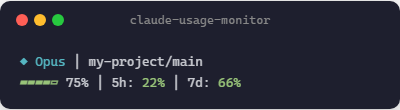
{ "env": { "CQB_TOKENS": "0", "CQB_RESET": "0", "CQB_DURATION": "0" } }
Heavy context
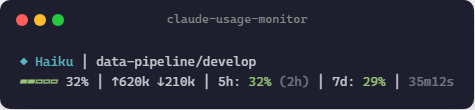
Critical usage
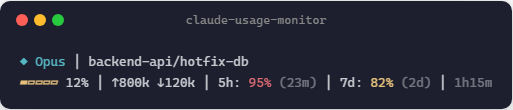
Manual install
git clone https://github.com/aiedwardyi/claude-usage-monitor.git
cd claude-usage-monitor
git switch --detach v0.1.2
python install.py
On Windows, py -3 install.py works too.
Or update ~/.claude/settings.json yourself:
{
  "statusLine": {
    "type": "command",
    "command": "bash /path/to/statusline.sh",
    "padding": 0
  }
}
On Windows, use the absolute path to statusline.cmd instead.
Uninstall
- Remove
~/.claude/plugins/claude-usage-monitor/ - Edit
~/.claude/settings.jsonand remove thestatusLineentry (restore.bakif needed) - Restart Claude Code
Troubleshooting
The launcher check fails
Make sure python3, python, or py -3 works from your shell.
The statusline shows 5h: -- | 7d: --
The first API call runs in the background. Wait a few seconds and let Claude Code refresh.
The statusline shows 5h: no token | 7d: no token
The usage API requires an OAuth login. If you logged in with an API key, run claude login to authenticate via browser instead. The OAuth token is stored in ~/.claude/.credentials.json.
Unicode characters look wrong
Use a UTF-8 terminal font. On older Windows terminals, run chcp 65001.
I want to inspect the network behavior
Read statusline.py and SECURITY.md. The only network call is to https://api.anthropic.com/api/oauth/usage.
Contributing
Issues and pull requests are welcome. Start with CONTRIBUTING.md.
If this is useful to you, a star helps others find it.
License
MIT
Reviews (0)
Sign in to leave a review.
Leave a reviewNo results found