apple-notes-mcp
Health Uyari
- License — License: MIT
- Description — Repository has a description
- Active repo — Last push 0 days ago
- Low visibility — Only 5 GitHub stars
Code Basarisiz
- rm -rf — Recursive force deletion command in package.json
- exec() — Shell command execution in src/db.ts
Permissions Gecti
- Permissions — No dangerous permissions requested
This MCP server enables AI clients to read, write, and search Apple Notes with native formatting support on macOS. It bridges local Notes data and AI tools, requiring macOS 26 (Tahoe) and Node.js 24+.
Security Assessment
Risk Rating: High. This tool accesses highly sensitive data—your entire Apple Notes database—requiring Full Disk Access. It also needs macOS Accessibility permissions to auto-confirm system dialogs. The audit found critical code concerns: it uses `exec()` for shell command execution and includes a recursive force deletion (`rm -rf`) command. While no dangerous hardcoded secrets or network requests were flagged, the combination of full disk access, accessibility controls, and shell execution represents a significant local threat profile. Granting these permissions to Node.js means any compromised script could control your system and read your files.
Quality Assessment
The project is very new and lacks community validation, evidenced by only 5 GitHub stars (low visibility). However, it is actively maintained with a recent push (0 days ago) and includes a clear description and an MIT license. The documentation is thorough, providing clear setup steps and detailing exactly what permissions are needed and why.
Verdict
Not recommended for daily use. The combination of extensive system permissions, shell execution, and force deletion commands poses too high a security risk for a tool that is not yet battle-tested by the broader community.
Read and write Apple Notes, with Apple Notes native formatting support
Apple Notes MCP Server
Read and write Apple Notes, with Apple Notes native formatting support.

Most Apple Notes MCP servers can only write plain text. This one creates natively formatted notes — Titles, Headings, Bold, Lists all render as real Apple Notes styles, not plain text. This is achieved by leveraging Notes.app's built-in Markdown import capability.
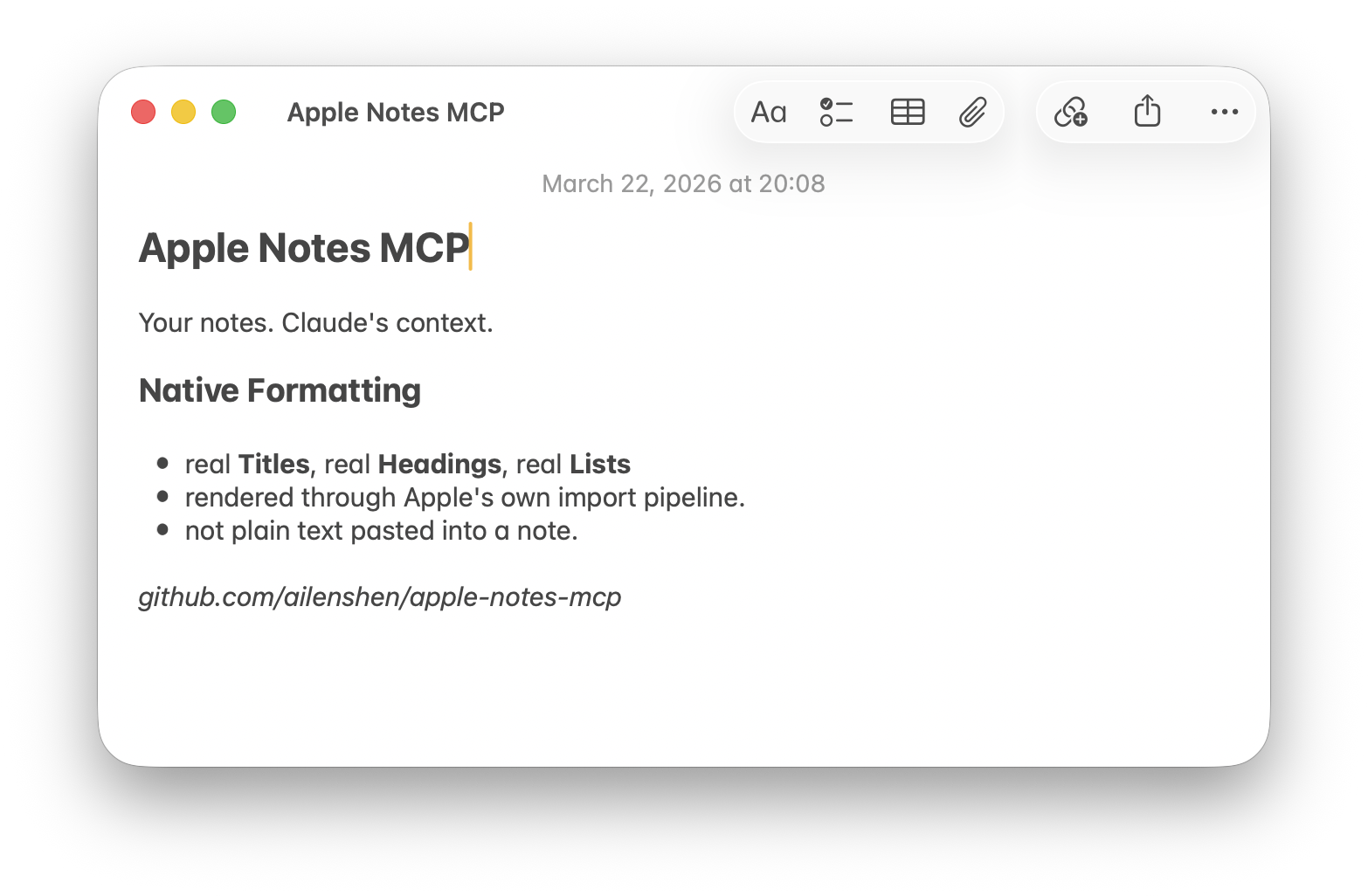
Requires: macOS 26 (Tahoe) or later, Node.js 24+
Setup
1. Add to your MCP client
Claude Desktop — edit ~/Library/Application Support/Claude/claude_desktop_config.json:
{
  "mcpServers": {
    "apple-notes": {
      "command": "npx",
      "args": ["-y", "@ailenshen/apple-notes-mcp@latest"]
    }
  }
}
Claude Code — run in Terminal:
claude mcp add apple-notes -- npx -y @ailenshen/apple-notes-mcp@latest
2. Grant permissions
To support native formatting, the server uses Notes.app's built-in Markdown import — it opens .md files with Notes.app and automatically confirms the Import dialog. This requires two macOS permissions for node:
| Permission | Where to enable | Why |
|---|---|---|
| Full Disk Access | System Settings > Privacy & Security > Full Disk Access > enable node |
Read the Notes database for listing and searching |
| Accessibility | System Settings > Privacy & Security > Accessibility > enable node |
Auto-confirm the Import dialog when creating notes |
On first use, macOS will prompt you to approve — just click Allow. If you missed the prompt, go to the settings above and turn on node manually. After granting, restart your MCP client.
If a permission is missing, the server will tell you exactly which one and how to fix it.
3. Start using it
Just talk to your AI naturally:
- "List all my notes in the Projects folder"
- "Search my notes for 'meeting agenda'"
- "Read my Shopping List note"
- "Create a note in Work with today's action items"
- "Update my Shopping List with these new items"
- "Delete the note called 'Old Draft'"
What Can It Do?
| Tool | Description |
|---|---|
list_notes |
Browse notes, optionally filter by folder |
search_notes |
Find notes by keyword |
get_note |
Read full content as Markdown |
create_note |
Write Markdown → natively formatted note |
update_note |
Replace content, preserving folder |
delete_note |
Move to Recently Deleted |
Markdown support in Notes
| Element | Works? |
|---|---|
Headings, bold, italic, lists, inline code |
Yes |
| Block quotes | Content kept, no indent style |
| Links | Text kept, URL lost |
| Tables, footnotes | No |
Remote Access (HTTP mode)
Want to access your Apple Notes from your phone or another computer?
npx @ailenshen/apple-notes-mcp@latest --http
This prints an endpoint URL with a built-in secret:
Endpoint: http://localhost:3100/mcp/a3f8b2c9e1d4...
Point your remote MCP client to this URL. To access over the internet, put it behind HTTPS using a tunnel (ngrok, Cloudflare Tunnel, etc.).
| Flag | Default | Description |
|---|---|---|
--port <number> |
3100 | Port number |
--secret <string> |
random | Custom URL secret |
To keep it running across reboots, see the wiki for a LaunchAgent example.
How It Works
| Action | Method | Speed |
|---|---|---|
| List / Search | SQLite (read-only) | < 100ms |
| Read | AppleScript → Markdown | ~1s |
| Create | Native Markdown import | ~0.5s |
| Update | Delete + Create | ~1.5s |
| Delete | AppleScript | ~1s |
- Reading queries the Notes database directly via SQLite — fast and safe. Content is converted from Apple's HTML to Markdown via turndown.
- Creating uses macOS's native Markdown import (
open -a Notes), so formatting is preserved natively. Notes.app briefly appears (~0.5s) during creation. - Updating deletes the old note and creates a new one, automatically preserving the original folder.
- Deleting moves notes to Recently Deleted, same as doing it by hand.
Known Limitations
- Partial note editing (e.g. "fix just this paragraph") is not supported.
update_notealways replaces the full content. This is a fundamental limitation of how Notes exposes content — its AppleScript interface returns HTML, not the original Markdown, so a clean read→edit→write round-trip isn't possible today. - Notes briefly appears during note creation. The Markdown import flow requires auto-confirming a dialog in Notes.app, which may momentarily bring it to the foreground.
These limitations would be lifted if Apple adds Markdown import/export to AppleScript, or opens an official Notes API — both are tracked for future macOS releases.
Vision
Apple Notes is the most natural place to keep personal knowledge on Apple devices — it syncs everywhere, it's fast, and it's private. But it's a walled garden with no API.
This project makes Apple Notes a first-class data source for AI. The long-term goal: wherever you're talking to AI — on your Mac, on your phone, on the web — your Apple Notes are always accessible, readable, and writable.
License
MIT
Yorumlar (0)
Yorum birakmak icin giris yap.
Yorum birakSonuc bulunamadi