atelier-cms
Health Uyari
- License — License: NOASSERTION
- Description — Repository has a description
- Active repo — Last push 0 days ago
- Low visibility — Only 8 GitHub stars
Code Uyari
- process.env — Environment variable access in .github/workflows/release.yml
Permissions Gecti
- Permissions — No dangerous permissions requested
Bu listing icin henuz AI raporu yok.
Run your website by talking to it — the open-source, self-hosted AI-native CMS. Built on Drupal; export the output as a static site and deploy it anywhere.

Atelier
Run your website by talking to it.
The AI-native CMS, by AIncient Labs.
Create, find, update, and publish content through an AI operator console —
no admin forms, no jargon, no SaaS login.




Quick start · See it work · Publish anywhere · Why Atelier · Whats inside · License
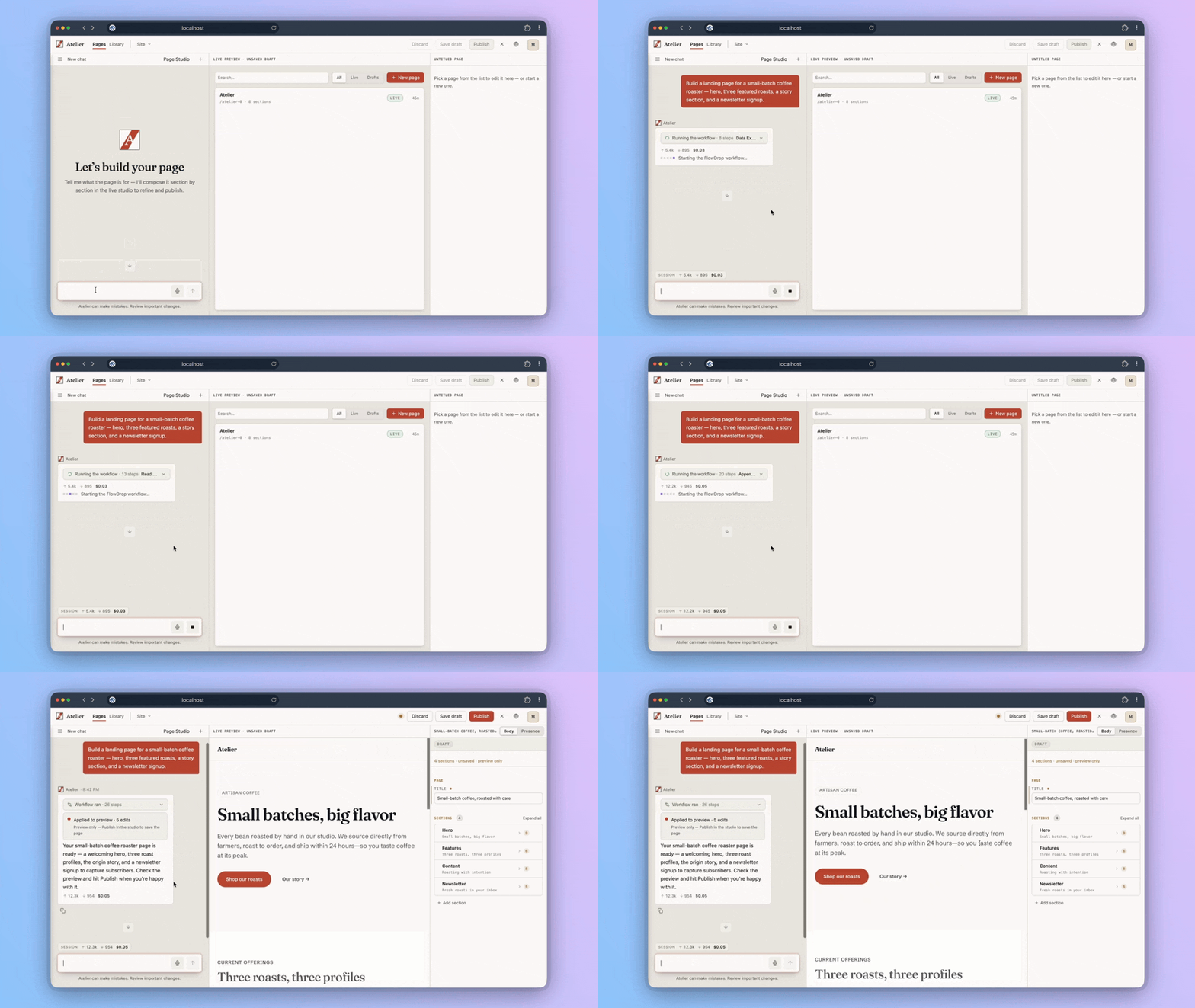
One sentence → a real page. Watch the full ~2-minute demo →
Quick start
On macOS or Linux, the smoothest path is the atelier CLI —
one Homebrew install gives you a managed appliance you can update, back up, and restore with a
single command:
brew install aincient-labs/tap/atelier
atelier app install     # pulls the image and starts your site
atelier app open        # opens the operator console in your browser
atelier app install is idempotent and keeps everything under ~/.atelier. First boot configures
the site by itself; when it settles you land in the operator console at /atelier (or open
http://localhost:41221/ directly).
No account to create, no key to paste in a config file, nothing held back for a paid tier —
you're now running the real product. Later, atelier app update upgrades in place with automatic
rollback, and atelier data backup / restore snapshot your whole site.
No Homebrew, or a headless Docker host? The one-line installer does the same first-run in
a single command — see Running Atelier for that and the manual path.
See it work in 30 seconds
▶ Watch the full demo — one sentence builds a coffee-roaster site, then
atelier site exportships it to Cloudflare Pages:
Watch on YouTube ·
on the site ·
direct MP4.
Log in. Atelier drops you straight into the operator console at
/atelier.Connect an AI provider in the first-run wizard — an Anthropic or OpenAI key, or a
local Ollama server. Keys live in the site's state storage, never in
code or config.Just say what you want:
"Write a short article about the Rosetta Stone and save it as a draft."
Watch the assistant pick the right tool, create the content, and report back — in one turn.
From there it's a conversation:
"Find the article about pyramids and unpublish it."
"Rename that to … and publish it."
"Delete it."
Full content management, by chat. Everything happens under your account and permissions —
the assistant can't do anything you couldn't do yourself.
Publish your site anywhere
Atelier isn't a walled garden. Any site you build can be exported as a plain static snapshot and
hosted wherever you like — no lock-in, no running server required:
atelier site export --base-url https://your-domain.com
atelier site export renders your pages to ordinary HTML, CSS, and assets with a built-in link
check, and drops the result in ./aincient-export ready to deploy. The
atelier-deploy-template
repo is pre-wired to publish that export to Netlify, Cloudflare Pages, Vercel, or GitHub Pages —
grab a host in one click, then drop your export in:

Full walkthrough (including drag-and-drop and GitHub Pages):
Host your exported site.
Why we build this
Working with a serious website should be as simple as saying what you want. You shouldn't
need to know what a content type or a view is to run one — especially if you've never touched
Drupal. Our aim, as far as a free and open-source project can carry it, is to make Drupal plus
everything happening in AI genuinely approachable.
- 🎯 A product, not a kit of parts. Atelier ships as a versioned container appliance that
installs itself, updates itself, and rolls itself back if an upgrade fails. - 🔓 Everything here is the real thing. Open source, self-hosted, no account, nothing
reserved for a paid tier. In a world where everything cool hides behind a login, we'd like
this to feel different. - 🏛️ Drupal underneath, curated on top. Built on Drupal and
deliberately restricted to the Atelier experience by default. If you know Drupal, the full
platform is yours to unlock. If you don't, you'll never need to.
Need an enterprise arrangement — support, guarantees, commercial licensing? We're happy to
talk. That funds the free product; it never shrinks it.
Running Atelier
Atelier is distributed as a versioned public container image — the image is the product
and the unit of versioning, the way Discourse, GitLab Omnibus, and Ghost are delivered. It's
published to GHCR atghcr.io/aincient-labs/atelier-cms
and is public — no login or token required. All three paths below run that same image; the
only prerequisite is Docker.
Every published image is signed with cosign. The install paths
don't require verification, but if you want it, the public key ships in this repo ascosign.pub:
cosign verify --key cosign.pub ghcr.io/aincient-labs/atelier-cms:latest
Option A — the atelier CLI (recommended · macOS & Linux)
A small Rust CLI that manages the appliance's whole
lifecycle over Docker — install once, then operate with grouped, memorable commands:
brew install aincient-labs/tap/atelier
atelier app install
| Command | What it does |
|---|---|
atelier app install |
Lay down ~/.atelier, pull the image, start the stack. Idempotent. |
atelier app update |
Pull + converge in place, with automatic rollback on failure. |
atelier app status / doctor |
Health and Docker-readiness checks. |
atelier app start / stop / open / password |
Everyday stack management. |
atelier site export |
Export your site to static HTML — deploy it anywhere. |
atelier data backup / restore |
Portable .tar.gz snapshots (database + uploaded files). |
atelier ai model list / set |
Inspect or bind the AI model per role. |
Run atelier --help for the full list.
Option B — one-line installer (any Docker host)
Lays down a Docker Compose stack and starts it, no CLI to install first:
curl -fsSL https://aincient-labs.com/atelier/install.sh | bash
Option C — manual Docker Compose
Everything you need is in docker/dist/:
cd docker/dist
cp .env.example .env    # set HASH_SALT — openssl rand -hex 32
docker compose up -d
Whichever you pick, first boot installs and configures the site on its own. Open
http://localhost:41221/ and log in.
Upgrading
- CLI:
atelier update - Installer / Compose: re-run the installer, or
docker compose pull && docker compose up -d
On every start the appliance converges: it snapshots the database, applies any pending
updates and configuration, health-checks itself, and rolls back automatically if anything
fails. Your content, files, and connected provider keys live in volumes and survive every
upgrade.
See docker/dist/README.md for the full walkthrough (admin login,
ports, reset) and docker/README.md for how convergence works. You can
also build the image yourself from docker/Dockerfile.
Requirements
- Docker with the Compose plugin — the one hard
prerequisite for every path. - An API key for an AI provider (Anthropic, OpenAI, …) or a local Ollama server,
connected through the in-app onboarding wizard. - Optional but recommended: the
atelierCLI (Homebrew, macOS & Linux) for managed
install, updates, and backups.
The appliance bundles PostgreSQL 16 (with pgvector) — the only supported database.
What's inside
Atelier is a deliberately curated Drupal build — an opinionated selection of core and
contributed modules with locked-down defaults, not a stock Drupal site. The product code
lives under web/modules/custom/:
| Module | Role |
|---|---|
aincient_core |
Foundation: shared permissions, the model-role layer, base services. |
aincient_chat |
The streaming chat layer: SSE endpoint, agent loop, thread/turn persistence, the typed event protocol. |
aincient_assistant_ui |
The operator console (React + assistant-ui) and its studios. |
aincient_pages |
Typed page schemas rendered through single-directory components. |
aincient_flows |
FlowDrop integration — site capabilities exposed as agent tool nodes. |
…plus supporting modules (first-run onboarding, brand system, checks/auditing, demo content)
and the front-end themes under web/themes/custom/. (aincient is the product's internal
namespace — AIncient Labs is the company behind Atelier.)
Supported use — and going off the map
Atelier restricts a lot by default. That's the product, not a limitation: an opinionated
selection of modules, locked-down defaults, one supported database (PostgreSQL), one supported
way to run it (the appliance). Install it, let it update itself, and operate the site through
the console.
Know Drupal and want more? "Jailbreaking" Atelier to reach the full platform underneath is
fairly easy — and encouraged. The complete source is right here under the GPL, and everything
Drupal can do is a module or a settings change away. Two caveats: Drupal can do so much that
we can't support what you build past the restrictions, and the appliance re-asserts each
release's configuration on upgrade, so local forks of shipped config will be overwritten by
design.
Contributing
Atelier gets better through the people who run it — and every install and every report
brings us closer to our north star of a million running sites. You don't need to write code to
help:
- 🐛 Try it and break it. Bug reports in the issue queue
are real participation. - 💡 Tell us what's missing. Feature requests and shared experiences shape what ships next.
- 🙋 Ask for help. Questions are welcome — if something confused you, it'll confuse the next
person too.
About this repository
This is the public source home of Atelier. Each release lands as a single snapshot commit
produced by our deployment pipeline, with a plain-language changelog as its message — so the
history here tracks shipped states rather than day-to-day development.
License
- The codebase is GPL-2.0-or-later — see LICENSE. Atelier is free software:
built on Drupal and distributed under the same license. - The operator console's React app,
web/modules/custom/aincient_chat/chat-ui/, is
licensed separately under the permissive MIT license — it's browser-side code, not a
Drupal derivative; see its LICENSE. - Custom Atelier modules and themes are © AIncient Labs.
Third-party credits: ACKNOWLEDGEMENTS.md.
Drupal is a registered trademark of Dries Buytaert.
Yorumlar (0)
Yorum birakmak icin giris yap.
Yorum birakSonuc bulunamadi