self-host
Health Pass
- License — License: Apache-2.0
- Description — Repository has a description
- Active repo — Last push 0 days ago
- Community trust — 1448 GitHub stars
Code Pass
- Code scan — Scanned 12 files during light audit, no dangerous patterns found
Permissions Pass
- Permissions — No dangerous permissions requested
No AI report is available for this listing yet.
Replace the SaaS you pay for. One binary installs and runs self-hosted apps at home, no Docker knowledge needed. Terminal dashboard for you, plain commands for your agent.

self-host
Stop renting your software.




Website · Docs · Showreel · Discord
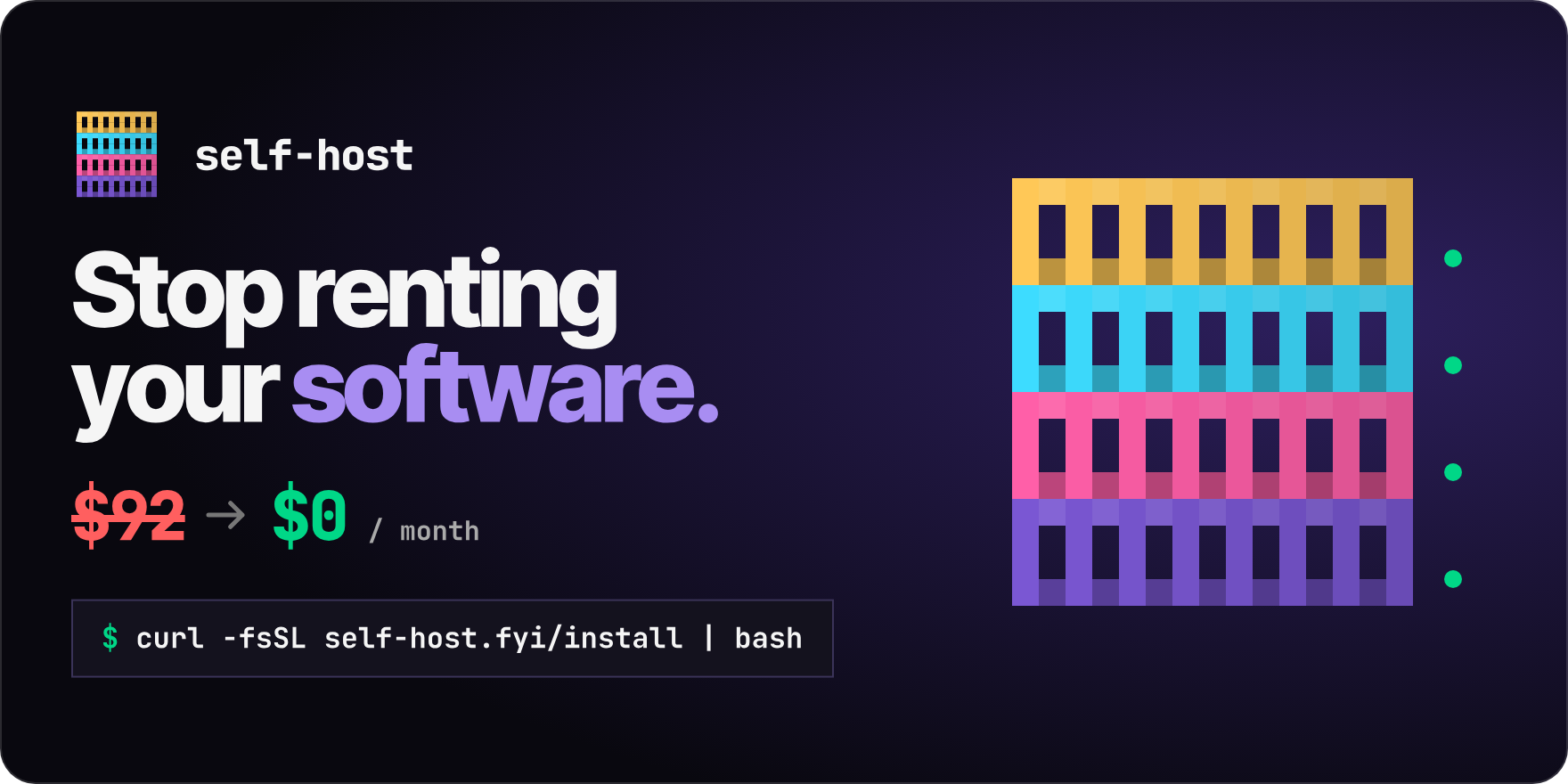
Run self-hosted Apps on your home server or homelab without learning Docker Compose. One binary installs and runs them, with a terminal Dashboard for you and plain commands for your agent.
curl -fsSL https://self-host.fyi/install | bash
That installs only the binary and deploys nothing. Needs Docker with the Compose v2 plugin on Linux, macOS or WSL2. Then run self-host.
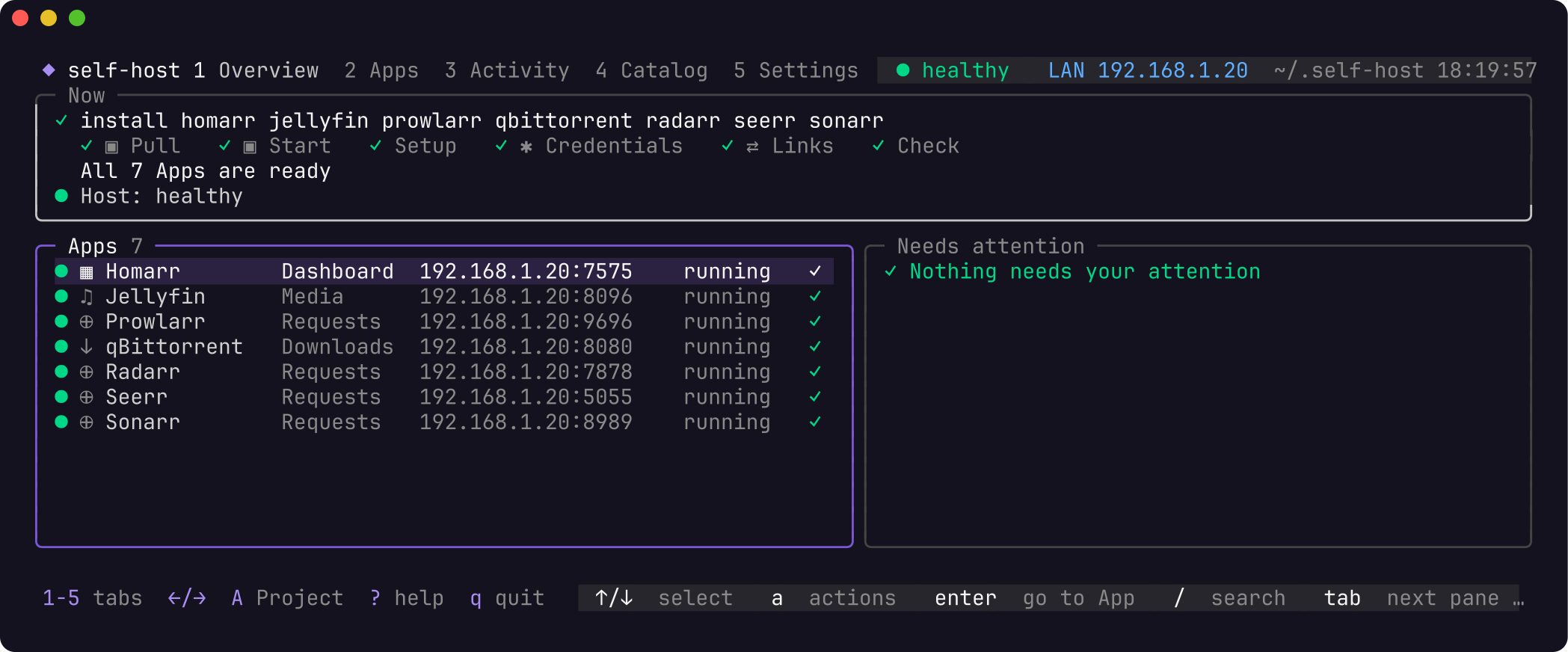
Once your Apps are running, ⭐ star self-host on GitHub. Stars are how other people find it.
Other ways to install (wget, Homebrew, Docker, packages, Arch, archive, source)Every channel installs the same release binary, byte for byte.
| Channel | Command |
|---|---|
| wget | wget -qO- https://self-host.fyi/install | bash |
| Homebrew (macOS) | brew install ajnart/tap/self-host |
| Docker | docker run --rm -it ghcr.io/ajnart/self-host:latest plus socket and Home folder mounts: full command |
| Debian, Ubuntu (.deb) | sudo apt install ./self-host_X.Y.Z_linux_amd64.deb |
| Fedora, RHEL (.rpm) | sudo dnf install ./self-host_X.Y.Z_linux_amd64.rpm |
| Alpine (.apk) | sudo apk add --allow-untrusted ./self-host_X.Y.Z_linux_amd64.apk |
| Arch Linux, Omarchy | sudo pacman -U ./self-host_X.Y.Z_linux_amd64.pkg.tar.zst |
| Release archive | self-host_<version>_<os>_<arch>.tar.gz from Releases, then check it against checksums.txt |
| Go | go install github.com/ajnart/self-host/cmd/self-host@latest |
| From source | git clone https://github.com/ajnart/self-host && cd self-host && go build -buildvcs=false -o ~/.local/bin/self-host ./cmd/self-host |
Packages come from GitHub Releases for amd64 or arm64. Go and source builds need Go 1.26.0+ and cannot self-update.
Update with self-host self-update for the script and the archive. Homebrew, Docker and packages update through their own tool.
To read the install script first: curl -fsSL https://self-host.fyi/install -o install.sh, compare shasum -a 256 install.sh with https://self-host.fyi/install.sh.sha256, then bash install.sh. It verifies the archive against checksums.txt and installs to ~/.local/bin. Version, folder and fork options are in the docs.
What it replaces
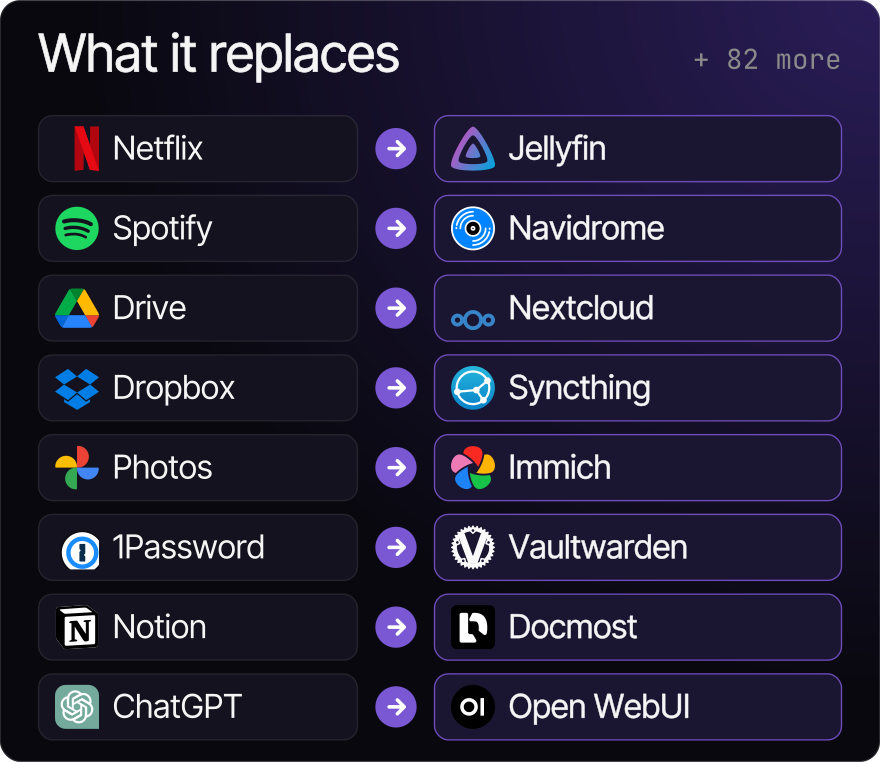
Choose Jellyfin for your media library, Immich for photos, Nextcloud for files or Vaultwarden for passwords, for example self-host install immich. Browse all 93 self-hosted Apps in the Catalog; see Platforms and support for what has been verified.
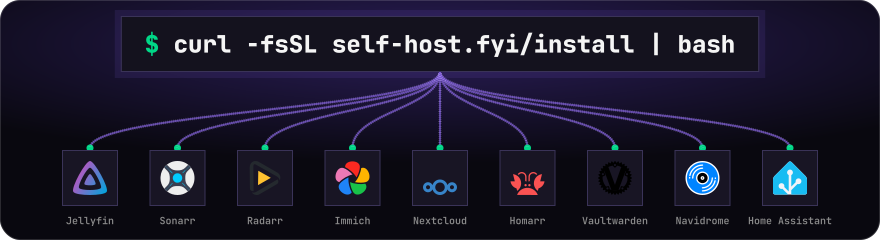
What it does and doesn't do
[!IMPORTANT]
Nothing installs without your approval. Onboarding writes nothing until you approve its plan, and no single Dashboard key changes an App.
The honest list[!NOTE]
Apps are third-party software under their own licences. self-host installs and connects them; it does not own or maintain them.
| ✅ Does | ❌ Doesn't |
|---|---|
| Ships the Catalog inside the binary: 93 Apps and 7 Recipes. | Install Docker for you. self-host doctor checks it. |
| Runs headless Setup for each App: accounts, API keys, settings. | Touch anything outside its one Compose Project in ~/.self-host. |
| Wires Apps together with Links, and gives Homarr native tiles. | Back up media libraries or data outside App folders. |
| Shows a five-tab Dashboard (Overview, Apps, Activity, Catalog, Settings). | Run on native Windows. Use WSL2. |
| Offers Access from the Home network to Tailscale, Cloudflare or your own proxy. | Ship indexers, trackers or content sources. |
| Backs up and restores with optional encryption. | Prove safe version-to-version migration. Update checks are not migration tests. |
Gives agents plain commands with --json output. |
Make every App work: one is hidden (details). |
A Recipe is a pre-wired bundle: media is qBittorrent, Sonarr, Radarr, Prowlarr, Jellyfin and Seerr.
With an agent
Paste this into Claude Code, Codex, OpenCode, OpenClaw or any coding agent:
Use https://self-host.fyi/llms.txt to help me set up my own home server. Ask what I want to run, explain the plan, and wait for my approval before installing.
Or write the shared skill and dedicated folders for supported agents installed on the machine:
self-host skill install
Your agent needs permission to run commands on the computer hosting your Apps.
See With an agent, including the OpenClaw section.
The one public skill, skills/self-host/SKILL.md, only routes to the guide built into the binary. Print it with self-host skill. Agents also read https://self-host.fyi/llms.txt.
Agents follow inspect → plan → approval → apply → verify. Loading the skill is intent, never approval: every change needs the person's explicit yes.
self-host doctor --json
self-host apps list --json
# only after the person approves:
self-host install ntfy --exposure local --yes --json
self-host status --json
- Pass secrets with
--set-file app.key=/path, never as arguments. They land only in the Project'ssecrets.env. - Exit codes:
0success,1error,2incomplete Setup,3only Manual steps remain. - A running container or HTTP 200 is not acceptance. Check that the App does its job.
All flags, events and the isolated Project setup are in the agent docs.
Reaching your Apps
Home network by default. Each change needs your approval.
Anything reachable from the internet needs its own explicit yes that names the risk. Do not forward port 80 on your router for Easy names.
Access options| Access | What you get | Status |
|---|---|---|
| Home network (default) | http://192.168.1.20:8096. Ports publish on all host interfaces. |
Verified 2026-10-14 on Linux (#499) and 2026-10-17 on macOS with OrbStack (#502). Another device was not tried on macOS. |
| This computer only | 127.0.0.1 (--exposure local). |
Verified 2026-10-26 on WSL2, opened from Windows through localhost forwarding (#502). |
| Easy names at home | http://jellyfin.192-168-1-20.sslip.io, through one managed Caddy. |
Verified 2026-10-14 on Linux with rootless Docker, from a second machine (#500). Not yet verified on macOS (#502). |
| From anywhere, privately | Tailscale, one HTTPS node per App. | Verified 2026-10-26 from another tailnet device, with the fix in v0.6.3 (#502). |
| Your own web address | Cloudflare Tunnel plus a login page. | Verified 2026-10-26 with a real domain: from outside, the App answered with the Cloudflare login page, and self-host cloudflare remove took it down again (v0.6.2, #502). |
| Bring your own | self-host access export for SWAG, Pangolin, Nginx Proxy Manager, Traefik or Caddy. |
Not yet verified on a real host. |
The IP:port Address is always kept as a fallback.
Cannot reach an App from another device? Run self-host debug <app>, then see Access and Troubleshooting.
Backup and Restore
Backup details[!NOTE]
Backups include App folders, Host settings, state and secrets, so keep the archive and its passphrase apart. Media libraries and data outside App folders are not included.
A written archive is not a verified recovery plan: restore into an isolated Project and check the data.
self-host backup --encrypt
self-host restore <archive> [app]
Commands
Everything the Dashboard does is also a plain command.
All commandsPrefix with self-host. --verbose (-v) adds detail. --yes authorizes an approved noninteractive install, remove or restore; it is not a preview flag.
| Command | What it does |
|---|---|
doctor |
Check Docker, Compose and the Host, and a Project's Apps and ports. |
host report [--extra] |
Report OS, Docker access and port binds. Changes nothing. |
install <app|recipe>... |
Install Apps or Recipes into the Project. |
status [--updates] |
URLs, container state, health and Setup; optionally check image updates. |
setup [app...] |
Retry unfinished Setup. |
up, down |
Start / remove the Project's containers and networks. down keeps volumes and App files. |
start, stop, restart [app...] |
Operate named Apps, or every installed App when omitted. |
update [app...] |
Pull images, recreate Apps and rerun checks. |
logs <app> [--follow] [--tail N] |
Container logs; default tail is 200 lines. |
remove <app>... [--yes] |
Remove Apps, keep data; --purge also deletes their data folders. |
config set KEY=value... |
Change Host settings and recreate affected Apps. |
config review [--yes] |
Review Host drift; --yes applies detected LAN address and time zone fixes. |
access export --format caddy|nginx|traefik|json |
Print each App's upstream for your own reverse proxy. Changes nothing. |
backup, restore |
See Backup and Restore. |
debug <app> |
Status, failed steps with hints and the last 100 log lines, secrets masked. |
apps list, apps info <app> |
Browse the Catalog. |
apps request <name> [--url URL] |
For agents: report an App the Catalog lacks. |
feedback [-m text] [--app app] |
Send a report to the maintainers after you see the masked text and agree. |
credentials |
Print the Admin login and per-App API keys. |
share |
Print a postable install line and site link for the Apps you run. |
profile, profile set experience |
Show or change what self-host remembers about you, such as your Experience level. |
skill, skill install|remove |
Print the agent guide; make the skill discoverable by your agents, or remove it. |
cloudflare plan|publish|remove |
Publish Apps on your domain behind a login; plan previews. |
self-update |
Replace the binary with the latest checksummed release. |
A Compose folder you add by hand under ~/.self-host/extra/<name>/ is an Unmanaged app: it gets lifecycle, Address listing and Backup, but no Setup.
Links: Apps that wire themselves
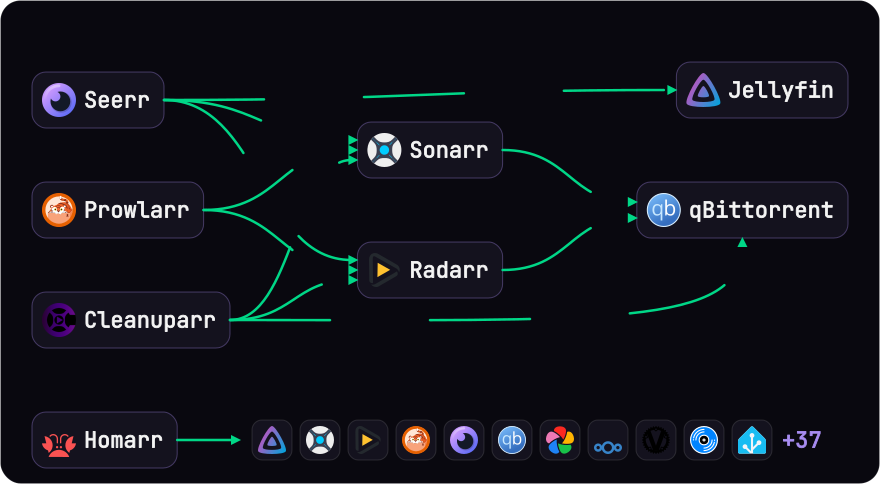
Every App gets headless Setup, and Links connect them: Sonarr and Radarr get qBittorrent, Seerr gets Jellyfin, Homarr gets native tiles.
Which Apps link to whichEach App gets automatic, headless Setup (accounts, API keys, settings). A Link is the part that connects one App to another. It belongs to the consuming App and runs once both have finished Setup.
| Consumer | Linked to |
|---|---|
| Sonarr, Radarr | qBittorrent (download client) |
| Prowlarr | Sonarr, Radarr |
| Seerr | Jellyfin, Sonarr, Radarr |
| Cleanuparr | Sonarr, Radarr, qBittorrent |
| Homarr | native tiles and widgets for the Apps it supports |
A failing Link marks the consuming App as needing attention, not its target. Browser-only steps are reported as Manual steps with a hint and stay retryable: self-host setup <app>. Homarr Links need Homarr 2.4.1 or newer; NZBGet and SABnzbd Links need 2.5.1 or newer. Other versions stop with a recovery hint (back up first). See the Homarr contracts and proof.
Platforms and support
Requirements, validated platforms and the runtime matrixYou need Docker with the docker compose v2 plugin (with include support), write access to the Project and data folders, free published ports, and enough storage and RAM for the Apps. Start with one App; photos, AI and multi-App Recipes need more. Run self-host doctor first.
Each status below is a dated launch run on a real host or VM, linked to its issue. Nothing else counts.
| Platform | Status | Run |
|---|---|---|
| Linux amd64 | Verified 2026-10-14 | Ubuntu 24.04, Debian 12 and 13 VMs. Install and self-update (#497); Onboarding, the Media Recipe with Homarr, Links, Backup and Restore (#499). |
| Linux amd64, Docker denied | Verified 2026-10-14 | sudo "$(command -v self-host)" installs the Media Recipe and the Project stays yours (#498). |
| Linux amd64, rootless Docker | Verified 2026-10-14 | Debian 13: a Recipe installs, and Easy names open from a second machine (#500). |
| Linux arm64 | Verified 2026-10-14 | Debian 12 VM: install and one Recipe (#501). |
| macOS arm64 with OrbStack | Verified 2026-10-17 | v0.5.11, Photos and cloud files Recipe, Home network Access (#502). |
| macOS with Docker Desktop | Not yet verified on a real host | Not run (#502). |
| Intel macOS | Not yet verified on a real host | Not run (#502). |
| WSL2 | Verified 2026-10-26 | v0.6.2 on Windows Server 2025 with WSL2 (Ubuntu 24.04, Docker Engine): Photos and cloud files Recipe, This computer only Access, opened from Windows (#502). |
| Native Windows | Unsupported | Not supported. |
Known issues from these runs, both fixed in v0.6.0: a newcomer saw Nextcloud's Homarr credential-recovery inputs and Review listed port 7575 (#589); removing the last App left its network and down refused (#590).
One App, Passbolt (#456), is hidden from new installs until it passes on a VM. BookStack, LLDAP and Speedtest Tracker passed a VM run on 2026-10-25 and are offered again. Existing installs keep working (#493). Apps beyond those in the runs above have no launch run, so the older runtime matrix, a 2026-10-07 snapshot, is a pre-launch record, not a promise.
Docker socket denied? Run sudo "$(command -v self-host)". The Project, config and cache stay yours. Rootless Docker also works.
Troubleshooting
Common fixes| Symptom | Fix |
|---|---|
self-host: command not found |
Add ~/.local/bin to PATH. |
| Docker missing or stopped | Install or start it, then self-host doctor. |
| 403 rate limit on install | SELF_HOST_GITHUB_TOKEN="$(gh auth token)" before bash, or wait an hour. |
curl error but the command seems to succeed |
A pipe hides curl's exit status; use set -o pipefail in scripts. |
| Native Windows | Unsupported. Use WSL2. |
More in the troubleshooting docs.
Responsible use
[!WARNING]
self-host installs and connects software; what you do with it is your responsibility. Download clients, indexers and media automation have legitimate uses: Linux ISOs, public-domain and Creative Commons works, and media you own or are licensed to copy. We do not condone piracy and do not help anyone find or download content they have no right to. self-host ships no indexers, trackers or content sources. Follow copyright law where you live and the terms of every service you connect.
The software is provided as is, without warranty (Apache-2.0). The maintainers are not liable for how it is used.
Telemetry
Anonymous, on by default, and easy to turn off.
What is sent, what is not, and how to turn it off| Sent | Never sent |
|---|---|
| A summary when you approve Onboarding's plan (your choices, not your data). | Your machine's host names or file paths. |
| Errors: which command failed, which step, and where in the code. | Secrets, App data or raw error text. |
| The name and homepage host of an App an agent asks for that the Catalog lacks. | IP addresses or locations. |
| Feedback you wrote, only after you see the text and agree. | An ID that identifies you or your machine. |
Nothing is stored to link one run to another. The maintainers use it to see which Apps people install and where Setup breaks. It is never sold or shared.
To turn it off, set SELF_HOST_NO_TELEMETRY=1 or DO_NOT_TRACK=1 (or true). The full list is on the telemetry page.
Docker Compose Maker
Prefer to own the YAML? Docker Compose Maker (DCM) turns the Apps you pick into a docker-compose.yaml and .env, with a Template gallery. self-host.fyi/apps lists every App in the Catalog with the same compose self-host installs, and self-host.fyi/compose adds containers only DCM defines. It lives in dcm/ and also runs standalone: docker run -p 7576:7576 ghcr.io/ajnart/dcm.
Repository layout
| Path | What it is |
|---|---|
cmd/, internal/ |
The Go binary: CLI, Dashboard, the Catalog and every App. |
site/ |
The Astro site at self-host.fyi. |
dcm/ |
Docker Compose Maker, served at self-host.fyi/compose. |
tools/sitegen |
Writes the site's and DCM's data from the Catalog. |
docs/ |
Decisions, agent briefs, release notes and proofs. |
site/ and dcm/ are one bun workspace: run bun install at the root. See CONTRIBUTING.md.
Community and support
- Star the repo if self-host saved you a subscription: it helps others find it.
- Discord: questions and show and tell.
- GitHub Issues: bugs and App requests.
- Support the work: GitHub Sponsors · Ko-fi.
- Contributing: read
CONTRIBUTING.mdandCONTEXT.md, open an issue first, then send a pull request. - New to self-hosting? awesome-selfhosted.
Reviews (0)
Sign in to leave a review.
Leave a reviewNo results found