zotero-ai-summary
Health Pass
- License — License: MIT
- Description — Repository has a description
- Active repo — Last push 0 days ago
- Community trust — 14 GitHub stars
Code Fail
- rm -rf — Recursive force deletion command in install.sh
- exec() — Shell command execution in plugin/lib/image-importer.js
Permissions Pass
- Permissions — No dangerous permissions requested
No AI report is available for this listing yet.
Save AI-generated paper summaries and deep lessons as formatted Zotero child notes.
AI Summary for Zotero



AI Summary for Zotero turns AI-assisted paper reading into structured Zotero child notes. A local Zotero plugin exposes a small HTTP API, and two AI-CLI skills (summary and pinpoint-lesson) use it to save formatted notes with figures, tables, math, and highlights directly beside the paper in your library.
It is built for researchers who already use Zotero and want their AI agent's paper-reading output to become durable Zotero notes instead of loose Markdown files.
Usage
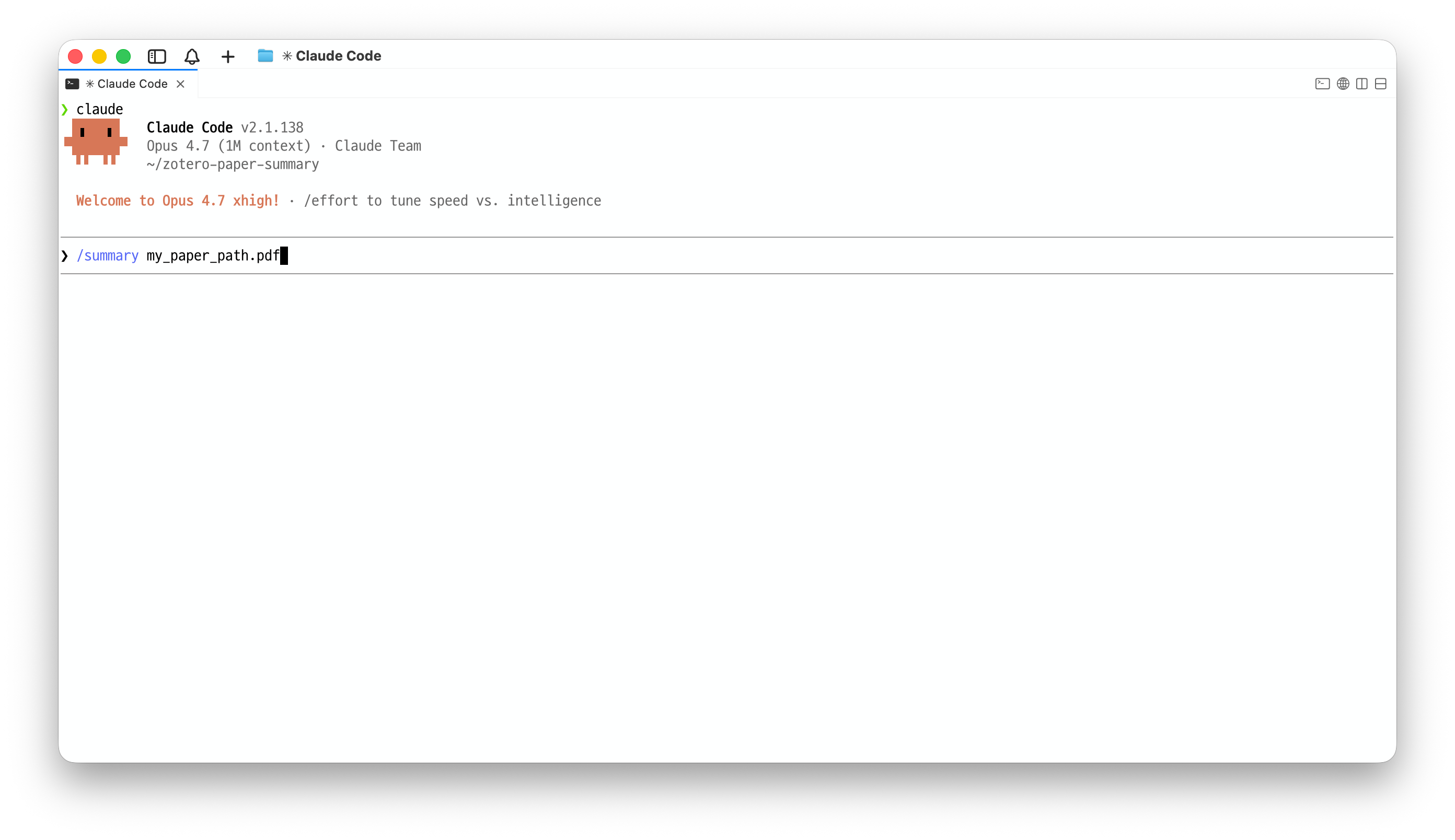
Before using the skills, the Zotero plugin must be installed and enabled. Once the plugin is loaded and the skills are installed, call either skill from your AI CLI:
Recommended CLI.
/summaryand/pinpoint-lessonwork across Claude Code, Codex CLI, and Gemini CLI, but Codex CLI or Claude Code are recommended for more reliable long-form instruction following and Zotero note registration.
Privacy warning. If you send a PDF or extracted paper text to a cloud AI model, assume every word in that PDF becomes public knowledge the moment you submit the prompt. Do not use these skills with confidential, embargoed, private, or otherwise sensitive papers unless you understand and accept that risk.
/summary          <PDF-path | Zotero-paper-title | citation-key> [language: <language>]
/pinpoint-lesson  <PDF-path | Zotero-paper-title | citation-key> [language: <language>]
https://github.com/user-attachments/assets/5f3215e5-6c31-4567-afde-f24433388fc5
Examples:
/summary  /Users/me/papers/DeepSeek-V4.pdf
/summary  /Users/me/papers/attention-paper.pdf  language: Korean

/pinpoint-lesson  "DeepSeek-V4: Scaling Sparse Mixture-of-Experts"
/pinpoint-lesson  @deepseekv42026
/pinpoint-lesson  @paper2026  language: Korean
The agent extracts evidence from the PDF, drafts the Markdown note from the selected skill, and sends it to localhost:23119/aisummary/note. The plugin saves the result as a child note of the matched Zotero item.
Arguments
| Field | Required | Meaning |
|---|---|---|
<skill> |
Yes | summary or pinpoint-lesson. |
<target> |
Yes | Local PDF path, Zotero paper title, or citation key such as @smith2026. Quote titles or paths with spaces if your CLI requires it. |
language: <language> |
No | Output language for note prose, table cells, bullets, and quiz Q/A text. If omitted, the agent uses your request language, then English as fallback. |
The note is always registered under an existing Zotero item. If you pass a local PDF that is not already in Zotero, the agent will ask you to add it first and then retry the lookup.
Installation
Setup has three parts:
The Zotero plugin is required. The skills cannot create Zotero notes by themselves; they send the generated note to the local plugin endpoint at localhost:23119/aisummary/.
| Step | What happens |
|---|---|
| 1. Skills | summary and pinpoint-lesson are copied into your selected AI CLI skill directories. |
| 2. Zotero plugin | The latest zotero-ai-summary-X.Y.Z.xpi is downloaded; you install it through Zotero's plugin manager. |
| 3. Dependencies | Poppler (pdftotext, pdfimages, pdftoppm) and Python 3 are checked. Missing tools are reported with install hints. |
Bootstrap script
/bin/bash -c "$(curl -fsSL https://raw.githubusercontent.com/ajs7270/zotero-ai-summary/main/install.sh)"
The script is interactive. It can install the skills for:
| CLI | Skill paths |
|---|---|
| Claude Code | ~/.claude/skills/{summary,pinpoint-lesson}/ |
| OpenAI Codex CLI | ~/.codex/skills/{summary,pinpoint-lesson}/ |
| Google Gemini CLI | ~/.gemini/skills/{summary,pinpoint-lesson}/ |
Zotero 9 requires plugin installation through the GUI: Tools -> Plugins -> gear menu -> Install Plugin From File... -> select the downloaded .xpi.
To install only one skill:
AI_SUMMARY_SKILLS=summary           bash install.sh
AI_SUMMARY_SKILLS=pinpoint-lesson   bash install.sh
Manual install
Download the latest
zotero-ai-summary-X.Y.Z.xpiand install it through Zotero's plugin manager.Copy the skill folders into your AI CLI's skills directory:
cp -R skill/summary          ~/.codex/skills/summary
cp -R skill/pinpoint-lesson  ~/.codex/skills/pinpoint-lesson

cp -R skill/summary          ~/.claude/skills/summary
cp -R skill/pinpoint-lesson  ~/.claude/skills/pinpoint-lesson

cp -R skill/summary          ~/.gemini/skills/summary
cp -R skill/pinpoint-lesson  ~/.gemini/skills/pinpoint-lesson
Install Poppler and Python 3:
brew install poppler python                  # macOS
sudo apt install poppler-utils python3       # Ubuntu / Debian
sudo pacman -S poppler python                # Arch
Skills
Both skills use the same Zotero plugin, PDF extraction helpers, image pipeline, math rendering path, and HTML sanitizer. They differ only in note depth.
| Skill | Output | Use when |
|---|---|---|
summary |
Concise structured note covering research questions, method, results, limitations, and takeaways. | You want a quick reference summary in Zotero. |
pinpoint-lesson |
Long-form lesson with mathematical preliminaries, idea provenance, method derivation, fundamental "why", and insight quizzes. | You want a deep, reusable, math-grounded lesson note. |
Features
- Zotero-native notes. Results are saved as child notes under matched Zotero items.
- Paper figures included. Raster figures are extracted with
pdfimages; vector-only pages can be rendered withpdftoppm. - Math rendering. Inline LaTeX (
$...$) is converted for Zotero's KaTeX note renderer. - Portable skills. The same skills install into Claude Code, OpenAI Codex CLI, and Google Gemini CLI.
- Self-contained plugin. The converter uses bundled
markdown-it14.x. No companion plugin or web API credentials are required.
Troubleshooting
Zotero is not running. Open Zotero and retry curl http://localhost:23119/aisummary/health.
Plugin is missing or disabled. In Zotero, open Tools -> Plugins and confirm AI Summary for Zotero is installed and enabled. If /aisummary/health returns 404, reinstall the latest .xpi.
Poppler or Python is missing. Install them with brew install poppler python on macOS or sudo apt install poppler-utils python3 on Ubuntu/Debian.
The CLI does not show /summary or /pinpoint-lesson. Confirm the skill folders are in the right CLI directory, then restart the CLI.
Zotero version is too old. The plugin requires Zotero 9.0+.
Development
bash build.sh
# -> dist/zotero-ai-summary-X.Y.Z.xpi

curl http://localhost:23119/aisummary/health
The plugin source is plain JavaScript with no transpile step. markdown-it.min.js is vendored in plugin/lib/vendor/.
Further details:
Acknowledgements
The bundled converter is markdown-it.
License
MIT. See LICENSE.
Reviews (0)
Sign in to leave a review.
Leave a reviewNo results found