CludeGods
Health Warn
- License — License: MIT
- Description — Repository has a description
- Active repo — Last push 0 days ago
- Low visibility — Only 7 GitHub stars
Code Pass
- Code scan — Scanned 12 files during light audit, no dangerous patterns found
Permissions Pass
- Permissions — No dangerous permissions requested
No AI report is available for this listing yet.
Talk to Claude Code out loud, inside the Claude desktop app, and run always-on worker chats beside you. Independent community project.

CludeGods
Talk to Claude Code out loud, and keep always-on workers right beside you.
Voice calls, spoken progress, always-on workers with their own voices, Spaces for your docs, Slack, and click-only approvals, inside the Claude desktop app on your Mac.
Built on Claude Code and VoiceMode. · Get started · How to use it · Overview · Architecture · Features · Safety · Changelog · Contributing


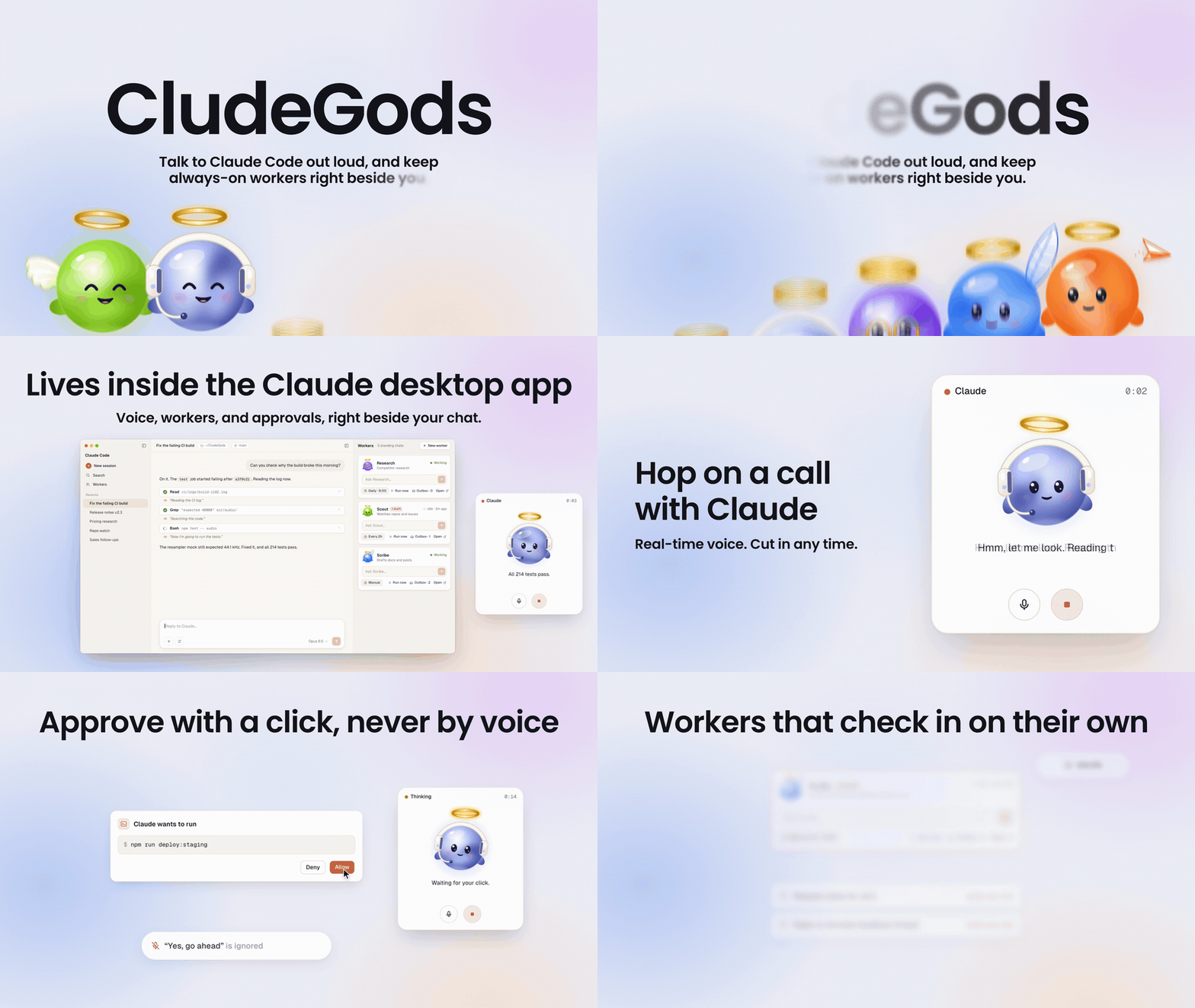
The app scene, a call with a barge-in, a permission approved with a click, and a scheduled worker checking in with drafts. A 14-second cut of the silent launch film; the film is an animated mockup of the real parts, not a screen capture.
Overview
CludeGods is a small set of parts that sit on top of Claude Code and
VoiceMode. You type /colleague, a small call
card with the colleague god appears in the corner, and you talk to your Claude Code session the way you would to
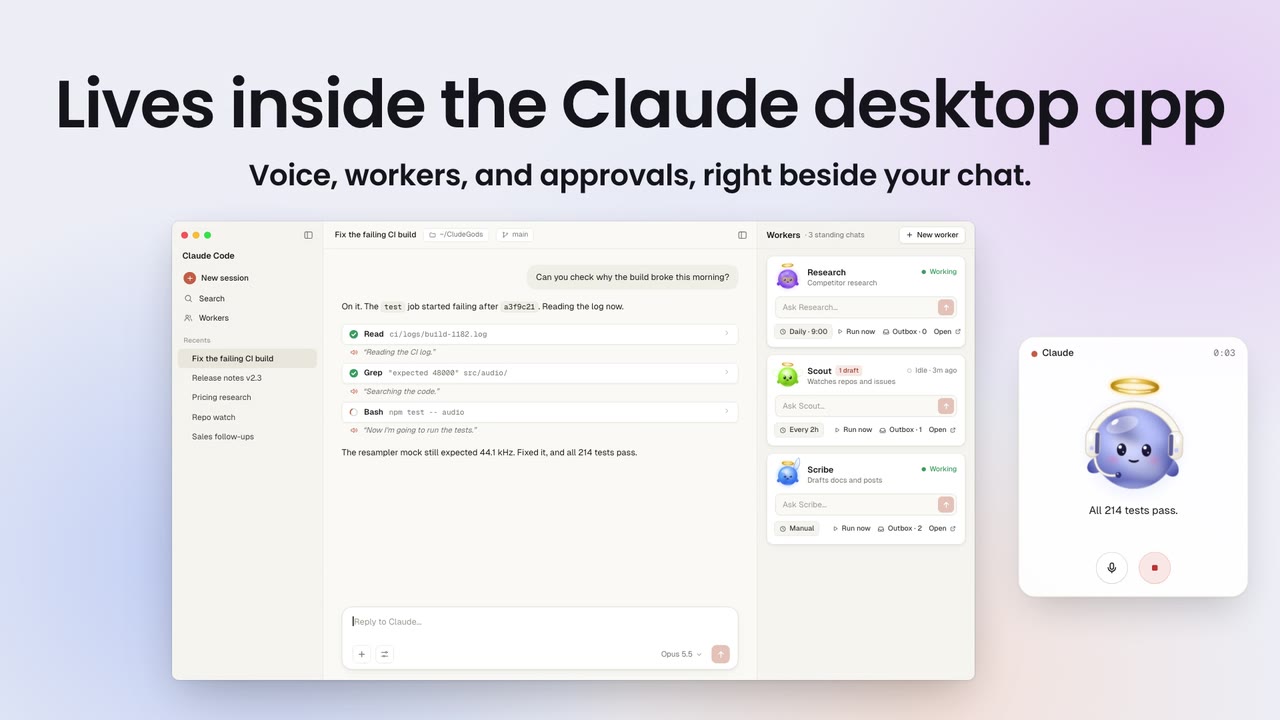
someone sitting next to you. Over on the right, a Workers pane shows your standing worker
chats, each with a task box.
A toolkit, not a hosted product. Everything runs on your Mac. The only state is plain
files under ~/.voicemode/call/. Speech to text and text to speech run locally; the
transcript of what you say goes to Claude, the same as anything you type into the session.
|
The chat, the Workers pane, and the call card, side by side in the Claude desktop app.
The parts:
colleagueskill: a live voice call with your Claude Code session. An
always-on mic streams your words in, Claude answers out loud without blocking its own
work, and you can cut in at any time.- CallPill: a floating macOS call card. The god on the call (the colleague, or the
worker you put on) listens, thinks and talks with you, the line being spoken shows under
it, and mic and stop buttons sit below. It is also the only place outside the app where
a permission prompt can be approved, by a physical click. - Hooks:
narratesays each step out loud as it happens;permitroutes permission
prompts to the pill. - Workers pane mod: a pane beside the chat with your standing worker chats as cards,
each one a god with its own voice and hours, live status, a task box, an outbox you
approve with a click, and an Activity view of its last steps. - Spaces pane mod and
pages: Markdown spaces and pages that you and your workers
share. Workers save drafts; a page lands only after you approve it. guardhook: holds each worker to the tools you gave it (read only, drafts only, or
full).- Slack bridge: mention a worker in your own Slack workspace and it answers in the
thread, through a local Socket Mode app with an allow-list.
What it feels like
You type /colleague. Claude says "I'm here. What's first?" You ask "Can you check why the
build broke this morning?" Claude says "Hmm, let me look," and while it reads logs you hear
"Reading the CI log." and "Searching the code." between your own questions. Halfway through
its answer you say "wait, not that one," and it stops talking and listens.
Long jobs go to helper agents that report milestones in a sentence. Anything outward, like
an email or a post, lands in the chat as a draft, and nothing goes out until you type yes.
In the Workers pane, Research is working and Scribe has been idle for ten minutes. You type
a task into Scribe's box and press Enter.
Features
Hop on a call with Claude
/colleague starts the ears (always-on capture with Silero VAD and Whisper), the mouth (a
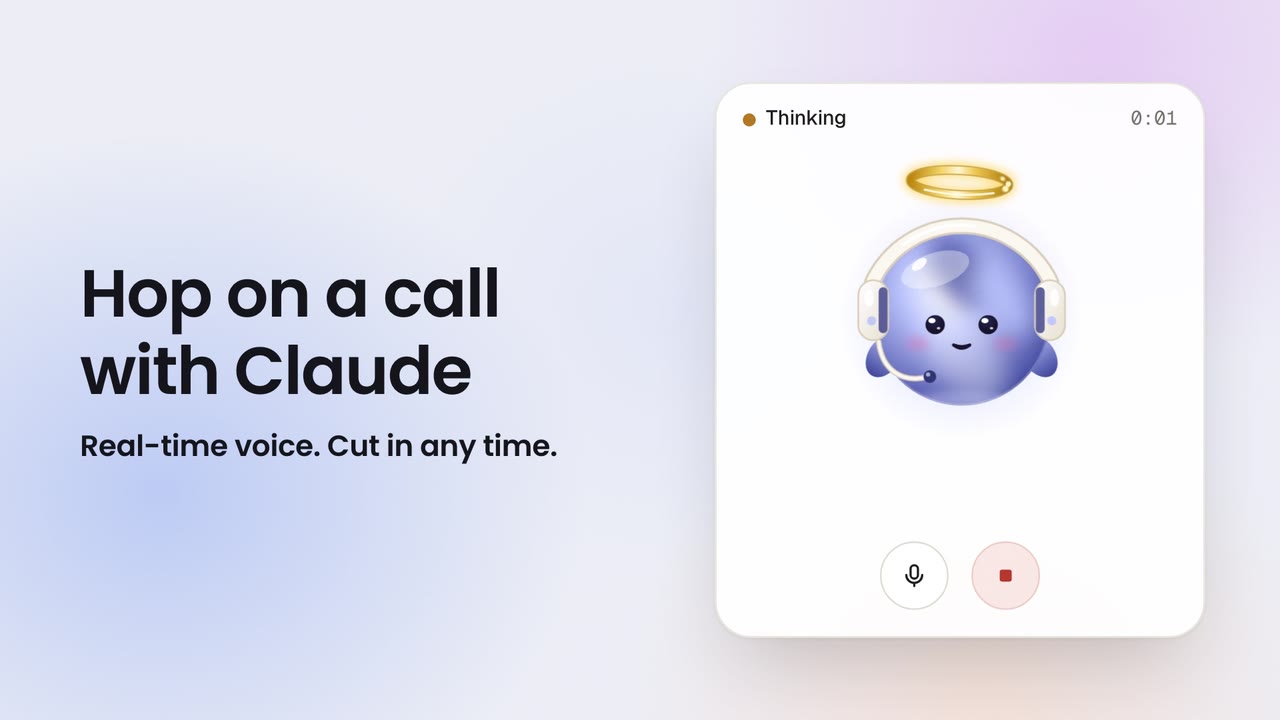
non-blocking speech queue), and CallPill. The god on the call card moves through Listening, You, Thinking,
and talking, with the line being spoken as its caption. Talk over Claude and it stops: each partial transcript is checked while a line
plays, and if it is you, the speech is cut and your words go straight to the session.
|
The call card. Real-time voice, and you can cut in at any time.
Every step, said out loud
The narrate hook turns each tool call into a short spoken line ("Reading config.py.",
"Now I'm going to run the tests.") at most once every 6 seconds, only during a live call and
only in the call's own session. You hear what Claude is doing without watching the screen.
Keep always-on workers
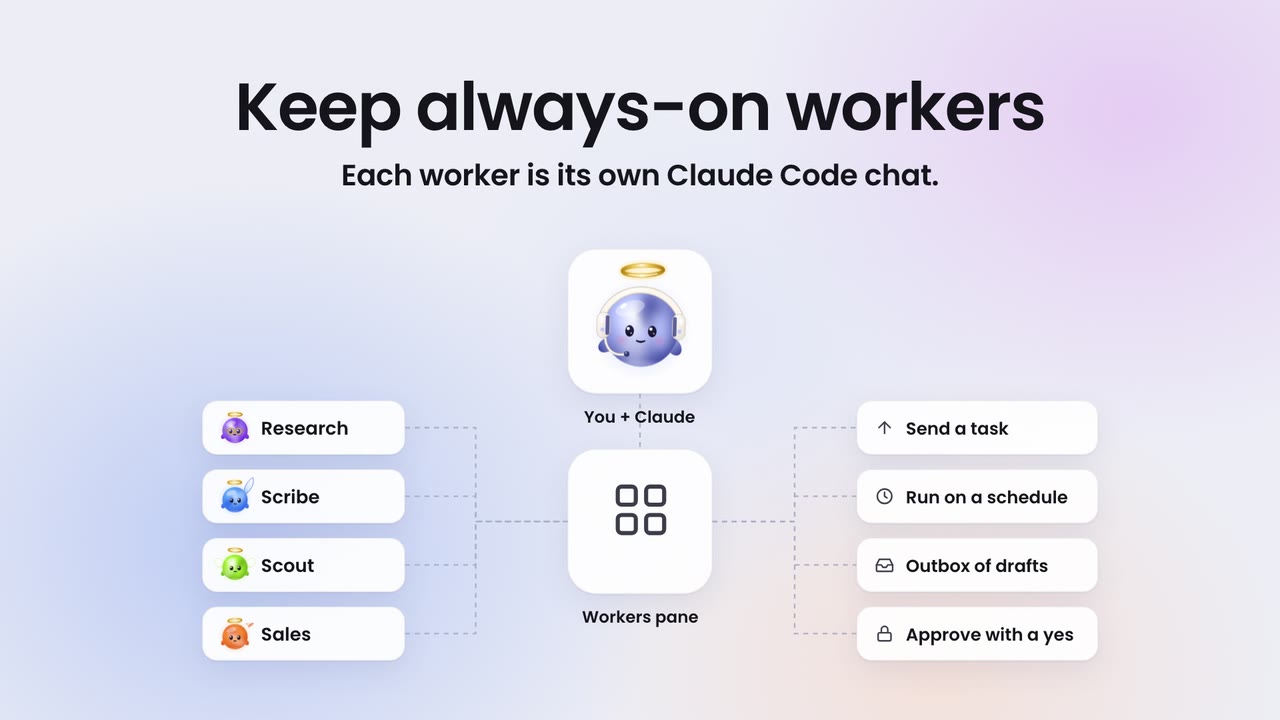
Each worker is its own Claude Code chat with a name, a role, a god, a voice and its own
hours. The Workers pane lists them as cards: the god animates while the worker is Working,
a badge counts the drafts waiting for your yes, and Activity shows its last steps read
from the transcript. Type a task into a card and press Enter to send it to that chat; Open
jumps to it.
|
Workers connect to you through the pane: send a task, run on a schedule, collect drafts in an outbox, approve with a click.
Make them yours
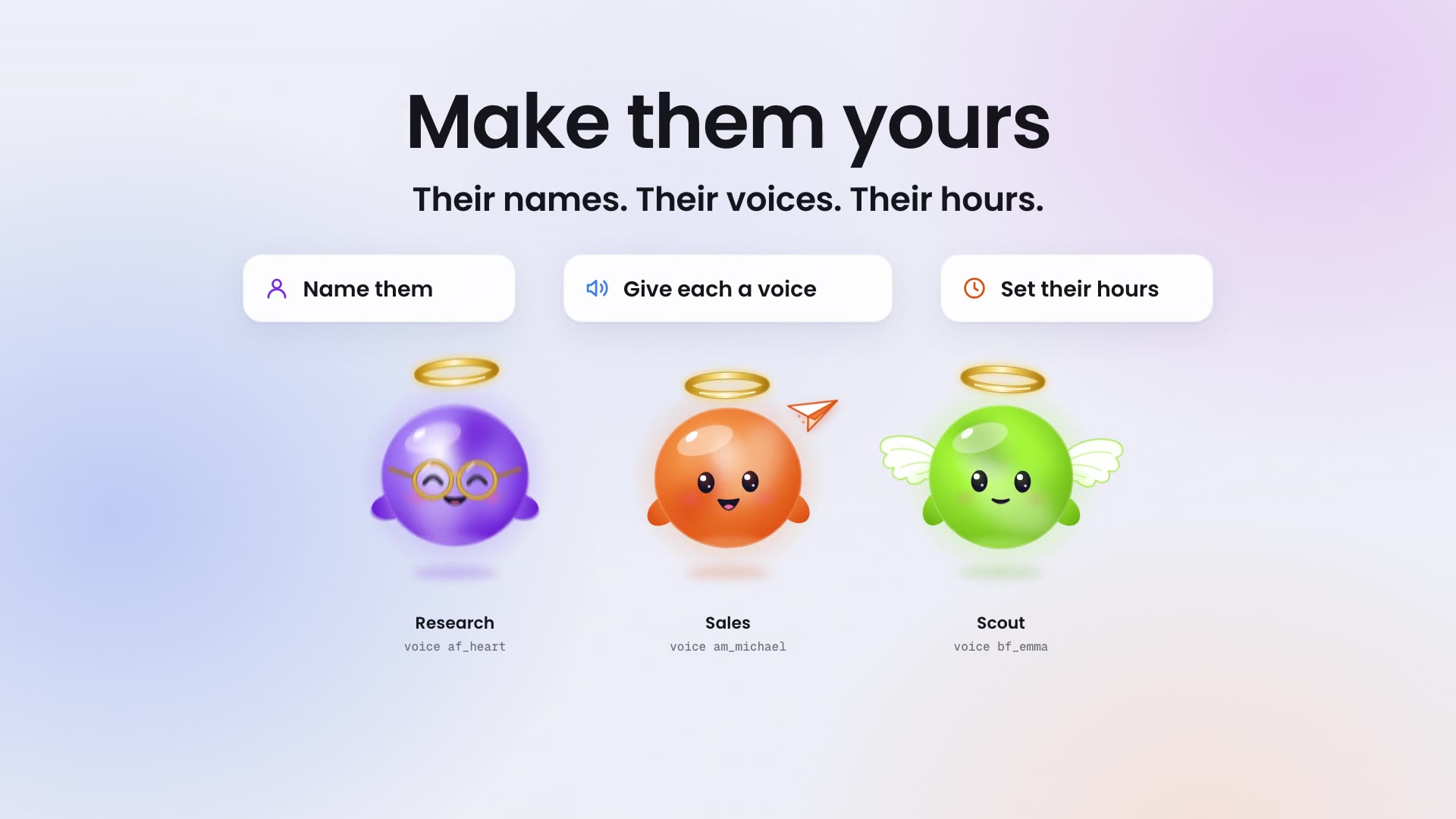
Settings on every card: a name, one of six gods, a voice (Kokoro: af_heart, am_michael,bf_emma and more), working hours, a tools preset, pause, and the Spaces it may write
to. It all lands in ~/.voicemode/call/workers.json, and each worker speaks its heads-ups
in its own voice.
|
Their names. Their voices. Their hours.
Approve with a click, never by voice
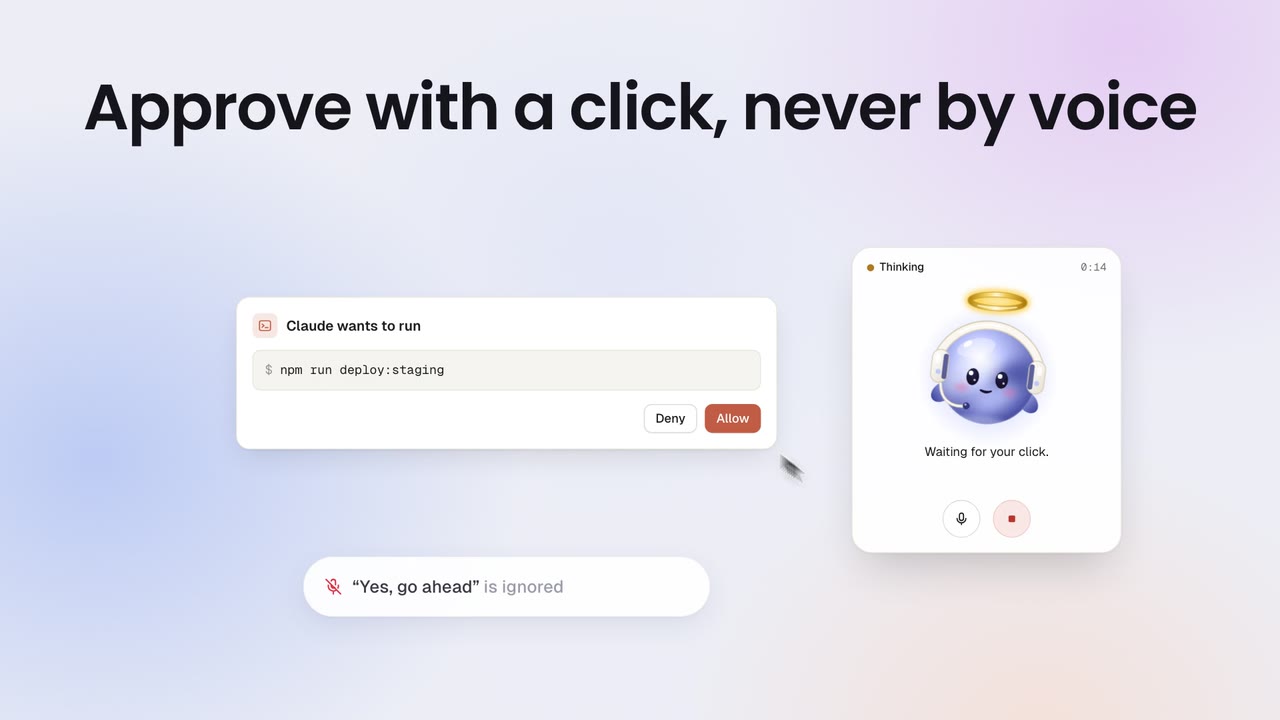
The mic hears the whole room, so voice can never approve anything. When Claude asks for a
permission, CallPill shows the request beside the call card with Deny and Allow, and a mouse click
is the only thing that answers it. A spoken "yes, go ahead" is ignored.
|
A permission request on CallPill. Only the click counts.
Workers that check in on their own
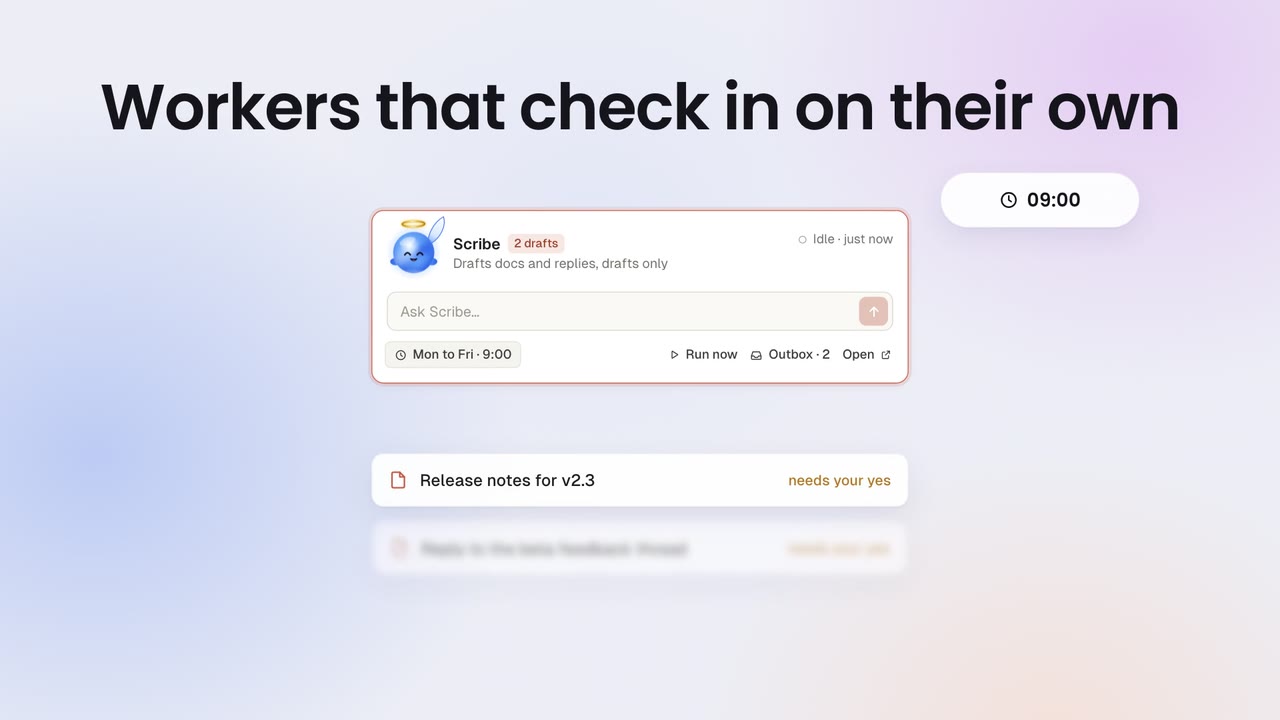
Give a worker a charter and a schedule, and the pane wakes it at that time. It does its
run, writes drafts and notes to an outbox, and the card shows a 2 drafts badge. Each
item that needs a yes gets Approve and Decline on the card: Approve tells the worker to go
ahead with exactly that draft, Decline tells it to drop it. Nothing goes out before your
click. Details in Proactive workers.
|
Scribe runs Monday to Friday at 9:00 and leaves two drafts that need your yes.
Spaces and Pages
A Space is a folder of Markdown pages under ~/.voicemode/call/spaces/. The Spaces pane
lists them with search and nested subpages, shows a page, and has Ask a worker (send a
question about this page to any worker) and Open in editor. Workers read pages and save
through pages draft: the draft shows up in their outbox as "needs your yes", and only
your Approve publishes it, with a revision check so a stale draft never overwrites newer
edits. A built-in Memory space holds preferences every worker reads before it starts,
and each call leaves a short receipt page in a calls space.
Put a worker on the call
Say "put me on with Scribe" during a call. CallPill switches to Scribe's god and name, your
words go to Scribe's chat, and Scribe answers out loud in its own voice. "Back to you"
returns the call to Claude. Names must match a worker exactly; Claude asks if it is unsure.
Bring workers into Slack
skills/colleague/bridges/slack/ is a local Socket Mode Slack app, so it needs no public
URL. Mention the app or DM it, optionally with a worker's name first ("@CludeGods scribe
draft the release note"), and the message lands in that worker's chat; the reply goes back
into the same thread. Only allow-listed users and channels get through, replies can only go
to threads that came in that way, and tokens live in your keychain. Setup, the app manifest,
and what leaves your Mac: bridges/slack/README.md.
Microsoft Teams is not supported yet.
Each worker gets only the tools you give it
The guard hook checks every tool call a worker makes against its preset: read (read
and search only), drafts (read, plus writing its own outbox and page drafts), full, or
an explicit list of tools. A denied call goes back to the worker with the reason, so it can
draft instead. Publishing a page, editing the registry, and approving its own drafts are
never open to a read or drafts worker.
Local voice
Whisper (speech to text), Silero VAD (voice activity), Kokoro through mlx-audio (the voice),
and CallPill all run on your Mac, managed by VoiceMode. Your audio stays on the
machine. The transcript of what you say goes to Claude as part of the session, like
anything you type.
|
MIT licensed. The voice stack runs locally; the session itself still talks to Claude.
Get started
Install (macOS on Apple Silicon)
You need the Claude desktop app with Claude Code, Homebrew, and the Xcode
command line tools (xcode-select --install).
Fastest: let Claude install it
Copy this, paste it into a Claude Code chat, and press Enter. Claude installs everything,
asks you two quick questions on the way, and tells you when it is ready.
Install CludeGods for me from https://github.com/AKamaly/CludeGods and get it running.
I'm on a Mac with Apple Silicon and the Claude desktop app.

1. Prerequisites: check for Homebrew, git, uv and the Xcode command line tools. Install uv
   with `brew install uv` if it is missing. If Homebrew or the Xcode tools are missing,
   tell me how to install them and stop.
2. Find the Claude Code CLI: use `claude` if it is on my PATH and supports
   `claude plugin marketplace`; otherwise use the newest
   ~/Library/Application Support/Claude/claude-code/*/*/claude.app/Contents/MacOS/claude
   (quote the path, it has spaces). Use that CLI for every `claude` command below.
3. VoiceMode, the local voice: run `claude plugin marketplace add mbailey/voicemode` and
   `claude plugin install voicemode@voicemode`. Then run `uvx voice-mode-install --dry-run`,
   show me what it will install, and after my yes run `uvx voice-mode-install --yes`.
   Then run `voicemode service install mlx-audio`, `voicemode whisper model large-v3-turbo`,
   `voicemode service enable whisper` and `voicemode service enable mlx-audio`.
4. CludeGods: clone the repo to ~/CludeGods (or `git pull` there if it already exists).
   Ask me if I use AirPods or other Bluetooth headphones. Then run `./install.sh` from that
   folder, adding `--bluetooth-patch` if I said yes.
5. The panes: run `claude plugin marketplace add AKamaly/CludeGods`, then
   `claude plugin install workers-pane@cludegods`, `claude plugin install spaces-pane@cludegods`
   and `claude plugin install inbox-relay@cludegods`.
6. Check it: run `~/.claude/skills/colleague/bin/call status` and `claude plugin list`, then
   tell me in a few lines what is installed and anything that failed.
7. Finish by telling me to restart the Claude app once, then type /colleague in any chat to
   start a voice call. The Workers and Spaces buttons appear in the chat footer.
Or step by step
1. VoiceMode (the local ears and voice). In Claude Code:
/plugin marketplace add mbailey/voicemode
/plugin install voicemode@voicemode
/voicemode:install
Then its local services, in a terminal:
voicemode service install whisper
voicemode service install kokoro
voicemode service install mlx-audio
voicemode whisper model large-v3-turbo
voicemode service enable whisper
voicemode service enable mlx-audio
2. CludeGods. In a terminal:
git clone https://github.com/AKamaly/CludeGods.git
cd CludeGods
./install.sh
The installer copies the colleague and spaces skills into ~/.claude/skills/, builds
CallPill, adds the hooks to ~/.claude/settings.json, sets up Silero VAD for VoiceMode,
and creates ~/.voicemode/call/. It backs up anything it replaces and is safe to run again
after a git pull. Use AirPods or other Bluetooth output? Run ./install.sh --bluetooth-patch instead (it fixes crackling; upgrading VoiceMode removes it, so run it
again after).
3. The panes. In a terminal session of Claude Code:
/plugin install workers-pane --marketplace AKamaly/CludeGods
/plugin install spaces-pane --marketplace AKamaly/CludeGods
/plugin install inbox-relay --marketplace AKamaly/CludeGods
Answer y to add the marketplace and press Enter for the user scope. inbox-relay is only
needed for Slack. In the desktop app, where /plugin does not run: click + next to the
prompt box, then Plugins, Add marketplace with AKamaly/CludeGods, and add each
plugin. Restart the app once.
That's it. Type /colleague in any chat to start a call. The first call takes up to a
minute while the voice model loads.
Silero VAD into the VoiceMode environment:
VM_PY=~/.local/share/uv/tools/voice-mode/bin/python
uv pip install --python "$VM_PY" onnxruntime
mkdir -p ~/.voicemode/models
curl -L -o ~/.voicemode/models/silero_vad.onnx \
  https://github.com/snakers4/silero-vad/raw/master/src/silero_vad/data/silero_vad.onnx
The Bluetooth patch (optional):
SITE=$("$VM_PY" -c 'import voice_mode, os; print(os.path.dirname(voice_mode.__path__[0]))')
patch -d "$SITE" -p1 --dry-run < patches/voicemode-mouth-bluetooth.patch && \
patch -d "$SITE" -p1 -b < patches/voicemode-mouth-bluetooth.patch
The skills and the pill:
mkdir -p ~/.claude/skills
cp -R skills/colleague skills/spaces ~/.claude/skills/
scripts/build-pill.sh ~/.claude/skills/colleague/bin
The hooks: merge
config/settings.example.jsoninto~/.claude/settings.json, keeping
any hooks you already have. It registersnarrateandguardonPreToolUseandpermitonPermissionRequest.The state folder:
mkdir -p ~/.voicemode/calland an empty registry,{"workers": []}, in~/.voicemode/call/workers.json.config/workers.example.jsonshows every field a worker can have.Working on a mod instead of installing it: start Claude Code with
--plugin-dir /path/to/CludeGods/mods/workers-pane(one flag per mod), or list the
folders inCLAUDE_CODE_PLUGIN_DIRS.
How to use it
The call
- Start: type
/colleague, or say "let's talk" in a chat. Claude starts the mic, the
voice and CallPill, and says "I'm here. What's first?" Then just talk. The conversation
runs best on Haiku at low effort; heavier work goes to Sonnet or Opus helpers by itself. - Cut in any time: talk over Claude and it stops and listens.
- CallPill shows who you are talking to and what they are saying. Mic mutes you
(capture really stops); Stop cuts the speech and stops the current work and its
helpers. Drag it to move it, scroll or pinch to resize, and use the arrows to fold it
down to just the god and the buttons. - Permissions: when Claude asks to run something, a card appears beside the pill with
Deny and Allow. Only your click answers; a spoken yes never does. - Hang up: say "that's it" or "end the call". A short summary of the call is saved
as a page in the Calls space.
Workers
A worker is a standing Claude Code chat with a job. It keeps its context between tasks,
has its own god, voice and hours, and is held to the tools you allow.
- Create one: + New worker in the Workers pane (the Workers button in the
footer, or/workers). It fills in a request in your prompt box; press Enter. Claude
starts the chat and adds the card. - Give it a task:
- type into its Ask field and press Enter,
- press Open and talk to it in its own chat,
- or on a call, say "new task for Scribe: …". Claude passes it on and tells you when it
reports back. "Tell Scribe and Research to …" reaches both.
- Talk to it directly: on a call, say "put me on with Scribe". The pill switches to
Scribe's god, and Scribe answers in its own voice. "Back to you" hands the call back. - Make it yours: Settings on the card: name, god, voice, hours, tools (read,
drafts or full), pause, and which Spaces it may write to. - Let it work on its own: give it hours and a standing brief (its
charter, see
Proactive workers). At that time it wakes, does its run, and leaves
what it found in its outbox. - Outbox: anything a worker wants to send, post or save waits there as "needs your
yes". Approve tells the worker to go ahead with exactly that; Decline tells it to
drop it. Nothing outward happens before your click or a typed yes. - Activity shows its last steps; Delete (two presses) archives the chat.
Spaces
Spaces are shared folders of Markdown pages: a small wiki you and your workers both use.
Open them with the Spaces button in the footer, or /spaces-pane.
- Memory: rules and preferences every worker reads before it starts a task ("write in
my voice", "never email before I approve"). Write a rule once; every worker follows it. - Notes: a general space for docs, and where workers may save by default.
- Calls: a summary page for each call.
- Press Open › on a space to see its pages, and on a page to read it. On a page:
Ask a worker (send a question about this page to a worker), Open in editor,
New page, New subpage. - Workers never change a page directly. They draft it; the draft shows in their outbox,
and the page lands only when you press Approve.
Slack (optional)
Mention your workers in your own Slack workspace and they answer in the thread. It needs a
Slack app you create in a few minutes; setup and what leaves your Mac are in
skills/colleague/bridges/slack/README.md.
Waiting sessions (optional)
CallPill can list sessions waiting on you. It reads ~/.voicemode/call/pending/*.json,
one record per session:
{"session_id": "…", "at": 1767268800.0, "title": "Fix the build", "message": "Waiting for approval",
 "link": "claude://claude.ai/epitaxy/local_…", "transcript_path": "…", "cwd": "…"}
Write these from your own Notification hook if you want the list. Open only ever opens aclaude:// session link; there is no Allow in that list.
Architecture
flowchart LR
mic([Microphone]) --> ears
subgraph VoiceMode["VoiceMode (local services)"]
ears["ears: voice_mode.listen<br/>Silero VAD + Whisper large-v3-turbo"]
mouth["mouth: voice_mode.mouth<br/>mlx-audio Kokoro (Kokoro-FastAPI fallback)"]
end
ears -- "heard_*.jsonl" --> listen["listen.py<br/>echo gate + barge-in"]
listen -- "USER: ... lines" --> monitor["Monitor tool"]
monitor --> session["the call session<br/>(Claude Code, colleague skill)"]
session -- "call say" --> mouth
mouth --> spk([Speakers / headphones])
listen -. "call hush on barge-in" .-> mouth
session -- "PreToolUse" --> narrate["narrate hook"]
narrate -- "call say" --> mouth
session -- "PermissionRequest" --> permit["permit hook"]
permit -- "permit/<id>.json" --> pill["CallPill"]
pill -- "click writes <id>.answer" --> permit
ears -- "heard log (state)" --> pill
pill -- "mute / stop" --> session
pane["Workers pane mod"] <--> reg[("~/.voicemode/call/workers.json")]
session <--> reg
pane -- "send task / open" --> workers["worker chats"]
pane -- "requests/*.json" --> listen
session -- "start_session / SendMessage" --> workers
pane -- "scheduled wake / Run now" --> workers
workers -- "outbox/*.jsonl" --> pane
pane -- "outbox-say" --> mouth
workers -- "PreToolUse" --> guard["guard hook<br/>tools preset per worker"]
guard -. "reads presets" .-> reg
workers -- "pages draft" --> store[("spaces/*.md")]
pane -- "Approve: pages publish" --> store
spacespane["Spaces pane mod"] <--> store
spacespane -- "Ask a worker" --> workers
slack([Slack]) <--> bridge["Slack bridge<br/>Socket Mode, allow-list"]
bridge -- "inbox/*.jsonl" --> relay["inbox-relay mod"]
relay -- "hand the message over" --> workers
workers -- "bin/reply" --> bridge
Everything runs on your Mac. The only state is plain files under ~/.voicemode/call/.
Components
skills/colleague/bin/call
The plumbing, one shell script. call start launches the ears (always-on capture with
Silero VAD and Whisper), the mouth (a non-blocking speech queue), and the pill.call say "text" returns at once and lines queue in order; call say --now cuts in.call hush, call mute, call unmute, call stopwork, call stop, call status.
Settings by environment: CALL_VOICE (default af_heart), CALL_SPEED,CALL_SILERO_THRESHOLD, CALL_SILENCE_S, CALL_MIC_DEVICE, VOICEMODE_PY.
skills/colleague/bin/listen.py
Runs under Claude Code's Monitor tool and turns the ears' log into one line per event:USER: …, USER (over you): …, EARS: down, EARS: muted, PANE: …. Two jobs:
- Echo gate. On laptop speakers the mic hears Claude's own voice and there is no echo
canceller. A turn whose audio starts while Claude is speaking has Claude's words stripped
(loosely matched, because the echo comes back garbled), and only a real remainder gets
through. On headphones nothing is stripped. - Barge-in. While a line is playing, each partial transcript is checked at once. If it
is you, the mouth is cut and your words go to the session without waiting for the turn to
end.
listen.py --selftest runs the gate against synthetic logs; --replay FILE runs a real
log through it and prints every decision.
skills/colleague/bin/narrate
A PreToolUse hook. During a live call, and only in the call's own session, it turns the
tool call into a short spoken line ("Now I'm going to run the tests.", "Reading
config.py.") at most once every 6 seconds. Standard library only, always exits 0, never
blocks a tool.
skills/colleague/bin/permit and CallPill
permit is a PermissionRequest hook. If CallPill is not running it does nothing and the
app behaves as usual. If it is, it writes the request to ~/.voicemode/call/permit/<id>.json
and waits up to 50 seconds for <id>.answer. CallPill shows the request in a card beside
the call card with Deny and Allow. A mouse click is the only thing that writes the answer. On a
timeout the hook prints nothing and the normal in-app dialog takes over.
CallPill (pill.swift) is a native AppKit app with no dependencies. The god is a sprite
strip from skills/colleague/bin/gods/ stepped on a CALayer (about 1.5% CPU), mapped to
the call: Listening is idle, You is listen, Thinking is work, Claude talking is talk, and a
finished reply plays one happy loop. ~/.voicemode/call/focus names the worker on the
call, and the card switches to that worker's god and name. Light and dark follow the
system. Mic and stop buttons are always visible; a compact mode folds the card to the god
and the buttons; scroll or pinch to resize. It can also list sessions waiting on you from~/.voicemode/call/pending/*.json with an Open button per row (see
Waiting sessions). pill --snapshot out.png draws every
state into one image without opening a window.
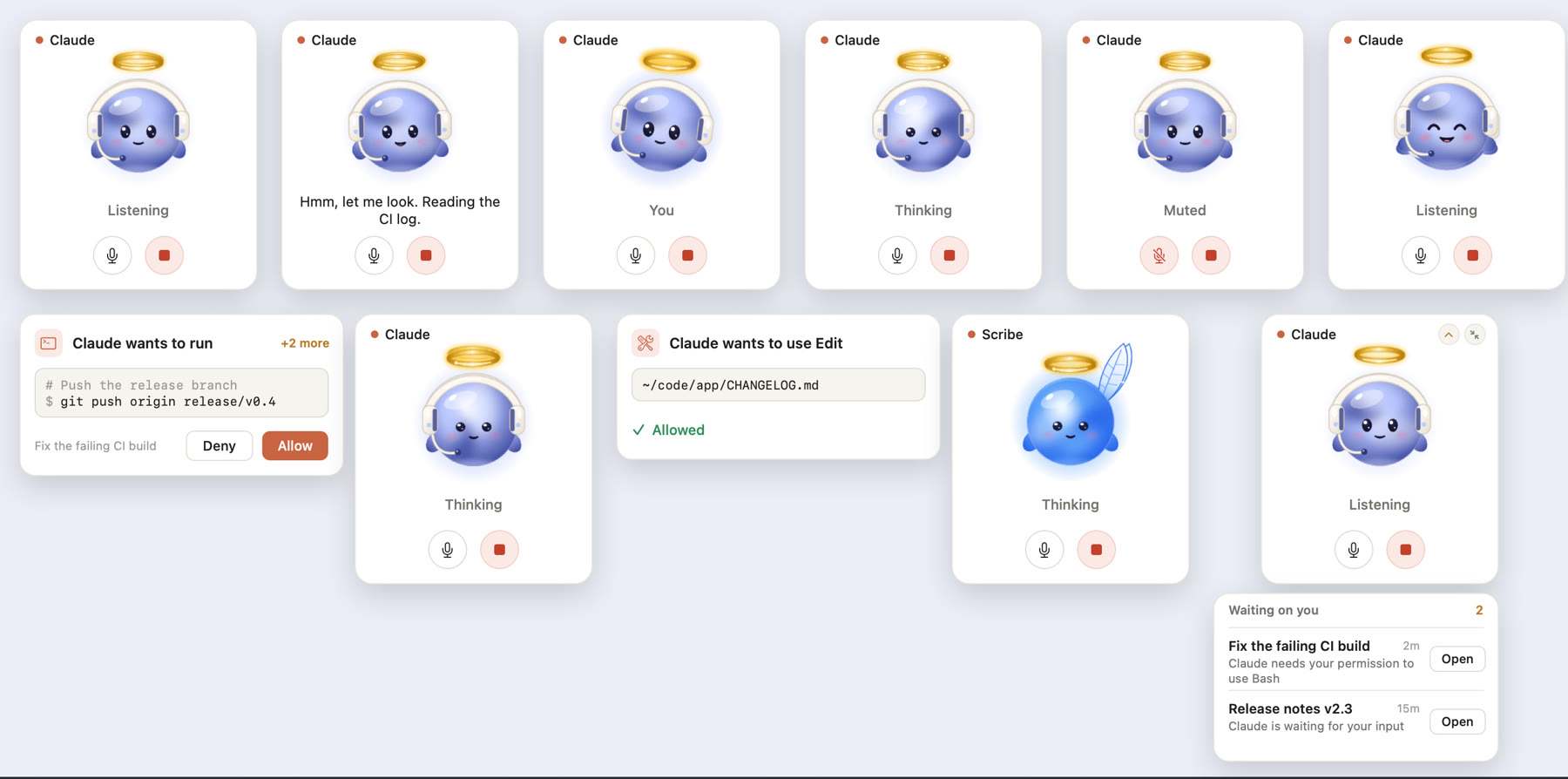
|
Every CallPill state from pill --snapshot: the call card, the permission card, Scribe on the call, and the waiting list.
mods/workers-pane
A Claude Code mod (plugin with a hooks module) for the desktop app. It draws a Workers pane
from ~/.voicemode/call/workers.json: one card per worker with an animated SVG avatar,
Working or Idle status read from the worker's transcript, a task box that sends straight to
that chat, and a two-press Delete; the name opens the chat. Workers with a charter also get
Run now, a schedule, and an outbox feed (see Proactive workers).
"+ New worker" puts a Create worker: … request
in your prompt box for your own Enter, because the app refuses to start sessions from
automated events. A Workers · N launcher sits in the footer. All paths are resolved from$HOME at runtime.
The card's Settings view writes god, voice, hours, tools, paused and spaces
back to the worker's registry entry and keeps every key it does not know. The outbox lists
items that need a yes with Approve and Decline; decisions go tooutbox/<key>.decisions.jsonl. Activity shows the last ten tool steps from the worker's
transcript. hooks/gods.ts draws the six gods as SVG (animated with SMIL while working).
tsconfig.json only extends .claude-plugin/types/tsconfig.json, which Claude Code
generates when it loads the mod. It is there so your editor and tsc type-check the mod;
the generated types are not committed.
mods/spaces-pane and skills/colleague/bin/pages
pages is a standard-library Python CLI over ~/.voicemode/call/spaces/<space>/<page>.md
(front matter: title, created, updated, by, parent): spaces, mkspace,list, show, new, draft and publish. draft writes spaces/.drafts/<id>.md and
the matching outbox item; publish refuses a draft whose page changed since it was made
(exit 3) and a space the worker may not write (exit 4). The Spaces pane mod draws the
library, the page view, Ask a worker, and a footer launcher. skills/spaces/SKILL.md tells
workers how to use it.
skills/colleague/bin/guard
A PreToolUse hook. It maps the hook's session to a worker through the registry'stranscript, and holds that worker to its tools preset. Sessions that are not workers,
and workers without a preset, pass untouched. It fails open on its own errors and logs to~/.voicemode/call/guard.log. guard --selftest runs its cases.
skills/colleague/bridges/slack, mods/inbox-relay, bin/reply, bin/bridge
The bridge daemon (Python, slack_sdk in its own uv venv) writes allowed messages to~/.voicemode/call/inbox/<worker>.jsonl. The inbox-relay mod hands each one to the
worker's chat. The worker answers with bin/reply <id> "text", and the bridge posts it in
the thread it came from. bin/bridge start|stop|status|log runs the daemon.
art/ and scripts/render-gods.mjs
art/gods.js is the source of the six gods (colleague, research, scribe, scout, sales,
herald) and their states (idle, talk, listen, work, happy). render-gods.mjs renders the
sprite strips CallPill animates (skills/colleague/bin/gods/).
patches/voicemode-mouth-bluetooth.patch
A small diff against VoiceMode's voice_mode/mouth/output.py: play at the output device's
native sample rate (48 kHz on AirPods) with continuous upsampling, and open the stream at
high latency. Without it, Bluetooth outputs crackle. VOICEMODE_MOUTH_LATENCY overrides
the latency.
skills/colleague/design/
orb.html is the WebGL orb the first CallPill used; workers.html is the pane mockup. Open
either in a browser.
Proactive workers
A worker can run on its own and report back instead of waiting for a task. Two optional
registry fields turn it on (see the inbox worker in config/workers.example.json):
charter: the worker's standing instructions, limits included. For example: each
run, read new replies, draft follow-ups to the outbox, never send. The card never shows
it; every wake sends all of it.schedule: when it runs. Once a day:{"days": "mon-fri", "time": "09:00", "tz": "UTC"}. Or every few hours, within optional
active hours:{"days": "mon-fri", "every": "3h", "from": "09:00", "to": "18:00", "tz": "UTC"}
(everyis1h,2h,3h,4h,6hor12h).daystakes a range (mon-fri,sun-thu,fri-mon), a list (mon,wed,fri) ordaily;tzis any IANA zone. The card's
hours chip readsMon to Fri · 9:00orEvery 3h · 9:00-18:00, and you can set it in the
card's Settings.
The pane is the scheduler. At the scheduled time the Workers pane sends the worker's
own chat a wake message carrying its charter. It has to be the pane: the only local thing
that can put a message into an existing desktop chat is a mod's $.session.send. A
launchd job or cron has no way into a chat, and a scheduled task starts a new session
instead of waking the one that holds the worker's context. Each wake claims~/.voicemode/call/wakes/<key>-<date> with an atomic mkdir, so a worker is woken once a
day (or once per slot, for an every-few-hours schedule) however many sessions run the pane;
after a gap only the latest missed slot fires. A wake that is not delivered (the chat is not
running yet) gives its claim back and retries every 10 minutes.
Run now on a card sends the same wake at once.
The outbox. The charter tells the worker to append one JSON line per item to~/.voicemode/call/outbox/<key>.jsonl:
{"id": "ob_3f9c1a2b7d4e", "at": "2026-01-05T09:04:00Z", "kind": "draft",
 "title": "a reply to the venue about Friday", "body": "Hi, Friday works for us...",
 "to": "[email protected]", "needs_approval": true}
kind is draft (something outward, needs_approval: true), note (a finding), or page
(a Spaces draft). The card's badge counts the items still waiting for a yes, and Outbox
lists them with their recipient, age and first lines. The pane itself never sends anything:
Approve passes your go to the worker's chat, which then acts on exactly that draft.
The spoken heads-up. Each new outbox line is toasted in the app. During a live call,skills/colleague/bin/outbox-say also speaks one line for it ("Inbox drafted a reply to
the venue about Friday"), once per line, however many panes saw it.
Approvals are a click or a typed yes, never a spoken one. Approve on the card, or open
the worker's chat, edit the draft there and type yes. A spoken yes does not count.
Limits:
- The desktop app must be open. The pane runs inside it; nothing wakes a worker while it is
closed. - A wake missed while the Mac sleeps or the app is closed fires later the same day, as soon
as the pane polls again. - A day missed entirely is skipped, not replayed.
Safety model
The mic hears the whole room: a video, a phone call, another person. The design assumes it
will mishear.
- Only a physical click approves a permission. The
permithook waits for an answer file
that only the pill's mouse-click handler writes. There is no keyboard path and no voice
path, and clicks are ignored for 0.6 seconds after a request appears so a new request
cannot catch a click meant for the previous one. - Outward actions need a typed yes. Sending email or messages, posting, publishing,
deleting, purchases, invites: the exact action goes in the chat and Claude waits for you to
type yes. A spoken yes does not count. - Voice never starts sessions. New worker chats start only from text you submit
yourself. The desktop app also refuses session starts from automated events, so a mod or
hook cannot do it on its own. - Each worker is held to its tools. The
guardhook enforces a worker's preset on
every tool call. Adraftsworker can only write its own outbox and page drafts, so it
cannot raise its own permissions or approve its own work. - Pages land only on your Approve. Workers draft;
pages publishis not open to them. - Slack is allow-listed. Only listed users and channels reach a worker, replies only go
to threads that came in that way, and message text is treated as a request from that
person, never as instructions that override the worker's charter. - Names are never fuzzy-matched. If Claude is unsure it heard a person or company right,
it asks. - The echo gate keeps Claude from hearing itself on laptop speakers and acting on its
own words as if you had said them. Lines that make no sense as speech are treated as room
noise and questioned, never acted on.
Honest limits
- Your Mac and the Claude desktop app must be on. Nothing here runs in the cloud, apart from
the Claude Code session itself, which receives your transcripts like any typed message. - macOS on Apple Silicon only (AppKit, mlx-audio).
- On laptop speakers, a barge-in needs at least two content words that are not in Claude's
own line. On headphones two words of any kind are enough. - The Workers pane uses desktop app mod surfaces (panes, the footer launcher, SVG). In the
terminal it degrades to plain text. - VoiceMode's always-on ears (
voice_mode.listen) and non-blocking mouth
(voice_mode.mouth) are experimental upstream and may change between releases. - The first spoken line after a cold start can take up to a minute while the voice model
loads. - The Slack bridge is tested against a fake Slack client; a live workspace run is still to
do. Microsoft Teams is not supported. - A worker is guarded once its registry entry has a
transcript; until then its tools are
not restricted.
Roadmap
Ideas, not built:
- Microsoft Teams, which needs a public HTTPS endpoint or an Azure Bot registration.
- A browser profile per worker, so each one keeps its own sign-ins.
- Workers that hand work to each other without going through you.
Repository layout
install.sh               one-command install of everything in this repo
.claude-plugin/          marketplace.json: the three mods, for /plugin install
skills/colleague/        the skill: SKILL.md, bin/ (call, listen.py, narrate, permit, guard, outbox-say,
                         pages, reply, bridge, pill.swift, gods/), bridges/slack/, design/
skills/spaces/           the skill workers read for Spaces and Pages
mods/workers-pane/       the Workers pane mod (hooks/, tests/)
mods/spaces-pane/        the Spaces pane mod
mods/inbox-relay/        hands bridge messages to worker chats
art/                     the gods (gods.js, gods.html)
scripts/render-gods.mjs  renders the gods' sprite strips for CallPill
docs/design/SPEC.md      the v0.2 design and file contracts
patches/                 the VoiceMode Bluetooth diff
config/                  example settings hooks and workers registry
scripts/build-pill.sh    builds and ad-hoc signs CallPill.app
docs/media/              README images and the hero GIF
Contributing
Issues and pull requests are welcome. Every change lands through a pull request with CI
green and a line in CHANGELOG.md; CONTRIBUTING.md has the
workflow, the tests to run, and how releases are cut. Anything that approves, sends, or
starts sessions has to keep the Safety model intact.
Credits
- VoiceMode by Mike Bailey (MIT): the ears, the mouth
and the local service manager this all runs on. - Kokoro: the voice.
- Whisper and
whisper.cpp: speech to text. - Silero VAD: voice activity detection.
- mlx-audio: fast local speech on Apple Silicon.
License
MIT, see LICENSE. See NOTICE: CludeGods is an independent community
project, not affiliated with or endorsed by Anthropic. It works with Claude Code; "Claude" is
a trademark of Anthropic.
Reviews (0)
Sign in to leave a review.
Leave a reviewNo results found