OpenGUI
Health Gecti
- License — License: MIT
- Description — Repository has a description
- Active repo — Last push 0 days ago
- Community trust — 27 GitHub stars
Code Uyari
- process.env — Environment variable access in build.ts
- process.env — Environment variable access in claude-code-bridge.mjs
- process.env — Environment variable access in codex-bridge.mjs
- network request — Outbound network request in dev.ts
Permissions Gecti
- Permissions — No dangerous permissions requested
This application provides a desktop and web-based command center for managing multiple AI coding agents. It allows users to run parallel coding sessions, stream responses, and switch between different models and agent backends from a single visual interface.
Security Assessment
Overall risk: Medium. As a tool designed to manage and interact with coding agents, it inherently relies on environment variables to pass API keys and configuration to the various AI backends, which explains the warnings for bridge and build files. There are no hardcoded secrets or dangerous system permissions requested. However, it does make outbound network requests during development, and users should be aware that any tool orchestrating AI agents naturally has access to the prompts, code context, and commands sent to those backends.
Quality Assessment
The project is actively maintained, with its last push occurring today. It uses the standard, permissive MIT license, making it highly accessible for modification and use. While the community footprint is currently small with 27 stars, the repository is well-documented, includes clear build instructions, and the author explicitly states that the project is early but usable and open to community contributions.
Verdict
Use with caution — it is a well-structured and actively maintained project, but as an early-stage orchestrator handling API keys and external AI connections, you should carefully review its bridge scripts before integrating it into sensitive environments.
Desktop + web command center for OpenCode, Claude Code, Codex, and Pi. Multi-project AI coding sessions with streaming chat, prompt queue, model switching, and MCP tools.

Desktop + web command center for coding agents. Run OpenCode, Claude Code, Codex, and Pi across multiple projects with streaming chat, prompt queue, model switching, voice input, and MCP tools.


Download latest release · Why OpenGUI · Supported backends · Build from source
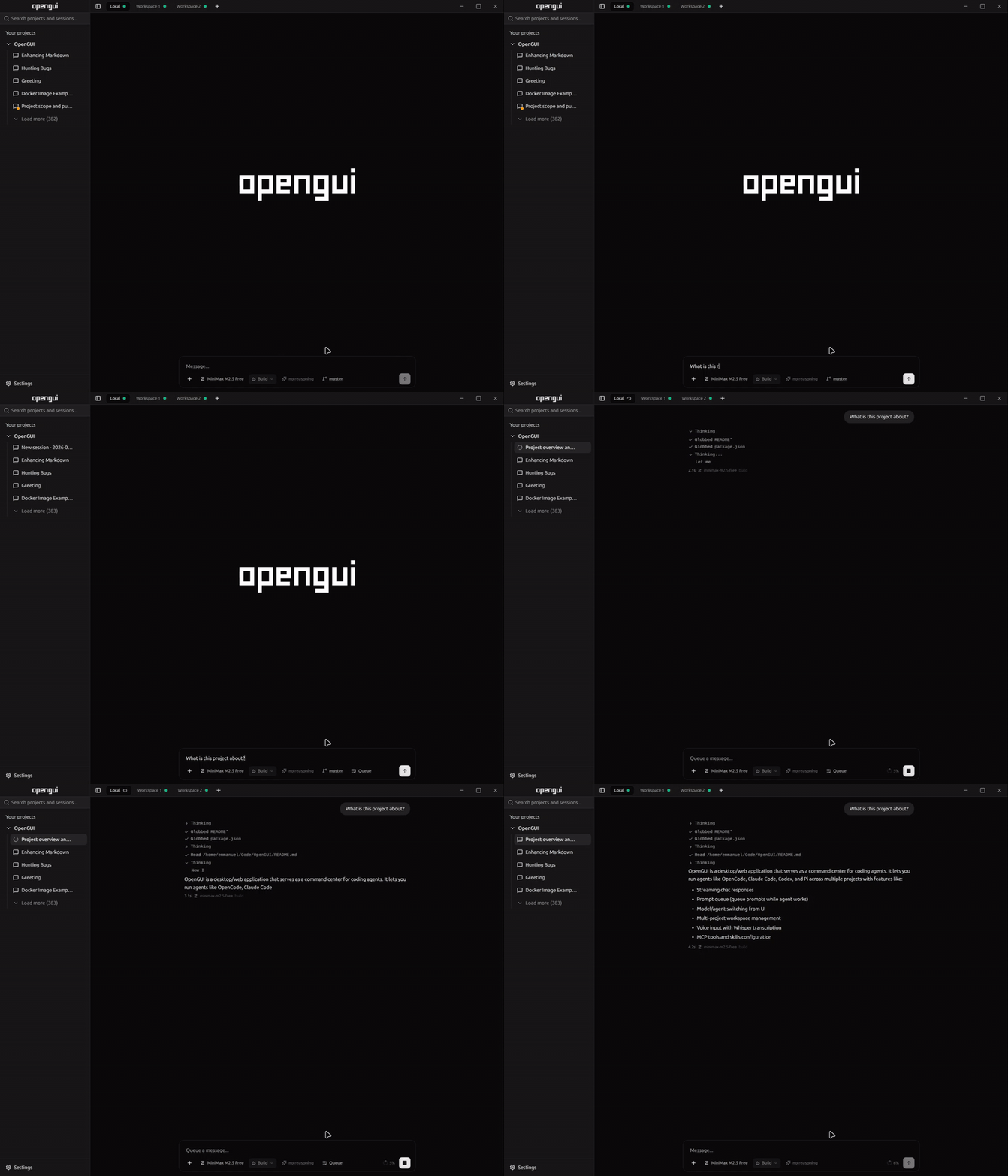
OpenGUI gives coding-agent users desktop and browser workflow for long sessions. Manage multiple projects visually, run different agent backends from one UI, watch responses stream live, queue prompts while agent works, and switch models or agents without terminal juggling.
Early but usable. Bug reports and PRs welcome.
Why OpenGUI
OpenGUI is for people who like coding agents but want stronger workflow than terminal tabs alone:
- Run multiple agent backends in one app instead of juggling separate tools
- Manage multiple projects at once with separate sessions per workspace
- See streaming responses live with token and context usage
- Queue prompts while agent is busy instead of waiting to type next step
- Switch providers, models, agents, and variants from UI
- Configure MCP tools and skills without leaving app
- Use voice input with Whisper-compatible transcription endpoint
Highlights
- Multi-agent workspace for OpenCode, Claude Code, Codex, and Pi
- Multi-project workspaces for parallel coding sessions
- Real-time streaming over SSE with live usage tracking
- Prompt queue that auto-dispatches when assistant becomes idle
- Model, backend, and agent selection directly from chat workflow
- Slash commands from prompt box
- Syntax highlighting + math rendering with Shiki and KaTeX
- Dark/light theme with system-aware toggle
- Desktop, web, and Docker deployment options
- Cross-platform builds for Linux, macOS, and Windows
Supported agent backends
OpenGUI currently supports these coding-agent backends:
- OpenCode
- Claude Code
- Codex
- Pi
Use one backend or switch between them per workflow.
Download
Grab prebuilt app from latest release:
- Linux:
.deb - macOS:
.dmg - Windows:
.exeinstaller
Requirements
Backend requirements depend on what you use:
- OpenCode backend: OpenCode CLI installed and available in your
PATH - Other backends: local CLI/auth/config for that backend available on your machine
Windows prerequisite for OpenCode: OpenCode must be available on your
PATHor at%USERPROFILE%\.opencode\bin\opencode.exe.
Note: Windows builds are unsigned. Windows SmartScreen will warn on first launch. Click More info -> Run anyway.
Build from source
Prerequisites
- Bun v1.2+
- At least one supported backend configured locally (for example OpenCode CLI in your
PATHfor OpenCode) - Electron installed through project dependencies
Install dependencies:
bun install
No manual config file needed. Connection settings live in UI. Pick backend, connect workspace, start prompting.
Development
Run Electron app with HMR:
bun dev
Run web app with local backend API (projects, git, agents):
bun dev:web
Open http://127.0.0.1:3000. Browser folder picker uses server paths. Set OPENGUI_ALLOWED_ROOTS=/path/to/projects to restrict browsable folders.
Docker
Docker install supports contained mode and host-control mode. Host-control mode uses host CLIs through nsenter while Docker manages web server.
See docs/docker.md for Docker modes and docs/apache.md for Apache reverse proxy + Basic Auth.
Production
Build frontend bundle:
bun run build
Run Electron app in production mode:
bun start
Build and run web app in production mode:
bun start:web
For internet-facing deploys, keep OpenGUI bound to localhost and put Apache or another HTTPS reverse proxy in front.
Distribution
Build Linux .deb:
bun run dist
Build macOS .dmg:
bun run dist:mac
Build Windows .exe installer:
bun run dist:win
Architecture
main.cjs              Electron main process (window management, IPC)
preload.cjs           Preload script (contextBridge API for renderer)
opencode-bridge.mjs    IPC bridge to OpenCode SDK
claude-code-bridge.mjs IPC bridge to Claude Code SDK
codex-bridge.mjs       IPC bridge to Codex SDK
pi-bridge.mjs          IPC bridge to Pi runtime
server/web-server.ts  Bun backend for browser mode (RPC, events, server FS browser)
src/
  index.ts            Renderer-only Bun dev server entry
  index.html          HTML entry point
  frontend.tsx        React entry point + web Electron shim install
  App.tsx             Main app layout
  hooks/
    use-agent-impl-core.tsx  Central agent/workspace state
  components/         UI components (sidebar, messages, prompt box, etc.)
  lib/
    web-electron-api.ts      Browser shim for Electron preload API
  types/              TypeScript type definitions
Configuration
OpenGUI stores connection and UI preferences via the app settings interface.
Voice input (speech-to-text) requires a Whisper-compatible transcription server. Set the endpoint URL in Settings > General > Voice transcription endpoint. The microphone button only appears when an endpoint is configured. The server should accept a multipart POST with an audio file field and return { text, language, duration_seconds }.
Contributing
Contributions are welcome. See CONTRIBUTING.md for guidelines.
Star History
If you find OpenGUI useful, consider giving it a star -- it helps others discover the project.
License
MIT
Yorumlar (0)
Yorum birakmak icin giris yap.
Yorum birakSonuc bulunamadi