openbin
Health Uyari
- License — License: AGPL-3.0
- Description — Repository has a description
- Active repo — Last push 0 days ago
- Low visibility — Only 5 GitHub stars
Code Uyari
- network request — Outbound network request in server/mcp/src/api-client.ts
- process.env — Environment variable access in server/mcp/src/index.ts
- network request — Outbound network request in server/mcp/src/resolve-item.ts
Permissions Gecti
- Permissions — No dangerous permissions requested
Bu listing icin henuz AI raporu yok.
Open source inventory with intelligence. Print labels, scan to reveal contents, and optionally plug in your own AI to do the heavy lifting: snap a photo and it names the bin and lists every item.





Inventory with intelligence. Organize physical storage bins with QR codes, photo recognition, and multi-user collaboration.
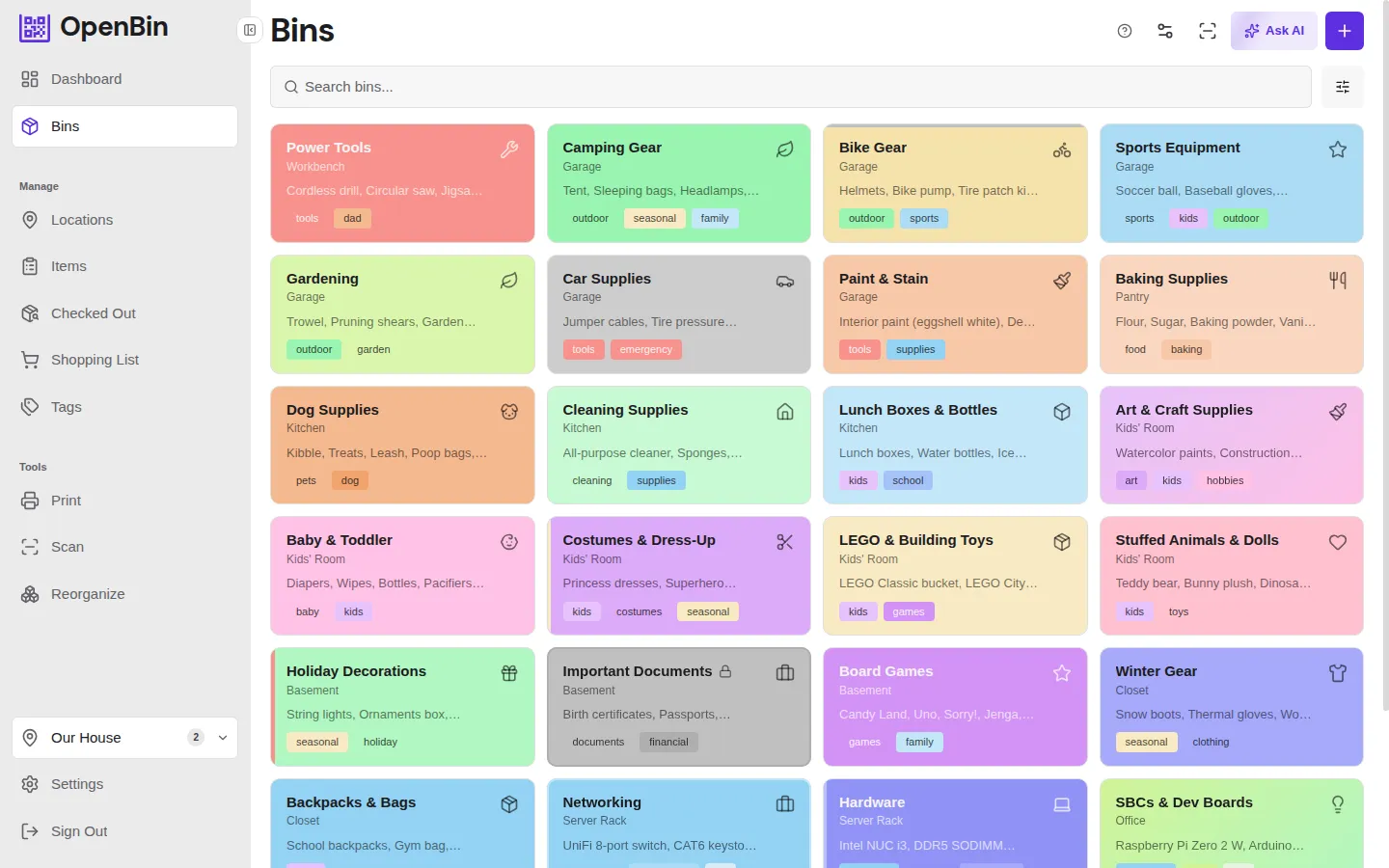
Features
- AI assisted autofill — Capture photos, and the assistant autofills the items in each bin. Bring your own AI.
- Natural language commands — "Add batteries to the tools bin" or "Create a bin with widgets x, y, and z".
- AI reorganization — Let the assistant suggest how to restructure an entire location's bins, areas, and tags in bulk.
- Print & scan QR labels — Generate customizable QR label sheets or name cards, stick them on bins, scan to see contents.
- MCP server included — Connect AI assistants directly to your inventory via Model Context Protocol
- Data portability — Full JSON/CSV/ZIP export with photos.
Quick Start
Create a docker-compose.yml:
services:
  openbin:
    image: ghcr.io/akifbayram/openbin:latest
    ports:
      - "1453:1453"
    volumes:
      - api_data:/data
    environment:
      DATABASE_PATH: /data/openbin.db
      PHOTO_STORAGE_PATH: /data/photos
      BACKUP_PATH: /data/backups

volumes:
  api_data:
docker compose up -d
Open http://localhost:1453. Register an account, create a location, and start adding bins.
Configuration
All settings are optional. Set environment variables or create a .env file to override defaults. See .env.example for the full list.
| Variable | Description | Default |
|---|---|---|
| Server | ||
PORT |
Express server port | 1453 |
HOST_PORT |
Docker external port | 1453 |
DATABASE_PATH |
SQLite database file path | ./data/openbin.db |
PHOTO_STORAGE_PATH |
Photo upload directory | ./data/photos |
TRUST_PROXY |
Set true when behind a reverse proxy |
false |
CORS_ORIGIN |
CORS origin (only needed for non-Docker dev setups) | http://localhost:5173 |
| Authentication | ||
JWT_SECRET |
JWT signing secret; auto-generated and persisted if unset | — |
ACCESS_TOKEN_EXPIRES_IN |
Short-lived access token lifetime | 15m |
REFRESH_TOKEN_MAX_DAYS |
Refresh token lifetime in days (1–90) | 7 |
COOKIE_SECURE |
Force Secure flag on cookies (auto in production) | — |
BCRYPT_ROUNDS |
Password hashing rounds (10–31) | 12 |
REGISTRATION_MODE |
Registration policy: open, invite (require location invite code), or closed |
open |
| Uploads | ||
MAX_PHOTO_SIZE_MB |
Max photo upload size in MB (1–50) | 5 |
MAX_AVATAR_SIZE_MB |
Max avatar upload size in MB (1–10) | 2 |
MAX_PHOTOS_PER_BIN |
Max photos per bin (1–100) | 1 |
UPLOAD_QUOTA_DEMO_MB |
Per-user upload quota in demo mode | 5 |
UPLOAD_QUOTA_GLOBAL_DEMO_MB |
Global upload quota in demo mode | 50 |
| AI (server-wide fallback) | ||
AI_PROVIDER |
openai, anthropic, gemini, or openai-compatible |
— |
AI_API_KEY |
API key for the configured provider | — |
AI_MODEL |
Model name (e.g. gpt-5-mini, claude-sonnet-4-6) |
— |
AI_ENDPOINT_URL |
Custom endpoint for openai-compatible provider |
— |
AI_ENCRYPTION_KEY |
Encrypts user AI API keys at rest (AES-256-GCM) | — |
| Backups | ||
BACKUP_ENABLED |
Enable automatic database backups | false |
BACKUP_INTERVAL |
Backup schedule (hourly/daily/weekly/cron) | daily |
BACKUP_RETENTION |
Number of backup files to keep (1–365) | 7 |
BACKUP_PATH |
Directory for backup files | ./data/backups |
BACKUP_WEBHOOK_URL |
Webhook URL for backup notifications | — |
| QR Code Payload | ||
QR_PAYLOAD_MODE |
QR encoding mode: app (openbin:// URI) or url (web URL) |
app |
BASE_URL |
Full URL for url mode (e.g. https://inventory.example.com) |
— |
| Rate Limiting | ||
AI_RATE_LIMIT |
Max AI requests per hour per user | 30 |
AI_RATE_LIMIT_API_KEY |
Max AI requests per hour per API key | 1000 |
DISABLE_RATE_LIMIT |
Set true to disable all rate limiters (dev only) |
false |
Architecture
Single Node.js process. All data lives in one SQLite file and a photos directory.
| Layer | Technology |
|---|---|
| Frontend | React 18, TypeScript, Vite 5, Tailwind CSS 4 |
| Backend | Express 4, SQLite (better-sqlite3), JWT auth |
| Container | Single-stage Alpine image, runs as non-root node user |
The /data Docker volume contains everything persistent:
/data
├── openbin.db        ← single database file (WAL journal)
├── .jwt_secret       ← auto-generated if JWT_SECRET unset
├── photos/           ← uploaded images
└── backups/          ← scheduled DB snapshots (opt-in)
API Documentation
OpenAPI spec at server/openapi.yaml. See the full API reference in the docs.
Local Development
Prerequisites: Node.js 20+
npm install                 # Install frontend dependencies
cd server && npm install    # Install server dependencies
npm run dev:all            # Both servers concurrently (recommended)
# Or separately in two terminals:
# cd server && npm run dev   API server at http://localhost:1453
# npm run dev                Frontend dev server at http://localhost:5173
AI Disclosure
Most of this codebase—features, tests, documentation—was written by AI. A human directs architecture, priorities, and design decisions but has not reviewed most code line-by-line. Type checking, linting, and an automated test suite are the primary quality gates.
License
Yorumlar (0)
Yorum birakmak icin giris yap.
Yorum birakSonuc bulunamadi